
Struts2 基础典型应用
例子
下面就是运用Struts2 实现的例子的运行效果
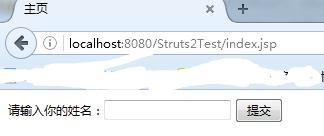
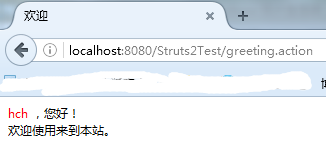
输入正确名字
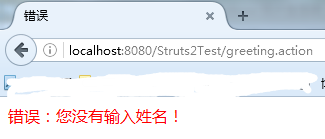
不输入直接点击提交按钮
在首页面中输入名称,点击提交按钮,显示欢迎界面。
如果没有名称,点击提交按钮,就显示错误界面。
=============================================================================================
原理:

1.当用户输入或不输入名字,并点击提交按钮后,相当于浏览器提交了一个请求(http://localhost:8080/Struts2Test/greeting.action)给web容器
2.Web容器调用Struts2过滤器的doFilter()方法(在web.xml中注册了一个Struts2提供的过滤器,所以才调用Struts2过滤器)
3.在第一步中可以看到,请求中调用的action的名称是greeting,那么Struts2就会在struts.xml中与greeting相匹配的action(如<action name="greeting" class="com.hch.action.GreetingAction">)
4.找到后将请求中的表单数据注入到这个action对象中,注入的方法是通过该对象的setXXX()方法,注入后再调用该对象的execute()方法来执行,并返回结果到struts2中,假设这里返回的结果是success。
5. Struts2 根据action对象返回的success结果,在struts.xml中找到<result name="success">success.jsp</result>信息,并将success.jsp返回给浏览器来展示,这样一次交互就结束了。
==============================================================================================
实现过程
1.创建一个Java Web项目。
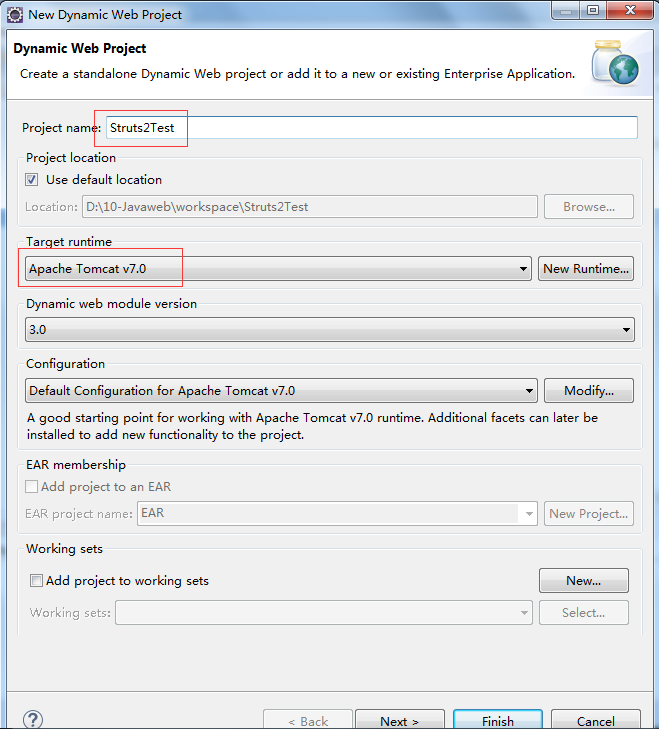
2. 下载依赖类库,并解压,将其中的库文件添加到WEB-INF目录的lib文件夹中。
最新的版本的下载链接
http://struts.apache.org/download.cgi#struts251 或者访问 http://pan.baidu.com/s/1nvvoLEp

本例子使用的全部依赖库下载地址:http://pan.baidu.com/s/1gfa2q5d
3.在WEB-INF目录下创建一个web.xml文件,并在其中注册一个Struts2提供的过滤器,文件内容如下
 <?xml version="1.0" encoding="UTF-8"?>

 <web-app xmlns:xsi="http://www.w3.org/2001/XMLSchema-instance"

     xmlns="http://java.sun.com/xml/ns/javaee" xmlns:web="http://java.sun.com/xml/ns/javaee/web-app_2_5.xsd"

     xsi:schemaLocation="http://java.sun.com/xml/ns/javaee http://java.sun.com/xml/ns/javaee/web-app_2_5.xsd"

     id="WebApp_ID" version="2.5">

     <display-name>8.2</display-name>

     <welcome-file-list>

         <welcome-file>index.html</welcome-file>

         <welcome-file>index.htm</welcome-file>

         <welcome-file>index.jsp</welcome-file>

         <welcome-file>default.html</welcome-file>

         <welcome-file>default.htm</welcome-file>

         <welcome-file>default.jsp</welcome-file>

     </welcome-file-list><!-- Struts2过滤器 -->

     <filter>

         <!-- 过滤器名称 -->

         <filter-name>struts2</filter-name>

         <!-- 过滤器类 -->

         <filter-class>org.apache.struts2.dispatcher.ng.filter.StrutsPrepareAndExecuteFilter</filter-class>

     </filter>

     <!-- Struts2过滤器映射 -->

     <filter-mapping>

         <!-- 过滤器名称 -->

         <filter-name>struts2</filter-name>

         <!-- 过滤器映射 -->

         <url-pattern>/*</url-pattern>

     </filter-mapping>

 </web-app>
4. 创建一个Action对象,其名称是GreetingAction。
位置如下

代码如下:
 package com.hch.action;

 import com.opensymphony.xwork2.ActionSupport;

 public class GreetingAction extends ActionSupport {

     private static final long serialVersionUID = 1L;

     // 用户名

     private String username;

     // 处理请求

     @Override

     public String execute() throws Exception{

         // 判断用户名是否有效

     if(username == null || "".equals(username)){

             // 返回到错误页面

             return ERROR;

         }else{

             // 返回到成功页面

             return SUCCESS;

         }

     }

     // username属性的getter方法

     public String getUsername() {

         return username;

     }

     // username属性的setter方法

     public void setUsername(String username) {

         this.username = username;

     }

 }
5. 创建struts.xml文件
位置如下
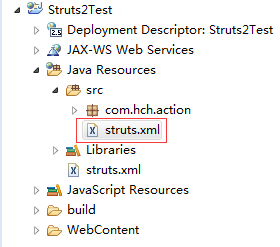
内容如下:
 <!DOCTYPE struts PUBLIC

     "-//Apache Software Foundation//DTD Struts Configuration 2.1//EN"

     "http://struts.apache.org/dtds/struts-2.1.dtd">

 <struts>

     <!-- 声明包 -->

     <package name="myPackage" extends="struts-default">

         <!-- 定义action -->

         <action name="greeting" class="com.hch.action.GreetingAction">

             <!-- 定义成功的映射页面 -->

             <result name="success">success.jsp</result>

             <!-- 定义失败的映射页面 -->

             <result name="error">error.jsp</result>

         </action>

     </package>

 </struts>
6. 创建 首页面index.jsp \ 处理成功页面success.jsp \ 处理失败页面error.jsp
位置如下:

内容如下:
index.jsp
<%@ page language="java" contentType="text/html; charset=UTF-8"

    pageEncoding="UTF-8"%>

<!DOCTYPE html PUBLIC "-//W3C//DTD HTML 4.01 Transitional//EN" "http://www.w3.org/TR/html4/loose.dtd">

<html>

<head>

<meta http-equiv="Content-Type" content="text/html; charset=UTF-8">

<title>主页</title>

<style type="text/css">

    *{font-size: 12px;}

</style>

</head>

<body>

  <form action="greeting.action" method="post">

      请输入你的姓名:<input type="text" name="username">

      <input type="submit" value="提交">

  </form>

</body>

</html>
success.jsp
 <%@ page language="java" contentType="text/html; charset=UTF-8"

     pageEncoding="UTF-8"%>

 <%@ taglib prefix="s" uri="/struts-tags" %>

 <!DOCTYPE html PUBLIC "-//W3C//DTD HTML 4.01 Transitional//EN" "http://www.w3.org/TR/html4/loose.dtd">

 <html>

 <head>

 <meta http-equiv="Content-Type" content="text/html; charset=UTF-8">

 <title>欢迎</title>

 <style type="text/css">

     *{font-size: 12px;}

 </style>

 </head>

 <body>

     <font color="red">

         <s:property value="username" />

     </font>

      ,您好!

     <br>

     欢迎使用来到本站。

 </body>

 </html>
error.jsp
 <%@ page language="java" contentType="text/html; charset=UTF-8"

     pageEncoding="UTF-8"%>

 <!DOCTYPE html PUBLIC "-//W3C//DTD HTML 4.01 Transitional//EN" "http://www.w3.org/TR/html4/loose.dtd">

 <html>

 <head>

 <meta http-equiv="Content-Type" content="text/html; charset=UTF-8">

 <title>错误</title>

 </head>

 <body>

     <font color="red"> 错误:您没有输入姓名!</font>

 </body>

 </html>
Struts2 基础典型应用的更多相关文章
- Struts2入门1 Struts2基础知识
Struts2入门1 Struts2基础知识 20131130 代码下载: 链接: http://pan.baidu.com/s/11mYG1 密码: aua5 前言: 之前学习了Spring和Hib ...
- Struts2基础学习2
Struts2基础学习2 项目结构,测试页面与实体类 <%@ page language="java" contentType="text/html; charse ...
- Struts2基础入门
Struts2基础入门 创建一个web工程 0)导包并且创建一个核心配置文件 <?xml version="1.0" encoding="UTF-8"?& ...
- Struts2框架学习第三章——Struts2基础
本章要点 — Struts 1框架的基本知识 — 使用Struts 1框架开发Web应用 — WebWork框架的基本知识 — 使用WebWork框架开发Web应用 — 在Eclipse中整合To ...
- Struts2基础学习总结
引用自:http://www.cnblogs.com/jbelial/archive/2012/05/10/2486886.html Struts 2是在WebWork2基础发展而来的. 注意:str ...
- struts2基础——标签
一.通用标签 1.s:property (读取值栈中对象的属性值) 属性:value:指定OGNL表达式:default:OGNL表达式返回为 null 时,使用默认值:escape:是否对 HTML ...
- 经典MVC框架技术-struts2基础知识
Struts2框架简介 struts2框架是在struts1和webwork技术的基础上,进行合并的全新框架,struts2以Webwork为核心,采用拦截器来处理用户的请求,这样的设计使得业务逻辑控 ...
- (一)Struts2 基础
一.Struts简介 1.1 历史 虽然Struts 2号称是一个全新的框架,但这仅仅是相对Struts 1而言.Struts 2与Struts 1相比,确实有很多革命性的改进,但它并不是新发布的新框 ...
- struts2 基础
框架(frameWork):某一种应用的半成品 struts2: 表现层 处理与页面进行交互的相关功能 hibernate: 持久层 负责业务逻辑数据的持久化 spring: 业务层 负责复杂的业 ...
随机推荐
- docker&k8s填坑记
本篇主要用于记录在实施docker和kubenetes过程中遇到的一个问题和解决办法. 本节部分内容摘自互联网,有些部分为自己在测试环境中遇到到实际问题,后面还会根据实际情况不断分享关于docker/ ...
- lua 字符串处理
匹配模式(pattern) . 任何单个字符 %a 任何字母 %c 任何控制字符 %d 任何数字 %g 任何除空白符外的可打印字符 %l 所有小写字母 %p 所有标点符号 %s 所有空白字符 %u 所 ...
- cubietruck制作刷新lubuntu-kernel
一:安装交叉编译工具链以及相应的工具(系统最好是ubutnu-64位-server) sudo apt-get install g++ sudo apt-get install libncurses5 ...
- UVA 11888 - Abnormal 89's(Manachar)
UVA 11888 - Abnormal 89's option=com_onlinejudge&Itemid=8&page=show_problem&category=524 ...
- Winform拖拽改变无边框窗体大小
大家在进行Winform开发过程中,很容易就可以完成一个窗口的布局工作,但现在的软件界面美化效果一个比一个好,很多软件都是无边框的,于是乎,你是不是也感叹:winform的带边框的窗体如此丑陋,我一定 ...
- csslint
http://csslint.net/ line column title description browserwarning 1 1 Disallow @import @import preven ...
- 基本动画、复合动画设置 平移、缩放、旋转、透明度 编码实现 xml实现
public class VAActivity extends Activity { private ImageView iv_animation; private TextView tv_anima ...
- 快速解决Android中的selinux权限问题【转】
本文转载自:http://blog.csdn.net/mike8825/article/details/49428417 版权声明:本文为博主原创文章,未经博主允许不得转载. 关于selinux的详细 ...
- 安装截图工具 Shutter【转】
本文转载自:http://blog.csdn.net/hanshileiai/article/details/46843713 一.安装截图工具 Shutter 1. 添加安装包软件源 sudo ad ...
- 调用html进行android布局
1. [代码]html代码 <html> <head> <meta http-equiv="content-type" content ...