
android MVP模式思考
在软件开发设计中,有多种软件设计模式,如web开发中经典的MVC, 将后台分为三层:Model层,View层和Controller层,其中,Model主要是数据处理,如数据库,文件,或网络数据等;View层是视图层,主要是指前端或后端用于直接展现给用户的页面,Controller层则是负责业务逻辑处理,即将Model中读取的数据显示到View层,同时又将View层触发的操作事件经过业务处理后将数据保存到Model层中。
在android中,可能很多开发者使用的还是mvc模式,比如,在代码中可以发现大量的IxxEntity,IxxDao,IxxDaoImpl,IxxController,IxxControllerImpldengdeng。但是,Android开发中,还有一种不错的开发设计,那就是MVP模式。在Android4.4源码中的InCallUI中,我们会发现就应用了这种模式。
首先,先解释下,什么是MVP,MVP模式其实跟MVC模式的意图是一样的,都是为了将视图,数据和业务层分离开了,从而更好的应用于后续的开发,升级以及维护。其中MVP中的P,代表Presenter,即主持的意思,主要负责业务逻辑处理,跟MVC模式不同的是,在MVP中View层是不允许跟Model层直接交互的。MVP模式的理想场景就是可以只修改View层的界面代码,但是Presenter层和model层不需要修改任何代码,这是因为在android中,开发者面对最多的需求就是界面,变化最多的也是界面,所以mvp模式对android开发来说是一个非常不错的选择,当然,弊端就是,额外增加的代码量也有点多。。。
具体调用逻辑,借用下面网上一张图:
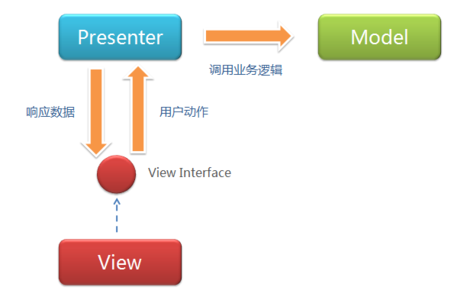
接着,我们来看看android4.4中InCallUI源码中MVP代码的应用。
InCallUI源码路径是在/packages/apps/InCallUI,我们直接看/src/com/android/incallui目录,会发现该目录下有一大堆xxxPresenter的类。其中,AnswerPresenter是处理接听电话的Presenter,CallButtonPresenter是处理拨号盘的Presenter,CallCardPresenter是通话界面的Presenter。在InCallUI中,从所有的界面中抽象出一个接口:Ui,它是一个空接口,它的子类分别对应不同的Ui,因为对应MVP每一个V,它的界面都是不同的,所以需要抽象出一个接口,并且让这个接口继承Ui,具体代码如下:
/*

 * Copyright (C) 2013 The Android Open Source Project

 *

 * Licensed under the Apache License, Version 2.0 (the "License");

 * you may not use this file except in compliance with the License.

 * You may obtain a copy of the License at

 *

 *      http://www.apache.org/licenses/LICENSE-2.0

 *

 * Unless required by applicable law or agreed to in writing, software

 * distributed under the License is distributed on an "AS IS" BASIS,

 * WITHOUT WARRANTIES OR CONDITIONS OF ANY KIND, either express or implied.

 * See the License for the specific language governing permissions and

 * limitations under the License

 */

package com.android.incallui;

/**

 * Base class for all presenter ui.

 */

public interface Ui {

}
如前面所说,CallButtonXX是负责拨号盘,对于拨号盘的界面显示,InCallUI抽象了一个继承Ui的接口CallButtonUi(定义在CallButtonPresenter类中),相关代码如下:
    public interface CallButtonUi extends Ui {

        void setEnabled(boolean on);

        void setMute(boolean on);

        void enableMute(boolean enabled);

        void setHold(boolean on);

        void showHold(boolean show);

        void enableHold(boolean enabled);

        void showMerge(boolean show);

        void showSwap(boolean show);

        void showAddCall(boolean show);

        void enableAddCall(boolean enabled);

        void displayDialpad(boolean on);

        boolean isDialpadVisible();

        void setAudio(int mode);

        void setSupportedAudio(int mask);

        void showManageConferenceCallButton();

        void showGenericMergeButton();

        void hideExtraRow();

        void displayManageConferencePanel(boolean on);

    }
在InCallUI中,抽象类Presenter是所有XXPresenter的父类,他主要实现了跟View交互时所有Presenter都所需的onUiReady和onUiUnready两个方法。具体代码如下:
/*

 * Copyright (C) 2013 The Android Open Source Project

 *

 * Licensed under the Apache License, Version 2.0 (the "License");

 * you may not use this file except in compliance with the License.

 * You may obtain a copy of the License at

 *

 *      http://www.apache.org/licenses/LICENSE-2.0

 *

 * Unless required by applicable law or agreed to in writing, software

 * distributed under the License is distributed on an "AS IS" BASIS,

 * WITHOUT WARRANTIES OR CONDITIONS OF ANY KIND, either express or implied.

 * See the License for the specific language governing permissions and

 * limitations under the License

 */

package com.android.incallui;

/**

 * Base class for Presenters.

 */

public abstract class Presenter<U extends Ui> {

    private U mUi;

    /**

     * Called after the UI view has been created.  That is when fragment.onViewCreated() is called.

     *

     * @param ui The Ui implementation that is now ready to be used.

     */

    public void onUiReady(U ui) {

        mUi = ui;

    }

    /**

     * Called when the UI view is destroyed in Fragment.onDestroyView().

     */

    public final void onUiDestroy(U ui) {

        onUiUnready(ui);

        mUi = null;

    }

    /**

     * To be overriden by Presenter implementations.  Called when the fragment is being

     * destroyed but before ui is set to null.

     */

    public void onUiUnready(U ui) {

    }

    public U getUi() {

        return mUi;

    }

}
其中Presenter中的实现CallButtonPresenter的代码如下:
/*

 * Copyright (C) 2013 The Android Open Source Project

 *

 * Licensed under the Apache License, Version 2.0 (the "License");

 * you may not use this file except in compliance with the License.

 * You may obtain a copy of the License at

 *

 *      http://www.apache.org/licenses/LICENSE-2.0

 *

 * Unless required by applicable law or agreed to in writing, software

 * distributed under the License is distributed on an "AS IS" BASIS,

 * WITHOUT WARRANTIES OR CONDITIONS OF ANY KIND, either express or implied.

 * See the License for the specific language governing permissions and

 * limitations under the License

 */

package com.android.incallui;

import com.android.incallui.AudioModeProvider.AudioModeListener;

import com.android.incallui.InCallPresenter.InCallState;

import com.android.incallui.InCallPresenter.InCallStateListener;

import com.android.incallui.InCallPresenter.IncomingCallListener;

import com.android.services.telephony.common.AudioMode;

import com.android.services.telephony.common.Call;

import com.android.services.telephony.common.Call.Capabilities;

import android.telephony.PhoneNumberUtils;

/**

 * Logic for call buttons.

 */

public class CallButtonPresenter extends Presenter<CallButtonPresenter.CallButtonUi>

        implements InCallStateListener, AudioModeListener, IncomingCallListener {

    //省略若干行代码

    public CallButtonPresenter() {

    }

    @Override

    public void onUiReady(CallButtonUi ui) {

        super.onUiReady(ui);

        AudioModeProvider.getInstance().addListener(this);

        // register for call state changes last

        InCallPresenter.getInstance().addListener(this);

        InCallPresenter.getInstance().addIncomingCallListener(this);

    }

    @Override

    public void onUiUnready(CallButtonUi ui) {

        super.onUiUnready(ui);

        InCallPresenter.getInstance().removeListener(this);

        AudioModeProvider.getInstance().removeListener(this);

        InCallPresenter.getInstance().removeIncomingCallListener(this);

    }

    @Override

    public void onStateChange(InCallState state, CallList callList) {

        //省略若干行代码

    }

    @Override

    public void onIncomingCall(InCallState state, Call call) {

        onStateChange(state, CallList.getInstance());

    }

    @Override

    public void onAudioMode(int mode) {

        if (getUi() != null) {

            getUi().setAudio(mode);

        }

    }

    @Override

    public void onSupportedAudioMode(int mask) {

        if (getUi() != null) {

            getUi().setSupportedAudio(mask);

        }

    }

    @Override

    public void onMute(boolean muted) {

        if (getUi() != null) {

            getUi().setMute(muted);

        }

    }

    public int getAudioMode() {

        return AudioModeProvider.getInstance().getAudioMode();

    }

    public int getSupportedAudio() {

        return AudioModeProvider.getInstance().getSupportedModes();

    }

    public void setAudioMode(int mode) {

        //省略若干行代码

    }

    /**

     * Function assumes that bluetooth is not supported.

     */

    public void toggleSpeakerphone() {

        //省略若干行代码

    }

    public void endCallClicked() {

        if (mCall == null) {

            return;

        }

        CallCommandClient.getInstance().disconnectCall(mCall.getCallId());

    }

    public void manageConferenceButtonClicked() {

        getUi().displayManageConferencePanel(true);

    }

    public void muteClicked(boolean checked) {

        Log.d(this, "turning on mute: " + checked);

        CallCommandClient.getInstance().mute(checked);

    }

    public void holdClicked(boolean checked) {

        if (mCall == null) {

            return;

        }

        Log.d(this, "holding: " + mCall.getCallId());

        CallCommandClient.getInstance().hold(mCall.getCallId(), checked);

    }

    public void mergeClicked() {

        CallCommandClient.getInstance().merge();

    }

    public void addCallClicked() {

        //省略若干行代码

    }

    public void swapClicked() {

        //省略若干行代码

    }

    public void showDialpadClicked(boolean checked) {

        //省略若干行代码

    }

    private void updateUi(InCallState state, Call call) {

        //省略若干行代码

    }

    private void updateExtraButtonRow() {

        //省略若干行代码

    }

    public void refreshMuteState() {

        //省略若干行代码

    }

    public interface CallButtonUi extends Ui {

        void setEnabled(boolean on);

        void setMute(boolean on);

        void enableMute(boolean enabled);

        void setHold(boolean on);

        void showHold(boolean show);

        void enableHold(boolean enabled);

        void showMerge(boolean show);

        void showSwap(boolean show);

        void showAddCall(boolean show);

        void enableAddCall(boolean enabled);

        void displayDialpad(boolean on);

        boolean isDialpadVisible();

        void setAudio(int mode);

        void setSupportedAudio(int mask);

        void showManageConferenceCallButton();

        void showGenericMergeButton();

        void hideExtraRow();

        void displayManageConferencePanel(boolean on);

    }

}
在InCallUI中,除了InCallActivity,其他界面都是由Fragment负责界面,即,每个Fragment都属于MVP中的View,InCallUI中抽象出了一个BaseFragment来作为所有Fragment的父类,BaseFragment代码如下:
/*

 * Copyright (C) 2013 The Android Open Source Project

 *

 * Licensed under the Apache License, Version 2.0 (the "License");

 * you may not use this file except in compliance with the License.

 * You may obtain a copy of the License at

 *

 *      http://www.apache.org/licenses/LICENSE-2.0

 *

 * Unless required by applicable law or agreed to in writing, software

 * distributed under the License is distributed on an "AS IS" BASIS,

 * WITHOUT WARRANTIES OR CONDITIONS OF ANY KIND, either express or implied.

 * See the License for the specific language governing permissions and

 * limitations under the License

 */

package com.android.incallui;

import android.app.Fragment;

import android.os.Bundle;

/**

 * Parent for all fragments that use Presenters and Ui design.

 */

public abstract class BaseFragment<T extends Presenter<U>, U extends Ui> extends Fragment {

    private T mPresenter;

    abstract T createPresenter();

    abstract U getUi();

    protected BaseFragment() {

        mPresenter = createPresenter();

    }

    /**

     * Presenter will be available after onActivityCreated().

     *

     * @return The presenter associated with this fragment.

     */

    public T getPresenter() {

        return mPresenter;

    }

    @Override

    public void onActivityCreated(Bundle savedInstanceState) {

        super.onActivityCreated(savedInstanceState);

        mPresenter.onUiReady(getUi());

    }

    @Override

    public void onDestroyView() {

        super.onDestroyView();

        mPresenter.onUiDestroy(getUi());

    }

}
即在BaseFragment或继承自BaseFragment的子Fragment被创建的时候,将V(Fragment)跟P(Presenter)关联,在Fragment被销毁的时候,将V和P解绑。这里我们继续看看CallButtonFragment的代码:
/*

 * Copyright (C) 2013 The Android Open Source Project

 *

 * Licensed under the Apache License, Version 2.0 (the "License");

 * you may not use this file except in compliance with the License.

 * You may obtain a copy of the License at

 *

 *      http://www.apache.org/licenses/LICENSE-2.0

 *

 * Unless required by applicable law or agreed to in writing, software

 * distributed under the License is distributed on an "AS IS" BASIS,

 * WITHOUT WARRANTIES OR CONDITIONS OF ANY KIND, either express or implied.

 * See the License for the specific language governing permissions and

 * limitations under the License

 */

package com.android.incallui;

import android.graphics.drawable.LayerDrawable;

import android.os.Bundle;

import android.view.LayoutInflater;

import android.view.Menu;

import android.view.MenuItem;

import android.view.View;

import android.view.View.OnClickListener;

import android.view.ViewGroup;

import android.widget.CompoundButton;

import android.widget.ImageButton;

import android.widget.PopupMenu;

import android.widget.PopupMenu.OnDismissListener;

import android.widget.PopupMenu.OnMenuItemClickListener;

import android.widget.ToggleButton;

import com.android.services.telephony.common.AudioMode;

/**

 * Fragment for call control buttons

 */

public class CallButtonFragment

        extends BaseFragment<CallButtonPresenter, CallButtonPresenter.CallButtonUi>

        implements CallButtonPresenter.CallButtonUi, OnMenuItemClickListener, OnDismissListener,

        View.OnClickListener, CompoundButton.OnCheckedChangeListener {

    private ImageButton mMuteButton;

    private ImageButton mAudioButton;

    private ImageButton mHoldButton;

    private ToggleButton mShowDialpadButton;

    private ImageButton mMergeButton;

    private ImageButton mAddCallButton;

    private ImageButton mSwapButton;

    private PopupMenu mAudioModePopup;

    private boolean mAudioModePopupVisible;

    private View mEndCallButton;

    private View mExtraRowButton;

    private View mManageConferenceButton;

    private View mGenericMergeButton;

    @Override

    CallButtonPresenter createPresenter() {

        // TODO: find a cleaner way to include audio mode provider than

        // having a singleton instance.

        return new CallButtonPresenter();

    }

    @Override

    CallButtonPresenter.CallButtonUi getUi() {

        return this;

    }

    @Override

    public void onCreate(Bundle savedInstanceState) {

        super.onCreate(savedInstanceState);

    }

    @Override

    public View onCreateView(LayoutInflater inflater, ViewGroup container,

            Bundle savedInstanceState) {

        //省略若干行代码

        mManageConferenceButton = parent.findViewById(R.id.manageConferenceButton);

        mManageConferenceButton.setOnClickListener(new View.OnClickListener() {

            @Override

            public void onClick(View v) {

                getPresenter().manageConferenceButtonClicked();

            }

        });

        mGenericMergeButton = parent.findViewById(R.id.cdmaMergeButton);

        mGenericMergeButton.setOnClickListener(new View.OnClickListener() {

            @Override

            public void onClick(View v) {

                getPresenter().mergeClicked();

            }

        });

        //省略若干行代码

    }

    @Override

    public void onActivityCreated(Bundle savedInstanceState) {

        //省略若干行代码

    }

    @Override

    public void onResume() {

        if (getPresenter() != null) {

            getPresenter().refreshMuteState();

        }

        //省略若干行代码

    }

    @Override

    public void onCheckedChanged(CompoundButton buttonView, boolean isChecked) {

    }

    @Override

    public void onClick(View view) {

        //省略若干行代码

    }

    @Override

    public void setEnabled(boolean isEnabled) {

       //省略若干行代码

    }

    @Override

    public void setMute(boolean value) {

        mMuteButton.setSelected(value);

    }

    @Override

    public void enableMute(boolean enabled) {

        mMuteButton.setEnabled(enabled);

    }

    @Override

    public void setHold(boolean value) {

        mHoldButton.setSelected(value);

    }

    @Override

    public void showHold(boolean show) {

        mHoldButton.setVisibility(show ? View.VISIBLE : View.GONE);

    }

    @Override

    public void enableHold(boolean enabled) {

        mHoldButton.setEnabled(enabled);

    }

    @Override

    public void showMerge(boolean show) {

        mMergeButton.setVisibility(show ? View.VISIBLE : View.GONE);

    }

    @Override

    public void showSwap(boolean show) {

        mSwapButton.setVisibility(show ? View.VISIBLE : View.GONE);

    }

    @Override

    public void showAddCall(boolean show) {

        mAddCallButton.setVisibility(show ? View.VISIBLE : View.GONE);

    }

    @Override

    public void enableAddCall(boolean enabled) {

        mAddCallButton.setEnabled(enabled);

    }

    @Override

    public void setAudio(int mode) {

        updateAudioButtons(getPresenter().getSupportedAudio());

        refreshAudioModePopup();

    }

    @Override

    public void setSupportedAudio(int modeMask) {

        updateAudioButtons(modeMask);

        refreshAudioModePopup();

    }

    @Override

    public boolean onMenuItemClick(MenuItem item) {

        //省略若干行代码

    }

    // PopupMenu.OnDismissListener implementation; see showAudioModePopup().

    // This gets called when the PopupMenu gets dismissed for *any* reason, like

    // the user tapping outside its bounds, or pressing Back, or selecting one

    // of the menu items.

    @Override

    public void onDismiss(PopupMenu menu) {

        Log.d(this, "- onDismiss: " + menu);

        mAudioModePopupVisible = false;

    }

    /**

     * Checks for supporting modes.  If bluetooth is supported, it uses the audio

     * pop up menu.  Otherwise, it toggles the speakerphone.

     */

    private void onAudioButtonClicked() {

        Log.d(this, "onAudioButtonClicked: " +

                AudioMode.toString(getPresenter().getSupportedAudio()));

        if (isSupported(AudioMode.BLUETOOTH)) {

            showAudioModePopup();

        } else {

            getPresenter().toggleSpeakerphone();

        }

    }

    /**

     * Refreshes the "Audio mode" popup if it's visible.  This is useful

     * (for example) when a wired headset is plugged or unplugged,

     * since we need to switch back and forth between the "earpiece"

     * and "wired headset" items.

     *

     * This is safe to call even if the popup is already dismissed, or even if

     * you never called showAudioModePopup() in the first place.

     */

    public void refreshAudioModePopup() {

        if (mAudioModePopup != null && mAudioModePopupVisible) {

            // Dismiss the previous one

            mAudioModePopup.dismiss();  // safe even if already dismissed

            // And bring up a fresh PopupMenu

            showAudioModePopup();

        }

    }

    /**

     * Updates the audio button so that the appriopriate visual layers

     * are visible based on the supported audio formats.

     */

    private void updateAudioButtons(int supportedModes) {

        //省略若干行代码

    }

    private boolean isSupported(int mode) {

        return (mode == (getPresenter().getSupportedAudio() & mode));

    }

    private boolean isAudio(int mode) {

        return (mode == getPresenter().getAudioMode());

    }

    @Override

    public void displayDialpad(boolean value) {

        mShowDialpadButton.setChecked(value);

        if (getActivity() != null && getActivity() instanceof InCallActivity) {

            ((InCallActivity) getActivity()).displayDialpad(value);

        }

    }

    @Override

    public boolean isDialpadVisible() {

        if (getActivity() != null && getActivity() instanceof InCallActivity) {

            return ((InCallActivity) getActivity()).isDialpadVisible();

        }

        return false;

    }

    @Override

    public void displayManageConferencePanel(boolean value) {

        if (getActivity() != null && getActivity() instanceof InCallActivity) {

            ((InCallActivity) getActivity()).displayManageConferencePanel(value);

        }

    }

    @Override

    public void showManageConferenceCallButton() {

        mExtraRowButton.setVisibility(View.VISIBLE);

        mManageConferenceButton.setVisibility(View.VISIBLE);

        mGenericMergeButton.setVisibility(View.GONE);

    }

    @Override

    public void showGenericMergeButton() {

        mExtraRowButton.setVisibility(View.VISIBLE);

        mManageConferenceButton.setVisibility(View.GONE);

        mGenericMergeButton.setVisibility(View.VISIBLE);

    }

    @Override

    public void hideExtraRow() {

       mExtraRowButton.setVisibility(View.GONE);

    }

}
从而,通过Ui,CallButtonUi,BaseFragment,CallButtonFragment,Presenter,CallButtonPresenter将M,V,P分开,让数据,业务,展示分开开发维护,代码变得清晰,每层只需要关注自己的东西就行,这就比我们以前都只在一个Activity或Fragment中糅杂在一起好很多。
如果有需要查看Android源码的童鞋,可以自行到Android官网下载或去下面两个网站进行在线查看。
1,http://androidxref.com
2,http://www.grepcode.com
android MVP模式思考的更多相关文章
- android MVP模式介绍与实战
android MVP模式介绍与实战 描述 MVP模式是什么?MVP 是从经典的模式MVC演变而来,它们的基本思想有相通的地方:Controller/Presenter负责逻辑的处理,Model提供数 ...
- Android MVP模式
转自http://segmentfault.com/blogs,转载请注明出处Android MVP Pattern Android MVP模式\[1\]也不是什么新鲜的东西了,我在自己的项目里也普遍 ...
- Android MVP模式 简单易懂的介绍方式
主要学习这位大神的博客:简而易懂 Android MVP模式 简单易懂的介绍方式 https://segmentfault.com/a/1190000003927200
- Android MVP模式简单易懂的介绍方式 (三)
Android MVP模式简单易懂的介绍方式 (一) Android MVP模式简单易懂的介绍方式 (二) Android MVP模式简单易懂的介绍方式 (三) 讲完M和P,接下来就要讲V了.View ...
- Android MVP模式简单易懂的介绍方式 (二)
Android MVP模式简单易懂的介绍方式 (一) Android MVP模式简单易懂的介绍方式 (二) Android MVP模式简单易懂的介绍方式 (三) 上一篇文章我们介绍完了Model的创建 ...
- Android MVP模式简单易懂的介绍方式 (一)
Android MVP模式简单易懂的介绍方式 (一) Android MVP模式简单易懂的介绍方式 (二) Android MVP模式简单易懂的介绍方式 (三) 最近正在研究Android的MVP模式 ...
- Android MVP模式 谷歌官方代码解读
Google官方MVP Sample代码解读 关于Android程序的构架, 当前(2016.10)最流行的模式即为MVP模式, Google官方提供了Sample代码来展示这种模式的用法. Repo ...
- Android mvp模式、mvvm模式
MVC和MVP的区别2007年08月08日 星期三 上午 09:23 MVC和MVP到底有什么区别呢? 从这幅图可以看到,我们可以看到在MVC里,View是可以直接访问Model的!从而,View里会 ...
- Xamarin.Android MVP模式
一.简介 随着UI创建技术的功能日益增强,UI层也履行着越来越多的职责.为了更好地细分视图(View)与模型(Model)的功能,让View专注于处理数 据的可视化以及与用户的交互,同时让Model只 ...
随机推荐
- MySQL中批量删除指定前缀表的sql语句
有时候我们在安装一些cms的时候,这些cms都是带表前缀的方便区分数据,但有时候我们测试完需要删除的时候又有别的前缀表就可以参考下面的方法 代码如下:Select CONCAT( 'drop tabl ...
- 从需求的角度去理解Linux系列:总线、设备和驱动
笔者成为博客专家后整理以前原创的嵌入式Linux系列博文,现推出以让更多的读者受益. <从需求的角度去理解linux系列:总线.设备和驱动>是一篇有关如何学习嵌入式Linux系统的方法论文 ...
- NV 3D投影方案 【转】
http://tu.pcpop.com/all-677013.htm 1/8 NVIDIA 3D方案涉及图形处理器(GPU).信号发射器.快门式3D眼镜.3D播放软件以及经过NVIDIA认证的显示器. ...
- Synchronized与ReentrantLock的区别
1.ReentrantLock 拥有Synchronized相同的并发性和内存语义,此外还多了 锁投票,定时锁等候和中断锁等候 线程A和B都要获取对象O的锁定,假设A获取了对象O锁,B将等待A释放对O ...
- 【音乐App】—— Vue-music 项目学习笔记:歌单及排行榜开发
前言:以下内容均为学习慕课网高级实战课程的实践爬坑笔记. 项目github地址:https://github.com/66Web/ljq_vue_music,欢迎Star. 歌单及详情页 排行榜及详情 ...
- SharePoint 2013 对话框
The quick way to open a sharepoint 2013 dialog modal form is via Javascript below 1 2 3 4 5 function ...
- hdu2141Can you find it?
给你四个集合.要你从这四个集合中 各取出一个数出来,推断,取出的前三个数的和 是否等于第四个数. 数据比較大.我的做法是将 前两个集合全部数全部和的情况取出来, 然后二分查找第四个集合和第三集合 ...
- Spark源码分析之五:Task调度(一)
在前四篇博文中,我们分析了Job提交运行总流程的第一阶段Stage划分与提交,它又被细化为三个分阶段: 1.Job的调度模型与运行反馈: 2.Stage划分: 3.Stage提交:对应TaskSet的 ...
- redis错误error记录
早上登服务器,看到程序的redis的报错, 具体如下: (error) MISCONF Redis is configured to save RDB snapshots, but is curren ...
- 通信协议之sdp---sdp会话协议
(1)sdp 描述格式 (2)sdp example (3) sdp (1)sdp 描述格式 m=video 1234 RTP/AVP 96a=rtpmap:96 H264a=framerate:15 ...