
【音乐App】—— Vue-music 项目学习笔记:歌单及排行榜开发
前言:以下内容均为学习慕课网高级实战课程的实践爬坑笔记。
项目github地址:https://github.com/66Web/ljq_vue_music,欢迎Star。
 |
 |
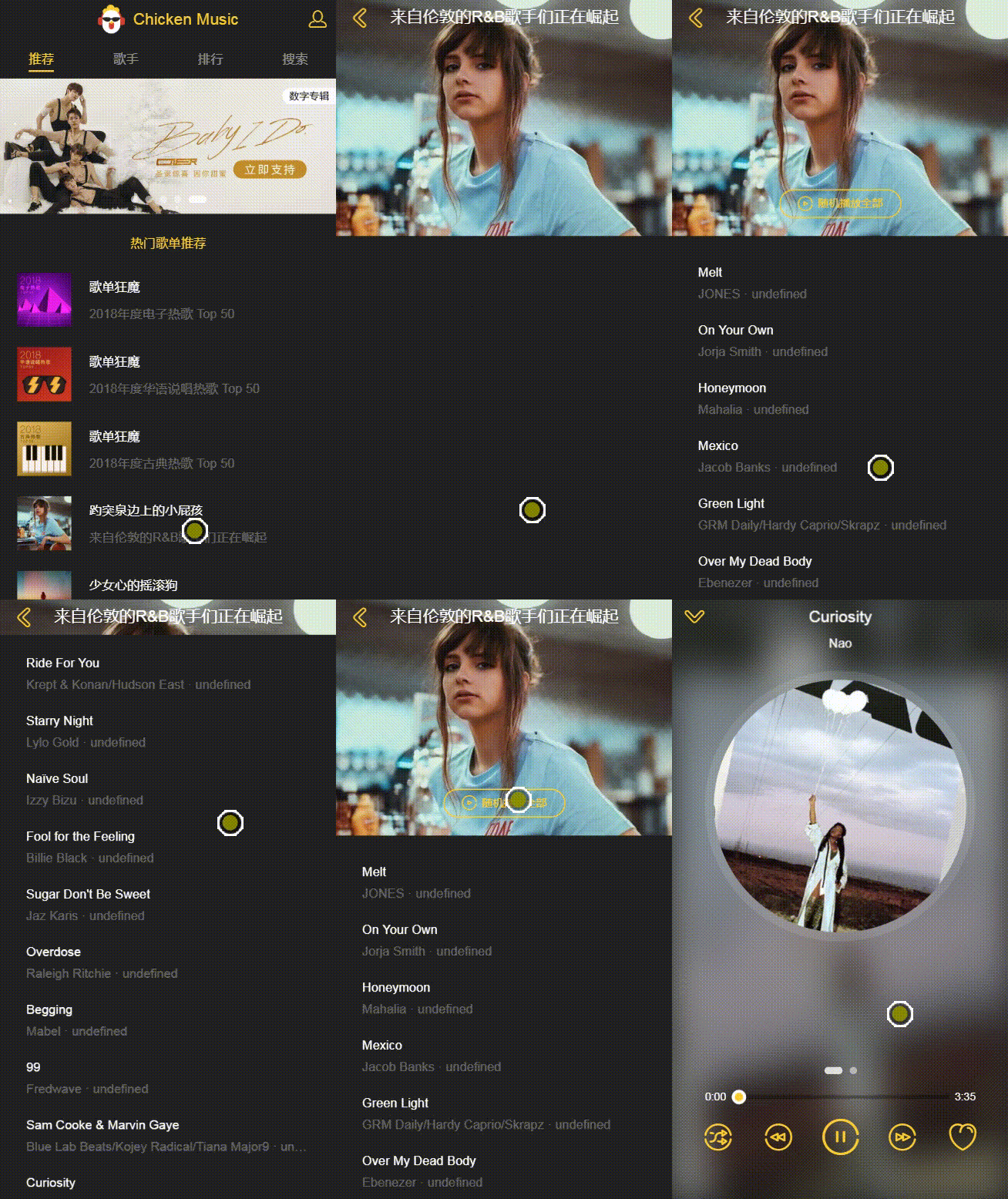
| 歌单及详情页 | 排行榜及详情页 |
| 一、歌单详情页开发 |
歌单详情页布局介绍及Vuex实现路由数据通讯
- components->disc目录下:创建disc.vue
- router->index.js中:给Recommend添加二级子路由Disc
{

    path: '/recommend',

    component: Recommend,

    children: [

        {

            path: ':id',

            component: Disc

        }

    ]

} - recommend.vue中:
- 添加路由容器
<router-view></router-view>
- 给歌单列表添加点击事件
@click="selectItem(item)"
- 定义selectItem()实现路由跳转
selectItem(item) {

    this.$router.push({

        path: `/recommend/${item.dissid}`

   })

}
- 使用vuex传递歌单数据
- state.js中:添加歌单对象
disc: {} - mutation-type.js中:定义type常量
export const SET_DISC = 'SET_DISC'
- mutation.js中:创建更改函数
[types.SET_DISC](state, disc){

    state.disc = disc

} - getters.js中:定义数据映射
export const disc = state => state.disc
- recommend.vue中:使用mapMutations修改disc
import {mapMutations} from 'vuex'

...mapMutations({

    setDisc: 'SET_DISC'

})

selectItem(item) {

    this.$router.push({

         path: `/recommend/${item.dissid}`

    })

   this.setDisc(item) //更改state中的disc

}
- disc.vue中:通过mapGetters获取到date中的disc
import {mapGetters} from 'vuex

computed: {

   ...mapGetters([

         'disc'

   ])

} - 传递数据:获取数据在computed里面,设置数据在methods里面
歌单详情页数据抓取
- api->recommend.js中:添加getSonglist接口
export function getSongList (disstid) {

     const url = '/api/getSongList'

     const data = Object.assign({}, commonParams, {

         uin: 0,

         format: 'json',

         notice: 0,

         needNewCode: 1,

         new_format: 1,

         pic: 500,

         disstid, //关键数据

         type: 1,

         json: 1,

         utf8: 1,

         onlysong: 0,

         picmid: 1,

         nosign: 1,

         song_begin: 0,

         platform: 'h5',

         song_num: 100,

         _: +new Date()

    })

    return axios.get(url, {

         params: data

    }).then((res) => {

         return Promise.resolve(res.data)

    })

} - 因为数据也经过加密,在webpack.dev.config.js中模仿header:
app.get('/api/getSongList', function (req, res) {

     var url = 'https://c.y.qq.com/qzone/fcg-bin/fcg_ucc_getcdinfo_byids_cp.fcg'

     axios.get(url, {

           headers: {

                referer: 'https://y.qq.com/',

                host: 'c.y.qq.com'

           },

           params: req.query

    }).then((response) => {

           res.json(response.data)

    }).catch((e) => {

           console.log(e)

    })

})
注意:后端配置之后,一定要重新启动!!!
歌单详情页数据的处理和应用
- 调用getSongList()方法获取数据,在created()时获取
import {getSongList} from '@/api/recommend'

_getSongList () {

     if(!this.disc.dissid){ //在歌单详情页强制刷新后,即没有获得id时,回退到推荐页面

         this.$router.push('/recommend')

         return

     }

     getSongList(this.disc.dissid).then((res) => {

         if (res.code === ERR_OK) {

             this.songs = this._normalizeSongs((res.cdlist[0].songlist))

              // console.log(res)

              // console.log(res.cdlist[0].songlist)

              // console.log(this._normalizeSongs(res.cdlist[0].songlist))

         }

    })

} - 获得数据后,在methods中对数据进行一些处理
- 同歌手详情页,歌曲的播放url中的vkey需要发送请求获取,同时将处理好的数据封装新的Song实例
import {ERR_OK} from '@/api/config'

import {creatSongList} from '@/common/js/song'

import {getMusic} from '@/api/singer'

_normalizeSongs (list) {

    let ret = []

    list.forEach((musicData) => {

         if (musicData.id && musicData.album) {

                // ret.push(creatSongList(musicData))

                getMusic(musicData.mid).then((res) => {

                       // console.log(res)

                       if(res.code === ERR_OK){

                            // console.log(res.data)

                            const svkey = res.data.items

                            const songVkey = svkey[0].vkey

                            const newSong = creatSongList(musicData, songVkey)

                             ret.push(newSong)

                       }

                })

         }

    })

    return ret

}
其中:调用getMusic()获取播放地址的vkey,调用creatSongList()实例化Song对象
- common->js->song.js中: 创建creatSongList()
export function creatSongList (musicData, songVkey) {

          return new Song({

                 id: musicData.id,

                 mid: musicData.mid,

                 singer: filterSinger(musicData.singer),

                 name: musicData.name,

                 album: musicData.albumname,

                 duration: musicData.interval,

                 image: `https://y.gtimg.cn/music/photo_new/T002R300x300M000${musicData.album.mid}.jpg?max_age=2592000`,

                 //注意guid以实时数据为主

                 url: `http://ws.stream.qqmusic.qq.com/C400${musicData.mid}.m4a?vkey=${songVkey}&guid=6319873028&uin=0&fromtag=66`

         })

}
| 二、排行榜及详情页开发 |
排行榜数据抓取
- 在api目录下:创建rank.js添加获取数据的接口
import jsonp from '@/common/js/jsonp'

import {commonParams, options} from './config'

export function getTopList() {

     const url = "https://c.y.qq.com/v8/fcg-bin/fcg_myqq_toplist.fcg"

     const data = Object.assign({}, commonParams, {

              platform: 'h5',

              needNewcode: 1

     })

     return jsonp(url, data, options)

} - rank.vue中:调用getTopList()方法获取数据,在created()时获取
import {getTopList} from '@/api/rank'

import {ERR_OK} from '@/api/config'

created() {

    this._getTopList()

},

methods: {

    _getTopList() {

          getTopList().then((res) => {

                if(res.code === ERR_OK){

                       console.log(res.data.topList)

                }

          })

    }

}
排行榜数据应用
- 在data中维护数据
topList: []
- 获取数据后赋值
this.topList = res.data.topList
- 将数据填入DOM:应用scroll组件替换父元素<div>并传入topList数据实现滚动
<scroll class="top-list" :data="topList">
- 优化:应用loading组件,设置当topList没有内容时显示loading
- 优化:应用mixin,实现播放器底部适配
榜单详情页布局及Vuex实现路由数据通讯
- 路由的跳转
- router->index.js中:设置Rank的二级路由
import TopList from '@/components/top-list/top-list'

{

    path: '/rank',

    component: Rank,

    children: [

        {

              path: ':id',

              component: TopList

         }

    ]

}
rank.vue中:添加路由容器,给列表添加点击事件,触发路由的跳转
<router-view></router-view>

@click="selectItem(item)"
selectItem(item) {
this.$router.push({
path: `/rank/${item.id}`
})
}
- Vuex传递数据
- state.js中:定义数据
topList: {} - mutation-types.js中:定义type常量
export const SET_TOP_LIST = 'SET_TOP_LIST'
- mutations.js中:添加修改topList的方法
[types.SET_TOP_LIST](state, topList){

     state.topList = topList

} - getters.js中:添加topList的数据映射
export const topList = state => state.topList
- 写入和获取state数据
- rank.vue中:通过mapMutations写入数据
import {mapMutations} from 'vuex'

this.setTopList(item)

...mapMutations({

    setTopList: 'SET_TOP_LIST'

}) - top-list.vue中:通过mapGatters拿到数据
import {mapGetters} from 'vuex'

computed: {

    ...mapGetters([

        'topList'

   ])

}
剩下的就是获取数据用computed,设置数据用methods
榜单详情歌曲数据的抓取
- 需求:榜单本身的背景图不好看,想要抓取榜单详情歌曲的图片作为背景图
- 问题:原请求是Ajax请求,不能跨域,但也支持jsonp请求,只是没有格式化不方便查看数据
- 解决: 在线网站www.bejson.com中格式化为json文件
- 因为这块数据QQ音乐也做了加密,这里抓取数据同歌单详情页方式
- api->rank.js中:添加获取数据的接口
export function getMusicList(topid) {

     const url = "https://c.y.qq.com/v8/fcg-bin/fcg_v8_toplist_cp.fcg"

     const data = Object.assign({}, commonParams, {

              page: 'detail',

              type: 'top',

              tpl: 3,

              platform: 'h5',

              needNewcode: 1

     })

     return jsonp(url, data, options)

} - top-list.vue中:调用getMusicList()方法获取数据,在created()时获取
import {getMusicList} from '@/api/rank'

import {ERR_OK} from '@/api/config'

created() {

    this._getMusicList()

}

getMusicList(this.topList.id).then((res) => {

    if(res.code === ERR_OK){

       this.songs = this._normalizeSongs(res.songlist)

       // console.log(res.songlist)

    }

}) - 获得数据后,在methods中对数据进行一些处理:同歌单详情页,歌曲的播放url中的vkey需要发送请求获取,同时将处理好的数据封装新的Song实例
import {getMusic} from '@/api/singer'

import {createSong} from '@/common/js/song'

_normalizeSongs(list) {

      let ret = []

      list.forEach((item) => {

            const musicData = item.data

            // console.log(musicData)

            if (musicData.songid && musicData.albumid) {

                getMusic(musicData.songmid).then((res) => {

                       // console.log(res)

                       if(res.code === ERR_OK){

                           // console.log(res.data)

                           const svkey = res.data.items

                           const songVkey = svkey[0].vkey

                           const newSong = createSong(musicData, songVkey)

                           ret.push(newSong)

                       }

               })

           }

     })

     return ret

}
这样数据就获取到了,剩下的把songs的数据传递给子组件就可以了
- 把bgImage的图片换成榜单第一首歌的图片
bgImage() {

   if (this.songs.length) {

       return this.songs[0].image

   }

   return this.topList.picUrl

}
带排行的song-list组件的扩展和应用
- 添加rank的DOM结构、图片以及样式
- 添加props字段rank,默认false,设置只有当rank为true时排行显示
rank: {

    type: Boolean,

    default: false

}
<div class="rank" v-show="rank">
- 定义两个方法分别获得动态绑定的class和文案
<span :class="getRankCls(index)">{{getRankText(index)}}</span>getRankCls(index) {
if(index<=2) {
return `icon icon${index}`
}else{
return 'text'
}
},
getRankText(index) {
if(index > 2) {
return index + 1
}
} - music-list.vue作为中间组件,也需要扩展一个props字段rank
rank: {

     type: Boolean,

     default: false

}
- 传入<song-list>
<song-list :rank="rank"></song-list>
- 这样就把最外层父组件传入的rank应用到了song-list.vue组件中
- top-list.vue中维护数据rank为true,同时传入<music-list>中
注:项目来自慕课网
【音乐App】—— Vue-music 项目学习笔记:歌单及排行榜开发的更多相关文章
- 【音乐App】—— Vue-music 项目学习笔记:歌手详情页开发
前言:以下内容均为学习慕课网高级实战课程的实践爬坑笔记. 项目github地址:https://github.com/66Web/ljq_vue_music,欢迎Star. 歌曲列表 歌曲播放 一.子 ...
- 【音乐App】—— Vue-music 项目学习笔记:用户个人中心开发
前言:以下内容均为学习慕课网高级实战课程的实践爬坑笔记. 项目github地址:https://github.com/66Web/ljq_vue_music,欢迎Star. 歌曲列表 收藏歌曲 一.用 ...
- 【音乐App】—— Vue-music 项目学习笔记:歌曲列表组件开发
前言:以下内容均为学习慕课网高级实战课程的实践爬坑笔记. 项目github地址:https://github.com/66Web/ljq_vue_music,欢迎Star. 当前歌曲播放列表 添加歌曲 ...
- 【音乐App】—— Vue-music 项目学习笔记:推荐页面开发
前言:以下内容均为学习慕课网高级实战课程的实践爬坑笔记. 上一篇总结了项目概述.项目准备.页面骨架搭建.这一篇重点梳理推荐页面开发.项目github地址:https://github.com/66We ...
- 【音乐App】—— Vue-music 项目学习笔记:项目准备
前言: 学习慕课网Vue高级实战课程后,在实践中总结一些这个项目带给自己的收获,希望可以再次巩固关于Vue开发的知识.这一篇主要梳理:项目概况.项目准备.页面骨架搭建.项目github地址:https ...
- 【音乐App】—— Vue-music 项目学习笔记:搜索页面开发
前言:以下内容均为学习慕课网高级实战课程的实践爬坑笔记. 项目github地址:https://github.com/66Web/ljq_vue_music,欢迎Star. 搜索歌手歌曲 搜索历史保存 ...
- 【音乐App】—— Vue-music 项目学习笔记:播放器内置组件开发(二)
前言:以下内容均为学习慕课网高级实战课程的实践爬坑笔记. 项目github地址:https://github.com/66Web/ljq_vue_music,欢迎Star. 播放模式切换 歌词滚动显示 ...
- 【音乐App】—— Vue-music 项目学习笔记:歌手页面开发
前言:以下内容均为学习慕课网高级实战课程的实践爬坑笔记. 项目github地址:https://github.com/66Web/ljq_vue_music,欢迎Star. 一.歌手页面布局与设计 需 ...
- 最新 Vue 源码学习笔记
最新 Vue 源码学习笔记 v2.x.x & v3.x.x 框架架构 核心算法 设计模式 编码风格 项目结构 为什么出现 解决了什么问题 有哪些应用场景 v2.x.x & v3.x.x ...
随机推荐
- 【JSOI2008】星球大战 并查集
题目描述 很久以前,在一个遥远的星系,一个黑暗的帝国靠着它的超级武器统治着整个星系. 某一天,凭着一个偶然的机遇,一支反抗军摧毁了帝国的超级武器,并攻下了星系中几乎所有的星球.这些星球通过特殊的以太隧 ...
- Java开发微信公众号(五)---微信开发中如何获取access_token以及缓存access_token
获取access_token是微信api最重要的一个部分,因为调用其他api很多都需要用到access_token.比如自定义菜单接口.客服接口.获取用户信息接口.用户分组接口.群发接口等在请求的时候 ...
- SQLServer存储引擎——06.索引的遍历与维护
一.遍历 索引树的每个节点都是一个页面. 索引树有三种类型的节点:根节点.中间节点.叶子节点. (1) 根节点与中间节点一样,只包含下一层节点的入口值与入口指针,它们称为索引节点: (2) 叶子节点包 ...
- 201621123034 《Java程序设计》第2周学习总结
1. 本周学习总结 本周学习了基本数据类型.包装类,自动装箱与自动拆箱.数组.ArrayList.包装类可以更加方便的转换基本数据类型,而其存放的是对象的引用,而非对象本身,在对其内容进行比较时,要使 ...
- 【bzoj1520】[POI2006]Szk-Schools 费用流
题目描述 输入 输出 如果有可行解, 输出最小代价,否则输出NIE. 样例输入 5 1 1 2 3 1 1 5 1 3 2 5 5 4 1 5 10 3 3 3 1 样例输出 9 题解 费用流 设xi ...
- 【SPOJ1297】Palindrome (SA+RMQ)
求最长回文串.把原串翻转后,加在原串后面,中间插入一个辨别字符.然后求SA,Height.然后枚举每个字母作为回文串中心,分长度为奇数和偶数去讨论:奇数求 suffix(i)和suffix(n-i+1 ...
- git pull命令模式
git pull 默认等于 git fetch + git mergegit pull --rebase 等于 git fetch + git rebasegit pull -–squash 等于 g ...
- white-space使用注意事项
今天写移动端的时候有个地方需要横向滚动的功能,自然而然需要用到white-space这个属性了,但是试了一下发现没有效果,反复查找原因后,发现white-space是对inline-block起作用的 ...
- 转:mysql 索引
转:mysql 索引 文章归属:http://feiyan.info/16.html,我想自己去写了,但是发现此君总结的非常详细.直接搬过来了 关于MySQL索引的好处,如果正确合理设计并且使用索引的 ...
- [CODEVS1205]单词反转
给出一个英语句子,希望你把句子里的单词顺序都翻转过来 这个题算是第二次做了……第二次用的C++然而还是写不出来 思路1:用一个数组把读过去的单词存起来,再逆序输出即可 思路2:读入句子后,先在句子开头 ...