
【.Net 学习系列】-- FileSystemWatcher 监控文件夹新生成文件,并在确认文件没有被其他程序占用后将其移动到指定文件夹
监控文件夹测试程序:
 using System;

 using System.Collections.Generic;

 using System.IO;

 using System.Linq;

 using System.Text;

 using System.Threading;

 using System.Threading.Tasks;

 namespace FileSystemWatcherTest

 {

     class Program

     {

         static void Main(string[] args)

         {

             FileSystemWatcher watcher = new FileSystemWatcher("C:\\FileSystemWatcher", "*.txt");

             watcher.NotifyFilter = NotifyFilters.FileName;

             watcher.Created += new FileSystemEventHandler(FileCreated);

             watcher.EnableRaisingEvents = true;

             Console.ReadLine();

         }

         private static void FileCreated(object sender, FileSystemEventArgs e)

         {

             if (!File.Exists(e.FullPath))

             {

                 return;

             }

             Console.WriteLine("Created: {0: HH:mm:ss}", DateTime.Now);

             while (!IsFileReady(e.FullPath))

             {

                 Console.WriteLine("Used: {0: HH:mm:ss}", DateTime.Now);

             }

             //在这里进行文件处理。。。

             Console.WriteLine("Ready: {0: HH:mm:ss}", DateTime.Now);

             Thread.Sleep( * );

             FileInfo fs = new FileInfo(e.FullPath);

             var moveToPath = @"\\testServer\Shares\" + fs.Name;

             fs.MoveTo(moveToPath);

             if (!File.Exists(moveToPath))

             {

                 Console.WriteLine("Move Faild: {0: HH:mm:ss}", DateTime.Now);

             }

             Console.WriteLine("Move Success: {0: HH:mm:ss}", DateTime.Now);

         }

         static bool IsFileReady(string filename)

         {

             FileInfo fi = new FileInfo(filename);

             FileStream fs = null;

             try

             {

                 fs = fi.Open(FileMode.Open, FileAccess.ReadWrite,FileShare.None);

                 return true;

             }

             catch (IOException)

             {

                 return false;

             }

             finally

             {

                 if (fs != null)

                     fs.Close();

             }

         }

     }

 }
文件生成测试程序:
 using System;

 using System.Collections.Generic;

 using System.IO;

 using System.Linq;

 using System.Text;

 using System.Threading;

 using System.Threading.Tasks;

 namespace GenerateFileTest

 {

     class Program

     {

         static void Main(string[] args)

         {

             FileStream fs = new FileStream("C:\\FileSystemWatcher\\Test.txt", FileMode.Create);

             StreamWriter sw = new StreamWriter(fs);

             var currDateTime = DateTime.Now;

             var maxDateTime = currDateTime.AddSeconds();

             Console.WriteLine("Log begin: {0}", DateTime.Now.ToString("HH:mm:ss"));

             while (currDateTime < maxDateTime)

             {

                 sw.WriteLine(DateTime.Now.ToString());

                 currDateTime = DateTime.Now;

             }

             //清空缓冲区

             sw.Flush();

             //关闭流

             sw.Close();

             fs.Close();

             Console.WriteLine("Log end: {0}", DateTime.Now.ToString("HH:mm:ss"));

             Console.ReadLine();

         }

     }

 }
运行结果: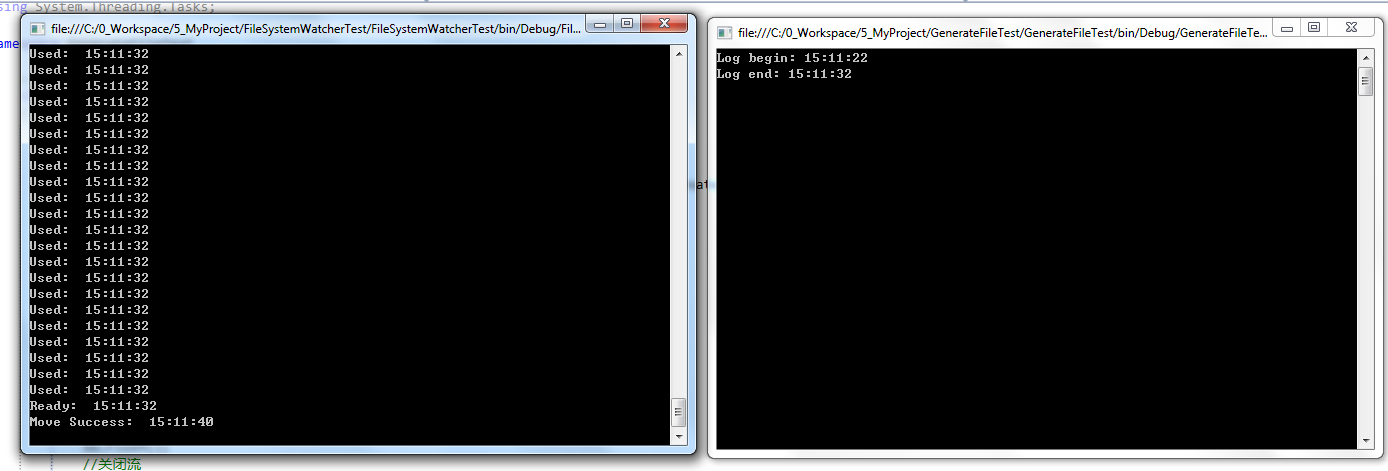
【.Net 学习系列】-- FileSystemWatcher 监控文件夹新生成文件,并在确认文件没有被其他程序占用后将其移动到指定文件夹的更多相关文章
- VS调试提示“无法启动程序,“...exe”。系统找不到指定文件
当VS调试提示上图所示的警告时,常用的方法是检查“项目”-“属性”-“配置属性”-“常规”-“输出目录”里的路径 项目”-“属性”-“配置属性”-“链接器”-“常规”-“输出文件”里的路径,是否一致, ...
- vs 2013 Express 无法启动程序xxx.exe,系统找不到指定文件
由于实验室有人用了含病毒的软件,网管把实验室出口给封了,周末人家又不上班.看样子树莓派是玩不成了,所以昨天在宿舍写windows程序,最基本的窗口程序,听说这段代码初学者至少要自己敲5遍以上.代码如下 ...
- Caffe学习系列(9):运行caffe自带的两个简单例子
为了程序的简洁,在caffe中是不带练习数据的,因此需要自己去下载.但在caffe根目录下的data文件夹里,作者已经为我们编写好了下载数据的脚本文件,我们只需要联网,运行这些脚本文件就行了. 注意: ...
- matlab操作之--读取指定文件夹下的“指定格式”文件
%% 正负样本所在folder fext='*.png';%要读取的文件格式 positiveFolder='F:\课题\Crater detection\machingLearning\Positi ...
- 转 Caffe学习系列(9):运行caffe自带的两个简单例子
为了程序的简洁,在caffe中是不带练习数据的,因此需要自己去下载.但在caffe根目录下的data文件夹里,作者已经为我们编写好了下载数据的脚本文件,我们只需要联网,运行这些脚本文件就行了. 注意: ...
- Java 遍历指定文件夹及子文件夹下的文件
Java 遍历指定文件夹及子文件夹下的文件 /** * 遍历指定文件夹及子文件夹下的文件 * * @author testcs_dn * @date 2014年12月12日下午2:33:49 * @p ...
- 使用FileSystemWatcher监控文件夹及文件
引言 这一周主要精力集中学习一个同事开发的本地文件搜索项目上,其中客户端添加共享文件时主要是使用FileSystemWatcher 监控文件,并在各种事件发生时向服务器发送消息. 解决方法 FileS ...
- [转]C# FileSystemWatcher监控指定文件或目录的文件的创建、删除、改动、重命名等活动
觉得这个很常用..比如一些软件. http://www.rabbit8.cn/DoNet/407.html FileSystemWatcher控件主要功能: 监控指定文件或目录的文件的创建.删 ...
- Python学习系列(五)(文件操作及其字典)
Python学习系列(五)(文件操作及其字典) Python学习系列(四)(列表及其函数) 一.文件操作 1,读文件 在以'r'读模式打开文件以后可以调用read函数一次性将文件内容全部读出 ...
随机推荐
- scala打印error,debug,info
1.以wordcount为例 package org.apache.spark.examples import org.apache.spark.examples.SparkPi.logger imp ...
- iOS programming UITableView and UITableViewController
iOS programming UITableView and UITableViewController A UITableView displays a single column of dat ...
- jQuery 开始动画,停止动画
<!DOCTYPE html> <html lang="en"> <head> <meta charset="UTF-8&quo ...
- 通过 GCC 学习 OpenMP 框架
OpenMP 框架是使用 C.C++ 和 Fortran 进行并发编程的一种强大方法.GNU Compiler Collection (GCC) V4.4.7 支持 OpenMP 3.0 标准,而 ...
- WPF动画 - Loading加载动画
存在问题: 最近接手公司一个比较成熟的产品项目开发(WPF桌面端),其中,在登陆系统加载时,60张图片切换,实现loading闪烁加载,快有密集恐惧症了!!! 代码如下: private void L ...
- Flutter走过的坑(持续更新)
1 Target of URI doesn't exist 'package:flutter/material.dart' 官方下载的flutter中有一个example文件夹,里面有很多flutte ...
- C++运行外部exe并判断exe返回值
有三个API函数可以运行可执行文件WinExec.ShellExecute和CreateProcess.CreateProcess因为使用复杂,比较少用. WinExec主要运行EXE文件. ⑴ 函数 ...
- C# html table转excel
1. protected void ebtDC_Click(object sender, EventArgs e) { string elxStr = "<table><t ...
- [Algorithm] 2. Trailing Zeros
Description Write an algorithm which computes the number of trailing zeros in n factorial. Example 1 ...
- 向数据库添加中文数据乱码的解决办法(本文使用spring-jdbcTemplate)
由于编码字符集的不同通常容易导致数据库中文乱码问题,如显示问号. 往往由以下三个方面所造成的 (一):数据库端字符集设置 1.安装mysql时,会有一个数据库编码设置,将其设置为utf-8 2.先设置 ...