
转】R利剑NoSQL系列文章 之 Hive
原博文出自于: http://blog.fens.me/category/%E6%95%B0%E6%8D%AE%E5%BA%93/page/3/ 感谢!
R利剑NoSQL系列文章 之 Hive
R利剑NoSQL系列文章,主要介绍通过R语言连接使用nosql数据库。涉及的NoSQL产品,包括Redis,MongoDB, HBase, Hive, Cassandra, Neo4j。希望通过我的介绍让广大的R语言爱好者,有更多的开发选择,做出更多地激动人心的应用。
关于作者:
- 张丹(Conan), 程序员Java,R,PHP,Javascript
- weibo:@Conan_Z
- blog: http://blog.fens.me
- email: bsspirit@gmail.com
转载请注明:
http://blog.fens.me/nosql-r-hive/
第四篇 R利剑Hive,分为5个章节。
- Hive介绍
- Hive安装
- RHive安装
- RHive函数库
- RHive基本使用操作
1. Hive介绍
Hive是建立在Hadoop上的数据仓库基础构架。它提供了一系列的工具,可以用来进行数据提取转化加载(ETL),这是一种可以存储、查询和分析存储在 Hadoop 中的大规模数据的机制。Hive 定义了简单的类 SQL 查询语言,称为 HQL,它允许熟悉 SQL 的用户查询数据。同时,这个语言也允许熟悉 MapReduce 开发者的开发自定义的 mapper 和 reducer 来处理内建的 mapper 和 reducer 无法完成的复杂的分析工作。
Hive 没有专门的数据格式。 Hive 可以很好的工作在 Thrift 之上,控制分隔符,也允许用户指定数据格式
上面内容摘自 百度百科(http://baike.baidu.com/view/699292.htm)
hive与关系数据库的区别:
- 数据存储不同:hive基于hadoop的HDFS,关系数据库则基于本地文件系统
- 计算模型不同:hive基于hadoop的mapreduce,关系数据库则基于索引的内存计算模型
- 应用场景不同:hive是OLAP数据仓库系统提供海量数据查询的,实时性很差;关系数据库是OLTP事务系统,为实时查询业务服务
- 扩展性不同:hive基于hadoop很容易通过分布式增加存储能力和计算能力,关系数据库水平扩展很难,要不断增加单机的性能
2. Hive安装
Hive是基于Hadoop开发的数据仓库产品,所以首先我们要先有Hadoop的环境。
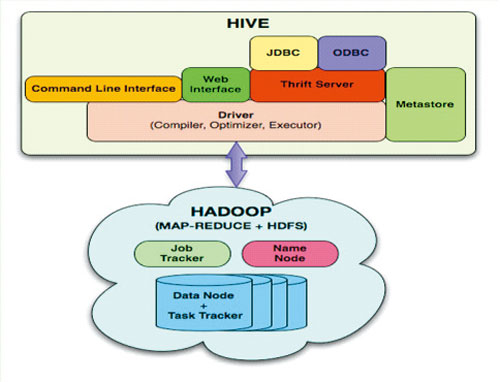
Hadoop安装,请参考:Hadoop环境搭建, 创建Hadoop母体虚拟机
Hive的安装,请参考:Hive安装及使用攻略
Hadoop-1.0.3的下载地址
http://archive.apache.org/dist/hadoop/core/hadoop-1.0.3/
Hive-0.9.0的下载地址
http://archive.apache.org/dist/hive/hive-0.9.0/
Hive安装好后
启动hiveserver的服务
~ nohup hive --service hiveserver  &

Starting Hive Thrift Server
打开hive shell
~ hive shell

Logging initialized using configuration in file:/home/conan/hadoop/hive-0.9.0/conf/hive-log4j.proper             ties

Hive history file=/tmp/conan/hive_job_log_conan_201306261459_153868095.txt

#查看hive的表

hive> show tables;

hive_algo_t_account

o_account

r_t_account

Time taken: 2.12 seconds

#查看o_account表的数据

hive> select * from o_account;

1       abc@163.com     2013-04-22 12:21:39

2       dedac@163.com   2013-04-22 12:21:39

3       qq8fed@163.com  2013-04-22 12:21:39

4       qw1@163.com     2013-04-22 12:21:39

5       af3d@163.com    2013-04-22 12:21:39

6       ab34@163.com    2013-04-22 12:21:39

7       q8d1@gmail.com  2013-04-23 09:21:24

8       conan@gmail.com 2013-04-23 09:21:24

9       adeg@sohu.com   2013-04-23 09:21:24

10      ade121@sohu.com 2013-04-23 09:21:24

11      addde@sohu.com  2013-04-23 09:21:24

Time taken: 0.469 seconds
3. RHive安装
请提前配置好JAVA的环境:
~ java -version

java version "1.6.0_29"

Java(TM) SE Runtime Environment (build 1.6.0_29-b11)

Java HotSpot(TM) 64-Bit Server VM (build 20.4-b02, mixed mode)
安装R:Ubuntu 12.04,请更新源再下载R2.15.3版本
~ sudo sh -c "echo deb http://mirror.bjtu.edu.cn/cran/bin/linux/ubuntu precise/ >>/etc/apt/sources.list"

~ sudo apt-get update

~ sudo apt-get install r-base-core=2.15.3-1precise0precise1
安装R依赖库:rjava
#配置rJava

~ sudo R CMD javareconf

#启动R程序

~ sudo R

install.packages("rJava")
安装RHive
install.packages("RHive")

library(RHive)

Loading required package: rJava

Loading required package: Rserve

This is RHive 0.0-7. For overview type ‘?RHive’.

HIVE_HOME=/home/conan/hadoop/hive-0.9.0

call rhive.init() because HIVE_HOME is set.
由于RHive已经从CRAN上移除,需要动手下载安装,下载地址:https://cran.r-project.org/src/contrib/Archive/RHive/。我们需要动手下载RHive_0.0-7.tar.gz包,然后通过命令进行安装。
# 安装RHive

~ R CMD INSTALL RHive_0.0-7.tar.gz
4. RHive函数库
rhive.aggregate        rhive.connect          rhive.hdfs.exists      rhive.mapapply

rhive.assign           rhive.desc.table       rhive.hdfs.get         rhive.mrapply

rhive.basic.by         rhive.drop.table       rhive.hdfs.info        rhive.napply

rhive.basic.cut        rhive.env              rhive.hdfs.ls          rhive.query

rhive.basic.cut2       rhive.exist.table      rhive.hdfs.mkdirs      rhive.reduceapply

rhive.basic.merge      rhive.export           rhive.hdfs.put         rhive.rm

rhive.basic.mode       rhive.exportAll        rhive.hdfs.rename      rhive.sapply

rhive.basic.range      rhive.hdfs.cat         rhive.hdfs.rm          rhive.save

rhive.basic.scale      rhive.hdfs.chgrp       rhive.hdfs.tail        rhive.script.export

rhive.basic.t.test     rhive.hdfs.chmod       rhive.init             rhive.script.unexport

rhive.basic.xtabs      rhive.hdfs.chown       rhive.list.tables

rhive.size.table

rhive.big.query        rhive.hdfs.close       rhive.load             rhive.write.table

rhive.block.sample     rhive.hdfs.connect     rhive.load.table

rhive.close            rhive.hdfs.du          rhive.load.table2
Hive和RHive的基本操作对比:
#连接到hive

Hive:  hive shell

RHive: rhive.connect("192.168.1.210")

#列出所有hive的表

Hive:  show tables;

RHive: rhive.list.tables()

#查看表结构

Hive:  desc o_account;

RHive: rhive.desc.table('o_account'), rhive.desc.table('o_account',TRUE)

#执行HQL查询

Hive:  select * from o_account;

RHive: rhive.query('select * from o_account')

#查看hdfs目录

Hive:  dfs -ls /;

RHive: rhive.hdfs.ls()

#查看hdfs文件内容

Hive:  dfs -cat /user/hive/warehouse/o_account/part-m-00000;

RHive: rhive.hdfs.cat('/user/hive/warehouse/o_account/part-m-00000')

#断开连接

Hive:  quit;

RHive: rhive.close()
5. RHive基本使用操作
#初始化

rhive.init()

#连接hive

rhive.connect("192.168.1.210")

#查看所有表

rhive.list.tables()

             tab_name

1 hive_algo_t_account

2           o_account

3         r_t_account

#查看表结构

rhive.desc.table('o_account');

     col_name data_type comment

1          id       int

2       email    string

3 create_date    string

#执行HQL查询

rhive.query("select * from o_account");

   id           email         create_date

1   1     abc@163.com 2013-04-22 12:21:39

2   2   dedac@163.com 2013-04-22 12:21:39

3   3  qq8fed@163.com 2013-04-22 12:21:39

4   4     qw1@163.com 2013-04-22 12:21:39

5   5    af3d@163.com 2013-04-22 12:21:39

6   6    ab34@163.com 2013-04-22 12:21:39

7   7  q8d1@gmail.com 2013-04-23 09:21:24

8   8 conan@gmail.com 2013-04-23 09:21:24

9   9   adeg@sohu.com 2013-04-23 09:21:24

10 10 ade121@sohu.com 2013-04-23 09:21:24

11 11  addde@sohu.com 2013-04-23 09:21:24

#关闭连接

rhive.close()

[1] TRUE
创建临时表
rhive.block.sample('o_account', subset="id<5")

[1] "rhive_sblk_1372238856"

rhive.query("select * from rhive_sblk_1372238856");

  id          email         create_date

1  1    abc@163.com 2013-04-22 12:21:39

2  2  dedac@163.com 2013-04-22 12:21:39

3  3 qq8fed@163.com 2013-04-22 12:21:39

4  4    qw1@163.com 2013-04-22 12:21:39

#查看hdfs的文件

rhive.hdfs.ls('/user/hive/warehouse/rhive_sblk_1372238856/')

  permission owner      group length      modify-time

1  rw-r--r-- conan supergroup    141 2013-06-26 17:28

                                                 file

1 /user/hive/warehouse/rhive_sblk_1372238856/000000_0

rhive.hdfs.cat('/user/hive/warehouse/rhive_sblk_1372238856/000000_0')

1abc@163.com2013-04-22 12:21:39

2dedac@163.com2013-04-22 12:21:39

3qq8fed@163.com2013-04-22 12:21:39

4qw1@163.com2013-04-22 12:21:39
按范围分割字段数据
rhive.basic.cut('o_account','id',breaks='0:100:3')

[1] "rhive_result_20130626173626"

attr(,"result:size")

[1] 443

rhive.query("select * from rhive_result_20130626173626");

             email         create_date     id

1      abc@163.com 2013-04-22 12:21:39  (0,3]

2    dedac@163.com 2013-04-22 12:21:39  (0,3]

3   qq8fed@163.com 2013-04-22 12:21:39  (0,3]

4      qw1@163.com 2013-04-22 12:21:39  (3,6]

5     af3d@163.com 2013-04-22 12:21:39  (3,6]

6     ab34@163.com 2013-04-22 12:21:39  (3,6]

7   q8d1@gmail.com 2013-04-23 09:21:24  (6,9]

8  conan@gmail.com 2013-04-23 09:21:24  (6,9]

9    adeg@sohu.com 2013-04-23 09:21:24  (6,9]

10 ade121@sohu.com 2013-04-23 09:21:24 (9,12]

11  addde@sohu.com 2013-04-23 09:21:24 (9,12]
Hive操作HDFS
#查看hdfs文件目录

rhive.hdfs.ls()

  permission owner      group length      modify-time   file

1  rwxr-xr-x conan supergroup      0 2013-04-24 01:52 /hbase

2  rwxr-xr-x conan supergroup      0 2013-06-23 10:59  /home

3  rwxr-xr-x conan supergroup      0 2013-06-26 11:18 /rhive

4  rwxr-xr-x conan supergroup      0 2013-06-23 13:27   /tmp

5  rwxr-xr-x conan supergroup      0 2013-04-24 19:28  /user

#查看hdfs文件内容

rhive.hdfs.cat('/user/hive/warehouse/o_account/part-m-00000')

1abc@163.com2013-04-22 12:21:39

2dedac@163.com2013-04-22 12:21:39

3qq8fed@163.com2013-04-22 12:21:39
转】R利剑NoSQL系列文章 之 Hive的更多相关文章
- 转】R利剑NoSQL系列文章 之 Cassandra
原博文出自于: http://blog.fens.me/category/%E6%95%B0%E6%8D%AE%E5%BA%93/page/3/ 感谢! R利剑NoSQL系列文章 之 Cassandr ...
- R学习笔记 ---- 系列文章
R实战 开篇:介绍R的使用 R学习笔记 第五篇:字符串操作 R学习笔记 第六篇:数据变换和清理 R学习笔记 第四篇:函数,分支和循环 R学习笔记 第三篇:数据框 R学习笔记 第二篇:矩阵.数组和列表 ...
- R的极客理想系列文章--转载
http://blog.fens.me/series-r/ R的极客理想系列文章,涵盖了R的思想,使用,工具,创新等的一系列要点,以我个人的学习和体验去诠释R的强大. R语言作为统计学一门语言,一直在 ...
- 大数据系列之数据仓库Hive安装
Hive系列博文,持续更新~~~ 大数据系列之数据仓库Hive原理 大数据系列之数据仓库Hive安装 大数据系列之数据仓库Hive中分区Partition如何使用 大数据系列之数据仓库Hive命令使用 ...
- Redis 学习笔记系列文章之 Redis 的安装与配置 (一)
1. 介绍 Redis is an open source (BSD licensed), in-memory data structure store, used as database, cach ...
- 【NLP】蓦然回首:谈谈学习模型的评估系列文章(一)
统计角度窥视模型概念 作者:白宁超 2016年7月18日17:18:43 摘要:写本文的初衷源于基于HMM模型序列标注的一个实验,实验完成之后,迫切想知道采用的序列标注模型的好坏,有哪些指标可以度量. ...
- [你必须知道的NOSQL系列]专题二:Redis快速入门
一.前言 在前一篇博文介绍了MongoDB基本操作,本来打算这篇博文继续介绍MongoDB的相关内容的,例如索引,主从备份等内容的,但是发现这些内容都可以通过官方文档都可以看到,并且都非常详细,所以这 ...
- WPF自定义控件与样式(15)-终结篇 & 系列文章索引 & 源码共享
系列文章目录 WPF自定义控件与样式(1)-矢量字体图标(iconfont) WPF自定义控件与样式(2)-自定义按钮FButton WPF自定义控件与样式(3)-TextBox & Ric ...
- R语言数据分析系列六
R语言数据分析系列六 -- by comaple.zhang 上一节讲了R语言作图,本节来讲讲当你拿到一个数据集的时候怎样下手分析,数据分析的第一步.探索性数据分析. 统计量,即统计学里面关注的数据集 ...
随机推荐
- Android进程绝杀技--forceStop(转)
一.概述 1.1 引言 话说Android开源系统拥有着App不计其数,百家争鸣,都想在这“大争之世”寻得系统存活的一席之地.然则系统资源有限,如若都割据为王,再强劲的CPU也会忙不过来,再庞大的内存 ...
- flask的路由配置,特殊装饰器
1,flask中的路由 endpoint-url_for反向地址 endpoint默认是视图函数名endpoint="雪雪" methods 指定视图函数的请求方式,默认GET d ...
- bash builtin eval
1 在开始执行eval后面的命令之前eval主要做了哪些事情 1.1 去掉反斜杠的quoting 比如\$ac_optarg,会变成$ac_optarg. 1.2 去掉单引号的quoting 比如: ...
- java 使用xom对象数据序列化为xml、反序列化、Preferences相关操作小案例
package org.rui.io.xml; import java.io.BufferedOutputStream; import java.io.FileOutputStream; import ...
- android锁屏软件制作
版权声明:本文为博主原创文章,未经博主同意不得转载. https://blog.csdn.net/mingyue_1128/article/details/33726515 转载请标明出处http:/ ...
- sphinx 针对tedfield搜索
query = "(user can be admin)" -> check all fields for the given words. If all words ar ...
- BZOJ_1307_玩具_单调栈+双指针
BZOJ_1307_玩具_单调栈+双指针 Description 小球球是个可爱的孩子,他喜欢玩具,另外小球球有个大大的柜子,里面放满了玩具,由于柜子太高了,每天小球球都会让妈妈从柜子上拿一些玩具放在 ...
- 使用Visual Studio 利用WinGDB编译和远程调试嵌入式Linux的程序
写这篇文章的目的在于帮助那些既要使用Visual Studio编写程序又要开发和调试嵌入式Linux 程序的苦命程序员们! 第一步, 安装 WinGDB ,下载位置 http://www.wingd ...
- Java-Runoob-高级教程-实例-字符串:10. Java 实例 - 测试两个字符串区域是否相等-uncheck
ylbtech-Java-Runoob-高级教程-实例-字符串:10. Java 实例 - 测试两个字符串区域是否相等 1.返回顶部 1. Java 实例 - 测试两个字符串区域是否相等 Java ...
- vue 生命周期钩子 过滤器 计算属性
每一个Vue实例在被创建之前都要经过一系列的初始化过程.例如,实例需要配置数据观测.编译模板.挂载实例到DOM,然后在数据变化时更新DOM,在这个过程中,实例也会调用一些生命周期钩子,这就给我们提供了 ...