
debug kibana in chrome
kibana5.6.5版本
在kibana根目录运行命令:NODE_OPTIONS='--inspect --debug' npm start
也可以尝试命令:NODE_OPTIONS="--debug-brk --inspect' npm start
npm start 可替换为 ./bin/kibana 或 ${project_dir}/src/cli
最后一个端口为5860的url
下面是命令执行后的日志:
caocy@ubuntu1:~/workspace/kibana-5.6.5$ NODE_OPTIONS='--inspect --debug' npm start

> kibana@5.6.5 start /home/caocy/workspace/kibana-5.6.5

> sh ./bin/kibana --dev

Debugger listening on port 9229.

Warning: This is an experimental feature and could change at any time.

To start debugging, open the following URL in Chrome:

    chrome-devtools://devtools/remote/serve_file/@60cd6e859b9f557d2312f5bf532f6aec5f284980/inspector.html?experiments=true&v8only=true&ws=127.0.0.1:9229/32809f53-3135-4523-9a5c-e5d36770bba0

 watching for changes  (407 files)

Debugger listening on port 5859.

Warning: This is an experimental feature and could change at any time.

To start debugging, open the following URL in Chrome:

    chrome-devtools://devtools/remote/serve_file/@60cd6e859b9f557d2312f5bf532f6aec5f284980/inspector.html?experiments=true&v8only=true&ws=127.0.0.1:5859/7877c417-38a6-470c-9b2e-77428acff5bf

Debugger listening on port 5860.

Warning: This is an experimental feature and could change at any time.

To start debugging, open the following URL in Chrome:

    chrome-devtools://devtools/remote/serve_file/@60cd6e859b9f557d2312f5bf532f6aec5f284980/inspector.html?experiments=true&v8only=true&ws=127.0.0.1:5860/1b36300a-30dd-4909-96f1-750c3fb8f7eb

  log   [04:08:49.225] [info][listening] basePath Proxy running at https://0.0.0.0:5701/dhe

optmzr    log   [04:08:53.402] [info][status][ui settings] Status changed from uninitialized to disabled - uiSettings.enabled config is set to `false`

optmzr    log   [04:08:54.713] [info][optimize] Lazy optimization of bundles for kibana, stateSessionStorageRedirect, timelion, sense-tests and status_page ready

server    log   [04:08:54.747] [info][optimize] Waiting for optimizer completion

optmzr    log   [04:08:54.771] [info][optimize] Lazy optimization started

optmzr    log   [04:08:54.801] [info] Plugin initialization disabled.

server    log   [04:08:54.885] [info][status][plugin:kibana@5.6.5] Status changed from uninitialized to green - Ready

server    log   [04:08:55.139] [info][status][plugin:elasticsearch@5.6.5] Status changed from uninitialized to yellow - Waiting for Elasticsearch

server    log   [04:08:55.220] [info][status][plugin:console@5.6.5] Status changed from uninitialized to green - Ready

server    log   [04:08:55.294] [info][status][plugin:metrics@5.6.5] Status changed from uninitialized to green - Ready

server    log   [04:08:55.341] [info][status][plugin:elasticsearch@5.6.5] Status changed from yellow to green - Kibana index ready

server    log   [04:08:55.871] [info][status][plugin:timelion@5.6.5] Status changed from uninitialized to green - Ready

server    log   [04:08:55.880] [info][listening] Server running at https://0.0.0.0:5603

server    log   [04:08:55.883] [info][status][ui settings] Status changed from uninitialized to green - Ready

optmzr    log   [04:09:49.859] [info][optimize] Lazy optimization success in 55.08 seconds
Debugging Node.js with Chrome DevTools:
Support for Node.js debuggability landed in Node.js in 2016. Here’s how to get up and running. (Post updated Jan 2018)
1. Download and install the current version of node. (v6.3.0+ required)
2. Run node with the --inspect flag:
▸ node --inspect index.js
# Break on the first statement of the script with --inspect-brk
▸ node --inspect-brk index.js
(In Node 6, you have to use --inspect --debug-brk for this inspect & pseudo-breakpoint combo.)
Next, you used to open the big chrome-devtools:// URL it spits out, but don’t. Now there’s a better way…
3. Open about:inspect in Chrome
It’ll redirect you to chrome://inspect quickly and you’ll see something like:
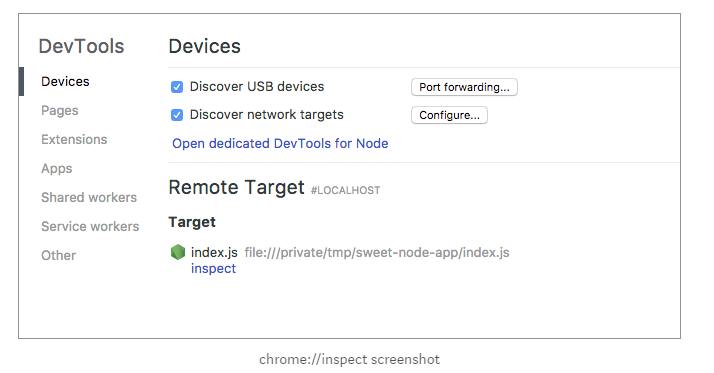
set targets:
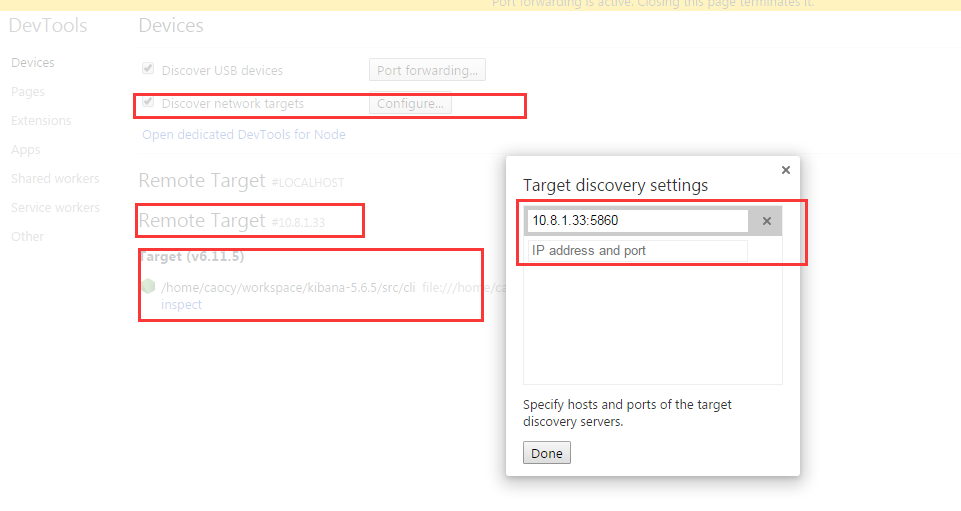
4. Click the Open dedicated DevTools for Node link.
You’ll get a popup window for debugging your node session.
But better than that, when you kill and restart node, the window will automatically reconnect to it.
debug kibana in chrome的更多相关文章
- 强制开启android webview debug模式使用Chrome inspect
强制开启android webview debug模式使用Chrome inspect https://blog.csdn.net/zhulin2609/article/details/5143782 ...
- Chrome开发者工具Debug入门
译者按: 手把手教你摆脱console.log,掌握高级的debug方法. 原文: Learn How To Debug JavaScript with Chrome DevTools 译者: Fun ...
- chrome extensions & debug
chrome extensions & debug debug background.js debug popup.js debug content_script.js chrome.stor ...
- How to debug Typescript in browser
How to debug typescript, In Chrome, we need to press F12, open settings, uncheck the Enable JavaScri ...
- Chrome 实用调试技巧
Chrome 实用调试技巧 2016-07-23 如今Chrome浏览器无疑是最受前端青睐的工具,原因除了界面简洁.大量的应用插件,良好的代码规范支持.强大的V8解释器之外,还因为Chrome开发者工 ...
- [chrome-debug]如何使用chrome调试你的移动设备
### usb debug by remote chrome ### https://developer.chrome.com/devtools/docs/remote-debugging ### c ...
- Chrome实用调试技巧
如今Chrome浏览器无疑是最受前端青睐的工具,原因除了界面简洁.大量的应用插件,良好的代码规范支持.强大的V8解释器之外,还因为Chrome开发者工具提供了大量的便捷功能,方便我们前端调试代码,我们 ...
- Chrome 编译错误汇总
由于各种你懂的原因,訪问google的服务总是出错,先是hosts不工作.代理也不好使,最后最终能够短暂訪问了.我的版本号还是採用svn维护的,直接svn update也不行.试试git吧,一晚上才下 ...
- .NET WEB程序员需要掌握的技能
本来这个是我给我们公司入职的新人做一个参考,由于 @张善友 老师在他的微信号转了我的这篇文章<<.Net WEB 程序员需要掌握的技能>>,很多人觉得比较有用,说是看了后知道一 ...
随机推荐
- java设计模式——多例模式
★ 缓存在单例中的使用 缓存在编程中使用很频繁,有着非常重要的作用,它能够帮助程序实现以空间换取时间,通 常被设计成整个应用程序所共享的一个空间,现要求实现一个用缓存存放单例对象的类. 说明:该 ...
- e684. 以多种格式打印
A Book object is used when printing pages with different page formats. This example prints the first ...
- ST500LT012-1DG142硬盘參数
ATA 设备物理信息 制造商 Seagate 硬盘名称 Momentus Thin 500LT012 形状特征 2.5" 格式化容量 500 GB 盘片数 1 记录面 2 外形尺寸 100 ...
- tomcat日志神器--kibana
最近公司搭了套kibana的日志系统,感受比原来查看日志方便多了.记得以前查看日志是通过ssh到服务器,查看系统日志用vi查看器查看或者下载到本地,用logview查看搜索,可读性很低.自从用了kib ...
- Nginx的启动与停止,重启
1.先确定nginx所在的文件位置 如: 重启 1.验证nginx配置文件是否正确 方法一:进入nginx安装目录sbin下,输入命令./nginx -t 2.重启Nginx服务 方法一:进入ngin ...
- Ubuntu Server 下的网络配置
$ ifconfig 配置DHCP客户端$ sudo vi /etc/network/interfaces加入 iface eth0 inet dhcp 配置静态IP地址$ sudo vi /etc/ ...
- 最大子数组之和(N)
int maxSum(int *array, int n) { ]; ; ; ; i < n; i++) { ) newsum += array[i]; else newsum = array[ ...
- 4 kafka集群部署及kafka生产者java客户端编程 + kafka消费者java客户端编程
本博文的主要内容有 kafka的单机模式部署 kafka的分布式模式部署 生产者java客户端编程 消费者java客户端编程 运行kafka ,需要依赖 zookeeper,你可以使用已有的 zo ...
- 国外大神说:在编程中使用If语句的潜在危险
大多数编程语言中if语句主要有两个作用:验证输入以保护域免受错误数据的影响,以及处理域内业务逻辑.但是,Udi Dahan最近在阿姆斯特丹DDD欧洲会议上的发言中指出,我们一般很 当我们查看系 ...
- PHP入门1
php是服务器端脚本语言,免费,跨平台,全称是英文Hypertext Preprocessor 一.语法规则 PHP代码写在<?php ?>标签之间, 所有用户定义的函数.类和关键词(例如 ...