
使用Kettle导出excel

 1 <dependency>

 2     <groupId>org.apache.commons</groupId>

 3     <artifactId>commons-vfs2</artifactId>

 4     <version>2.0</version>

 5 </dependency>

 6 <dependency>

 7     <groupId>org.scannotation</groupId>

 8     <artifactId>scannotation</artifactId>

 9     <version>1.0.3</version>

10 </dependency>

11 <dependency>

12     <groupId>dom4j</groupId>

13     <artifactId>dom4j</artifactId>

14     <version>1.6.1</version>

15 </dependency>

16 <dependency>

17     <groupId>pentaho-kettle</groupId>

18     <artifactId>kettle-vfs</artifactId>

19     <version>5.2.0.0</version>

20     <classifier>pentaho</classifier>

21 </dependency>

22 <dependency>

23     <groupId>pentaho-kettle</groupId>

24     <artifactId>kettle-engine</artifactId>

25     <version>5.2.0.0</version>

26 </dependency>

27 <dependency>

28     <groupId>pentaho-kettle</groupId>

29     <artifactId>kettle-core</artifactId>

30     <version>5.2.0.0</version>

31 </dependency>
仓库如果没有kettle的jar包,可以先现在下来再上传到maven仓库
3.ktr文件:如以下附件下载链接
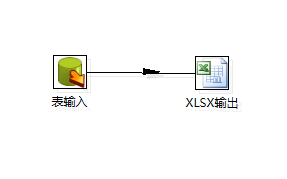
这里用到一个输入和excel输出,里面配置的参数:
查询语句: ${exec_select_sql}、
文件名称:${filepath}、
sheet名称:${sheetname}
5.测试导出方法
web项目中的测试
@RequestMapping("/kettle")public Object kettle(int rows, String sql) { String sqlLimit = sql + "LIMIT "+rows; String fullName = "/home/admin/DataPlatform/temp"+ "/kettle"+uuid; this.kettleExportExcel(sqlLimit, fullName, "kettle"); return null;}@Component
@Aspect
public class ControllerAspect {
private static Logger logger_info = Logger.getLogger("api-info");
private static Logger logger_error = Logger.getLogger("api-error");
/**
* 切面
*/
private final String POINT_CUT = "execution(* com.demo.controller.*.*(..))";
@Pointcut(POINT_CUT)
private void pointcut() {
}
@AfterThrowing(value = POINT_CUT, throwing = "e")
public void afterThrowing(Throwable e) {
logger_error.error("afterThrowing: " + e.getMessage(), e);
}
/**
* @功能描述: 打印Controller方法的执行时间
* @创建日期: 2016年11月2日 上午11:44:11
* @param proceedingJoinPoint
* @return
* @throws Throwable
*/
@Around(value = POINT_CUT)
public Object around(ProceedingJoinPoint proceedingJoinPoint)
throws Throwable {
String className = proceedingJoinPoint.getTarget().getClass().getName();
String methodName = proceedingJoinPoint.getSignature().getName();
Long begin = System.currentTimeMillis();
Long beginMemory = Runtime.getRuntime().totalMemory()-Runtime.getRuntime().freeMemory();
StringBuilder log = new StringBuilder(className+"@"+methodName);
Object result = null;
try {
result = proceedingJoinPoint.proceed();
} catch (Exception e) {
logger_error.error(log + e.getMessage(), e);
}
Long end = System.currentTimeMillis();
Long endMemory = Runtime.getRuntime().totalMemory()-Runtime.getRuntime().freeMemory();
log.append(" 执行时间: ").append(end - begin).append("ms");
log.append(" 消耗内存: ").append(endMemory - beginMemory).append("Byte");
logger_info.info(log);
return result;
}
}
7.执行结果
* 导出10w行记录
执行时间: 1133ms
执行时间: 1082ms
执行时间: 1096ms
* 导出100w行记录
执行时间: 39784ms
执行时间: 8566ms
执行时间: 8622ms
* Excel 2007行数极限 1048575 执行时间: 9686ms
第一次导数据要加载kettle组件运行稍慢,后面几次再导数据速度就飞快了,更多结果有兴趣的可以去试试。
使用Kettle导出excel的更多相关文章
- kettle 使用excel模板导出数据
通过excel进行高速开发报表: 建设思路: 1.首先制订相关的execl模板. 2.通过etl工具(kettle)能够高速的 将数据库中的数据按excel模板导出成新的excel就可以. 当中ket ...
- C#使用Aspose.Cells导出Excel简单实现
首先,需要添加引用Aspose.Cells.dll,官网下载地址:http://downloads.aspose.com/cells/net 将DataTable导出Xlsx格式的文件下载(网页输出) ...
- 利用poi导出Excel
import java.lang.reflect.Field;import java.lang.reflect.InvocationTargetException;import java.lang.r ...
- [django]数据导出excel升级强化版(很强大!)
不多说了,原理采用xlwt导出excel文件,所谓的强化版指的是实现在网页上选择一定条件导出对应的数据 之前我的博文出过这类文章,但只是实现导出数据,这次左思右想,再加上网上的搜索,终于找出方法实现条 ...
- NPOI导出Excel
using System;using System.Collections.Generic;using System.Linq;using System.Text;#region NPOIusing ...
- ASP.NET Core 导入导出Excel xlsx 文件
ASP.NET Core 使用EPPlus.Core导入导出Excel xlsx 文件,EPPlus.Core支持Excel 2007/2010 xlsx文件导入导出,可以运行在Windows, Li ...
- asp.net DataTable导出Excel 自定义列名
1.添加引用NPOI.dll 2.cs文件头部添加 using NPOI.HSSF.UserModel; using NPOI.SS.UserModel; using System.IO; 3.代码如 ...
- Aspose.Cells导出Excel(1)
利用Aspose.Cells导出excel 注意的问题 1.DataTable的处理 2.进行编码,便于中文名文件下载 3.别忘了Aspose.Cells.dll(可以自己在网上搜索) public ...
- 前端导出Excel兼容写法
今天整理出在Web前端导出Excel的写法,写了一个工具类,对各个浏览器进行了兼容. 首先,导出的数据来源可能有两种: 1. 页面的HTML内容(一般是table) 2. 纯数据 PS:不同的数据源, ...
随机推荐
- CTF-安恒19年一月月赛部分writeup
CTF-安恒19年一月月赛部分writeup MISC1-赢战2019 是一道图片隐写题 linux下可以正常打开图片,首先到binwalk分析一下. 里面有东西,foremost分离一下 有一张二维 ...
- 第一节 如何用Go实现单链表
一.概念介绍 下面这副图是我们单链表运煤车队. 每节运煤车就是单链表里的元素,每节车厢里的煤炭就是元素中保存的数据.前后车通过锁链相连,作为单链表运煤车,从1号车厢开始,每节车厢都知道后面拉着哪一节车 ...
- Go实现发送解析GET与POST请求
参考链接: https://www.jb51.net/article/115693.htm https://www.jb51.net/article/60900.htm https://www.cnb ...
- 和IDEA一样好用的go语言IDE:Goland
因为IDEA和Goland来自同一家非常有名的捷克公司:JetBrains 很好用,智能化程度高 最新版下载地址:http://www.jetbrains.com/go/?fromMenu 相关使用手 ...
- 数据结构与算法之有序数组(2)——in dart
本文比第一篇,采用了类实现.增加了运算符重载等功能.本来有序数组是不能修改某个位置的值的,因为这样会打破数组的有序性:但为了演示,保留了修改的方法,但为此增加了排序. import 'dart:mat ...
- 消除运行MATLAB生成独立可执行程序的DOS黑屏
基于Matlab生成独立可执行文件后,每次运行都存在DOS黑屏问题,可通过以下方法解决: 在Matlab命令窗口中输入: cd(prefdir) edit compopts.bat 在打开的文件最后添 ...
- 程序与程序之间共享对象:MarshalByRefObject
源自于:http://stackoverflow.com/questions/439173/message-pumps-and-appdomains/442316 程序与程序之间共享对象: Marsh ...
- windows phone 8.1 让项目开启蓝牙genericAttributeProfile
1.打开项目里面的 Package.appxmanifest 文件 找到<Capabilities>节点,添加代码如下,其中 serviceId:6006 可以自己修改值 <m2: ...
- 4825: [Hnoi2017]单旋
4825: [Hnoi2017]单旋 链接 分析: 以后采取更保险的方式写代码!!!81行本来以为不特判也可以,然后就总是比答案大1,甚至出现负数,调啊调啊调啊调~~~ 只会旋转最大值和最小值,以最小 ...
- cogs1439 货车运输
cogs1439 货车运输 一道傻逼板子题. 边一定在最大生成树上,这个可以用消圈证明 然后kruskal跑一遍再搜一遍再建ST表再跑LCA这题就做完了. RT PS.交上去的代码把Kruskal打成 ...