
springmvc fileupload
1.pom文件中fileupload的dependencyyinr
<dependency>

	<groupId>commons-fileupload</groupId>

	<artifactId>commons-fileupload</artifactId>

	<version>1.3.1</version>

</dependency>
2.springmvc配置文件
<bean id="multipartResolver" class="org.springframework.web.multipart.commons.CommonsMultipartResolver">

	    <!-- 上传的最大限制 -->

	    <property name="maxUploadSize" value="209715200" />

	    <!-- 默认编码 -->

	    <property name="defaultEncoding" value="UTF-8" />

	    <!-- 上传文件的解析 -->

	    <property name="resolveLazily" value="true" />

</bean>
3.前台jsp
<%@ page contentType="text/html;charset=UTF-8" language="java"%>

<%@ taglib prefix="c" uri="http://java.sun.com/jsp/jstl/core"%>

<%

	String path = request.getContextPath();

	String basePath = request.getScheme() + "://" + request.getServerName() + ":" + request.getServerPort()

			+ path;

%>

<html>

<head>

	<script type="text/javascript" src="<%=basePath%>/js/jquery.min.js"></script>

	<style type="text/css">

		#pic{

			width:200px;

			height:200px;

			/* border-radius:50% ; */

			margin:20px auto;

			cursor: pointer;

			}

	</style>

</head>

<c:import url="main.jsp"></c:import>

<body>

	<input id="serverPath" type="hidden" value="<%=basePath %>"/>

	<form enctype="multipart/form-data" id="uploadForm">

		<div>省:<input type="text" id="province"></div>

		<div>市:<input type="text" id="city"></div>

	    <img id="pic" src="<%=basePath%>/images/upload_img.png" >

		<input id="upload_file" name="upload_file" accept="image/*" type="file" style="display: none"/>

		<input type="button" id="uploadPicButton" value="上传" onclick="uploadPic()">

	</form>

</body>

</html>
4.js代码
var serverPath;

$(function() {

	serverPath = $("#serverPath").val();

	$("#pic").click(function () {

	$("#upload_file").click(); //隐藏了input:file样式后,点击头像就可以本地上传

	$("#upload_file").on("change",function(){

		var objUrl = getObjectURL(this.files[0]) ; //获取图片的路径,该路径不是图片在本地的路径

		if (objUrl) {

			$("#pic").attr("src", objUrl) ; //将图片路径存入src中,显示出图片

		}

	});

	});

});

//建立一個可存取到該file的url

function getObjectURL(file) {

var url = null ;

if (window.createObjectURL!=undefined) { // basic

url = window.createObjectURL(file) ;

} else if (window.URL!=undefined) { // mozilla(firefox)

url = window.URL.createObjectURL(file) ;

} else if (window.webkitURL!=undefined) { // webkit or chrome

url = window.webkitURL.createObjectURL(file) ;

}

return url ;

}

function uploadPic(){

    var pic = $('#upload_file')[0].files[0];

    var fd = new FormData();

    fd.append('file', pic);

    fd.append('province', $('#province').val());

    fd.append('city', $('#city').val());

    $.ajax({

        url:serverPath + "/bmdList/test",

        type:"post",

        // Form数据

        data: fd,

        cache: false,

        contentType: false,

        processData: false,

        success:function(data){

            alert(data);

        }

    });

}
5.后台代码
@RequestMapping(value = "/test",method = RequestMethod.POST)

    @ResponseBody

    public String test(PhoneCardEntity entity) throws IOException{

    	System.out.println("省:"+entity.getProvince());

    	System.out.println("市:"+entity.getCity());

    	System.out.println(entity.getFile().getOriginalFilename());

    	byte[] bytes = entity.getFile().getBytes();

    	return "success";

    }
6.entity代码
private String province; // 省

private String city; // 市

private MultipartFile file;
----------------------------------------------------------------------------------华丽的分割线----------------------------------------------------------------------------------------
执行效果
1/ 页面初始化
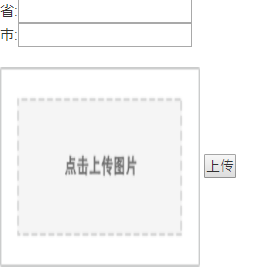
2.选择图片及输入内容

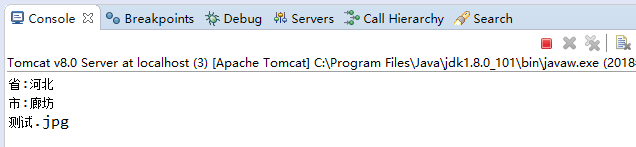
3.点击上传后台输出log
springmvc fileupload的更多相关文章
- 3.2.3 SpringMVC注解式开发
SpringMVC注解式开发 1. 搭建环境 (1) 后端控制器无需实现接口 , 添加相应注解 Controller类添加注解 @Controller //该注解表将当前类交给spring容器管理 @ ...
- SpringMVC的文件上传与下载
1. 单文件上传 配置jsp页面 <%@ page contentType="text/html;charset=UTF-8" language="java&quo ...
- spring之文件上传
<%@ page language="java" contentType="text/html; charset=UTF-8" pageEncoding= ...
- dwz+jquery+fileupload+springmvc实现文件上传 及图片预览
1 前台jsp:文件的上传利用了iframe实现局部刷新功能.使用了apache的fileupload组件,用到的jar: commons-fileupload.jar,commons-io.jarD ...
- SpringMVC使用FileUpload上传文件
进口FileUpload和common-io的Jar包 注意:1.Struts2其它方法需要使用的:struts2过滤,将改变reqeust类型,由HttpServletRequest成为MultiP ...
- java.lang.ClassNotFoundException: org.apache.commons.fileupload.FileItemFactory报错springmvc
转自:https://blog.csdn.net/qq_41879385/article/details/82892555 下面是错误信息:java.lang.ClassNotFoundExcepti ...
- springMVC学习笔记--知识点总结1
以下是学习springmvc框架时的笔记整理: 结果跳转方式 1.设置ModelAndView,根据view的名称,和视图渲染器跳转到指定的页面. 比如jsp的视图渲染器是如下配置的: <!-- ...
- springmvc的图片上传与导出显示
1.前端文件上传需要在form表单内添加enctype="multipart/form-data" ,以二进制传递: 2.web.xml文件内配置 <servlet-mapp ...
- 基于Spring+SpringMVC+Mybatis的Web系统搭建
系统搭建的配置大同小异,本文在前人的基础上做了些许的改动,重写数据库,增加依据权限的动态菜单的实现,也增加了后台返回json格式数据的配置,详细参见完整源码. 主要的后端架构:Spring+Sprin ...
随机推荐
- php foreach 遍历细节探讨
foreach 也是正常的语法循环结构,可以有 break 和 continue 等操作 遍历过程中值变量传递默认是值传递 输出结果为: 遍历过程中值变量可以认为设定为引用传递:foreach($数组 ...
- [UWP开发]在windows10中设置壁纸~UserProfilePersonalizationSettings
在之前的wp8.1和wp8中,微软没有公开设置壁纸的API,只有一个设置锁屏的API,但在Windows10中,微软为我们提供了设置壁纸的API:TrySetWallpaperImageAsync,他 ...
- jquery综合练习--模态对话框传值,删除,新增表格行
效果示例: 个人的练习代码: <!DOCTYPE html> <html lang="en"> <head> <meta charset= ...
- Unity下的开发框架--适应web和微端游戏异步资源请求的框架
一. 内容简介: 1. 框架对Web与微端游戏特性的支持: Web和微端游戏最重要的特性是,资源是持续从服务器上即时下载下来的.而保证体验流畅的关键就是保证资源下载分散到持续的体验过程中,并保 ...
- sqlite3简单操作
最近在操作公司视频设备的tutk转发服务器的时候,用到的数据库是sqlite,在此复习一下 目录 1 建立数据库档案 2 在sqlite3提示列下操作 3 SQL的指令格式 4 建立资料表 5 建立索 ...
- H - Graphics(dfs)
H - Graphics Time Limit:1000MS Memory Limit:131072KB 64bit IO Format:%lld & %llu Submi ...
- 设置视口中心点setViewCenter
ads_point pt; ads_name ent,ss; //切换到模型空间 acedMspace(); if (RTNORM != acedGetPoint(NULL,_T("\n选择 ...
- webpack 踩的坑
我是看着这篇博客学习的 http://www.jianshu.com/p/42e11515c10f# 看到loaders的时候,按照博主写法去试 结果报错....找了好久,上网查了好多 也看错误信息了 ...
- Java 设计模式之单利模式
一.首先介绍一下单例模式: 单例模式(Singleton),也叫单子模式,是一种常用的软件设计模式.在应用这个模式时,单例对象的类必须保证只有一个实例存在.许多时候整个系统只需要拥有一个的全局 ...
- http协议缓存小结
缓存可以使用expire方式,设置到期时间,缓存的时间等于expire设置的时间减去当前的时间 也可以使用no-cache的方式进行缓存,当设置了no-cache的方式时,以no-cache的为准,e ...