
微信小程序-movable-view
<view class="page-body">

  <view class="page-section">

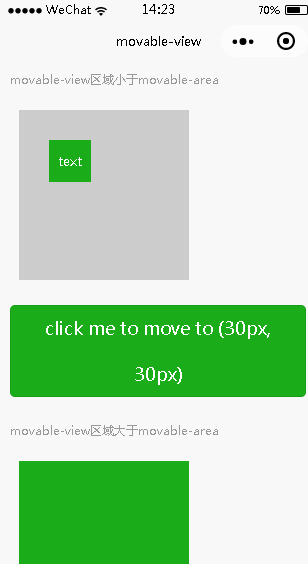
    <view class="page-section-title">movable-view区域小于movable-area</view>

    <movable-area>

      <movable-view x="{{x}}" y="{{y}}" direction="all">text</movable-view>

    </movable-area>

  </view>

  <view class="btn-area">

    <button bindtap="tap" class="page-body-button" type="primary">click me to move to (30px, 30px)</button>

  </view>

  <view class="page-section">

    <view class="page-section-title">movable-view区域大于movable-area</view>

    <movable-area>

      <movable-view class="max" direction="all">text</movable-view>

    </movable-area>

  </view>

  <view class="page-section">

    <view class="page-section-title">只可以横向移动</view>

    <movable-area>

      <movable-view direction="horizontal">text</movable-view>

    </movable-area>

  </view>

  <view class="page-section">

    <view class="page-section-title">只可以纵向移动</view>

    <movable-area>

      <movable-view direction="vertical">text</movable-view>

    </movable-area>

  </view>

  <view class="page-section">

    <view class="page-section-title">可超出边界</view>

    <movable-area>

      <movable-view direction="all" out-of-bounds>text</movable-view>

    </movable-area>

  </view>

  <view class="page-section">

    <view class="page-section-title">带有惯性</view>

    <movable-area>

      <movable-view direction="all" inertia>text</movable-view>

    </movable-area>

  </view>

  <view class="page-section">

    <view class="page-section-title">可放缩</view>

    <movable-area scale-area>

      <movable-view direction="all" bindchange="onChange" bindscale="onScale" scale scale-min="0.5" scale-max="4" scale-value="{{scale}}">text</movable-view>

    </movable-area>

  </view>

  <view class="btn-area">

    <button bindtap="tap2" class="page-body-button" type="primary">click me to scale to 3.0</button>

  </view>

</view>
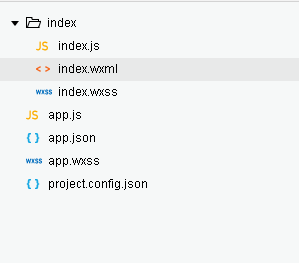
index.wxml
movable-view {

  display: flex;

  align-items: center;

  justify-content: center;

  height: 100rpx;

  width: 100rpx;

  background: #1AAD19;

  color: #fff;

}

movable-area {

  height: 400rpx;

  width: 400rpx;

  margin: 50rpx;

  background-color: #ccc;

  overflow: hidden;

}

.max {

  width: 600rpx;

  height: 600rpx;

}

.page-section{

  width: 100%;

  margin-bottom: 60rpx;

}

.page-section:last-child{

  margin-bottom:;

}

.page-section-title{

  font-size: 28rpx;

  color: #999999;

  margin-bottom: 10rpx;

  padding-left: 30rpx;

  padding-right: 30rpx;

}
index.wxss
Page({

  data: {

    x: 0,

    y: 0,

    scale: 2,

  },

  tap(e) {

    this.setData({

      x: 30,

      y: 30

    })

  },

  tap2() {

    this.setData({

      scale: 3

    })

  },

  onChange(e) {

    console.log(e.detail)

  },

  onScale(e) {

    console.log(e.detail)

  }

})
index.js
{

  "pages":[

    "index/index"

  ],

  "window":{

    "backgroundTextStyle":"light",

    "navigationBarBackgroundColor": "#F8F8F8",

    "navigationBarTitleText": "movable-view",

    "navigationBarTextStyle":"black"

  }

}
app.json
page {

  background-color: #F8F8F8;

  height: 100%;

  font-size: 32rpx;

  line-height: 1.6;

}

.page-body {

  padding: 20rpx 0;

}

.btn-area{

  margin: 60rpx 0;

  box-sizing: border-box;

  width: 100%;

  padding: 0 30rpx;

}
app.wxss
{

    "description": "项目配置文件。",

    "setting": {

        "urlCheck": true,

        "es6": true,

        "postcss": true,

        "minified": true,

        "newFeature": true

    },

    "compileType": "miniprogram",

    "libVersion": "1.9.93",

    "appid": "wxc32558e56ff41f5d",

    "projectname": "movable-view",

    "isGameTourist": false,

    "condition": {

        "search": {

            "current": -1,

            "list": []

        },

        "conversation": {

            "current": -1,

            "list": []

        },

        "game": {

            "currentL": -1,

            "list": []

        },

        "miniprogram": {

            "current": -1,

            "list": []

        }

    }

}
project.config.json
微信小程序-movable-view的更多相关文章
- 关于微信小程序获取view的动态高度填坑
wx.createSelectorQuery().select('#box').boundingClientRect(function (rect) { width = rect.width heig ...
- 【微信小程序】view顶部固定或底部固定 + scroll-view中的元素view也可以使用position:fixed;固定选中元素位置
1.顶端固定核心代码如下: <view class="page__hd" style="position:fixed; top:0;width: 750rpx;&q ...
- 微信小程序将view动态填满全屏
一.在app.js利用官方方法获取设备信息,将获取到的screenHeight.windowHeight度量单位统一由rpx换算为px 注:官方文档给出 [rpx换算px (屏幕宽度/750) ][ ...
- 微信小程序 -- scroll view
效果图:横向滚动和纵向滚动 scroll view使用方法文档,前面已经介绍查找文档方法,此处不再赘述 一.横向滚动 创建一个页面scroll-nav 然后,在.wxml文件中排版 <!--水平 ...
- 一个小时快速搭建微信小程序教程
「小程序」这个划时代的产品发布快一周了,互联网技术人都在摩拳擦掌,跃跃欲试.可是小程序目前还在内测,首批只发放了 200 个内测资格(泪流满面).本以为没有 AppID 这个月就与小程序无缘了,庆幸的 ...
- 一个小时快速搭建微信小程序
「小程序」这个划时代的产品发布快一周了,互联网技术人都在摩拳擦掌,跃跃欲试.可是小程序目前还在内测,首批只发放了 200 个内测资格(泪流满面).本以为没有 AppID 这个月就与小程序无缘了,庆幸的 ...
- 微信小程序如何像vue一样在动态绑定类名
微信小程序如何像vue一样在动态绑定类名 更新时间:2018年04月17日 14:08:44 这篇文章主要介绍了微信小程序如何像vue一样在动态绑定类名,文中给大家提到了vue与微信小程序的区别, ...
- 微信小程序(一),授权页面搭建
wxml代码如下: <!--pages/index2/index2.wxml--> <view class="index2Container"> <i ...
- 微信小程序踩坑集合
1:官方工具:https://mp.weixin.qq.com/debug/w ... tml?t=1476434678461 2:简易教程:https://mp.weixin.qq.com/debu ...
- 微信小程序自定义组件的使用以及调用自定义组件中的方法
在写小程序的时候,有时候页面的内容过多,逻辑比较复杂,如果全部都写在一个页面的话,会比较繁杂,代码可读性比较差,也不易于后期代码维护,这时候可以把里面某部分功能抽出来,单独封装为一个组件,也就是通常说 ...
随机推荐
- 解压命令tar zxvf中zxvf的意思
x : 从 tar 包中把文件提取出来 z : 表示 tar 包是被 gzip 压缩过的,所以解压时需要用 gunzip 解压 v : 显示详细信息 f xxx.tar.gz : 指定被处理的文件是 ...
- #Go# 常用类型转换
#string 2 int int, err := strconv.Atoi(string) #string 2 int64 int64, err := strconv.ParseInt(string ...
- Codeforces Round #555 (Div. 3) D. N Problems During K Days 【数学思维】
一 题面 D. N Problems During K Days 二 分析 对于这题,刚开始我就是陷入了对公式的执着,企图用公式直接确定第一个数,然后试着去找序列.经过思考和手动模拟后发现是很难保证正 ...
- HLS:跑马灯实验
跑马灯实验的第一部分记录: 1. vivado 2018.2的HLS在跑C/RTL co-simulation的时候,一直报错,不论是用modelsim 还是vivado自带的similator.使用 ...
- Mac 10.12安装Git管理工具SourceTree
说明:Git的GUI工具应该是这款最好用. 下载: (链接: https://pan.baidu.com/s/1mhRr35Y 密码: vv67)
- 解决Ubuntu系统的每次开机重启后,resolv.conf清空的问题和DNS域名解析问题(图文详解)
不多说,直接上干货! 问题情况描述如下: 普及知识: /etc/resolv.conf ,其实是一个Link .它其实指向的是 /run/resolvconf/resolv.conf. Ubun ...
- 利器推荐-Snipaste截图工具
利器推荐-Snipaste截图工具 一.引言 接触这个工具之前一直用QQ的ctrl+alt功能进行截图,但是有时候QQ没有登陆,或者没网的环境就没法使用:这时候可能会使用windows自带的截图工具, ...
- [PY3]——函数——函数注解 | 实现类型检查功能
函数注解(Function Annotations)——> 可以在定义函数的时候对参数和返回值添加注解 写函数注解 #平时我们使用help()可以查看一个函数的说明,我们自己写的函数也可以提供这 ...
- Implicit super constructor xx() is undefined for default constructor. Must define an explicit constructor
错误:Implicit super constructor xx() is undefined for default constructor. Must define an explicit c ...
- C# Winform程序CPU占用高的原因和解决方法
程序CPU占用高的可能原因: 1.存在死循环: 为什么死循环会导致CPU占用高呢? 虽然分时操作系统是采用时间片的机制对CPU的时间进行管理的,也就是说到了一定时间它会自动从一个进程切换到下 ...