
Change SSH Welcome Banner on Ubuntu
One of the easiest way to protect and secure SSH logins by displaying warming message to UN-authorized users or display welcome or informational messages to authorized users.
Being a system administrator whenever configure Linux servers I always use to configure a security banners for ssh logins. The banner contains some security warning information or general information. See my example banner message which I used for my all servers.
ALERT! You are entering into a secured area! Your IP, Login Time, Username has been noted and has been sent to the server administrator!
This service is restricted to authorized users only. All activities on this system are logged.
Unauthorized access will be fully investigated and reported to the appropriate law enforcement agencies.
There are two way to display messages one is using issue.net file and second one is using MOTD file.
- issue.net : Display a banner message before the password login prompt.
- motd : Display a banner message after the user has logged in.
So, I strongly recommended all system administrator to display a banner messages before allowing users to log in to systems. Just follow below simple steps to enable SSH logging messages.
Display SSH Warning Message to Users Before Login
To display Welcome or Warning message for SSH users before login. We use issue.net file to display a banner massages. Open the following file with VI editor.
# vi /etc/issue.net
Add the following banner sample message and save the file. You can add any custom banner message to this file.
###############################################################

#                                                      Welcome to TecMint.com                                                           #

#                                   All connections are monitored and recorded                                         #

#                          Disconnect IMMEDIATELY if you are not an authorized user!                    #

###############################################################
Open the master ssh configuration file and enable banners.
# vi /etc/ssh/sshd_config
Search for the word “Banner” and uncomment out the line and save the file.
#Banner /some/path
It should be like this.
Banner /etc/issue.net (you can use any path you want)
Next, restart the SSH daemon to reflect new changes.
# /etc/init.d/sshd restart

Stopping sshd:                                             [  OK  ]

Starting sshd:                                             [  OK  ]
Now try to connect to server you will see banner message similar to below.
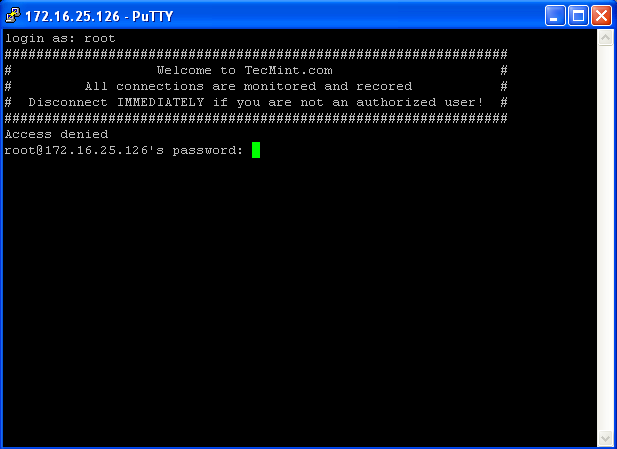
SSH Banner Messages Before Login
Display SSH Warning Message to Users After Login
To display banner messages after login, we use motd file, which is used to display banner massages after login. Now open it with VI editor.
vi /etc/motd
Place the following banner sample message and save the file.
###############################################################

#                                                   Welcome to TecMint.com                                                             #

#                                    All connections are monitored and recorded                                       #

#                           Disconnect IMMEDIATELY if you are not an authorized user!                  #

###############################################################
Now again try to login into server you will get both the banner messages. See the screenshot attached below.
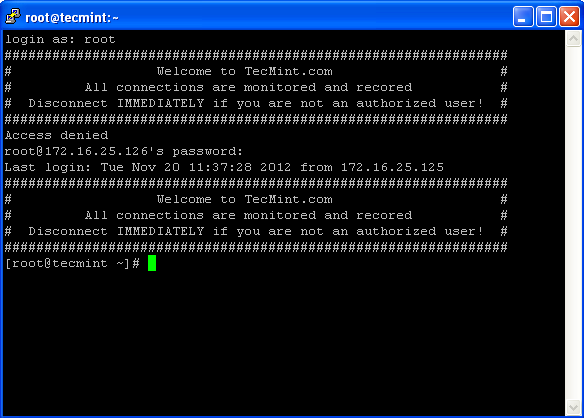
Display SSH Banner After Login
Change SSH Welcome Banner on Ubuntu的更多相关文章
- [错误解决]paramiko.ssh_exception.SSHException: Error reading SSH protocol banner 设置
报错信息 上午的时候数据组的同事跟我说有几个程序报错,经过查看log发现找到报错信息: paramiko.ssh_exception.SSHException: Error reading SSH p ...
- SSHException: Error reading SSH protocol banner
当我在使用ssh 远程connect 另一台机器的server 时出现了错误,错误如下,起初以为是自己代码写的有问题,后来本地了一下看了跑的没问题,我就开始根据报错去查寻原因, 起初在论坛博客看到这 ...
- Hide SSH Welcome Banner/Message on Ubuntu14.04+
Introduction Usually when you logged in you linux based PC remotely via SSH, a long banner will be d ...
- How to permit SSH root Login in Ubuntu 18.04
https://www.ubuntu18.com/ssh-permitrootlogin/ SSH root login is disabled by default in Ubuntu 18.04. ...
- 使用SecureCRT远程 SSH 登陆 CentOS 和 Ubuntu
1.CentOS下安装SSH 使用下列命令查看当前系统是否已经安装 ssh 和 rsync.rsync是一个远程数据同步工具,可通过LAN/WAN快速同步多台主机间的文件. rpm –qa | gre ...
- 【解决问题】SSH连不上Ubuntu虚拟机解决办法
1. 安装openssh-client Ubuntu默认缺省安装了openssh-client,apt-get安装即可 sudo apt-get install openssh-client 2. 安 ...
- 不能ssh连接ubuntu linux 服务器 secureCRT不能ssh连接服务器 不能远程ssh连接虚拟机的ubuntu linux
我是用的是secureCRT,远程连接我的虚拟机里面的ubuntu 直接报错,连接不上 1,先分别在windows上ipconfig和ubuntu上ifconfig下 互ping一下,是可以ping通 ...
- ssh连接docker镜像ubuntu与debian
用密码登录root docker官网给的sshdemo是ubuntu的,https://docs.docker.com/engine/examples/running_ssh_service/ 亲 ...
- 使用SSH密钥方式登录ubuntu Linux,指令(ssh-keygen 和 ssh-copy-id)
实验目的 从myVM1(本地主机)上登录myVM2(远程主机).采用密钥方式,不输入密码. 测试环境 主机:window7 sp1 64位 专业版 虚拟机:VMware workstation 12 ...
随机推荐
- 物联网学习之路——物联网通信技术:NBIoT
NBIoT是什么 NB-IoT,Narrow Band Internet of Things,窄带物联网,是一种专为万物互联打造的蜂窝网络连接技术.顾名思义,NB-IoT所占用的带宽很窄,只需约180 ...
- 同一个Activity先后加载2个Layout,从layout1取值传入layout2
同一个Activity先后加载2个Layout,从layout1取值传入layout2 没啥技术含量,就权当丰富下mono for android的小代码. Main.xaml <?xml ve ...
- deepin安装php5.6
sudo su -echo "deb http://ppa.launchpad.net/ondrej/php/ubuntu xenial main" | tee -a /etc/a ...
- Tomcat8-启动脚本分析
1. Tomcat也是一个java程序 最终的入口启动文件:org.apache.catalina.startup.Bootstrap 最后一条命令: start "Tomcat" ...
- varchar(n) 和 int(n)
mysql(测试版本为5.6) 的varchar必须加范围,否则报错: mysql> CREATE TABLE test ( -> id INT, -> name VARCHAR - ...
- JS+Zero Clipboard swf复制到剪贴板 兼容浏览器(bind事件绑定函数)
转自http://www.ipmtea.net/css_ie_firefox/201107/07_499.html 1.ZeroClipboard其实是国外的一个js类库,源码结构如: var Zer ...
- Linux笔记-vim 配置
本文是转载的,我用的ubuntu12.04在vim设置方面就是参考了本文,拿来分享给大家! ubuntu10.10中的设置方法: $cd /etc/vim $sudo cp vimrc vimrc.b ...
- [转]OData and Authentication – Part 5 – Custom HttpModules
本文转自:https://blogs.msdn.microsoft.com/odatateam/2010/07/19/odata-and-authentication-part-5-custom-ht ...
- 浅谈.net MVC
大学毕业对MVC的概念还不是很清晰,总觉得MVC是和三层一样的,是同一级别的架构.其实不然,三层架构是:BLL(业务逻辑层),DAL(数据库访问层),UI(页面显示层),而MVC仅仅是属于三层架构UI ...
- 使用Redis进行简单的数据缓存
引入spring-data-redis包.jedis.connection-pool包 applicationContext.xml的配置 <!-- redis Connection --> ...