
testng系列-ReportNG
生成reportng报告操作步骤:
一、maven的pom.xml文件需要添加内容:
<properties>

        <!-- maven 参数配置,这里引用不同的testng.xml -->

        <project.build.sourceEncoding>UTF-8</project.build.sourceEncoding>

        <xmlFileName>testng.xml</xmlFileName>

    </properties>
<!-- https://mvnrepository.com/artifact/org.testng/testng -->

        <dependency>

            <groupId>org.testng</groupId>

            <artifactId>testng</artifactId>

            <version>6.9.10</version>

            <!-- <scope>compile</scope> -->

              <scope>test</scope>

        </dependency>

        <!-- 依赖reportNg 关联testNg-->

        <dependency>

            <groupId>org.uncommons</groupId>

            <artifactId>reportng</artifactId>

            <version>1.1.4</version>

            <scope>test</scope>

            <exclusions>

                <exclusion>

                    <groupId>org.testng</groupId>

                    <artifactId>testng</artifactId>

                </exclusion>

            </exclusions>

        </dependency>

         <!-- 依赖Guice -->

        <dependency>

            <groupId>com.google.inject</groupId>

            <artifactId>guice</artifactId>

            <version>3.0</version>

            <scope>test</scope>

        </dependency>
<!--  build -->

        <build>

           <plugins>

              <plugin>

                <groupId>org.apache.maven.plugins</groupId>

                <artifactId>maven-surefire-plugin</artifactId>

                <version>2.18.1</version>

                <configuration>

                    <systemPropertyVariables>

                        <org.uncommons.reportng.escape-output>false</org.uncommons.reportng.escape-output>

                    </systemPropertyVariables>

                    <properties>

                        <property>

                            <name>usedefaultlisteners</name>

                            <value>false</value>

                        </property>

                    </properties>

                    <suiteXmlFiles>

                        <suiteXmlFile>res/${xmlFileName}</suiteXmlFile>

                        <!--表示使用xmlFileName作为testNG的配置文件 -->

                    </suiteXmlFiles>

                    <testFailureIgnore>true</testFailureIgnore>

                    <!--当case错误的时候继续运行,否则当case错误的时候报build错误 -->

                </configuration>

            </plugin>

            <!-- 添加插件,添加ReportNg的监听器,修改最后的TestNg的报告 -->

       <plugin>

            <groupId>org.apache.maven.plugins</groupId>

            <artifactId>maven-surefire-plugin</artifactId>

            <version>2.5</version>

            <configuration>

                <properties>

                    <property>

                        <name>usedefaultlisteners</name>

                        <value>false</value>

                    </property>

                    <property>

                        <name>listener</name>

                        <value>org.uncommons.reportng.HTMLReporter,  org.uncommons.reportng.JUnitXMLReporter</value>

                    </property>

                </properties>

                <workingDirectory>target/</workingDirectory>

                <forkMode>always</forkMode>

            </configuration>

           </plugin>

           </plugins>

        </build>
备注:以上内容添加完成后运行Maven install确保依赖包加载到工程的Maven Dependencies里边;
二、testng的testng.xml文件需要添加内容:
    <listeners>

        <listener class-name="org.uncommons.reportng.HTMLReporter" />

        <listener class-name="org.uncommons.reportng.JUnitXMLReporter" />

    </listeners>
三、选中pom.xml执行Maven test后测试报告艘在位置及最终效果如下:
1)位置
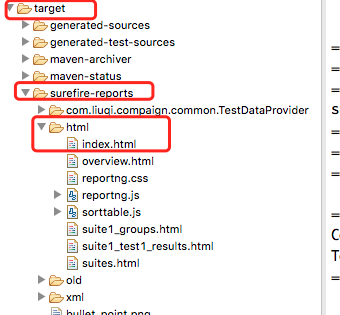
2)效果


testng系列-ReportNG的更多相关文章
- Idea+maven+testNG+Selenium+ReportNG自动化框架搭建
1.Idea创建一个空的Maven项目 创建后默认项目目录如图所示 2.配置pom.xml文件 <?xml version="1.0" encoding="UTF- ...
- 自动化测试:java + testng + maven + reportng + jenkins + selenium (一)_基于win环境
集成环境:jdk1.7 + tomcat1.7+ eclipse mars + maven + testng6.14.2 + selenium-java2.40.0 + reportng1.1.4 + ...
- 我的自动化测试历程(Selenium+TestNG+Java+ReportNG+Jenkins)
原地址:http://blog.csdn.net/shilinjie_8952/article/details/53380373?locationNum=11&fps=1 测试环境:Java+ ...
- IDEA+MAVEN+testNG(reportNG)
转载:http://www.cnblogs.com/aikachin/p/7765846.html 参考: http://blog.csdn.net/langsand/article/details/ ...
- Selenium 我的自动化测试历程 (Selenium+TestNG+Java+ReportNG+Jenkins)
测试环境:Java+Selenium+TestNG,Jenkins持续集成. 测试代码 代码结构 采用页面对象模型(Page Object),减少UI修改后,对代码的影响. Java编写,采用Te ...
- TestNG系列(五)TestNG测试报告
以TestNG执行测试方法后会生成test-output测试结果集,其中index.html是测试结果的展示.TestNG的测试报告可以通过IReporter监听自定义,也可以通过第三方工具(Repo ...
- TestNG系列之四: TestNg依赖 dependsOnMethods
有时候,你可能需要在一个特定的顺序调用方法 执行原则: 1.被依赖的先执行: 2. 再执行没配置依赖的, 3.再执行需要依赖的: 4.若无依赖关系,依次执行) 一个方法有多个依赖时用空格隔开 有两种依 ...
- TestNG系列之二:TestNG套件测试
测试套件的测试是为了测试软件程序的行为或一系列行为的情况下,是一个集合.在TestNG,我们不能定义一套测试源代码,但它代表的套件是一个XML文件执行特征.这也允许灵活的配置要运行的测试.套件可以包含 ...
- TestNG系列之:TestNG基本注解(注释)
注解 描述 @BeforeSuite 注解的方法只运行一次,在当前suite所有测试执行之前执行 @AfterSuite 注解的方法只运行一次,在当前suite所有测试执行之后执行 @BeforeCl ...
随机推荐
- fdfs上传图片成功在浏览器中访问不到404 Not Found
1.检查自己nginx配置文件,看是否有 user root这行 . 在nginx.conf文件里加一条:user root; 2.检查自己配置文件: storage.conf中的文件路径是否正确 ...
- 图形剖析,当给 ul 设置padding=0, margin=0后 li前面的小黑点消失的现象原理!
- DDL-数据类型
一.数值型1.整型tinyint.smallint.mediumint.int/integer.bigint1 2 3 4 8 特 ...
- MongoDB数据库 : 基础
三元素:数据库 集合 文档(json的扩展bson) 服务启动重启停止: sudo service mongodb start(stop,restart) 修改配置文件 /etc/mongodb.co ...
- 检测com端口代码实现
1:scan HRESULT CDevHound::Scan(const vector<CString> &guiInfo, vector<DEV_INFO> & ...
- 20155204 2016-2017-2 《Java程序设计》第2周学习总结
20155204 2016-2017-2 <Java程序设计>第2周学习总结 教材学习内容总结 本章主要学习了Java语言的基础语法,基本同C语言逻辑相通,比较着学不算难理解,包括了一些简 ...
- 20170531 课堂实践 MyOD
MyOD 题目 编写MyOD.java 用java MyOD XXX实现Linux下od -tx -tc XXX的功能 Linux下od功能详解 od(octal dump)命令可以以八进制.十进制. ...
- 20155231 java实验一 Java开发环境的熟悉
20155231 java实验一 Java开发环境的熟悉 实验要求 没有Linux基础的同学建议先学习<Linux基础入门(新版)><Vim编辑器> 课程: 完成实验.撰写实验 ...
- 20155333 2016-2017-2 《Java程序设计》第三周学习总结
20155333 2016-2017-2 <Java程序设计>第三周学习总结 教材学习内容总结 第四章 类定义时使用class关键词,名称使用Clothes,建立实例要使用new关键词. ...
- 20145207 java第二周学习总结
教材学习内容总结 这部分可能要扒一些课本而上的东西了.在第三章中,知道了Java可区分为基本类型和类类型两大类型系统,其中类类型也称为参考类型.在这一周主要学习了类类型. 对象(Object):存在的 ...