
Qt-QML-电子罗盘
使用QML中的Canvas实现电子罗盘绘制,效果图如下
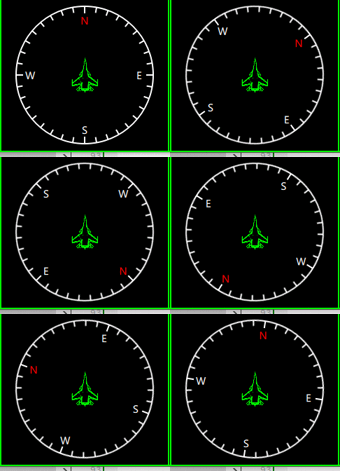
一个简单的电子罗盘,红色N极。其中中间飞机表示当前的指向,
还是比较简单的,直接上代码吧
/*
作者:张建伟
时间:2018年4月27日
简述:电子罗盘界面实现
*/
importQtQuick2.0
Rectangle
{
id:root
width:200
height:200
anchors.centerIn:parent
color:"transparent"
propertyintm_Angle:0
Rectangle
{
width:parent.width
height:parent.height
color:"transparent"
rotation:root.m_Angle
Canvas
{
anchors.fill:parent
onPaint:
{
varctx=getContext("2d");
//绘制圆圈
ctx.lineWidth=2;
ctx.strokeStyle="#FFFFFF";
ctx.globalAlpha=1.0;
ctx.beginPath();
ctx.arc(width/2,width/2,width/2-2,0,2*Math.PI);
ctx.stroke();
ctx.restore();
for(vari=0;i<36;i++)
{
ctx.save();
ctx.translate(width/2,height/2);
ctx.rotate(i*10*Math.PI/180);
ctx.beginPath();
if(i%9==0)
{
ctx.moveTo(0,-width/2+12);
ctx.lineTo(0,-width/2+2);
}
else
{
ctx.moveTo(0,-width/2+10);
ctx.lineTo(0,-width/2+2);
}
ctx.stroke();
ctx.restore();
}
}
}
Rectangle
{
width:20
height:20
anchors.horizontalCenter:parent.horizontalCenter
anchors.top:parent.top
anchors.topMargin:12
rotation:-parent.rotation
color:"#00000000"
Text{
anchors.centerIn:parent
font.family:"微软雅黑"
font.pixelSize:14
color:"#FF0000"
text:qsTr("N")
}
}
Rectangle
{
width:20
height:20
anchors.verticalCenter:parent.verticalCenter
anchors.right:parent.right
anchors.rightMargin:12
color:"#00000000"
rotation:-parent.rotation
Text{
anchors.centerIn:parent
font.family:"微软雅黑"
font.pixelSize:14
color:"#FFFFFF"
text:qsTr("E")
}
}
Rectangle
{
width:20
height:20
anchors.verticalCenter:parent.verticalCenter
anchors.left:parent.left
anchors.leftMargin:12
color:"#00000000"
rotation:-parent.rotation
Text{
anchors.centerIn:parent
font.family:"微软雅黑"
font.pixelSize:14
color:"#FFFFFF"
text:qsTr("W")
}
}
Rectangle
{
width:20
height:20
anchors.horizontalCenter:parent.horizontalCenter
anchors.bottom:parent.bottom
anchors.bottomMargin:12
color:"#00000000"
rotation:-parent.rotation
Text{
anchors.centerIn:parent
font.family:"微软雅黑"
font.pixelSize:14
color:"#FFFFFF"
text:qsTr("S")
}
}
Rectangle
{
width:50
height:50
color:"transparent"
rotation:-parent.rotation
anchors.centerIn:parent
Image{
anchors.fill:parent
source:"file:Images/Su_33_Pointer.png"
}
}
}
}

Qt-QML-电子罗盘的更多相关文章
- Qt qml 单例模式
Qt qml 单例模式,没什么好说的,看代码吧.单例模式很适合做全局的配置文件. [示例下载] http://download.csdn.net/detail/surfsky/8539313 [以下是 ...
- Qt qml listview 列表视图控件(下拉刷新、上拉分页、滚动轴)
Qt qml listview下拉刷新和上拉分页主要根据contentY来判断.但要加上顶部下拉指示器.滚动条,并封装成可简单调用的组件,着实花了我不少精力:) [先看效果] [功能] 下拉刷新 ...
- qt qml qchart 图表组件
qt qml qchart 图表组件 * Author: Julien Wintz * Created: Thu Feb 13 23:41:59 2014 (+0100) 这玩意是从chart.js迁 ...
- qt qml中PropertyAnimation的几种使用方法
qml文章 qt qml中PropertyAnimation的几种使用方法 动画应用场景有以下几种: 首先如果一个Rectangle.动画是要改变它的x和y值 1,Rectangle一旦被创建,就要移 ...
- Qt QML referenceexamples attached Demo hacking
/********************************************************************************************* * Qt ...
- Qt qml的软件架构设计
google: qt qml application architecture 有很多资源. 1 https://www.ics.com/blog/multilayered-architecture- ...
- QT QML目录导航列表视图
[功能] /目录.文件 /文件过滤 /递归 /事件 /高亮当前行 /当前选项 /目录切换动画 /限制根目录 [下载]:http://download.csdn.net/detail/surfsky/8 ...
- Qt(QML)本地化
Internationalization and Localization with Qt Quick 程序国际化 1) Use qsTr() for all Literial UI strings ...
- qt qml 利用xmlhttprequest 调用有赞api
最近朋友在有赞商城上面开了一个店铺,因为有实体店,一般卖商品后送货上门,但是打票时候老是人工用world文档人工复制黏贴订单打印小票, 所以就找我帮忙做一个软件专门打印小票的,就研究起来调用有赞第三方 ...
- QT QML 3D模型查看器
原文链接:http://amin-ahmadi.com/2018/01/28/viewing-3d-models-using-qt/ 本文使用QT Quick中的Scene3D QML类型来查看3D模 ...
随机推荐
- windows系统安装erlang
1.什么是erlang erlang是一种通用的面向并发的编程语言,它由瑞典电信设备制造商爱立信所辖的CS-Lab开发,目的是创造一种可以应对大规模并发活动的编程语言和运行环境.Erlang是一个结构 ...
- JBPM学习(四):运行流程实例
概念: ProcessInstance,流程实例:代表流程定义的一次执行.如:张三昨天按请假流程请了一次假.一个流程实例包含了全部执行阶段,当中最典型的属性就是跟踪当前节点的指针,例如以下图. Exe ...
- linux内存管理---物理地址、线性地址、虚拟地址、逻辑地址之间的转换
linux内存管理---虚拟地址.逻辑地址.线性地址.物理地址的区别(一) 这篇文章中介绍了四个名词的概念,下面针对四个地址的转换进行分析 CPU将一个虚拟内存空间中的地址转换为物理地址,需要进行两步 ...
- Http请求发送json数据用实体类接收
以上是请求URL以及json数据 接收层
- 轻量ORM-SqlRepoEx (十二)SqlRepoEx 2.0.1 至 2.2.0 版本更新说明
一.功能变化 (一).强化特性支持 1.部分类型拥有复杂属性: 2.有些属性不是来源于数据库 3.用户在原来的代码中使用 SqlRepoEx ,减少字段与数据库字段之间的冲突: 4.为支持新的特性及优 ...
- sql-case when 条件1 then 取值1 when 条件2 then 取值2 else 取值3 end
遇到 XXX情况 就 XXX 遇不到就 XXX 结束case when …… then …… else …… end 例如一个3条件取值的字段: case when 条件1 then 取值1 when ...
- iOS:cocoapods 配置相关(19-04-02更)
1.gem sources 2.libwebp 1.gem sources 因为,mac更新,cocoapods也要更新,使用下面指令,提示找不到.org,原因是淘宝的镜像源.org换成.com,所以 ...
- duplicate symbol _OBJC_IVAR
duplicate symbol _OBJC_IVAR - Kingdev - 博客园 代码合并问题 git合并提示冲突文件为project.pbxproj,先去掉所有冲突提示<<< ...
- 【MySQL】基本语句
##mac启动mysql的命令语句## /usr/local/mysql/bin/mysql -u root -p ##然后输入密码 查看当前存在数据库 show databases; 创建数据库 c ...
- [笔记][SQL] 连接join
在学习菜鸟教程里的MySQL教程时,对左右连接的结果有点不解. 其中有如下两个表: runoob_tbl: +-----------+--------------+---------------+-- ...