
Associate File Type with Qt In Mac Os and Win
Win Registry
Question
One day, my boss want me to finish one function which let the users can double click project file(*.opr) to startup application easy and quickly. oh, This function is very common, Just like double clicked the Microsoft Word Document(*doc,*docx), then, we can startup Micrsoft Word Application to edit frich text. Ok, let's do it.
- Win And Mac OS use the different way to associated file type.
- Now the App only process one project at same time. if use the double click to open opr file. how to do when opend one project now?
- Current App mode is single-one mode.
How
When we get the new task about program, First to think about it. What's i will finish? Did i do it before? How i should to do ? If you think nothing, There is better way to get the answer from internet for you.
I think nothing. But, I know it is associate windows registry in Windows OS and List.Info file In Mac OS. So, I want to know how to finished it use the C++ or Qt. I also searched some documents about how to read/write registry with Qt. I was feel better that time. But when i tried all ways what them said, they are both failed. I spend half of the day, but not working. Their blogs not have the good introduction.
Now, I get the right answer from blogs of cnblogs.com. cnblogs.com is bester web site bout the programe than others.
Done
I used Qt frame to finished it. if you know QSettings classes, it will be very easy, if not, please to see thw Qt help manual about the QSettings class at first.
/** some include file */

#ifdef Q_OS_WIN

#include <QSettings>

#endif

#ifdef Q_OS_WIN

void checkWinRegistry()

{

    QString val;

    QString exePath = qApp->applicationFilePath();

    exePath.replace("/", "\\");

    QSettings regType("HKEY_CURRENT_USER\\SOFTWARE\\Classes\\.abc",

                                   QSettings::NativeFormat);

    QSettings regIcon("HKEY_CURRENT_USER\\SOFTWARE\\Classes\\.abc\\DefaultIcon",

                                   QSettings::NativeFormat);

    QSettings regShell("HKEY_CURRENT_USER\\SOFTWARE\\Classes\\.abc\\Shell\\Open\\Command",

                                   QSettings::NativeFormat);

    /** . means default value, you can also use the "Default" string */

    if("" != regType.value(".").toString()){

        regType.setValue(".","");

    }

    /** 0 使用当前程序内置图标 */

    val = exePath + ",0";

    if(val != regIcon.value(".").toString()){

        regIcon.setValue(".",val);

    }

    val = exePath + " \"%1\"";

    if(val != regShell.value(".").toString()){

        regShell.setValue(".",val);

    }

}

#endif

int main(int argc, char *argv[])

{

    QApplication a(argc, argv);

    checkWinRegistry();

    /** if you want to get the file path, please use argv[1], if argc >= 2 */

    QString text;

    text = QString::number(argc);

    text += "\n";

    for(int i=0; i<argc; i++){

        text += QString(argv[i]);///< This way to get the QString may be is unreadable code. eg, include chinese language, we should use `QStringList ltArguments = a.arguments();`

        text += "\n";

    }

    Widget w(text);

    w.show();

    return a.exec();

}
Compared
if you don't clear about my way. Now, you could to see the following images about How to associate file type in QtCreater. we know that double *.pro file, we can startup QtCreater application to programing. How ?
- In Windows we can use
Ctrl+Rand inputregedit,Enterto open the windows registry editer. - Let we find
HKEY_CURRENT_USER\SOFTWARE\Classes\.pro, you can see what keys and values under this item;
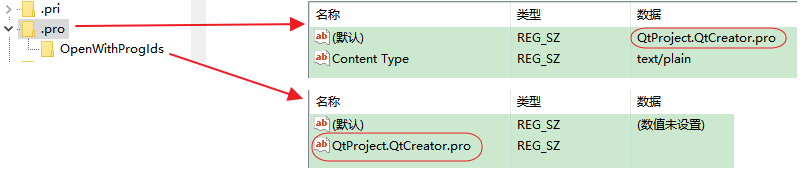
- Then let we find
HKEY_CURRENT_USER\SOFTWARE\Classes\QtProject.QtCreator.pro, what keys and values under this item;
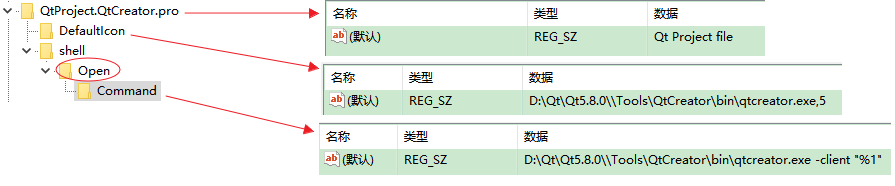
- There are other file type of qt.
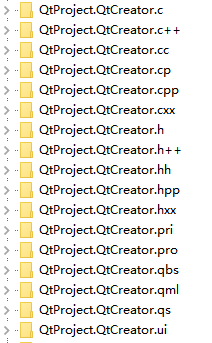
Compared and to finished your work by try and try.
Associate Aile Aype An Aac As
personal Blogs
qt.io
stackoverflow
Qt Mac Release
stackoverflow
qt.io
Info.plist Mac
stackoverflow:overriding Mac app file associations via CFBundleDocumentTypes in info.plist
Reference
wikipedia Windows Registry
support windows registry
wikipedia Registry cleaner
知乎:为什么Win要有注册表,而Unix其他系统不需要
win注册表详解
c# cnblogs
vc cnblogs
Qt Win wiki.qt.io
Qt Mac stackoverflow
Qt Mac csdn
Mac And Win csdn
Associate File Type with Qt In Mac Os and Win的更多相关文章
- QT在Mac OS上编译运行初体验
QT是一个跨平台的框架,支持PC端(Windows.Linux和Mac OS)以及移动端(Android和IOS),之前的开发大都在Windows或者Ubuntu上,考虑到项目多平台支持性,本文对Ma ...
- Qt在Mac OS X下的编程环境搭建
尊重作者,支持原创,如需转载,请附上原地址:http://blog.csdn.net/libaineu2004/article/details/46234079 在Mac OS X下使用Qt开发,需要 ...
- Qt在Mac OS X下的编程环境搭建(配置Qt库和编译器,有图,很清楚)
尊重作者,支持原创,如需转载,请附上原地址:http://blog.csdn.net/libaineu2004/article/details/46234079 在Mac OS X下使用Qt开发,需要 ...
- vmware 安装 Mac OS X 10.9 Mavericks
This guide shows how to install fresh OS X 10.9 Mavericks on VMware workstation with Windows 7 or Wi ...
- Qt在windows与Mac OS中获取执行程序版本号
1 windows中获取执行文件exe的版本号 QString GetFileVertion(QString aFullName) { QString vRetVersion; string vF ...
- A MacFUSE-Based Process File System for Mac OS X
referer: http://osxbook.com/book/bonus/chapter11/procfs/ Processes as Files The process file system ...
- Mac OS X 10.10 Yosemite PHP 5.5.14 free type support fix
通过将php将至5.4来勉强支持freetype扩展,不推荐此方法 after upgrading to new Mac OS X Yosemite, i noticed that free type ...
- 在 Virtual Box 安装 Mac Os 并安装 Qt 开发应用
导读 由于 Beslyric-for-X 项目开发需要,开始尝试在 Mac Os 下开发 Qt 应用.尝试成功后,记录于此,希望对有类似需求的人有所帮助. 本文以开发 Beslyric-for-X 为 ...
- Mac OS安装octave出现的问题-'error:terminal type set to 'unknown'的解决'
学习Machine learning需要使用Octave语言,毕竟Andrew Ng (恩达.吴)力荐.本机系统Mac OS X EI Capitan, 其实什么系统都无所谓了,安装原理都是一样的. ...
随机推荐
- tensorflow命令行参数:tf.app.flags.DEFINE_string、tf.app.flags.DEFINE_integer、tf.app.flags.DEFINE_boolean
tf 中定义了 tf.app.flags.FLAGS ,用于接受从终端传入的命令行参数,相当于对Python中的命令行参数模块optpars(参考:python中处理命令行参数的模块optpars)做 ...
- 6-19 Count Connected Components(20 分)
Write a function to count the number of connected components in a given graph. Format of functions: ...
- list_for_each与list_for_each_entry具体解释
一.list_for_each 1.list_for_each原型#define list_for_each(pos, head) \ for (pos = (head)->next, ...
- .NET可变性解析(协变和逆变)
[一]何为可变性 可变性是.NET4.0中的一个新特性,可变性可分为 : 协变性.逆变性.不可变性. 那么在.NET4.0之前是否有可变性? 答案是肯定的,我们可以通过下面的几个实例来简单的了解一下. ...
- 两个不错点电影ED2000资源
http://simplecd.me/ http://www.ed2000.com/ http://www.2tu.cc/ http://www.mp4ba.com/ http://www.ddyy. ...
- 【linux】U盘安装启动出现press the enter key to begin the installation process 就不动弹了
今天在物理机上安装centOS6.5 64bit 系统的时候,出现了U盘安装启动出现press the enter key to begin the installation process 就不动 ...
- 【python】函数名存在变量中
变量函数:意思就是将函数名存在变量中,然后根据变量值动态的调用需要的函数. LOGIN = 'xxxx' PASSWD = "xxx" URL = 'xxxxx' def hand ...
- 解决移动端H5海报滑动插件适应大部分手机问题 手机端高度自适应
Html5微信端滑屏海报在各种尺寸的手机上总会有这样那样的问题,经过多次制作总结出来一些小心得,分享下. 我使用的是jquery插件swiper.min.js,动画可以利用animate.css,如果 ...
- <只看这个就够了。。。>Android自动化测试及性能优化
Android自动化测试及性能优化 分类: Android Java Tools2012-12-09 23:31 4300人阅读 评论(0) 收藏 举报 软件自动化测试对于程序员来说能够确保软件开发的 ...
- 教你判断一个APP页面是原生的还是H5页面 。(还没看)
来源:https://www.25xt.com/appdesign/11851.html 刚好是周末,无意之间学堂君在收集相关资料的时候,发现有部分童鞋在问<如何判断一个APP页面是不是H5页面 ...