
vmware 安装 Mac OS X 10.9 Mavericks
This guide shows how to install fresh OS X 10.9 Mavericks on VMware workstation with Windows 7 or Windows 8. Mavericks is the latest desktop & laptop OS from Apple with full of new features. After it has been release officially, it can be download from Apple site (or from any torrent sites).
By any chance you like to try latest OS X 10.9 on VMware virtual machine with Windows 7 or Windows 8 host, you can follow these steps. Basically the OS is available as an app. So, it has to be used with existing Mac OS X and installed on different partition with dual boot. This way doesn’t work in virtual environment due to boot loader and disk issues with VMware and VirtualBox.
Update: If you like to use OS X 10.9 Mavericks with pre-installed VMware image without trying fresh installation as shown below, you can click here to see our simple guide.
To continue our normal steps, we will be making a virtual bootable hard disk from OS X 10.9 DMG, and boot the new virtual machine from it. Creating bootable VMDK file is slightly a lengthy processor and I’m sure the below each steps will be good enough to explain it.
Earlier this guide was made with DP version of Mavericks, but you can follow the same steps to do the installation of final retail version.
What you Need to Make Bootable OS X 10.9 VMDK in VMware
1) Running OS X (10.8 or 10.7) in VMware
2) OS X 10.9 Mavericks DMG file
Part 1 – How to Make Bootable Hard disk (VMDK)
1) Make sure to have a running Mac OS X virtual machine in VMware workstation.
2) Attach a new hard disk VMDK file (single file, no split) size of 10GB. The virtual machine should be powered off to add new virtual hard disk.
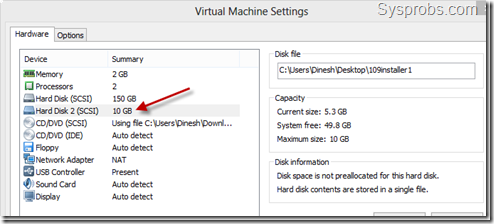
3) Transfer (copy) the OS X 10.9 Mavericks DMG file inside virtual machine. I have used USB disk for this.
4) Once you have started virtual machine with newly added hard disk, you need to initiate the disk and create a partition.
Name the partition, and select correct format and type.
- Name – 109installer
- Format: Mac OS X Extended
- Partitions: Single partition – Apple Partition Map
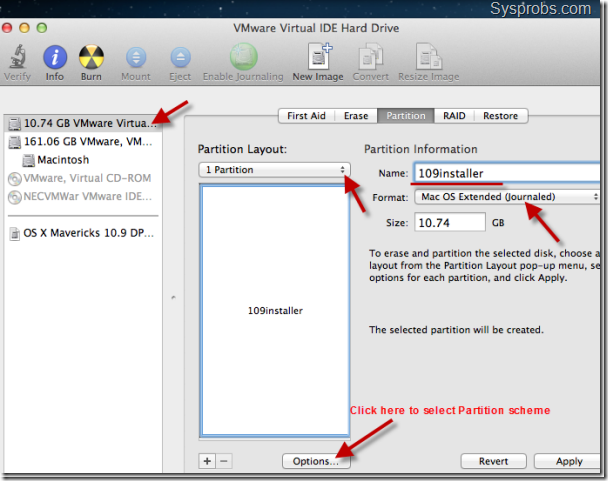
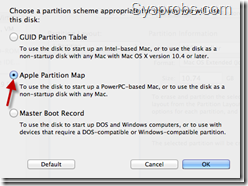
Press apply to create partition and format.
5) Double click OS X 10.9 Mavericks DMG file and let it mount. A new volume ( ‘OS X Mavericks 10.9 DP1” as of now) will appear under volumes once it’s mounted.
We need to open (mount) InstallESD.dmg file now. You can run the following terminal command from inside OS X Mavericks 10.9 DP1.
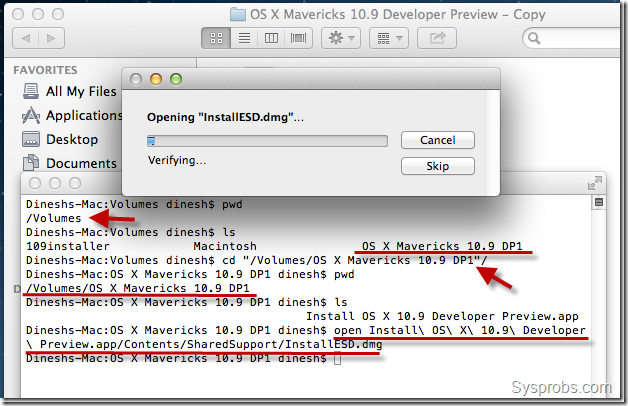
6) Mount BaseSystem.dmg which is inside the volume mounted in previous step.
Run following command from inside newly mounted volume called ‘OS X Install ESD’.

Wait for some time to get over of mounting BaseSystem.
7) It’s time to restore BaseSystem content to newly created partition (VMDK disk).
Open Disk Utility under utilities. Set the source and destination correctly as shown below. Press Restore button to start the process.
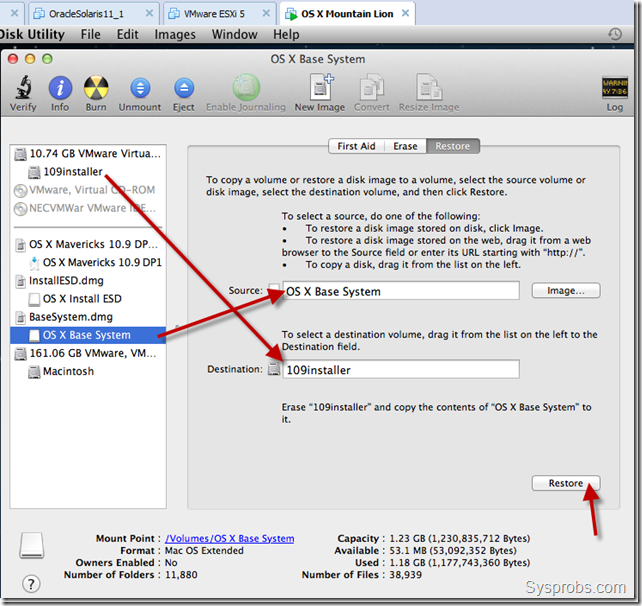
Remember: The above process will overwrite destination volume and it’s name. So, to get the same name (‘109installer’ in this example), you need to rename the volume again after above restore process had been completed.
8.) Let’s copy the packages from original location to new installer disk.

Make sure to follow correct volume names in your scenario.
9) I’m not sure whether this step is required, but still I’m following it to mark as OS X server version.

That’s it, we have completed major part of installing OS X 10.9 on VMware workstation, which is preparing bootable disk.
Shutdown the existing Mac OS X virtual machine and safely remove the second 10GB VMDK file. I recommend to take a copy of this file.
Part 2 – How to Boot OS X 10.9 Mavericks on VMware workstation with Windows 8 or Windows 7
10) Better to have latest version of VMware workstation.
Unlock VMware workstation for Mac OS X guest support in Windows host. Check our earlier guide how to use VMware workstation 8 or 9 unlocker.
You must see Apple Mac OS X support in guest OS area after applying the patch,
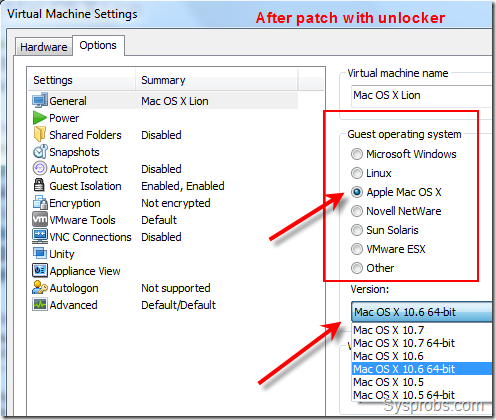
11) Download Sysprobs lion files from here and extract it where you have enough disk space for 10.9 installation.
Open pre configured virtual machine VMX file from extracted location, it will be opened by VMware workstation by default.
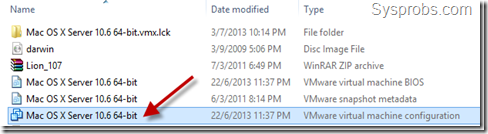
Modify the hardware settings as you like depending on the physical computer hardware resources.
12) Attach the bootable VMDK file which we created in earlier steps. Make sure to add it as first disk of SCSI controller of virtual machine.
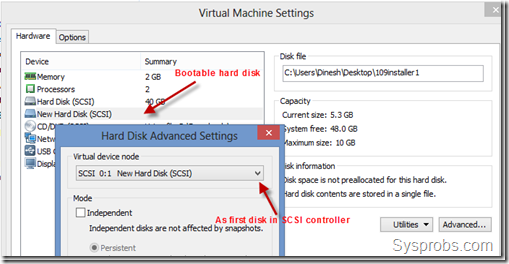
13) Power on Mavericks OS X 10.9 virtual machine now. If the unlocker patch and bootable hard disk (VMDK) worked fine, then you will be seeing the installation screen.
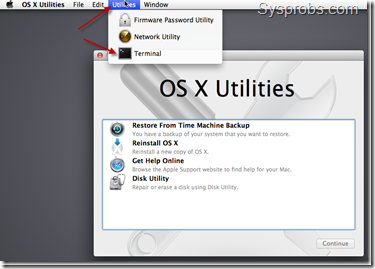
As you could see in above screen, there is no install button to start installation straightaway. No worries, start the terminal as mentioned.
14) Use installer command to start installation by specifying destination volume. By default the new disk (destination disk) will be named ‘Macintosh’. If you are not sure about disk name, you can use ‘Disk Utility’ to see the correct name.
Use below command to start.
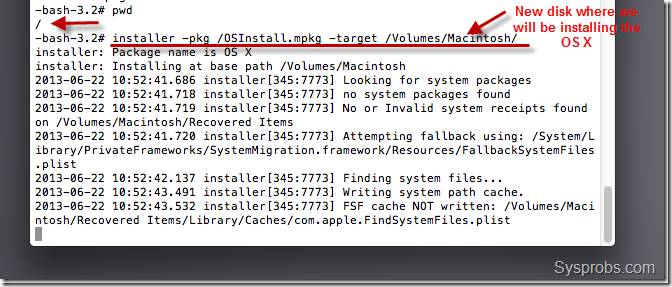
Installation process will take some time. Nothing may appear on screen for some time, do not worry and let it run until you see the final message.
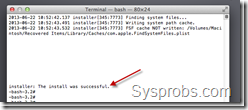
15) Once installation completed, shut down the virtual machine and remove bootable VMDK file. Start up the Mavericks virtual machine and I’m sure you will be landing on initial configuration and personalization screens. Complete them and enjoy.
This method is completely for testing and learning purpose only. You can’t use OS X on VMware workstation for full utilization of all features.
Install VMware Tools on OS X 10.9 Mavericks
16) Download latest darwin.iso from here. The correct available version as of now is here.
Attach darwin.iso to virtual machine’s CD drive. Once it’s mounted, run install VMware tools to start installation.
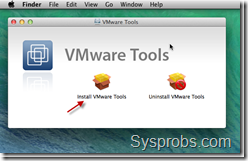
VMware tools will slightly improve the video performance and mouse integration. Even full screen option will be enabled.
But the overall display performance is very poor as OS X machine can’t access the physical hardware resources directly.
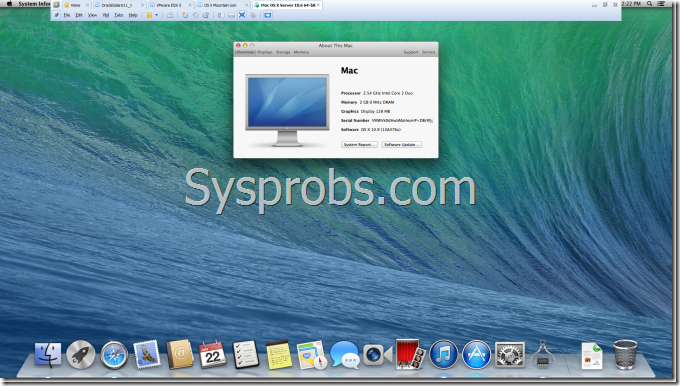
Here is the working OS X 10.9 Mavericks on VMware workstation with Windows 8 ( full screen view enabled).
vmware 安装 Mac OS X 10.9 Mavericks的更多相关文章
- VMWare 安装 Mac OS X10.10 Yosemite
OS X Yosemite 新功能特性 Mac OS X10.10 GM3|OS X 10.10 Yosemite 正式版下载 如何在虚拟机中安装苹果mac系统图示说明 vm10虚拟机安装Mac OS ...
- VMware 11完全安装Mac OS X 10.10
本文已迁移到我的个人网站 http://www.wshunli.com 文章地址: http://www.wshunli.com/2016/03/17/VMware-12安装Mac-OS-X-10-1 ...
- VMware Workstation 11 安装MAC OS X 10.10 Yosemite(14B25)图解 2015-01-13 12:26:01|
VMware Workstation 11 安装MAC OS X 10.10 Yosemite(14B25)图解 2015-01-13 12:26:01| 分类: 网络互联 | 标签:10.10 ...
- 【转】VMware 11安装Mac OS X 10.10
VM11安装Mac OS X 10.10 网上竟没有搜到相似的内容,所以拿出来大家分享 工具/原料 1.VMware Workstation 11 2.unlocker 203(for OS X 插件 ...
- 在VMware Workstation 9中安装Mac OS X 10.8 Mountain Lion
本文环境: CPU:Intel Core i7 920: OS:Windows 7: 内存:8G: 玩Hackintosh各有各的理由,不管什么理由,利用虚拟机安装Mac OS X都是一个可行的办法. ...
- [看图说话]在VMware Workstation 9中安装Mac OS X 10.8 Mountain Lion
本文环境: CPU:Intel Core i7 920: OS:Windows 7: 内存:8G: 玩Hackintosh各有各的理由,不管什么理由,利用虚拟机安装Mac OS X都是一个可行的办法. ...
- VMware 8安装Mac OS X 10.7
(Windows 7 X64环境下,VMware 8.0正式版)虚拟机首尝MAC OS X 10.7 Lion系统成功,特将此好消息分享.2年了,终于我也装上了Mac,我也成功的尝到了苹果味道,看着那 ...
- VMware 12安装Mac OS X 10.11
去年写了一篇安装Mac OS X 10.10的文章,看到大家都想体验OS X,大多数都能成功,但也在其中发现了一些问题,所以更新一下,希望对大家有所帮助. 1048VMware 11安装Mac O ...
- VMware 12安装Mac OS X 10.11&解决上网的问题
近日想在Win10上安装Mac OS 玩玩,于是上网搜了相关资源,查看了相关经验分享,开始着手安装.系统很快成功安装,但最大问题是虚拟机中的Mac OS无法上网.费了很长时间,最终看到Ping通结果, ...
随机推荐
- WPF ICommandSource Implementations Leak Memory!
Actually the title of this article should be entitled "How to use WeakEventManager with IComman ...
- C语言实现Linux下删除非空目录
#include <sys/stat.h> #include <dirent.h> #include <fcntl.h> /** * 递归删除目录(删除该目录以及该 ...
- linux mongodb数据库的安装
折腾两天, 前领导留下的烂摊子,前天忽然挂掉了, 整个公司就我会linux, 奶奶的, 一言难尽. 下面记录下怎么安装mongodb, 前面是从菜鸟教程复制来的 1. 下载 MongoDB 提供了 l ...
- mysql limit分页查询效率
对于有大数据量的mysql表来说,使用LIMIT分页存在很严重的性能问题. 查询从第1000000之后的30条记录: SQL代码1:平均用时6.6秒 SELECT * FROM `cdb_posts` ...
- windows下docker使用及注意事项
1.windows container模式下,pull镜像会失败 no matching manifest for windows/amd64 in the manifest list entries ...
- 如何允许你的应用移动到SD卡?(转至http://blog.csdn.net/feng88724/article/details/6946670)
我们在使用Android手机时发现,有的程序允许被移动到SD卡,而有的不行?这是为什么呢? 因为在Android 2.2版之后, Android应用才被允许移动到SD卡中.而在此之前开发的应用,全部没 ...
- Python——pyiso8601
该模块不是Python内建的模块,为Python补充了 ISO 8601 解析——将常见的 ISO 8601 日期字符创转化为 Python 的 datetime 对象. 安装 $ pip insta ...
- Spring7种事务传播行为类型--PROPAGATION_REQUIRED及其他6种事务传播行为种类
PROPAGATION_REQUIRED及其他6种事务传播行为种类,有需要的朋友可以参考下. Spring在TransactionDefinition接口中规定了7种类型的事务传播行为,它们规定了事务 ...
- Android(或者Java)通过HttpUrlConnection向SpringMVC请求数据(数据绑定)
问题描写叙述 当我们使用SpringMVC作为服务端的框架时,有时不仅仅要应对web前端(jsp.javascript.Jquery等)的訪问请求,有时还可能须要响应Android和JavaSE(桌面 ...
- UIImage 读取图片内存优化
在图片处理时,我们总会遇到一些内存优化的问题. 这里介绍的是其中一种内存优化处理方式. 场景: App 运行很卡,然后我用 Instruments 中的相关工具查看对象的内存占用情况,发现当图片加载 ...