
Android简易数据存储之SharedPreferences
Andorid提供了多种数据存储的方式,例如前面说到的“Android数据存储之SQLite的操作”是用于较复杂的数据存储。然而,如果有些简单的数据存储如果采用SQLite的方式的话会显得比较笨重。例如:记录用户是否访问过APP的欢迎页面之类的数据,如果采用SQLite的话会显得没必要而且费时费力。因此Andorid提供了另一种存储简单数据的方式SharedPreferences。SharedPreferences是一个轻量级的数据存储方式,其仅支持boolean、int、long、float、String和Set<String>这几种数据类型。
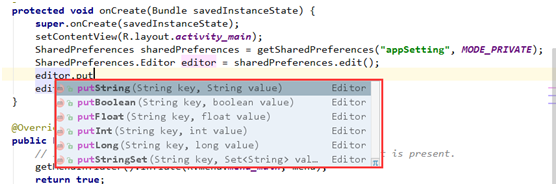
此外,SharedPreferences不能直接添加和修改数据,添加和修改数据需要通过SharedPreferences的Editor来完成。具体的实现可参考官方文档:http://developer.android.com/reference/android/content/SharedPreferences.html。下面看看SharedPreferences是如何进行添加、修改和读取数据的。
新建一个工程,名字为DataOperate,然后再MainActivity.java中添加如下代码
        SharedPreferences sharedPreferences = getSharedPreferences("appSetting", MODE_PRIVATE);

        SharedPreferences.Editor editor = sharedPreferences.edit();

        editor.putBoolean("IsFirstView", false);

        editor.putString("AppName", "SharePreferences Demo");

        editor.commit();//同步提交到磁盘文件,因而会出现阻塞等的现象,如果要确保提交成功,尽量使用commit

        editor.apply();//先提交到内存,然后异步提交到磁盘,效率更高,但没有返回消息。

        Boolean isFirstView = sharedPreferences.getBoolean("IsFirstView", false);

        System.out.println("IsFirstView : " + isFirstView);

        String appName = sharedPreferences.getString("AppName", "");

        System.out.println("AppName : " + appName);

        String author = sharedPreferences.getString("author", "author null");

        System.out.println("Author : " + author);
将APP运行到模拟器中,可以看到如下的输出结果:
09-12 10:34:50.627    2669-2669/com.example.ibm.dataoperate I/System.out﹕ IsFirstView : false

09-12 10:34:50.627    2669-2669/com.example.ibm.dataoperate I/System.out﹕ AppName : SharePreferences Demo

09-12 10:34:50.651    2669-2669/com.example.ibm.dataoperate I/System.out﹕ Author : author null
这就是SharedPreferences的简单应用。然而,这里有几个地方需要注意的:
1、文件创建或读取的方式有三种:MODE_PRIVATE、MODE_WORLD_READABLE和MODE_WORLD_WRITEABLE。
然而官方推荐的使用方式为MODE_PRIVATE的使用方式,也是默认的方式。至于原因,官方文档是这么说的:
This constant was deprecated in API level 17.

Creating world-readable files is very dangerous, and likely to cause security holes in applications. It is strongly discouraged; instead, applications should use more formal mechanism for interactions such as ContentProvider, BroadcastReceiver, and Service. There are no guarantees that this access mode will remain on a file, such as when it goes through a backup and restore. File creation mode: allow all other applications to have read access to the created file.
MODE_WORLD_READABLE和MODE_WORLD_WRITEABLE都是very dangerous的,如果采用了这两种方式都会导致应用存在安全漏洞。因此官方推荐使用的MODE_PRIVATE的方式。
2、Editor提交数据的方式有两种。一种是通过commit的方式提交,另一种是通过apply的方式来提交。
官方文档是这么说的:
Commit your preferences changes back from this Editor to the SharedPreferences object it is editing. This atomically performs the requested modifications, replacing whatever is currently in the SharedPreferences.

Note that when two editors are modifying preferences at the same time, the last one to call apply wins.

Unlike commit(), which writes its preferences out to persistent storage synchronously, apply() commits its changes to the in-memory SharedPreferences immediately but starts an asynchronous commit to disk and you won't be notified of any failures. If another editor on this SharedPreferences does a regular commit() while a apply() is still outstanding, the commit() will block until all async commits are completed as well as the commit itself.

As SharedPreferences instances are singletons within a process, it's safe to replace any instance of commit() with apply() if you were already ignoring the return value.

You don't need to worry about Android component lifecycles and their interaction with apply() writing to disk. The framework makes sure in-flight disk writes from apply() complete before switching states.

The SharedPreferences.Editor interface isn't expected to be implemented directly. However, if you previously did implement it and are now getting errors about missing apply(), you can simply call commit() from apply().
这两种提交方式的不同点在于(英文不好,有错请指出):
a、apply是先将数据提交到内存,然后异步写入文件,效率较高;而commit是同步提交到内存并写入文件,因此效率相对较低,如果数据大的话会存在阻塞的情况。
b、由于apply是使用异步提交的方式,因此没有返回值,即使写入失败也不会返回消息。而commit有返回值,能确保数据正常写入磁盘文件。因此如果需要确保数据写入的完整性,最好采用commit的方式。
3、数据存储方式和位置
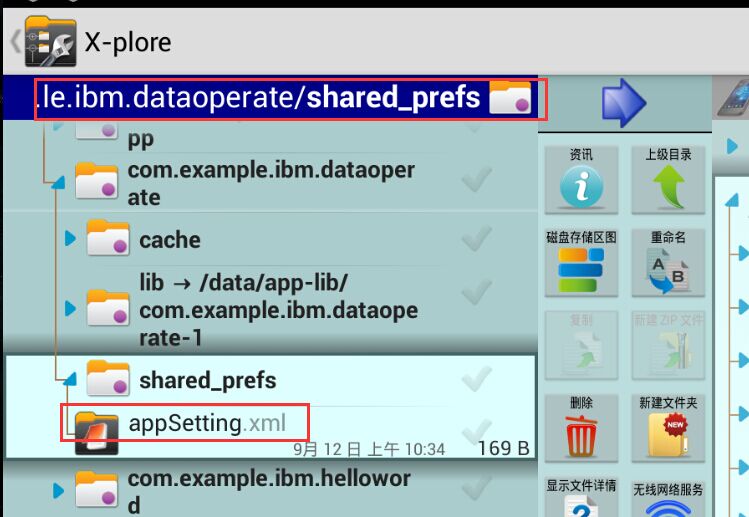
成功运行APP后,可以在app安装目录下的shared_prefs(完整路径为/data/data/项目包/shared_prefs/名称.xml)中看到“appSetting.xml”(文件名为自定义的名称),打开xml文件后可以看到其实就是采用了标准xml文件键值对的方式进行存储。
存储位置:
文件内容:

4、PreferenceActivity创建配置首选项界面
此外Android还提供了PreferenceActivity快速创建首选项页面。和SharedPreferences不同的是,SharedPreferences是纯操作,要另外创建设置页面;而PreferenceActivity则可以让你快速地创建设置界面和存储数据。在此先不深入说明,改天有空再另写一篇文章加以描述。感兴趣的可以在查看官方文档:http://developer.android.com/reference/android/preference/PreferenceActivity.html。墙哦!俗话说。。。
Android简易数据存储之SharedPreferences的更多相关文章
- Android中数据存储之SharedPreferences
import android.content.Context; import android.content.SharedPreferences; import android.content.Sha ...
- Android之数据存储之SharedPreferences
SharedPreferences是以键值对形式存储数据,主要用于记录系统的设置,如飞行模式是否开启,声音大小的值等.//SharedPreferences方式保存到xml文件SharedPrefer ...
- Android数据存储-通过SharedPreferences实现记住密码的操作
在Android中登陆中,为了实现用户的方便,往往需要根据用户的需要进行记住密码的操作,所以,在Android数据存储中SharedPreferences恰恰可以实现这一点 下面,小编将带领大家通过S ...
- Android 数据存储之 SharedPreferences储存
------------------------------------------SharedPreferences存储--------------------------------------- ...
- Android开发手记(16) 数据存储一 SharedPreferences
Android为数据存储提供了五种方式: 1.SharedPreferences 2.文件存储 3.SQLite数据库 4.ContentProvider 5.网络存储 SharedPreferenc ...
- Android数据存储三剑客——SharedPreferences、File、SQLite
Android中常用的数据存储一般有三种方式:SharedPreferences.文件和SQLite数据库,用来保存需要长时间保存的数据.本文将通过几个具体的小实例来讲解这三种方式的具体实现. 数据存 ...
- Android中数据存储(一)
国庆没有给国家添堵,没有勾搭妹子,乖乖的写着自己的博客..... 本文将为大家介绍Android中数据存储的五种方式,数据存储可是非常重要的知识哦. 一,文件存储数据 ①在ROM存储数据 关于在ROM ...
- android学习笔记45——android的数据存储和IO
android的数据存储和IO SharedPreferences与Editor简介 SharedPreferences保存的数据主要是类似于配置信息格式的数据,因此其保存的数据主要是简单的类型的ke ...
- Android实现数据存储技术
转载:Android实现数据存储技术 本文介绍Android中的5种数据存储方式. 数据存储在开发中是使用最频繁的,在这里主要介绍Android平台中实现数据存储的5种方式,分别是: 1 使用Shar ...
随机推荐
- 关于Jquery 操作Cookie 取值错误
使用JQuery操作cookie时 发生取的值不正确的问题: 结果发现cookie有四个不同的属性: 名称,内容,域,路径 $.cookie('the_cookie'); // 读取 cookie $ ...
- SQL注入备忘单
Find and exploit SQL Injections with free Netsparker SQL Injection Scanner SQL Injection Cheat Sheet ...
- hdu5007 字符串
字符串问题.是否出现iPhone Apple等词:我考虑时想到既然是否有这些词,可以写map标记一下:然后又最长的是iPhone,6个单词,所以第一个for遍历所有单词 然后在一个for(1~6),用 ...
- 【CodeForces 567F】Mausoleum
寒假最后一题补完啦 ^∀^ 题意 1到n每个数字有两个,排成先不降后不升的序列,比如112332,并且满足k个形如 3 <= 6 代表第三个数字要≤第六个数字这样的约束要求,求有多少种排法. 分 ...
- 【POJ 1061】青蛙的约会
题 Description 两只青蛙在网上相识了,它们聊得很开心,于是觉得很有必要见一面.它们很高兴地发现它们住在同一条纬度线上,于是它们约定各自朝西跳,直到碰面为止.可是它们出发之前忘记了一件很重要 ...
- Teradata(不同date输出要求;表类型)
1. 需要某种特定形式的date 类型export 到文件中,例如 YYYYMMDD/ YYYY-MM-DD 这时候不一定非要用date 类型,可以转换为varchar 类型! CAST(CAST ( ...
- c++中string类型用下标初始化后str.size()为0 输出string值为空
你的string list是个默认构造函数,这样就没有为list分配空间,自然list[i]就会报出超出string范围的错误,可以简单更改为string list(6, '\0'),事先为list指 ...
- Android Studio集成SVN报错:can't use subversion command line client : svn
Android Studio集成SVN插件,check out出代码后,每次开启都会在右上角出现如下错误: Can't use Subversion command line client: svn ...
- 使用UpdLock来扣减库存
UPDLOCK.UPDLOCK 的优点是允许您读取数据(不阻塞其它事务)并在以后更新数据,同时确保自从上次读取数据后数据没有被更改. 当我们用UPDLOCK来读取记录时可以对取到的记录加上更新锁,从而 ...
- centOS下yum安装配置samba
centOS下yum安装配置samba 2010-03-29 15:46:00 标签:samba yum centOS 安装 休闲 注意:本文的原则是只将文件共享应用于内网服务器,并让将要被共享的目 ...