
Chrome RenderText分析(2)
继续分析以下步骤
一.TextRun结构
struct TextRun {

  TextRun();

  ~TextRun();

  ui::Range range;

  Font font;

  // A gfx::Font::FontStyle flag to specify bold and italic styles.

  // Supersedes |font.GetFontStyle()|. Stored separately to avoid calling

  // |font.DeriveFont()|, which is expensive on Windows.

  int font_style;

  // TODO(msw): Disambiguate color/style from TextRuns for proper glyph shaping.

  //            See an example: http://www.catch22.net/tuts/uniscribe-mysteries

  SkColor foreground;

  bool strike;

  bool diagonal_strike;

  bool underline;

  int width;

  // The cumulative widths of preceding runs.

  int preceding_run_widths;

  SCRIPT_ANALYSIS script_analysis;

  scoped_ptr<WORD[]> glyphs;

  scoped_ptr<WORD[]> logical_clusters;

  scoped_ptr<SCRIPT_VISATTR[]> visible_attributes;

  int glyph_count;

  scoped_ptr<int[]> advance_widths;

  scoped_ptr<GOFFSET[]> offsets;

  ABC abc_widths;

  SCRIPT_CACHE script_cache;

 private:

  DISALLOW_COPY_AND_ASSIGN(TextRun);

};
TextRun可以理解为一个输出结果
- ScriptItemize输出script_analysis
- ScriptShape输出glyphs,logical_clusters,visible_attributes,glyph_count
- ScriptPlace输出advance_widths,offsets,abc_widths(真正想要的宽度结果)
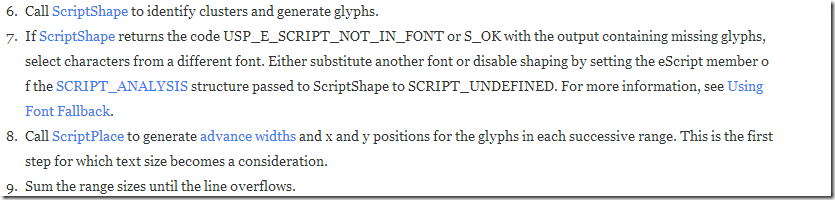
二.ScriptShape
- 根据文字的长度初始化相关的缓冲区
- 选择文字字体
- 调用ScriptShape来填充TextRun
- 如果调用ScriptShape失败的话则使用SCRIPT_FONTPROPERTIES的默认值来填充
void RenderTextWin::LayoutTextRun(internal::TextRun* run) {
const size_t run_length = run->range.length();
const wchar_t* run_text = &(GetLayoutText()[run->range.start()]);
Font original_font = run->font;
LinkedFontsIterator fonts(original_font);
bool tried_cached_font = false;
bool tried_fallback = false;
// Keep track of the font that is able to display the greatest number of
// characters for which ScriptShape() returned S_OK. This font will be used
// in the case where no font is able to display the entire run.
int best_partial_font_missing_char_count = INT_MAX;
Font best_partial_font = original_font;
bool using_best_partial_font = false;
Font current_font;
run->logical_clusters.reset(new WORD[run_length]);
while (fonts.NextFont(¤t_font)) {
HRESULT hr = ShapeTextRunWithFont(run, current_font);
bool glyphs_missing = false;
if (hr == USP_E_SCRIPT_NOT_IN_FONT) {
glyphs_missing = true;
} else if (hr == S_OK) {
// If |hr| is S_OK, there could still be missing glyphs in the output.
// http://msdn.microsoft.com/en-us/library/windows/desktop/dd368564.aspx
const int missing_count = CountCharsWithMissingGlyphs(run);
// Track the font that produced the least missing glyphs.
if (missing_count < best_partial_font_missing_char_count) {
best_partial_font_missing_char_count = missing_count;
best_partial_font = run->font;
}
glyphs_missing = (missing_count != 0);
} else {
NOTREACHED() << hr;
}
// Use the font if it had glyphs for all characters.
if (!glyphs_missing) {
// Save the successful fallback font that was chosen.
if (tried_fallback)
successful_substitute_fonts_[original_font.GetFontName()] = run->font;
return;
}
// First, try the cached font from previous runs, if any.
if (!tried_cached_font) {
tried_cached_font = true;
std::map<std::string, Font>::const_iterator it =
successful_substitute_fonts_.find(original_font.GetFontName());
if (it != successful_substitute_fonts_.end()) {
fonts.SetNextFont(it->second);
continue;
}
}
// If there are missing glyphs, first try finding a fallback font using a
// meta file, if it hasn't yet been attempted for this run.
// TODO(msw|asvitkine): Support RenderText's font_list()?
if (!tried_fallback) {
tried_fallback = true;
Font fallback_font;
if (ChooseFallbackFont(cached_hdc_, run->font, run_text, run_length,
&fallback_font)) {
fonts.SetNextFont(fallback_font);
continue;
}
}
}
// If a font was able to partially display the run, use that now.
if (best_partial_font_missing_char_count < static_cast<int>(run_length)) {
// Re-shape the run only if |best_partial_font| differs from the last font.
if (best_partial_font.GetNativeFont() != run->font.GetNativeFont())
ShapeTextRunWithFont(run, best_partial_font);
return;
}
// If no font was able to partially display the run, replace all glyphs
// with |wgDefault| from the original font to ensure to they don't hold
// garbage values.
// First, clear the cache and select the original font on the HDC.
ScriptFreeCache(&run->script_cache);
run->font = original_font;
SelectObject(cached_hdc_, run->font.GetNativeFont());
// Now, get the font's properties.
SCRIPT_FONTPROPERTIES properties;
memset(&properties, 0, sizeof(properties));
properties.cBytes = sizeof(properties);
HRESULT hr = ScriptGetFontProperties(cached_hdc_, &run->script_cache,
&properties);
if (hr == S_OK) {
// Finally, initialize |glyph_count|, |glyphs| and |visible_attributes| on
// the run (since they may not have been set yet).
run->glyph_count = run_length;
memset(run->visible_attributes.get(), 0,
run->glyph_count * sizeof(SCRIPT_VISATTR));
for (int i = 0; i < run->glyph_count; ++i) {
run->glyphs[i] = IsWhitespace(run_text[i]) ? properties.wgBlank :
properties.wgDefault;
}
}
// TODO(msw): Don't use SCRIPT_UNDEFINED. Apparently Uniscribe can
// crash on certain surrogate pairs with SCRIPT_UNDEFINED.
// See https://bugzilla.mozilla.org/show_bug.cgi?id=341500
// And http://maxradi.us/documents/uniscribe/
run->script_analysis.eScript = SCRIPT_UNDEFINED;
}
HRESULT RenderTextWin::ShapeTextRunWithFont(internal::TextRun* run,
const Font& font) {
// Update the run's font only if necessary. If the two fonts wrap the same
// PlatformFontWin object, their native fonts will have the same value.
if (run->font.GetNativeFont() != font.GetNativeFont()) {
const int font_size = run->font.GetFontSize();
const int font_height = run->font.GetHeight();
run->font = font;
DeriveFontIfNecessary(font_size, font_height, run->font_style, &run->font);
ScriptFreeCache(&run->script_cache);
}
// Select the font desired for glyph generation.
SelectObject(cached_hdc_, run->font.GetNativeFont());
HRESULT hr = E_OUTOFMEMORY;
const size_t run_length = run->range.length();
const wchar_t* run_text = &(GetLayoutText()[run->range.start()]);
// Max glyph guess: http://msdn.microsoft.com/en-us/library/dd368564.aspx
size_t max_glyphs = static_cast<size_t>(1.5 * run_length + 16);
while (hr == E_OUTOFMEMORY && max_glyphs < kMaxGlyphs) {
run->glyph_count = 0;
run->glyphs.reset(new WORD[max_glyphs]);
run->visible_attributes.reset(new SCRIPT_VISATTR[max_glyphs]);
hr = ScriptShape(cached_hdc_,
&run->script_cache,
run_text,
run_length,
max_glyphs,
&run->script_analysis,
run->glyphs.get(),
run->logical_clusters.get(),
run->visible_attributes.get(),
&run->glyph_count);
max_glyphs *= 2;
}
return hr;
}
三.ScriptPlace
run->abc_widths是计算的结果
void RenderTextWin::LayoutVisualText() {

  DCHECK(!runs_.empty());

  if (!cached_hdc_)

    cached_hdc_ = CreateCompatibleDC(NULL);

  HRESULT hr = E_FAIL;

  string_size_.set_height(0);

  for (size_t i = 0; i < runs_.size(); ++i) {

    internal::TextRun* run = runs_[i];

    LayoutTextRun(run);

    string_size_.set_height(std::max(string_size_.height(),

                                     run->font.GetHeight()));

    common_baseline_ = std::max(common_baseline_, run->font.GetBaseline());

    if (run->glyph_count > 0) {

      run->advance_widths.reset(new int[run->glyph_count]);

      run->offsets.reset(new GOFFSET[run->glyph_count]);

      hr = ScriptPlace(cached_hdc_,

                       &run->script_cache,

                       run->glyphs.get(),

                       run->glyph_count,

                       run->visible_attributes.get(),

                       &(run->script_analysis),

                       run->advance_widths.get(),

                       run->offsets.get(),

                       &(run->abc_widths));

      DCHECK(SUCCEEDED(hr));

    }

  }

  // Build the array of bidirectional embedding levels.

  scoped_ptr<BYTE[]> levels(new BYTE[runs_.size()]);

  for (size_t i = 0; i < runs_.size(); ++i)

    levels[i] = runs_[i]->script_analysis.s.uBidiLevel;

  // Get the maps between visual and logical run indices.

  visual_to_logical_.reset(new int[runs_.size()]);

  logical_to_visual_.reset(new int[runs_.size()]);

  hr = ScriptLayout(runs_.size(),

                    levels.get(),

                    visual_to_logical_.get(),

                    logical_to_visual_.get());

  DCHECK(SUCCEEDED(hr));

  // Precalculate run width information.

  size_t preceding_run_widths = 0;

  for (size_t i = 0; i < runs_.size(); ++i) {

    internal::TextRun* run = runs_[visual_to_logical_[i]];

    run->preceding_run_widths = preceding_run_widths;

    const ABC& abc = run->abc_widths;

    run->width = abc.abcA + abc.abcB + abc.abcC;

    preceding_run_widths += run->width;

  }

  string_size_.set_width(preceding_run_widths);

}
Chrome RenderText分析(2)的更多相关文章
- Chrome RenderText分析(1)
先从一些基础的类开始 1.Range // A Range contains two integer values that represent a numeric range, like the ...
- JS内存泄漏 和Chrome 内存分析工具简介(摘)
原文地址:http://web.jobbole.com/88463/ JavaScript 中 4 种常见的内存泄露陷阱 原文:Sebastián Peyrott 译文:伯乐在线专栏作者 - AR ...
- Chrome渲染分析之Timeline工具的使用
原文http://www.th7.cn/web/html-css/201406/42043.shtml Timeline工具栏提供了对于在装载你的Web应用的过程中,时间花费情况的概览,这些应用包括处 ...
- chrome性能分析
Chrome开发者工具之JavaScript内存分析 前端性能优化 —— 前端性能分析 Chrome DevTools - 性能监控
- 通过chrome浏览器分析网页加载时间
今天趁着下班的时间看了下chrome浏览器的网页加载时间分析工具和相关文档,简单写点儿东西记录一下. 以百度首页加载为例,分析下一张图片1.jgp(就是背景图)的加载时间 看右侧的Timing标签,从 ...
- Chrome性能分析工具lightHouse用法指南
本文主要讲如何使用Chrome开发者工具linghtHouse进行页面性能分析. 1.安装插件 非常简单,点击右上角的“添加至Chrome”即可. 2.使用方式 1)打开要测试的页面,点击浏览器右上角 ...
- Wappalyzer(chrome网站分析插件)
Wappalyzer是一款功能强大的.且非常实用的chrome网站技术分析插件,通过该插件能够分析目标网站所采用的平台构架. 网站环境.服务器配置环境.JavaScript框架.编程语言等参数,使用时 ...
- Chrome性能分析工具Coverage使用方法
操作路径如下: 打开控制台-->点击‘Sources’-->ctrl+shift+p-->在命令窗口输入coverage-->在下边新出现的窗口中点击左上角刷新按钮. 界面如下 ...
- 使用Chrome逆向分析JS实战---分析google网站翻译器原文存放位置
剧透:就是使用了一下Chrome DevTools的Memory功能,通过已知的JS变量的值查找JS内存中变量的引用 一:不分析一下现有的网页翻译方法么? 总所周知,(As is well known ...
随机推荐
- c 数据拼接
char buf1[] = {0x31,0x32,0x33,0x00,0x51,0x52,0x53,0xaa,0xbb,0xcc,0x00}; int a=0xabcd6799; int b=0x88 ...
- dmesg
在开机的时候你会发现有很多的讯息出现吧,例如 CPU 的形式.硬盘. 光盘型号及硬盘分割表等等,这 些信息的产生都是核心 (kernel) 在进行硬件的测试与驱动啦.要看这些讯息你可以用 dmesg ...
- Eclipse is running in a JRE, but a JDK is required 解决方法(转)
转自:http://comeonbabye.iteye.com/blog/1186239 安装Maven后每次启动出现警告信息: Eclipse is running in a JRE, but a ...
- UBUNTU9.10下安装TFTP学习笔记一(arm学习SEED-138板子)
擦,刚刚写的没保存都丢了,郁闷中~~~~ 简单重写 1什么是TFTP .安装TFTP(TFTP(Trivial File Transfer Protocol,简单文件传输协议)是TCP/IP协议族中的 ...
- Linux Shell脚本入门--cut命令
Linux Shell脚本入门--cut命令 cut cut 命令可以从一个文本文件或者文本流中提取文本列. cut语法 [root@www ~]# cut -d'分隔字符' -f fields &l ...
- props
// 这里是导入的包 import React, { Component } from 'react'; // 导入需要用到的组件 import { AppRegistry, Text, View } ...
- Cadence16.6安装破解
1.软件安装 1.运行stepup.exe.出现下面界面后开始安装License manager和project installation. 注意:只安装第一项License manager和第二项p ...
- JAVA:抽象类VS接口
JAVA中抽象类和接口的区别比较,以及它们各自的用途. 1.JAVA抽象类: 抽象类除了不能实例化以外,跟普通类没有任何区别.在<JAVA编程思想>一书中,将抽象类定义为“包含抽象方法的类 ...
- wget的使用详解
我在工作中, 经常下载遥感影像,每个影像都很大,使用普通的ftphelpe下载不太稳定,最终选择了linux下一款牛逼的下载工具wget,使用它的windows移植版本的.在此写此文,希望对和我一样保 ...
- 02-JAVA中的基本语法
第一个动手动脑: 首先用枚举类型定义两个变量,然后判断两个变量是否引用同一对象,在判断枚举类型是否是原始数据类型,再从字符串中转换,最后列出所有的对象. 很明显,这两个变量都是枚举类型,但是这两个变量 ...