
context 从入门到深入了解
1. 前言
在 Go 语言中,上下文 context.Context 用来设置截止日期,同步信号,传递值的功能,它与 goroutine 关系密切,被用来解决 goroutine 之间 退出通知,元数据传递 等的任务。本文通过示例代码来学习梳理 context.Context 包,希望做到从入门到深入了解。
2. context.Context 包类型
首先看类图如下:
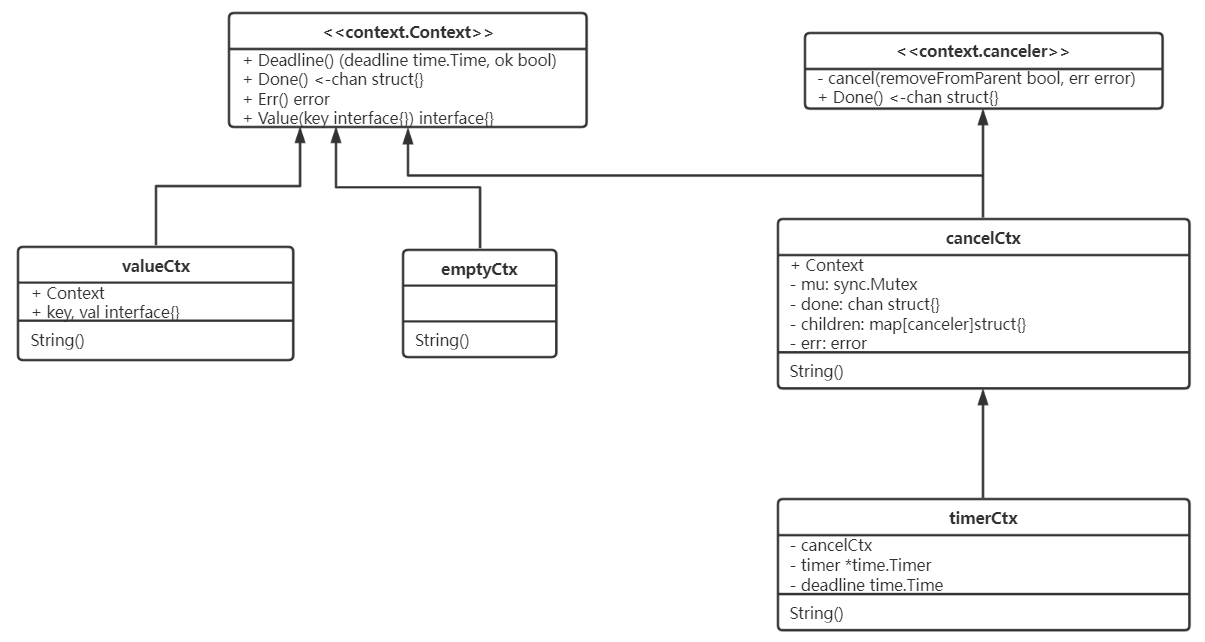
从类图可以看出:
- context.Context 是个接口类型,它实现了 Deadline(),Done(),Err() 和 Value(key interface{}) 方法。各方法的功能如下:
- Deadline: 返回上下文 context.Context 的截止时间,截止时间到将取消该上下文。
- Done: 返回只读空结构体通道。源码中没有向该通道写结构体,调用该方法会使通道阻塞在接收数据,直到关闭该通道(关闭通道会读到结构体的零值)。
- Err: 返回上下文 context.Context 结束的错误类型。有两种错误类型:
- 如果 context.Context 被取消,则返回 canceled 错误;
- 如果 context.Context 超时,则返回 DeadlineExceeded 错误。
- Value: 返回 context.Context 存储的键 key 对应的值。
- canceler 也是一个接口,该接口实现了 cancel(removeFromParent bool, err error) 和 Done() 方法。实现了该接口的上下文 context.Context 均能被取消(通过调用 cancel 方法取消)。
- cancelCtx 和 timerCtx(timerCtx 内嵌了 cancelCtx 结构体) 均实现了 canceler 接口,因此这两类上下文是可取消的。
- emptyCtx 是空的上下文。它被 Backgroud 函数调用作为父上下文或被 ToDo 函数调用,用于不明确传递什么上下文 context.Context 时使用。
- valueCtx 是存储键值对的上下文。
3. 代码示例
前面解释如果看不懂也没关系,这里通过代码来分析 context.Context 包的内部原理,毕竟 talk is cheap...
3.1 代码示例一: 单子 goroutine
func worker1(ctx context.Context, name string) {

	time.Sleep(2 * time.Second)

	for {

		select {

		case <-ctx.Done():

			fmt.Println("worker1 stop", name, ctx.Err())

			return

		default:

			fmt.Println(name, "send request")

		}

	}

}

func main() {

	ctx, cancel := context.WithCancel(context.Background())

	go worker1(ctx, "worker1")

	time.Sleep(1 * time.Second)

	cancel()

	time.Sleep(1 * time.Second)

}
代码的输出为:worker1 stop worker1 context canceled。
逐层分析看代码为何输出信息如上。首先,查看 context.WithCancel 函数:
func WithCancel(parent Context) (ctx Context, cancel CancelFunc) {

	if parent == nil {

		panic("cannot create context from nil parent")

	}

	c := newCancelCtx(parent)

	propagateCancel(parent, &c)

	return &c, func() { c.cancel(true, Canceled) }

}
函数接受的是父上下文,也就是 main 中传入的函数 context.Background() 返回的 emptyCtx 上下文。在 newCancelCtx 函数新建 context.cancelCtx 上下文:
func newCancelCtx(parent Context) cancelCtx {

	return cancelCtx{Context: parent}

}
然后,propagateCancel 函数将父上下文的 cancel 信号传递给新建的 context.cancelCtx:
func propagateCancel(parent Context, child canceler) {

	done := parent.Done()

	if done == nil {

		return // parent is never canceled

	}

    ...
截取部分函数内容分析,后续会接着介绍。由于 emptyCtx 不会被取消,它的 Done 方法返回值为 nil,实际上执行到第一个判断 if done == nil 函数就会返回。
最后,返回新建上下文 context.cancelCtx 的地址及 CancelFunc 函数 func() { c.cancel(true, Canceled) }。后续取消上下文即是通过调用该函数取消的。
花开两朵,各表一枝。在把视线移到 worker1 函数,这个函数需要介绍的即是 ctx.Done() 方法,前面说过它返回只读通道,如果通道不关闭,将一直是阻塞状态。从时间上看,当子 goroutine 还在 sleep,即还未调用 ctx.Done 方法,main 中的 cancel() 函数已经执行完了。那么,cancel 函数做了什么动作呢?接着看:
func (c *cancelCtx) cancel(removeFromParent bool, err error) {

	if err == nil {

		panic("context: internal error: missing cancel error")

	}

	c.mu.Lock()

	if c.err != nil {

		c.mu.Unlock()

		return // already canceled

	}

	c.err = err

	if c.done == nil {

		c.done = closedchan

	} else {

		close(c.done)

	}

	for child := range c.children {

		// NOTE: acquiring the child's lock while holding parent's lock.

		child.cancel(false, err)

	}

	c.children = nil

	c.mu.Unlock()

	if removeFromParent {

		removeChild(c.Context, c)

	}

}
在 cancel 函数中的关键代码是 c.done = closedchan,由于 goroutine 中还未调用 ctx.Done 方法,所以这里 context.cancelCtx 的 done 属性还是 nil。closedchan 是个已关闭通道,它在 context.Context 包的 init 函数就已经关闭了:
var closedchan = make(chan struct{})

func init() {

	close(closedchan)

}
那么等 goroutine 睡醒了就知道通道已经关闭了从而读取到通道类型的零值,然后退出 goroutine。即打印输出 worker1 stop worker1 context canceled。
到这里这一段代码的解释基本上结束了,还有一段是 cancel() 的执行要介绍,在 c.children for 循环这里,由于 c context.cancelCtx 没有 children 也即 c.children 是 nil,从而跳出 for 循环。
在 removeChild 函数中,父上下文 parent 并未取消,所以函数 parentCancelCtx 返回 ok 为 false,从而退出函数:
func removeChild(parent Context, child canceler) {

	p, ok := parentCancelCtx(parent)

	if !ok {

		return

	}

	p.mu.Lock()

	if p.children != nil {

		delete(p.children, child)

	}

	p.mu.Unlock()

}
3.2 代码示例二:单子 goroutine
讨论完上一段代码,在看另一种变形就不难理解了,即子 goroutine 在取消前执行的情况。代码就不贴了,只是 sleep 时间换了下。区别在于 cancel 函数的判断:
if c.done == nil {

    c.done = closedchan

} else {

    close(c.done)

}
由于子 goroutine 中已经调用了 ctx.Done() 方法:
func (c *cancelCtx) Done() <-chan struct{} {

	c.mu.Lock()

	if c.done == nil {

		c.done = make(chan struct{})

	}

	d := c.done

	c.mu.Unlock()

	return d

}
所以这里 c.done 的判断将不等于 nil 而走向 close(c.done) 直接关闭通道。
3.3 代码示例三:多子 goroutine
多子 goroutine 即一个 parent context.Context 有多个子 context.cancelCtx 的情况。如代码所示:
func worker1(ctx context.Context, name string, cancel context.CancelFunc) {

	time.Sleep(2 * time.Second)

	cancel()

	for {

		select {

		case <-ctx.Done():

			fmt.Println("worker1 stop", name, ctx.Err())

			return

		default:

			fmt.Println(name, "send request")

		}

	}

}

func worker2(ctx context.Context, name string) {

	time.Sleep(2 * time.Second)

	for {

		select {

		case <-ctx.Done():

			fmt.Println("worker2 stop", name, ctx.Err())

			return

		default:

			fmt.Println(name, "send request")

		}

	}

}

func main() {

	ctx, cancel := context.WithCancel(context.Background())

	go worker1(ctx, "worker1", cancel)

	go worker2(ctx, "worker2")

	time.Sleep(1 * time.Second)

	cancel()

	time.Sleep(2 * time.Second)

}
类似于代码示例一中单子 goroutine 的情况。区别在于同步锁这里:
c.mu.Lock()

if c.err != nil {

	c.mu.Unlock()

	return // already canceled

}
这里如果有一个 goroutine 调用了 cancel() 方法,c.err 就不等于 nil,其它 goroutine 再去调用 cancel() 就会判断 if c.err != nil 从而直接退出。这也引申出一点,上下文 context.Context 的方法是幂等性的,对于不同 goroutine 调用同样的上下文 context.Context 会得到相同的结果。
3.4 代码示例四:单父单子和单孙上下文
3.4.1 场景一
构造这样一种场景:父上下文 parent 有一个子上下文,该子上下文还有一个子上下文,也就是父上下文 parent 的孙上下文:
func worker3(ctx context.Context, name string, cancel context.CancelFunc) {

	for {

		select {

		case <-ctx.Done():

			fmt.Println("worker3 stop", name, ctx.Err())

			return

		default:

			fmt.Println(name, "send request")

		}

	}

}

func worker2(ctx context.Context, name string) {

	time.Sleep(2 * time.Second)

	cctx, cancel := context.WithCancel(ctx)

	go worker3(cctx, "worker3", cancel)

	time.Sleep(2 * time.Second)

	cancel()

	for {

		select {

		case <-ctx.Done():

			fmt.Println("worker2 stop", name, ctx.Err())

			return

		default:

			fmt.Println(name, "send request")

		}

	}

}

func main() {

	ctx, cancel := context.WithCancel(context.Background())

	go worker2(ctx, "worker2")

	time.Sleep(1 * time.Second)

	cancel()

	time.Sleep(2 * time.Second)

}
输出结果:
worker3 stop worker3 context canceled

worker2 stop worker2 context canceled
在这样一个场景下,子上下文会先于孙上下文取消,同样的层层查看为何会打印以上输出。首先,对于main 中的 cancel() 函数,当它运行时孙上下文还未创建,所以它的运行和代码示例一样。那么,我们看当孙上下文 cctx 创建时发生了什么:
func propagateCancel(parent Context, child canceler) {

	done := parent.Done()

	if done == nil {

		return // parent is never canceled

	}

	select {

	case <-done:

		// parent is already canceled

		child.cancel(false, parent.Err())

		return

	default:

	}

	...
还是看 propagateCancel 函数,由于传入的 parent context.Context 已经取消了,所以 case <- done 会读到结构体的零值,进而调用 child.cancel 方法:
func (c *cancelCtx) cancel(removeFromParent bool, err error) {

    ...

	c.err = err

	if c.done == nil {

		c.done = closedchan

	} else {

		close(c.done)

	}

	for child := range c.children {

		// NOTE: acquiring the child's lock while holding parent's lock.

		child.cancel(false, err)

	}

	c.children = nil

	c.mu.Unlock()

	if removeFromParent {

		removeChild(c.Context, c)

	}

}
为了篇幅起见这里省略了部分 cancel 代码,类似前文调用 c.done = closedchan 关闭上下文 cctx 的通道,接着执行 cancel 方法,由于 cctx 并没有 children 同样的 for child := range c.children 将跳出循环,并且 removeFromParent 为 false 跳出 if 判断。
此时孙上下文 cctx 通道已经被关闭了,再次调用 cancel() context.cancelFunc 会判断 if c.err != nil 进而退出。
3.4.2 场景二
更改 sleep 时间,使得 main 中 cancel 函数在孙上下文 cancel() 执行后执行。由于子上下文并未 cancel,在 propagateCancel 里会走到 parentCancelCtx 判断这里,这里通过 p.children[child] = struct{}{} 将孙上下文绑定:
if p, ok := parentCancelCtx(parent); ok {

	p.mu.Lock()

	if p.err != nil {

		// parent has already been canceled

		child.cancel(false, p.err)

	} else {

		if p.children == nil {

			p.children = make(map[canceler]struct{})

		}

		p.children[child] = struct{}{}

	}

	p.mu.Unlock()

}
绑定的目的是:对下,当子上下文取消时会直接调用孙上下文取消,实现了取消信号的同步。对上,当孙上下文取消时会切断和子上下文的关系,保持子上下文的运行状态。这部分是在 cancel 函数里实现的:
for child := range c.children {

	// NOTE: acquiring the child's lock while holding parent's lock.

	child.cancel(false, err)

}

c.children = nil

c.mu.Unlock()

if removeFromParent {

	removeChild(c.Context, c)

}
对于 removeFromParent 函数,重点是其中的 delete 函数 delete(p.children, child) 将子上下文从父上下文的 p.children map 中移除掉:
func removeChild(parent Context, child canceler) {

	p, ok := parentCancelCtx(parent)

	if !ok {

		return

	}

	p.mu.Lock()

	if p.children != nil {

		delete(p.children, child)

	}

	p.mu.Unlock()

}
3.5 代码示例四:多子上下文
直接看图:
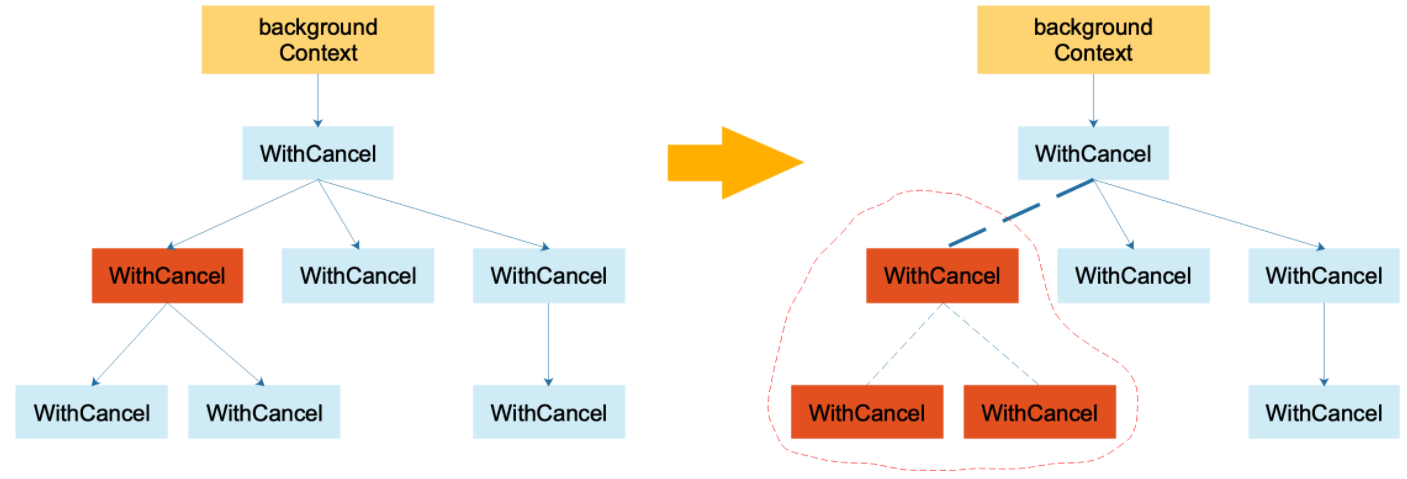
图片来自 深度解密 Go 语言之context,这里不作过多分析,有兴趣的读者可自行研究。相信通过前文几个代码示例的梳理已基本到深入了解的程度了。
4. 附言
本文希望通过代码的梳理达到从入门上下文 context.Context 到深入了解的程度,然而本文并未高屋建瓴的对其中的设计进行抽象,也并未分析 context.Context 的由来及其它上下文 context.Context 如 valueCtx 和 timerCtx 等的分析,这些内容是本文缺乏的。幸好网上有较好的文章记录,想更深入了解,推荐博文:
context 从入门到深入了解的更多相关文章
- Spring框架入门
技术分析之什么是Spring框架 1. Spring框架的概述 * Spring是一个开源框架 * Spring是于2003 年兴起的一个轻量级的Java开发 ...
- Spring框架第一天
## 今天课程:Spring框架第一天 ## ---------- **Spring框架的学习路线** 1. Spring第一天:Spring的IOC容器之XML的方式,Spring框架与Web项目整 ...
- JavaScript入门之Canvas(一): 2D Context
概念 Canvas 是 HTML5 新增的元素,可用于通过使用JavaScript中的脚本来绘制图形.例如,它可以用于绘制图形,制作照片,创建动画,甚至可以进行实时视频处理或渲染.自HTML5添 ...
- SpringCloud入门之应用程序上下文服务(Spring Cloud Context)详解
构建分布式系统非常复杂且容易出错.Spring Cloud为最常见的分布式系统模式提供了简单易用的编程模型,帮助开发人员构建弹性,可靠和协调的应用程序.Spring Cloud构建于Spring Bo ...
- react入门(六):状态提升&context上下文小白速懂
一.状态提升 使用 react 经常会遇到几个组件需要共用状态数据的情况.这种情况下,我们最好将这部分共享的状态提升至他们最近的父组件当中进行管理. 原理:父组件基于属性把自己的一个fn函数传递给子组 ...
- Go语言的context包从放弃到入门
目录 一.Context包到底是干嘛用的 二.主协程退出通知子协程示例演示 主协程通知子协程退出 主协程通知有子协程,子协程又有多个子协程 三.Context包的核心接口和方法 context接口 e ...
- 分布式学习系列【dubbo入门实践】
分布式学习系列[dubbo入门实践] dubbo架构 组成部分:provider,consumer,registry,monitor: provider,consumer注册,订阅类似于消息队列的注册 ...
- Spring MVC入门
1.什么是SpringMvc Spring MVC属于SpringFrameWork的后续产品,已经融合在Spring Web Flow里面.Spring 框架提供了构建 Web 应用程序的全功能 M ...
- 【腾讯Bugly干货分享】Android动态布局入门及NinePatchChunk解密
本文来自于腾讯bugly开发者社区,非经作者同意,请勿转载,原文地址:http://dev.qq.com/topic/57c7ff5d53bbcffd68c64411 作者:黄进——QQ音乐团队 摆脱 ...
- ABP(现代ASP.NET样板开发框架)系列之2、ABP入门教程
点这里进入ABP系列文章总目录 基于DDD的现代ASP.NET开发框架--ABP系列之2.ABP入门教程 ABP是“ASP.NET Boilerplate Project (ASP.NET样板项目)” ...
随机推荐
- 组合式api-跨层级组件通信provide和inject
vue2的provide和inject:https://v2.cn.vuejs.org/v2/api/#provide-inject 主要作用: 跨层级传递数据(响应和非相应数据都可以).方法(函数) ...
- Arrarylist集合的使用
前提:最近JAVA实训课老师讲了一些Arrarylist集合的相关知识,刚好端午假期有空就把这课上学到的知识和自己碰到的一些问题总结下来. 一.Arrarylist集合的使用(以学生信息存储作为演示) ...
- ModuleNotFoundError: No module named '_pytest.resultlog'
新环境运行Python时报错 ModuleNotFoundError: No module named '_pytest.resultlog' 上网查,看到解决方法 https://www.cnbl ...
- 【玩转腾讯混元大模型】怎么说?我用混元AI大模型开发了个IDEA插件
前言 halo 我是杨不易呀,在混元大模型内测阶段就已经体验了一番当时打开页面的时候灵感模块让我大吃一惊这么多角色模型真的太屌了,随后我立马进行了代码处理水平和上下文的效果结果一般般但是到如今混元大模 ...
- Vulntarget-b-wp
Vulntarget-b 环境配置 centos7 用户 密码 root root vulntarget root 宝塔Linux面板http://192.168.0.104:8888/045b276 ...
- TDD、BDD、ATDD都是什么、有什么区别?(下)
在<TDD.BDD.ATDD都是什么.有什么区别?(下)>一文中,探讨了TDD.BDD和ATDD的概念.虽然TDD.BDD和ATDD都是软件开发中使用的测试方法,但它们在方法和重点上有所不 ...
- CentOS基线检测脚本
本脚本适用于CentOS 7.5-7.9版本,其他版本不详 1.检查系统信息 查看代码 echo " " echo "########################## ...
- python脚本抢大麦网演唱会门票 ---保姆级教程 python脚本抢大麦网演唱会门票
python脚本抢大麦网演唱会门票 流程: 1.下载并安装anaconda:https://repo.continuum.io/archive/ 下载对应linux/mac/windows版本 2.下 ...
- .NET技术分享日活动-202104
2021年4月27日下午,个人组织举办了山东地区的山东.NET技术分享日活动.围绕互联网技术.大数据.机器学习.业务实践等方向进行创新技术的实践分享. 本次技术分享日活动面向了山东地区广大的.NET ...
- 这场世界级的攻坚考验,华为云GaussDB稳过
摘要:实践证明,华为云GaussDB完全经受住了这场世界级的攻坚考验,也完全具备支撑大型一体机系统迁移上云的能力,并积累了丰富的经验. 本文分享自华为云社区<这场世界级的攻坚考验,华为云Gaus ...