
SpringBoot获取配置:@Value、@ConfigurationProperties方式
配置文件yml
# phantomjs的位置地址

phantomjs:

  binPath:

    windows: binPath-win

    linux: binPath-linux

  jsPath:

    windows: jsPath-win

    linux: jsPath-linux

  imagePath:

    windows: imagePath-win

    linux: imagePath-linux

phantomjs2:

  binPath2: I‘m binPath2

  binPath3: I‘m binPath3
一、@Value
1、常规方式
- 注入(需要把类交给spring)
@Data

@Component

public class PhantomPath {

    @Value("${phantomjs.binPath.windows}")

    private String binPathWin;

    @Value("${phantomjs.jsPath.windows}")

    private String jsPathWin;

    @Value("${phantomjs.binPath.linux}")

    private String binPathLinux;

    @Value("${phantomjs.jsPath.linux}")

    private String jsPathLinux;

    @Value("${phantomjs.imagePath.windows}")

    private String imagePathWin;

    @Value("${phantomjs.imagePath.linux}")

    private String imagePathLinux;

    //下面可以直接在方法中使用

}
- 使用(可以直接在注入的类中使用)
    @Resource

    private PhantomPath phantomPath;

    @Test

    public void test03()throws Exception{

        System.out.println(phantomPath.getBinPathWin());

        System.out.println(phantomPath.getJsPathWin());

        System.out.println(phantomPath.getBinPathLinux());

        System.out.println(phantomPath.getJsPathLinux());

        System.out.println(phantomPath.getImagePathWin());

        System.out.println(phantomPath.getImagePathLinux());

    }
- 测试

2、注入到静态属性上
解释
不能这样直接注入到静态属性上

这样是获取不到值的

注入(需要注入到非静态set方法上,再复制给静态属性)
package com.cc.urlgethtml.utils;

import lombok.Data;

import lombok.Getter;

import org.springframework.beans.factory.annotation.Value;

import org.springframework.stereotype.Component;

/**

 * <p>根据不同系统获取不同路径</p>

 *

 * @author CC

 * @since 2023/11/3

 */

@Component

public class PhantomPathStatic {

    public static String binPathWin;

    public static String jsPathWin;

    //必须是非静态的set方法

    @Value("${phantomjs.binPath.windows}")

    public void setBinPathWin(String binPathWin) {

        PhantomPathStatic.binPathWin = binPathWin;

    }

    @Value("${phantomjs.jsPath.windows}")

    public void setJsPathWin( String jsPathWin) {

        PhantomPathStatic.jsPathWin = jsPathWin;

    }

    public static String getBinPathWin() {

        return binPathWin;

    }

    public static String getJsPathWin() {

        return jsPathWin;

    }

}
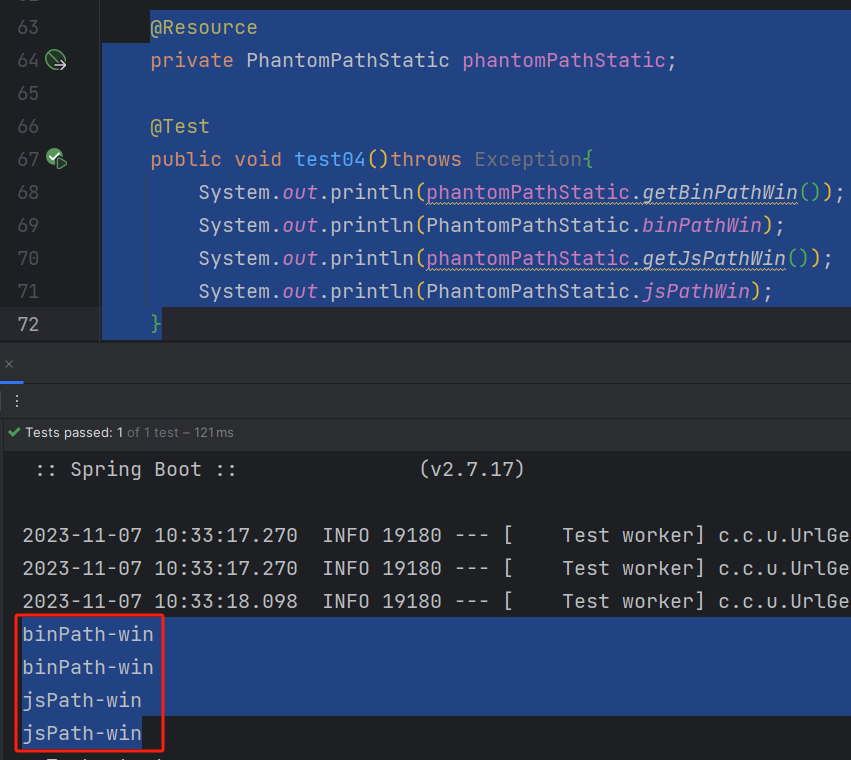
- 使用(有两种方式:静态属性方式、get方式)
    @Resource

    private PhantomPathStatic phantomPathStatic;

    @Test

    public void test04()throws Exception{

        System.out.println(phantomPathStatic.getBinPathWin());

        System.out.println(PhantomPathStatic.binPathWin);

        System.out.println(phantomPathStatic.getJsPathWin());

        System.out.println(PhantomPathStatic.jsPathWin);

    }
- 测试
一、@ConfigurationProperties
1、常规方式
- 注入
@Data

@Component

@ConfigurationProperties(prefix = "phantomjs2")

public class PhantomConPro {

    private String binPath2;

    private String binPath3;

}
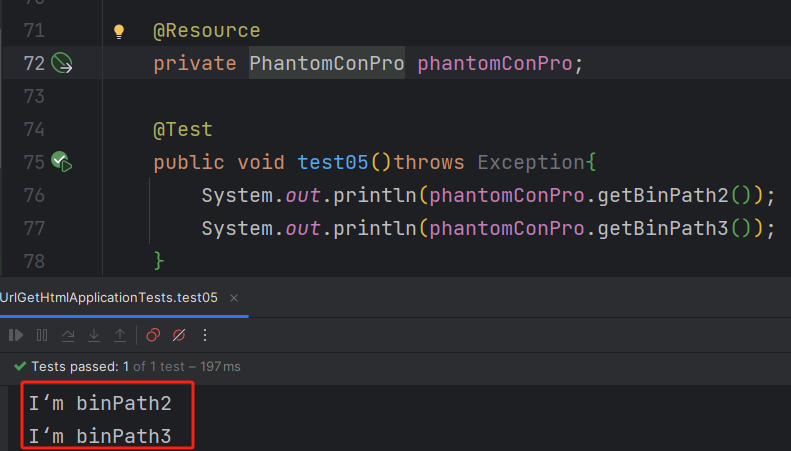
- 使用、测试
2、获取map方式
- 注入
package com.cc.urlgethtml.utils;

import lombok.Data;

import org.springframework.boot.context.properties.ConfigurationProperties;

import org.springframework.stereotype.Component;

import java.util.Map;

/**

 * <p></p>

 *

 * @author CC

 * @since 2023/11/7

 */

@Data

@Component

@ConfigurationProperties(prefix = "phantomjs")

public class PhantomConProMap {

    private Map<String, String> binPath;

    private Map<String, String> jsPath;

    private Map<String, String> imagePath;

}
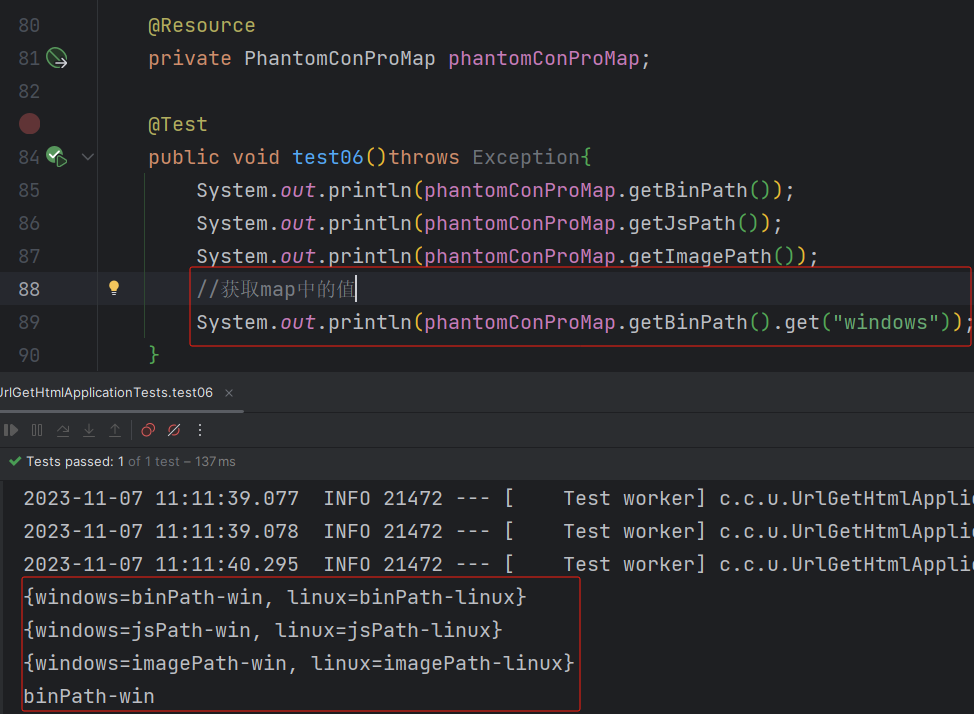
- 使用、测试
3、注入到静态属性上
- 注入
package com.cc.urlgethtml.utils;

import lombok.Data;

import lombok.Getter;

import org.springframework.boot.context.properties.ConfigurationProperties;

import org.springframework.stereotype.Component;

import java.util.Map;

/**

 * <p></p>

 *

 * @author CC

 * @since 2023/11/7

 */

@Component

@ConfigurationProperties(prefix = "phantomjs")

public class PhantomConProMapStatic {

    @Getter

    public static Map<String, String> binPath;

    @Getter

    public static Map<String, String> jsPath;

    @Getter

    public static Map<String, String> imagePath;

    //必须是非静态的set方法

    public void setBinPath(Map<String, String> binPath) {

        PhantomConProMapStatic.binPath = binPath;

    }

    public void setJsPath(Map<String, String> jsPath) {

        PhantomConProMapStatic.jsPath = jsPath;

    }

    public void setImagePath(Map<String, String> imagePath) {

        PhantomConProMapStatic.imagePath = imagePath;

    }

}
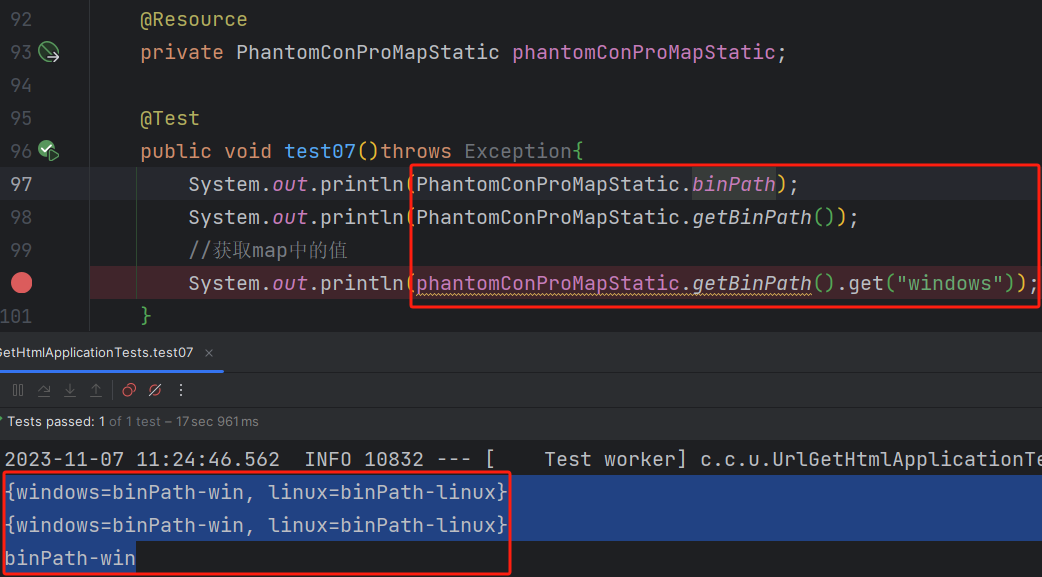
- 使用、测试(三种使用方式)
三、总结
参考:https://zhuanlan.zhihu.com/p/639448969
SpringBoot获取配置:@Value、@ConfigurationProperties方式的更多相关文章
- SpringBoot自定义属性配置以及@ConfigurationProperties注解与@Value注解区别
我们可以在application.properties中配置自定义的属性值,为了获取这些值,我们可以使用spring提供的@value注解,还可以使用springboot提供的@Configurati ...
- SpringBoot 获取配置 @Value
@Value注解可以在代码中直接取到相应的值 如在application.yml中 # 自定义属性 leysen: xcx: url: aaa 1.java代码里的属性值是非静态的,直接在属性上加@V ...
- SpringBoot配置分析、获取到SpringBoot配置文件信息以及几种获取配置文件信息的方式
Spring入门篇:https://www.cnblogs.com/biehongli/p/10170241.html SpringBoot的默认的配置文件application.properties ...
- SpringBoot获取全局配置文件的属性以及@ConfigurationProperties实现类型安全的配置
在SpringBoot,可以定义一个全局配置文件,全局配置文件有两种形式: 1). application.properties 2).application.yml 二者的后缀名不同,编辑的格式也不 ...
- 掌握这些springboot的配置方式,让你工作效率翻个倍!
springboot的多种配置方式 java配置主要靠java类和一些注解,比较常用的注解有: @Configuration :声明一个类作为配置类,代替xml文件 @Bean :声明在方法上,将方法 ...
- SpringBoot三种配置Dubbo的方式
*必须首先导入dubbo-starter (1).使用SpringBoot配置文件(application.properties或application.yml) dubbo.application. ...
- springboot 获取控制器参数的几种方式
这里介绍springboot 获取控制器参数有四种方式 1.无注解下获取参数 2.使用@RequestParam获取参数 3.传递数组 4.通过URL传递参数 无注解下获取参数无注解下获取参数,需要控 ...
- SpringBoot Logback无法获取配置中心属性
SpringBoot Logback无法获取配置中心属性 前言 最近在做项目中,需要把项目中的日志信息通过RabbitMQ将规定格式的消息发送到消息队列中,然后ELK系统通过消息队列拿日志并且保存起来 ...
- 【坑】Mybatis原始获取配置方式,获取配置失败
错误环境: mysql版本:6.0.6 mybatis 3.4.1 idea 2017.1.2 maven 3.5.0 错误描述: 配置经路径见图1,classpath是java文件夹 获取配置的代码 ...
- 补习系列(10)-springboot 之配置读取
目录 简介 一.配置样例 二.如何注入配置 1. 缺省配置文件 2. 使用注解 3. 启动参数 还有.. 三.如何读取配置 @Value 注解 Environment 接口 @Configuratio ...
随机推荐
- [MySQL]细节、经验
[版权声明]未经博主同意,谢绝转载!(请尊重原创,博主保留追究权) https://blog.csdn.net/m0_69908381/article/details/129922615 出自[进步* ...
- ARM和x86比较
信不信,随便逮住一个人问他知不知道CPU,我想他的答案一定会是肯定的,但是如果你再问他知道ARM和X86架构么?这两者的区别又是什么?绝大多数的人肯定是一脸懵逼.今天小编就带你深入了解CPU的这两大架 ...
- 【问题解决1】fatal error: X11/XXXX.h: No such file or directory
问题现象 编译鸿蒙代码时,报如下类似的错误: 错误1: 错误2: 解决方法 step 1:安装依赖文件 sudo apt-get install apt-file sudo apt-file upda ...
- 【Learning eBPF-1】什么是 eBPF?为什么它很吊?
本书中, eBPF 被称为一种 革命性的 内核技术,被广泛应用于网络.观测 和 安全工具中. 这种技术允许你在不重新编译内核的情况下,使能你的自定义工具,与内核数据进行交互.听起来很厉害. 1.1 追 ...
- Spring Bean 的一生
Spring Bean 的一生包括其从创建到消亡的整个过程: 实例创建 => 填充 => 初始化 => 使用 => 销毁. 这里需要注意的是,从 bean 实例的创建到可以使用 ...
- #整体二分,树状数组#洛谷 3332 [ZJOI2013]K大数查询
题目 分析 虽然树套树也可以做,这里考虑整体二分, 对于二分的答案\(mid\),1操作实际上就是如果\(c>mid\)就给区间整体加1, 2操作即询问区间和是否超过\(k\),如果超过\(k\ ...
- OpenHarmony社区运营报告(2023年9月)
●9月12日,由宁夏回族自治区教育厅.OpenAtom OpenHarmony(以下简称"OpenHarmony")项目群工作委员会指导,北京新大陆时代科技有限公司主办,宁夏职 ...
- C# 虚方法virtual详解(转载)
C# 虚方法virtual详解 在C++.Java等众多OOP语言里都可以看到virtual的身影,而C#作为一个完全面向对象的语言当然也不例外. 虚拟函数从C#的程序编译的角度来看,它和其它一般的函 ...
- innoSetup打包文件编写模板
现在打包主要是使用 innosetup 这个软件来进行打包,支持录制脚本和手动编写脚本,比较好用. 此文章主要记录手写脚本,便于后期查询,借鉴. 文档: inno setup :https://blo ...
- IDEA 各个版本下载指引
1.IDEA 其它版本下载指引 网址: https://www.jetbrains.com.cn/idea/download/other.html 2.下载问题 下载哪个版本? win + R 打开命 ...