
【RabbitMQ】04 路由模式
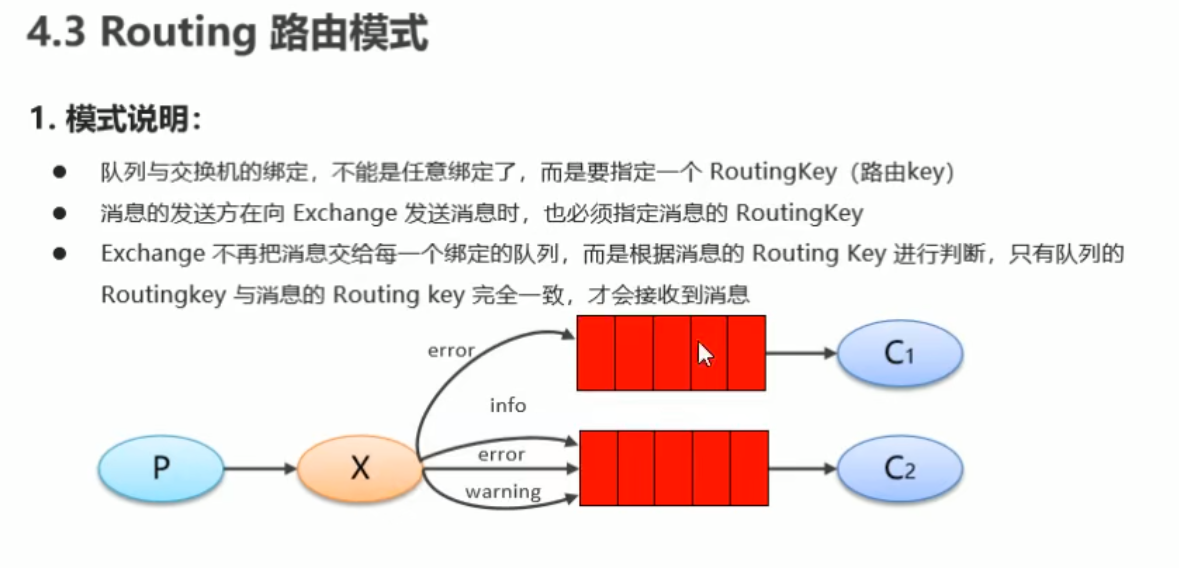
在订阅模式的基础上制定一些特定发送规则
创建路由模式的生产者:
注意这些变化,跟之前的订阅模式并不一样
package cn.dzz.routineQueueInProducer;

import com.rabbitmq.client.BuiltinExchangeType;

import com.rabbitmq.client.Channel;

import com.rabbitmq.client.Connection;

import com.rabbitmq.client.ConnectionFactory;

import java.nio.charset.StandardCharsets;

public class RoutineInProducer {

    public static void main(String[] args) throws Exception{

        ConnectionFactory connectionFactory = new ConnectionFactory();

        connectionFactory.setHost("192.168.2.121");

        connectionFactory.setPort(ConnectionFactory.DEFAULT_AMQP_PORT); // 5672

        connectionFactory.setVirtualHost("/dzz"); // 虚拟主机? 默认值 /

        connectionFactory.setUsername("test"); // guest

        connectionFactory.setPassword("123456"); // guest

        Connection connection = connectionFactory.newConnection();

        Channel channel = connection.createChannel();

        /**

         *  多了一个创建交换机的过程

         *  public DeclareOk exchangeDeclare(String exchange, BuiltinExchangeType type, boolean durable, boolean autoDelete, boolean internal, Map<String, Object> arguments) throws IOException {

         *      return this.exchangeDeclare(exchange, type.getType(), durable, autoDelete, internal, arguments);

         *  }

         *  String exchange 交换机名称

         *  String type 交换机类型,这里换成枚举类型,方便查找 com.rabbitmq.client.BuiltinExchangeType

         *      DIRECT("direct"), 定向  简单模式 和 工作模式

         *      FANOUT("fanout"), 扇形  广播(通知给所有和这个交换机绑定的队列)

         *      TOPIC("topic"), 通配符 ?

         *      HEADERS("headers"); 参数匹配, 视频暂不讲解

         *  boolean durable 持久化

         *  boolean autoDelete 自动删除

         *  boolean internal 内部使用 一般false

         *  Map<String, Object> arguments

        */

        String exchangeName = "test_routine";

        channel.exchangeDeclare(

                exchangeName,

                BuiltinExchangeType.DIRECT,

                true,

                false,

                false,

                null

        );

        String queueName1 = "routine - exchange - 1";

        String queueName2 = "routine - exchange - 2";

        channel.queueDeclare(queueName1, true, false, false, null);

        channel.queueDeclare(queueName2, true, false, false, null);

        /**

         * 将交换机和队列绑定

         *  public com.rabbitmq.client.AMQP.Queue.BindOk queueBind(String queue, String exchange, String routingKey) throws IOException {

         *      return this.queueBind(queue, exchange, routingKey, (Map)null);

         *  }

         *  String queue 队列名称

         *  String exchange 交换机名称

         *  String routingKey 路由键,绑定规则

         *      如果是fanout模式, 设置""即可,默认就是给所有队列绑定

         *

         */

        channel.queueBind(queueName1, exchangeName, "error");

        channel.queueBind(queueName2, exchangeName, "info");

        channel.queueBind(queueName2, exchangeName, "warning");

        channel.queueBind(queueName2, exchangeName, "error");

        // 发送消息 这里制定一些不同的消息 以做出区分

        String level = "info";

        for (int i = 0; i < 10; i++) {

            if (i == 4) level = "warning";

            else if (i == 7) level = "error";

            String body = "sending routine msg " + i + level;

            channel.basicPublish(exchangeName, level, null, body.getBytes(StandardCharsets.UTF_8));

        }

        // 释放资源

        channel.close();

        connection.close();

    }

}
发送到队列之后可以查看队列面板
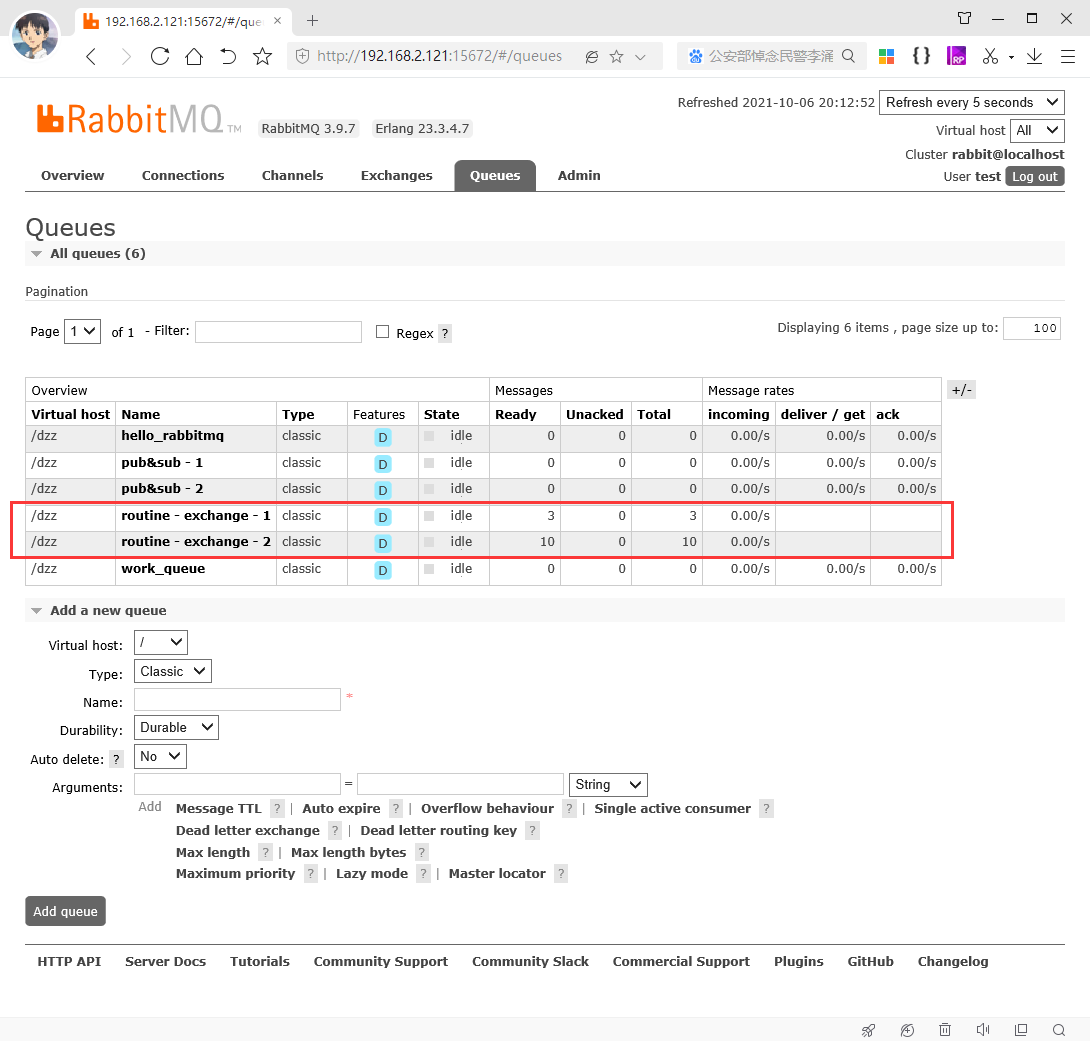
可以看到队列1 只有3条消息,队列2有10条消息
我们再创建对应的消费者(1 和 2)打印查看
消费和之前的模式一致,只是需要找到对应的队列名称来进行消费
package cn.dzz.routineQueue;

import com.rabbitmq.client.*;

import java.io.IOException;

import java.nio.charset.StandardCharsets;

public class RoutineQueueInConsumer2 {

    /**

     * 工作队列 消费者

     * @param args

     */

    public static void main(String[] args) throws Exception{

        ConnectionFactory connectionFactory = new ConnectionFactory();

        connectionFactory.setHost("192.168.2.121");

        connectionFactory.setPort(ConnectionFactory.DEFAULT_AMQP_PORT); // 5672

        connectionFactory.setVirtualHost("/dzz"); // 虚拟主机? 默认值 /

        connectionFactory.setUsername("test"); // guest

        connectionFactory.setPassword("123456"); // guest

        Connection connection = connectionFactory.newConnection();

        Channel channel = connection.createChannel();

        // 声明将不在需要

        // channel.queueDeclare("work_queue", true, false, false, null);

        // 从生产者复制过来需要的队列名称

        String queueName1 = "routine - exchange - 1";

        String queueName2 = "routine - exchange - 2";

        Consumer consumer = new DefaultConsumer(channel) {

            @Override

            public void handleDelivery(String consumerTag, Envelope envelope, AMQP.BasicProperties properties, byte[] body) throws IOException {

                System.out.println("body(message) " + new String(body, StandardCharsets.UTF_8));

                System.out.println("- - - - - over - - - - -");

            }

        };

        channel.basicConsume(queueName2, true, consumer);

    }

}
消费者1打印
"C:\Program Files (x86)\Java\jdk1.8.0_291\bin\java.exe" "-javaagent:C:\Program Files\JetBrains\IntelliJ IDEA 2021.2.1\lib\idea_rt.jar=60928:C:\Program Files\JetBrains\IntelliJ IDEA 2021.2.1\bin" -Dfile.encoding=UTF-8 -classpath "C:\Program Files (x86)\Java\jdk1.8.0_291\jre\lib\charsets.jar;C:\Program Files (x86)\Java\jdk1.8.0_291\jre\lib\deploy.jar;C:\Program Files (x86)\Java\jdk1.8.0_291\jre\lib\ext\access-bridge-32.jar;C:\Program Files (x86)\Java\jdk1.8.0_291\jre\lib\ext\cldrdata.jar;C:\Program Files (x86)\Java\jdk1.8.0_291\jre\lib\ext\dnsns.jar;C:\Program Files (x86)\Java\jdk1.8.0_291\jre\lib\ext\jaccess.jar;C:\Program Files (x86)\Java\jdk1.8.0_291\jre\lib\ext\jfxrt.jar;C:\Program Files (x86)\Java\jdk1.8.0_291\jre\lib\ext\localedata.jar;C:\Program Files (x86)\Java\jdk1.8.0_291\jre\lib\ext\nashorn.jar;C:\Program Files (x86)\Java\jdk1.8.0_291\jre\lib\ext\sunec.jar;C:\Program Files (x86)\Java\jdk1.8.0_291\jre\lib\ext\sunjce_provider.jar;C:\Program Files (x86)\Java\jdk1.8.0_291\jre\lib\ext\sunmscapi.jar;C:\Program Files (x86)\Java\jdk1.8.0_291\jre\lib\ext\sunpkcs11.jar;C:\Program Files (x86)\Java\jdk1.8.0_291\jre\lib\ext\zipfs.jar;C:\Program Files (x86)\Java\jdk1.8.0_291\jre\lib\javaws.jar;C:\Program Files (x86)\Java\jdk1.8.0_291\jre\lib\jce.jar;C:\Program Files (x86)\Java\jdk1.8.0_291\jre\lib\jfr.jar;C:\Program Files (x86)\Java\jdk1.8.0_291\jre\lib\jfxswt.jar;C:\Program Files (x86)\Java\jdk1.8.0_291\jre\lib\jsse.jar;C:\Program Files (x86)\Java\jdk1.8.0_291\jre\lib\management-agent.jar;C:\Program Files (x86)\Java\jdk1.8.0_291\jre\lib\plugin.jar;C:\Program Files (x86)\Java\jdk1.8.0_291\jre\lib\resources.jar;C:\Program Files (x86)\Java\jdk1.8.0_291\jre\lib\rt.jar;C:\Users\Administrator\IdeaProjects\RabbitMQ\ConsumerService\target\classes;C:\Users\Administrator\.m2\repository\com\rabbitmq\amqp-client\5.6.0\amqp-client-5.6.0.jar;C:\Users\Administrator\.m2\repository\org\slf4j\slf4j-api\1.7.25\slf4j-api-1.7.25.jar" cn.dzz.routineQueue.RoutineQueueInConsumer1

SLF4J: Failed to load class "org.slf4j.impl.StaticLoggerBinder".

SLF4J: Defaulting to no-operation (NOP) logger implementation

SLF4J: See http://www.slf4j.org/codes.html#StaticLoggerBinder for further details.

body(message) sending routine msg 7error

- - - - - over - - - - -

body(message) sending routine msg 8error

- - - - - over - - - - -

body(message) sending routine msg 9error

- - - - - over - - - - -
消费者2打印
"C:\Program Files (x86)\Java\jdk1.8.0_291\bin\java.exe" "-javaagent:C:\Program Files\JetBrains\IntelliJ IDEA 2021.2.1\lib\idea_rt.jar=60918:C:\Program Files\JetBrains\IntelliJ IDEA 2021.2.1\bin" -Dfile.encoding=UTF-8 -classpath "C:\Program Files (x86)\Java\jdk1.8.0_291\jre\lib\charsets.jar;C:\Program Files (x86)\Java\jdk1.8.0_291\jre\lib\deploy.jar;C:\Program Files (x86)\Java\jdk1.8.0_291\jre\lib\ext\access-bridge-32.jar;C:\Program Files (x86)\Java\jdk1.8.0_291\jre\lib\ext\cldrdata.jar;C:\Program Files (x86)\Java\jdk1.8.0_291\jre\lib\ext\dnsns.jar;C:\Program Files (x86)\Java\jdk1.8.0_291\jre\lib\ext\jaccess.jar;C:\Program Files (x86)\Java\jdk1.8.0_291\jre\lib\ext\jfxrt.jar;C:\Program Files (x86)\Java\jdk1.8.0_291\jre\lib\ext\localedata.jar;C:\Program Files (x86)\Java\jdk1.8.0_291\jre\lib\ext\nashorn.jar;C:\Program Files (x86)\Java\jdk1.8.0_291\jre\lib\ext\sunec.jar;C:\Program Files (x86)\Java\jdk1.8.0_291\jre\lib\ext\sunjce_provider.jar;C:\Program Files (x86)\Java\jdk1.8.0_291\jre\lib\ext\sunmscapi.jar;C:\Program Files (x86)\Java\jdk1.8.0_291\jre\lib\ext\sunpkcs11.jar;C:\Program Files (x86)\Java\jdk1.8.0_291\jre\lib\ext\zipfs.jar;C:\Program Files (x86)\Java\jdk1.8.0_291\jre\lib\javaws.jar;C:\Program Files (x86)\Java\jdk1.8.0_291\jre\lib\jce.jar;C:\Program Files (x86)\Java\jdk1.8.0_291\jre\lib\jfr.jar;C:\Program Files (x86)\Java\jdk1.8.0_291\jre\lib\jfxswt.jar;C:\Program Files (x86)\Java\jdk1.8.0_291\jre\lib\jsse.jar;C:\Program Files (x86)\Java\jdk1.8.0_291\jre\lib\management-agent.jar;C:\Program Files (x86)\Java\jdk1.8.0_291\jre\lib\plugin.jar;C:\Program Files (x86)\Java\jdk1.8.0_291\jre\lib\resources.jar;C:\Program Files (x86)\Java\jdk1.8.0_291\jre\lib\rt.jar;C:\Users\Administrator\IdeaProjects\RabbitMQ\ConsumerService\target\classes;C:\Users\Administrator\.m2\repository\com\rabbitmq\amqp-client\5.6.0\amqp-client-5.6.0.jar;C:\Users\Administrator\.m2\repository\org\slf4j\slf4j-api\1.7.25\slf4j-api-1.7.25.jar" cn.dzz.routineQueue.RoutineQueueInConsumer2

SLF4J: Failed to load class "org.slf4j.impl.StaticLoggerBinder".

SLF4J: Defaulting to no-operation (NOP) logger implementation

SLF4J: See http://www.slf4j.org/codes.html#StaticLoggerBinder for further details.

body(message) sending routine msg 0info

- - - - - over - - - - -

body(message) sending routine msg 1info

- - - - - over - - - - -

body(message) sending routine msg 2info

- - - - - over - - - - -

body(message) sending routine msg 3info

- - - - - over - - - - -

body(message) sending routine msg 4warning

- - - - - over - - - - -

body(message) sending routine msg 5warning

- - - - - over - - - - -

body(message) sending routine msg 6warning

- - - - - over - - - - -

body(message) sending routine msg 7error

- - - - - over - - - - -

body(message) sending routine msg 8error

- - - - - over - - - - -

body(message) sending routine msg 9error

- - - - - over - - - - -
【RabbitMQ】04 路由模式的更多相关文章
- RabbitMQ 的路由模式 Topic模式
模型 生产者 package cn.wh; import java.io.IOException; import java.util.concurrent.TimeoutException; impo ...
- Rabbitmq(5) 路由模式
设置路由键 发送者 package com.aynu.bootamqp.service; import com.aynu.bootamqp.commons.utils.Amqp; import com ...
- rabbitMQ的三种路由模式
rabbitMQ工作流程: 1.声明交换机 2.声明消息队列 3.绑定交换机和队列 4.生产者往交换机里发送新消息 5.交换机根据所选的模式和routingKey决定消息发往哪条消息队列 6.一个消费 ...
- RabbitMQ (六) 订阅者模式之路由模式 ( direct )
路由模式下,生产者发送消息时需要指定一个路由键(routingKey),交换机只会把消息转发给包含该路由键的队列 这里,我们改变一下声明交换机的方式. 我们通过管理后台添加一个交换机. 添加后,生产者 ...
- RabbitMQ六种队列模式-路由模式
前言 RabbitMQ六种队列模式-简单队列RabbitMQ六种队列模式-工作队列RabbitMQ六种队列模式-发布订阅RabbitMQ六种队列模式-路由模式 [本文]RabbitMQ六种队列模式-主 ...
- RabbitMQ学习第四记:路由模式(direct)
1.什么是路由模式(direct) 路由模式是在使用交换机的同时,生产者指定路由发送数据,消费者绑定路由接受数据.与发布/订阅模式不同的是,发布/订阅模式只要是绑定了交换机的队列都会收到生产者向交换机 ...
- RabbitMQ 一二事(4) - 路由模式介绍
路由模式其实和订阅模式差不多,只不过交换机的类型不同而已 路由模式可以用下图来表示,比订阅模式多了一个key,举个栗子就是根据不同的人群来订阅公众号,来收取消息 根据不同的key来获取不同的消息 最简 ...
- python使用rabbitMQ介绍四(路由模式)
一.模式介绍 路由模式,与发布-订阅模式一样,消息发送到exchange中,消费者把队列绑定到exchange上. 这种模式在exchange上添加添加了一个路由键(routing-key),生产者发 ...
- 阶段5 3.微服务项目【学成在线】_day05 消息中间件RabbitMQ_10.RabbitMQ研究-工作模式-路由工作模式介绍
队列在绑定交换机的时候可以指定routingKey, 路由模式: 1.每个消费者监听自己的队列,并且设置routingkey. 2.生产者将消息发给交换机,由交换机根据routingkey来转发消息到 ...
- 【RabbitMQ】工作模式介绍
一.前言 之前,笔者写过< CentOS 7.2 安装 RabbitMQ> 这篇文章,今天整理一下 RabbitMQ 相关的笔记便于以后复习. 二.模式介绍 在 RabbitMQ 官网上提 ...
随机推荐
- jquery浏览器的上卷高度 节点的创建和写入 节点的删除
// js 的兼容语法 // let scrollT = document.documentElement.scrollTop || document.body.scrollTop; ...
- 图形库使用 Direct3d
1 里面的数学 矩阵是三角函数组合出来的 旋转的时候 xy 两个变量距离变 第三轴被影响角度 2视锥 远近四棱锥双剪切平面 3 三维点 A点 B点 C点 确定三位坐标 ,初始坐标是坐标中中心值 x,y ...
- Scrapy框架(七)--中间件及Selenium应用
中间件 下载中间件(Downloader Middlewares) 位于scrapy引擎和下载器之间的一层组件. 作用:批量拦截到整个工程中所有的请求和响应 - 拦截请求: - UA伪装:proces ...
- 从零开始写 Docker(十八)---容器网络实现(下):为容器插上”网线“
本文为从零开始写 Docker 系列第十八篇,利用 linux 下的 Veth.Bridge.iptables 等等相关技术,构建容器网络模型,为容器插上"网线". 完整代码见:h ...
- tempCode
package com.cmbchina.monitor.service.imp; import com.alibaba.fastjson.JSON; import com.cmbchina.moni ...
- 深入探索 Nuxt3 Composables:掌握目录架构与内置API的高效应用
title: 深入探索 Nuxt3 Composables:掌握目录架构与内置API的高效应用 date: 2024/6/23 updated: 2024/6/23 author: cmdragon ...
- NVIDIA Jetson AGX Xavier 从刷机之后到配置环境
特殊的配置环境需求: cuda-10.2.python 3.6.9.torch 1.7.0.torchversion 0.8.1,剩下的顺其自然即可(逃. 顺便说一句,里面的指令请一行一行仔细复制粘贴 ...
- Project Euler 1~10 野蛮题解
这些题都比较简单就不贴代码和做法了 23333333 具体到做法就是枚举暴力,这十题中可能难一点地方的就是筛质数表,可以学习一下 Eratosthenes 筛法或者是欧拉筛. 如果您不会前十题建议好好 ...
- 计算订单签收率的sql查询思路与过程(涉及百分比和四舍五入)
领导提出一个签收率需求,想要通过数据库达到excel中表现的形式,提高计算速度和工作效率, 如下形式: 数据库中表数据结构: 部分数据如下: sql语句思路如下: -- 1.已签收:以物流反馈管道,状 ...
- 制作visual studio 离线安装包
应用场景:脱机.内网环境安装vs开发环境. 概述:在互联网环境下载安装工具,下载根据需求并缓存布局(类似功能模块),压缩缓存内容拷贝至离线环境进行安装. 1.官网下载指定版本的vs安装客户端 创建基于 ...