
python使用rabbitMQ介绍四(路由模式)
一、模式介绍
路由模式,与发布-订阅模式一样,消息发送到exchange中,消费者把队列绑定到exchange上。
这种模式在exchange上添加添加了一个路由键(routing-key),生产者发布消息的时候添加路由键(routing-key),消费者绑定队列到交换机时添加键值(routing-key),这样就可以接收到对应的消息。
路由模式的direct exchange。
队列模型:

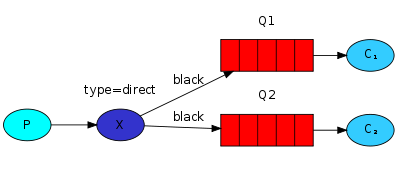
与发布-订阅模式不同的是,每个消费者队列接收的消息不同,根据消息的routing-key把消息发送到不同的队列中。
当所有的消费队列绑定的routing-key一样时,路由模式行为与发布-订阅模式一样。
二、代码示意
发布者:不再创建队列,发送消息到exchange(交换机)中。exchange_type为direct。
 import pika

 import sys

 connection = pika.BlockingConnection(pika.ConnectionParameters(host='localhost'))

 channel = connection.channel()

 channel.exchange_declare(exchange='direct_logs',

                          exchange_type='direct')

 severity = ['info', 'warning', 'error']

 for i in range(20):

     message = '{} Hello World! {}'.format(i, severity[i % 3])

     channel.basic_publish(exchange='direct_logs',

                           routing_key=severity[i % 3],

                           body=message)

     print(" [x] Sent: {}".format(message))

 connection.close()
每个消费者绑定的队列定义不同的routing-key,接收到不同的消息。
以info为示例:
 import pika

 import sys

 connection = pika.BlockingConnection(pika.ConnectionParameters(host='localhost'))

 channel = connection.channel()

 channel.exchange_declare(exchange='direct_logs',

                          exchange_type='direct')

 result = channel.queue_declare(exclusive=True)

 queue_name = result.method.queue

 channel.queue_bind(exchange='direct_logs',

                    queue=queue_name,

                    routing_key='info')

 print(' [*] Waiting for logs. To exit press CTRL+C')

 def callback(ch, method, properties, body):

     print(" [x] %r:%r" % (method.routing_key, body))

 channel.basic_consume(callback,

                       queue=queue_name,

                       no_ack=True)

 channel.start_consuming()
执行结果输出:
发布者:
[x] Sent: 0 Hello World! info

 [x] Sent: 1 Hello World! warning

 [x] Sent: 2 Hello World! error

 [x] Sent: 3 Hello World! info

 [x] Sent: 4 Hello World! warning

 [x] Sent: 5 Hello World! error

 [x] Sent: 6 Hello World! info

 [x] Sent: 7 Hello World! warning

 [x] Sent: 8 Hello World! error

 [x] Sent: 9 Hello World! info

 [x] Sent: 10 Hello World! warning

 [x] Sent: 11 Hello World! error

 [x] Sent: 12 Hello World! info

 [x] Sent: 13 Hello World! warning

 [x] Sent: 14 Hello World! error

 [x] Sent: 15 Hello World! info

 [x] Sent: 16 Hello World! warning

 [x] Sent: 17 Hello World! error

 [x] Sent: 18 Hello World! info

 [x] Sent: 19 Hello World! warning
Info输出:
[*] Waiting for logs. To exit press CTRL+C

 [x] 'info':b'0 Hello World! info'

 [x] 'info':b'3 Hello World! info'

 [x] 'info':b'6 Hello World! info'

 [x] 'info':b'9 Hello World! info'

 [x] 'info':b'12 Hello World! info'

 [x] 'info':b'15 Hello World! info'

 [x] 'info':b'18 Hello World! info'
Warning输出:
[*] Waiting for logs. To exit press CTRL+C

 [x] 'warning':b'1 Hello World! warning'

 [x] 'warning':b'4 Hello World! warning'

 [x] 'warning':b'7 Hello World! warning'

 [x] 'warning':b'10 Hello World! warning'

 [x] 'warning':b'13 Hello World! warning'

 [x] 'warning':b'16 Hello World! warning'

 [x] 'warning':b'19 Hello World! warning'
Error输出:
[*] Waiting for logs. To exit press CTRL+C

 [x] 'error':b'2 Hello World! error'

 [x] 'error':b'5 Hello World! error'

 [x] 'error':b'8 Hello World! error'

 [x] 'error':b'11 Hello World! error'

 [x] 'error':b'14 Hello World! error'

 [x] 'error':b'17 Hello World! error'
可以看到,不同的消费者收到不同级别的日志信息。
三、队列信息
管理页面,exchange页面,点击“direct_logs”上查看队列情况,可以看到三个不同routing_key的队列
routing key列展示了对应的key。

python使用rabbitMQ介绍四(路由模式)的更多相关文章
- python使用rabbitMQ介绍五(话题模式)
一.模式介绍 话题模式(Topic)基本思想和路由模式是一样的,只不过路由键支持模糊匹配,符号“#”匹配一个或多个词,符号“*”匹配不多不少一个词 话题模式相当于消息的模糊匹配,或者按照正则匹配.其中 ...
- python使用rabbitMQ介绍一(生产-消费者模式)
1 模式介绍 生产者-消费者模式是最简单的使用模式. 一个生产者P,给队列发送消息,一个消费者C来取队列的消息. 这里的队列长度不限,生产者和消费者都不用考虑队列的长度. 队列的模型图: 2 示例代码 ...
- python使用rabbitMQ介绍三(发布订阅模式)
一.模式介绍 在前面的例子中,消息直接发送到queue中. 现在介绍的模式,消息发送到exchange中,消费者把队列绑定到exchange上. 发布-订阅模式是把消息广播到每个消费者,每个消费者接收 ...
- python使用rabbitMQ介绍二(工作队列模式)
一模式介绍 第一章节的生产-消费者模式,是非常简单的模式,一发一收.在实际的应用中,消费者有的时候需要工作较长的时间,则需要增加消费者. 队列模型: 这时mq实现了一下几个功能: rabbitmq循环 ...
- Python 操作rabbitmq中的confirm模式的错误
今天使用rabbitmq的confirm模式,书上介绍的是pika版本是0.9.6,但是我用的是别的版本,发现这样的错误 Traceback (most recent call last): Fil ...
- RabbitMQ学习第四记:路由模式(direct)
1.什么是路由模式(direct) 路由模式是在使用交换机的同时,生产者指定路由发送数据,消费者绑定路由接受数据.与发布/订阅模式不同的是,发布/订阅模式只要是绑定了交换机的队列都会收到生产者向交换机 ...
- python - 操作RabbitMQ
python - 操作RabbitMQ 介绍 RabbitMQ是一个在AMQP基础上完整的,可复用的企业消息系统.他遵循Mozilla Public License开源协议.MQ全称为Mess ...
- ASP.NET Core路由中间件[2]: 路由模式
一个Web应用本质上体现为一组终结点的集合.终结点则体现为一个暴露在网络中可供外界采用HTTP协议调用的服务,路由的作用就是建立一个请求URL模式与对应终结点之间的映射关系.借助这个映射关系,客户端可 ...
- RabbitMq四种模式介绍和授权
rabbitmqctl change_password admin admin123 修改admin密码 界面管理和授权操作 1新增用户 rabbitmqctl add_user admin amin ...
随机推荐
- C#EF中,使用类似于SQL中的% 模糊查询
最近在做项目的时候需要使用到模糊查询,但是后台使用EF写的 而不是ADO或者是Dapper,如果是这样的话,我们就可以使用Sql语句直接进行模糊查询 现在我们需要在LINQ中使用类似于模糊查询 在EF ...
- 为什么HTTPS比HTTP更安全?
摘要: 理解HTTPS. 作者:浪里行舟 Fundebug经授权转载,版权归原作者所有. 前言 近几年,互联网发生着翻天覆地的变化,尤其是我们一直习以为常的HTTP协议,在逐渐的被HTTPS协议所取代 ...
- 如何给自己的app添加分享到有道云笔记这样的功能
文章同步自http://javaexception.com/archives/34 如何给自己的app添加分享到有道云笔记这样的功能 问题: 在之前的一个开源笔记类项目Leanote中,有个用户反馈想 ...
- 粮草先行——Android折叠屏开发技术点番外篇之运行时变更处理原则
上一篇文章中,我们有提到Activity在屏幕尺寸发生变更时的处理方式,总共有两种: 重启APP以适应屏幕改变: 手动处理数据,避免APP重启. 同样,这两种方式也同时适用于改变屏幕方向.更改系统语言 ...
- 【转载】 Sqlserver中查看自定义函数被哪些对象引用
Sqlserver数据库中支持自定义函数,包含表值函数和标量值函数,表值函数一般返回多个数据行即数据集,而标量值函数一般返回一个值,在数据库的存储过程中可调用自定义函数,也可在该自定义函数中调用另一个 ...
- windows server 2008 R2 Enterprise 系统安全配置
window 安全配置规则 一.开启防火墙 二.允许远程网络进行远程桌面连接 如果使用默认的远程端口的话,按照下图,允许远程桌面通过防火墙就行了: 如果你的远程端口号不是默认的,则需要按照(四)中新建 ...
- pytest进阶之fixture
前言 学pytest就不得不说fixture,fixture是pytest的精髓所在,就像unittest中的setup和teardown一样,如果不学fixture那么使用pytest和使用unit ...
- 一键解决更改计算机名后无法启动MSSQLSERVER服务问题
问题版本:SQL Server 2012. 解决办法:打开服务,Win + R运行services.msc,找到 SQL SERVER(MSSQLSERVER)服务右键->属性,切换至登录选项卡 ...
- python学习——读取染色体长度(七:读取fasta文件)
读取fasta文件genome_test.fa,并计算染色体总长,同时输出最长染色体编号.序列以及长度 fasta文件genom_test.fa的内容如下: >chr1ATATATATAT> ...
- [.net core] 在 Windows 中运行出现 WinHttpException: The parameter is incorrect
有一个 web 服务一直跑在 docker 中,今天需要在 Windows 上部署一个备份版本,于是,签出源代码,编译,运行.结果抛出 500 ,日志中有如下记录: System.Net.Http.H ...