
ERROR: Failed to install the following Android SDK packages as some licences have not been accepted.
android studio 配置sdk时提示如下错误
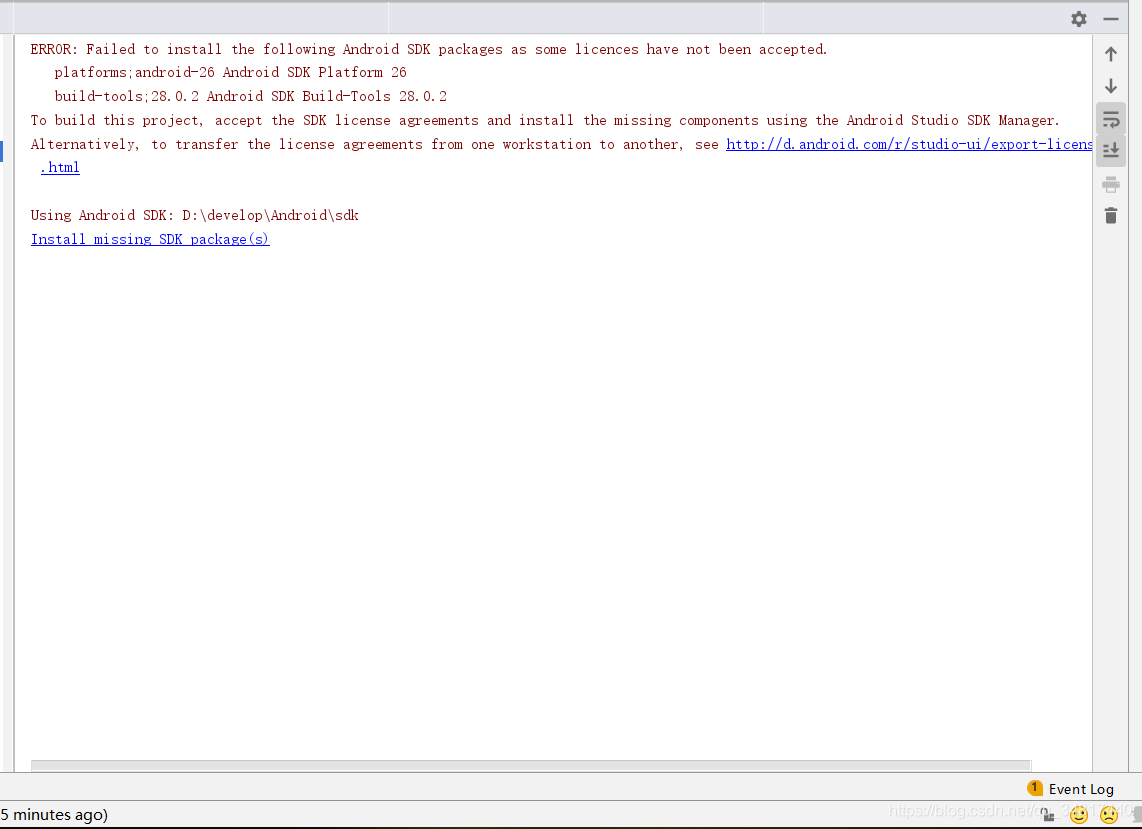
麻麻蛋~
根据accepted 了解到是安装android-26时未被允许;于是执行如下步骤
1、cd 到sdk目录
D:\develop\Android>cd sdk
2、再到tools目录
D:\develop\Android\sdk>cd tools
3、再到bin 目录
D:\develop\Android\sdk\tools>cd bin
4、最后执行sdkmanager --licenses
D:\develop\Android\sdk\tools\bin>sdkmanager --licenses
5、最后会有一大波提示(y/n)
Review licenses that have not been accepted (y/N)? y

1/6: License android-googletv-license:

---------------------------------------

Terms and Conditions
6、全部y执行到底,完成后重新刷新android studio 配置即ok

ERROR: Failed to install the following Android SDK packages as some licences have not been accepted.的更多相关文章
- Failed to install the following Android SDK packages as some licences have not been accepted.
问题描述: 执行gradle tasks报错: gradle tasks > Configure project :app Exception /package.xml. Probably th ...
- 百度人脸识别集成错误:Build command failed. Error while executing process F:\dev\Android\Sdk\cmake\3.6.4111459\bin\cmake.exe with arguments
大概是这么个错误 Build command failed. Error while executing process F:\dev\Android\Sdk\cmake\3.6.4111459\bi ...
- Failed to load C:\ProgramFilesTwo\Android\sdk\build-tools\27.0.3\lib\dx.jar
Eclipse遇到如下错误: Failed to load C:\ProgramFilesTwo\Android\sdk\build-tools\27.0.3\lib\dx.jar 原因: eclip ...
- Error! Failed to install react, react-dom, next, try again.
问题:用create-next-app创建应用报错,部分模块没有安装,react.react-dom.next等模块安装失败,如下图所示 操作环境: 系统:Ubuntu 16.04.4 LTS npm ...
- [ubuntu]android SDK 与Gradle环境的安装与配置|搭建android基础开发/构建环境
系统环境: linux:ubuntu18 已配置jdk 环境变量 切换到root账户 sudo su 安装Android-sdk (0)准备工作 切换到/usr/local目录: /usr/local ...
- 解决Android Studio Fetching Android SDK component information失败问题【转】
本文转载自:http://blog.csdn.net/isesar/article/details/41908089 Android Studio 安装完成后,如果直接启动,Android Studi ...
- android sdk启动报错error: could not install *smartsocket* listener: cannot bind to 127.0.0.1:5037:
android sdk启动报错error: could not install *smartsocket* listener: cannot bind to 127.0.0.1:5037: 问题原因: ...
- ionic cordova platform add android Cordova failed to install plugin Error: ENOENT: no such file or directory AndroidManifest.xml
问题描述: 在ionic 项目中出现编译android 的时候 出现 Cordova failed to install plugin Error: ENOENT: no such file or ...
- Android Studio 1.5启动出现“SDK Manager: failed to install”问题的解决
问题描述 Android Studio 1.5是当前最新Android手机应用开发平台,下载bundle版安装后,启动Studio后出现“SDK Manager: failed to install” ...
- Error:Execution failed for task ':app:compileDebugAidl'. > java.lang.IllegalStateException: aidl is missing from '/Users/renguodong/Library/Android/sdk/build-tools/26.0.2/aidl'
错误信息:Error:Execution failed for task ':app:compileDebugAidl'. > java.lang.IllegalStateException: ...
随机推荐
- 火山引擎 DataLeap:一家企业,数据体系要怎么搭建?
更多技术交流.求职机会,欢迎关注字节跳动数据平台微信公众号,回复[1]进入官方交流群 导读:经过十多年的发展,数据治理在传统行业以及新兴互联网公司都已经产生落地实践.字节跳动也在探索一种分布式的数据治 ...
- Rainbond PipeLine插件部署与springboot应用部署实践
前言:上一篇介绍额rainbond单机部署+单个节点的k8s环境搭建,本篇介绍rainbond5.12新增的pipeline插件的使用 1.Pipeline插件的安装 安装gitlab与gitlab- ...
- 记一次 .NET 某医疗住院系统 崩溃分析
一:背景 1. 讲故事 最近收到了两起程序崩溃的dump,查了下都是经典的 double free 造成的,蛮有意思,这里就抽一篇出来分享一下经验供后面的学习者避坑吧. 二:WinDbg 分析 1. ...
- Unity实现3D物体遮挡血条
Unity 实现3D物体遮挡血条 前言:在游戏开发中,我们经常会遇到UI和3D物体的层级遮挡问题,最常见的比如血条跟随敌人的时候,多个敌人的血条会遮挡住玩家或者3D物体,去网上查了一下也没有很好的解决 ...
- PHP 图片的合并,微信小程序码合并,文字合并
//业务需求:我们需要一个微信小程序码,但是是需要提供给别人扫码的但是只有一个纯粹的小程序码是不好看的,所以需要推广的海报图片.再结合文字 最终效果 准备工作 1.需要海报的底图 2.小程序码的图 ...
- GitHub+Typora实现云笔记一键上传
git实现笔记自动上传功能 简介: 将更新内容自动上传同步git,无需手动提交,解锁一键式同步.流程大致为,创建新仓库,配置公钥和私钥,安装quicker软件,通过quicker上某脚本完成一键提交. ...
- window.onload / onscroll/onresize 事件
onload当文档加载完成后执行一些操作 window.onload = function(){ console.log("页面加载完成") } onscroll当页面发生滚动时执 ...
- Json和对象之间的转换
JSON是一种字符: json转对象: var str = '{"name":"admin","age":16,"sex" ...
- .NET周报 【4月第1期 2023-04-02】
国内文章 探索 SK 示例 -- GitHub 存储库中的机器人 https://www.cnblogs.com/shanyou/p/17280627.html 微软 3月22日 一篇文章" ...
- 系统评价——层次分析法AHP的R语言实现(四)
对一个事物的评价往往会涉及多个因素或者多个指标,评价是在多个因素相互作用下的一个综合判断.多指标综合评价方法具有以下的特点:包含若干个指标,分别说明被评价对象的不同方面,评价方法最终要对被评价对象作出 ...