
第11課-Channel Study For Create Custom Restful Service
这节课我们一起学习利用Mirth Connect的HTTP Listener源通道与JavaScript Writer目的通道搭建自定义Restful风格webapi服务。
1.新建名为‘Custom Restful api’的信道,指定源通道与目的通道的输入输出消息格式
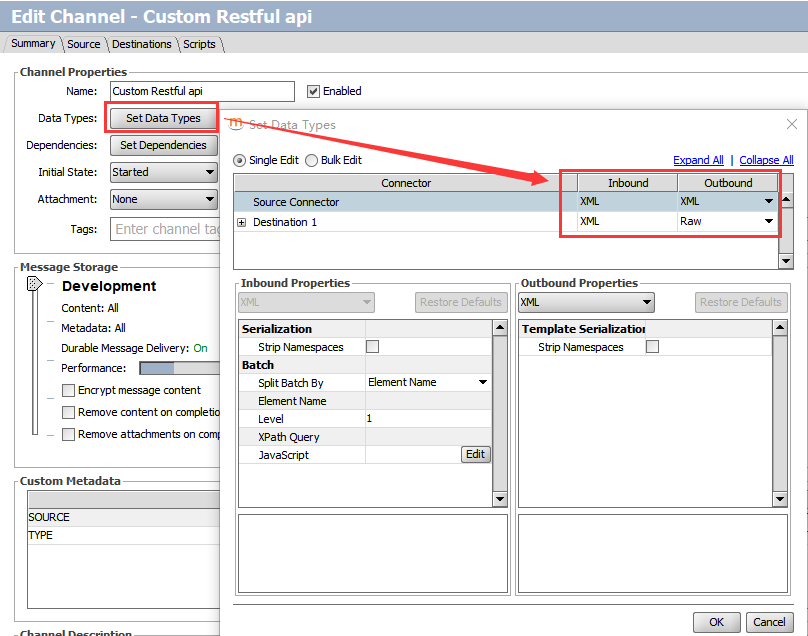
2.设置HTTP Listener类型源通道参数
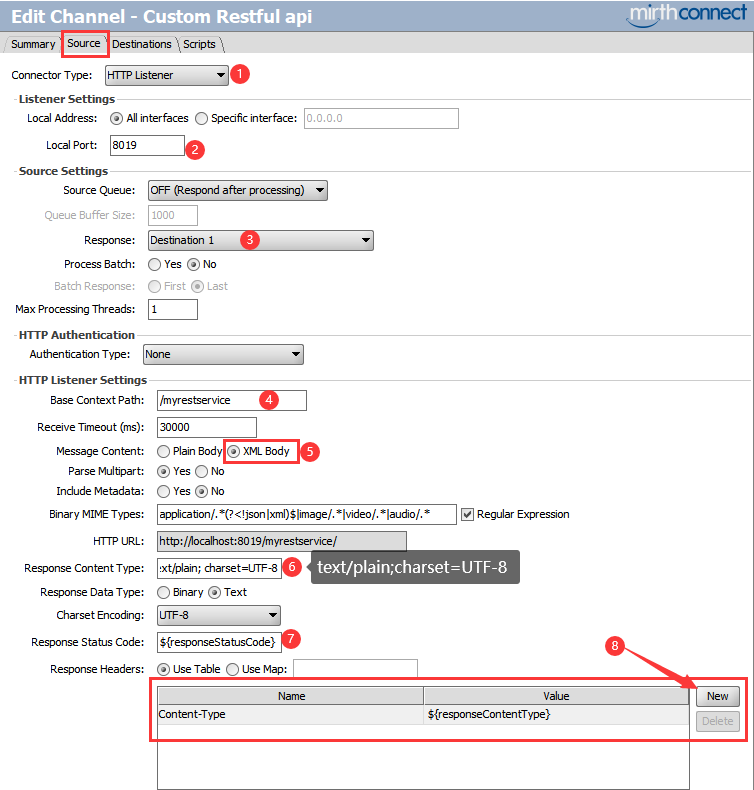
- 把 "Response" 响应指定为 destination 1
- 输入‘Base context path’ 为
/myrestservice - 设置 "Message Content" 为 XML Body
- 设置默认"Response Content Type" 为
text/plain; charset=UTF-8我们将在目的通道中通过channel map重写它的值为application/xml或application/json - 设置 "Response Status Code" 响应码为
${responseStatusCode}我们将在目的通道中通过channel map重写它的值为200(成功)或500(失败) - 在 "Response Header" 中添加一个变量 "Content-Type" ,指定其值为
${responseContentType}我们将在目的通道中通过channel map重写它的值为application/xml或application/json
3.设置JavaScript Writer目的通道参数并编写JS实现脚本
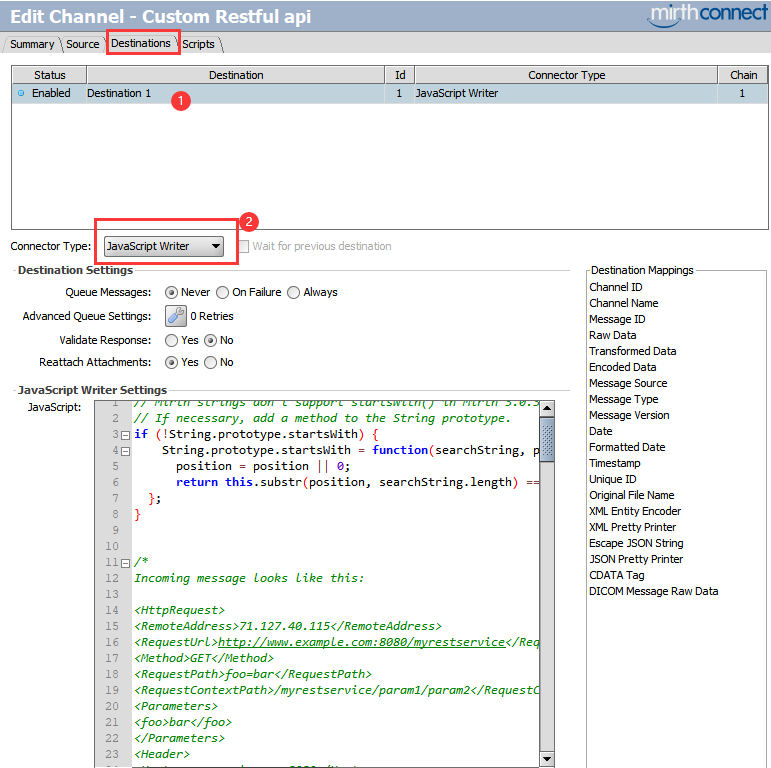
// Mirth strings don't support startsWith() in Mirth 3

// If necessary, add a method to the String prototype.

if (!String.prototype.startsWith) {

    String.prototype.startsWith = function(searchString, position){

      position = position || 0;

      return this.substr(position, searchString.length) === searchString;

  };

}

/*

Incoming message looks like this:

<HttpRequest>

<RemoteAddress>71.127.40.115</RemoteAddress>

<RequestUrl>http://www.example.com:8080/myrestservice</RequestUrl>

<Method>GET</Method>

<RequestPath>foo=bar</RequestPath>

<RequestContextPath>/myrestservice/param1/param2</RequestContextPath>

<Parameters>

<foo>bar</foo>

</Parameters>

<Header>

<Host>www.example.com:8080</Host>

<Accept-Encoding>identity</Accept-Encoding>

<User-Agent>Wget/1.18 (darwin15.5.0)</User-Agent>

<Connection>keep-alive</Connection>

<Accept>application/xml</Accept>

</Header>

<Content/>

</HttpRequest>

<HttpRequest>

<RemoteAddress>71.127.40.115</RemoteAddress>

<RequestUrl>http://www.example.com:8080/myrestservice</RequestUrl>

<Method>GET</Method>

<RequestPath>foo=bar</RequestPath>

<RequestContextPath>/myrestservice/param1/param2</RequestContextPath>

<Parameters>

<foo>bar</foo>

</Parameters>

<Header>

<Host>www.example.com:8080</Host>

<Accept-Encoding>identity</Accept-Encoding>

<User-Agent>Wget/1.18 (darwin15.5.0)</User-Agent>

<Connection>keep-alive</Connection>

<Accept>application/json</Accept>

</Header>

<Content/>

</HttpRequest>

*/

// Just in case we fail, set a sane responseContentType

channelMap.put('responseContentType', 'text/plain');

var msg = XML(connectorMessage.getRawData());

 logger.info(msg);

// Get the REST data from the "context path" which is actually

// the "path info" of the request, so it will start with '/myrestservice'.

var rest = msg['RequestContextPath'];

logger.info(rest);

var myServicePrefix = '/myrestservice';

var minimumURLParameterCount = 4; // This is the minimum you require to do your work

var maximumExpectedURLParameterCount = 5; // however many you expect to get

var params = rest.substring(myServicePrefix).split('/', maximumExpectedURLParameterCount);

if(params.length < minimumURLParameterCount)

 return Packages.com.mirth.connect.server.userutil.ResponseFactory.getErrorResponse('Too few parameters in request');

var mrn = params[1]; // params[0] will be an empty string

logger.info(mrn);

// Now, determine the client's preference for what data type to return (XML vs. JSON).

// We will default to XML.

var clientWantsJSON = false;

var responseContentType = 'text/xml';

// If we see any kind of JSON before any kind of XML, we'll use

// JSON. Otherwise, we'll use XML.

//

// Technically, this is incorrect resolution of the "Accept" header,

// but it's good enough for an example.

var mimeTypes = msg['Header']['Accept'].split(/\s*,\s*/);

for(var i=0; i<mimeTypes.length; ++i) {

  var mimeType = mimeTypes[i].toString();

  if(mimeType.startsWith('application/json')) {

    clientWantsJSON = true;

    responseContentType = 'application/json';

    break;

  } else if(mimeType.startsWith('application/xml')) {

    clientWantsJSON = false;

    responseContentType = 'application/xml';

    break;

  } else if(mimeType.startsWith('text/xml')) {

    clientWantsJSON = false;

    responseContentType = 'text/xml';

    break;

  }

}

var xml;

var json;

if(clientWantsJSON)

  json = { status : '' };

else

  xml = new XML('<response></response>');

try {

    /*

      Here is where you do whatever your service needs to actually do.

     */

  if(clientWantsJSON) {

   json.data = { foo: 1,

                  bar: 'a string',

                  baz: [ 'list', 'of', 'strings']

                };

  } else {

    xml['@foo'] = 1;

    xml['bar'] = 'a string';

    xml['baz'][0] = 'list';

    xml['baz'][1] = 'of';

    xml['baz'][3] = 'strings';

  }

  // Set the response code and content-type appropriately.

  // http://www.mirthproject.org/community/forums/showthread.php?t=12678

  channelMap.put('responseStatusCode', 200);

  if(clientWantsJSON) {

    json.status = 'success';

    var content = JSON.stringify(json);

    channelMap.put('responseContent', content);

    channelMap.put('responseContentType', responseContentType);

    return content;

  } else {

    channelMap.put('responseContentType', responseContentType);

    var content = xml.toString();

    channelMap.put('responseContent', content);

    return content;

  }

}

catch (err)

{

  channelMap.put('responseStatusCode', '500');

  if(clientWantsJSON) {

    json.status = 'error';

    if(err.javaException) {

      // If you want to unpack a Java exception, this is how you do it:

      json.errorType = String(err.javaException.getClass().getName());

      json.errorMessage = String(err.javaException.getMessage());

    }

    channelMap.put('responseContentType', responseContentType);

    // Return an error with our "error" JSON

    return Packages.com.mirth.connect.server.userutil.ResponseFactory.getErrorResponse(JSON.stringify(json));

  } else {

    if(err.javaException) {

      xml['response']['error']['@type'] = String(err.javaException.getClass().getName());

      xml['response']['error']['@message'] = String(err.javaException.getMessage());

    }

    channelMap.put('responseContentType', responseContentType);

    // Return an error with our "error" XML

    return Packages.com.mirth.connect.server.userutil.ResponseFactory.getErrorResponse(xml.toString());

  }

}
我们通过目的通道以上JS脚本,学习到以下特别重要的知识:
- 获取输入请求的原始消息并自动格式化为XML格式:
var xml = new XML(connectorMessage.getRawData()) - 设置响应类型,如:
channelMap.put('responseContentType', 'application/json') - 设置响应码,如:
channelMap.put('responseStatusCode', '200') - 设置响应内容并通过JS脚本返回XML实体或者Json实体的字符串格式值
- 异常处理通过JS脚本调用Mirth的API函数Packages.com.mirth.connect.server.userutil.ResponseFactory.getErrorResponse(string)返回字符串格式错误消息
4.部署信道并测试
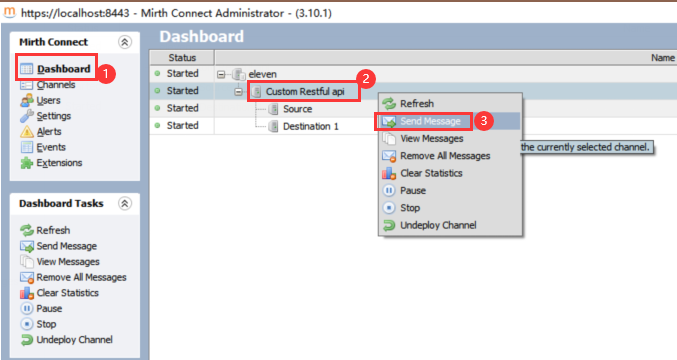
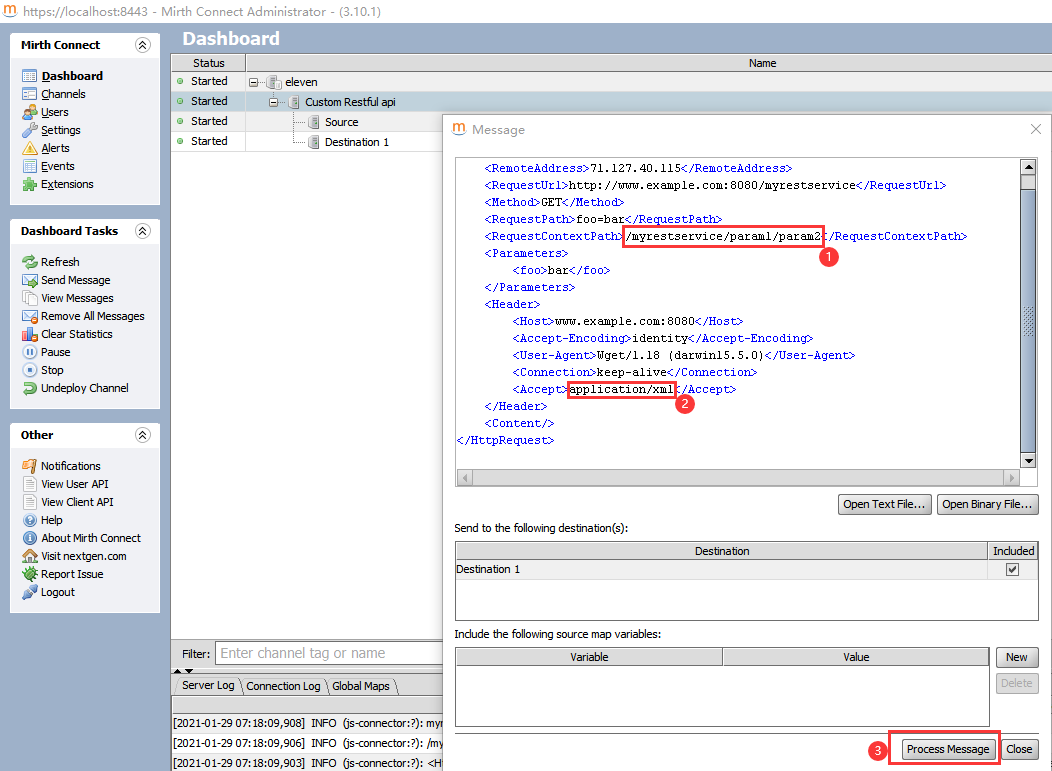
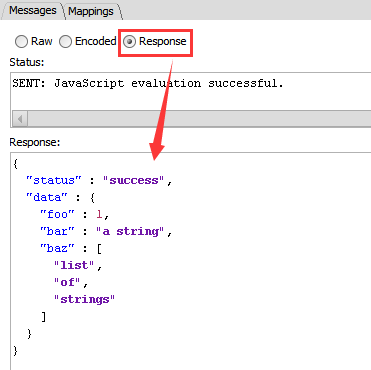
发送消息要区分application/json和application/xml,可以看到响应值格式会相应变化
<HttpRequest>

    <RemoteAddress>71.127.40.115</RemoteAddress>

    <RequestUrl>http://www.example.com:8080/myrestservice</RequestUrl>

    <Method>GET</Method>

    <RequestPath>foo=bar</RequestPath>

    <RequestContextPath>/myrestservice/param1/param2</RequestContextPath>

    <Parameters>

        <foo>bar</foo>

    </Parameters>

    <Header>

        <Host>www.example.com:8080</Host>

        <Accept-Encoding>identity</Accept-Encoding>

        <User-Agent>Wget/1.18 (darwin15.5.0)</User-Agent>

        <Connection>keep-alive</Connection>

        <Accept>application/json</Accept>

    </Header>

    <Content/>

</HttpRequest>
<HttpRequest>

    <RemoteAddress>71.127.40.115</RemoteAddress>

    <RequestUrl>http://www.example.com:8080/myrestservice</RequestUrl>

    <Method>GET</Method>

    <RequestPath>foo=bar</RequestPath>

    <RequestContextPath>/myrestservice/param1/param2</RequestContextPath>

    <Parameters>

        <foo>bar</foo>

    </Parameters>

    <Header>

        <Host>www.example.com:8080</Host>

        <Accept-Encoding>identity</Accept-Encoding>

        <User-Agent>Wget/1.18 (darwin15.5.0)</User-Agent>

        <Connection>keep-alive</Connection>

        <Accept>application/xml</Accept>

    </Header>

    <Content/>

</HttpRequest>

第11課-Channel Study For Create Custom Restful Service的更多相关文章
- How to Create Custom Filters in AngularJs
http://www.codeproject.com/Tips/829025/How-to-Create-Custom-Filters-in-AngularJs Introduction Filter ...
- create custom launcher icon 细节介绍
create custom launcher icon 是创建你的Android app的图标 点击下一步的时候,出现的界面就是创建你的Android的图标 Foreground: ” Foregro ...
- [转]How to Create Custom Filters in AngularJs
本文转自:http://www.codeproject.com/Tips/829025/How-to-Create-Custom-Filters-in-AngularJs Introduction F ...
- How to: Create Custom Configuration Sections Using ConfigurationSection
https://msdn.microsoft.com/en-us/library/2tw134k3.aspx You can extend ASP.NET configuration settings ...
- java中如何创建自定义异常Create Custom Exception
9.创建自定义异常 Create Custom Exception 马克-to-win:我们可以创建自己的异常:checked或unchecked异常都可以, 规则如前面我们所介绍,反正如果是chec ...
- Custom Data Service Providers
Custom Data Service Providers Introduction Data Services sits above a Data Service Provider, which i ...
- Unable to create Azure Mobile Service: Error 500
I had to go into my existing azure sql database server and under the configuration tab select " ...
- Cannot create container for service peer1.org2.example.com: Conflict. 解决方案
I have a docker-compose.yaml file defining 5 services: orderer.example.com peer0.org1.example.com pe ...
- docker启动报错解决及分析(Cannot create container for service *******: cannot mount volume over existing file, file exists /var/lib/docker/overlay2/)
现象: Cannot create container for service *******: cannot mount volume over existing file, file exists ...
- [转]Create Custom Exception Filter in ASP.NET Core
本文转自:http://www.binaryintellect.net/articles/5df6e275-1148-45a1-a8b3-0ba2c7c9cea1.aspx In my previou ...
随机推荐
- 使用RTX Voice,用N卡打造降噪麦克风
原文地址:使用RTX Voice,用N卡打造降噪麦克风 | Stars-One的杂货小窝 随着直播的流行,不少人为了追求良好的直播效果,都选择购买相应的设备.如想要实现降噪的功能,得通过物理手段(买个 ...
- dbvisualizer不能执行pl/sql块
如果是如下语句: begin dbms_output.put_line('Hello World!'); end; 控制台会报错 解决方案:语句改写为如下 --/ begin ...
- TomCat 的 Jenkins 报错:反向代理设置有误
1.进入 Linux 系统的 TomCat 安装目录的 conf 目录 2.编辑 server.xml 3.找到 <Connector> 标签 4.这里的 redirectPort 的值才 ...
- lazy-nvim插件管理器基础入门
一篇通过使用lazy.nvim进行nvim插件管理的入门笔记. 基础安装 init.lua 路径:stdpath("config")/init.lua stdpath(" ...
- 「AntV」全球AQI数据获取与L7可视化
1. 引言 L7 地理空间数据可视分析引擎是一种基于 WebGL 技术的地理空间数据可视化引擎,可以用于实现各种地理空间数据可视化应用.L7 引擎支持多种数据源和数据格式,包括 GeoJSON.CSV ...
- OpenLayers绘制热力图 代码记录
这里给大家分享我在网上总结出来的一些知识,希望对大家有所帮助 做地图开发,往往需要掌握专题地图制作的技能.今天用OpenLayers6来做一个热力图的效果. 页面效果: 代码部分: <!DOCT ...
- C# SM2
Cipher using Org.BouncyCastle.Crypto; using Org.BouncyCastle.Crypto.Digests; using Org.BouncyCastle. ...
- C# OpenCv DNN 人脸检测
using OpenCvSharp; using OpenCvSharp.Dnn; using System; using System.Collections.Generic; using Syst ...
- quartus中的时序约束常用方法
quartus中的时序约束常用方法 一.约束操作 quartus中有三种时序约束方法: 1️⃣Timing Setting 2️⃣Wizards/Timing Wizard 3️⃣Assignment ...
- C++设计模式 - 适配器模式(Adapter)
接口隔离模式 在组件构建过程中,某些接口之间直接的依赖常常会带来很多问题.甚至根本无法实现.采用添加一层间接(稳定)接口,来隔离本来互相紧密关联的接口是一种常见的解决方案. 典型模式 Facade P ...