
[转]Create Custom Exception Filter in ASP.NET Core
本文转自:http://www.binaryintellect.net/articles/5df6e275-1148-45a1-a8b3-0ba2c7c9cea1.aspx
In my previous article I explained how errors in an ASP.NET Core web application can be dealt with using middleware. I also mentioned that time that you can also use exception filters to handle errors. In this article I will explain how to do just that.
In ASP.NET MVC 5 you used the [HandleError] attribute and OnException() controller method to deal with exceptions that arise in the actions of a controller. In ASP.NET Core the process is bit different but the overall concept is still the same. As you are probable aware of, filters sit in the ASP.NET Core pipeline and allow you to execute a piece of code before or after an action execution. To understand how errors can be handled in ASP.NET Core let's create an exception filter called HandleException and then try to mimic the behavior of [HandleError] of ASP.NET MVC 5.
Begin by creating a new ASP.NET web application. Then add a class to it named HandleExceptionAttribute. This class needs to inherit from ExceptionFilterAttribute base class. The complete code of this class is shown below:
using Microsoft.AspNetCore.Mvc;

using Microsoft.AspNetCore.Mvc.Filters;

using Microsoft.AspNetCore.Mvc.ModelBinding;

using Microsoft.AspNetCore.Mvc.ViewFeatures;

....

....

public class HandleExceptionAttribute : ExceptionFilterAttribute

{

    public override void OnException(ExceptionContext context)

    {

      var result = new ViewResult { ViewName = "Error" };

      var modelMetadata = new EmptyModelMetadataProvider();

      result.ViewData = new ViewDataDictionary(

              modelMetadata, context.ModelState);

      result.ViewData.Add("HandleException",

              context.Exception);

      context.Result = result;

      context.ExceptionHandled = true;

    }

 }

}
The HandleExceptionAttribute class overrides the OnException() method of t he base class. The OnException() method is called only when there is an unhandled exception in an action. Inside, we create a ViewResult object that represents the custom error page. It is assumed that the view representing the custom error page is Error.cshtml. Later we will write some code to remove this hard-coding.
Then the code creates an empty object of EmptyModelMetadataProvider class. This is required because we need to initialize the ViewData of the request and add exception details in it. Then ViewData property of the ViewResult is assigned to a new ViewDataDictionary object. While creating the ViewDataDictionary the IModelMetadataProvider object created earlier is passed to the constructor along with the context's ModelState.
We would like to store the exception details into the ViewData so that the Error view can retrieve them and possibly display on the page. To facilitate this HandleException key is added to the ViewData. The exception being thrown can be obtained using context's Exception property.
Then Result property of context is set to the ViewResult we just configured. Finally, ExceptionHandled property is set to true to indicate that the exception need not be bubbled up any further.
Now open the HomeController and decorate the Index() action with the [HandleException] attribute.
[HandleException]

public IActionResult Index()

{

    throw new Exception("This is some exception!!!");

    return View();

}
Also add Error.cshtml in Shared folder and write the following code to it:
@{

    Exception ex = ViewData["HandleException"] as Exception;

}

<h1>@ex.Message</h1>

<div>@ex.StackTrace</div>
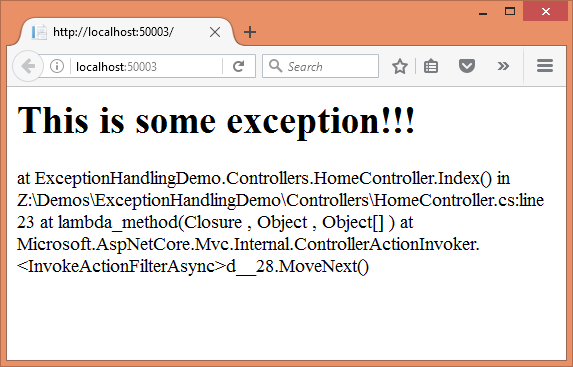
As you can see the Error view can grab the exception details using the HandleException key stored in the ViewData. The Message and StackTrace properties of the Exception are then outputted on the page.
If you run the application you should see the error page like this:
So far so good. Now let's add a couple of features to our [HandleException] attribute:
- The ViewName should be customizable
- There should be provision to handle only specific type of exceptions
Go ahead and add two public properties to the HandleExceptionAttribute class. These properties are shown below:
public class HandleExceptionAttribute : ExceptionFilterAttribute

{

    public string ViewName { get; set; } = "Error";

    public Type ExceptionType { get; set; } = null;

    ....

    ....

}
The ViewName property allows you to specify a custom view name that is then used while forming the ViewResult. The ExceptionType property holds the Type of the exception you wish to handle (say DivideByZeroException or FormatException).
Then modify the OnException() as shown below:
 public override void OnException(ExceptionContext context)

{

  if(this.ExceptionType != null)

  {

    if(context.Exception.GetType() == this.ExceptionType)

    {

      ....

      ....

    }

  }

  else

  {

    ....

    ....

  }

}
The OnException() method now checks whether a specific ExceptionType is to be handled (non null value). If yes then it checks whether the exception being thrown matches with that type (inner if block) and accordingly ViewResult is configured. If no specific ExceptionType is to be checked then control directly goes in the else block. The code in both the cases is shown below:
var result = new ViewResult { ViewName = this.ViewName };

var modelMetadata = new EmptyModelMetadataProvider();

result.ViewData = new ViewDataDictionary

(modelMetadata, context.ModelState);

result.ViewData.Add("HandleException", context.Exception);

context.Result = result;

context.ExceptionHandled = true;
This code is quite similar to what you wrote earlier. But this time it uses the ViewName property while forming the ViewResult.
Now open the HomeController and change the [HandleException] attribute like this:
[HandleException(ViewName ="CustomError",

ExceptionType =typeof(DivideByZeroException))]

public IActionResult Index()

{

    throw new Exception("This is some exception!!!");

    return View();

}
Now the [HandleException] attribute specifies two properties - ViewName and ExceptionType. Since ExceptionType is set to the type of DivideByZeroException the [HandleException] won't handle the error (because Index() throws a custom Exception). So, rename Error.cshtml to CustomError.cshtml and throw a DivideByZeroException. This time error gets trapped as expected.
It should be noted that [HandleException] can be applied on top of the controller class itself rather than to individual actions.
[HandleException]

public class HomeController : Controller

{

....

....

}
More details about the ASP.NET Core filters can be found here.
That's it for now! Keep coding!!
[转]Create Custom Exception Filter in ASP.NET Core的更多相关文章
- java中如何创建自定义异常Create Custom Exception
9.创建自定义异常 Create Custom Exception 马克-to-win:我们可以创建自己的异常:checked或unchecked异常都可以, 规则如前面我们所介绍,反正如果是chec ...
- 002.Create a web API with ASP.NET Core MVC and Visual Studio for Windows -- 【在windows上用vs与asp.net core mvc 创建一个 web api 程序】
Create a web API with ASP.NET Core MVC and Visual Studio for Windows 在windows上用vs与asp.net core mvc 创 ...
- 004.Create a web app with ASP.NET Core MVC using Visual Studio on Windows --【在 windows上用VS创建mvc web app】
Create a web app with ASP.NET Core MVC using Visual Studio on Windows 在 windows上用VS创建mvc web app 201 ...
- Global exception handling in asp.net core webapi
在.NET Core中MVC和WebAPI已经组合在一起,都继承了Controller,但是在处理错误时,就很不一样,MVC返回错误页面给浏览器,WebAPI返回Json或XML,而不是HTML.Us ...
- Custom Exception in ASP.NET Web API 2 with Custom HttpResponse Message
A benefit of using ASP.NET Web API is that it can be consumed by any client with the capability of m ...
- [转]How do you create a custom AuthorizeAttribute in ASP.NET Core?
问: I'm trying to make a custom authorization attribute in ASP.NET Core. In previous versions it was ...
- [转]ASP.NET Core Exception Filters and Resource Filters
本文转自:https://damienbod.com/2015/09/30/asp-net-5-exception-filters-and-resource-filters/ This article ...
- Asp.Net Core Filter 深入浅出的那些事-AOP
一.前言 在分享ASP.NET Core Filter 使用之前,先来谈谈AOP,什么是AOP 呢? AOP全称Aspect Oriented Programming意为面向切面编程,也叫做面向方法编 ...
- Filters in ASP.NET Core
Filters in ASP.NET Core allow code to be run before or after specific stages in the request processi ...
随机推荐
- oracle取order by的第一条数据
SELECT * FROM (SELECT * FROM TABLE_NAME ORDER BY COL1) WHERE ROWNUM = 1; 备注: 1.不能给 (SELECT * FROM TA ...
- 洛谷P3357 最长k可重线段集问题(费用流)
传送门 其实和最长k可重区间集问题差不多诶…… 把这条开线段给压成x轴上的一条线段,然后按上面说的那种方法做即可 然而有一个坑点是线段可以垂直于x轴,然后一压变成一个点,连上正权环,求最长路……然后s ...
- DRF 的解析器和渲染器
一.解析器 解析器作用 解析器的作用就是服务端接收客户端传过来的数据,把数据解析成自己可以处理的数据.本质就是对请求体中的数据进行解析. 在了解解析器之前,我们要先知道Accept以及ContentT ...
- PEP 8 – Style Guide for Python Code
原文:PEP 8 – Style Guide for Python Code PEP:8 题目:Python代码风格指南 作者:Guido van Rossum, www.yszx11.cnBarry ...
- P3705 [SDOI2017]新生舞会 01分数规划+费用流
$ \color{#0066ff}{ 题目描述 }$ 学校组织了一次新生舞会,Cathy作为经验丰富的老学姐,负责为同学们安排舞伴. 有\(n\)个男生和\(n\)个女生参加舞会买一个男生和一个女生一 ...
- python 第三次作业
习题1: **1.初始化一个数据集,包括5-10位同学的成绩数据(数据类型不限),数据格式如下: **学号 姓名 Java C语言 Python 2017XXXX 小白 87 68 92 2017XX ...
- \\.\Global\vmx86: 系统找不到指定的文件
使用vmware虚拟机时出现如下的错误: vmware安装无法打开内核设备 \\.\Global\vmx86: 系统找不到指定的文件 解决办法: 新建文件,将下面的代码拷贝进去: @Echo Off ...
- spring中的idref标签详解
spring中的idref元素 idref元素是一个简单的对容器中存在的另外一个bean的检错途径(通过id); <idref bean="someBeanId"/> ...
- 洛谷 P1800 software_NOI导刊2010提高(06)
题目链接 题解 二分答案+dp 如果我们知道答案,贪心地想,让每个人做尽量多的模块一定不会比最优解差 \(f[i][j]\)表示前\(i\)个人第一个模块做了\(j\)块,第二个模块最多能做多少 然后 ...
- .NET 海量数据并发处理
.NET 海量数据并发处理 2013-02-19 10:27 提问者悬赏:10分 |XL码的小伙纸| 分类:C#/.NET| 浏览364次 百万级的数据并发处理,网站呈现数据..NET 开发,可能会使 ...