
day02-Spring基本介绍02
Spring基本介绍02
5.简单模拟Spring基于XML配置的程序
5.1需求说明
自己写一个简单的Spring容器,通过读取beans.xml,获取第一个Javabean:Monster的对象,给该对象属性赋值,放入到容器中,并输出该对象信息
也就是说,不使用spring原生框架,我们自己简单模拟实现,目的是了解Spring容器的简单机制
5.2思路分析
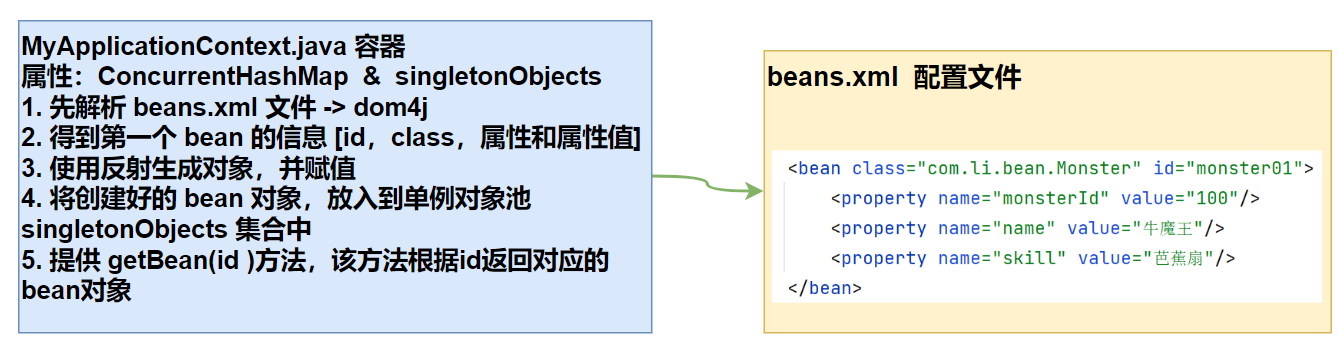
5.3代码实现
引入dom4j.jar包

MyApplicationContext.java:
package com.li.myapplicationcontext;

import com.li.bean.Monster;

import org.dom4j.Document;

import org.dom4j.Element;

import org.dom4j.io.SAXReader;

import java.io.File;

import java.lang.reflect.Method;

import java.util.List;

import java.util.concurrent.ConcurrentHashMap;

/**

 * @author 李

 * @version 1.0

 * 1. 这个程序用于实现Spring的一个简单容器机制

 * 2. 后面还会详细的实现

 * 3. 这里我们主要实现的是如何将beans.xml文件进行解析,并生成对象,放入容器中

 * 4. 然后提供一个getBean(id) 返回对应的对象

 */

public class MyApplicationContext {

    private ConcurrentHashMap<String, Object> singletonObjects

            = new ConcurrentHashMap<>();

    //构造器

    //接收一个容器的配置文件,如 beans.xml,默认路径在src下

    public MyApplicationContext(String iocBeanXMLFile) throws Exception {

        //1.得到配置文件的类加载路径

        String path = this.getClass().getResource("/").getPath();

        //2.创建 saxReader

        SAXReader saxReader = new SAXReader();

        //3.得到document对象

        Document document = saxReader.read(new File(path + iocBeanXMLFile));

        //4.得到rootDocument

        Element rootElement = document.getRootElement();

        //5.得到第一个bean-monster01

        Element bean = (Element) rootElement.elements("bean").get(0);

        //6.获取到第一个bean的相关属性(真实的情况下会把属性保存到beanDefinitionMap中)

        String id = bean.attributeValue("id");//bean的id

        String classFullPath = bean.attributeValue("class");//类的全路径

        List<Element> property = bean.elements("property");

        //原本是遍历,这里为了简化,就直接获取

        //property的value值

        Integer monsterId =

                Integer.parseInt(property.get(0).attributeValue("value"));

        String name = property.get(1).attributeValue("value");

        String skill = property.get(2).attributeValue("value");

        //7.反射创建对象

        Class<?> aClass = Class.forName(classFullPath);

        //这里的 o对象就是Monster对象

        Monster o = (Monster) aClass.newInstance();

        //给对象赋值-这里为了简化,直接赋值(真实情况下会使用反射)

        o.setMonsterId(monsterId);

        o.setName(name);

        o.setSkill(skill);

        //8.将创建好的对象放到singletonObjects单例对象池中

        singletonObjects.put(id, o);

    }

    public Object getBean(String id) {

        return singletonObjects.get(id);

    }

}
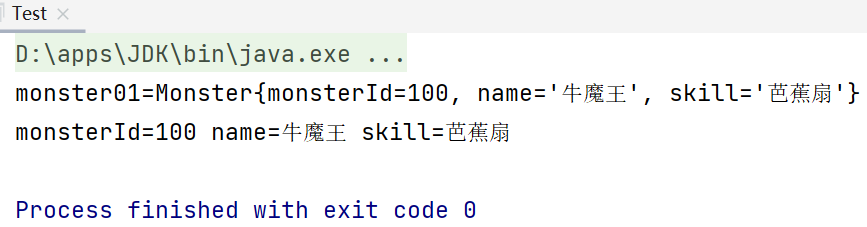
Test.java用于测试:
package com.li.myapplicationcontext;

import com.li.bean.Monster;

/**

 * @author 李

 * @version 1.0

 */

public class Test {

    public static void main(String[] args) throws Exception {

        MyApplicationContext ioc = new MyApplicationContext("beans.xml");

        Monster monster01 = (Monster) ioc.getBean("monster01");

        System.out.println("monster01=" + monster01);

        System.out.println("monsterId=" + monster01.getMonsterId() +

                " name=" + monster01.getName() +

                " skill=" + monster01.getSkill());

    }

}
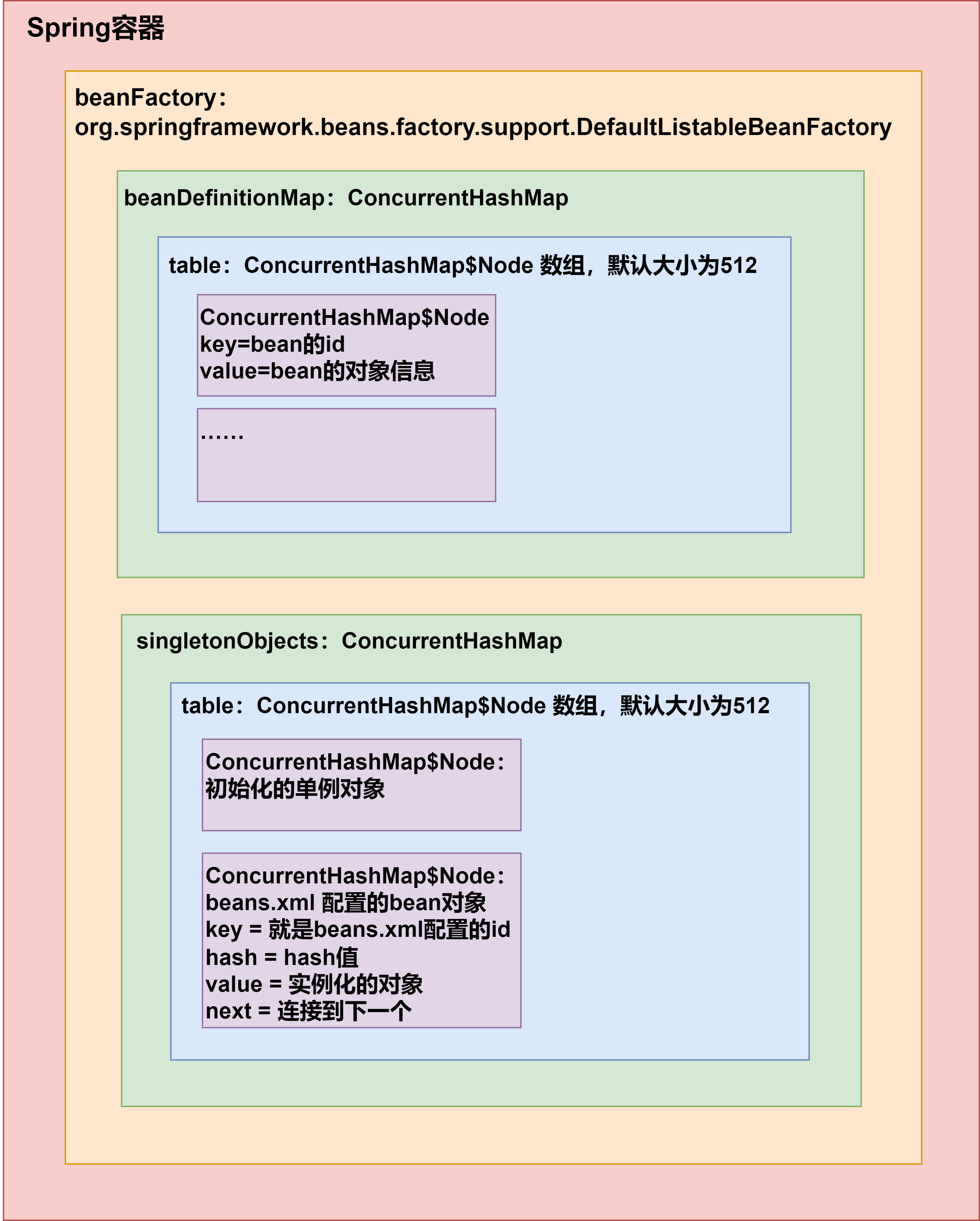
6.Spring原生容器底层结构梳理
我们之前在Spring基本介绍01--4.5Spring容器的结构/机制有一些基础的分析,现在来梳理一下:
7.练习
7.1关于bean的id
如下,在beans.xml中,我们注入2个Monster对象,但是不指定bean的id
<bean class="com.li.bean.Monster">

    <property name="monsterId" value="100"/>

    <property name="name" value="牛魔王"/>

    <property name="skill" value="芭蕉扇"/>

</bean>

<bean class="com.li.bean.Monster">

    <property name="monsterId" value="200"/>

    <property name="name" value="红孩儿"/>

    <property name="skill" value="三昧真火"/>

</bean>
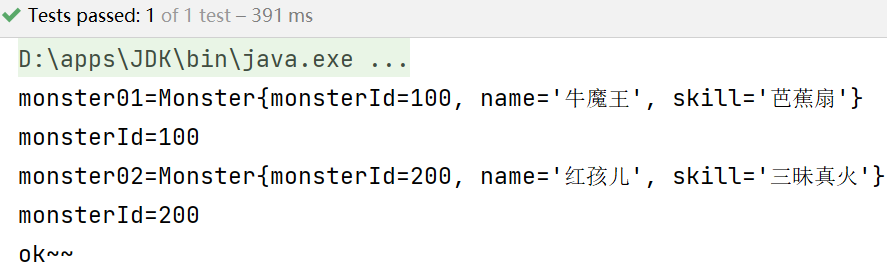
问题1:运行会不会报错?
答:不会报错,可以正常运行。
问题2:如果不报错,你是否能找到分配的id并获取该对象?
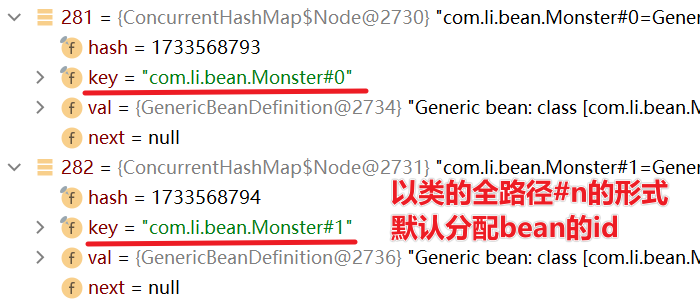
答:系统会默认分配id,分配id的规则是:全类名#0,全类名#1......全类名#n,这样的规则来分配id
我们可以通过debug的方式来查看:
beanFactory.beanDefinitionMap.table:
package com.li.homework;

import com.li.bean.Monster;

import org.springframework.context.ApplicationContext;

import org.springframework.context.support.ClassPathXmlApplicationContext;

import org.testng.annotations.Test;

/**

 * @author 李

 * @version 1.0

 */

public class Homework01 {

    @Test

    public void getMonster() {

        ApplicationContext ioc =

                new ClassPathXmlApplicationContext("beans.xml");

        Monster monster01 = ioc.getBean("com.li.bean.Monster#0", Monster.class);

        System.out.println("monster01=" + monster01);

        System.out.println("monsterId=" + monster01.getMonsterId());

        Monster monster02 = ioc.getBean("com.li.bean.Monster#1", Monster.class);

        System.out.println("monster02=" + monster02);

        System.out.println("monsterId=" + monster02.getMonsterId());

        System.out.println("ok~~");

    }

}
在实际开发中不会省略bean的id
7.2练习2
创建一个Car类(属性:id,name,price),具体要求如下:
- 创建ioc容器文件(即配置文件),并配置一个Car对象(bean)
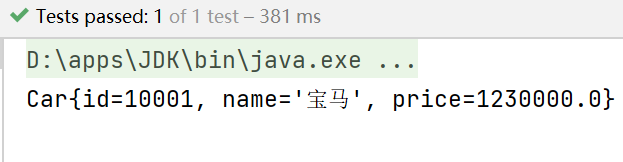
- 通过java程序到ioc容器获取该bean对象,并输出
Car:
package com.li.bean;

/**

 * @author 李

 * @version 1.0

 */

public class Car {

    private Integer id;

    private String name;

    private Double price;

    public Car() {

    }

    public Car(Integer id, String name, Double price) {

        this.id = id;

        this.name = name;

        this.price = price;

    }

    public Integer getId() {

        return id;

    }

    public void setId(Integer id) {

        this.id = id;

    }

    public String getName() {

        return name;

    }

    public void setName(String name) {

        this.name = name;

    }

    public Double getPrice() {

        return price;

    }

    public void setPrice(Double price) {

        this.price = price;

    }

    @Override

    public String toString() {

        return "Car{" +

                "id=" + id +

                ", name='" + name + '\'' +

                ", price=" + price +

                '}';

    }

}
beans2.xml:
<?xml version="1.0" encoding="UTF-8"?>

<beans xmlns="http://www.springframework.org/schema/beans"

       xmlns:xsi="http://www.w3.org/2001/XMLSchema-instance"

       xsi:schemaLocation="http://www.springframework.org/schema/beans http://www.springframework.org/schema/beans/spring-beans.xsd">

    <bean class="com.li.bean.Car" id="car01">

        <property name="id" value="10001"/>

        <property name="name" value="宝马"/>

        <property name="price" value="1230000"/>

    </bean>

</beans>
Homework02:
package com.li.homework;

import com.li.bean.Car;

import org.springframework.context.ApplicationContext;

import org.springframework.context.support.ClassPathXmlApplicationContext;

import org.testng.annotations.Test;

/**

 * @author 李

 * @version 1.0

 */

public class Homework02 {

    @Test

    public void getCart() {

        ApplicationContext ioc =

                new ClassPathXmlApplicationContext("beans2.xml");

        Car car = ioc.getBean("car01", Car.class);

        System.out.println(car);

    }

}
day02-Spring基本介绍02的更多相关文章
- 黑马_13 Spring Boot:01.spring boot 介绍&&02.spring boot 入门
13 Spring Boot: 01.spring boot 介绍&&02.spring boot 入门 04.spring boot 配置文件 SpringBoot基础 1.1 原有 ...
- Spring Security 介绍与Demo
一.Spring Security 介绍 Spring Security 是针对Spring项目的安全框架,也是Spring Boot底层安全模块的默认技术选型.我们仅需引入spring-boot-s ...
- Spring Batch 中文参考文档 V3.0.6 - 1 Spring Batch介绍
1 Spring Batch介绍 企业领域中许多应用系统需要采用批处理的方式在特定环境中运行业务操作任务.这种业务作业包括自动化,大量信息的复杂操作,他们不需要人工干预,并能高效运行.这些典型作业包括 ...
- [翻译]Spring框架参考文档(V4.3.3)-第二章Spring框架介绍 2.1 2.2 翻译--2.3待继续
英文链接:http://docs.spring.io/spring-framework/docs/current/spring-framework-reference/html/overview.ht ...
- Spring 的介绍和目标
1. Spring介绍 打开Spring 官网查看对 Spring 的介绍和目标 http://www.springsource.org/about We believe that: · J2EE s ...
- Spring的介绍与搭建
一.Spring的介绍 二.Spring的搭建 (1)导包 (2)创建一个对象 (3)书写配置注册对象到容器 (4)代码测试
- Spring Shell介绍
最近开发中在下遇到了spring-shell开发工具的项目,现在整理了相关文章,以供大家学习 本博客相关的文章均是在Spring Shell 1.2.0的基础上建立 Spring Shell介绍 ...
- Spring DevTools 介绍
Spring DevTools 介绍 Spring Boot包括一组额外的工具,可以使应用程序开发体验更加愉快. spring-boot-devtools模块可以包含在任何项目中,它可以节省大量的时间 ...
- 第1章—Spring之旅—Spring模块介绍
Spring模块介绍 Spring7大核心模块: 核心容器(Spring Core) 核心容器提供Spring框架的基本功能.Spring以bean的方式组织和管理Java应用中的各个组件及其关系.S ...
- 01.课程介绍 & 02.最小可行化产品MVP
01.课程介绍 02.最小可行化产品MVP 产品开发过程 最小化和可用之间找到一个平衡点
随机推荐
- 关于React-Router6 (React 路由)
一.概要 (1)每个单页应用其实是一系列的 JS 文件,当用户请求网站时,网站返回一整个(或一系列)的 js 文件和 HTML,而当用户在某个页面内点击时,你需要告诉浏览器怎么加载另一个页面地址.单页 ...
- 简单总结Tomcat/SpringMVC/Spring/SpringBoot的关系
Tomcat是一个Web应用服务器,可以作为Servlet容器.它的作用是,解析客户端client发起的request,并组装出HttpRequest.创建HttpResponse,将二者交于内部的H ...
- c语言实现内存池
概要 所谓内存池,顾名思义和线程池的设计原理是一样的,为了减少频繁申请释放内存而带来的资源消耗,减少释放内存后产生的内存碎片. 设计理念 为了方便管理内存池的设计通常是划分出一定数量的内存块,这些内存 ...
- LLM研究之-NVIDIA的CUDA
一.什么是NVIDIA的CUDA CUDA(Compute Unified Device Architecture)是由NVIDIA公司开发的一个并行计算平台和应用程序编程接口(API),它允许软件开 ...
- 开源.NetCore通用工具库Xmtool使用连载 - 发送短信篇
[Github源码] <上一篇> 介绍了Xmtool工具库中的发送邮件类库,今天我们继续为大家介绍其中的发送短信类库. 发送短信就像发送邮件一样,在软件系统中使用非常普遍,甚至比发送邮件还 ...
- Moon.Orm版本维护及下载
MoonOrm最新版及代码生成器 (2020-8-29)
- [技术选型与调研] 流程引擎(工作流引擎|BPM引擎):Activiti、Flowable、Camunda
1 概述:流程与流程引擎 低代码平台.办公自动化(OA).BPM平台.工作流系统均需要[流程引擎]功能 BPM平台与工作流系统的区别,参见本文档:3.2 章节 流程引擎是任务分配软件(例如业务流程管理 ...
- CSS实现导航栏
1.知识点 列表 浮动 伪类 背景 文本格式化 盒子模型 2.效果 3.代码 <!DOCTYPE html> <html lang="en"> <he ...
- 使用 CMake 编写 Windows 静态库
最近有一个多个 .h .cc .cpp 编译成静态库的需求,故记录下过程 静态库不同于动态库,它不需要 main 入口,只要各个源文件与头文件能对应,也就是源文件和头文件引用的头文件能够找到函数的符号 ...
- 无 dmp 文件的情况下使用 windbg
项目线上出现了闪退问题,查看日志发现是 sentry 模块出问题了 因为用户电脑上没有 pdb 文件,所以无法加载具体函数的调用位置,只能手动去计算 具体步骤是:在 windbg.exe 中加载 se ...