
git体验
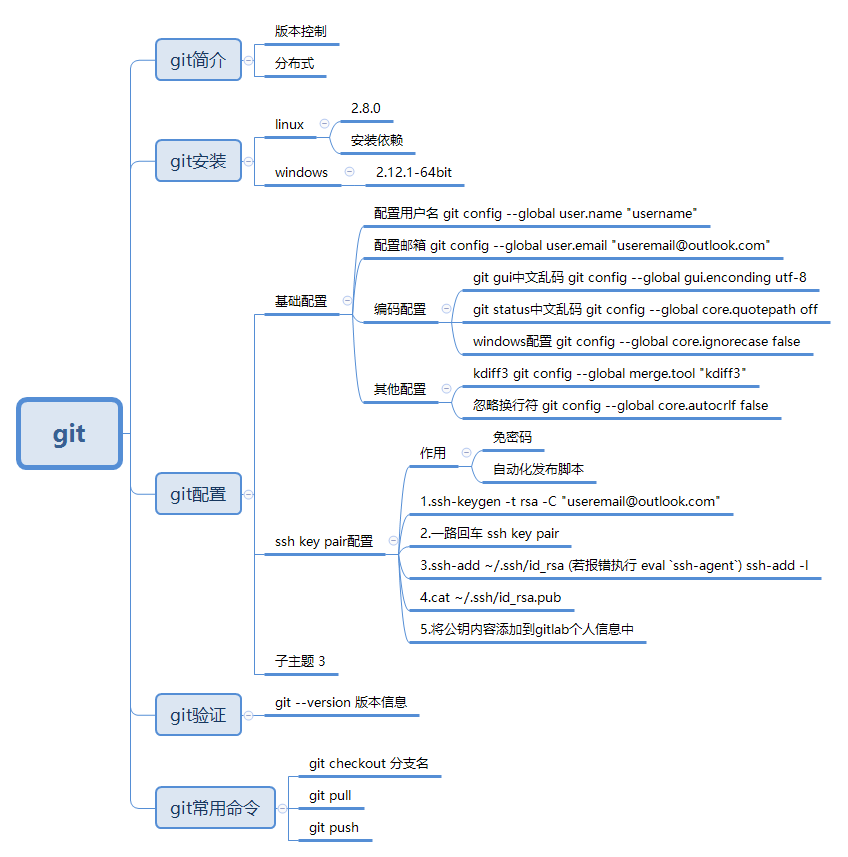
(1)git初始化配置
#配置用户名
git config --global user.name "azcode"
#配置邮箱
git config --global user.email "azcode_cn@outlook.com"
#配置gui编码
git config --global gui.encoding utf-8
#配置status编码
git config --global core.quotepath off
#windows配置
git config --global core.ignorecase false
#忽略换行符
git config --global core.autocrlf false
#生成ssh key pair
ssh-keygen -t rsa -C "azocde_cn@outlook.com"
ssh key pair
cat ~/.ssh/id_rsa.pub
#将生成的key pair复制到gitlab的配置信息中
(2)将项目上传到远程仓库
#进入到项目目录并创建README.md文件
touch README.md
vim README.md
#创建.gitignore文件设定忽略规则
touch .gitignore
vim .gitignore
*.class

#package file

*.war

*.ear

#kidff3 ignore

*.orig

#maven ignore

target/

#eclipse ignore

.settings/

.project

.classpath

#idea ignore

.idea/

/idea/

*.ipr

*.iml

*.iws

#temp file ignore

*.log

*.cache

*.diff

*.patch

*.tmp

#system ignore

.DS_store

Thumbs.db
#初始化git仓库
git init
Initialized empty Git repository in C:/workspace/freshman-ssh/.git/
#查看git状态
git status
On branch master
Initial commit
Untracked files:
(use "git add <file>..." to include in what will be committed)
.gitignore
README.md
pom.xml
src/
nothing added to commit but untracked files present (use "git add" to track)
#将修改信息添加到仓库
git add .
#再次查看状态
git status
On branch master
Initial commit
Changes to be committed:
(use "git rm --cached <file>..." to unstage)
new file: .gitignore
new file: README.md
new file: pom.xml
new file: src/main/java/com/iflytek/ssh/conf/AppConfig.java
new file: src/main/java/com/iflytek/ssh/conf/AppInitializer.java
new file: src/main/java/com/iflytek/ssh/conf/HibernateConfiguration.java
new file: src/main/java/com/iflytek/ssh/controller/AppController.java
new file: src/main/java/com/iflytek/ssh/dao/AbstractDao.java
new file: src/main/java/com/iflytek/ssh/dao/EmployeeDao.java
new file: src/main/java/com/iflytek/ssh/dao/EmployeeDaoImpl.java
new file: src/main/java/com/iflytek/ssh/model/Employee.java
new file: src/main/java/com/iflytek/ssh/service/EmployeeService.java
new file: src/main/java/com/iflytek/ssh/service/EmployeeServiceImpl.java
new file: src/main/resources/application.properties
new file: src/main/resources/log4j.properties
new file: src/main/resources/message.properties
new file: src/main/webapp/WEB-INF/views/allemployees.jsp
new file: src/main/webapp/WEB-INF/views/registration.jsp
new file: src/main/webapp/WEB-INF/views/success.jsp
#确认提交并添加注释
git commit -am 'first commit init project'
#添加远程仓库地址
git remote add origin git@git.coding.net:qjtang/freshman-ssh.git
#查看分支信息
git branch
#将仓库提交到远程的master分支
git push -u origin master
The authenticity of host 'git.coding.net (116.211.78.90)' can't be established.
RSA key fingerprint is SHA256:jok3FH7q5LJ6qvE7iPNehBgXRw51ErE77S0Dn+Vg/Ik.
Are you sure you want to continue connecting (yes/no)? yes
Warning: Permanently added 'git.coding.net,116.211.78.90' (RSA) to the list of known hosts.
To git.coding.net:qjtang/freshman-ssh.git
! [rejected] master -> master (fetch first)
error: failed to push some refs to 'git@git.coding.net:qjtang/freshman-ssh.git'
hint: Updates were rejected because the remote contains work that you do
hint: not have locally. This is usually caused by another repository pushing
hint: to the same ref. You may want to first integrate the remote changes
hint: (e.g., 'git pull ...') before pushing again.
hint: See the 'Note about fast-forwards' in 'git push --help' for details.
#需要先从远程仓库拉取
git pull
warning: no common commits
remote: Counting objects: 5, done.
remote: Compressing objects: 100% (4/4), done.
remote: Total 5 (delta 0), reused 0 (delta 0)
Unpacking objects: 100% (5/5), done.
From git.coding.net:qjtang/freshman-ssh
* [new branch] master -> origin/master
There is no tracking information for the current branch.
Please specify which branch you want to merge with.
See git-pull(1) for details.
git pull <remote> <branch>
If you wish to set tracking information for this branch you can do so with:
git branch --set-upstream-to=origin/<branch> master
#再次提交提示远程仓库比本地仓库版本新
git push -u origin master
To git.coding.net:qjtang/freshman-ssh.git
! [rejected] master -> master (non-fast-forward)
error: failed to push some refs to 'git@git.coding.net:qjtang/freshman-ssh.git'
hint: Updates were rejected because the tip of your current branch is behind
hint: its remote counterpart. Integrate the remote changes (e.g.
hint: 'git pull ...') before pushing again.
hint: See the 'Note about fast-forwards' in 'git push --help' for details.
#直接覆盖远程仓库强制提交
git push -u -f origin master
Counting objects: 36, done.
Delta compression using up to 4 threads.
Compressing objects: 100% (27/27), done.
Writing objects: 100% (36/36), 11.12 KiB | 0 bytes/s, done.
Total 36 (delta 2), reused 0 (delta 0)
To git.coding.net:qjtang/freshman-ssh.git
+ 49234d0...4fc84f9 master -> master (forced update)
Branch master set up to track remote branch master from origin.
#查看所有分支信息
git branch -r
origin/master
#查看当前分支信息
git branch
* master
#新建一个v1.0的分支并切换到该分支,从master分支检出该分支
git checkout -b v1.0 origin/master
Switched to a new branch 'v1.0'
Branch v1.0 set up to track remote branch master from origin.
#查看当前分支信息
git branch
master
* v1.0
#将新建分支提交到远程仓库
git push origin HEAD -u
Total 0 (delta 0), reused 0 (delta 0)
To git.coding.net:qjtang/freshman-ssh.git
* [new branch] HEAD -> v1.0
Branch v1.0 set up to track remote branch v1.0 from origin.
git体验的更多相关文章
- 【git体验】git原理及基础
原理:分布式版本号控制系统像 Git,Mercurial,Bazaar 以及 Darcs 等,client并不仅仅提取最新版本号 的文件快照,而是把原始的代码仓库完整地镜像下来. 这么一来.不论什么一 ...
- 常用git命令(一)
git add 命令. 这是个多功能命令:可以用它开始跟踪新文件,或者把已跟踪的文件放到暂存区,还能用于合并时把有冲突的文件标记为已解决状态等. 将这个命令理解为“添加内容到下一次提交中”而不是“将一 ...
- Git Pro Book
目录 2nd Edition (2014) Switch to 1st Edition Download Ebook The entire Pro Git book, written by Scott ...
- Git 基本操作指南
Git 基本操作指南 内容概要 这个作业属于哪个课程 2022面向对象程序设计 这个作业要求在哪里 2022面向对象程序设计寒假作业1 这个作业的目标 Git & Github 作业正文 如下 ...
- [翻译]正式宣布 Visual Studio 2022
原文: [Visual Studio 2022] 首先,我们要感谢正在阅读这篇文章的你,我们所有的产品开发都始于你也止于你,无论你是在开发者社区上发帖,还是填写了调查问卷,还是向我们发送了反馈意见,或 ...
- .NET6系列:微软正式宣布Visual Studio 2022
系列目录 [已更新最新开发文章,点击查看详细] 首先,我们要感谢正在阅读这篇文章的你,我们所有的产品开发都始于你也止于你,无论你是在开发者社区上发帖,还是填写了调查问卷,还是向我们发送了反馈意 ...
- git初体验(三)git分支
分支的理念就是分身,就像孙悟空拔出猴毛变出很多跟自己一模一样的猴子,然后每个猴子做自己的事情互不干涉,等到所有猴子做完之后,猴子集合来合并劳动成果,然后悟空就把那些猴子猴孙门统统收回了. 你创建了一个 ...
- 【android Studio】零git知识、零脚本命令,即刻体验git版本管理魅力!
git的优点就不去多说了.阻碍咱新手体验它的唯一问题就是门槛太高,脚本看着像天书, 本文主要阐述的,就是如何在android studio上,也能像tfs那样,非常简单的操作,就能使用git进行版本管 ...
- Git 使用初体验
http://my.oschina.net/moooofly/blog/228608 很久之前在 http://git.oschina.net/ 上创建了一个私有项目 modb ,目的主要是用来学习如 ...
随机推荐
- RabbitMQ消息模型概览(简明教程)
小菜最近用到RabbitMQ,由于之前了解过其他消息中间件,算是有些基础,所以随手从网上搜了几篇文章,准备大概了解下RabbitMQ的消息模型,没想到网上文章千篇一律,写一大堆内容,就是说不明白到底怎 ...
- Eclipse里JAR文件的打包和使用
作用:用于封装class.properties文件,是文件封装的最小单元: 包含Java类的普通库.资源(resources).辅助文件(auxiliary files)等. 可以将程 ...
- LNMP环境下部署搭建wordpress
1. 下载WordPress安装包 访问官方网站https://cn.wordpress.org/ 点击Download.tar.gz下载linux平台安装包 2. 安装软件 2.1.上传安装包 使用 ...
- Python----多项式回归
多项式线性回归 1.多项式线性方程: 与多元线性回归相比,它只有一个自变量,但有不同次方数. 2.举例: import numpy as np import matplotlib.pyplot as ...
- (八)jdk8学习心得之Optional类
八.Optional 类 1. 作用:可以存放空指针null,主要用于解决空指针问题. 2. 使用方法 1) 创建对象(2种方法) Optional optional = Optional.of(非n ...
- PHP变量传值赋值和引用赋值,变量销毁
<?php $a = 100; $b = 200; var_dump($a,$b); //int(100) int(200) ?> php中,上面的代码,变量是怎么存放的呢? 上面的代码变 ...
- sql是最成功的第四代语言
SQL发展的前世今生 很多年前,两名年轻的IBM研究员将一门关系型语言带到了数据库领域,旨在使用声明性的方式来操作数据.从Don Chamberlin和Ramond Boyce发表"SEQU ...
- dp回文
.dp回文子串 通常在dp数组中存放的是 从i到j是否是回文子串 1.动态规划 2.中心扩展法 #include<iostream> #include<algorithm> # ...
- cas-5.3.x接入REST登录认证,移动端登录解决方案
一.部署cas-server及cas-sample-java-webapp 1.克隆cas-overlay-template项目并切换到5.3分支 git clone git@github.com:a ...
- Windows Server 2012 蓝屏 Wpprecorder.sys 故障
坑爹的园区昨天停电了,导致运行中的服务器中断,来电之后,其中有一台Windows 系统的服务无法运行了,接了个显示器,发现无法进入系统了,挂掉了,这下可完蛋了,虽然做了Radio 磁盘阵列,数据不会丢 ...