
微信开发基于springboot
0.申请一个微信公众号,记住他的appId,secret,token,accesstoken
1.创建一个springboot项目。在pom文件里面导入微信开发工具类
<dependency>
    <groupId>com.github.binarywang</groupId>
    <artifactId>weixin-java-mp</artifactId>
    <version>3.1.0</version>
</dependency>
2.编写controller
package com.weixin.demo.demo.web.back.controller;

import me.chanjar.weixin.mp.api.WxMpService;

import me.chanjar.weixin.mp.bean.message.WxMpXmlMessage;

import me.chanjar.weixin.mp.bean.message.WxMpXmlOutImageMessage;

import me.chanjar.weixin.mp.bean.message.WxMpXmlOutTextMessage;

import org.springframework.beans.factory.annotation.Autowired;

import org.springframework.stereotype.Controller;

import org.springframework.web.bind.annotation.PostMapping;

import org.springframework.web.bind.annotation.RequestMapping;

import org.springframework.web.bind.annotation.RequestMethod;

import org.springframework.web.bind.annotation.ResponseBody;

import javax.servlet.http.HttpServletRequest;

import javax.servlet.http.HttpServletResponse;

import java.io.IOException;

import java.io.PrintWriter;

@Controller

public class weixinController {

    @Autowired

    private WxMpService wxMpService;

    /**

     * 1.接入公众号:公众号服务器配置的接口地址为这个

     * @param signature

     * @param timestamp

     * @param nonce

     * @param echostr

     * @return

     */

    @RequestMapping(value= "/wechart/index",method = RequestMethod.GET)

    @ResponseBody

    public String checkSignature(String signature, String timestamp, String nonce, String echostr)

    {

        System.out.println("————————微信接入——————————");

        if (wxMpService.checkSignature(timestamp,nonce,signature))

        {

            return  echostr;

        }else

            {

                return null;

            }

    }

    /**

     * 消息的接收和回复

     */

    @PostMapping("/wechart/index")

    @ResponseBody

    public void sendWxMessage(HttpServletRequest request, HttpServletResponse response) throws IOException {

        System.out.println("————————微信消息接收和发送——————————");

        //获取消息流

        WxMpXmlMessage message=WxMpXmlMessage.fromXml(request.getInputStream());

        //消息的处理:文本 text

        String msgType = message.getMsgType();//消息的类型

        String fromUser = message.getFromUser();//发送消息用户的账号

        String toUser = message.getToUser();//开发者账号

        String content = message.getContent();//文本内容

        String msg = message.getMsg();

        //回复文本消息

        if("text".equals(msgType))

        {

            //创建文本消息内容

            WxMpXmlOutTextMessage text=WxMpXmlOutTextMessage.TEXT().

                    toUser(message.getFromUser()).

                    fromUser(message.getToUser()).

                    content("你好,很高心认识你").build();

            //转化为xml格式

            String xml=text.toXml();

            System.out.println(xml);

            //返回消息

            response.setCharacterEncoding("UTF-8");

            PrintWriter out=response.getWriter();

            out.print(xml);

            out.close();

        }

    }

    /**

     * 首页访问

     * @return

     */

    @RequestMapping(value= "/",method = RequestMethod.GET)

    @ResponseBody

    public String index()

    {

        return "hello";

    }

}
weixinController
3.编写初始化文件:从application.yml配置文件中获取 appId,secret,token,accesstoken,这几个值来自公众号
package com.weixin.demo.demo.web.common.config;

import me.chanjar.weixin.mp.api.WxMpInMemoryConfigStorage;

import me.chanjar.weixin.mp.api.WxMpService;

import me.chanjar.weixin.mp.api.impl.WxMpServiceImpl;

import org.springframework.boot.context.properties.ConfigurationProperties;

import org.springframework.context.annotation.Bean;

import org.springframework.context.annotation.Configuration;

@ConfigurationProperties("siping")

@Configuration

public class WechatConfig {

    //从配置文件中获取字段,需要设置get,set方法

    private String appId;

    private String secret;

    private String token;

    private String accesstoken;

    /**

     * 初始化微信service

     *

     * @return

     */

    @Bean

    public WxMpService getWxMpService() {

        WxMpService wxMpService = new WxMpServiceImpl();

        WxMpInMemoryConfigStorage wxMpInMemoryConfigStorage = new WxMpInMemoryConfigStorage();

        wxMpInMemoryConfigStorage.setAppId(appId);

        wxMpInMemoryConfigStorage.setSecret(secret);

        wxMpInMemoryConfigStorage.setToken(token);

        wxMpInMemoryConfigStorage.setAccessToken(accesstoken);

        wxMpService.setWxMpConfigStorage(wxMpInMemoryConfigStorage);

        return wxMpService;

    }

    public String getAppId() {

        return appId;

    }

    public void setAppId(String appId) {

        this.appId = appId;

    }

    public String getSecret() {

        return secret;

    }

    public void setSecret(String secret) {

        this.secret = secret;

    }

    public String getToken() {

        return token;

    }

    public void setToken(String token) {

        this.token = token;

    }

    public String getAccesstoken() {

        return accesstoken;

    }

    public void setAccesstoken(String accesstoken) {

        this.accesstoken = accesstoken;

    }

}
WechatConfig
3.注意:
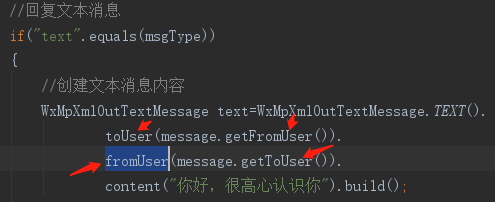
在回复消息的时候需要注意:toUser,和fromUser的主体是谁,一般时候微信端传递过来的值反着的。
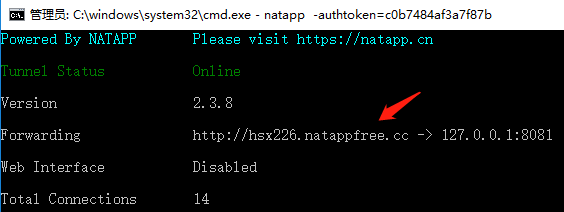
4.通过natapp配置内网穿透映射127.0.0.1:8080端口,让微信端能够访问到:
登录注册natapp,下载natapp的客户端,运行,在命令行输入:natapp -authtoken=自己登录后分配的natapptoken号
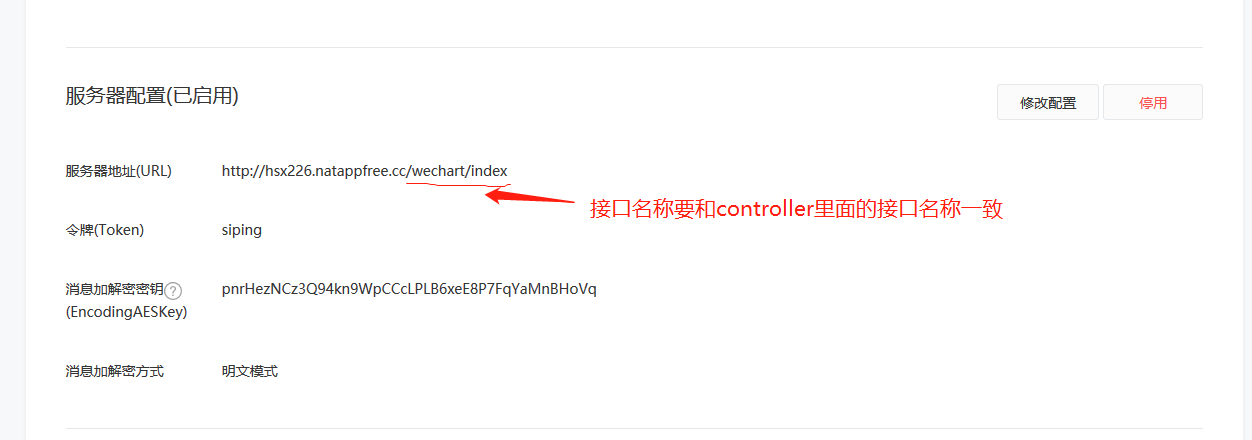
5.和公众号平台对接自己的服务器
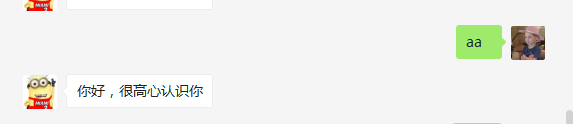
6.结果
微信开发基于springboot的更多相关文章
- 接口开发-基于SpringBoot创建基础框架
说到接口开发,能想到的开发语言有很多种,像什么Java啊..NET啊.PHP啊.NodeJS啊,太多可以用.为什么选择Java,究其原因,最后只有一个解释,那就是“学Java的人多,人员招聘范围大,有 ...
- 基于spring-boot的社区社交微信小程序,适合做脚手架、二次开发
基于spring-boot的社区社交微信小程序,适合做脚手架.二次开发 代码地址如下:http://www.demodashi.com/demo/13867.html 1 概述 笔者做的一个后端基于s ...
- 基于SpringBoot的开源微信开发平台,Jeewx-Boot 1.0 版本发布
项目介绍 JeewxBoot 是一款基于SpringBoot的免费微信开发平台.支持微信公众号.小程序官网.微信抽奖活动. Jeewx-Boot实现了微信公众号管理.小程序CMS.微信抽奖活动等基础功 ...
- 基于SpringBoot从零构建博客网站 - 技术选型和整合开发环境
技术选型和整合开发环境 1.技术选型 博客网站是基于SpringBoot整合其它模块而开发的,那么每个模块选择的技术如下: SpringBoot版本选择目前较新的2.1.1.RELEASE版本 持久化 ...
- Jeewx-Boot 1.1 版本发布,基于SpringBoot的开源微信管家系统
项目介绍 JeewxBoot是一款基于SpringBoot的开源微信管家系统,采用SpringBoot2.1.3 + Mybatis + Velocity 框架技术.支持微信公众号.微信第三方平台(扫 ...
- JeecgBoot 2.1.1 代码生成器AI版本发布,基于SpringBoot+AntDesign的JAVA快速开发平台
此版本重点升级了 Online 代码生成器,支持更多的控件生成,所见即所得,极大的提高开发效率:同时做了数据库兼容专项工作,让 Online 开发兼容更多数据库:Mysql.SqlServer.Ora ...
- 在线Online表单来了!JeecgBoot 2.1 版本发布——基于SpringBoot+AntDesign的快速开发平台
项目介绍 Jeecg-Boot 是一款基于SpringBoot+代码生成器的快速开发平台! 采用前后端分离架构:SpringBoot,Ant-Design-Vue,Mybatis,Shiro,JWT. ...
- 基于SpringBoot免费开源的微信管家平台,Jeewx-Boot 1.0.3 版本发布
项目介绍 JeewxBoot 是一款基于SpringBoot的免费微信开发平台.支持微信公众号.小程序官网.微信抽奖活动.Jeewx-Boot实现了微信公众号管理.小程序CMS.微信抽奖活动等基础功能 ...
- 基于SpringBoot+AntDesign的快速开发平台,JeecgBoot 2.0.2 版本发布
Jeecg-Boot 是一款基于SpringBoot+代码生成器的快速开发平台! 采用前后端分离架构:SpringBoot,Ant-Design-Vue,Mybatis,Shiro,JWT. 强大的代 ...
随机推荐
- EF6 CodeFirst使用MySql
如何使用EF CodeFirst连接MySql数据库? 环境:VS2015.Win7..NetFramework4.5.2.MySql5.6 一.基本操作 1.创建MVC5项目:ZmsoftsWebM ...
- JdbcTemplate中queryForObject方法返回空结果或不正确结果数量的解决方法
在使用Spirng提供的JdbcTemplate中名为queryForObject API进行数据库查询时有时会抛出如下异常: org.springframework.dao.EmptyResultD ...
- 解决 CentOS7 安装完成后ifconfig命令不能用
今天用VMWare安装了CentOS7,选择了最小安装包模式,安装完毕之后想查看一下本机的ip地址,发现报错 # ifconfig -bash: ifconfig: command not found ...
- 20175226 2018-2019-2 《Java程序设计》第四周学习总结
20175226 2018-2019-2 <Java程序设计>第四周学习总结 教材学习内容总结 子类与父类 格式class 子类名 extends 父类名 Object类是所有类的祖先类 ...
- Java实现大数加法运算的几种方法
大数加法 思路一:定义String变量str1和str2分别存储输入的两个大数,定义num1[]和num2[]两个int型数组,将两个字符串分别逐个字符逆序存入数组,定义sum[]数组存放求和结果,使 ...
- 微信H5支付证书过滤
在对接微信支付,退款的时候,遇到 Caused by: java.lang.RuntimeException: java.io.IOException: DerInputStream.getLengt ...
- apache 配置反向代理 设置
1.下载 安装 下载地址:http://httpd.apache.org/download.cgi 将apache 安装到某个目录中 修改conf/http.conf文件 修改配置文件端口 (端口为 ...
- 大一上c语言学习总结
一: 近期C语言知识点易错点整理(1)main()----在c语言中称之为“主函数”,一个c程序有且仅有一个main函数,任何一个c程序总是从main函数开始执行,main函数后面的一对圆括号不能省略 ...
- Android CameraManager 类
先看代码: private SurfaceView mSurfaceView; private SurfaceHolder mSurfaceHolder; private CameraManager ...
- Codeforces 840C. On the Bench 动态规划 排列组合
原文链接https://www.cnblogs.com/zhouzhendong/p/CF840C.html 题解 首先,我们可以发现,如果把每一个数的平方因子都除掉,那么剩下的数,不相等的数都可以相 ...