
运用SqlSugar框架+Axios写的增删查案例
使用SqlSugar框架需要引用NuGet程序包否则会出现报错。

前台页面创建代码:
@{
ViewBag.Title = "Index";
}
<h2>Index</h2>
<link href="~/Content/bootstrap.min.css" rel="stylesheet" />
<script src="~/Scripts/vue.min.js"></script>
<script src="~/Scripts/axios.min.js"></script>
<div id="app">
<table style="width:80%;margin:auto;" class="table table-bordered table-hover">
<tr>
<th>姓名:</th>
<td><input type="text" v-model="user.UserName" /></td>
</tr>
<tr>
<th>手机号:</th>
<td>
<input type="text" v-model="user.PhoneNumber" />
</td>
</tr>
<tr>
<th>密码:</th>
<td><input type="text" v-model="user.UserPassword" /></td>
</tr>
<tr>
<th>状态:</th>
<td><input type="text" v-model="user.UserState" /></td>
</tr>
<tr>
<td colspan="2"><button v-on:click="add" class="btn btn-info">添加</button></td>
</tr>
</table>
<table class="table table-bordered table-hover">
<tr>
<td>编号</td>
<td>用户名</td>
<td>手机号</td>
<td>密码</td>
<td>状态</td>
<td>操作</td>
</tr>
@foreach (var item in ViewBag.data)
{
<tr>
<td>@item.UserID</td>
<td>@item.UserName</td>
<td>@item.PhoneNumber</td>
<td>@item.UserPassword</td>
<td>@item.UserState</td>
<td><a href="/Home/Delete/@item.UserID">删除</a> <a href="#">修改</a></td>
</tr>
}
</table>
</div>
<script>
new Vue({
el: "#app",
data: {
user: { UserName: "", PhoneNumber: "", UserPassword: "", UserState: 0 },
} ,
methods: {
add: function () {
axios.post('/Home/Insert', { users:this.user }).then(
res => {
window.location.href = "/Home/Index"
}).catch(
error => {
console.log(error);
});
}
}
});
</script>
创建Config.CS链接数据库
public class Config
{
/// <summary>
/// 数据库连接字符串(私有字段)
/// </summary>
private static readonly string _connectionString = System.Configuration.
ConfigurationManager.ConnectionStrings["SqlServerConn"].ToString();
/// <summary>
/// 数据库连接字符串(公有属性)
/// </summary>
public static string ConnectionString
{
get { return _connectionString; }
}
}
创建DBSuglar.CS
public class DBSuglar
{
public static SqlSugarClient GetSqlSugarClient()
{
SqlSugarClient db = new SqlSugarClient(new ConnectionConfig()
{
ConnectionString = Config.ConnectionString,//必填, 数据库连接字符串
DbType = DbType.SqlServer, //必填, 数据库类型
IsAutoCloseConnection = true, //默认false, 时候知道关闭数据库连接, 设置为true无需使用using或者Close操作
InitKeyType = InitKeyType.SystemTable //默认SystemTable, 字段信息读取, 如:该属性是不是主键,是不是标识列等等信息
});
return db;
}
}
创建实体类User.cs
public class User
{
public List<UserInfo> Show()
{
return Users.GetAll().ToList();
}
public bool Delete(int id)
{
return Users.Delete(id);
}
public bool Insert(UserInfo us)
{
return Users.Insert(us);
}
}
创建Home控制器
public class HomeController : Controller
{
public static SqlSugarClient db = DBSuglar.GetSqlSugarClient();
User us = new User();
/// <summary>
/// 查询
/// </summary>
/// <returns></returns>
public ActionResult Index()
{
ViewBag.data = db.SqlQueryable<UserInfo>("select * from UserInfo").ToList();
return View();
}
/// <summary>
/// 删除
/// </summary>
/// <param name="id">删除的主键</param>
/// <returns></returns>
public ActionResult Delete(int id)
{
db.Deleteable<UserInfo>().Where(it => it.UserID == id).ExecuteCommand();
return RedirectToAction("Index");
}
/// <summary>
/// 添加
/// </summary>
public ActionResult Insert(UserInfo users)
{
var i= db.Insertable(users).ExecuteReturnBigIdentity();
return Json(i,JsonRequestBehavior.AllowGet);
}
}
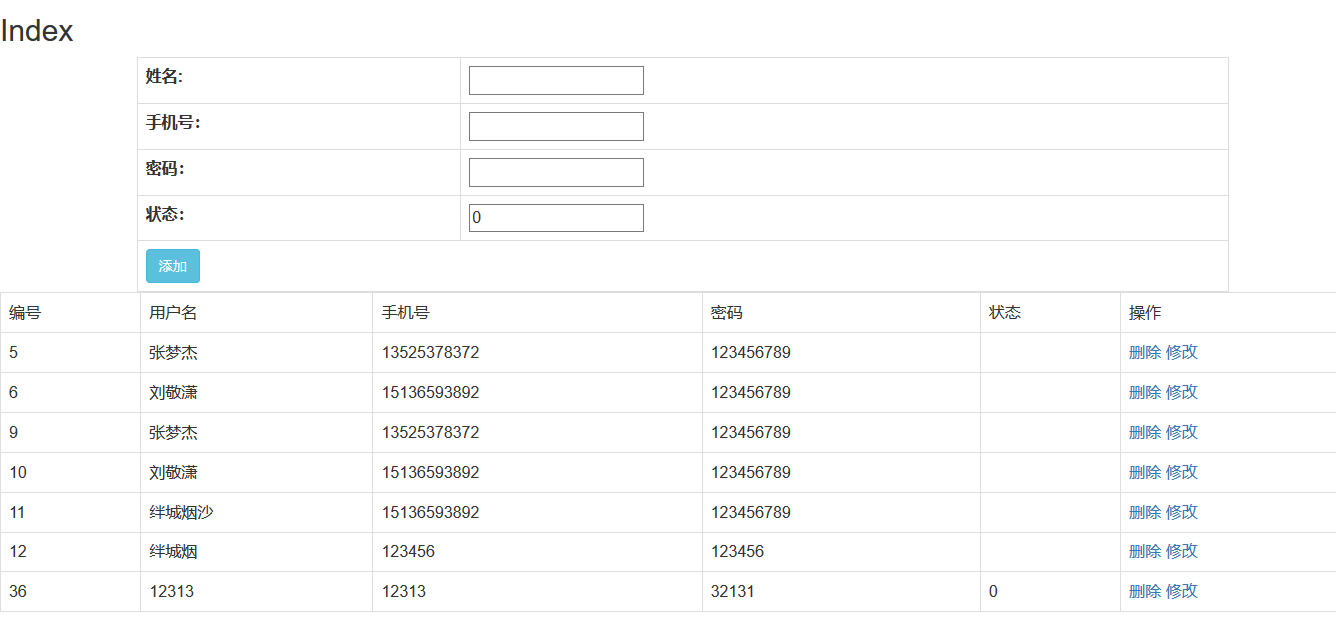
整体页面效果
运用SqlSugar框架+Axios写的增删查案例的更多相关文章
- Django框架model实现数据库增删查改
1.创建Django工程 https://www.cnblogs.com/CK85/p/10159159.html 2.在model.py中配置生成表格的类对象. from django.db imp ...
- 快速入门GreenDao框架并实现增删改查案例
大家的项目中不可避免的使用到SQLite,为此我们要花费心思编写一个增删改查框架.而一个好的ORM框架则能够给我们带来极大的方便,今天给大家讲解一个非常火热的ORM-GreenDao. 基本概念 Gr ...
- ssm项目框架搭建(增删改查案例实现)——(SpringMVC+Spring+mybatis项目整合)
Spring 常用注解 内容 一.基本概念 1. Spring 2. SpringMVC 3. MyBatis 二.开发环境搭建 1. 创建 maven 项目 2. SSM整合 2.1 项目结构图 2 ...
- 一套手写ajax加一般处理程序的增删查改
倾述下感受:8天16次驳回.这个惨不忍睹. 好了不说了,说多了都是泪. 直接上代码 : 这个里面的字段我是用动软生成的,感觉自己手写哪些字段太浪费时间了,说多了都是泪 ajax.model层的代码: ...
- TP框架 增删查
TP框架添加数据到数据库1.使用数组方式添加造模型对象 2.使用AR方式 强类型语言存在的方式 3.使用自动收集表单添加 :只能用POST方式,提交数据一个操作方法实现两个逻辑:A显示页面B得到数据 ...
- SSH框架的多表查询和增删查改 (方法一)中
原创作品,允许转载,转载时请务必标明作者信息和声明本文章==>http://www.cnblogs.com/zhu520/p/7774144.html 这边文章是接的刚刚前一遍的基础上敲的 ...
- backbonejs mvc框架的增删查改实例
一:开发环境 coffeescript和nodejs需要先安装,没装网上自己查安装步骤. 代码编写环境及esp框架下载: esp框架下载地址:https://github.com/nonocast/e ...
- SSH框架的多表查询和增删查改 (方法一)上
原创作品,允许转载,转载时请务必标明作者信息和声明本文章==> http://www.cnblogs.com/zhu520/p/7772823.html 因为最近在做Android 练习的 ...
- SSH框架的多表查询(方法二)增删查改
必须声明本文章==>http://www.cnblogs.com/zhu520/p/7773133.html 一:在前一个方法(http://www.cnblogs.com/zhu520/p ...
随机推荐
- 源码-mybatis-01-SqlSessionFactory创建
0.总概 1.SqlSessionFactory在mybatis只要创建一次: import com.suntek.vdm.gw.util.AESEncipher; import org.apac ...
- 前端自动提示功能插件-typeahead
typeahead https://npm.taobao.org/package/npm-typeahead A lightweight web-app that implements typeahe ...
- Ajax简述
AJAX即“Asynchronous Javascript And XML”(异步JavaScript和XML),是指一种创建交互式网页应用的网页开发技术.AJAX = 异步 JavaScript和X ...
- Bootstrap常用样板
http://blog.csdn.net/Star_449/article/details/76098292 1.图片样式 1.1..img-responsive: 直接为图片添加该样式,可以实现响应 ...
- C# NPOI 操作Excel 案例
1.加入NPOI 程序集,使用nuget添加程序集 2.引用NPOI程序集 private IWorkbook ExportExcel(PrintQuotationOrderViewModel mod ...
- linux --xampp 配置多个网站
我们想要在本地安装两个测试域名,www.abc.tld, www.xyz.tld, 分别指向到 htdoc 目录下的 abc.tld 和 xyz.tld 文件夹下.tld 是顶级域名 the top ...
- java Socket实例
可以实现客户端与服务端双向通信,支持多客户端连接,客户端断开连接,服务端不会出现异常 服务端代码: package com.thinkgem.jeesite.modules.socketTest.de ...
- Vagrant上运行SITL
打算给Tower加个手机遥控的功能,用运行于vagrant sitl来联合调试,在公司的网络条件很好的情况下没出任何错,都是根据http://ardupilot.org/dev/docs/settin ...
- flask学习(二)
一.蓝图 作用:给开发者提供目录结构 功能:1.自定义模板.静态文件目录 2.给一类url加前缀 3.给一类url添加before_request 目录结构 from flask_werkzur ...
- spring boot集成websocket实现聊天功能和监控功能
本文参考了这位兄台的文章: https://blog.csdn.net/ffj0721/article/details/82630134 项目源码url: https://github.com/zhz ...