
Summary on deep learning framework --- Theano && Lasagne
Summary on deep learning framework --- Theano && Lasagne
2017-03-23
1. theano.function
output = input ** 2
f = theano.function([input], output)
print(f(3))
>> the output is: 3^2 = 9.

2. verbose = 1 or 0, does it have any difference ?
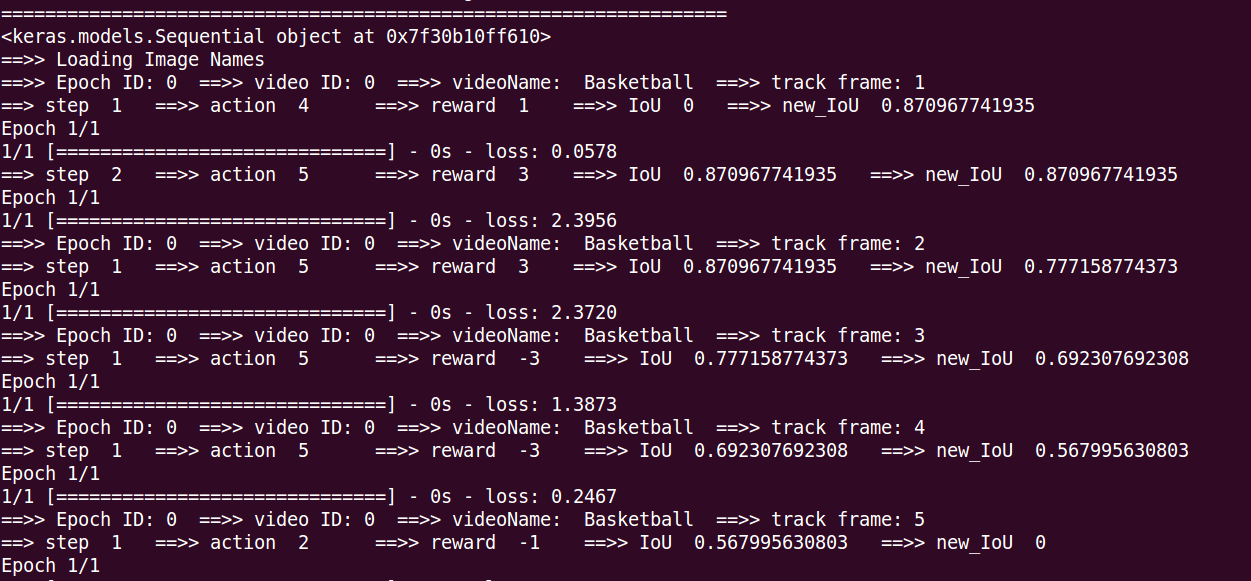
some deep learning framework such as torch or theano, use this flag to control whether shown some training information on the terminal.
such as: hist = Deep_Q_Network.fit(X_train, y_train, batch_size=batch_size, nb_epoch=1, verbose=1)
It will display on the terminal: loss: ~~~
3. how to use specific GPU with Theano framework ?
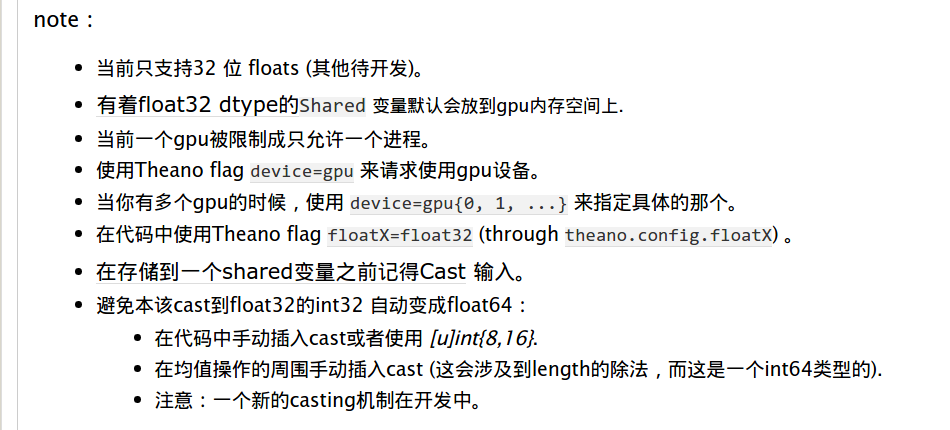
-->> device=gpu{0, 1, ...}
the answer from: http://www.cnblogs.com/shouhuxianjian/p/4590224.html
4. ValueError: GpuJoin: Wrong inputs for input 2 related to inputs 0.!
0%| | 0/301 [00:00<?, ?it/s]
Traceback (most recent call last):
File "wangxiao-02-train.py", line 187, in <module>
train()
File "wangxiao-02-train.py", line 171, in train
salgan_batch_iterator(model, train_data, None)
File "wangxiao-02-train.py", line 108, in salgan_batch_iterator
G_obj, D_obj, G_cost = model.D_trainFunction(batch_input,batch_output,batch_patch) #add batch_patch ???
File "/usr/local/lib/python2.7/dist-packages/theano/compile/function_module.py", line 871, in __call__
storage_map=getattr(self.fn, 'storage_map', None))
File "/usr/local/lib/python2.7/dist-packages/theano/gof/link.py", line 314, in raise_with_op
reraise(exc_type, exc_value, exc_trace)
File "/usr/local/lib/python2.7/dist-packages/theano/compile/function_module.py", line 859, in __call__
outputs = self.fn()
ValueError: GpuJoin: Wrong inputs for input 2 related to inputs 0.!
Apply node that caused the error: GpuJoin(TensorConstant{1}, GpuElemwise{Composite{scalar_sigmoid((i0 + i1))},no_inplace}.0, GpuFromHost.0)
Toposort index: 955
Inputs types: [TensorType(int8, scalar), CudaNdarrayType(float32, (False, True, False, False)), CudaNdarrayType(float32, 4D)]
Inputs shapes: [(), (32, 1, 192, 256), (32, 3, 224, 224)]
Inputs strides: [(), (49152, 0, 256, 1), (150528, 50176, 224, 1)]
Inputs values: [array(1, dtype=int8), 'not shown', 'not shown']
Outputs clients: [[GpuContiguous(GpuJoin.0)]]
HINT: Re-running with most Theano optimization disabled could give you a back-trace of when this node was created. This can be done with by setting the Theano flag 'optimizer=fast_compile'. If that does not work, Theano optimizations can be disabled with 'optimizer=None'.
HINT: Use the Theano flag 'exception_verbosity=high' for a debugprint and storage map footprint of this apply node.
what's going on ???
==>> Because I input wrong image size: as shown in blue ! (32, 1, 192, 256), (32, 3, 224, 224)
5. Error when tring to find the memory information on the GPU: an illegal memory access was encountered
0%| | 0/301 [00:00<?, ?it/s]Error when tring to find the memory information on the GPU: an illegal memory access was encountered
Error freeing device pointer 0x10372a00000 (an illegal memory access was encountered). Driver report 0 bytes free and 0 bytes total
CudaNdarray_uninit: error freeing self->devdata. (self=0x7f19d0544830, self->devata=0x10372a00000)
Error when trying to find the memory information on the GPU: an illegal memory access was encountered
Error allocating 422125568 bytes of device memory (an illegal memory access was encountered). Driver report 0 bytes free and 0 bytes total
Segmentation fault
==>>
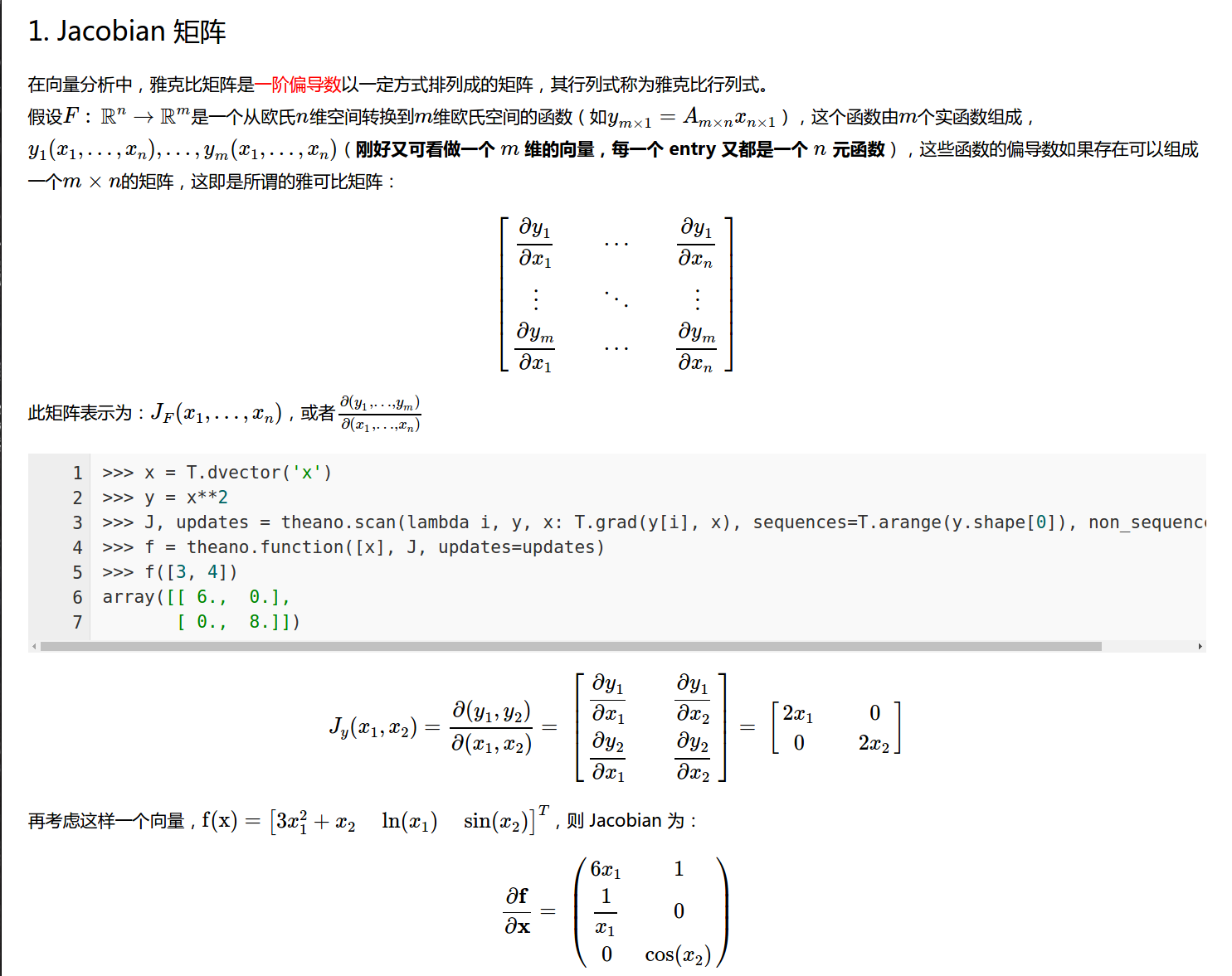
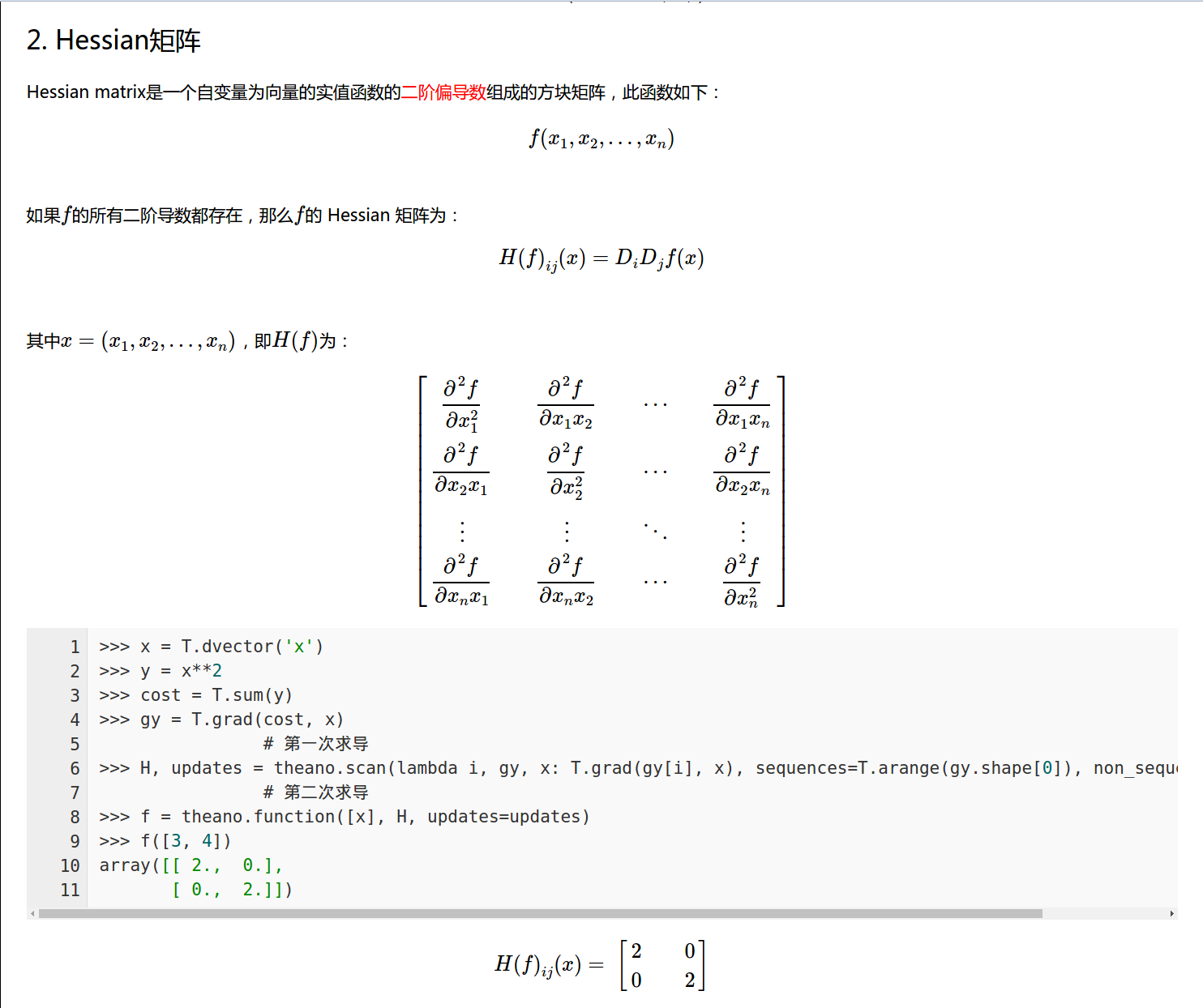
6. some explnations about Jacobian matrix, Hessian matrix :
from: http://blog.csdn.net/lanchunhui/article/details/50234117
7. some basic tutorials from theano Document v0.9:
(1). basic functin definition:
>> import numpy as np
>> import theano.tensor as T
>> from theano import function
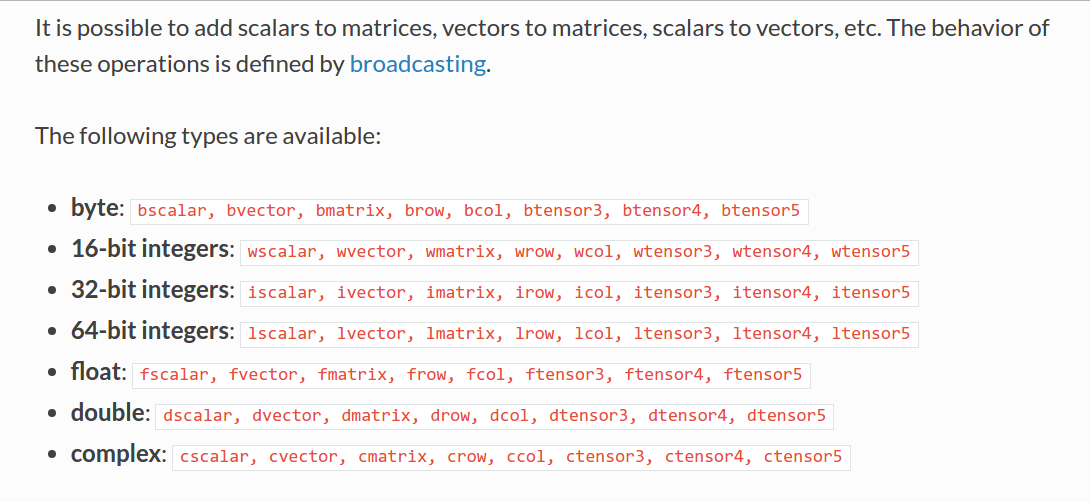
>> x = T.dscalar('x') -- double style the type we assign to “0-dimensional arrays (scalar) of doubles (d)”.
>> y = T.dscalar('y')
>> z = x + y
>> f = function([x, y], z)
when test, just input f(2, 3), then it will return z = 2+3 = array(5.0). We can also use the pp function to pretty-print out the computation associdated to z.
==>> print(pp(z)) ==>> (x+y).
Also, we can add two matrices: x = T.dmatrix('x')
(2). Derivatives in Theano
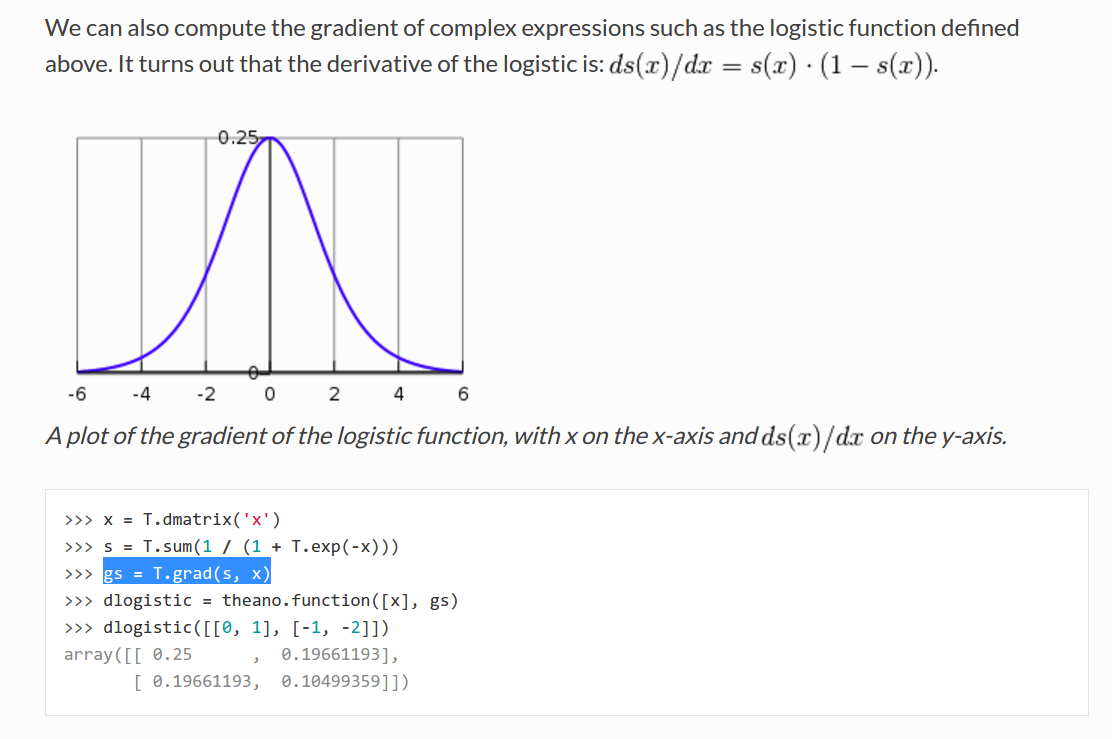
<1>. Computing Gradients: using T.grad
<2>. Computing the Jacobian
this blog provided us a good tutorial about this definiton: http://blog.csdn.net/lanchunhui/article/details/50234117
8. set the GPU mode in theano framework:
vim ~/.theanorc
and add these lines into this file:
[global]
device = gpu
floatX=float32
[nvcc]
flags=--machine=64
[lib] cnmem=100
==>> then test these codes to see whether it shown success ?
from theano import function, config, shared, tensor

import numpy

import time

vlen = 10 * 30 * 768  # 10 x #cores x # threads per core

iters = 1000

rng = numpy.random.RandomState(22)

x = shared(numpy.asarray(rng.rand(vlen), config.floatX))

f = function([], tensor.exp(x))

print(f.maker.fgraph.toposort())

t0 = time.time()

for i in range(iters):

    r = f()

t1 = time.time()

print("Looping %d times took %f seconds" % (iters, t1 - t0))

print("Result is %s" % (r,))

if numpy.any([isinstance(x.op, tensor.Elemwise) and

              ('Gpu' not in type(x.op).__name__)

              for x in f.maker.fgraph.toposort()]):

    print('Used the cpu')

else:

    print('Used the gpu')

9. No Module named cv2 :
sudo apt-get install Python-OpenCV
otherwise, you can try:
    pip install --upgrade setuptools

    pip install numpy Matplotlib

    pip install opencv-python
10. The following error happened while compiling the node':
mod.cu(305): warning: subscript out of range
mod.cu(313): warning: subscript out of range
mod.cu(317): error: identifier "cudnnSetConvolutionNdDescriptor_v3" is undefined
1 error detected in the compilation of "/tmp/tmpxft_0000053a_00000000-9_mod.cpp1.ii".
['nvcc', '-shared', '-O3', '-arch=sm_61', '-m64', '-Xcompiler', '-fno-math-errno,-Wno-unused-label,-Wno-unused-variable,-Wno-write-strings,--machine=64,-DCUDA_NDARRAY_CUH=c72d035fdf91890f3b36710688069b2e,-DNPY_NO_DEPRECATED_API=NPY_1_7_API_VERSION,-fPIC,-fvisibility=hidden', '-Xlinker', '-rpath,/root/.theano/compiledir_Linux-3.19--generic-x86_64-with-Ubuntu-14.04-trusty-x86_64-2.7.6-64/cuda_ndarray', '-I/usr/local/lib/python2.7/dist-packages/theano/sandbox/cuda', '-I/usr/local/cuda/include', '-I/usr/local/lib/python2.7/dist-packages/numpy/core/include', '-I/usr/include/python2.7', '-I/usr/local/lib/python2.7/dist-packages/theano/gof', '-o', '/root/.theano/compiledir_Linux-3.19--generic-x86_64-with-Ubuntu-14.04-trusty-x86_64-2.7.6-64/tmpOSxzD1/bd1168e6726f16baed8c5f60c7ded9d1.so', 'mod.cu', '-L/usr/lib', '-lcudnn', '-lpython2.7', '-lcudart']
... and
Exception: ('The following error happened while compiling the node', GpuDnnConvDesc{border_mode=(1, 1), subsample=(1, 1), conv_mode='conv', precision='float32'}(MakeVector{dtype='int64'}.0, MakeVector{dtype='int64'}.0), '\n', 'nvcc return status', 2, 'for cmd', 'nvcc -shared -O3 -arch=sm_61 -m64 -Xcompiler -fno-math-errno,-Wno-unused-label,-Wno-unused-variable,-Wno-write-strings,--machine=64,-DCUDA_NDARRAY_CUH=c72d035fdf91890f3b36710688069b2e,-DNPY_NO_DEPRECATED_API=NPY_1_7_API_VERSION,-fPIC,-fvisibility=hidden -Xlinker -rpath,/root/.theano/compiledir_Linux-3.19--generic-x86_64-with-Ubuntu-14.04-trusty-x86_64-2.7.6-64/cuda_ndarray -I/usr/local/lib/python2.7/dist-packages/theano/sandbox/cuda -I/usr/local/cuda/include -I/usr/local/lib/python2.7/dist-packages/numpy/core/include -I/usr/include/python2.7 -I/usr/local/lib/python2.7/dist-packages/theano/gof -o /root/.theano/compiledir_Linux-3.19--generic-x86_64-with-Ubuntu-14.04-trusty-x86_64-2.7.6-64/tmpOSxzD1/bd1168e6726f16baed8c5f60c7ded9d1.so mod.cu -L/usr/lib -lcudnn -lpython2.7 -lcudart', "[GpuDnnConvDesc{border_mode=(1, 1), subsample=(1, 1), conv_mode='conv', precision='float32'}(<TensorType(int64, vector)>, <TensorType(int64, vector)>)]")
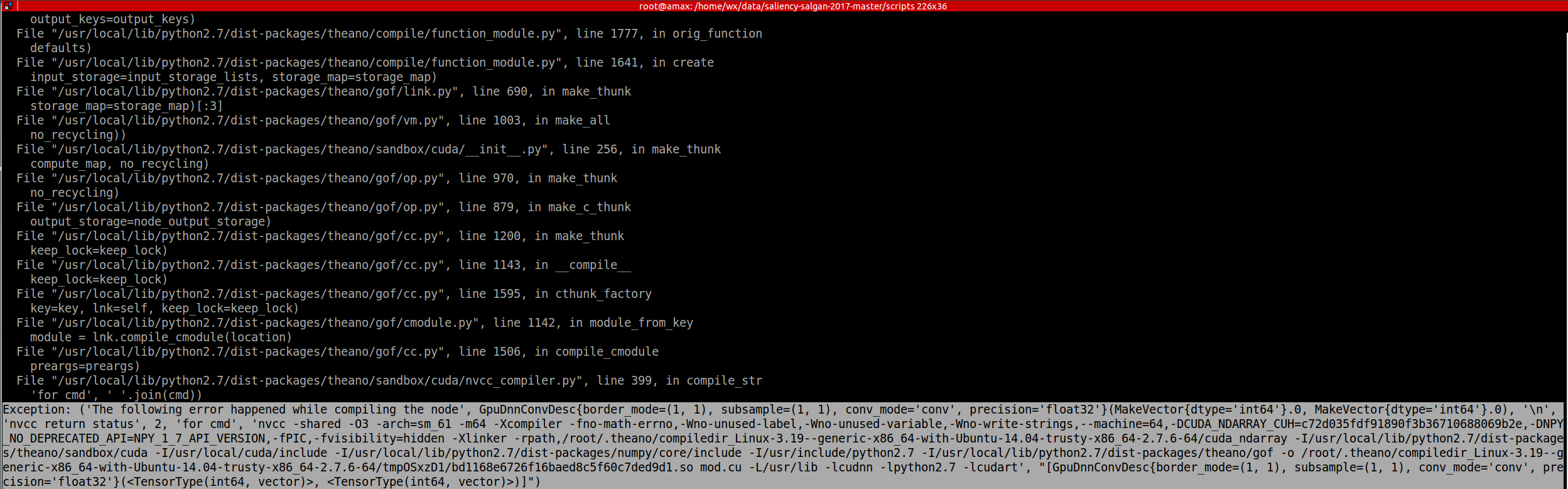
the version of theano is not matched with the code. update the theano will be ok.
11. Theano framework shown an error like this:
File "/usr/local/lib/python2.7/dist-packages/enum.py", line 199, in __init__ raise EnumBadKeyError(key)
Need 2 paramers (given 4)
==>> This error is caused when the enum34 module has been installed alongside the old enum module. enum34 is the backport for Python 2.x of the standard enum in Python 3.4. Many packages have started to use it and so it will be installed implicitly while installing another package. enum34 overrides the old enum files and causes this error.
You could remove enum34 and get rid of this error. But since Python 3.x has already adapted a new enum type, it might be wiser to uninstall the old enum and rewrite your code to use enum34. Its syntax is shown in this example. This explnation comes from: https://codeyarns.com/2015/07/16/attributeerror-with-python-enum/
==>> maybe first you need to do is just install: $ sudo pip install enum34
==>> The second main reason is that: you are using pkle file generted not by your current environments, it's also caused by enum, this is a bug !
==>> So, you can re-generate your pkle file and try again. It will be OK.
12. Load pkl file in python:
## Download the mnist dataset if it is not yet available.
url = 'http://deeplearning.net/data/mnist/mnist.pkl.gz'
filename = 'mnist.pkl.gz'
if not os.path.exists(filename):
print("Downloading mnist dataset ... ")
urlretrieve(url, filename)
## we will then load and unpickle the file.
import gzip
with gzip.open(filename, 'rb') as f:
data = pickle_load(f, encoding='latin-1')
13. ValueError: You are tring to use the old GPU back-end. It was removed from Theano. Use device=cuda* now.
wangxiao@AHU-Wangxiao:/media/wangxiao/724eaeef-e688-4b09-9cc9-dfaca44079b2/saliency-salgan-2017-master-tracking/scripts--suntao--finalVersion$ python wangxiao-02-train.py
Traceback (most recent call last):
File "wangxiao-02-train.py", line 11, in <module>
import theano
File "/usr/local/lib/python2.7/dist-packages/theano/__init__.py", line 67, in <module>
from theano.configdefaults import config
File "/usr/local/lib/python2.7/dist-packages/theano/configdefaults.py", line 119, in <module>
in_c_key=False)
File "/usr/local/lib/python2.7/dist-packages/theano/configparser.py", line 285, in AddConfigVar
configparam.__get__(root, type(root), delete_key=True)
File "/usr/local/lib/python2.7/dist-packages/theano/configparser.py", line 333, in __get__
self.__set__(cls, val_str)
File "/usr/local/lib/python2.7/dist-packages/theano/configparser.py", line 344, in __set__
self.val = self.filter(val)
File "/usr/local/lib/python2.7/dist-packages/theano/configdefaults.py", line 98, in filter
'You are tring to use the old GPU back-end. '
ValueError: You are tring to use the old GPU back-end. It was removed from Theano. Use device=cuda* now. See https://github.com/Theano/Theano/wiki/Converting-to-the-new-gpu-back-end%28gpuarray%29 for more information.
==>> just replace your gpu back-end with the suggestions, i.e. device=cuda*
vim ~/.theanorc
and add these lines into this file:
[global]
device = cuda
floatX=float32
[nvcc]
flags=--machine=64
[lib] cnmem=100
14. Can not use cuDNN on context None: cannot compile with cuDNN. We got this error:
wangxiao@wangxiao:/media/wangxiao/724eaeef-e688-4b09-9cc9-dfaca44079b2/saliency-salgan-2017-master-tracking/scripts--suntao--finalVersion$ python wangxiao-02-train.py
Can not use cuDNN on context None: cannot compile with cuDNN. We got this error:
/usr/bin/ld: cannot find -lcudnn
collect2: error: ld returned 1 exit status
==>> vim .theanorc
[global]
device = cuda
floatX = float32
[dnn]
enabled = True
include_path=/usr/local/cuda/include
library_path=/usr/local/cuda/lib64
==>> This will make the cuDNN work.
Using cuDNN version 5110 on context None
Mapped name None to device cuda: GeForce GTX 1080 (0000:02:00.0)
15. theano && Lasagne, ImportError: No module named cuda
Traceback (most recent call last):
File "wangxiao-02-train.py", line 17, in <module>
from models.model_salgan import ModelSALGAN
File "/media/wangxiao/724eaeef-e688-4b09-9cc9-dfaca44079b2/saliency-salgan-2017-master-tracking/scripts--suntao--finalVersion/models/model_salgan.py", line 7, in <module>
import generator
File "/media/wangxiao/724eaeef-e688-4b09-9cc9-dfaca44079b2/saliency-salgan-2017-master-tracking/scripts--suntao--finalVersion/models/generator.py", line 11, in <module>
import C3D_AlexNet
File "/media/wangxiao/724eaeef-e688-4b09-9cc9-dfaca44079b2/saliency-salgan-2017-master-tracking/scripts--suntao--finalVersion/models/C3D_AlexNet.py", line 14, in <module>
from lasagne.layers.dnn import Conv3DDNNLayer, MaxPool3DDNNLayer
File "/usr/local/lib/python2.7/dist-packages/lasagne/layers/dnn.py", line 2, in <module>
from theano.sandbox.cuda import dnn
ImportError: No module named cuda
==>> change the following codes:
export LD_LIBRARY_PATH=/home/wangxiao/cuda-v5.1/lib64:$LD_LIBRARY_PATH

export CPATH=/home/wangxiao/cuda-v5.1/include:$CPATH

export LIBRARY_PATH=/home/wangxiao/cuda-v5.1/lib64:$LIBRARY_PATH
16. Error: pygpu.gpuarray.GpuArrayException: out of memory
0%| | 0/301 [00:00<?, ?it/s]Traceback (most recent call last):
File "wangxiao-02-train.py", line 231, in <module>
train()
File "wangxiao-02-train.py", line 217, in train
salgan_batch_iterator(model, train_data, None)
File "wangxiao-02-train.py", line 148, in salgan_batch_iterator
G_obj, D_obj, G_cost = model.G_trainFunction(batch_input,batch_output,batch_patch)
File "/home/wangxiao/anaconda2/lib/python2.7/site-packages/theano/compile/function_module.py", line 898, in __call__
storage_map=getattr(self.fn, 'storage_map', None))
File "/home/wangxiao/anaconda2/lib/python2.7/site-packages/theano/gof/link.py", line 325, in raise_with_op
reraise(exc_type, exc_value, exc_trace)
File "/home/wangxiao/anaconda2/lib/python2.7/site-packages/theano/compile/function_module.py", line 884, in __call__
self.fn() if output_subset is None else\
File "pygpu/gpuarray.pyx", line 654, in pygpu.gpuarray.pygpu_empty (pygpu/gpuarray.c:9764)
File "pygpu/gpuarray.pyx", line 280, in pygpu.gpuarray.array_empty (pygpu/gpuarray.c:5616)
pygpu.gpuarray.GpuArrayException: out of memory
Apply node that caused the error: GpuAllocEmpty{dtype='float32', context_name=None}(Assert{msg='The convolution would produce an invalid shape (dim[0] < 0).'}.0, Assert{msg='The convolution would produce an invalid shape (dim[1] < 0).'}.0, Assert{msg='The convolution would produce an invalid shape (dim[2] <= 0).'}.0, Assert{msg='The convolution would produce an invalid shape (dim[3] <= 0).'}.0)
Toposort index: 1310
Inputs types: [TensorType(int64, scalar), TensorType(int64, scalar), TensorType(int64, scalar), TensorType(int64, scalar)]
Inputs shapes: [(), (), (), ()]
Inputs strides: [(), (), (), ()]
Inputs values: [array(30), array(256), array(56), array(56)]
Outputs clients: [[GpuDnnConv{algo='small', inplace=True}(GpuContiguous.0, GpuContiguous.0, GpuAllocEmpty{dtype='float32', context_name=None}.0, GpuDnnConvDesc{border_mode=(1, 1), subsample=(1, 1), conv_mode='conv', precision='float32'}.0, Constant{1.0}, Constant{0.0})]]
HINT: Re-running with most Theano optimization disabled could give you a back-trace of when this node was created. This can be done with by setting the Theano flag 'optimizer=fast_compile'. If that does not work, Theano optimizations can be disabled with 'optimizer=None'.
HINT: Use the Theano flag 'exception_verbosity=high' for a debugprint and storage map footprint of this apply node.
==>> THEANO_FLAGS="device=gpu0,floatX=float32" python test.py
==>> THEANO_FLAGS="device=gpu0,floatX=float32,optimizer=None" python test.py
比较有用的信息是:Input dimension mis-match,但是具体出问题在哪里,仍然让人一头雾水。因为Theano的计算图进行了一些优化,导致出错的时候难以与原始代码对应起来。想解决这个也很简单,就是关闭计算图的优化功能。可以通过THEANO_FLAGS的optimizer,它的默认值是”fast_run”,代表最大程度的优化,我们平时一般就使用这个,但是如果想让调试信息更详细,我们就需要关闭一部分优化:fast_compile或者关闭全部优化:None,这里我们将optimizer设置成”None”,执行如下命令:
THEANO_FLAGS="device=gpu0,floatX=float32,optimizer=None" python test.py

reference: http://www.qingpingshan.com/bc/jsp/198194.html
17. When import theano, it shown the error:
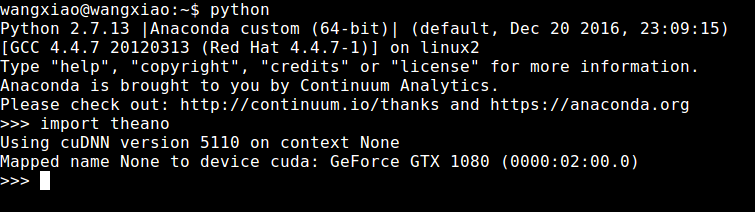
>>> import theano
Using cuDNN version 5110 on context None
Mapped name None to device cuda: GeForce GTX 1080 (0000:02:00.0)
>>>
==>> Solution:
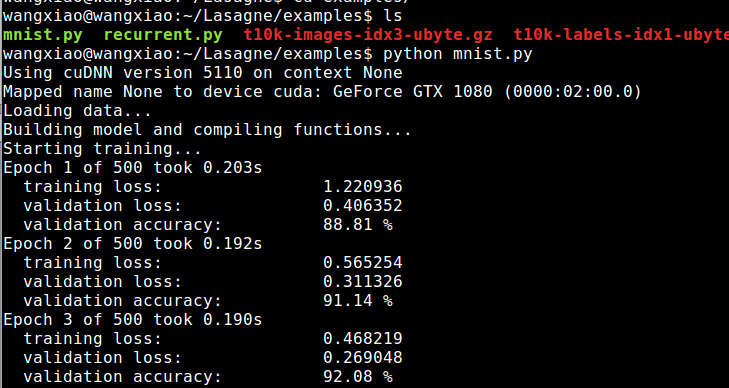
But when I try the example code in Lasagne: mnist.py, it indeed could run ......
Does it really concern ?
18. one problem occured today, when I import keras using tensorflow backend and pytorch. as followings:
Could not parse default value '20' from Attr("lower_frequency_limit: float = 20") for Op Mfcc
==>> try import keras first, then import pytorch. I solved this issue with this method. TT ...
Summary on deep learning framework --- Theano && Lasagne的更多相关文章
- Summary on deep learning framework --- PyTorch
Summary on deep learning framework --- PyTorch Updated on 2018-07-22 21:25:42 import osos.environ[ ...
- Summary on deep learning framework --- TensorFlow
Summary on deep learning framework --- TensorFlow Updated on 2018-07-22 21:28:11 1. Check failed: s ...
- Summary on deep learning framework --- Torch7
Summary on deep learning framework --- Torch7 2018-07-22 21:30:28 1. 尝试第一个 CNN 的 torch版本, 代码如下: -- ...
- Deep Learning framework --- MexNet 安装,测试,以及相关问题总结
Deep Learning framework --- MexNet 安装,测试,以及相关问题总结 一.安装: 参考博文:http://www.open-open.com/lib/view/op ...
- Install and Compile MatConvNet: CNNs for MATLAB --- Deep Learning framework
Install and Compile MatConvNet: CNNs for MATLAB --- Deep Learning framework 2017-04-18 10:19:35 If ...
- deep learning framework(不同的深度学习框架)
常用的deep learning frameworks 基本转自:http://www.codeceo.com/article/10-open-source-framework.html 1. Caf ...
- Deep learning with Theano 官方中文教程(翻译)(四)—— 卷积神经网络(CNN)
供大家相互交流和学习,本人水平有限,若有各种大小错误,还请巨牛大牛小牛微牛们立马拍砖,这样才能共同进步!若引用译文请注明出处http://www.cnblogs.com/charleshuang/. ...
- Deep learning with Theano 官方中文教程(翻译)(三)——多层感知机(MLP)
关于更多的http://deeplearning.net/tutorial/的翻译还有学习笔记会陆续整理传到博客. 供大家相互交流和学习,本人水平有限,若有各种大小错误,还请巨牛大牛小牛微牛们立马拍砖 ...
- Machine and Deep Learning with Python
Machine and Deep Learning with Python Education Tutorials and courses Supervised learning superstiti ...
随机推荐
- springcloud第四步:ribbon搭建服务负载均衡
使用ribbon实现负载均衡 启动两个会员服务工程,端口号分别为8762.8763,订单服务 使用负载均衡策略轮训到会员服务接口. 什么是ribbon ribbon是一个负载均衡客户端 类似nginx ...
- gitlab自动备份和定时删除
GitLab数据手动备份1.GitLab默认备份目录为/var/opt/gitlab/backups,可以修改/etc/gitlab/gitlab.rb里面的默认存放备份文件目录,这里使用默认备份目录 ...
- 阿里云RDS数据库改造迁移方案
1. 改造原因 (1) 由于历史原因, 本应该是同一个库的表分布在两个数据库中,需要对这两个库进行合并. (2) 已有的数据库性能无法满足业务的增长需要, 查询卡,慢问题突出. (3) 当前自建Mys ...
- ui component 是一个前端 mvc 开发框架
- Xamarin.Forms 自定义 TapGestureRecognizer 附加属性
While creating Xamarin.Forms applications, definitely you are going to need TapGestureRecognizer oft ...
- 递归函数 Vue ElementUI
对树形菜单的递归操作,首先应该对树形菜单数据进行整理,优化成自己需要的类型 比如Vue + ElementUI的动态侧边栏数据 export function routerRoleToPretty ( ...
- JDK8 HashMap--getTreeNode()获取红黑树指定key的节点
/*获取红黑树的指定节点*/ final TreeNode<K,V> getTreeNode(int h, Object k) { return ((parent != null) ? r ...
- windows CMD常用命令
命令简介 cmd是command的缩写.即命令行 . 虽然随着计算机产业的发展,Windows 操作系统的应用越来越广泛,DOS 面临着被淘汰的命运,但是因为它运行安全.稳定,有的用户还在使用,所以一 ...
- Emmet:HTML/CSS代码快速编写神器教程
Emmet的前身是大名鼎鼎的Zen coding,如果你从事Web前端开发的话,对该插件一定不会陌生.它使用仿CSS选择器的语法来生成代码,大大提高了HTML/CSS代码编写的速度,比如下面的演示: ...
- 《高性能Mysql》解读---Mysql的事务和多版本并发
1.base:ACID属性,并发控制 2.MySql事务的隔离级别有哪些,含义是什么? 3.锁知多少,读锁,写锁,排他锁,共享锁,间隙锁,乐观锁,悲观锁. 4.Mysql的事务与锁有什么关联?MySq ...