
Summary on deep learning framework --- Torch7
Summary on deep learning framework --- Torch7
2018-07-22 21:30:28
1. 尝试第一个 CNN 的 torch版本, 代码如下:
 --    We now have 5 steps left to do in training our first torch neural network

 --    1. Load and normalize data

 --    2. Define Neural Network

 --    3. Define Loss function

 --    4. Train network on training data

 --    5. Test network on test data.

 --    1. Load and normalize data

 require 'paths'

 require 'image';

 if (not paths.filep("cifar10torchsmall.zip")) then

     os.execute('wget -c https://s3.amazonaws.com/torch7/data/cifar10torchsmall.zip')

     os.execute('unzip cifar10torchsmall.zip')

 end

 trainset = torch.load('cifar10-train.t7')

 testset = torch.load('cifar10-test.t7')

 classes = {'airplane', 'automobile', 'bird', 'cat',

            'deer', 'dog', 'frog', 'horse', 'ship', 'truck'}

 print(trainset)

 print(#trainset.data)

 itorch.image(trainset.data[]) -- display the 100-th image in dataset

 print(classes[trainset.label[]])

 -- ignore setmetatable for now, it is a feature beyond the scope of this tutorial.

 -- It sets the index operator

 setmetatable(trainset,

     {__index = function(t, i)

                     return {t.data[i], t.label[i]}

                 end}

 );

 trainset.data = trainset.data:double()  -- convert the data from a ByteTensor to a DoubleTensor.

 function trainset:size()

     return self.data:size()

 end

 print(trainset:size())

 print(trainset[])

 itorch.image(trainset[][])

 redChannel = trainset.data[{ {}, {}, {}, {} }] -- this pick {all images, 1st channel, all vertical pixels, all horizontal pixels}

 print(#redChannel)

 -- TODO:fill

 mean = {}

 stdv = {}

 for i = , do

     mean[i] = trainset.data[{ {}, {i}, {}, {} }]:mean()  -- mean estimation

     print('Channel ' .. i .. ' , Mean: ' .. mean[i])

     trainset.data[{ {}, {i}, {}, {} }]:add(-mean[i]) -- mean subtraction

     stdv[i] = trainset.data[ { {}, {i}, {}, {} }]:std()  -- std estimation

     print('Channel ' .. i .. ' , Standard Deviation: ' .. stdv[i])

     trainset.data[{ {}, {i}, {}, {} }]:div(stdv[i])  -- std scaling

 end

 --    2. Define Neural Network

 net = nn.Sequential()

 net:add(nn.SpatialConvolution(, , , )) -- 3 input image channels, 6 output channels, 5x5 convolution kernel

 net:add(nn.ReLU())                       -- non-linearity

 net:add(nn.SpatialMaxPooling(,,,))     -- A max-pooling operation that looks at 2x2 windows and finds the max.

 net:add(nn.SpatialConvolution(, , , ))

 net:add(nn.ReLU())                       -- non-linearity

 net:add(nn.SpatialMaxPooling(,,,))

 net:add(nn.View(**))                    -- reshapes from a 3D tensor of 16x5x5 into 1D tensor of 16*5*5

 net:add(nn.Linear(**, ))             -- fully connected layer (matrix multiplication between input and weights)

 net:add(nn.ReLU())                       -- non-linearity

 net:add(nn.Linear(, ))

 net:add(nn.ReLU())                       -- non-linearity

 net:add(nn.Linear(, ))                   -- 10 is the number of outputs of the network (in this case, 10 digits)

 net:add(nn.LogSoftMax())                     -- converts the output to a log-probability. Useful for classification problems

 -- 3. Let us difine the Loss function

 criterion = nn.ClassNLLCriterion()

 -- 4. Train the neural network

 trainer = nn.StochasticGradient(net, criterion)

 trainer.learningRate = 0.001

 trainer.maxIteration =  -- just do 5 epochs of training.

 trainer:train(trainset)

 -- 5. Test the network, print accuracy

 print(classes[testset.label[]])

 itorch.image(testset.data[])

 testset.data = testset.data:double()   -- convert from Byte tensor to Double tensor

 for i=, do -- over each image channel

     testset.data[{ {}, {i}, {}, {}  }]:add(-mean[i]) -- mean subtraction

     testset.data[{ {}, {i}, {}, {}  }]:div(stdv[i]) -- std scaling

 end

 -- for fun, print the mean and standard-deviation of example-100

 horse = testset.data[]

 print(horse:mean(), horse:std())

 print(classes[testset.label[]])

 itorch.image(testset.data[])

 predicted = net:forward(testset.data[])

 -- the output of the network is Log-Probabilities. To convert them to probabilities, you have to take e^x

 print(predicted:exp())

 for i=,predicted:size() do

     print(classes[i], predicted[i])

 end

 -- test the accuracy

 correct =

 for i=, do

     local groundtruth = testset.label[i]

     local prediction = net:forward(testset.data[i])

     local confidences, indices = torch.sort(prediction, true)  -- true means sort in descending order

     if groundtruth == indices[] then

         correct = correct +

     end

 end

 print(correct, *correct/ .. ' % ')

 class_performance = {, , , , , , , , , }

 for i=, do

     local groundtruth = testset.label[i]

     local prediction = net:forward(testset.data[i])

     local confidences, indices = torch.sort(prediction, true)  -- true means sort in descending order

     if groundtruth == indices[] then

         class_performance[groundtruth] = class_performance[groundtruth] +

     end

 end

 for i=,#classes do

     print(classes[i], *class_performance[i]/ .. ' %')

 end

 require 'cunn';

 net = net:cuda()

 criterion = criterion:cuda()

 trainset.data = trainset.data:cuda()

 trainset.label = trainset.label:cuda()

 trainer = nn.StochasticGradient(net, criterion)

 trainer.learningRate = 0.001

 trainer.maxIteration =  -- just do 5 epochs of training.

 trainer:train(trainset)
那么,运行起来 却出现如下的问题:
(1).
/home/wangxiao/torch/install/bin/luajit: ./train_network.lua:26: attempt to index global 'itorch' (a nil value)
stack traceback:
./train_network.lua:26: in main chunk
[C]: in function 'dofile'
...xiao/torch/install/lib/luarocks/rocks/trepl/scm-1/bin/th:145: in main chunk
[C]: at 0x00406670
wangxiao@AHU:~/Documents/Lua test examples$
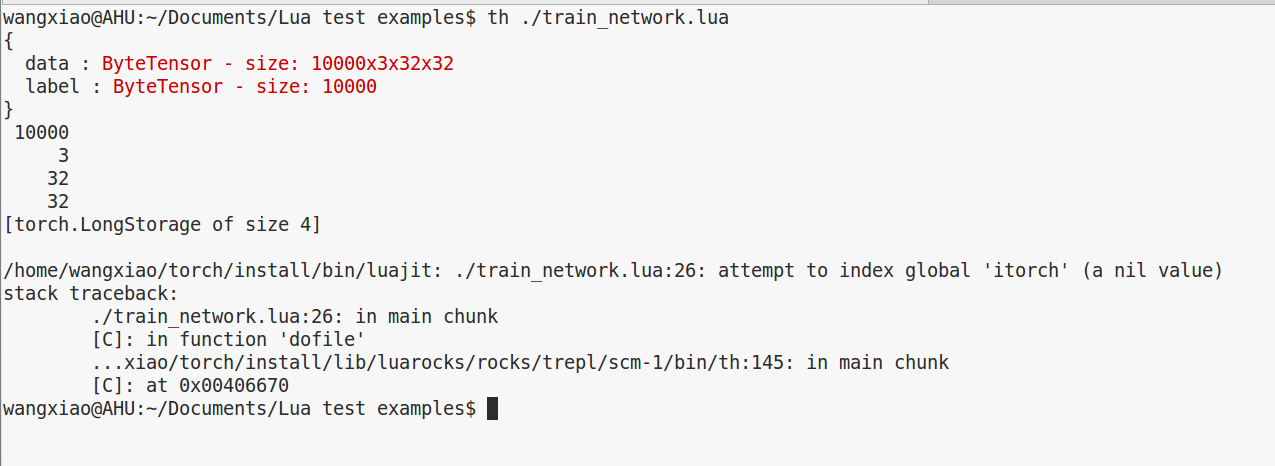
主要是 itorch 的问题, 另外就是 要引用 require 'nn' 来解决 无法辨别 nn 的问题.
我是把 带有 itorch 的那些行都暂时注释了.
2. 'libcudnn (R5) not found in library path.
wangxiao@AHU:~/Downloads/wide-residual-networks-master$ th ./train_Single_Multilabel_Image_Classification.lua
nil
/home/wangxiao/torch/install/bin/luajit: /home/wangxiao/torch/install/share/lua/5.1/trepl/init.lua:384: /home/wangxiao/torch/install/share/lua/5.1/trepl/init.lua:384: /home/wangxiao/torch/install/share/lua/5.1/cudnn/ffi.lua:1600: 'libcudnn (R5) not found in library path.
Please install CuDNN from https://developer.nvidia.com/cuDNN

Then make sure files named as libcudnn.so.5 or libcudnn.5.dylib are placed in your library load path (for example /usr/local/lib , or manually add a path to LD_LIBRARY_PATH)
stack traceback:
[C]: in function 'error'
/home/wangxiao/torch/install/share/lua/5.1/trepl/init.lua:384: in function 'require'
./train_Single_Multilabel_Image_Classification.lua:8: in main chunk
[C]: in function 'dofile'
...xiao/torch/install/lib/luarocks/rocks/trepl/scm-1/bin/th:145: in main chunk
[C]: at 0x00406670
wangxiao@AHU:~/Downloads/wide-residual-networks-master$
================================================================>>
答案是:
重新下载了 cudnn-7.5-linux-x64-v5.0-ga.tgz
并且重新配置了,但是依然提醒这个问题,那么,问题何在呢?查看了博客:http://blog.csdn.net/hungryof/article/details/51557666 中的内容:
坑4 可能出现’libcudnn not found in library path’的情况
截取其中一段错误信息:
Please install CuDNN from https://developer.nvidia.com/cuDNN
Then make sure files named as libcudnn.so.5 or libcudnn.5.dylib are placed in your library load path (for example /usr/local/lib , or manually add a path to LD_LIBRARY_PATH)- 1
- 2
LD_LIBRARY_PATH是该环境变量,主要用于指定查找共享库(动态链接库)时除了默认路径之外的其他路径。由于刚才已经将
“libcudnn*”复制到了/usr/local/cuda-7.5/lib64/下面,因此需要
- sudo gedit /etc/ld.so.conf.d/cudnn.conf 就是新建一个conf文件。名字随便
- 加入刚才的路径/usr/local/cuda-7.5/lib64/
- 反正我还添加了/usr/local/cuda-7.5/include/,这个估计不要也行。
- 保存后,再sudo ldconfig来更新缓存。(可能会出现libcudnn.so.5不是符号连接的问题,不过无所谓了!!)
此时运行
th neural_style.lua -gpu 0 -backend cudnn- 1
成功了!!!!
============================================================>>>>
评价: 按照这种做法试了,确实成功了! 赞一个 !!!
3. 利用 gm 加载图像时,提示错误,但是装上那个包仍然提示错误:

Load library:
gm = require 'graphicsmagick'
First, we provide two high-level functions to load/save directly into/form tensors:
img = gm.load('/path/to/image.png' [, type])    -- type = 'float' (default) | 'double' | 'byte'

gm.save('/path/to/image.jpg' [,quality])        -- quality = 0 to 100 (for jpegs only)
The following provide a more controlled flow for loading/saving jpegs.
Create an image, from a file:
image = gm.Image('/path/to/image.png')

-- or

image = gm.Image()

image:load('/path/to/image.png')

  但是悲剧的仍然有错, 只好换了用  image.load() 的方式加载图像:
--To load as byte tensor for rgb imagefile

local img = image.load(imagefile,3,'byte')
  4. Torch 保存 txt 文件:
  -- save opt
  file = torch.DiskFile(paths.concat(opt.checkpoints_dir, opt.name, 'opt.txt'), 'w')
  file:writeObject(opt)
  file:close()

  5. Torch 创建新的文件夹
  opts.modelPath = opt.modelDir .. opt.modelName
  if not paths.dirp(opt.modelPath) then
    paths.mkdir(opts.modelPath)
  end

  6. Torch Lua 保存 图像到文件夹
  借助 image package,首先安装: luarocks install image
  然后 require 'image'
  就可以使用了: local img = image.save('./saved_pos_neg_image/candidate_' .. tostring(i) .. tostring(j) .. '.png', pos_patch, 1, 32, 32)

  7. module 'bit' not found:No LuaRocks module found for bit
wangxiao@AHU:/media/wangxiao/724eaeef-e688-4b09-9cc9-dfaca44079b2/fast-neural-style-master$ th ./train.lua
/home/wangxiao/torch/install/bin/lua: /home/wangxiao/torch/install/share/lua/5.2/trepl/init.lua:389: /home/wangxiao/torch/install/share/lua/5.2/trepl/init.lua:389: /home/wangxiao/torch/install/share/lua/5.2/trepl/init.lua:389: module 'bit' not found:No LuaRocks module found for bit
no field package.preload['bit']
no file '/home/wangxiao/.luarocks/share/lua/5.2/bit.lua'
no file '/home/wangxiao/.luarocks/share/lua/5.2/bit/init.lua'
no file '/home/wangxiao/torch/install/share/lua/5.2/bit.lua'
no file '/home/wangxiao/torch/install/share/lua/5.2/bit/init.lua'
no file '/home/wangxiao/.luarocks/share/lua/5.1/bit.lua'
no file '/home/wangxiao/.luarocks/share/lua/5.1/bit/init.lua'
no file '/home/wangxiao/torch/install/share/lua/5.1/bit.lua'
no file '/home/wangxiao/torch/install/share/lua/5.1/bit/init.lua'
no file './bit.lua'
no file '/home/wangxiao/torch/install/share/luajit-2.1.0-beta1/bit.lua'
no file '/usr/local/share/lua/5.1/bit.lua'
no file '/usr/local/share/lua/5.1/bit/init.lua'
no file '/home/wangxiao/.luarocks/lib/lua/5.2/bit.so'
no file '/home/wangxiao/torch/install/lib/lua/5.2/bit.so'
no file '/home/wangxiao/torch/install/lib/bit.so'
no file '/home/wangxiao/.luarocks/lib/lua/5.1/bit.so'
no file '/home/wangxiao/torch/install/lib/lua/5.1/bit.so'
no file './bit.so'
no file '/usr/local/lib/lua/5.1/bit.so'
no file '/usr/local/lib/lua/5.1/loadall.so'
stack traceback:
[C]: in function 'error'
/home/wangxiao/torch/install/share/lua/5.2/trepl/init.lua:389: in function 'require'
./train.lua:5: in main chunk
[C]: in function 'dofile'
...xiao/torch/install/lib/luarocks/rocks/trepl/scm-1/bin/th:145: in main chunk
[C]: in ?
wangxiao@AHU:/media/wangxiao/724eaeef-e688-4b09-9cc9-dfaca44079b2/fast-neural-style-master$
在终端中执行:luarocks install luabitop
就可以了。
8. HDF5Group:read() - no such child 'media' for [HDF5Group 33554432 /]
/home/wangxiao/torch/install/bin/lua: /home/wangxiao/torch/install/share/lua/5.2/hdf5/group.lua:312: HDF5Group:read() - no such child 'media' for [HDF5Group 33554432 /]
stack traceback:
[C]: in function 'error'
/home/wangxiao/torch/install/share/lua/5.2/hdf5/group.lua:312: in function </home/wangxiao/torch/install/share/lua/5.2/hdf5/group.lua:302>
(...tail calls...)
./fast_neural_style/DataLoader.lua:44: in function '__init'
/home/wangxiao/torch/install/share/lua/5.2/torch/init.lua:91: in function </home/wangxiao/torch/install/share/lua/5.2/torch/init.lua:87>
[C]: in function 'DataLoader'
./train.lua:138: in function 'main'
./train.lua:327: in main chunk
[C]: in function 'dofile'
...xiao/torch/install/lib/luarocks/rocks/trepl/scm-1/bin/th:145: in main chunk
[C]: in ?
最近在训练 类型迁移的代码,发现这个蛋疼的问题。哎。。纠结好几天了。。这个 hdf5 到底怎么回事 ? 求解释 !!!
------------------------------------------------------------------------------------------------
后来发现, 是我自己的数据集路径设置的有问题, 如: 应该是 CoCo/train/image/
但是,我只是给定了 CoCo/train/ ...
9. 怎么设置 torch代码在哪块 GPU 上运行 ? 或者 怎么设置在两块卡上同时运行 ?

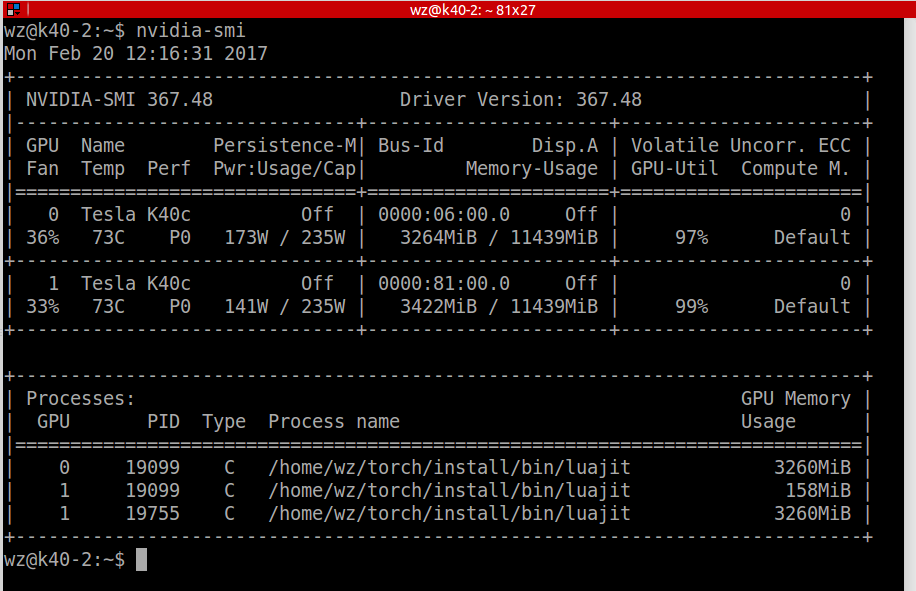
如图所示: export CUDA_VISIBLE_DEVICES=0 即可指定代码在 GPU-0 上运行.
10. When load the pre-trained VGG model, got the following errors:
MODULE data UNDEFINED
warning: module 'data [type 5]' not found
nn supports no groups!
warning: module 'conv2 [type 4]' not found
nn supports no groups!
warning: module 'conv4 [type 4]' not found
nn supports no groups!
warning: module 'conv5 [type 4]' not found
 using cudnn

 Successfully loaded ./feature_transfer/AlexNet_files/bvlc_alexnet.caffemodel

 MODULE data UNDEFINED

 warning: module 'data [type 5]' not found

 nn supports no groups!

 warning: module 'conv2 [type 4]' not found

 nn supports no groups!

 warning: module 'conv4 [type 4]' not found

 nn supports no groups!

 warning: module 'conv5 [type 4]' not found
 wangxiao@AHU:~/Downloads/multi-modal-visual-tracking$ qlua ./train_match_function_alexNet_version_2017_02_28.lua

 using cudnn

 Successfully loaded ./feature_transfer/AlexNet_files/bvlc_alexnet.caffemodel

 MODULE data UNDEFINED

 warning: module 'data [type 5]' not found

 nn supports no groups!

 warning: module 'conv2 [type 4]' not found

 nn supports no groups!

 warning: module 'conv4 [type 4]' not found

 nn supports no groups!

 warning: module 'conv5 [type 4]' not found

 conv1:

 conv3:

 fc6:

 fc7:

 fc8:

 nn.Sequential {

 [input -> () -> () -> () -> output]

 (): nn.SplitTable

 (): nn.ParallelTable {

 input

 |`-> (): nn.Sequential {

 | [input -> () -> () -> () -> () -> () -> () -> () -> () -> () -> () -> () -> () -> () -> () -> () -> () -> () -> () -> output]

 | (): nn.SpatialConvolution( -> , 11x11, ,)

 | (): nn.ReLU

 | (): nn.SpatialCrossMapLRN

 | (): nn.SpatialMaxPooling(3x3, ,)

 | (): nn.ReLU

 | (): nn.SpatialCrossMapLRN

 | (): nn.SpatialMaxPooling(3x3, ,)

 | (): nn.SpatialConvolution( -> , 3x3, ,, ,)

 | (): nn.ReLU

 | (): nn.ReLU

 | (): nn.ReLU

 | (): nn.SpatialMaxPooling(3x3, ,)

 | (): nn.View(-)

 | (): nn.Linear( -> )

 | (): nn.ReLU

 | (): nn.Dropout(0.500000)

 | (): nn.Linear( -> )

 | (): nn.ReLU

 | }

 `-> (): nn.Sequential {

 [input -> () -> () -> () -> () -> () -> () -> () -> () -> () -> () -> () -> () -> () -> () -> () -> () -> () -> () -> output]

 (): nn.SpatialConvolution( -> , 11x11, ,)

 (): nn.ReLU

 (): nn.SpatialCrossMapLRN

 (): nn.SpatialMaxPooling(3x3, ,)

 (): nn.ReLU

 (): nn.SpatialCrossMapLRN

 (): nn.SpatialMaxPooling(3x3, ,)

 (): nn.SpatialConvolution( -> , 3x3, ,, ,)

 (): nn.ReLU

 (): nn.ReLU

 (): nn.ReLU

 (): nn.SpatialMaxPooling(3x3, ,)

 (): nn.View(-)

 (): nn.Linear( -> )

 (): nn.ReLU

 (): nn.Dropout(0.500000)

 (): nn.Linear( -> )

 (): nn.ReLU

 }

 ... -> output

 }

 (): nn.PairwiseDistance

 }

 =================================================================================================================

 ================= AlextNet based Siamese Search for Visual Tracking ========================

 =================================================================================================================

 ==>> The Benchmark Contain:  videos ...

 deal with video / video name: BlurFace ... please waiting ...

 the num of gt bbox:

 the num of video frames:

 ========>>>> Begin to track  video name: nil-th frame, please waiting ...

 ========>>>> Begin to track  video name: nil-th frame, please waiting ... ............] ETA: 0ms | Step: 0ms

 ========>>>> Begin to track  video name: nil-th frame, please waiting ... ............] ETA: 39s424ms | Step: 80ms

 ========>>>> Begin to track  video name: nil-th frame, please waiting ... ............] ETA: 33s746ms | Step: 69ms

 ========>>>> Begin to track  video name: nil-th frame, please waiting ... ............] ETA: 31s817ms | Step: 65ms

 ========>>>> Begin to track  video name: nil-th frame, please waiting ... ............] ETA: 32s575ms | Step: 66ms

 ========>>>> Begin to track  video name: nil-th frame, please waiting ... ............] ETA: 34s376ms | Step: 70ms

 ========>>>> Begin to track  video name: nil-th frame, please waiting ... ............] ETA: 40s240ms | Step: 82ms

 ========>>>> Begin to track  video name: nil-th frame, please waiting ... ...........] ETA: 44s211ms | Step: 91ms

 ========>>>> Begin to track  video name: nil-th frame, please waiting ... ...........] ETA: 45s993ms | Step: 95ms

 ========>>>> Begin to track  video name: nil-th frame, please waiting ... ...........] ETA: 47s754ms | Step: 99ms

 ========>>>> Begin to track  video name: nil-th frame, please waiting ... ...........] ETA: 50s392ms | Step: 104ms

 ========>>>> Begin to track  video name: nil-th frame, please waiting ... ...........] ETA: 53s138ms | Step: 110ms

 ========>>>> Begin to track  video name: nil-th frame, please waiting ... ...........] ETA: 55s793ms | Step: 116ms

 ========>>>> Begin to track  video name: nil-th frame, please waiting ... ...........] ETA: 59s253ms | Step: 123ms

 ========>>>> Begin to track  video name: nil-th frame, please waiting ... ...........] ETA: 1m2s | Step: 130ms

 ========>>>> Begin to track  video name: nil-th frame, please waiting ... ...........] ETA: 1m5s | Step: 137ms

 ========>>>> Begin to track  video name: nil-th frame, please waiting ... ...........] ETA: 1m8s | Step: 143ms

 ========>>>> Begin to track  video name: nil-th frame, please waiting ... ...........] ETA: 1m11s | Step: 149ms

 //////////////////////////////////////////////////////////////////////////..............] ETA: 1m14s | Step: 157ms

 ==>> pos_proposal_list:

 ==>> neg_proposal_list:

 qlua: /home/wangxiao/torch/install/share/lua/5.1/nn/Container.lua::

 In  module of nn.Sequential:

 In  module of nn.ParallelTable:

 In  module of nn.Sequential:

 /home/wangxiao/torch/install/share/lua/5.1/nn/THNN.lua:: Need input of dimension  and input.size[] ==  but got input to be of shape: [ x  x ] at /tmp/luarocks_cunn-scm--/cunn/lib/THCUNN/generic/SpatialConvolutionMM.cu:

 stack traceback:

 [C]: in function 'v'

 /home/wangxiao/torch/install/share/lua/5.1/nn/THNN.lua:: in function 'SpatialConvolutionMM_updateOutput'

 ...ao/torch/install/share/lua/5.1/nn/SpatialConvolution.lua:: in function <...ao/torch/install/share/lua/5.1/nn/SpatialConvolution.lua:>

 [C]: in function 'xpcall'

 /home/wangxiao/torch/install/share/lua/5.1/nn/Container.lua:: in function 'rethrowErrors'

 ...e/wangxiao/torch/install/share/lua/5.1/nn/Sequential.lua:: in function <...e/wangxiao/torch/install/share/lua/5.1/nn/Sequential.lua:>

 [C]: in function 'xpcall'

 /home/wangxiao/torch/install/share/lua/5.1/nn/Container.lua:: in function 'rethrowErrors'

 ...angxiao/torch/install/share/lua/5.1/nn/ParallelTable.lua:: in function <...angxiao/torch/install/share/lua/5.1/nn/ParallelTable.lua:>

 [C]: in function 'xpcall'

 /home/wangxiao/torch/install/share/lua/5.1/nn/Container.lua:: in function 'rethrowErrors'

 ...e/wangxiao/torch/install/share/lua/5.1/nn/Sequential.lua:: in function 'forward'

 ./train_match_function_alexNet_version_2017_02_28.lua:: in function 'opfunc'

 /home/wangxiao/torch/install/share/lua/5.1/optim/adam.lua:: in function 'optim'

 ./train_match_function_alexNet_version_2017_02_28.lua:: in main chunk

 WARNING: If you see a stack trace below, it doesn't point to the place where this error occurred. Please use only the one above.

 stack traceback:

 [C]: at 0x7f86014df9c0

 [C]: in function 'error'

 /home/wangxiao/torch/install/share/lua/5.1/nn/Container.lua:: in function 'rethrowErrors'

 ...e/wangxiao/torch/install/share/lua/5.1/nn/Sequential.lua:: in function 'forward'

 ./train_match_function_alexNet_version_2017_02_28.lua:: in function 'opfunc'

 /home/wangxiao/torch/install/share/lua/5.1/optim/adam.lua:: in function 'optim'

 ./train_match_function_alexNet_version_2017_02_28.lua:: in main chunk

 wangxiao@AHU:~/Downloads/multi-modal-visual-tracking$

Just like the screen shot above, change the 'nn' into 'cudnn' will be ok and passed.
11. both (null) and torch.FloatTensor have no less-than operator
qlua: ./test_MM_tracker_VGG_.lua:254: both (null) and torch.FloatTensor have no less-than operator
stack traceback:
[C]: at 0x7f628816e9c0
[C]: in function '__lt'
./test_MM_tracker_VGG_.lua:254: in main chunk
Because it is floatTensor () style and you can change it like this if you want this value printed in a for loop: predictValue -->> predictValue[i] .
12.
========>>>> Begin to track the 6-th and the video name is ILSVRC2015_train_00109004 , please waiting ...
THCudaCheck FAIL file=/tmp/luarocks_cutorch-scm-1-707/cutorch/lib/THC/generic/THCStorage.cu line=66 error=2 : out of memory
qlua: cuda runtime error (2) : out of memory at /tmp/luarocks_cutorch-scm-1-707/cutorch/lib/THC/generic/THCStorage.cu:66
stack traceback:
[C]: at 0x7fa20a8f99c0
[C]: at 0x7fa1dddfbee0
[C]: in function 'Tensor'
./train_match_function_VGG_version_2017_03_02.lua:377: in main chunk
wangxiao@AHU:~/Downloads/multi-modal-visual-tracking$
Yes, it is just out of memory of GPU. Just turn the batchsize to a small value, it may work. It worked for me. Ha ha ...
13. luarocks install class does not have any effect, it still shown me the error: No Module named "class" in Torch.
==>> in terminal, install this package in sudo.
==>> then, it will be OK.
14. How to install opencv 3.1 on Ubuntu 14.04 ???
As we can found from: http://blog.csdn.net/a125930123/article/details/52091140
1. first, you should install torch successfully ;
2. then, just follow what the blog said here:
安装opencv3.1
1、安装必要的包
sudo apt-get install build-essential
sudo apt-get install cmake git libgtk2.0-dev pkg-config libavcodec-dev libavformat-dev libswscale-dev
2、下载opencv3.1
http://opencv.org/downloads.html
解压:unzip  opencv-3.1.0
3、安装
cd ~/opencv-3.1.0
mkdir build
cd build
cmake -D CMAKE_BUILD_TYPE=Release -D CMAKE_INSTALL_PREFIX=/usr/local ..
sudo make -j24
sudo make install -j24
sudo /bin/bash -c 'echo "/usr/local/lib" > /etc/ld.so.conf.d/opencv.conf'
sudo ldconfig
安装完成
4、问题在安装过程中可能会出现无法下载ippicv_linux_20151201.tgz的问题。
解决方案:
手动下载ippicv_linux_20151201.tgz:https://raw.githubusercontent.com/Itseez/opencv_3rdparty/81a676001ca8075ada498583e4166079e5744668/ippicv/ippicv_linux_20151201.tgz
将下载好的文件 放入 opencv-3.1.0/3rdparty/ippicv/downloads/linux-808b791a6eac9ed78d32a7666804320e 中,如果已经存在 ,则替换掉,这样就可以安装完成了。
5、最后执行命令
luarocks install cv
OpenCV bindings for Torch安装成功。
But, maybe you may found some errors, such as:
cudalegacy/src/graphcuts.cpp:120:54: error: ‘NppiGraphcutState’ has not been declared (solution draw from: http://blog.csdn.net/allyli0022/article/details/62859290)
At this moment, you need to change some files:
found graphcuts.cpp in opencv3.1, and do the following changes:
解决方案:需要修改一处源码:

在graphcuts.cpp中将
#if !defined (HAVE_CUDA) || defined (CUDA_DISABLER) 改为#if !defined (HAVE_CUDA) || defined (CUDA_DISABLER) || (CUDART_VERSION >= 8000)
then, try again, it will be ok...this code just want to make opencv3.1 work under cuda 8.0, you know...skip that judge sentence...
15. 安装torch-hdf5
sudo apt-get install libhdf5-serial-dev hdf5-tools

git clone https://github.com/deepmind/torch-hdf5

cd torch-hdf5

sudo luarocks make hdf5--.rockspec LIBHDF5_LIBDIR=”/usr/lib/x86_64-Linux-gnu/”
17. iTorch安装
git clone https://github.com/zeromq/zeromq4-1.git

mkdir build-zeromq

cd build-zeromq

cmake ..

make && make install

安装完之后,luarocks install itorch

之后可以通过luarocks list查看是否安装成功
Summary on deep learning framework --- Torch7的更多相关文章
- Summary on deep learning framework --- PyTorch
Summary on deep learning framework --- PyTorch Updated on 2018-07-22 21:25:42 import osos.environ[ ...
- Summary on deep learning framework --- Theano && Lasagne
Summary on deep learning framework --- Theano && Lasagne 2017-03-23 1. theano.function outp ...
- Summary on deep learning framework --- TensorFlow
Summary on deep learning framework --- TensorFlow Updated on 2018-07-22 21:28:11 1. Check failed: s ...
- Deep Learning framework --- MexNet 安装,测试,以及相关问题总结
Deep Learning framework --- MexNet 安装,测试,以及相关问题总结 一.安装: 参考博文:http://www.open-open.com/lib/view/op ...
- Install and Compile MatConvNet: CNNs for MATLAB --- Deep Learning framework
Install and Compile MatConvNet: CNNs for MATLAB --- Deep Learning framework 2017-04-18 10:19:35 If ...
- deep learning framework(不同的深度学习框架)
常用的deep learning frameworks 基本转自:http://www.codeceo.com/article/10-open-source-framework.html 1. Caf ...
- What are some good books/papers for learning deep learning?
What's the most effective way to get started with deep learning? 29 Answers Yoshua Bengio, ...
- (转) Deep Learning Resources
转自:http://www.jeremydjacksonphd.com/category/deep-learning/ Deep Learning Resources Posted on May 13 ...
- (转) Awesome Deep Learning
Awesome Deep Learning Table of Contents Free Online Books Courses Videos and Lectures Papers Tutori ...
随机推荐
- python 贪吃蛇
#!/usr/bin/python3 ''' 项目分析: -构成 -蛇Snake -实物Food -世界World -蛇和食物属于整个世界 class world: self.snake self.f ...
- 20190422 8个小时的T-SQL基础视频课件-分享
链接:https://pan.baidu.com/s/1YLjtU0Ymn0rI-KMF0DFehw 提取码:yeuw 我最近缺钱..... SQLSERVER 2016视频T-SQL(一) 路径:h ...
- 在visual studio code 中配置python以及解决中文乱码问题
安装好 visual stuido code (下面简称 “ VSC ”)后,要想使用它运行调试 python 代码还需要做一些工作以解决下列问题: 搭建 python 环境 print 打印中文出现 ...
- python类之魔法方法
python类之魔法方法: class A(object): def __init__(self,x): self.x = x def __neg__(self): print('-v') def _ ...
- YEP_fpssynchoption
帧率调节插件 ============================================================================Introduction===== ...
- SpringBoot缓存之redis--最简单的使用方式
第一步:配置redis 这里使用的是yml类型的配置文件 mybatis: mapper-locations: classpath:mapping/*.xml spring: datasource: ...
- 怎样的操作才能让HashMap以红黑树类型存储数据? (文中没有解答该问题)
怎样才能让HashMap以红黑树类型存储数据? 看上面的代码可知:如果一个Node的长度大于等于7.就会触发Node转TreeNode的操作. 我向一个map中插入了一百万条数据(插入一亿条时,内存溢 ...
- Json常用序列化工具包大比拼
一.前言 Json已成为计算机编程中最常用的数据传输和存储格式之一,所以对Json的序列化和反序列化工具的选择也是互联网系统中比较重要的环节,尤其在高并发下的执行效率,可能会直接影响系统的吞吐率.本文 ...
- druid数据源连接oracle10g报错:not support oracle driver 1.0
jdbc驱动与数据库版本不一致,去数据库服务器的安装目录(cd $ORACLE_HOME)找jdbc->lib->ojdbcX.jar 替换到你项目中即可. oracle目录lib下jar ...
- PKCS RSA执行标准
RSA是一种算法,但是,在相关应用的时候,还是需要有一些标准的.这就是pkcs.现在的各种程序中,基本都是遵循这个标准来使用RSA的.最近陆续读取RSA相关的内容进行学习. RSA官网:https:/ ...