
SpringBoot 入门 Demo
SpringBoot 入门 Demo
Spring Boot是由Pivotal团队提供的全新框架,其设计目的是用来简化新Spring应用的初始搭建以及开发过程。该框架使用了特定的方式来进行配置,从而使开发人员不再需要定义样板化的配置。通过这种方式,Spring Boot致力于在蓬勃发展的快速应用开发领域(rapid application development)成为领导者。
特点
springBoot 简介地址:
https://baike.baidu.com/item/Spring%20Boot/20249767?fr=aladdin#1
1.学习SpringBoot 需要有 ssm 的基础知识
2. SpringBoot 是在Maven 环境下开发的 需要有Maven 知识做铺垫
3.开发工具 (IDEA , eclipse )
4. 实际开发步骤:
1.) 创建一个 maven 工程
2.) Maven 是 web 项目
3.) 完善maven 创建的目录结构
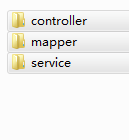
4.) 修改 pom.xml 文件
 <project xmlns="http://maven.apache.org/POM/4.0.0" xmlns:xsi="http://www.w3.org/2001/XMLSchema-instance"

   xsi:schemaLocation="http://maven.apache.org/POM/4.0.0 http://maven.apache.org/maven-v4_0_0.xsd">

   <modelVersion>4.0.0</modelVersion>

   <groupId>dt55</groupId>

   <artifactId>springboot1</artifactId>

   <packaging>war</packaging>

   <version>0.0.1-SNAPSHOT</version>

   <name>springboot1 Maven Webapp</name>

   <url>http://maven.apache.org</url>

      <!-- 配置spring boot所需的依赖 -->

     <parent>

         <groupId>org.springframework.boot</groupId>

         <artifactId>spring-boot-starter-parent</artifactId>

         <version>1.5.10.RELEASE</version>

     </parent>

     <dependencies>

         <!-- spring boot的相关启动 -->

         <dependency>

             <groupId>org.springframework.boot</groupId>

             <artifactId>spring-boot-starter-web</artifactId>

         </dependency>

         <!-- 热部署 -->

         <dependency>

             <groupId>org.springframework.boot</groupId>

             <artifactId>spring-boot-devtools</artifactId>

             <optional>true</optional>

             <scope>true</scope>

         </dependency>

         <!-- log4j -->

         <dependency>

             <groupId>org.springframework.boot</groupId>

             <artifactId>spring-boot-starter-log4j2</artifactId>

         </dependency>

         <!-- 使用Jasper引擎解析JSP -->

         <dependency>

             <groupId>org.apache.tomcat.embed</groupId>

             <artifactId>tomcat-embed-jasper</artifactId>

             <scope>provided</scope>

         </dependency>

         <!--jsp支持-->

         <!-- servlet 依赖. -->

         <dependency>

           <groupId>javax.servlet</groupId>

           <artifactId>javax.servlet-api</artifactId>

           <scope>provided</scope>

         </dependency>

         <dependency>

           <groupId>javax.servlet</groupId>

           <artifactId>jstl</artifactId>

         </dependency>

         <!-- spring boot整合mybatis -->

         <dependency>

             <groupId>org.mybatis.spring.boot</groupId>

             <artifactId>mybatis-spring-boot-starter</artifactId>

             <version>1.3.0</version>

         </dependency>

         <!-- MySQL -->

         <dependency>

             <groupId>mysql</groupId>

             <artifactId>mysql-connector-java</artifactId>

         </dependency>

   </dependencies>

   <build>

       <plugins>

             <plugin>

                 <groupId>org.springframework.boot</groupId>

                 <artifactId>spring-boot-maven-plugin</artifactId>

                 <configuration>

                     <!-- 没有该配置,devtools 不生效 -->

                     <fork>true</fork>

                 </configuration>

             </plugin>

         </plugins>

     <finalName>springboot1</finalName>

   </build>

 </project>
5.) 修改端口号 创建一个 application.properties 文件
server.port=8888
6.) 配置数据源信息 在application.properties 文件中配置数据源
 spring.datasource.driver-class-name=com.mysql.jdbc.Driver

 spring.datasource.url=jdbc:mysql:///dt55

 spring.datasource.username=root

 spring.datasource.password=root
7.) 测试代码:
 /**

  * Project Name:springboot1

  * File Name:FrontController.java

  * Package Name:cn.java.controller.front

  * Date:下午5:21:57

  * Copyright (c) 2018, bluemobi All Rights Reserved.

  *

 */

 package cn.java.controller.front;

 import java.util.List;

 import java.util.Map;

 import org.mybatis.spring.annotation.MapperScan;

 import org.springframework.beans.factory.annotation.Autowired;

 import org.springframework.boot.SpringApplication;

 import org.springframework.boot.autoconfigure.EnableAutoConfiguration;

 import org.springframework.context.annotation.ComponentScan;

 import org.springframework.stereotype.Controller;

 import org.springframework.web.bind.annotation.RequestMapping;

 import org.springframework.web.bind.annotation.ResponseBody;

 import cn.java.service.FrontService;

 /**

  * Description: <br/>

  * Date: 下午5:21:57 <br/>

  *

  * @author 朱开心

  * @version

  * @see

  */

 @Controller

 @EnableAutoConfiguration

 @ComponentScan(value = { "cn.java.controller.*", "cn.java.service.impl" })

 @MapperScan(value = "cn.java.mapper")

 public class FrontController {

     @Autowired

     private FrontService frontService;

     @RequestMapping("/index")

     @ResponseBody

     public String getLogin() {

         return "Hello World !!!!!";

     }

     public static void main(String[] args) {

         // 启动springboot框架

         SpringApplication.run(FrontController.class, args);

     }

 }
就是这么的简单的操作 ,比 ssm 简单的多啦
道友们试试吧 有问题 @我
SpringBoot 入门 Demo的更多相关文章
- SpringBoot入门Demo
前言:相信做java后台编程的童鞋都知道Spring家族,Spring作为我们项目中必备的框架.JavaSpringBoot号称javaEE的颠覆者,这引起了本Y的好奇,这才花费了一点时间,学习了下s ...
- SpringBoot入门Demo(Hello Word Boot)
Spring Boot 是由Pivotal团队提供的全新框架,其设计目的是用来简化新的Spring应用的初始搭建以及开发过程.该框架使用了特定的方式来进行配置,从而使开发人员不再需要定义样板化的配置. ...
- SpringBoot 入门demo
创建SpringBoot项目方式一 (1)新建maven项目,不使用骨架. 使用maven管理依赖就行了,不必使用骨架(模板). (2)在pom.xml中添加 <!--springboot核心. ...
- SpringBoot入门示例
SpringBoot入门Demo SpringBoot可以说是Spring的简化版.配置简单.使用方便.主要有以下几种特点: 创建独立的Spring应用程序 嵌入的Tomcat,无需部署WAR文件 简 ...
- 基于springboot构建dubbo的入门demo
之前记录了构建dubbo入门demo所需的环境以及基于普通maven项目构建dubbo的入门案例,今天记录在这些的基础上基于springboot来构建dubbo的入门demo:众所周知,springb ...
- springboot + kafka 入门实例 入门demo
springboot + kafka 入门实例 入门demo 版本说明 springboot版本:2.3.3.RELEASE kakfa服务端版本:kafka_2.12-2.6.0.tgz zooke ...
- springboot + mybatisPlus 入门实例 入门demo
springboot + mybatisPlus 入门实例 入门demo 使用mybatisPlus的优势 集成mybatisplus后,简单的CRUD就不用写了,如果没有特别的sql,就可以不用ma ...
- Springboot 入门及Demo
一:SpringBoot入门1.1:SpringBoot简介Spring Boot是由Pivotal团队提供的全新框架,其设计目的是用来简化新Spring应用的初始搭建以及开发过程.该框架使用了特定的 ...
- SpringBoot入门基础
目录 SpringBoot入门 (一) HelloWorld. 2 一 什么是springboot 1 二 入门实例... 1 SpringBoot入门 (二) 属性文件读取... 16 一 自定义属 ...
随机推荐
- 转载--解决ora-00119和ora-00132这个问题
前提:服务全部打开,监听也配置好了! win7 64位 Oracle 11g 简单的sql命令: 先登录到sqlplus: sqlplus /nolog; 登录数据库: conn system/ ...
- Bootstrap教程目录
1.Bootstrap 简介(Web前端CSS框架) 2.Bootstrap 学习资料 3.Bootstrap 入门 4.Bootstrap 概览 5.Bootstrap 栅格系统 6.Bootstr ...
- 09-nginx Rewrite语法详解
和location类似,也是要负责URL解析的. rewrite 重写 nginx的配置非常多,nginx的第三方模块也非常非常多.不可能讲每一种模块的配置办法.通常碰到一个nginx的新问题你想怎 ...
- 【总结整理】微信产品-张小龙-PM学习总结
伟大的产品可以满足人类的情感需求.找到需求背后的心理诉求产品的终极目标是满足任性需求,不在产品中掺杂自己的道德感.“我有个好主意”,往往都是脱离用户需求的. 1,不直接满足用户需求2,用户需求是零散的 ...
- c++策略模式(Strategy Method)
别人的博客再讲策略模式时都会讲三国,策略类就是赵云的锦囊,锦囊里装着若干妙计.在打仗时想要用什么妙计,直接从锦囊里去取. 锦囊类: class context { public: context(IS ...
- cocos2d-x 初探helloWorld
cocos2d-x的main函数代码很少,把一些复杂的接口封装到AppDelegate类里了,“AppDelegate”从词意可以得出是app的代理类,而一些最早的场景都会在AppDelegate类里 ...
- SpringAOP03 项目脚手架、自定义注解、织入切面、引介增强
1 项目脚手架 利用 Maven 进行创建 1.1 利用IDEA创建一个Maven原型项目 技巧01:原型Maven项目是没有webapp文件夹和resources项目文件夹的,需要自己手动创建:创建 ...
- 293. Flip Game只翻转一步的加减号翻转游戏
[抄题]: You are playing the following Flip Game with your friend: Given a string that contains only th ...
- opennebula image单个实例响应数据格式
{ ", ", ", "TEMPLATE": { "DEV_PREFIX": "hd", " }, ...
- JavaWeb中的路径问题
JavaWEB 开发中的 / 的含义 ①.当前WEB应用的根路径(http://localhost:8080/contextPath/) 请求转发时:request.getRequestDispath ...