
CFindReplaceDialog学习
The CFindReplaceDialog class allows you to implement standard string Find/Replace dialog boxes in your application. Unlike the other Windows common dialog boxes, CFindReplaceDialog objects are modeless, allowing users to interact with other windows while they are on screen. There are two kinds of CFindReplaceDialog objects: Find dialog boxes and Find/Replace dialog boxes. Although the dialog boxes allow the user to input search and search/replace strings, they do not perform any of the searching or replacing functions. You must add these to the application.
To construct a CFindReplaceDialog object, use the provided constructor (which has no arguments). Since this is a modeless dialog box, allocate the object on the heap using the new operator, rather than on the stack.
Once a CFindReplaceDialog object has been constructed, you must call the Create member function to create and display the dialog box.
Use the m_fr structure to initialize the dialog box before calling Create. The m_fr structure is of type FINDREPLACE. For more information on this structure, see the Win32 SDK documentation.
In order for the parent window to be notified of find/replace requests, you must use the Windows RegisterWindowMessage function and use the ON_REGISTERED_MESSAGE message-map macro in your frame window that handles this registered message. You can call any of the member functions listed in the “Operations” section of the CFindReplaceDialog Class Members table from the frame window’s callback function.
You can determine whether the user has decided to terminate the dialog box with the IsTerminating member function.
CFindReplaceDialog relies on the COMMDLG.DLL file that ships with Windows versions 3.1 and later.
To customize the dialog box, derive a class from CFindReplaceDialog, provide a custom dialog template, and add a message map to process the notification messages from the extended controls. Any unprocessed messages should be passed to the base class.
Customizing the hook function is not required.
/*

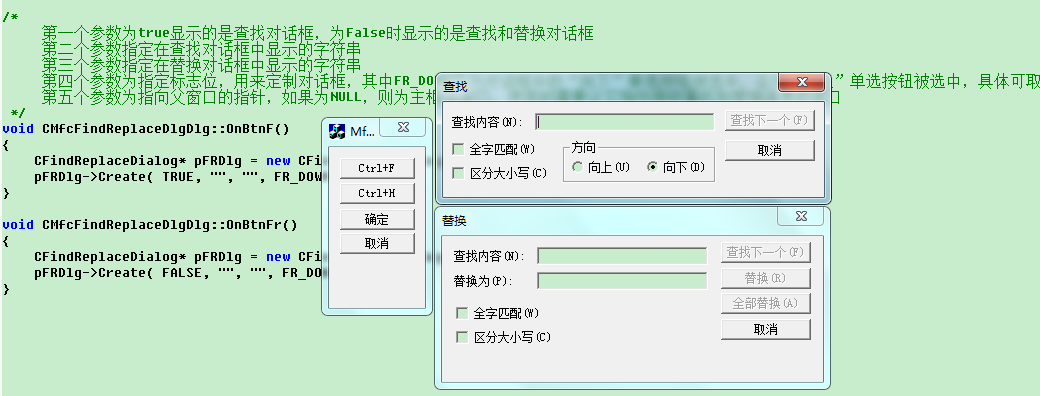
     第一个参数为true显示的是查找对话框,为False时显示的是查找和替换对话框

     第二个参数指定在查找对话框中显示的字符串

     第三个参数指定在替换对话框中显示的字符串

     第四个参数为指定标志位,用来定制对话框,其中FR_DOWM表示对话框中的“向下”单选按钮被选中,否则“向上”单选按钮被选中,具体可取值参考MSDN

     第五个参数为指向父窗口的指针,如果为NULL,则为主框架窗口,使用时需要让它指向接收查找和替换消息的窗口

 */

void CMfcFindReplaceDlgDlg::OnBtnF()

{

    CFindReplaceDialog* pFRDlg = new CFindReplaceDialog();  // Must be created on the heap

    pFRDlg->Create( TRUE, "", "", FR_DOWN, this );

}

void CMfcFindReplaceDlgDlg::OnBtnFr()

{

    CFindReplaceDialog* pFRDlg = new CFindReplaceDialog();  // Must be created on the heap

    pFRDlg->Create( FALSE, "", "", FR_DOWN, this );

}
CFindReplaceDialog学习的更多相关文章
- 从直播编程到直播教育:LiveEdu.tv开启多元化的在线学习直播时代
2015年9月,一个叫Livecoding.tv的网站在互联网上引起了编程界的注意.缘于Pingwest品玩的一位编辑在上网时无意中发现了这个网站,并写了一篇文章<一个比直播睡觉更奇怪的网站:直 ...
- Angular2学习笔记(1)
Angular2学习笔记(1) 1. 写在前面 之前基于Electron写过一个Markdown编辑器.就其功能而言,主要功能已经实现,一些小的不影响使用的功能由于时间关系还没有完成:但就代码而言,之 ...
- ABP入门系列(1)——学习Abp框架之实操演练
作为.Net工地搬砖长工一名,一直致力于挖坑(Bug)填坑(Debug),但技术却不见长进.也曾热情于新技术的学习,憧憬过成为技术大拿.从前端到后端,从bootstrap到javascript,从py ...
- 消息队列——RabbitMQ学习笔记
消息队列--RabbitMQ学习笔记 1. 写在前面 昨天简单学习了一个消息队列项目--RabbitMQ,今天趁热打铁,将学到的东西记录下来. 学习的资料主要是官网给出的6个基本的消息发送/接收模型, ...
- js学习笔记:webpack基础入门(一)
之前听说过webpack,今天想正式的接触一下,先跟着webpack的官方用户指南走: 在这里有: 如何安装webpack 如何使用webpack 如何使用loader 如何使用webpack的开发者 ...
- Unity3d学习 制作地形
这周学习了如何在unity中制作地形,就是在一个Terrain的对象上盖几座小山,在山底种几棵树,那就讲一下如何完成上述内容. 1.在新键得项目的游戏的Hierarchy目录中新键一个Terrain对 ...
- 《Django By Example》第四章 中文 翻译 (个人学习,渣翻)
书籍出处:https://www.packtpub.com/web-development/django-example 原作者:Antonio Melé (译者注:祝大家新年快乐,这次带来<D ...
- 菜鸟Python学习笔记第一天:关于一些函数库的使用
2017年1月3日 星期二 大一学习一门新的计算机语言真的很难,有时候连函数拼写出错查错都能查半天,没办法,谁让我英语太渣. 关于计算机语言的学习我想还是从C语言学习开始为好,Python有很多语言的 ...
- 多线程爬坑之路-学习多线程需要来了解哪些东西?(concurrent并发包的数据结构和线程池,Locks锁,Atomic原子类)
前言:刚学习了一段机器学习,最近需要重构一个java项目,又赶过来看java.大多是线程代码,没办法,那时候总觉得多线程是个很难的部分很少用到,所以一直没下决定去啃,那些年留下的坑,总是得自己跳进去填 ...
随机推荐
- Swing:LookAndFeel 教程第一篇——手把手教你写出自己的 LookAndFeel
本文是 LookAndFeel 系列教程的第一篇. 是我在对 Swing 学习摸索中的一些微薄经验. 我相信,细致看全然系列之后.你就能写出自己的 LookAndFeel. 你会发现 Swing 原来 ...
- 搭建svnserve并创建提交钩子
之前做过很多这个过程了,但每次总有些地方不记得要查资料,现在顺手记录一下,以后好查. 安装svn apt-get install subversion 创建代码仓库 svnadmin create & ...
- maven 打包不全(xml,properties文件没打进包)解决方案
在pom.xml的build标签中加入以下代码即可 <build> <resources> <resource> ...
- Unity3d 嵌入GoogleMap
原地址“http://cl314413.blog.163.com/blog/static/190507976201442371753142/ 新建工程导入Google Maps for Unity包 ...
- Git——使用gitignore建立项目过滤规则
在进行协作开发代码管理的过程中,常常会遇到某些临时文件.配置文件.或者生成文件等,这些文件由于不同的开发端会不一样,如果使用git add . 将所有文件纳入git库中,那么会出现频繁的改动和push ...
- re中match和search的不同
re.match与re.search的区别:re.match只匹配字符串的开始,如果字符串开始不符合正则表达式,则匹配失败,函数返回None:而re.search匹配整个字符串,直到找到一个匹配.
- Java: 获取当前执行位置的文件名/类名/方法名/行号
在 JAVA 程序有时需要获取当前代码位置, 于是就利用 Thread.currentThread().getStackTrace() 写了下面这个工具类, 用来获取当前执行位置处代码的文件名/类名/ ...
- Oracle,跳出游标循环
1,跳出游标的循环,不执行遍历了. 方法一:goto for c_row in 游标 loop if 条件 then dbms_output.put_line('测试跳出循环'); goto brea ...
- 【Android进阶】怎样使用文件来保存程序中的数据
在程序中.有非常多保存和获取数据的方法,本篇文章,主要介绍使用文件系统对程序中的数据进行保存和读取的操作 我直接写了一个帮助类,进行文件的写入和读取操作 /** * 用于在文件里保存程序数据 * * ...
- LoadRunner+Java接口性能测试
想必各位小伙伴们会对LR还可以调用java感到好奇,之前我也这么一直认为LR只支持C语言.其实LR脚本支持的语言有:C.Java.Visual Basic.VbScript.JavaScript,只不 ...