
rsync错误
rsync error:No route to host
rsync服务端开启的iptables防火墙

   [root@nfs01 tmp]# rsync -avz /etc/hosts rsync_backup@172.16.1.41::backup

   rsync: failed to connect to 172.16.1.41: No route to host (113)

   rsync error: error in socket IO (code 10) at clientserver.c(124) [sender=3.0.6]

   异常问题解决:

   关闭rsync服务端的防火墙服务(iptables)

   [root@backup mnt]# /etc/init.d/iptables stop

   iptables: Setting chains to policy ACCEPT: filter          [  OK  ]

   iptables: Flushing firewall rules:                         [  OK  ]

   iptables: Unloading modules:                               [  OK  ]

   [root@backup mnt]# /etc/init.d/iptables status

   iptables: Firewall is not running.
ERROR: The remote path must start with a module name not a /
 rsync客户端执行rsync命令错误:

   客户端的错误现象:

   [root@nfs01 tmp]# rsync -avz /etc/hosts rsync_backup@172.16.1.41::/backup

   ERROR: The remote path must start with a module name not a /

   rsync error: error starting client-server protocol (code 5) at main.c(1503) [sender=3.0.6]

   异常问题解决:

   rsync命令语法理解错误,::/backup是错误的语法,应该为::backup(rsync模块)
@ERROR: auth failed on module backup
 @ERROR: auth failed on module oldboy

   客户端的错误现象:

   [root@nfs01 tmp]# rsync -avz /etc/hosts rsync_backup@172.16.1.41::backup

Password:

@ERROR: auth failed on module backup

rsync error: error starting client-server protocol (code 5) at main.c(1503) [sender=3.0.6]

   异常问题解决:

   1. 密码真的输入错误,用户名真的错误

   2. secrets file = /etc/rsync.password指定的密码文件和实际密码文件名称不一致

   3. /etc/rsync.password文件权限不是600

   4. rsync_backup:123456密码配置文件后面注意不要有空格

   5. rsync客户端密码文件中只输入密码信息即可,不要输入虚拟认证用户名称
@ERROR: Unknown module 'backup'
Unknown module 'backup'

[root@nfs01 tmp]# rsync -avz /etc/hosts rsync_backup@172.16.1.41::backup

@ERROR: Unknown module 'backup'

rsync error: error starting client-server protocol (code 5) at main.c(1503) [sender=3.0.6]
异常问题解决:
1. /etc/rsyncd.conf配置文件模块名称书写错误
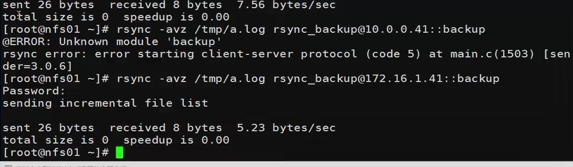
2.配置文件中网段限制不对
Permission denied
情况1
sync -avzP --delete /data/  rsync_backup@172.16.1.41::nfsbackup --password-file=/etc/rsync.password

sending incremental file list

./

rsync: failed to set times on "." (in nfsbackup): Operation not permitted (1)

ett.txt

         324 100%    0.00kB/s    0:00:00 (xfer#1, to-check=13/15)

ett.txt_hard_link

         324 100%  316.41kB/s    0:00:00 (xfer#2, to-check=12/15)

oldboyedu/

rsync: recv_generator: mkdir "oldboyedu" (in nfsbackup) failed: Permission denied (13)
情况2
[root@nfs01 tmp]# rsync -avz /etc/hosts rsync_backup@172.16.1.41::backup

Password:

sending incremental file list

hosts

rsync: mkstemp ".hosts.5z3AOA" (in backup) failed: Permission denied (13)

sent 196 bytes  received 27 bytes  63.71 bytes/sec

total size is 349  speedup is 1.57

rsync error: some files/attrs were not transferred (see previous errors) (code 23) at main.c(1039) [sender=3.0.6]

   异常问题解决:

   1. 共享目录的属主和属组不正确,不是rsync

   2. 共享目录的权限不正确,不是755
chdir failed
[root@nfs01 tmp]# rsync -avz /etc/hosts rsync_backup@172.16.1.41::backup

Password:

@ERROR: chdir failed

rsync error: error starting client-server protocol (code 5) at main.c(1503) [sender=3.0.6]

    异常问题解决:

    1. 备份存储目录没有建立

    2. 建立的备份存储目录和配置文件定义不一致

[root@backup backup]# /etc/init.d/xinetd restart

shell-init: error retrieving current directory: getcwd: cannot access parent directories: No such file or directory

Stopping xinetd:                                           [  OK  ]

Starting xinetd: shell-init: error retrieving current directory: getcwd: cannot access parent directories: No such file or directory

                                                           [  OK  ]

说明:如果没有备份存储目录,xinetd服务都不能正确启动
invalid uid rsync
[root@nfs01 tmp]# rsync -avz /etc/hosts rsync_backup@172.16.1.41::backup

Password:

@ERROR: invalid uid rsync

rsync error: error starting client-server protocol (code 5) at main.c(1503) [sender=3.0.6]

    异常问题解决:

rsync服务对应rsync虚拟用户不存在了
continuing without password file
客户端已经配置了密码文件,但免秘钥登录方式,依旧需要输入密码
password file must not be other-accessible

[root@nfs01 tmp]# rsync -avz /etc/hosts rsync_backup@172.16.1.41::backup --password-file=/etc/rsync.password

password file must not be other-accessible

continuing without password file

Password:

sending incremental file list

sent 26 bytes  received 8 bytes  5.23 bytes/sec

total size is 349  speedup is 10.26

    异常问题解决:

rsync客户端的秘钥文件也必须是600权限
rsync客户端连接慢问题
错误日志输出

2017/03/08 20:14:43 [3422] params.c:Parameter() - Ignoring badly formed line in configuration file: ignore errors

2017/03/08 20:14:43 [3422] name lookup failed for 172.16.1.31: Name or service not known

2017/03/08 20:14:43 [3422] connect from UNKNOWN (172.16.1.31)

2017/03/08 20:14:43 [3422] rsync to backup/ from rsync_backup@unknown (172.16.1.31)

2017/03/08 20:14:43 [3422] receiving file list

2017/03/08 20:14:43 [3422] sent 76 bytes  received 83 bytes  total size 349

正确日志输出

2017/03/08 20:16:45 [3443] params.c:Parameter() - Ignoring badly formed line in configuration file: ignore errors

2017/03/08 20:16:45 [3443] connect from nfs02 (172.16.1.31)

2017/03/08 20:16:45 [3443] rsync to backup/ from rsync_backup@nfs02 (172.16.1.31)

2017/03/08 20:16:45 [3443] receiving file list

2017/03/08 20:16:45 [3443] sent 76 bytes  received 83 bytes  total size 349

    异常问题解决:

查看日志进行分析
rsync服务没有正确启动Connection refused (111)
 [root@oldboy-muban ~]#  rsync -avz /etc/hosts rsync_backup@172.16.1.41::backup

rsync: failed to connect to 172.16.1.41: Connection refused (111)

rsync error: error in socket IO (code 10) at clientserver.c(124) [sender=3.0.6]

解决 rsync服务没开启

[root@oldboy-muban ~]# rsync --daemon

[root@oldboy-muban ~]# ss -lntup |grep rsync

tcp    LISTEN     0      5                     :::873                  :::*      users:(("rsync",1434,5))

tcp    LISTEN     0      5                      *:873                   *:*      users:(("rsync",1434,4))

[root@oldboy-muban ~]# rsync -avz /etc/hosts rsync_backup@172.16.1.41::backup

Password:

sending incremental file list

hosts

sent 196 bytes  received 27 bytes  49.56 bytes/sec

total size is 349  speedup is 1.57
rsync错误的更多相关文章
- rsync错误日志
问题一: @ERROR: chroot failed rsync error: error starting client-server protocol (code 5) at main.c(152 ...
- 【Linux】rsync错误解析
rsync: Failed to exec ssh: No such file or directory (2) rsync error: error in IPC code (code 14) at ...
- Linux下rsync daemon模式下的错误汇总
一.前言:最近学习服务环境搭建,遇到了许多大大小小的问题,不过还好,经过我的一通努力终于都解决了,所以分享出来给自己留个纪念,同时也希望能帮助学习中的朋友. 二.环境:两台服务器环境相同 1 [roo ...
- Inotify+Rsync实现Linux服务器文件同步
做这个功能的时候遇到了好多坑,在此感谢一下这篇博客 http://kerry.blog.51cto.com/172631/734087/ ,大家参照这篇博客就能实现该功能. 另外如果想详细了解一下的 ...
- Rsync备份服务
一.Rsync 原理图 二.Rsync 原理描述 2.1:什么是Rsync Rsync是备份的一款软件,它可以实现全量备份.增量备份,也可以在不改变内容.属性的情况下进行同步备份,端口默认是873 2 ...
- 【Rsync实战】Rsync 备份的配置与管理
一.Rsync 基本概述 rsync 是一款开源的备份工具,可以在不同主机之间进行同步,可实现全量备份与增量备份,因此非常适合用于架构集中式备份或异地备份等应用. rsync 官方地址: rsync ...
- 【CentOS】Linux日常管理
/////////////////////////目录///////////////////////////////////////// 一.日常监控指标相关 1.监控系统状态命令 2.查看系统进程 ...
- Owasp Top 10 Security Risks for 2014
A1-互联网泄密事件/撞库攻击 以大量的用户数据为基础,利用用户相同的注册习惯(相同的用户名和密码),尝试登陆其它的网站.2011年,互联网泄密事件引爆了整个信息安全 界,导致传统的用户+密码认证的方 ...
- lesson - 15 Linux系统日常管理4
内容概要:1. rsync 命令格式rsync [OPTION]... SRC DESTrsync [OPTION]... SRC [USER@]HOST:DESTrsync [OPTION].. ...
随机推荐
- 吴裕雄 Bootstrap 前端框架开发——Bootstrap 辅助类:"text-danger" 类的文本样式
<!DOCTYPE html> <html> <head> <meta charset="utf-8"> <title> ...
- 【转载】Oracle创建数据库和用户
以前开发的时候用得比较多的是mysql和sql server,oracle用的比较少,用起来比较生疏,mysql和sql server用起来比较类似,就oracle的使用方式和他们不同,oracle在 ...
- C 随机数产生
// ConsoleApplication5.cpp : Defines the entry point for the console application. // #include " ...
- 不一样的Vue实战3:布局与组件
不一样的Vue实战3:布局与组件 发表于 2017-06-05 | 分类于 web前端| | 阅读次数 11534 http://yangyi1024.com/2017/06/05/%E4%B ...
- mysql安装到最后一步无响应的问题超简单最有效解决
mysql安装到最后一步无响应的问题超简单最有效解决 无论你是安装过还是没安装过,通过此方法都可以解决.之前我的机器和服务器就是都到最后一步卡住,上网搜索方法都无果.后自己尝试了很多次,亲测64位机和 ...
- 从0开始完成SpringBoot+Mybatis实现增删改查
1.准备知识: 1)需要掌握的知识: Java基础,JavaWeb开发基础,Spring基础(没有Spring的基础也可以,接触过Spring最好),ajax,Jquery,Mybatis. 2)项目 ...
- [*CTF2019]babyflash
用JPEXS反编译flash.swf得到441张黑白图片和1个mp3文件 软件下载地址:https://github.com/jindrapetrik/jpexs-decompiler/release ...
- loadrunner-11安装+破解+汉化
一.loadrunner-11安装下载地址:链接:https://pan.baidu.com/s/10meUz5DfkS8WleLSOalCtQ 提取码:iw0p 由于LR11安装包三个多G,没办法上 ...
- Jumpserver docker-compose 随手记
wget 或 git clone docker build -t jumpserver:v1 . #构建镜像 docker images vim jumpserver ...
- C++ 类 与 static
背景 从学习C++到使用现在,发现很多新的东西,正好整理一下. static 为静态,指是当类编译加载的时候,内存就会开辟存储空间的. static 数据成员 在类中,static 可修饰 类中的成员 ...