
rsync错误
rsync error:No route to host
rsync服务端开启的iptables防火墙

   [root@nfs01 tmp]# rsync -avz /etc/hosts rsync_backup@172.16.1.41::backup

   rsync: failed to connect to 172.16.1.41: No route to host (113)

   rsync error: error in socket IO (code 10) at clientserver.c(124) [sender=3.0.6]

   异常问题解决:

   关闭rsync服务端的防火墙服务(iptables)

   [root@backup mnt]# /etc/init.d/iptables stop

   iptables: Setting chains to policy ACCEPT: filter          [  OK  ]

   iptables: Flushing firewall rules:                         [  OK  ]

   iptables: Unloading modules:                               [  OK  ]

   [root@backup mnt]# /etc/init.d/iptables status

   iptables: Firewall is not running.
ERROR: The remote path must start with a module name not a /
 rsync客户端执行rsync命令错误:

   客户端的错误现象:

   [root@nfs01 tmp]# rsync -avz /etc/hosts rsync_backup@172.16.1.41::/backup

   ERROR: The remote path must start with a module name not a /

   rsync error: error starting client-server protocol (code 5) at main.c(1503) [sender=3.0.6]

   异常问题解决:

   rsync命令语法理解错误,::/backup是错误的语法,应该为::backup(rsync模块)
@ERROR: auth failed on module backup
 @ERROR: auth failed on module oldboy

   客户端的错误现象:

   [root@nfs01 tmp]# rsync -avz /etc/hosts rsync_backup@172.16.1.41::backup

Password:

@ERROR: auth failed on module backup

rsync error: error starting client-server protocol (code 5) at main.c(1503) [sender=3.0.6]

   异常问题解决:

   1. 密码真的输入错误,用户名真的错误

   2. secrets file = /etc/rsync.password指定的密码文件和实际密码文件名称不一致

   3. /etc/rsync.password文件权限不是600

   4. rsync_backup:123456密码配置文件后面注意不要有空格

   5. rsync客户端密码文件中只输入密码信息即可,不要输入虚拟认证用户名称
@ERROR: Unknown module 'backup'
Unknown module 'backup'

[root@nfs01 tmp]# rsync -avz /etc/hosts rsync_backup@172.16.1.41::backup

@ERROR: Unknown module 'backup'

rsync error: error starting client-server protocol (code 5) at main.c(1503) [sender=3.0.6]
异常问题解决:
1. /etc/rsyncd.conf配置文件模块名称书写错误
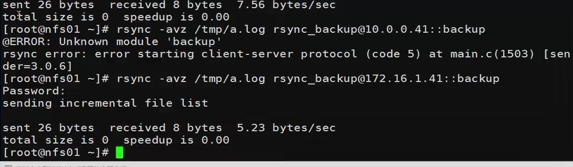
2.配置文件中网段限制不对
Permission denied
情况1
sync -avzP --delete /data/  rsync_backup@172.16.1.41::nfsbackup --password-file=/etc/rsync.password

sending incremental file list

./

rsync: failed to set times on "." (in nfsbackup): Operation not permitted (1)

ett.txt

         324 100%    0.00kB/s    0:00:00 (xfer#1, to-check=13/15)

ett.txt_hard_link

         324 100%  316.41kB/s    0:00:00 (xfer#2, to-check=12/15)

oldboyedu/

rsync: recv_generator: mkdir "oldboyedu" (in nfsbackup) failed: Permission denied (13)
情况2
[root@nfs01 tmp]# rsync -avz /etc/hosts rsync_backup@172.16.1.41::backup

Password:

sending incremental file list

hosts

rsync: mkstemp ".hosts.5z3AOA" (in backup) failed: Permission denied (13)

sent 196 bytes  received 27 bytes  63.71 bytes/sec

total size is 349  speedup is 1.57

rsync error: some files/attrs were not transferred (see previous errors) (code 23) at main.c(1039) [sender=3.0.6]

   异常问题解决:

   1. 共享目录的属主和属组不正确,不是rsync

   2. 共享目录的权限不正确,不是755
chdir failed
[root@nfs01 tmp]# rsync -avz /etc/hosts rsync_backup@172.16.1.41::backup

Password:

@ERROR: chdir failed

rsync error: error starting client-server protocol (code 5) at main.c(1503) [sender=3.0.6]

    异常问题解决:

    1. 备份存储目录没有建立

    2. 建立的备份存储目录和配置文件定义不一致

[root@backup backup]# /etc/init.d/xinetd restart

shell-init: error retrieving current directory: getcwd: cannot access parent directories: No such file or directory

Stopping xinetd:                                           [  OK  ]

Starting xinetd: shell-init: error retrieving current directory: getcwd: cannot access parent directories: No such file or directory

                                                           [  OK  ]

说明:如果没有备份存储目录,xinetd服务都不能正确启动
invalid uid rsync
[root@nfs01 tmp]# rsync -avz /etc/hosts rsync_backup@172.16.1.41::backup

Password:

@ERROR: invalid uid rsync

rsync error: error starting client-server protocol (code 5) at main.c(1503) [sender=3.0.6]

    异常问题解决:

rsync服务对应rsync虚拟用户不存在了
continuing without password file
客户端已经配置了密码文件,但免秘钥登录方式,依旧需要输入密码
password file must not be other-accessible

[root@nfs01 tmp]# rsync -avz /etc/hosts rsync_backup@172.16.1.41::backup --password-file=/etc/rsync.password

password file must not be other-accessible

continuing without password file

Password:

sending incremental file list

sent 26 bytes  received 8 bytes  5.23 bytes/sec

total size is 349  speedup is 10.26

    异常问题解决:

rsync客户端的秘钥文件也必须是600权限
rsync客户端连接慢问题
错误日志输出

2017/03/08 20:14:43 [3422] params.c:Parameter() - Ignoring badly formed line in configuration file: ignore errors

2017/03/08 20:14:43 [3422] name lookup failed for 172.16.1.31: Name or service not known

2017/03/08 20:14:43 [3422] connect from UNKNOWN (172.16.1.31)

2017/03/08 20:14:43 [3422] rsync to backup/ from rsync_backup@unknown (172.16.1.31)

2017/03/08 20:14:43 [3422] receiving file list

2017/03/08 20:14:43 [3422] sent 76 bytes  received 83 bytes  total size 349

正确日志输出

2017/03/08 20:16:45 [3443] params.c:Parameter() - Ignoring badly formed line in configuration file: ignore errors

2017/03/08 20:16:45 [3443] connect from nfs02 (172.16.1.31)

2017/03/08 20:16:45 [3443] rsync to backup/ from rsync_backup@nfs02 (172.16.1.31)

2017/03/08 20:16:45 [3443] receiving file list

2017/03/08 20:16:45 [3443] sent 76 bytes  received 83 bytes  total size 349

    异常问题解决:

查看日志进行分析
rsync服务没有正确启动Connection refused (111)
 [root@oldboy-muban ~]#  rsync -avz /etc/hosts rsync_backup@172.16.1.41::backup

rsync: failed to connect to 172.16.1.41: Connection refused (111)

rsync error: error in socket IO (code 10) at clientserver.c(124) [sender=3.0.6]

解决 rsync服务没开启

[root@oldboy-muban ~]# rsync --daemon

[root@oldboy-muban ~]# ss -lntup |grep rsync

tcp    LISTEN     0      5                     :::873                  :::*      users:(("rsync",1434,5))

tcp    LISTEN     0      5                      *:873                   *:*      users:(("rsync",1434,4))

[root@oldboy-muban ~]# rsync -avz /etc/hosts rsync_backup@172.16.1.41::backup

Password:

sending incremental file list

hosts

sent 196 bytes  received 27 bytes  49.56 bytes/sec

total size is 349  speedup is 1.57
rsync错误的更多相关文章
- rsync错误日志
问题一: @ERROR: chroot failed rsync error: error starting client-server protocol (code 5) at main.c(152 ...
- 【Linux】rsync错误解析
rsync: Failed to exec ssh: No such file or directory (2) rsync error: error in IPC code (code 14) at ...
- Linux下rsync daemon模式下的错误汇总
一.前言:最近学习服务环境搭建,遇到了许多大大小小的问题,不过还好,经过我的一通努力终于都解决了,所以分享出来给自己留个纪念,同时也希望能帮助学习中的朋友. 二.环境:两台服务器环境相同 1 [roo ...
- Inotify+Rsync实现Linux服务器文件同步
做这个功能的时候遇到了好多坑,在此感谢一下这篇博客 http://kerry.blog.51cto.com/172631/734087/ ,大家参照这篇博客就能实现该功能. 另外如果想详细了解一下的 ...
- Rsync备份服务
一.Rsync 原理图 二.Rsync 原理描述 2.1:什么是Rsync Rsync是备份的一款软件,它可以实现全量备份.增量备份,也可以在不改变内容.属性的情况下进行同步备份,端口默认是873 2 ...
- 【Rsync实战】Rsync 备份的配置与管理
一.Rsync 基本概述 rsync 是一款开源的备份工具,可以在不同主机之间进行同步,可实现全量备份与增量备份,因此非常适合用于架构集中式备份或异地备份等应用. rsync 官方地址: rsync ...
- 【CentOS】Linux日常管理
/////////////////////////目录///////////////////////////////////////// 一.日常监控指标相关 1.监控系统状态命令 2.查看系统进程 ...
- Owasp Top 10 Security Risks for 2014
A1-互联网泄密事件/撞库攻击 以大量的用户数据为基础,利用用户相同的注册习惯(相同的用户名和密码),尝试登陆其它的网站.2011年,互联网泄密事件引爆了整个信息安全 界,导致传统的用户+密码认证的方 ...
- lesson - 15 Linux系统日常管理4
内容概要:1. rsync 命令格式rsync [OPTION]... SRC DESTrsync [OPTION]... SRC [USER@]HOST:DESTrsync [OPTION].. ...
随机推荐
- 全球定位IP位置 2018(离线版)
球定位IP位置 2018(离线版) 这次写的软件使用Python写的,所以体积可能有点大 我特地写了GUI打包成了Exe可执行文件,方便小白使用== 只要输入目标ip就能显示目标所在的国家城市和经纬度 ...
- Linux和云供应商Red Hat被IBM以34亿美元的价格收购
导读 今天的主题包括IBM以340亿美元收购Red Hat,人性化是使人工智能成功的关键.两家公司于10月28日宣布,IBM正以340亿美元的价格收购Linux和云技术供应商Red Hat,以期改变云 ...
- scrcpy投屏android手机到电脑
在mac os下 投票iPhone投屏是最简单不过了,只需要用Quicktime player就可以. 但是在mac下咱投屏android的手机呢,就需要用到scrcpy了. 1.打开终端,输入命令: ...
- MySQL 常用SQL 汇总
1.查看当前应用连接,连接数突增排查 select user,SUBSTRING_INDEX(host,':',1) as ip , count(*) as count,db from informa ...
- 「SP1716」GSS3 - Can you answer these queries III
传送门 Luogu 解题思路 区间最大子段和板子题. 考虑用线段树来做. 对于一个线段树节点所包含区间,它的最大子段和有两种情况,包含中点与不包含. 不包含的情况直接从左右子树转移. 对于包含的情况: ...
- nodejs(12)Express 中间件middleware
中间件 客户端的请求到达服务器时,他的生命周期是:request -- 服务器端处理 -- 响应 在服务器端处理过程中,业务逻辑复杂时,为了便于开发维护,需要把处理的事情分成几步,这里每一步就是一个中 ...
- Hive的原生部署方式
一.Hive的部署 1.官方文档 https://cwiki.apache.org/confluence/display/Hive/GettingStarted 2.前提条件 需要安装JDK1.7之上 ...
- 个人项目发表到GitHub
个人项目源程序代码发送到github上. 因为之前假期已经注册过了账户,所以只是上传了做过的小账本项目. https://www.cnblogs.com/sdcs/p/8270029.html
- PAT (Advanced Level) 1136~1139:1136模拟 1137模拟 1138 前序中序求后序 1139模拟
1136 A Delayed Palindrome(20 分) 题意:给定字符串A,判断A是否是回文串.若不是,则将A反转得到B,A和B相加得C,若C是回文串,则A被称为a delayed palin ...
- Linux安装C++环境
centos 安装gcc-c++ yum install gcc-c++ 安装CMake yum install cmake 切换gcc版本 安装devtoolset-x 安装devtoolset-3 ...