
上篇: php 微信公众号 基于Thinkphp3.2框架开发
说明:本教程是自己自学+自己的理解+扩展(包括学习过程中遇到的一些问题)
参考教程:麦子学院--李忠益--http://www.maiziedu.com/u/70409/
微盟:
用户名:****
密码:******
邮箱:*****
猪八戒(外包平台):
微信开发者平台:
http://www.henkuai.com/forum.php
微信公众号开发流程文档:
http://www.cnblogs.com/txw1958/p/wechat-tutorial.html
微信JS-SDK说明文档:
https://mp.weixin.qq.com/wiki?t=resource/res_main&id=mp1421141115
方倍工作室:
http://www.fangbei.org/tool/menu
微信公众平台sdk命名空间版:
http://www.thinkphp.cn/extend/588.html
注:这个最新版本测试时有点问题(需要认证通过的服务号来进行测试),建议使用麦子学院李忠益老师教程里使用的旧版本的微信公众平台sdk来进行学习使用。
说明:
学习过程中需要将项目上传到第三方服务器(具体申请试用过程参见新浪云sae申请)来和微信服务器进行消息传递,为避免学习成本和将代码上传第三方服务器上带来的不便,此处也可以通过花生壳将本地项目访问的域名映射到公网,然后就可以在本地对微信公众平台进行开发测试(具体过程参见第七步(5))。
阿里云sae申请:
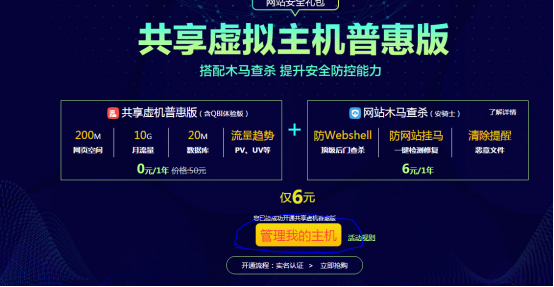

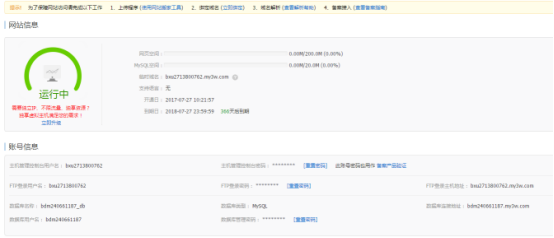
新浪云sae申请:
用户名:*********
密 码:********
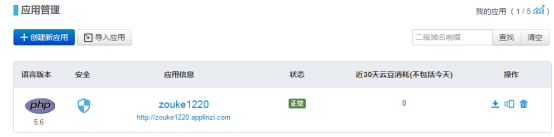
第一步:创建应用
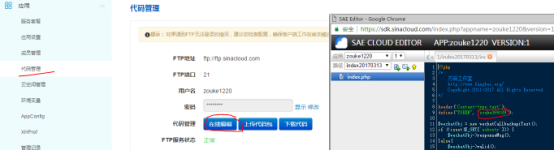
第二步:上传代码并配置token信息
http://sae.sina.com.cn/?m=sum&app_id=zouke1220&ver=1

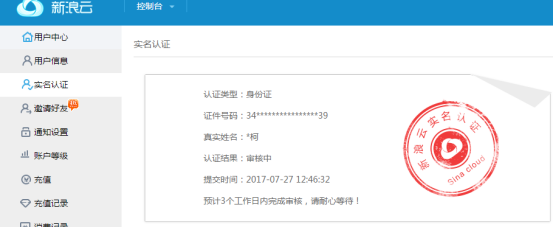
第三步:实名认证
http://www.sinacloud.com/ucenter.html?from=topnav
第四步:右击index.php通过URL访问
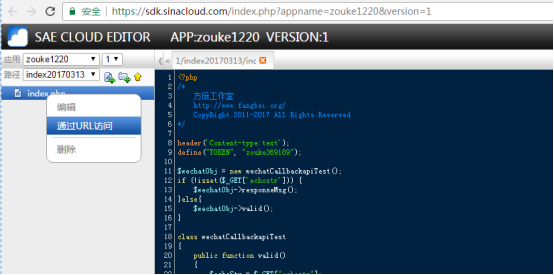
跳转到地址:http://1.zouke1220.applinzi.com/index20170313/index.php

第五步:微信接口测试号申请:
http://mp.weixin.qq.com/debug/cgi-bin/sandbox?t=sandbox/login
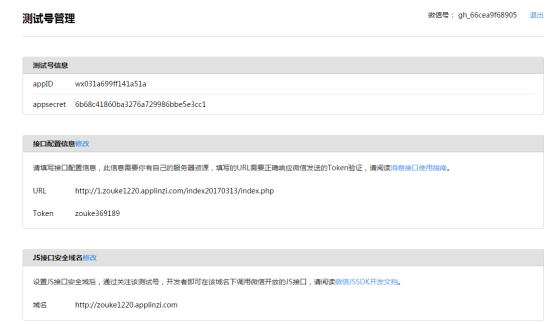
AppID=wx031a699ff141a51a
Appsecret=6b68c41860ba3276a729986bbe5e3cc1
第五步:微信接口正式号申请:(未实名认证)
邮箱:*******
密码:*******
https://mp.weixin.qq.com/cgi-bin/registermidpage?action=index&lang=zh_CN

微信认证:

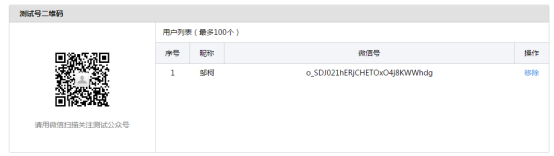
第六步:微信扫一扫
测试微信号:o_SDJ021hERjCHETOxO4j8KWWhdg
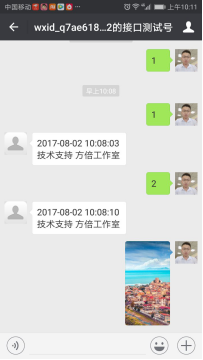
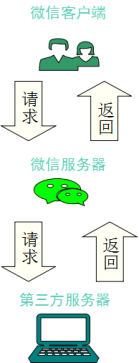
(1)index.php
<?php

header('Content-type:text');

define("TOKEN", "zouke369189");

$wechatObj = new wechatCallbackapiTest();

if (!isset($_GET['echostr'])) {

    $wechatObj->responseMsg();

}else{

    $wechatObj->valid();

}

class wechatCallbackapiTest{
    public function valid()

    {

        $echoStr = $_GET["echostr"];

        //验证消息的确来自微信服务器

        if($this->checkSignature()){

            echo $echoStr;

            exit;

        }

    }

    //验证消息的确来自微信服务器

    private function checkSignature()

    {

        $signature = $_GET["signature"];   //加密签名

        $timestamp = $_GET["timestamp"]; //时间戳

        $nonce = $_GET["nonce"];        //随机数

        $token = TOKEN;                //token

        $tmpArr = array($token, $timestamp, $nonce); //组成新数组

        sort($tmpArr);               //重新排序

        $tmpStr = implode($tmpArr);   //数组转成字符串

        $tmpStr = sha1($tmpStr);      //将字符串进行加密

        if($tmpStr == $signature){

            return true;

        }else{

            return false;

        }

    }

    public function responseMsg()

    {

        $postStr = $GLOBALS["HTTP_RAW_POST_DATA"];

        if (!empty($postStr)){

            $this->logger("R ".$postStr);

            $postObj = simplexml_load_string($postStr, 'SimpleXMLElement', LIBXML_NOCDATA);

            $RX_TYPE = trim($postObj->MsgType);

            switch ($RX_TYPE)

            {

                case "event":

                    $result = $this->receiveEvent($postObj);

                    break;

                case "text":

                    $result = $this->receiveText($postObj);

                    break;

            }

            $this->logger("T ".$result);

            echo $result;

        }else {

            echo "";

            exit;

        }

    }

    private function receiveEvent($object)

    {

        $content = "";

        switch ($object->Event)

        {

            case "subscribe":

                $content = "欢迎关注方倍工作室";

                break;

            case "unsubscribe":

                $content = "取消关注";

                break;

        }

        $result = $this->transmitText($object, $content);

        return $result;

    }

    //接收文本消息

    private function receiveText($object)

    {

        //去除空白

        $keyword = trim($object->Content);

        //回复内容

        //回复的文本内容

        //$content = date("Y-m-d H:i:s",time())."\n技术支持 方倍工作室";

        //回复的图文数组

        /*

        $content=array(

             array(

                 'Title'=>'zouke1',

                 'Description'=>'zzzzzzzzzzzzzzz',

                 'PicUrl'=>'http://pic32.nipic.com/20130812/8977957_215354223000_2.jpg',

                 'Url'=>'http://www.baidu.com'

             ),

             array(

                 'Title'=>'zouke2',

                 'Description'=>'zzzzzzzzzzzzzzz',

                 'PicUrl'=>'http://pic32.nipic.com/20130812/8977957_215354223000_2.jpg',

                 'Url'=>'http://www.baidu.com'

             ),

             array(

                 'Title'=>'zouke3',

                 'Description'=>'zzzzzzzzzzzzzzz',

                 'PicUrl'=>'http://pic32.nipic.com/20130812/8977957_215354223000_2.jpg',

                 'Url'=>'http://www.baidu.com'

             )

        );

        */

        //回复单图片

        $content=array(

             'MediaId'=>'q-hgbeHxuYyIkR3Tm9hbvLeFa-cM_LfNw6-tPZ3pf7SPEhdipTaWDZ-vAzlVv2HR',

        );

        /*

        if(is_array($content)){

            if (isset($content[0]['PicUrl'])){

                //回复多图文消息

                $result = $this->transmitNews($object, $content);

            }else if (isset($content['MusicUrl'])){

                //回复音乐消息

                $result = $this->transmitMusic($object, $content);

            }

        }else{

            //回复文本消息

            $result = $this->transmitText($object, $content);

        }

        */

        if($keyword=='图文'){

            if (isset($content[]['PicUrl'])){

                //回复多图文消息

                $result = $this->transmitNews($object, $content);

            }else if (isset($content['MusicUrl'])){

                //回复音乐消息

                $result = $this->transmitMusic($object, $content);

            }else{

                //回复单图片

                $result = $this->transmitImage($object, $content);

            }

        }else{

            //回复文本消息

            $result = $this->transmitText($object, $content);

        }

        //$this->logger($result)

        return $result;

    }

    //回复文本消息

    private function transmitText($object, $content)

    {

        $textTpl = "<xml>

<ToUserName><![CDATA[%s]]></ToUserName>

<FromUserName><![CDATA[%s]]></FromUserName>

<CreateTime>%s</CreateTime>

<MsgType><![CDATA[text]]></MsgType>

<Content><![CDATA[%s]]></Content>

</xml>";

        //sprintf把百分号(%)符号替换成一个作为参数进行传递的变量

        $result = sprintf($textTpl, $object->FromUserName, $object->ToUserName, time(), $content);

        return $result;

    }

    //回复多图文消息

    private function transmitNews($object, $arr_item)

    {

        if(!is_array($arr_item))

            return;

        $itemTpl = "<item>

   <Title><![CDATA[%s]]></Title>

   <Description><![CDATA[%s]]></Description>

   <PicUrl><![CDATA[%s]]></PicUrl>

   <Url><![CDATA[%s]]></Url>

</item>";

        $item_str = "";

        foreach ($arr_item as $item)

            $item_str .= sprintf($itemTpl, $item['Title'], $item['Description'], $item['PicUrl'], $item['Url']);

        $newsTpl = "<xml>

<ToUserName><![CDATA[%s]]></ToUserName>

<FromUserName><![CDATA[%s]]></FromUserName>

<CreateTime>%s</CreateTime>

<MsgType><![CDATA[news]]></MsgType>

<Content><![CDATA[]]></Content>

<ArticleCount>%s</ArticleCount>

<Articles>$item_str</Articles>

</xml>";

        $result = sprintf($newsTpl, $object->FromUserName, $object->ToUserName, time(), count($arr_item));

        return $result;

    }

    //回复音乐消息

    private function transmitMusic($object, $musicArray)

    {

        $itemTpl = "<Music>

    <Title><![CDATA[%s]]></Title>

    <Description><![CDATA[%s]]></Description>

    <MusicUrl><![CDATA[%s]]></MusicUrl>

    <HQMusicUrl><![CDATA[%s]]></HQMusicUrl>

</Music>";

        $item_str = sprintf($itemTpl, $musicArray['Title'], $musicArray['Description'], $musicArray['MusicUrl'], $musicArray['HQMusicUrl']);

        $textTpl = "<xml>

<ToUserName><![CDATA[%s]]></ToUserName>

<FromUserName><![CDATA[%s]]></FromUserName>

<CreateTime>%s</CreateTime>

<MsgType><![CDATA[music]]></MsgType>

$item_str

</xml>";

        $result = sprintf($textTpl, $object->FromUserName, $object->ToUserName, time());

        return $result;

    }

    //回复单图片

    private function transmitImage($object, $imageArray)

    {

        $itemTpl = "<Image>

        <MediaId><![CDATA[%s]]></MediaId>

    </Image>";

        $item_str = sprintf($itemTpl, $imageArray['MediaId']);

        $xmlTpl = "<xml>

    <ToUserName><![CDATA[%s]]></ToUserName>

    <FromUserName><![CDATA[%s]]></FromUserName>

    <CreateTime>%s</CreateTime>

    <MsgType><![CDATA[image]]></MsgType>

    $item_str

</xml>";
        $result = sprintf($xmlTpl, $object->FromUserName, $object->ToUserName, time());

        return $result;

    }

    //日志记录

    private function logger($log_content)

    {

        if(isset($_SERVER['HTTP_APPNAME'])){   //SAE

            sae_set_display_errors(false);

            sae_debug($log_content);
            sae_set_display_errors(true);

        }else if($_SERVER['REMOTE_ADDR'] != "127.0.0.1"){ //LOCAL

            $max_size = ;

            $log_filename = "log.xml";

            if(file_exists($log_filename) and (abs(filesize($log_filename)) > $max_size)){unlink($log_filename);}

            file_put_contents($log_filename, date('H:i:s')." ".$log_content."\r\n", FILE_APPEND);

        }

    }

}

?>
(2)update.php
//微信上传素材之curl用法

function http_curl($url,$data=null){

        //1.初始化,创建一个新cURL资源

        $ch = curl_init();

        curl_setopt ( $ch, CURLOPT_SAFE_UPLOAD, false);

        //2.设置URL和相应的选项

        curl_setopt($ch, CURLOPT_URL, $url);

        //curl_setopt($ch, CURLOPT_HEADER, 0);

        if(!empty($data)){

            curl_setopt($ch,CURLOPT_POST,);

            curl_setopt($ch,CURLOPT_POSTFIELDS,$data);

        }

        //禁止curl资源直接输出

        curl_setopt($ch,CURLOPT_RETURNTRANSFER,);

        //3.抓取URL并把它传递给浏览器

        $opt=curl_exec($ch);

        //4.关闭cURL资源,并且释放系统资源

        curl_close($ch);

        return $opt;

}

//获取token

function  get_token(){

        $appid="wx031a699ff141a51a";

        $secret="6b68c41860ba3276a729986bbe5e3cc1";

        $url="https://api.weixin.qq.com/cgi-bin/token?grant_type=client_credential&appid={$appid}&secret={$secret}";

        $json=http_curl($url);

        $result=json_decode($json);

        return $result->access_token;

}

$token=get_token();
//上传图片到微信服务器上
第一步:将要上传到微信服务器上的图片先上传到新浪云服务器上
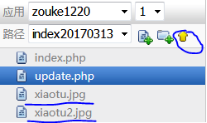
第二步:update.php处理

$type="image";

$url="http://file.api.weixin.qq.com/cgi-bin/media/upload?access_token={$token}&type={$type}";

$path=dirname(__FILE__)."/xiaotu.jpg";

//var_dump($path); // /data1/www/htdocs/950/zouke1220/1/index20170313/xiaotu.jpg

$data["media"]='@'.$path;

$arr=http_curl($url,$data);

//var_dump($arr);

//"{"type":"image","media_id":"q-hgbeHxuYyIkR3Tm9hbvLeFa-cM_LfNw6-tPZ3pf7SPEhdipTaWDZ-vAzlVv2HR","created_at":1501658024}"

//上传临时素材到公众号遇到的问题:"errcode":41005,"errmsg":"media data missing

/***********************解决方法*****************************

http_curl 方法中增加  curl_setopt ( $ch, CURLOPT_SAFE_UPLOAD, false);

************************************************************/

//自定义菜单上传到服务器上

$url="https://api.weixin.qq.com/cgi-bin/menu/create?access_token={$token}";

$data='{

    "button":[

        {

            "type":"click",

            "name":"今日歌曲",

            "key":"V1001_TODAY_MUSIC"

        },

        {

            "name":"菜单",

            "sub_button":[

                {

                    "type":"view",

                    "name":"搜索",

                    "url":"http://www.soso.com/"

                },

                 {

                    "type":"miniprogram",

                    "name":"wxa",

                    "url":"http://mp.weixin.qq.com",

                    "appid":"wx286b93c14bbf93aa",

                    "pagepath":"pages/lunar/index.html",

                },

                {

                    "type":"click",

                    "name":"赞一下我们",

                    "key":"V1001_GOOD"

                }]

        }]

}';

$result=http_curl($url,$data);

var_dump($result);   //string(27) "{"errcode":0,"errmsg":"ok"}"

//错误:string(71) "{"errcode":85005,"errmsg":"appid not bind weapp hint: [wuKL50493vr20]"}"

/**********************解决方法**********************************

//删除菜单中以下小程序菜单项

{

    "type":"miniprogram",

    "name":"wxa",

    "url":"http://mp.weixin.qq.com",

    "appid":"wx286b93c14bbf93aa",

    "pagepath":"pages/lunar/index.html",

},

****************************************************************/
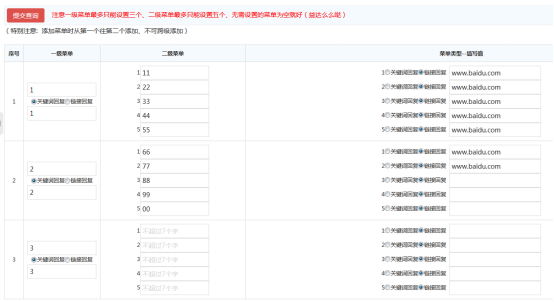
//通过表单提交创建菜单json字符串
http://1.zouke1220.applinzi.com/admin/

第一步:先接收提交过来的表单数据

//echo "<pre>";

//print_r($_POST);

//echo "</pre>";

/********************************

Array

(

    [do_submit] => 提交查询

    [menu0] => 1

    [menu0_box] => click

    [menu0_0] => 1

    [menu0_menu0] => 11

    [menu0_menu1] => 22

    [menu0_menu2] => 33

    [menu0_menu3] => 44

    [menu0_menu4] => 55

    [menu0_menu0_box0] => view

    [menu0_menu0_name0] => www.baidu.com

    [menu0_menu0_box1] => view

    [menu0_menu0_name1] => www.baidu.com

    [menu0_menu0_box2] => view

    [menu0_menu0_name2] => www.baidu.com

    [menu0_menu0_box3] => view

    [menu0_menu0_name3] => www.baidu.com

    [menu0_menu0_box4] => view

    [menu0_menu0_name4] => www.baidu.com

    [menu1] => 2

    [menu1_box] => click

    [menu1_1] => 2

    [menu1_menu0] => 66

    [menu1_menu1] => 77

    [menu1_menu2] =>

    [menu1_menu3] =>

    [menu1_menu4] =>

    [menu1_menu0_box0] => view

    [menu1_menu0_name0] => www.baidu.com

    [menu1_menu0_box1] => view

    [menu1_menu0_name1] => www.baidu.com

    [menu1_menu0_box2] => view

    [menu1_menu0_name2] =>

    [menu1_menu0_box3] => view

    [menu1_menu0_name3] =>

    [menu1_menu0_box4] => view

    [menu1_menu0_name4] =>

    [menu2] => 3

    [menu2_box] => click

    [menu2_2] => 3

    [menu2_menu0] =>

    [menu2_menu1] =>

    [menu2_menu2] =>

    [menu2_menu3] =>

    [menu2_menu4] =>

    [menu2_menu0_box0] => view

    [menu2_menu0_name0] =>

    [menu2_menu0_box1] => view

    [menu2_menu0_name1] =>

    [menu2_menu0_box2] => view

    [menu2_menu0_name2] =>

    [menu2_menu0_box3] => view

    [menu2_menu0_name3] =>

    [menu2_menu0_box4] => view

    [menu2_menu0_name4] =>

)

*******************************/

第二步:拼接菜单

if(isset($_POST["do_submit"])){

     for($i=;$i<;$i++){

          //指定下标

          //一级菜单的名字

          $button="menu{$i}";

          //一级菜单的类型
          $type="menu{$i}_box";

          //一级菜单的值

          $key="menu{$i}_{$i}";

          //二级菜单的名字

          $sub_submit="menu{$i}_menu0";

          //如果有子菜单

          if(trim($_POST[$sub_submit]) !=""){

              //组装二级菜单

              for($j=;$j<;$j++){

                   //二级菜单名字

                   $sub_submit="menu{$i}_menu{$j}";

                   //二级菜单类型

                   $sub_type="menu{$i}_menu0_box{$j}";

                   //二级菜单的值

                   $sub_key="menu{$i}_menu0_name{$j}";

                   if(trim($_POST[$sub_submit]) !=""){

                        //一级菜单的名称

                        $menuarr['button'][$i]['name']=$_POST[$button];

                        if($_POST[$sub_type]=="click"){

                             $menuarr['button'][$i]['sub_button'][$j]['type']="click";

                             $menuarr['button'][$i]['sub_button'][$j]['name']=$_POST[$sub_submit];

                             $menuarr['button'][$i]['sub_button'][$j]['key']=$_POST[$sub_key];

                        }else if($_POST[$sub_type]=="view"){

                             $menuarr['button'][$i]['sub_button'][$j]['type']="view";

                             $menuarr['button'][$i]['sub_button'][$j]['name']=$_POST[$sub_submit];

                             $menuarr['button'][$i]['sub_button'][$j]['url']=$_POST[$sub_key];

                        }

                   }

               }

          }else{

               //组装一级菜单

               if(trim($_POST[$button]) !=""){

                    if($_POST[$type]=="click"){

                         $menuarr['button'][$i]['type']="click";

                         $menuarr['button'][$i]['name']=$_POST[$button];

                         $menuarr['button'][$i]['key']=$_POST[$key];

                    }else if($_POST[$type]=="view"){

                         $menuarr['button'][$i]['type']="view";

                         $menuarr['button'][$i]['name']=$_POST[$button];

                         $menuarr['button'][$i]['url']=$_POST[$key];

                    }

               }

          }

     }

}

//echo "<pre>";

//print_r($menuarr);

//echo "</pre>";

/***********************

Array

(

    [button] => Array

        (

            [0] => Array

                (

                    [name] => 1

                    [sub_button] => Array

                        (

                            [0] => Array

                                (

                                    [type] => view

                                    [name] => 11

                                    [url] => www.baidu.com

                                )

                            [1] => Array

                                (

                                    [type] => view

                                    [name] => 22

                                    [url] => www.baidu.com

                                )

                            [2] => Array

                                (

                                    [type] => view

                                    [name] => 33

                                    [url] => www.baidu.com

                                )

                            [3] => Array

                                (

                                    [type] => view

                                    [name] => 44

                                    [url] => www.baidu.com

                                )

                            [4] => Array

                                (

                                    [type] => view

                                    [name] => 55

                                    [url] => www.baidu.com

                                )

                        )

                )

            [1] => Array

                (

                    [name] => 2

                    [sub_button] => Array

                        (

                            [0] => Array

                                (

                                    [type] => view

                                    [name] => 66

                                    [url] => www.baidu.com

                                )

                            [1] => Array

                                (

                                    [type] => view

                                    [name] => 77

                                    [url] => www.baidu.com

                                )

                            [2] => Array

                                (

                                    [type] => view

                                    [name] => 88

                                    [url] =>

                                )

                            [3] => Array

                                (

                                    [type] => view

                                    [name] => 99

                                    [url] =>

                                )

                            [4] => Array

                                (

                                    [type] => view

                                    [name] => 00

                                    [url] =>

                                )

                        )

                )

            [2] => Array

                (

                    [type] => click

                    [name] => 3

                    [key] => 3

                )

        )

)

***********************/

第三步:将菜单数组转json

$data=json_encode($menuarr,JSON_UNESCAPED_SLASHES | JSON_UNESCAPED_UNICODE);

//print_r("'$data'");

/**********************

$data='{

    "button": [

        {

            "name": "1",

            "sub_button": [

                {

                    "type": "view",

                    "name": "11",

                    "url": "http://www.baidu.com"

                },

                {

                    "type": "view",

                    "name": "22",

                    "url": "http://www.baidu.com"

                },

                {

                    "type": "view",

                    "name": "33",

                    "url": "http://www.baidu.com"

                },

                {

                    "type": "view",

                    "name": "44",

                    "url": "http://www.baidu.com"

                }

            ]

        },

        {

            "name": "2",

            "sub_button": [

                {

                    "type": "view",

                    "name": "66",

                    "url": "http://www.baidu.com"

                },

                {

                    "type": "view",

                    "name": "77",

                    "url": "http://www.baidu.com"

                },

                {

                    "type": "view",

                    "name": "88",

                    "url": "http://www.soso.com/"

                },

                {

                    "type": "view",

                    "name": "99",

                    "url": "http://www.soso.com/"

                }

            ]

        },

        {

            "type": "click",

            "name": "3",

            "key": "3"

        }

    ]

}';

**********************/

第四步:将拼接好的菜单提交到微信服务器上

$url="https://api.weixin.qq.com/cgi-bin/menu/create?access_token={$token}";

$result=http_curl($url,$data);

//var_dump($result);

$arr=json_decode($result,true);

if($arr['errmsg']=="ok"){

     echo "<script>alert('提交成功!');history.go(-1);</script>";

}else{

     echo "<script>alert('提交失败!');history.go(-1);</script>";

}
错误:string(81) "{"errcode":40054,"errmsg":"invalid sub button url domain hint: [X6VYra0784vr19]"}"
解决方法:地址前面加http://
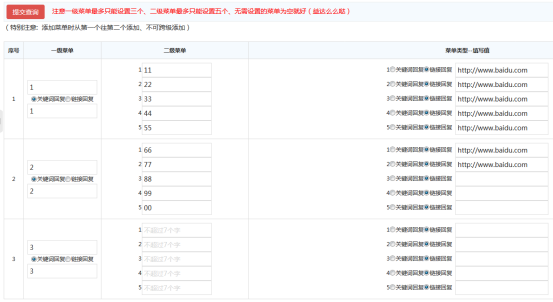
错误:string(73) "{"errcode":40027,"errmsg":"invalid sub button url size hint: [0205vr23]"}"
解决方法:二级菜单有值的,其菜单类型对应的值也必须填

string(27) "{"errcode":0,"errmsg":"ok"}"
第五步:登录微信公众号,查看上面创建自定义菜单的效果
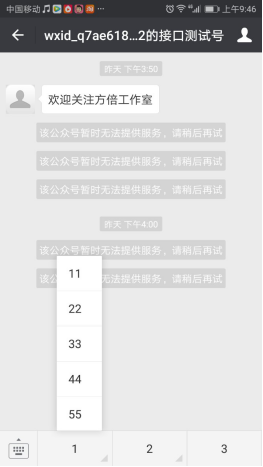
(3)index完整版+update完整版

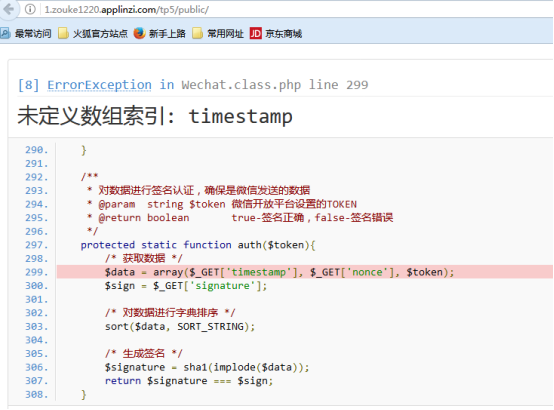
第七步:引入Thinkphp5框架 此处测试的微信sdk有些问题 建议看tp3下的测试
(1)登录TP官网
用户名:*******
密 码:********
(2)下载Thinkphp5框架,解压并改名tp5

(3)微信公众平台API接口扩展包
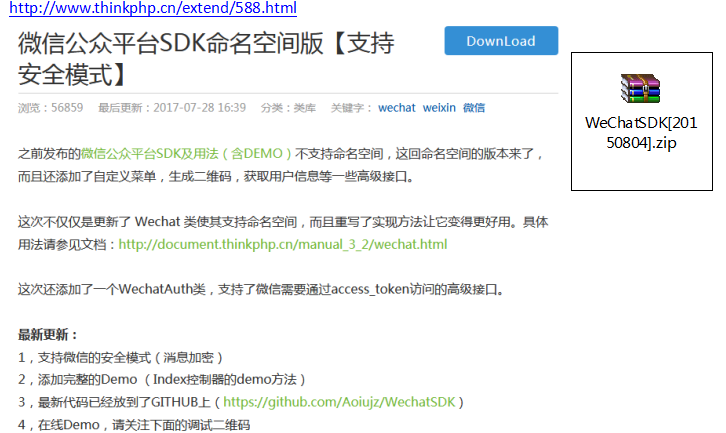
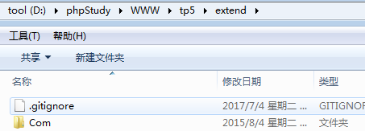
Com放入D:\phpStudy\WWW\tp5\extend文件下
(4)控制器调用处理
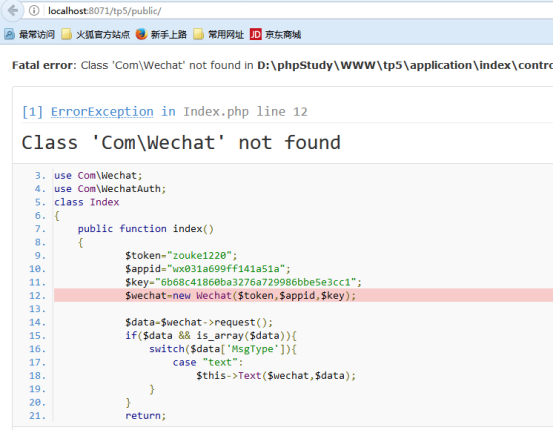
D:\phpStudy\WWW\tp5\application\index\controller\Index.php
<?php

namespace app\index\controller;

use Com\Wechat;

use Com\WechatAuth;

class Index

{

    public function index(){

       $token="zouke369189";

       $wechat=new Wechat($token);

       $data=$wechat->request();

       if($data && is_array($data)){

           switch($data['MsgType']){

               case "text":

                   $this->Text($wechat,$data);

           }

       }

    }

    //回复文本消息

    private function Text($wechat,$data){
        if(strstr($data['Content'],"文本")){

            $text="我正在使用Thinkphp开发微信";

            $this->logger("发送文本消息:\n".$text);

            $wechat->replyText($text);

        }

    }

    //写日志

    private function logger($content){

        $logSize=;

        $log="log.txt";

        if(file_exists($log) && fileSize($log) >$logSize){

            unlink($log);

        }

        file_put_contents($log,date('H:I:S')." ".$content."\n",FILE_APPEND);
   }

}
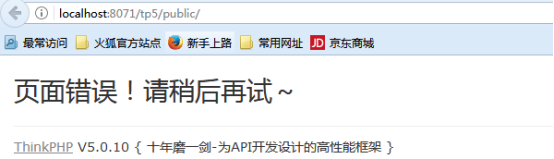
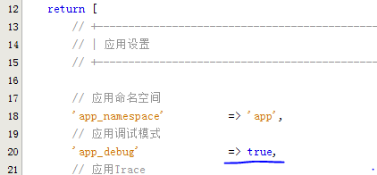
D:\phpStudy\WWW\tp5\application\config.php
(5)上传tp5到新浪云服务器上
(6)修改测试微信公众号的配置信息
http://mp.weixin.qq.com/debug/cgi-bin/sandbox?t=sandbox/login
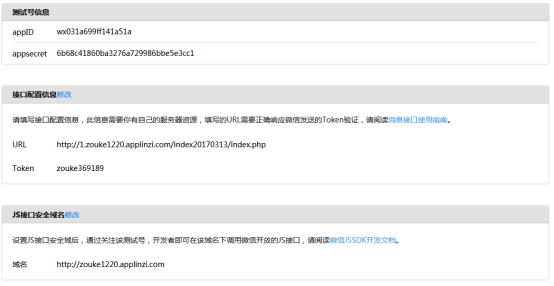
URL:http://1.zouke1220.applinzi.com/index20170313/index.php
Token:zouke1220
第七步:引入Thinkphp3框架
(1)下载Thinkphp3框架,解压并改名tp3
(2)下载微信sdk
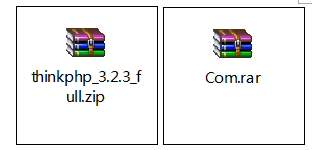
(3)将sdk解压放到D:\phpStudy\WWW\wechat\tp3\ThinkPHP\Library\Com
(4)访问http://localhost:8071/wechat/tp3/index.php/Home/Index
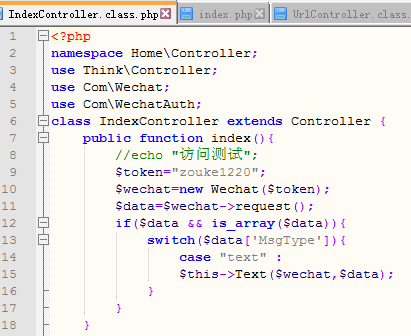

(5)花生壳映射域名到公网
① 登录
用户名:*******
密 码:********
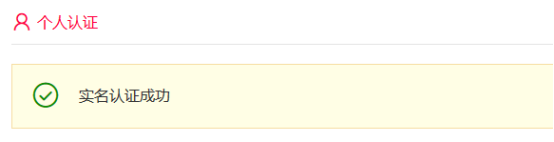
② 实名认证
③ 添加映射
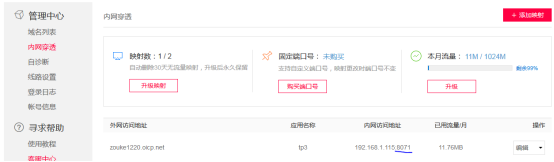
④ 访问将localhost:8071换成zouke1220.oicp.net进行访问
http://zouke1220.oicp.net/wechat/tp3/index.php/Home/Index

(6)微信测试号申请
https://mp.weixin.qq.com/debug/cgi-bin/sandboxinfo?action=showinfo&t=sandbox/index
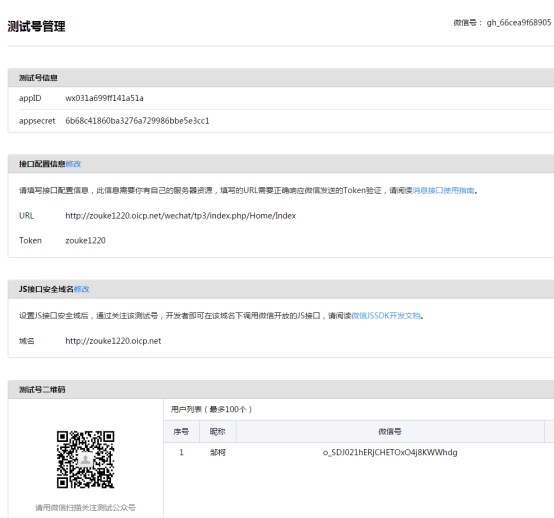
(7)网页授权获取用户基本信息
https://mp.weixin.qq.com/debug/cgi-bin/sandboxinfo?action=showinfo&t=sandbox/index

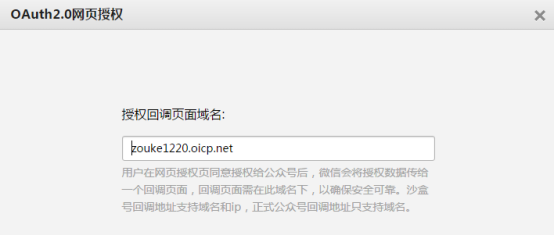
注意:前面不要加http://
    //网页授权获取用户基本信息

    public function webUsers(){

        $appid="wx031a699ff141a51a";

        $appSecret="6b68c41860ba3276a729986bbe5e3cc1";

        $WechatAuth=new WechatAuth($appid,$appSecret);

        if($_GET['iscode']){

            $url="http://zouke1220.oicp.net/wechat/tp3/index.php/Home/Index/webUsers";

            $result=$WechatAuth->getRequestCodeURL($url);

            echo $result;

        }

}
打开:微信web开发者工具,输入下面的网址
访问:http://zouke1220.oicp.net/wechat/tp3/index.php/Home/Index/webUsers/iscode/1
返回:
    //网页授权获取用户基本信息

    public function webUsers(){

        $appid="wx031a699ff141a51a";

        $appSecret="6b68c41860ba3276a729986bbe5e3cc1";

        $WechatAuth=new WechatAuth($appid,$appSecret);

        if($_GET['iscode']){

            $url="http://zouke1220.oicp.net/wechat/tp3/index.php/Home/Index/webUsers";

            $result=$WechatAuth->getRequestCodeURL($url);

            header("Location:{$result}");

        }

}
再次访问:http://zouke1220.oicp.net/wechat/tp3/index.php/Home/Index/webUsers/iscode/1
返回:
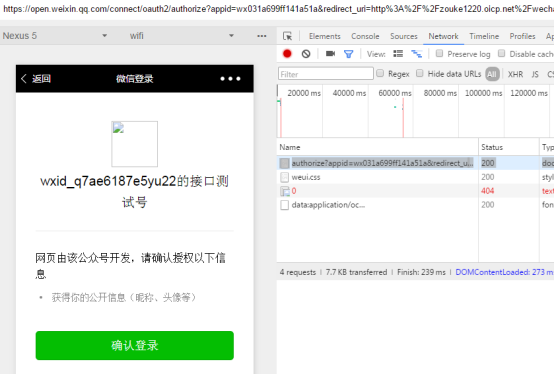
创建数据库tp3_wechat和表users:
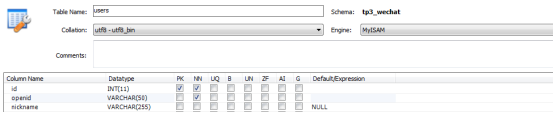
配置数据库:D:\phpStudy\WWW\wechat\tp3\Application\Home\Conf\config.php
<?php

return array(

    'URL_MODEL' => ,

    'DB_TYPE'   => 'mysql', // 数据库类型

    'DB_HOST'   => 'localhost', // 服务器地址

    'DB_NAME'  => 'tp3_wechat', // 数据库名

    'DB_USER'   => 'root', // 用户名

    'DB_PWD'   => 'root', // 密码

);
登录后获取用户信息
    //网页授权获取用户基本信息

    public function webUsers(){

        $appid="wx031a699ff141a51a";

        $appSecret="6b68c41860ba3276a729986bbe5e3cc1";

        $WechatAuth=new WechatAuth($appid,$appSecret);

        if($_GET['iscode']){

            $url="http://zouke1220.oicp.net/wechat/tp3/index.php/Home/Index/webUsers";

            $result=$WechatAuth->getRequestCodeURL($url);

            //echo $result;

            header("Location:{$result}");

        }else if($_GET['code']){

            header('Content-type:text/html;charset=utf-8');

            $user=$WechatAuth->getAccessToken('code',$_GET['code']);

            //var_dump($user);

            $openid=$user['openid'];

            $users=$WechatAuth->getUserInfo($openid);

            //var_dump($users);

            //将获取的用户信息插入数据库

            $m=M('users');

            $data['openid']=$users['openid'];

            $data['nickname']=$users['nickname'];

            $result=$m->add($data);

            if($result){

                $text="你的openid是:".$users['openid']."\n你的昵称是:".$users['nickname']."\n

                       你的性别是:".$users['sex']."\n你的城市是:".$users['city']."\n你所在国家是".$users['country']."\n

                       你在的省份是:".$users['province'];

                echo $text;

            }

        }

}
点击确认登录:跳转到下面地址
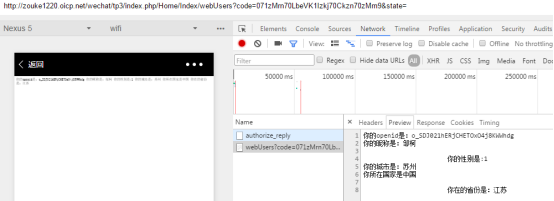

(8)用户分组接口的使用
1.效率
2.token有效期:2小时
3.调用限制:
4.缓存token
<?php

namespace Home\Controller;

use Think\Controller;

use Com\Wechat;

use Com\WechatAuth;

class UserController extends Controller {

private $appid="wx031a699ff141a51a";

    private $appSecret="6b68c41860ba3276a729986bbe5e3cc1";

    //初始化WechatAuth类

    private $WechatAuth="";

    //缓存token

    private $accsess_token="";

    public function __construct(){

         parent::__construct();

         if(!session('token')){

             //初始化WechatAuth类

             $this->WechatAuth=new WechatAuth($this->appid,$this->appSecret);

             $WechatAuth=$this->WechatAuth;

             $token=$WechatAuth->getAccessToken();

             //设置过期时间

             session(array('expire'=>$token['expires_in']));

             //缓存token

             session('token',$token['accsess_token']);

             $this->accsess_token=$token;

        }else{

             $token=session('token');

             //初始化WechatAuth类

             $this->WechatAuth=new WechatAuth($this->appid,$this->appSecret,$token);

             //缓存token

             $this->accsess_token=$token;

        }

    }

     //获取所有用户组

     public function selectGroupsGet(){

          header('Content-type:text/html;charset=utf-8;');

          $WechatAuth=$this->WechatAuth;

          $data=$WechatAuth->groupsGet();

          var_dump($data);

    }
http://zouke1220.oicp.net/wechat/tp3/index.php/Home/User/selectGroupsGet

//创建一个分组

public function createGroup(){

     $WechatAuth=$this->WechatAuth;

     $data=$WechatAuth->groupsCreate('我的分组');

     var_dump($data);

}
http://zouke1220.oicp.net/wechat/tp3/index.php/Home/User/createGroup
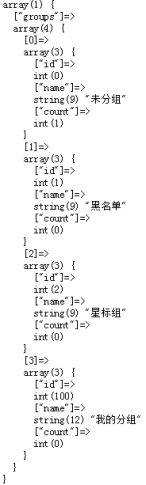
//查询一下指定用户的分组

public function GroupId(){

      $m=M('users');

      $user=$m->find();

      $openid=$user['openid'];

      $WechatAuth=$this->WechatAuth;

      $data=$WechatAuth->groupsGetid($openid);

      var_dump($data);

}
http://zouke1220.oicp.net/wechat/tp3/index.php/Home/User/GroupId
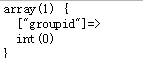
(9)群发消息接口的使用
由于sdk中未封装该方法,所以需要自己写。
D:\phpStudy\WWW\wechat\tp3\ThinkPHP\Library\Com\WechatAuth.class.php
/**

 *预览群发消息接口

 */

public function messageMass($msgtype,$openid,$content){

    $data=array(

         'touser'=>$openid,

         $msgtype=>array("content"=>$content),

         'msgtype'=>$msgtype

    );

    //echo json_encode($data);

    /********************************************

    {

        "touser":"o_SDJ021hERjCHETOxO4j8KWWhdg",

        "text":{"content":"\u4f60\u597d\uff0c\u6211\u5728\u9884\u89c8\u7fa4\u53d1\u6d88\u606f"},

        "msgtype":"text"

    }

    *******************************************/

    return $this->api("message/mass/preview",$data);

}
D:\phpStudy\WWW\wechat\tp3\Application\Home\Controller\MassController.class.php
<?php

namespace Home\Controller;

use Think\Controller;

use Com\Wechat;

use Com\WechatAuth;

//群发消息接口的使用

class MassController extends Controller {

private  $appid="wx031a699ff141a51a";

    private  $appSecret="6b68c41860ba3276a729986bbe5e3cc1";

    //初始化WechatAuth类

    private  $WechatAuth="";

    //缓存token

    private  $accsess_token="";

    public function __construct(){

        parent::__construct();

        if(!session('token')){

            //初始化WechatAuth类

            $this->WechatAuth=new WechatAuth($this->appid,$this->appSecret);

            $WechatAuth=$this->WechatAuth;

            $token=$WechatAuth->getAccessToken();

            //设置过期时间

            session(array('expire'=>$token['expires_in']));

            //缓存token

            session('token',$token['accsess_token']);

            $this->accsess_token=$token;

       }else{
            $token=session('token');

            //初始化WechatAuth类

            $this->WechatAuth=new WechatAuth($this->appid,$this->appSecret,$token);

            //缓存token

            $this->accsess_token=$token;

        }

    }

     //预览群发消息

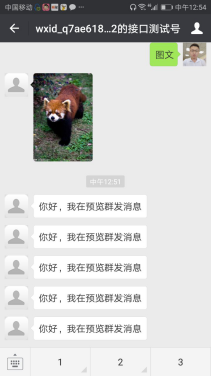
     public function Send(){

         header('Content-type:text/html;charset=utf-8;');

         $WechatAuth=$this->WechatAuth;

         $msgtype="text";

         $openid="o_SDJ021hERjCHETOxO4j8KWWhdg";

         $content="你好,我在预览群发消息";

         $arr=$WechatAuth->messageMass($msgtype,$openid,$content);

         var_dump($arr);

}
http://zouke1220.oicp.net/wechat/tp3/index.php/Home/Mass/Send
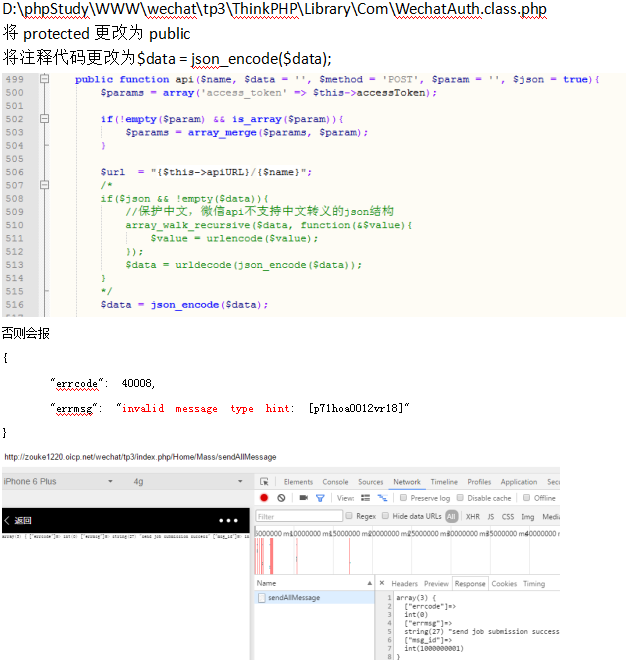
/**

 * 群发接口

 * @param  string $name   API名称

 * @param  string $data   POST请求数据

 * @param  string $method 请求方式

 * @param  string $param  GET请求参数

 * @return array          api返回结果

 */

public function sendAllMessage(){

    $WechatAuth=$this->WechatAuth;

    $group_id=null;

    $msgtype='text';

    $content="zz";

    $data=array(

        'filter'=>array('is_to_all'=>true,'group_id'=>$group_id),

        $msgtype=>array('content'=>$content),

        'msgtype'=>$msgtype

    );

    $arr=$WechatAuth->api("message/mass/sendall",$data);

    var_dump($arr);

}
(10)生成带参数的二维码
<?php

namespace Home\Controller;

use Think\Controller;

use Com\Wechat;

use Com\WechatAuth;

//创建二维码接口的使用

class UrlController extends Controller {

    private  $appid="wx031a699ff141a51a";

    private  $appSecret="6b68c41860ba3276a729986bbe5e3cc1";

    //初始化WechatAuth类

    private  $WechatAuth="";

    //缓存token

    private  $accsess_token="";

    public function __construct(){

        parent::__construct();

        if(!session('token')){

            //初始化WechatAuth类

            $this->WechatAuth=new WechatAuth($this->appid,$this->appSecret);

            $WechatAuth=$this->WechatAuth;

            $token=$WechatAuth->getAccessToken();

            //设置过期时间

            session(array('expire'=>$token['expires_in']));

            //缓存token

            session('token',$token['accsess_token']);

            $this->accsess_token=$token;

        }else{

            $token=session('token');

            //初始化WechatAuth类

            $this->WechatAuth=new WechatAuth($this->appid,$this->appSecret,$token);

            //缓存token

            $this->accsess_token=$token;

        }

    }

     /**

     * 创建二维码,可创建指定有效期的二维码和永久二维码

     * @param  integer $scene_id       二维码参数

     * @param  integer $expire_seconds 二维码有效期,0-永久有效

     */

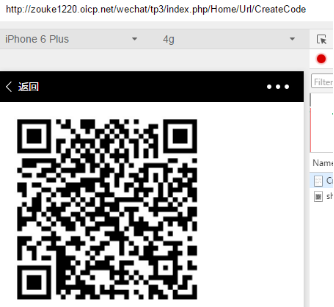
     //http://zouke1220.oicp.net/wechat/tp3/index.php/Home/Url/CreateCode

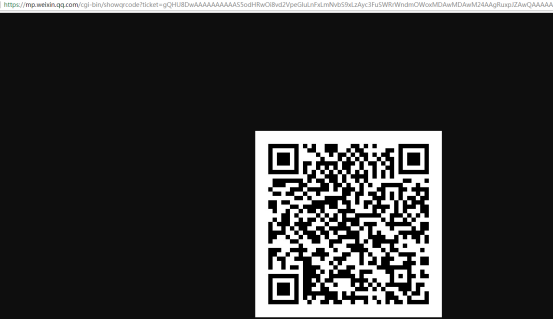
    public function CreateCode(){

        $WechatAuth=$this->WechatAuth;

        $ticket=$WechatAuth->qrcodeCreate("");

        //var_dump($src);
        //var_dump($ticket);

        //string(147) "https://mp.weixin.qq.com/cgi-bin/showqrcode?ticket=gQHU8DwAAAAAAAAAAS5odHRwOi8vd2VpeGluLnFxLmNvbS9xLzAyc3FuSWRrWndmOWoxMDAwMDAwM24AAgRuxpJZAwQAAAAA"

        echo "<img width='70%' src='https://mp.weixin.qq.com/cgi-bin/showqrcode?ticket=gQHU8DwAAAAAAAAAAS5odHRwOi8vd2VpeGluLnFxLmNvbS9xLzAyc3FuSWRrWndmOWoxMDAwMDAwM24AAgRuxpJZAwQAAAAA' />";

    }

    //长链接转短链接  接(10)

    public function Short(){

        $WechatAuth=$this->WechatAuth; $url=$WechatAuth->shortUrl("http://pan.baidu.com/disk/home?errno=0&errmsg=Auth%20Login%20Sucess&&bduss=&ssnerror=0#list/path=%2F&vmode=list");

        var_dump($url);

        /********************************

        array(3) {

          ["errcode"]=>

          int(0)

          ["errmsg"]=>

          string(2) "ok"

          ["short_url"]=>

          string(26) "https://w.url.cn/s/AhZBsc8"

        }

        ***********************/

    }

}
(11)微信js-sdk的使用
微信-公众平台-企业号开发者中心:
http://qydev.weixin.qq.com/wiki/index.php?title=%CE%A2%D0%C5JS-SDK%BD%D3%BF%DA
微信js-sdk说明文档:
https://mp.weixin.qq.com/wiki?t=resource/res_main&id=mp1421141115
① 下载js-sdk

② 打开sdk文件下的jssdk.php文件,复制getSignPackage、createNonceStr、httpGet、getJsApiTicket 4个方法,并改造getSignPackage、getJsApiTicket方法将getJsApiTicket下的代码放入__construct,并删除getJsApiTicket方法
D:\phpStudy\WWW\wechat\tp3\Application\Home\Controller\SdkController.class.php
<?php

namespace Home\Controller;

use Think\Controller;

use Com\Wechat;

use Com\WechatAuth;

//微信js-sdk的使用

class SdkController extends Controller {

    private  $appid="wx031a699ff141a51a";

    private  $appSecret="6b68c41860ba3276a729986bbe5e3cc1";

    //初始化WechatAuth类

    private  $WechatAuth="";

    //缓存token

    private  $access_token="";

    //缓存jsapi_ticket

    private  $jsapi_ticket="";

    public function __construct(){

        parent::__construct();

        if(!session('token')){

            //初始化WechatAuth类

            $this->WechatAuth=new WechatAuth($this->appid,$this->appSecret);

            $WechatAuth=$this->WechatAuth;

            $token=$WechatAuth->getAccessToken();

            //设置过期时间

            session(array('expire'=>$token['expires_in']));

            //缓存token

            session('token',$token['access_token']);

            $this->access_token=$token['access_token'];

        }else{

            $token=session('token');

            //初始化WechatAuth类

            $this->WechatAuth=new WechatAuth($this->appid,$this->appSecret,$token);

            //缓存token

            $this->access_token=$token;

        }

        // jsapi_ticket 应该全局存储与更新

        if (!session('jsapi_ticket')) {

            $accessToken = $this->access_token;

            // 如果是企业号用以下 URL 获取 ticket

            // $url = "https://qyapi.weixin.qq.com/cgi-bin/get_jsapi_ticket?access_token=$accessToken";

            $url = "https://api.weixin.qq.com/cgi-bin/ticket/getticket?type=jsapi&access_token=$accessToken";

            $res = json_decode($this->httpGet($url));

            $this->jsapi_ticket=$res->ticket;

            //设置过期时间

            session(array('expire'=>));

            session('jsapi_ticket',$this->jsapi_ticket);

        } else {

            $this->jsapi_ticket = session('jsapi_ticket');

        }

    }

    //http://zouke1220.oicp.net/wechat/tp3/index.php/Home/Sdk/index

    public function index(){

        $data=$this->getSignPackage();

        //var_dump($data);

        /*******************************

        array(6) {

          ["appId"]=>

          string(18) "wx031a699ff141a51a"

          ["nonceStr"]=>

          string(16) "mJ0NRQYoQkplFazN"

          ["timestamp"]=>

          int(1502868681)

          ["url"]=>

          string(61) "http://zouke1220.oicp.net/wechat/tp3/index.php/Home/Sdk/index"

          ["signature"]=>

          string(40) "0a49a3088a29abb98126cf76020f790c2dbc7759"

          ["rawString"]=>

          string(126) "jsapi_ticket=&noncestr=mJ0NRQYoQkplFazN×tamp=1502868681&url=http://zouke1220.oicp.net/wechat/tp3/index.php/Home/Sdk/index"

        }

        *******************************/

        $this->assign('data',$data);

        $this->display();

    }

    public function getSignPackage() {

        $jsapiTicket = $this->jsapi_ticket;

        // 注意 URL 一定要动态获取,不能 hardcode.

        $protocol = (!empty($_SERVER['HTTPS']) && $_SERVER['HTTPS'] !== 'off' || $_SERVER['SERVER_PORT'] == ) ? "https://" : "http://";

        $url = "$protocol$_SERVER[HTTP_HOST]$_SERVER[REQUEST_URI]";

        $timestamp = time();

        $nonceStr = $this->createNonceStr();

        // 这里参数的顺序要按照 key 值 ASCII 码升序排序

        $string = "jsapi_ticket=$jsapiTicket&noncestr=$nonceStr×tamp=$timestamp&url=$url";

        $signature = sha1($string);

        $signPackage = array(

              "appId"     => $this->appid,

              "nonceStr"  => $nonceStr,

              "timestamp" => $timestamp,

              "url"       => $url,

              "signature" => $signature,

              "rawString" => $string

        );

        return $signPackage;

    }

    private function createNonceStr($length = ) {

        $chars = "abcdefghijklmnopqrstuvwxyzABCDEFGHIJKLMNOPQRSTUVWXYZ0123456789";

        $str = "";

        for ($i = ; $i < $length; $i++) {

          $str .= substr($chars, mt_rand(, strlen($chars) - ), );

        }

        return $str;

    }

    private function httpGet($url) {

        $curl = curl_init();

        curl_setopt($curl, CURLOPT_RETURNTRANSFER, true);

        curl_setopt($curl, CURLOPT_TIMEOUT, );

        // 为保证第三方服务器与微信服务器之间数据传输的安全性,所有微信接口采用https方式调用,必须使用下面2行代码打开ssl安全校验。

        // 如果在部署过程中代码在此处验证失败,请到 http://curl.haxx.se/ca/cacert.pem 下载新的证书判别文件。

        curl_setopt($curl, CURLOPT_SSL_VERIFYPEER, true);

        curl_setopt($curl, CURLOPT_SSL_VERIFYHOST, true);

        curl_setopt($curl, CURLOPT_URL, $url);

        $res = curl_exec($curl);

        curl_close($curl);

        return $res;

    }

}
D:\phpStudy\WWW\wechat\tp3\Application\Home\View\Sdk\index.html
<html lang="en">

<head>

  <meta charset="UTF-8">

  <title></title>

</head>

<body>

</body>

<script src="http://res.wx.qq.com/open/js/jweixin-1.0.0.js"></script>

<script>

  /*

   * 注意:

   * 1. 所有的JS接口只能在公众号绑定的域名下调用,公众号开发者需要先登录微信公众平台进入“公众号设置”的“功能设置”里填写“JS接口安全域名”。

   * 2. 如果发现在 Android 不能分享自定义内容,请到官网下载最新的包覆盖安装,Android 自定义分享接口需升级至 6.0.2.58 版本及以上。

   * 3. 常见问题及完整 JS-SDK 文档地址:http://mp.weixin.qq.com/wiki/7/aaa137b55fb2e0456bf8dd9148dd613f.html

   * 开发中遇到问题详见文档“附录5-常见错误及解决办法”解决,如仍未能解决可通过以下渠道反馈:

   * 邮箱地址:weixin-open@qq.com

   * 邮件主题:【微信JS-SDK反馈】具体问题

   * 邮件内容说明:用简明的语言描述问题所在,并交代清楚遇到该问题的场景,可附上截屏图片,微信团队会尽快处理你的反馈。

   */

  wx.config({

    debug: true,

    appId: '<?php echo $data["appId"];?>',

    timestamp: <?php echo $data["timestamp"];?>,

    nonceStr: '<?php echo $data["nonceStr"];?>',

    signature: '<?php echo $data["signature"];?>',

    jsApiList: [

           // 所有要调用的 API 都要加到这个列表中

      'checkJsApi'

    ]

  });

  wx.ready(function () {

    // 在这里调用 API

   // https://mp.weixin.qq.com/wiki?t=resource/res_main&id=mp1421141115

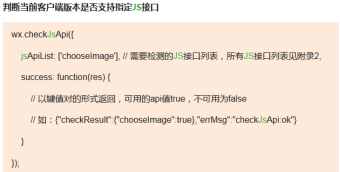
    // 判断当前客户端版本是否支持指定JS接口

    wx.checkJsApi({

           jsApiList: ['chooseImage'], // 需要检测的JS接口列表,所有JS接口列表见附录2,

           success: function(res) {

                // 以键值对的形式返回,可用的api值true,不可用为false

                // 如:{"checkResult":{"chooseImage":true},"errMsg":"checkJsApi:ok"}

      }

    });

  });

</script>

</html>
③ 图像接口和扫一扫接口的使用
<html lang="en">

<head>

  <meta charset="UTF-8">

  <title></title>

</head>

<body>

  <button id="btn1"  style="width:80%;height:300px;font-size:100px;background:green;">图像接口的使用</button>

  <button id="btn2"  style="width:80%;height:300px;font-size:100px;background:green;">扫一扫接口的使用</button>

</body>

<script src="http://res.wx.qq.com/open/js/jweixin-1.0.0.js"></script>

<script>

  /*

   * 注意:

   * 1. 所有的JS接口只能在公众号绑定的域名下调用,公众号开发者需要先登录微信公众平台进入“公众号设置”的“功能设置”里填写“JS接口安全域名”。

   * 2. 如果发现在 Android 不能分享自定义内容,请到官网下载最新的包覆盖安装,Android 自定义分享接口需升级至 6.0.2.58 版本及以上。

   * 3. 常见问题及完整 JS-SDK 文档地址:http://mp.weixin.qq.com/wiki/7/aaa137b55fb2e0456bf8dd9148dd613f.html
   * 开发中遇到问题详见文档“附录5-常见错误及解决办法”解决,如仍未能解决可通过以下渠道反馈:

   * 邮箱地址:weixin-open@qq.com

   * 邮件主题:【微信JS-SDK反馈】具体问题

   * 邮件内容说明:用简明的语言描述问题所在,并交代清楚遇到该问题的场景,可附上截屏图片,微信团队会尽快处理你的反馈。

   */

  wx.config({

    debug: true,

    appId: '<?php echo $data["appId"];?>',

    timestamp: <?php echo $data["timestamp"];?>,

    nonceStr: '<?php echo $data["nonceStr"];?>',

    signature: '<?php echo $data["signature"];?>',

    jsApiList: [

             // 所有要调用的 API 都要加到这个列表中
        'checkJsApi',

       'chooseImage',

            'scanQRCode'

    ]

  });

  var bnt1=document.getElementById("btn1");

  bnt1.onclick=function(){

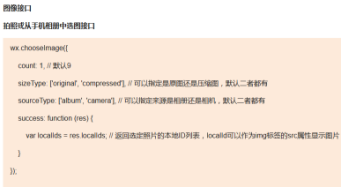
      wx.chooseImage({

          count: , // 默认9

          sizeType: ['original', 'compressed'], // 可以指定是原图还是压缩图,默认二者都有

          sourceType: ['album', 'camera'], // 可以指定来源是相册还是相机,默认二者都有

          success: function (res) {

               var localIds = res.localIds; //

               document.write("<img src="+localIds+">");
          }

     });

  }

var bnt2=document.getElementById('btn2');

bnt2.onclick=function(){

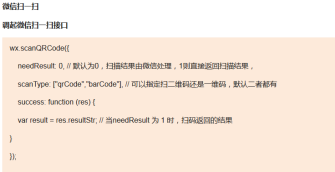
    wx.scanQRCode({

        needResult: , // 默认为0,扫描结果由微信处理,1则直接返回扫描结果,

        scanType: ["qrCode","barCode"], // 可以指定扫二维码还是一维码,默认二者都有

        success: function (res) {

            var result = res.resultStr; // 当needResult 为 1 时,扫码返回的结果

        }

    });

}

wx.ready(function () {
    // 在这里调用 API

    // 判断当前客户端版本是否支持指定JS接口

    wx.checkJsApi({

       jsApiList: ['chooseImage'], // 需要检测的JS接口列表,所有JS接口列表见附录2,

       success: function(res) {

             // 以键值对的形式返回,可用的api值true,不可用为false

             // 如:{"checkResult":{"chooseImage":true},"errMsg":"checkJsApi:ok"}

       }

    });
});

</script>

</html>
微信中访问链接:
http://zouke1220.oicp.net/wechat/tp3/index.php/Home/Sdk/index
首先出现 然后出现 当点击扫一扫或图像接口出现
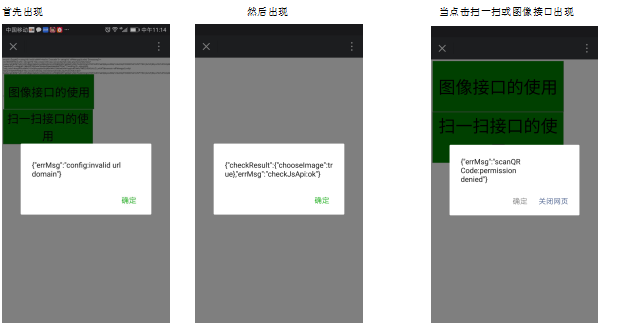
解决方法:
打开微信测试号申请页面:
https://mp.weixin.qq.com/debug/cgi-bin/sandboxinfo?action=showinfo&t=sandbox/index
将以下域名

修改为:
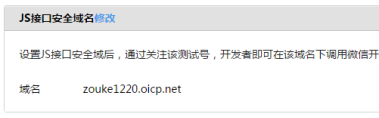
微信中再次访问链接:
http://zouke1220.oicp.net/wechat/tp3/index.php/Home/Sdk/index
首先出现 然后出现
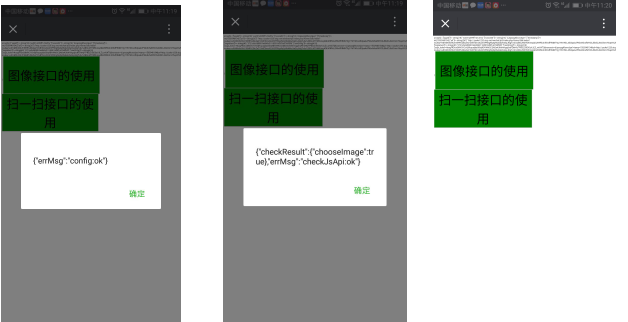
点击图像接口的使用 点击扫一扫接口的使用

④ 微信js-sdk完整版demo
上篇: php 微信公众号 基于Thinkphp3.2框架开发的更多相关文章
- php 微信公众号+微商城开发 基于Thinkphp3.2框架开发
说明:本教程是自己自学+自己的理解+扩展(包括学习过程中遇到的一些问题) 参考教程:麦子学院--李忠益--http://www.maiziedu.com/u/70409/ 微盟: http://www ...
- 基于APPIUM测试微信公众号的UI自动化测试框架(结合Allure2测试报告框架)
框架初衷 前两周组内的小伙伴跟我说她现在测试的微信公众号项目(保险)每次上新产品时测试起来很费时,存在大量的重复操作(点点点),手工测试每个产品可能需要半天到一天的时间,复杂的产品需要两天. 由于保险 ...
- 下篇: php 微商城 基于Thinkphp3.2框架开发
(12)微信商城 ① 前台模板引入 a.引入微信商城模板的css+js+Images+img+bootstrap b.引入微商城的首页index.html及详情页detail.html页面模板 注意: ...
- Senparc.Weixin SDK 微信公众号 .NET 开发教程 索引
Senparc.WeixinSDK从一开始就坚持开源的状态,这个过程中得到了许多朋友的认可和支持. 目前SDK已经达到比较稳定的版本,这个过程中我觉得有必要整理一些思路和经验,和大家一起分享.也欢迎大 ...
- C#开发微信门户及应用(37)--微信公众号标签管理功能
微信公众号,仿照企业号的思路,增加了标签管理的功能,对关注的粉丝可以设置标签管理,实现更加方便的分组管理功能.开发者可以使用用户标签管理的相关接口,实现对公众号的标签进行创建.查询.修改.删除等操作, ...
- Java微信公众号开发
微信公众平台是腾讯为了让用户申请和管理微信公众账号而推出的一个web平台.微信公众账号的种类可以分为3种,并且一旦选定不可更改.按照功能的限制从小到大依次为:订阅号.服务号.企业号.个人只能注册订阅号 ...
- 13、ABPZero系列教程之拼多多卖家工具 微信公众号开发前的准备
因为是开发阶段,我需要在本地调试,而微信开发需要配置域名,这样natapp.cn就有了用武之地,应该说natapp就是为此而生的. natapp.cn是什么 这是一个内网映射的网站,支持微信公众号.小 ...
- 微信公众号 SVG长按互动
<section class="" style="display: block;width: 100%;height:667px;overflow:hidden;m ...
- 基于搜狗搜索的微信公众号爬虫实现(C#版本)
Author: Hoyho Luo Email: luohaihao@gmail.com Source Url:http://here2say.me/11/ 转载请保留此出处 本文介绍基于搜狗的微信公 ...
随机推荐
- 吴裕雄 python 机器学习——模型选择参数优化暴力搜索寻优GridSearchCV模型
import scipy from sklearn.datasets import load_digits from sklearn.metrics import classification_rep ...
- MYSQL 传汉字获取拼音首字母
--获取单个汉字首字母拼音 --CREATE DEFINER=`by`@`%` FUNCTION `fun_first_pinyin`(`P_NAME` VARCHAR(5)) RETURNS var ...
- win10中,vscode安装go插件排雷指南
最近学习go,想着使用强大的vscode编写go,在安装go插件过程中,遇到了很多问题.下面记录解决方案. 1)win10环境,安装go,vscode,git 配置GOPATH环境变量,在我的电脑-& ...
- Spring 的 Bean 生命周期,11 张高清流程图及代码,深度解析
在网上已经有跟多Bean的生命周期的博客,但是很多都是基于比较老的版本了,最近吧整个流程化成了一个流程图.待会儿使用流程图,说明以及代码的形式来说明整个声明周期的流程.注意因为代码比较多,这里的流程图 ...
- Fluent_Python_Part4面向对象,11-iface-abc,协议(接口),抽象基类
第四部分第11章,接口:从协议到抽象基类(重点讲抽象基类) 接口就是实现特定角色的方法集合. 严格来说,协议是非正式的接口(只由文档约束),正式接口会施加限制(抽象基类对接口一致性的强制). 在Pyt ...
- Wordpress-微信机器人高级版
微信机器人高级版是我爱水煮鱼开发的一款插件,功能很棒,运行此插件需要同时开启WPJAM Basic插件. 高级版5.0 版本对服务器要求非常高,只支持 Linux 服务器,PHP 要求 7.2 及以上 ...
- 数据库的小案例(三):用递归实现TreeView层级显示
从这个小案例我学到了不少知识.这些无论如何无法从书里得来.正所谓实践出真知,学习编程需要大量实践这句话永不过时. 首先:好的代码和坏的代码带来的性能上的差异很明显.好的策略可以让你的程序运行速度大大加 ...
- 在VS2017配置OpenGL开发环境
这个方法适合初学者使用,较为简单方便.第一,你的VS2017一定要安装了C/C++开发组件可以打开Visual Studio Installer来查看另外,确定你有安装NuGet包管理器,在单个组件中 ...
- 【原】mac电脑使用总结
mac下终端配置(item2+oh-my-zsh)+solarized配色方案:https://www.cnblogs.com/weixuqin/p/7029177.html
- iPhone代工商,谁敢要求苹果赔偿损失?
据外国媒体报道,苹果的首席设计师已准备离职,有相关评论称:库克已经不在把硬件设计放到第一位,整个团队都巧妙地遭遇降级.相信熟悉苹果组织的人都知道,他们一切的核心都是围绕"硬件设计" ...