
微信小程序表单弹窗实例
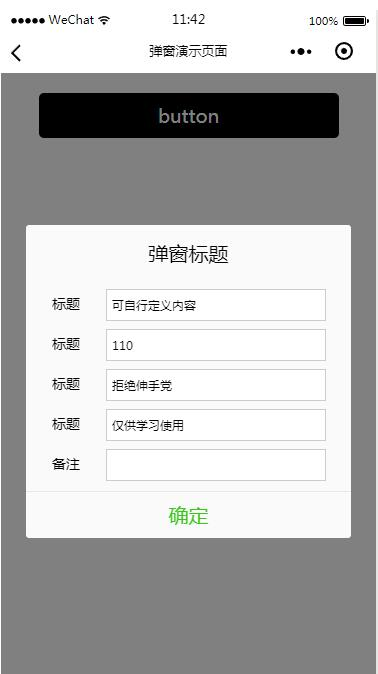
开发中有时候会碰到需要一个表单弹窗来处理数据的提交处理,然后这次发布的这套源码就是解决这个问题!
<!--button-->

<view class="btn" bindtap="powerDrawer" data-statu="open">button</view>

<!--mask-->

<view class="drawer_screen" bindtap="powerDrawer" data-statu="close" wx:if="{{showModalStatus}}"></view>

<!--content-->

<!--使用animation属性指定需要执行的动画-->

<view animation="{{animationData}}" class="drawer_box" wx:if="{{showModalStatus}}">

 <!--drawer content-->

 <view class="drawer_title">弹窗标题</view>

 <view class="drawer_content">

  <view class="top grid">

   <label class="title col-0">标题</label>

   <input class="input_base input_h30 col-1" name="rName" value="可自行定义内容"></input>

  </view>

  <view class="top grid">

   <label class="title col-0">标题</label>

   <input class="input_base input_h30 col-1" name="mobile" value="110"></input>

  </view>

  <view class="top grid">

   <label class="title col-0">标题</label>

   <input class="input_base input_h30 col-1" name="phone" value="拒绝伸手党"></input>

  </view>

  <view class="top grid">

   <label class="title col-0">标题</label>

   <input class="input_base input_h30 col-1" name="Email" value="仅供学习使用"></input>

  </view>

  <view class="top bottom grid">

   <label class="title col-0">备注</label>

   <input class="input_base input_h30 col-1" name="bz"></input>

  </view>

 </view>

 <view class="btn_ok" bindtap="powerDrawer" data-statu="close">确定</view>

</view>
Page({

 data: {

  showModalStatus: false

 },

 powerDrawer: function (e) {

  var currentStatu = e.currentTarget.dataset.statu;

  this.util(currentStatu)

 },

 util: function(currentStatu){

  /* 动画部分 */

  // 第1步:创建动画实例

  var animation = wx.createAnimation({

   duration: 200, //动画时长

   timingFunction: "linear", //线性

   delay: 0 //0则不延迟

  });

  // 第2步:这个动画实例赋给当前的动画实例

  this.animation = animation;

  // 第3步:执行第一组动画

  animation.opacity(0).rotateX(-100).step();

  // 第4步:导出动画对象赋给数据对象储存

  this.setData({

   animationData: animation.export()

  })

  // 第5步:设置定时器到指定时候后,执行第二组动画

  setTimeout(function () {

   // 执行第二组动画

   animation.opacity(1).rotateX(0).step();

   // 给数据对象储存的第一组动画,更替为执行完第二组动画的动画对象

   this.setData({

    animationData: animation

   })

   //关闭

   if (currentStatu == "close") {

    this.setData(

     {

      showModalStatus: false

     }

    );

   }

  }.bind(this), 200)

  // 显示

  if (currentStatu == "open") {

   this.setData(

    {

     showModalStatus: true

    }

   );

  }

 }

})
/*button*/

.btn {

 width: 80%;

 padding: 20rpx 0;

 border-radius: 10rpx;

 text-align: center;

 margin: 40rpx 10%;

 background: #000;

 color: #fff;

}

/*mask*/

.drawer_screen {

 width: 100%;

 height: 100%;

 position: fixed;

 top:;

 left:;

 z-index:;

 background: #000;

 opacity: 0.5;

 overflow: hidden;

}

/*content*/

.drawer_box {

 width: 650rpx;

 overflow: hidden;

 position: fixed;

 top: 50%;

 left:;

 z-index:;

 background: #FAFAFA;

 margin: -150px 50rpx 0 50rpx;

 border-radius: 3px;

}

.drawer_title{

 padding:15px;

 font: 20px "microsoft yahei";

 text-align: center;

}

.drawer_content {

 height: 210px;

 overflow-y: scroll; /*超出父盒子高度可滚动*/

}

.btn_ok{

 padding: 10px;

 font: 20px "microsoft yahei";

 text-align: center;

 border-top: 1px solid #E8E8EA;

 color: #3CC51F;

}

.top{

  padding-top:8px;

}

.bottom {

  padding-bottom:8px;

}

.title {

  height: 30px;

  line-height: 30px;

  width: 160rpx;

  text-align: center;

  display: inline-block;

  font: 300 28rpx/30px "microsoft yahei";

}

.input_base {

  border: 2rpx solid #ccc;

  padding-left: 10rpx;

  margin-right: 50rpx;

}

.input_h30{

  height: 30px;

  line-height: 30px;

}

.input_h60{

  height: 60px;

}

.input_view{

  font: 12px "microsoft yahei";

  background: #fff;

  color:#000;

  line-height: 30px;

}

input {

  font: 12px "microsoft yahei";

  background: #fff;

  color:#000 ;

}

radio{

  margin-right: 20px;

}

.grid { display: -webkit-box; display: box; }

.col-0 {-webkit-box-flex:;box-flex:;}

.col-1 {-webkit-box-flex:;box-flex:;}

.fl { float: left;}

.fr { float: right;}
微信小程序表单弹窗实例的更多相关文章
- 微信小程序表单校验WxValidate.js使用
WxValidate插件是参考 jQuery Validate 封装的,为小程序表单提供了一套常用的验证规则,包括手机号码.电子邮件验证等等,同时提供了添加自定义校验方法,让表单验证变得更简单. 首先 ...
- 微信小程序表单验证(WxValidate使用)
参考博客: https://www.cnblogs.com/zhangxiaoyong/p/10166951.html https://github.com/wux-weapp/wx-extend/b ...
- 微信小程序表单验证
参考:http://www.cnblogs.com/zhangxiaoyong/p/10166951.html
- 第六章 “我要点爆”微信小程序云开发实例之爆文详情页制作
爆文详情页制作 从首页中数据列表打开相应详情页面的方法: 给数据列表中每个数据项加一个点击事件,同时将当前数据项的id暂时记录在本地,然后跳转到详情页面detail goopen: function ...
- 微信小程序自定义弹窗wcPop插件|仿微信弹窗样式
微信小程序自定义组件弹窗wcPop|小程序消息提示框|toast自定义模板弹窗 平时在开发小程序的时候,弹窗应用场景还是蛮广泛的,但是微信官方提供的弹窗比较有局限性,不能自定义修改.这个时候首先想到的 ...
- 微信小程序背景音乐官方实例代码无效问题解决及音乐src获取方法
最近在学习微信小程序时遇到了个问题:官方的背景音乐的api实例代码中的音乐src不管用(可能有期限,后面的方法获取的src同样可能有期限),因此本人只能自己去寻找办法获取src,现将方法记录在下面.( ...
- “我要点爆”微信小程序云开发实例
使用云开发进行微信小程序“我要点爆”的制作 下一章:“我要点爆”微信小程序云开发之项目建立与我的页面功能实现 接下来我将对“我要点爆”微信小程序进行完整的开源介绍 小程序名称: 我要点爆 查看方式:从 ...
- 微信小程序request请求实例,网络请求。
最近微信小程序开始开放测试了,小程序提供了很多api,极大的方便了开发者,其中网络请求api是wx.request(object),这是小程序与开发者的服务器实现数据交互的一个很重要的api. 官方参 ...
- 微信小程序底部弹窗动画
第一步,在组件里编写弹窗的代码 <!-- 活动类型弹框 --> <view class='bottomModel' wx:if="{{modelFlag}}" c ...
随机推荐
- Java 倒入文章显示前n个单词频率
package com_1; import java.io.FileNotFoundException; import java.io.FileReader; import java.io.IOExc ...
- Ubuntu16 nginx 配置 Let's Encrypt 免费ssl
每篇一句 Some of us get dipped in flat, some in satin, some in gloss. But every once in a while you find ...
- POJ 1274 The Perfect Stall(二分图 && 匈牙利 && 最小点覆盖)
嗯... 题目链接:http://poj.org/problem?id=1274 一道很经典的匈牙利算法的题目: 将每只奶牛看成二分图中左边的点,将牛圈看成二分图中右边的点,如果奶牛看上某个牛圈,就将 ...
- CDH搭建大数据集群(5.10.0)
纠结了好久,还是花钱了3个4核8G的阿里云主机,且行且珍惜,想必手动搭建过Hadoop集群的完全分布式.HBase的完全分布式的你(当然包括我,哈哈),一定会抱怨如此多的配置,而此时CDH正是解决我们 ...
- Java的单例模式(singleton)
为什么需要单例?只因为国家的独生子女政策(当然现在可以生2个) 单例是一个很孤独的物种,因为它的类里面做多只有也仅只有它一个. 常见的是懒汉及饿汉模式, 1.懒汉,为什么这么叫,看看英文,原为lazy ...
- VMware虚拟磁盘修复
最近VMware虚拟机老是断掉提示无法完成同步,后来提示虚拟磁盘需要修复,经过一番查询,找到了相关检查与修复口令,先记录如下. vmware-vdiskmanager -R “PATH” 说明: PA ...
- Centos610安装MVN
1.下载mav安装 下载免安装版上传linux cd /opt/maven mkdir repository cd apche-maven-3.3.9/conf vi settings.xml 设置 ...
- sql语句查询指定月份数据
要求:查询出emp表中1981年2月份入职的员工 emp表 常用的两种方式: 1.YEAR查询年,MONTH查询月 SELECT * FROM emp WHERE ' 2.date_format (使 ...
- python opencv:使用滑动条做调色板
cv2.getTrackbarPos() 函数的 一个参数是滑动条的名字, 第二个参数是滑动条被放置窗口的名字, 第三个参数是滑动条的默认位置. 第四个参数是滑动条的最大值, 第五个函数是回调函数,每 ...
- linux磁盘管理2-raid,lvm
raid 多个磁盘合成一个“阵列”来提供更好的性能.冗余,或者两者都提供 提高IO能力 磁盘并行读写 提高耐用性 磁盘冗余来实现 级别:多块磁盘组织在一起的工作方式有所不同 RAID实现的方式 外接式 ...