
吴裕雄--天生自然TensorFlow2教程:全连接层
out = f(X@W + b)

out = relut(X@W + b)


import tensorflow as tf

x = tf.random.normal([4, 784])

net = tf.keras.layers.Dense(512)

out = net(x)

out.shape
net.kernel.shape, net.bias.shape

net = tf.keras.layers.Dense(10)

try:

    net.bias

except Exception as e:

    print(e)
net.build(input_shape=(None, 4))

net.kernel.shape, net.bias.shape

net.build(input_shape=(None, 20))

net.kernel.shape, net.bias.shape
net.build(input_shape=(2, 4))

net.kernel
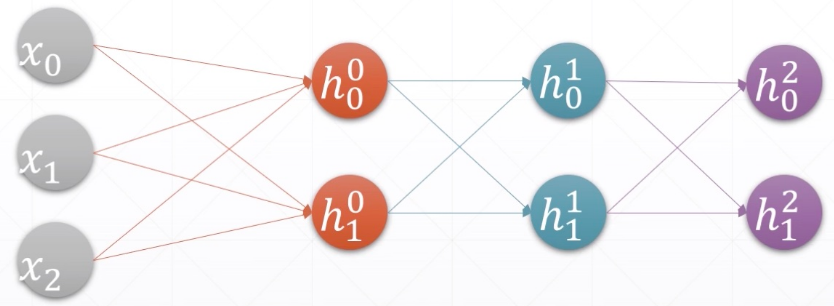
from tensorflow import keras

x = tf.random.normal([2, 3])

model = keras.Sequential([

    keras.layers.Dense(2, activation='relu'),

    keras.layers.Dense(2, activation='relu'),

    keras.layers.Dense(2)

])

model.build(input_shape=[None, 3])

model.summary()

# [w1,b1,w2,b2,w3,b3]

for p in model.trainable_variables:

    print(p.name, p.shape)
吴裕雄--天生自然TensorFlow2教程:全连接层的更多相关文章
- 吴裕雄--天生自然TensorFlow2教程:合并与分割
import tensorflow as tf # 6个班级的学生分数情况 a = tf.ones([4, 35, 8]) b = tf.ones([2, 35, 8]) c = tf.concat( ...
- 吴裕雄--天生自然TensorFlow2教程:手写数字问题实战
import tensorflow as tf from tensorflow import keras from keras import Sequential,datasets, layers, ...
- 吴裕雄--天生自然TensorFlow2教程:函数优化实战
import numpy as np import matplotlib.pyplot as plt from mpl_toolkits.mplot3d import Axes3D def himme ...
- 吴裕雄--天生自然TensorFlow2教程:反向传播算法
- 吴裕雄--天生自然TensorFlow2教程:链式法则
import tensorflow as tf x = tf.constant(1.) w1 = tf.constant(2.) b1 = tf.constant(1.) w2 = tf.consta ...
- 吴裕雄--天生自然TensorFlow2教程:多输出感知机及其梯度
import tensorflow as tf x = tf.random.normal([2, 4]) w = tf.random.normal([4, 3]) b = tf.zeros([3]) ...
- 吴裕雄--天生自然TensorFlow2教程:单输出感知机及其梯度
import tensorflow as tf x = tf.random.normal([1, 3]) w = tf.ones([3, 1]) b = tf.ones([1]) y = tf.con ...
- 吴裕雄--天生自然TensorFlow2教程:损失函数及其梯度
import tensorflow as tf x = tf.random.normal([2, 4]) w = tf.random.normal([4, 3]) b = tf.zeros([3]) ...
- 吴裕雄--天生自然TensorFlow2教程:激活函数及其梯度
import tensorflow as tf a = tf.linspace(-10., 10., 10) a with tf.GradientTape() as tape: tape.watch( ...
随机推荐
- Flutter 开发入门实践
前言: Flutter 是 Google 推出的跨平台解决方案, 开发语言:Dart 优势: 劣势: 学习推荐: 官方网站:https://flutter.io/ 书籍:<Flutter技术入门 ...
- 远程连接本地mongodb 数据库
绑定本地IP即可 start mongod --dbpath D:\mongodb\data\db --bind_ip 192.168.31.143
- source insight 编译后出现停止工作解决方法
解决方法: 工程的路径不要有中文,都用英文
- hackinglab-脚本关1——key又又找不到了
首先打开链接然后会发现是 然后用bp进行抓包然后会发现 然后点一下网页中的链接然后会发现 会发现抓包抓到一个地址 然后提示改一下网页的后缀地址 然后就得到了 key
- 【代码学习】PYTHON迭代器
一.迭代器 迭代是访问集合元素的一种方式.迭代器是一个可以记住遍历的位置的对象.迭代器对象从集合的第一个元素开始访问,直到所有的元素被访问完结束.迭代器只能往前不会后退. 二.可迭代对象 以直接作用于 ...
- Swagger Learning Notes
背景 首先指定schema[计划的提纲],实时更新最新API,降低集成风险: 早些年:制定word计划文档:前后端分离: 前端测试后端接口:postman 后端提供接口,需要实时更新最新的消息改动 什 ...
- python匿名函数与三元运算
匿名函数 匿名函数就是不需要显示式的指定函数名 首先看一行代码: def calc(x,y): return x*y print(calc(2,3)) # 换成匿名函数 calc = lambda ...
- python csv 数据切割定制jmeter数据
需求压测随机抽取10w数据中自定义区间的指定数量数据进行压测: jmeter csv/txt配置: 需要获取{data: [${myList}] } jmeter需要数据类型 获取展读取csv数据 ...
- 【STM32H7教程】第58章 STM32H7的硬件JPEG应用之图片解码显示
完整教程下载地址:http://www.armbbs.cn/forum.php?mod=viewthread&tid=86980 第58章 STM32H7的硬件JPEG应用之图片解 ...
- python-opencv:读取图片
代码 import cv2 # 读取一张图片 src = cv2.imread("../images/lena.jpg") # 命名一个窗口 cv2.namedWindow(&qu ...