
SpringCloud(五)学习笔记之Hystrix
在微服务架构中多层服务之间会相互调用,如果其中有一层服务故障了,可能会导致一层服务或者多层服务故障,从而导致整个系统故障。这种现象被称为服务雪崩效应。
Hystrix组件就可以解决此类问题,Hystrix 负责监控服务之间的调用情况,连续多次失败的 情况进行熔断保护。保护的方法就是使用 Fallback,当调用的服务出现故障时,就可以使用 Fallback 方法的返回值;Hystrix 间隔时间会再次检查故障的服务,如果故障服务恢复,将继续使用服务。
Hystrix自带Ribbon支持,所以默认支持负载均衡
Hystrix+Ribbon(不使用Feign)
一、构建Eureka Server
【基于第二章节创建的Eureka Server】
二、构建Eureka Client提供者
mhb-cloud-producer-hystrix 【提供者 端口:9907】
1:pom文件
<!--eureka客户端环境支持-->

<dependency>

	<groupId>org.springframework.cloud</groupId>

	<artifactId>spring-cloud-starter-netflix-eureka-client</artifactId>

</dependency>
2:application.yml文件
debug: false #关闭debug模式

spring:

  application:

    name: mhb-cloud-producer-hystrix #应用的名称

server:

  port: 9907 #应用的端口号

eureka:

  instance:

    appname: producer-hystrix #eureka application的名称

    prefer-ip-address: true #开启ip显示eureka的主机服务

    #eureka仪表盘的Instances格式

    instance-id: ${spring.application.name}:${spring.cloud.client.ip-address}:${server.port}

  client:

    service-url:

     defaultZone: http://admin:123456@eureka1.com:8762/eureka/,http://admin:123456@eureka2.com:8762/eureka/,http://admin:123456@eureka3.com:8763/eureka/

    #从eureka服务器注册表中获取注册表信息的时间间隔,默认30s

    registry-fetch-interval-seconds: 30

    #客户端发送变化同步到eureka服务器的时间间隔 默认30s

    instance-info-replication-interval-seconds: 30

    #询问eureka服务url信息的变化的间隔时间 默认300s

    eureka-service-url-poll-interval-seconds: 300

    #最初同步到eureka服务器的时间 默认40s

    initial-instance-info-replication-interval-seconds: 40

    #注册表是否压缩

    g-zip-content: true

    #eureka等待超时时间 默认是5s

    eureka-server-connect-timeout-seconds: 5

    #eureka等待读取时间 默认是8s

    eureka-server-read-timeout-seconds: 8

    #eureka客户端允许的所有eureka服务器连接的总数 默认200

    eureka-server-total-connections: 200
3:启动类开启Hystrix支持
@@EnableEurekaClient
package com.applesnt;

import org.springframework.boot.SpringApplication;

import org.springframework.boot.autoconfigure.SpringBootApplication;

import org.springframework.cloud.client.circuitbreaker.EnableCircuitBreaker;

import org.springframework.cloud.netflix.eureka.EnableEurekaClient;

@SpringBootApplication

@EnableEurekaClient/*开启Eureka支持*/

public class MhbCloudProducerHystrixApplication {

	public static void main(String[] args) {

		SpringApplication.run(MhbCloudProducerHystrixApplication.class, args);

	}

}
4:构建controller控制层
com\applesnt\controller\ProducerController.java
package com.applesnt.controller;

import lombok.extern.slf4j.Slf4j;

import org.springframework.web.bind.annotation.*;

/**

 * @description: 服务提供者控制层

 **/

@RestController

@RequestMapping("/producer")

@Slf4j

public class ProducerController {

    /*返回传递过来的id

    * 请求路径:http://localhost:9907/producer/get/123

    * */

    @GetMapping("/get/{id}")

    public String getId(@PathVariable("id") String id){

        System.out.println("-----"+id);

        try{

            Thread.sleep(2000);

        }catch (Exception e){

        }

        return "服务端口9907 = "+id;

    }

}
三、构建Eureka Client消费者
mhb-cloud-consumer-ribbon-hystrix【消费者 端口:8803】
1:pom文件
<!--eureka客户端环境支持-->

<dependency>

	<groupId>org.springframework.cloud</groupId>

	<artifactId>spring-cloud-starter-netflix-eureka-client</artifactId>

</dependency>

<!--hystrix环境支持-->

<dependency>

	<groupId>org.springframework.cloud</groupId>

	<artifactId>spring-cloud-starter-netflix-hystrix</artifactId>

</dependency>
2:application.yml文件
Ribbon和Hystrix的超时时间需要计算,所以此处没有设置Ribbon的超时时间
debug: false

spring:

  application:

    name: mhb-cloud-consumer-ribbon-hystrix #每一个微服务必须有这个应用名称

server:

  port: 8803 #端口

eureka:

  instance:

    appname: ribbon-hystrix #eureka application的名称

    prefer-ip-address: true #开启ip显示eureka的主机服务

    #eureka仪表盘的Instances格式

    instance-id: ${spring.application.name}:${spring.cloud.client.ipAddress}:${server.port}

  client:

    service-url:

     #eureka服务开启了认证,要加上用户名和密码

     defaultZone: http://admin:123456@eureka1.com:8762/eureka/,http://admin:123456@eureka2.com:8762/eureka/,http://admin:123456@eureka3.com:8763/eureka/

    #从eureka服务器注册表中获取注册表信息的时间间隔,默认30s

    registry-fetch-interval-seconds: 30

    #客户端发送变化同步到eureka服务器的时间间隔 默认30s

    instance-info-replication-interval-seconds: 30

    #询问eureka服务url信息的变化的间隔时间 默认300s

    eureka-service-url-poll-interval-seconds: 300

    #最初同步到eureka服务器的时间 默认40s

    initial-instance-info-replication-interval-seconds: 40

    #注册表是否压缩

    g-zip-content: true

    #eureka等待超时时间 默认是5s

    eureka-server-connect-timeout-seconds: 5

    #eureka等待读取时间 默认是8s

    eureka-server-read-timeout-seconds: 8

    #eureka客户端允许的所有eureka服务器连接的总数 默认200

    eureka-server-total-connections: 200

ribbon:

  eager-load:

    enabled: true #预加载 服务器启动的时候就加载服务列表 建议开启

    clients: mhb-cloud-producer-hystrix #预加载哪个微服务  多个话用逗号隔开

#hystrix超时时间设置

hystrix:

  command:

    default: #全局

      execution:

        isolation:

          thread:

            timeoutInMilliseconds: 2000 #默认为1000
3:启动类开启Hystrix支持
@@EnableEurekaClient
@EnableHystrix
实例化RestTemplate对象
package com.applesnt;

import org.springframework.boot.SpringApplication;

import org.springframework.boot.autoconfigure.SpringBootApplication;

import org.springframework.cloud.client.loadbalancer.LoadBalanced;

import org.springframework.cloud.netflix.eureka.EnableEurekaClient;

import org.springframework.cloud.netflix.hystrix.EnableHystrix;

import org.springframework.context.annotation.Bean;

import org.springframework.web.client.RestTemplate;

@SpringBootApplication

@EnableEurekaClient/*eureka客户端支持*/

@EnableHystrix/*hystrix断路器支持*/

public class MhbCloudConsumerRibbonHystrixApplication {

	public static void main(String[] args) {

		SpringApplication.run(MhbCloudConsumerRibbonHystrixApplication.class, args);

	}

	@Bean

	@LoadBalanced/*微服务通讯时需要负载均衡 相同的spring.applincatin.name*/

	public RestTemplate balanceRestTemplate(){

		return new RestTemplate();

	}

}
4:构建controller远程调用控制层
com\applesnt\controller\ProducerController.java
@@HystrixCommand(fallbackMethod = "getIdHystrix")
package com.applesnt.controller;

import com.netflix.hystrix.contrib.javanica.annotation.HystrixCommand;

import lombok.extern.slf4j.Slf4j;

import org.springframework.beans.factory.annotation.Autowired;

import org.springframework.web.bind.annotation.GetMapping;

import org.springframework.web.bind.annotation.PathVariable;

import org.springframework.web.bind.annotation.RequestMapping;

import org.springframework.web.bind.annotation.RestController;

import org.springframework.web.client.RestTemplate;

@RestController

@RequestMapping("/ribbon")

@Slf4j

public class RibbonConsumerController {

    /*注入 RestTemplate  在启动类中已初始化 使用ribbon负载均衡*/

    @Autowired

    private RestTemplate balanceRestTemplate;

    @GetMapping("/get/{id}")

     /*超时时间默认为1s*/

    @HystrixCommand(fallbackMethod = "getIdHystrix")

    public String getId(@PathVariable("id") String id){

        String result = null;

        result = balanceRestTemplate.getForObject("http://mhb-cloud-producer-hystrix/producer/get/"+id,String.class);

        log.info("使用负载均衡-url为微服务的balanceRestTemplate==result:"+result);

        return  result;

    }

    public String getIdHystrix(@PathVariable("id") String id){

        log.info("触发了消费者端hystrix熔断机制");

        return "触发了消费者端hystrix熔断机制";

    }

}
5:测试
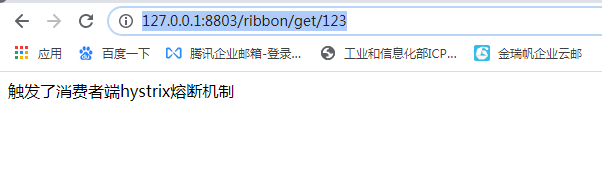
消费者的hystrix的超时时间设置的3秒,提供者中的controller设置的睡眠时间时4秒,那么应该触发熔断机制:
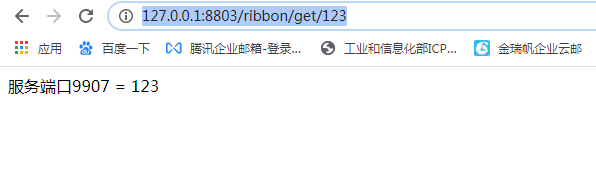
http://127.0.0.1:8803/ribbon/get/123
把controller中设置的睡眠时间时2秒,应该正常返回结果:
Hystrix+Feign
一、构建Eureka Server
【基于第二章节创建的Eureka Server】
二、构建Eureka Client提供者
【基于上面创建的mhb-cloud-producer-hystrix】
三、构建Eureka Client消费者
mhb-cloud-consumer-feign-hystrix【端口:8804】
Feign自带Hystrix,不需要引入Hystrix依赖
1:pom文件
<!--eureka客户端环境支持-->

<dependency>

	<groupId>org.springframework.cloud</groupId>

	<artifactId>spring-cloud-starter-netflix-eureka-client</artifactId>

</dependency>

<!--feign环境支持,自带hystrix-->

<dependency>

	<groupId>org.springframework.cloud</groupId>

	<artifactId>spring-cloud-starter-openfeign</artifactId>

</dependency>
2:application.yml
在配置文件中开启Hystrix支持
设置Hystrix的超时时间时,要先设置Ribbon的超时时间
debug: false

spring:

  application:

    name: mhb-cloud-consumer-feign-hystrix #每一个微服务必须有这个应用名称

server:

  port: 8804 #端口

eureka:

  instance:

    appname: feign-hystrix #eureka application的名称

    prefer-ip-address: true #开启ip显示eureka的主机服务

    #eureka仪表盘的Instances格式

    instance-id: ${spring.application.name}:${spring.cloud.client.ip-address}:${server.port}

  client:

    service-url:

     #eureka服务开启了认证,要加上用户名和密码

     defaultZone: http://admin:123456@eureka1.com:8762/eureka/,http://admin:123456@eureka2.com:8762/eureka/,http://admin:123456@eureka3.com:8763/eureka/

    #从eureka服务器注册表中获取注册表信息的时间间隔,默认30s

    registry-fetch-interval-seconds: 30

    #客户端发送变化同步到eureka服务器的时间间隔 默认30s

    instance-info-replication-interval-seconds: 30

    #询问eureka服务url信息的变化的间隔时间 默认300s

    eureka-service-url-poll-interval-seconds: 300

    #最初同步到eureka服务器的时间 默认40s

    initial-instance-info-replication-interval-seconds: 40

    #注册表是否压缩

    g-zip-content: true

    #eureka等待超时时间 默认是5s

    eureka-server-connect-timeout-seconds: 5

    #eureka等待读取时间 默认是8s

    eureka-server-read-timeout-seconds: 8

    #eureka客户端允许的所有eureka服务器连接的总数 默认200

    eureka-server-total-connections: 200

#让feign支持hystrix

feign:

  hystrix:

   enabled: true

#ribbon的超时

ribbon:

  ReadTimeout: 10000

  ConnectTimeout: 10000

#hystrix超时时间设置(ribbon的超时一定要大于hystrix超时时间)

hystrix:

  command:

    default:

      execution:

        isolation:

          thread:

            timeoutInMilliseconds: 3000
3:启动类
@@EnableEurekaClient
@EnableFeignClients
package com.applesnt;

import org.springframework.boot.SpringApplication;

import org.springframework.boot.autoconfigure.SpringBootApplication;

import org.springframework.cloud.netflix.eureka.EnableEurekaClient;

import org.springframework.cloud.openfeign.EnableFeignClients;

@SpringBootApplication

@EnableEurekaClient

@EnableFeignClients//开启feign支持

public class MhbCloudConsumerFeignHystrixApplication {

	public static void main(String[] args) {

		SpringApplication.run(MhbCloudConsumerFeignHystrixApplication.class, args);

	}

}
4:编写远程调用service接口
com\applesnt\service\FeignClientService.java
其中的fallback = FeignClientFailBackImpl.class就是熔断调用,要定义FeignClientFailBackImpl类实现当前这个service接口
package com.applesnt.service;

import com.applesnt.config.FeignLogConfiguration;

import com.applesnt.failback.FeignClientFailBackImpl;

import org.springframework.cloud.netflix.feign.FeignClient;

import org.springframework.web.bind.annotation.*;

import java.util.List;

/*使用默认配置 FeignClientsConfiguration:feign的默认配置类

* 默认配置支持springmvc注解

* */

@FeignClient(name = "mhb-cloud-producer-hystrix",fallback = FeignClientFailBackImpl.class)

public interface FeignClientService {

    /*value要写全路径 */

    @GetMapping(value = "/producer/get/{id}")

    public String getId(@PathVariable("id") String id);

}
5:编写远程调用service接口的fallback实现类
com\applesnt\failback\FeignClientFailBackImpl.java
package com.applesnt.failback;

import com.applesnt.service.FeignClientService;

import lombok.extern.slf4j.Slf4j;

import org.springframework.stereotype.Component;

@Component/*一定要加上这个注解*/

@Slf4j

public class FeignClientFailBackImpl implements FeignClientService{

    @Override

    public String getId(String id) {

        log.info("feign 熔断机制");

        return "feign 触发熔断机制";

    }

}
6:测试
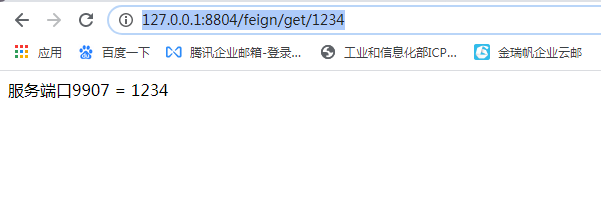
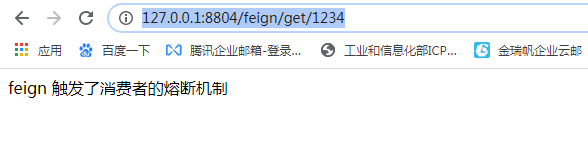
http://127.0.0.1:8804/feign/get/1234
hystrix设置的超时时间时3秒,提供者的方法睡眠时间如果为2秒时:
hystrix设置的超时时间时3秒,提供者的方法睡眠时间如果为4秒时或者直接宕机:
四、Hystrix Dashboard监控
1:加入依赖包
mhb-cloud-consumer-feign-hystrix【端口 8804】
<dependency>

	<groupId>org.springframework.cloud</groupId>

	<artifactId>spring-cloud-starter-netflix-hystrix-dashboard</artifactId>

</dependency>
2:启动类注解
@@EnableHystrixDashboard
3:在启动类中配置servlet
@Bean

public ServletRegistrationBean getServlet(){

	HystrixMetricsStreamServlet streamServlet = new HystrixMetricsStreamServlet();

	ServletRegistrationBean registrationBean = new ServletRegistrationBean(streamServlet);

	registrationBean.setLoadOnStartup(1);

	registrationBean.addUrlMappings("/actuator/hystrix.stream");

	registrationBean.setName("HystrixMetricsStreamServlet");

	return registrationBean;

}
4:访问Hystrix Dashboard面板
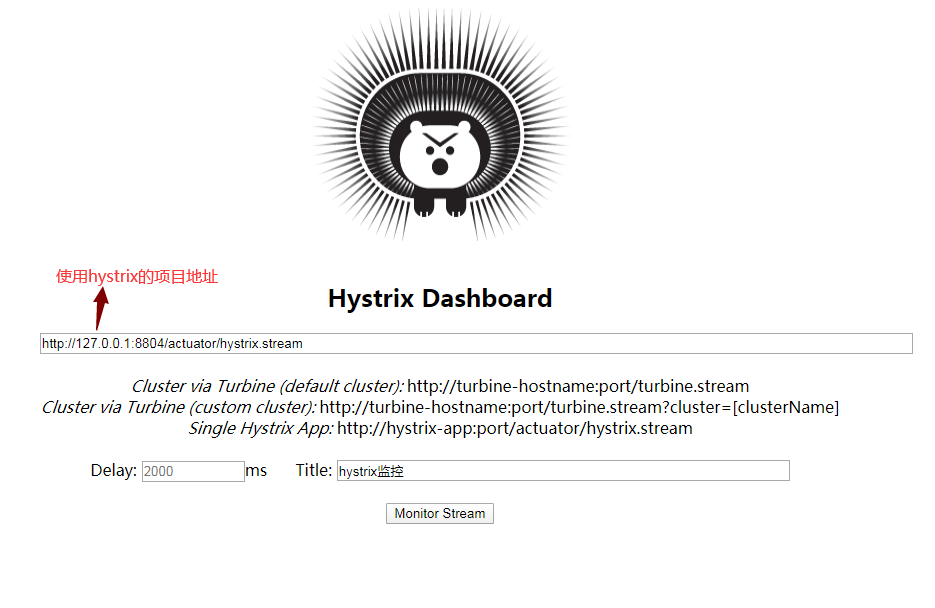
点击Monitor Stream
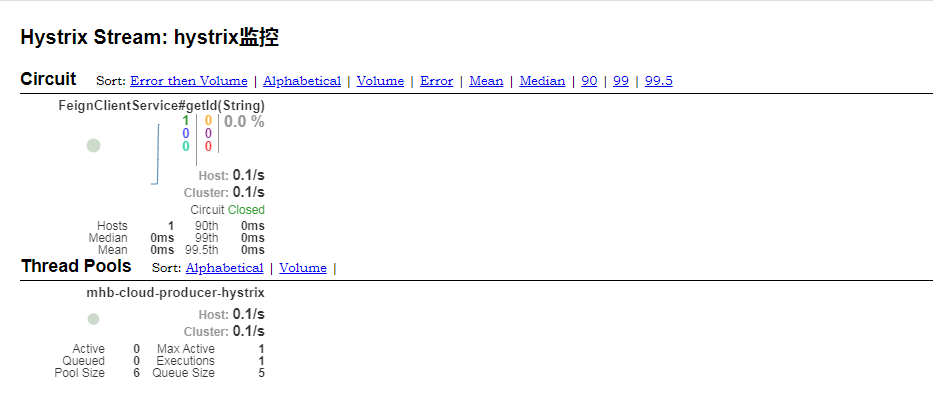
5:注意事项
1>:被监控的服务 在pom文件中要加入端点的依赖
<!--端点依赖-->

<dependency>

    <groupId>org.springframework.boot</groupId>

    <artifactId>spring-boot-starter-actuator</artifactId>

</dependency>
2>:如果监控界面是loading状态,需要发一次请求激活Hystrix
SpringCloud(五)学习笔记之Hystrix的更多相关文章
- springcloud Eureka学习笔记
最近在学习springcloud,抽空记录下学习笔记;主要记录Eureka的实现过程和高可用性的实现 Eureka是一个服务治理框架,它提供了Eureka Server和Eureka Client两个 ...
- SpringCloud学习笔记(3)——Hystrix
参考Spring Cloud官方文档第13.14.15章 13. Circuit Breaker: Hystrix Clients Netflix提供了一个叫Hystrix的类库,它实现了断路器模式. ...
- springcloud Ribbon学习笔记二
之前介绍了如何搭建eureka服务并开发了一个用户服务成功注册到了eureka中,接下来介绍如何通过ribbon来从eureka中获取用户服务: springcloud ribbon提供客户端的负载均 ...
- SpringCloud Alibaba学习笔记
目录 目录 目录 导学 为什么学 学习目标 进阶目标 思路 Spring Cloud Alibaba的重要组件 环境搭建 Spring Boot必知必会 Spring Boot特性 编写第一个Spri ...
- springcloud(五):熔断监控Hystrix Dashboard和Turbine
Hystrix-dashboard是一款针对Hystrix进行实时监控的工具,通过Hystrix Dashboard我们可以在直观地看到各Hystrix Command的请求响应时间, 请求成功率等数 ...
- springcloud Zuul学习笔记
SpringCloud Zull是一个基于NetflixZuul实现的API网关组件,它实现了请求路由,负载均衡,校验过滤等功能;本文主要记录springcloud zuul的入门级demo开发过程; ...
- springcloud Ribbon学习笔记一
上篇已经介绍了如何开发eureka服务并让多个服务进行相互注册,接下来记录如何开发一个服务然后注册到eureka中并能通过ribbon成功被调用 开发一个用户服务并注册到eureka中,用户服务负责访 ...
- SpringCloud(六)学习笔记之Zuul
Zuul 在云平台上提供动态路由,监控,弹性,安全等边缘服务的框架.Zuul 相当于是设备和 Netflix 流应用的 Web 网站后端所有请求的前门 Hystrix+Ribbon(不使用Feign) ...
- SpringCloud(四)学习笔记之Feign
Feign是一个声明式的Web服务客户端,可帮助我们更加便捷.优雅地调用HTTP API Feign可以与Eureka和Ribbon组合使用以支持负载均衡 一.构建Eureka Server [基于第 ...
随机推荐
- Vue组件通信方式全面详解
vue组件通信方式全面详解 众所周知,Vue主要思想就是组件化开发.因为,在实际的项目开发中,肯定会以组件的开发模式进行.形如页面和页面之间需要通信一样,Vue 组件和组件之间肯定也需要互通有无.共享 ...
- 使用一行Python代码从图像读取文本
处理图像不是一项简单的任务.对你来说,作为一个人,很容易看着某样东西然后马上知道你在看什么.但电脑不是这样工作的. 对你来说太难的任务,比如复杂的算术,或者一般意义上的数学,是计算机毫不费力就能完成的 ...
- UVA - 548 根据中序遍历和后序遍历建二叉树(关于三种遍历二叉树)
题意: 同时给两个序列,分别是二叉树的中序遍历和后序遍历,求出根节点到叶子结点路径上的权值最小和 的那个 叶子节点的值,若有多个最小权值,则输出最小叶子结点的和. 想法: 一开始想着建树,但是没有这样 ...
- MySQL常用存储引擎:MyISAM与InnoDB之华山论剑
一 MyISAM 1.1 MyISAM简介 MyISAM是MySQL的默认数据库引擎(5.5版之前),由早期的 ISAM (Indexed Sequential Access Method:有索引的顺 ...
- 《Flutter 动画系列》组合动画
老孟导读:在前面的文章中介绍了 <Flutter 动画系列>25种动画组件超全总结 http://laomengit.com/flutter/module/animated_1/ < ...
- MATLAB 动图绘制、保存
动图有gif格式和视频的avi格式. 1.sin(x)动图 clear all h = animatedline;%动画线 axis([0 4*pi -1 1]) box on x = linspac ...
- SpringCloud入门(九): Zuul 上传&回退&异常处理&跨域
Zuul的上传 1.构建一个上传类 import org.springframework.web.bind.annotation.PostMapping; import org.springframe ...
- 关于js在一个固定的盒子里面拖拽的问题(包含临界值)
回武汉打卡第三天,武汉加油,逆战必胜!今天我们一起分享一下js拖拽的问题. 当然实现拖拽方法是有很多的,下面简单讲一种方法,大致思路如下: 首先需要用到的事件主要有 onmousedown,onmo ...
- python常用模块 以及第三方导入
python常用模块 1模块的分类 标准模块(内置模块)( 标准库 )300 第三方模块 18万 pip install 直接通过pip安装 软件一般会被自动安装你python安装目录的这个子目录里 ...
- Java IO流的写入和写出操作 FileInputStream和FileOutputStream
今天学习了Java的IO流,关于文件的读入和写出,主要是FileInputStream和FileOutputStream来实现,这两个流是字节流.还有字符流(FileReader和FileWriter ...