
Spring Cloud Alibaba入门实战之nacos(一)
Spring Cloud Alibaba入门实战之nacos(一)
前情介绍
Spring Cloud Alibaba 是阿里巴巴提供的新一代的微服务解决方案,相信会有越来越多采用微服务架构的公司会将目标投入到Spring Cloud Alibaba 中。
Spring Cloud Alibaba 为国人开发,为我们提供了详尽的中文文档,阅读起来并不费劲。故本系列文章不会有太多的理论知识,文章的目的是记录搭建和使用Spring Cloud Alibaba的过程。
相关文档:
Spring Cloud Alibaba github: https://github.com/alibaba/spring-cloud-alibaba
nacos 中文文档: https://nacos.io/zh-cn/
Nacos Discovery Example: https://github.com/alibaba/spring-cloud-alibaba/blob/master/spring-cloud-alibaba-examples/nacos-example/nacos-discovery-example/readme-zh.md
1. Nacos 作为服务注册中心
1.1 首先需要到Nacos的release notes 中下载Nacos并进行解压启动,推荐下载目前最新稳定版1.1.4 及Linux 压缩包,因为Nacos是使用Java编写的,故启动环境需要JDK1.8 ,下载并上传后通过tar -zxf nacosxxx 解压后,到nacos的bin目录下执行 sh startup.sh -m standalone 启动单机模式(集群模式后续介绍). 默认端口为8848 (ps:珠穆朗玛峰,Spring Cloud Alibaba nb!)
1.2 接着我们需要创建一个Maven项目作为父工程并引入相关依赖:
<dependencyManagement>

        <dependencies>

            <dependency>

                <groupId>com.alibaba.cloud</groupId>

                <artifactId>spring-cloud-alibaba-dependencies</artifactId>

                <version>2.1.0.RELEASE</version>

                <type>pom</type>

                <scope>import</scope>

            </dependency>

            <dependency>

                <groupId>org.springframework.boot</groupId>

                <artifactId>spring-boot-dependencies</artifactId>

                <version>2.1.7.RELEASE</version>

                <type>pom</type>

                <scope>import</scope>

            </dependency>

            <!-- spring-cloud -->

            <dependency>

                <groupId>org.springframework.cloud</groupId>

                <artifactId>spring-cloud-dependencies</artifactId>

                <version>Greenwich.SR2</version>

                <type>pom</type>

                <scope>import</scope>

            </dependency>

        </dependencies>

    </dependencyManagement>
这里我们先以创建一个provider项目为例,consumer项目的创建也是同样的道理:
1.3 引入依赖:
<dependencies>

        <dependency>

            <groupId>com.alibaba.cloud</groupId>

            <artifactId>spring-cloud-starter-alibaba-nacos-discovery</artifactId>

        </dependency>

        <dependency>

            <groupId>org.springframework.boot</groupId>

            <artifactId>spring-boot-starter-web</artifactId>

        </dependency>

    </dependencies>
1.4 接着编写配置文件:
spring:

  cloud:

    nacos:

      discovery:

		#注册中心地址

        server-addr: 192.168.41.133:8848

  application:

    name: provider
1.5 编写启动类并添加注解
@SpringBootApplication

@EnableDiscoveryClient

public class ProviderApplication {

    public static void main(String[] args) {

        SpringApplication.run(ProviderApplication.class, args);

    }

    @RestController

    class EchoController {

        @GetMapping(value = "/echo/{string}")

        public String echo(@PathVariable String string) {

            return string;

        }

    }

}
三板斧:1. 加依赖 2. 写配置 3. 写注解
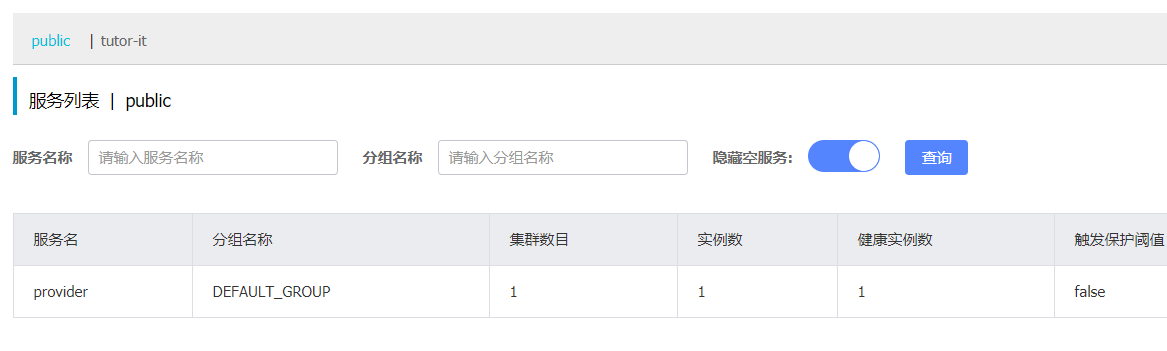
接着我们就可以在nacos的管理界面中进行查看了,url: http://ip:8848/nacos ip地址为nacos服务的ip,账号和密码都是nacos
可以看到服务成功注册到了nacos的服务列表中,此时nacos作为注册中心就已经完成了,其他服务要注册也是同样的三板斧。
服务调用
nacos默认继承了Ribbon,此时我们再像创建provider项目一样创建consumer项目,同样的三板斧。
然后再启动类上加上如下代码:
	@Bean

    @LoadBalanced

    public RestTemplate restTemplate(){

        return new RestTemplate();

    }

    @GetMapping("/nacos/rpc/{string}")

    public String test(@PathVariable String string) {

  		string = restTemplate().

        getForObject("http://provider:8080/echo/"+string,String.class);

        return "rpc" + string;

    }
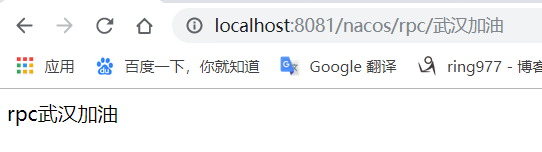
这里配置了具有负载均衡能力的RestTemplate,通过restTempleta调用provider服务接口可以看到调用结果:
好了,这里就简单的入门实战了使用Spring Cloud Alibaba nacos 作为注册中心。下一篇入门实战nacos作为来配置中心。
Spring Cloud Alibaba入门实战之nacos(一)的更多相关文章
- Spring Cloud Alibaba基础教程:Nacos的集群部署
继续说说生产环境的Nacos搭建,通过上一篇<Spring Cloud Alibaba基础教程:Nacos的数据持久化>的介绍,我们已经知道Nacos对配置信息的存储原理,在集群搭建的时候 ...
- Spring Cloud Alibaba基础教程:Nacos的数据持久化
前情回顾: <Spring Cloud Alibaba基础教程:使用Nacos实现服务注册与发现> <Spring Cloud Alibaba基础教程:支持的几种服务消费方式> ...
- Spring Cloud Alibaba基础教程:Nacos配置的多文件加载与共享配置
前情回顾: <Spring Cloud Alibaba基础教程:使用Nacos实现服务注册与发现> <Spring Cloud Alibaba基础教程:支持的几种服务消费方式> ...
- Spring Cloud Alibaba基础教程:Nacos配置的多环境管理
前情回顾: <Spring Cloud Alibaba基础教程:使用Nacos实现服务注册与发现> <Spring Cloud Alibaba基础教程:支持的几种服务消费方式> ...
- Spring Cloud Alibaba入门篇
学习条件 了解web三层架构 熟练应用SSM架构 了解Maven管理工具的使用 熟练使用SpringBoot,以及了解SpringBoot基本原理. 了解部分术语:应用.工具.耦合.负载等 温馨提示: ...
- Spring Cloud Alibaba基础教程:Nacos配置的加载规则详解
前情回顾: <Spring Cloud Alibaba基础教程:使用Nacos实现服务注册与发现> <Spring Cloud Alibaba基础教程:支持的几种服务消费方式(Res ...
- 主流微服务一站式解决方案Spring Cloud Alibaba入门看这篇就足够了
学习路线 **本人博客网站 **IT小神 www.itxiaoshen.com 生态概述 架构演进 什么是微服务 https://martinfowler.com/microservices/ Mic ...
- Spring Cloud Alibaba基础教程:Nacos服务发现与配置管理
随着微服务概念的流行,越来越多的公司采用`Spring Cloud`全家桶构建微服务系统,实现业务的快速迭代.`Spring Cloud`提供了快速构建分布式微服务常用组件,包括`Spring Clo ...
- Spring Cloud Alibaba基础教程:Nacos 生产级版本 0.8.0
昨晚Nacos社区发布了第一个生产级版本:0.8.0.由于该版本除了Bug修复之外,还提供了几个生产管理非常重要的特性,所以觉得还是有必要写一篇讲讲这次升级,在后续的文章中也都将以0.8.0版本为基础 ...
随机推荐
- c++中set 的用法
1.关于set C++ STL 之所以得到广泛的赞誉,也被很多人使用,不只是提供了像vector, string, list等方便的容器,更重要的是STL封装了许多复杂的数据结构算法和大量常用数据结构 ...
- 解决Vue-cli3.0下scss文件编译过慢、卡顿问题
在使用Vue-cli 3.0构建的项目中,可能存在项目编译过慢的问题,具体表现在编译时会在某一进度比如40%时停顿,等好一会儿才能够编译完成.这使得浏览器中的实时预览也会卡顿,不利于我们快速查看效果, ...
- 项目Alpha冲刺 Day12
1)站立式会议: 2)今日安排: 项目演示. 3)项目情况 项目进展:系统已实现预期的所有的功能.问题困难:系统测试不够全面,主要做功能测试,对于非功能测试,如压力测试.效能测试.安全性等并未测试.心 ...
- 是时候实现 SOC 2.0 了
本文讲的是是时候实现 SOC 2.0 了,SOC,安全运营中心,为取得其最佳效果,以及真正最小化网络风险,需要全员就位,让安全成为每个人的责任. 早在几年前,企业就开始创建SOC来集中化威胁与漏洞的监 ...
- 为物联网而生:高性能时间序列数据库HiTSDB商业化首发!
为什么80%的码农都做不了架构师?>>> 摘要: 近日,阿里云宣布高性能时间序列数据库 (High-Performance Time Series Database , 简称 H ...
- Codeforce-CodeCraft-20 (Div. 2)-A. Grade Allocation
n students are taking an exam. The highest possible score at this exam is m. Let ai be the score of ...
- Codeforces Round #623 (Div. 2, based on VK Cup 2019-2020 - Elimination Round, Engine) B. Homecoming
After a long party Petya decided to return home, but he turned out to be at the opposite end of the ...
- 在for循环里面的++i与i++的区别
++i与i++在表面上没有什么区别 for(语句 1;语句 2;语句 3) 语句 1 在循环(代码块)开始前执行 语句 2 定义运行循环(代码块)的条件 语句 3 在循环(代码块)已被执行之后执行 ( ...
- spring bootweb综合开发的整理
1.json接口开发 当前开发中微服务的概念日渐深入人心,所以json数据交互可以带来的便利也不言而喻.在springboot中json数据的返回方式比较简单,只需要用@RestController注 ...
- DHCP报文(1)
DHCP报文 1.地址申请类型(4步工作原理,常考) (1)此题是典型的四步工作原理,在其配置过程中由于没有分配IP地址,用的是广播形式,所以其4中报文类型的目的IP地址均为255.255.255.2 ...