
Selenium RemoteWebDriver 利用CDP修改User-Agent
地球人都知道,如果使用selenium时要修改user-agent可以在启动浏览器时添加配置项,如chromeOptions.addArguments("user-agent=xxx");。但是如何在每次请求的时候动态更改user-agent呢?
经过我的不懈努力,终于在网上找到一个相关的信息使用python3和selenium4修改chrome的user-agent。
这里面提到了使用driver.execute_cdp_cmd来切换,这让我了解了一下cdp命令。简单的来说,cdp命令时chrome支持的一种基于websocket的协议,通过这个协议可以与浏览器内核通信。平常使用的F12浏览器开发工具就是基于cdp的。cpd命令可以实现的功能很多,可以参考Chrome DevTools Protocol。再这里面我找到了一个Network.setUserAgentOverride命令可以修改请求user-agent。
命令的参数如下:
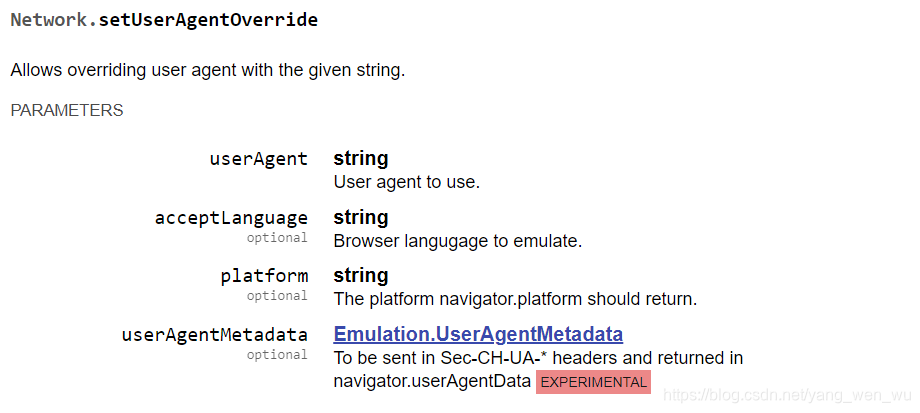
但是,在我的项目中目前使用的selenium-java的版本是3.141.59,这个版本还没用提供对于cdp命令的支持,前面信息中提到了是在selenium4中使用使用的cdp命令。于是我又去maven仓库搜索有没有selenium4的jar包可以用。
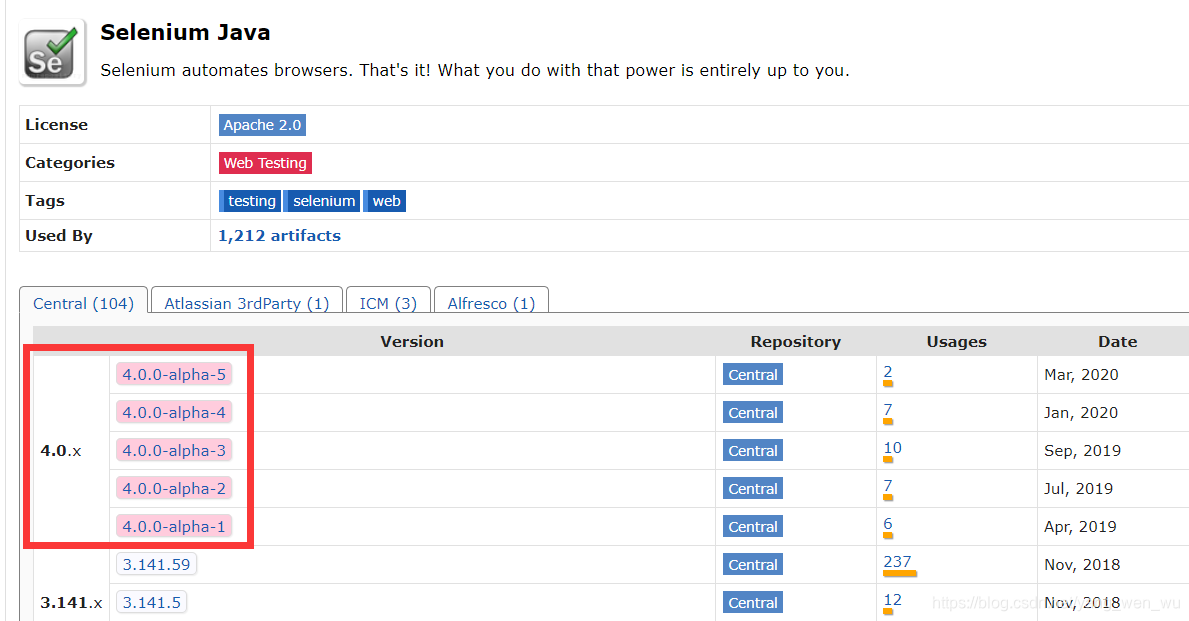
这里面已经有5个alpha测试的版本了,虽然还不是稳定版本,但是为了实现新功能先试一试,在maven中添加依赖:
<!-- https://mvnrepository.com/artifact/org.seleniumhq.selenium/selenium-java -->

<dependency>

    <groupId>org.seleniumhq.selenium</groupId>

    <artifactId>selenium-java</artifactId>

    <version>4.0.0-alpha-5</version>

</dependency>
然后尝试调用ChromeDriver的executeCdpCommand方法

可以看到,第一个参数是commandName,对于修改user-agent的需求,这个地方应该填写Network.setUserAgentOverride,后面是参数的键值对,现在只需要填写userAgent就可以了,其他都是不需要的可选参数。
一般情况下,问题到这里就解决了,但是在我的项目中却没有这么简单。因为各种原因,我的项目中使用的是Selenium-Server来提供浏览器环境的,也就是说,创建的都是RemoteWebDriver,虽然ChromeDriver是继承自RemoteWebDriver的,但是cdp命令是chrome浏览器独有的, 因此RemoteWebDriver也就没有提供相关的支持了。那么如何在确定RemoteWebDriver调用chrome浏览器的情况下提供cpd命令的支持呢?为了实现这个功能还是费了一些时间,因此在这里把过程记录下来。
首先看一下ChromeWebDriver是如何实现cdp命令的:
public Map<String, Object> executeCdpCommand(String commandName, Map<String, Object> parameters) {

    Objects.requireNonNull(commandName, "Command name must be set.");

    Objects.requireNonNull(parameters, "Parameters for command must be set.");

    Map<String, Object> toReturn = (Map)this.getExecuteMethod().execute("executeCdpCommand", ImmutableMap.of("cmd", commandName, "params", parameters));

    return ImmutableMap.copyOf(toReturn);

}
在Selenium4中,ChromeDriver继承自ChromiumDriver,二者其实是一模一样的。ChromiumDriver提供了cdp命令的支持,利用executeMethod运行命令executeCdpCommand,将要运行的具体命令和参数一并传入。于是我又开始找这个ExecuteMethod是什么东西,发现ChromiumWebDriver并没有对这个参数进行任何设置,因此应该是在ChromiumDriver继承的RemoteWebDriver来设置的。果然,在RemoteWebDriver中有this.executeMethod = new RemoteExecuteMethod(this);,在ChromiumWebDriver中获取到的一定也是这个对象。那么很容易想到,继承一个RemoteWebDriver并编写一个方法调用这个executeMethod不就行了吗?
public class CdpRemoteWebDriver extends RemoteWebDriver {

    public CdpRemoteWebDriver(URL remoteAddress, Capabilities capabilities) {

        super(remoteAddress, capabilities);

    }

    public Map<String, Object> executeCdpCommand(String commandName, Map<String, Object> parameters) {

        Objects.requireNonNull(commandName, "Command name must be set.");

        Objects.requireNonNull(parameters, "Parameters for command must be set.");

        Map<String, Object> toReturn = (Map)this.getExecuteMethod().execute("executeCdpCommand", ImmutableMap.of("cmd", commandName, "params", parameters));

        return ImmutableMap.copyOf(toReturn);

    }

}
然后再创建CdpRemoteWebDriver实例,在访问网页之前设置user-agent
Map uaMap = new HashMap(){{

    put("userAgent", "customUserAgent");

}};

((CdpRemoteWebDriver) driver).executeCdpCommand("Network.setUserAgentOverride",

        uaMap

        );

driver.get(url);
运行试一下!
org.openqa.selenium.UnsupportedCommandException: executeCdpCommand

Build info: version: '4.0.0-alpha-5', revision: 'b3a0d621cc'

System info: host: 'DESKTOP-BM176Q1', ip: '192.168.137.1', os.name: 'Windows 10', os.arch: 'amd64', os.version: '10.0', java.version: '1.8.0_161'

Driver info: driver.version: CdpRemoteWebDriver

	at org.openqa.selenium.remote.codec.AbstractHttpCommandCodec.encode(AbstractHttpCommandCodec.java:246)

	at org.openqa.selenium.remote.codec.AbstractHttpCommandCodec.encode(AbstractHttpCommandCodec.java:129)

	at org.openqa.selenium.remote.HttpCommandExecutor.execute(HttpCommandExecutor.java:155)

	at org.openqa.selenium.remote.RemoteWebDriver.execute(RemoteWebDriver.java:582)

	at org.openqa.selenium.remote.RemoteWebDriver.execute(RemoteWebDriver.java:639)

	at org.openqa.selenium.remote.RemoteExecuteMethod.execute(RemoteExecuteMethod.java:36)

	at com.zju.edu.eagle.accessibilitycheck.a11ycheck.executor.impl.CdpRemoteWebDriver.executeCdpCommand(CdpRemoteWebDriver.java:24)
结果不行,说executeCdpCommand是不支持的命令,为什么一样的executeMethod结果不一样呢?定位到错误的地方看一下
public HttpRequest encode(Command command) {

    String name = (String)this.aliases.getOrDefault(command.getName(), command.getName());

    AbstractHttpCommandCodec.CommandSpec spec = (AbstractHttpCommandCodec.CommandSpec)this.nameToSpec.get(name);

    if (spec == null) {

        throw new UnsupportedCommandException(command.getName());

    }

    ...

}
运行命令时,先从(AbstractHttpCommandCodec.CommandSpec)this.nameToSpec中获取命令的相关信息了,而要运行的executeCdpCommand没有事先定义,所以就出现异常了。
public AbstractHttpCommandCodec() {

    this.defineCommand("status", get("/status"));

    this.defineCommand("getAllSessions", get("/sessions"));

    this.defineCommand("newSession", post("/session"));

    this.defineCommand("getCapabilities", get("/session/:sessionId"));

    ...

}
这些命令是在AbstractHttpCommandCodec中定义的,而executeCdpCommand不在其中。这说明虽然ChromeDriver和RemoteWebDriver有相同的executeMethod,但后续调用还是涉及到了不同的类,于是我又回头查看ChromeDriver中的代码,发现有这样一个构造函数
public ChromeDriver(ChromeDriverService service, Capabilities capabilities) {

    super(new ChromiumDriverCommandExecutor(service), capabilities, "goog:chromeOptions");

}
这里面创建了一个ChromiumDriverCommandExecutor,再点进来看一下
static {

    CHROME_COMMAND_NAME_TO_URL.put("launchApp", new CommandInfo("/session/:sessionId/chromium/launch_app", HttpMethod.POST));

    CHROME_COMMAND_NAME_TO_URL.put("getNetworkConditions", new CommandInfo("/session/:sessionId/chromium/network_conditions", HttpMethod.GET));

    CHROME_COMMAND_NAME_TO_URL.put("setNetworkConditions", new CommandInfo("/session/:sessionId/chromium/network_conditions", HttpMethod.POST));

    CHROME_COMMAND_NAME_TO_URL.put("deleteNetworkConditions", new CommandInfo("/session/:sessionId/chromium/network_conditions", HttpMethod.DELETE));

    CHROME_COMMAND_NAME_TO_URL.put("executeCdpCommand", new CommandInfo("/session/:sessionId/goog/cdp/execute", HttpMethod.POST));

    CHROME_COMMAND_NAME_TO_URL.put("getCastSinks", new CommandInfo("/session/:sessionId/goog/cast/get_sinks", HttpMethod.GET));

    CHROME_COMMAND_NAME_TO_URL.put("selectCastSink", new CommandInfo("/session/:sessionId/goog/cast/set_sink_to_use", HttpMethod.POST));

    CHROME_COMMAND_NAME_TO_URL.put("startCastTabMirroring", new CommandInfo("/session/:sessionId/goog/cast/start_tab_mirroring", HttpMethod.POST));

    CHROME_COMMAND_NAME_TO_URL.put("getCastIssueMessage", new CommandInfo("/session/:sessionId/goog/cast/get_issue_message", HttpMethod.GET));

    CHROME_COMMAND_NAME_TO_URL.put("stopCasting", new CommandInfo("/session/:sessionId/goog/cast/stop_casting", HttpMethod.POST));

    CHROME_COMMAND_NAME_TO_URL.put("setPermission", new CommandInfo("/session/:sessionId/permissions", HttpMethod.POST));

}
可以看到这里面也定义了一些命令,executeCdpCommand也在其中。而RemoteWebDriver没有这个命令的信息,自然也就无法执行了。经过进一步查看源码,我发现ChromiumDriverCommandExecutor是HttpCommandExecutor的子类,HttpCommandExecutor是RemoteWebDriver中真正的命令执行者。
ChromeWebDriver能够提供自定义的CommandExecutor来增加额外命令,自然我们自己继承的类也可以。在HttpCommandExecutor中有这样一个构造函数HttpCommandExecutor(Map<String, CommandInfo> additionalCommands, URL addressOfRemoteServer),只要把添加的命令的键值对传入,就可以支持额外的命令了。
最终版本的代码如下
public class CdpRemoteWebDriver extends RemoteWebDriver {

    private static final HashMap<String, CommandInfo> CHROME_COMMAND_NAME_TO_URL = new HashMap();

    public CdpRemoteWebDriver(URL remoteAddress, Capabilities capabilities) {

        super((CommandExecutor)(new HttpCommandExecutor(ImmutableMap.copyOf(CHROME_COMMAND_NAME_TO_URL), remoteAddress)), capabilities);

    }

    public Map<String, Object> executeCdpCommand(String commandName, Map<String, Object> parameters) {

        Objects.requireNonNull(commandName, "Command name must be set.");

        Objects.requireNonNull(parameters, "Parameters for command must be set.");

        Map<String, Object> toReturn = (Map)this.getExecuteMethod().execute("executeCdpCommand", ImmutableMap.of("cmd", commandName, "params", parameters));

        return ImmutableMap.copyOf(toReturn);

    }

    static {

        CHROME_COMMAND_NAME_TO_URL.put("launchApp", new CommandInfo("/session/:sessionId/chromium/launch_app", HttpMethod.POST));

        CHROME_COMMAND_NAME_TO_URL.put("getNetworkConditions", new CommandInfo("/session/:sessionId/chromium/network_conditions", HttpMethod.GET));

        CHROME_COMMAND_NAME_TO_URL.put("setNetworkConditions", new CommandInfo("/session/:sessionId/chromium/network_conditions", HttpMethod.POST));

        CHROME_COMMAND_NAME_TO_URL.put("deleteNetworkConditions", new CommandInfo("/session/:sessionId/chromium/network_conditions", HttpMethod.DELETE));

        CHROME_COMMAND_NAME_TO_URL.put("executeCdpCommand", new CommandInfo("/session/:sessionId/goog/cdp/execute", HttpMethod.POST));

        CHROME_COMMAND_NAME_TO_URL.put("getCastSinks", new CommandInfo("/session/:sessionId/goog/cast/get_sinks", HttpMethod.GET));

        CHROME_COMMAND_NAME_TO_URL.put("selectCastSink", new CommandInfo("/session/:sessionId/goog/cast/set_sink_to_use", HttpMethod.POST));

        CHROME_COMMAND_NAME_TO_URL.put("startCastTabMirroring", new CommandInfo("/session/:sessionId/goog/cast/start_tab_mirroring", HttpMethod.POST));

        CHROME_COMMAND_NAME_TO_URL.put("getCastIssueMessage", new CommandInfo("/session/:sessionId/goog/cast/get_issue_message", HttpMethod.GET));

        CHROME_COMMAND_NAME_TO_URL.put("stopCasting", new CommandInfo("/session/:sessionId/goog/cast/stop_casting", HttpMethod.POST));

        CHROME_COMMAND_NAME_TO_URL.put("setPermission", new CommandInfo("/session/:sessionId/permissions", HttpMethod.POST));

    }

}
再测试一下效果
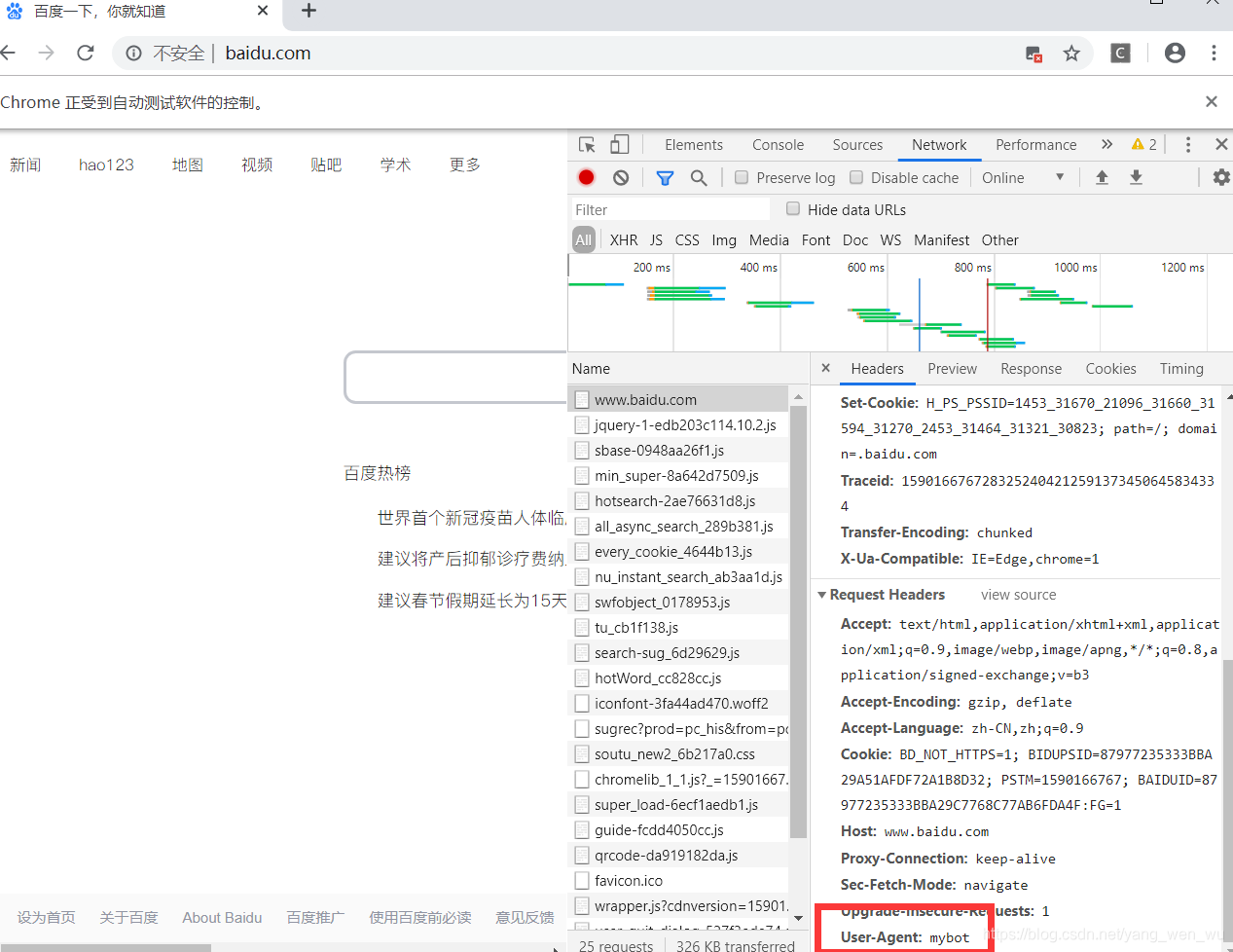
可以看到user-agent已经被成功替换了。
总结一下解决问题的流程
- 继承RemoteWebDriver类
- 参考ChromeDriver实现
executeCdpCommand方法 - 参考ChromeDriver创建自定义的
commandExecutor增加命令
事实上,因为cdp命令是chrome浏览器提供的支持,与selenium无关,在selenium4中只是内置了这个命令的参数和地址,调用的原理与原来支持的方法是一样的。在自己实现的CdpRemoteWebDriver中已经自己添加了参数,并不需要将依赖升级到4.0.0就可以调用cdp命令了。
Selenium RemoteWebDriver 利用CDP修改User-Agent的更多相关文章
- 利用Photoshop修改图片以达到投稿要求
摘自:http://www.dxy.cn/bbs/thread/8602152#8602152 利用Photoshop修改图片以达到投稿要求 软件版本为Photoshop CS V8.0.1(中文版) ...
- 利用phpmyadmin修改mysql的root密码及如何进入修改密码后的phpmyadmin
1.利用phpmyadmin修改mysql的root密码 很多人利用phpmyadmin或者命令行来修改了mysql的root密码,重启后发现mysql登录错误,这是为什么呢?修改mysql的root ...
- UIWebView使用时的问题,包含修改user agent
1.①像普通controller那样实现跳转到webview的效果,而不是直接加到当前controller②隐藏webview的某些元素③webview跳往原生app④给webview添加进度条 解决 ...
- 利用脚本修改SQL SERVER排序规则
利用脚本修改SQL SERVER排序规则 编写人:CC阿爸 2014-3-1 l 今年的一项重要工作是对公司所用系统进行繁简的转换,程序转成简体基本很容易解决,但数据库转换成简体,就没那么容易了.经 ...
- Selenium之利用Excel实现参数化
Selenium之利用Excel实现参数化 说明:我是通过Workbook方式来读取excel文件的,这次以登陆界面为例 备注:使用Workbook读取excel文件,前提是excel需要2003版本 ...
- [Python爬虫] 之二十:Selenium +phantomjs 利用 pyquery通过搜狗搜索引擎数据
一.介绍 本例子用Selenium +phantomjs 利用 pyquery通过搜狗搜索引擎数据()的资讯信息,输入给定关键字抓取资讯信息. 给定关键字:数字:融合:电视 抓取信息内如下: 1.资讯 ...
- 利用反射修改final数据域
当final修饰一个数据域时,意义是声明该数据域是最终的,不可修改的.常见的使用场景就是eclipse自动生成的serialVersionUID一般都是final的. 另外还可以构造线程安全(thre ...
- shell编程系列12--文本处理三剑客之sed利用sed修改文件内容
shell编程系列12--文本处理三剑客之sed利用sed修改文件内容 修改命令对照表 编辑命令 1s/old/new/ 替换第1行内容old为new ,10s/old/new/ 替换第1行到10行的 ...
- [唐胡璐]Selenium技巧 - 利用MonteScreenRecorder录制视频
我们可以用以下方式在Selenium Webdriver中capture video. 基本步骤: 从 http://www.randelshofer.ch/monte/,下载“MonteScreen ...
随机推荐
- js 函数对象的继承 inherit 带 插件完整解析版[helpers.js]
前言: 本人纯小白一个,有很多地方理解的没有各位大牛那么透彻,如有错误,请各位大牛指出斧正!小弟感激不尽. 本篇文章为您分析一下原生JS的对象继承方法 需求分析: 1. ...
- c语言----- 冒泡排序 for while do-while 递归练习
1. 冒泡排序简介(默认从小到大排序) 核心思想:只比较相邻的两个元素,如果满足条件就交换 5 8 2 1 6 9 4 3 7 0 目标:0 1 2 3 4 5 6 7 8 9 第一次排序: 5 ...
- 记django从1.11.7升级到2.0.1
第一步:升级django之后记录下django等其他相关依赖包的版本号. 在terminal中输入 pip freeze, 获取所有包的版本号.为了在升级不成功后可以回到低版本. 第二步:卸载再重装d ...
- iOS9.2.1 App从AppStore上下载闪退问题
首先这是小编的第一篇文章,我是一名做iOS开发的小白,出于爱好会更新发表些相关的技术文章,偶尔也会发些视频.恳请大家不要去嘲笑一个努力的人,要是做的不好请多多评论,反正我也不改. 好了!敲黑板!!说正 ...
- vue获取当前时间 实时刷新
需求:获取当前系统时间,在页面上展示 年月日 时分秒 ,并且实时刷新,和系统时间保持一致 第一步:在deta 里面声明两个变量第二步:把时间调用写在created() 生命周期里面,进入页面就需要调用 ...
- JWT安全问题
Json Web Tokens 在线工具网站:https://jwt.io/ python 用到的库 jwt // pip install pyjwt JWTCrack key // git c ...
- gulp插件学习01
1.安装和使用 安装node环境:官网:https://nodejs.org: 命令行输入 npm i gulp -g ,gulp-v查看安装是否成功: 创建项目目录: 进入目录,并在目录中按住shi ...
- 认识mysql3个基本库
一.3个基本库 数据库初始化安装完毕会有三个基本库mysql .information_schema.performace_schema.作为应用程序开发者,平时较少关注这些数据库尤其是后两者.但是通 ...
- train loss与test loss结果分析/loss不下降
train loss与test loss结果分析 train loss 不断下降,test loss不断下降,说明网络仍在学习; train loss 不断下降,test loss趋于不变,说明网络过 ...
- 【Hadoop离线基础总结】linux的shell编程
linux的shell编程 基本了解 概述 Shell是一个用C语言编写的程序,通过shell用户可以访问操作系统内核服务,它类似于DOS下的command和后来的cmd.exe.Shell既是一种命 ...