
[Python爬虫] 之二十:Selenium +phantomjs 利用 pyquery通过搜狗搜索引擎数据
一、介绍
本例子用Selenium +phantomjs 利用 pyquery通过搜狗搜索引擎数据()的资讯信息,输入给定关键字抓取资讯信息。
给定关键字:数字;融合;电视
抓取信息内如下:
1、资讯标题
2、资讯链接
3、资讯时间
4、资讯来源
二、网站信息
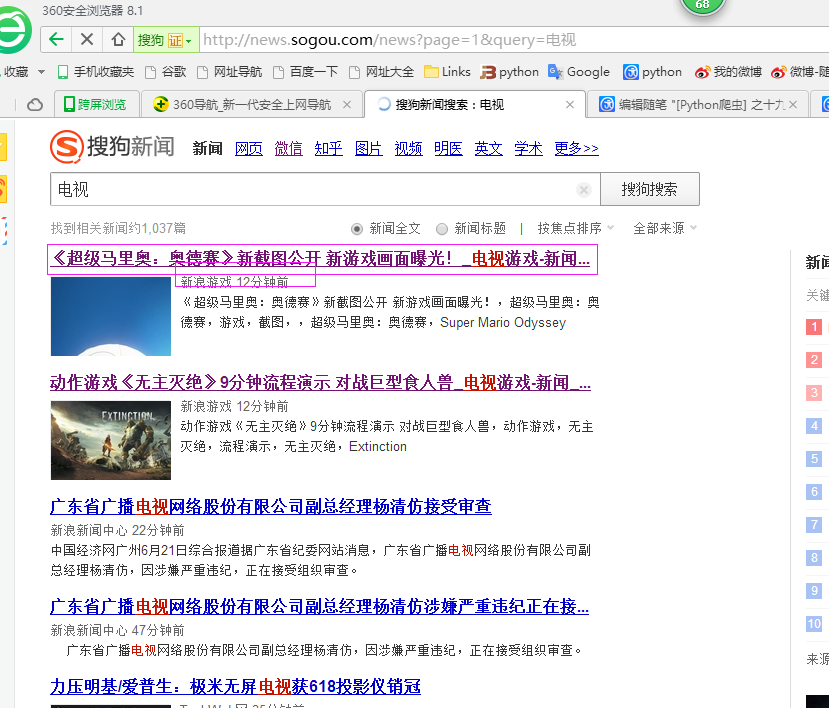

三、数据抓取
针对上面的网站信息,来进行抓取
1、首先抓取信息列表
抓取代码:Elements = doc('div[class="news151102"]')
2、抓取标题
抓取代码:title = element('h3[class="vrTitle"]').find('a').text().encode('utf8').strip()
3、抓取链接
抓取代码:url = element('h3[class="vrTitle"]').find('a').attr('href')
4、抓取日期
抓取代码:strdate = element('p[class="news-from"]').text().encode('utf8').strip()
5、抓取来源
抓取代码:strSources = dochtml('span[class="wzof"]').text().encode('utf8').strip().split(':')
四、完整代码
# coding=utf-8

import os

import re

from selenium import webdriver

import selenium.webdriver.support.ui as ui

import time

from datetime import datetime

import IniFile

# from threading import Thread

from pyquery import PyQuery as pq

import LogFile

import mongoDB

import urllib

class sogouSpider(object):

    def __init__(self):

        logfile = os.path.join(os.path.dirname(os.getcwd()), time.strftime('%Y-%m-%d') + '.txt')

        self.log = LogFile.LogFile(logfile)

        configfile = os.path.join(os.path.dirname(os.getcwd()), 'setting.conf')

        cf = IniFile.ConfigFile(configfile)

        self.webSearchUrl_list = cf.GetValue("sogou", "webSearchUrl").split(';')

        self.keyword_list = cf.GetValue("section", "information_keywords").split(';')

        self.db = mongoDB.mongoDbBase()

        self.start_urls = []

        for word in self.keyword_list:

            keyword = urllib.quote(word)

            for url in self.webSearchUrl_list:

                self.start_urls.append(url + keyword)

        self.driver = webdriver.PhantomJS()

        self.wait = ui.WebDriverWait(self.driver, 2)

        self.driver.maximize_window()

    def Comapre_to_days(self,leftdate, rightdate):

        '''

        比较连个字符串日期,左边日期大于右边日期多少天

        :param leftdate: 格式:2017-04-15

        :param rightdate: 格式:2017-04-15

        :return: 天数

        '''

        l_time = time.mktime(time.strptime(leftdate, '%Y-%m-%d'))

        r_time = time.mktime(time.strptime(rightdate, '%Y-%m-%d'))

        result = int(l_time - r_time) / 86400

        return result

    def date_isValid(self, strDateText):

        '''

        判断日期时间字符串是否合法:如果给定时间大于当前时间是合法,或者说当前时间给定的范围内

        :param strDateText: 四种格式 '慧聪网 7小时前'; '新浪游戏 29分钟前' ; '中国行业研究网 2017-6-13'

        :return: True:合法;False:不合法

        '''

        currentDate = time.strftime('%Y-%m-%d')

        source = strDateText.split(' ')[0]

        if strDateText.find('分钟前') > 0:

            return True, source, currentDate

        elif strDateText.find('小时前') > 0:

            datePattern = re.compile(r'\d{1,2}')

            ch = int(time.strftime('%H'))  # 当前小时数

            strDate = re.findall(datePattern, strDateText)

            if len(strDate) == 1:

                if int(strDate[0]) <= ch:  # 只有小于当前小时数,才认为是今天

                    return True, source, currentDate

        else:

            datePattern = re.compile(r'\d{4}-\d{1,2}-\d{1,2}')

            strDate = re.findall(datePattern, strDateText)

            if len(strDate) == 1:

                if self.Comapre_to_days(currentDate, strDate[0]) == 0:

                    return True, source, currentDate

        return False, '', ''

    def log_print(self, msg):

        '''

        #         日志函数

        #         :param msg: 日志信息

        #         :return:

        #         '''

        print '%s: %s' % (time.strftime('%Y-%m-%d %H-%M-%S'), msg)

    def scrapy_date(self):

        strsplit = '------------------------------------------------------------------------------------'

        for link in self.start_urls:

            self.driver.get(link)

            selenium_html = self.driver.execute_script("return document.documentElement.outerHTML")

            doc = pq(selenium_html)

            infoList = []

            self.log.WriteLog(strsplit)

            self.log_print(strsplit)

            Elements = doc('div[class="news151102"]')

            for element in Elements.items():

                strdate = element('p[class="news-from"]').text().encode('utf8').strip()

                flag, source, date = self.date_isValid(strdate)

                if flag:

                    title = element('h3[class="vrTitle"]').find('a').text().encode('utf8').strip()

                    for keyword in self.keyword_list:

                        if title.find(keyword) > -1:

                            url = element('h3[class="vrTitle"]').find('a').attr('href')

                            dictM = {'title': title, 'date': date,

                             'url': url, 'keyword': keyword, 'introduction': title, 'source': source}

                            infoList.append(dictM)

                            self.log.WriteLog('title:%s' % title)

                            self.log.WriteLog('url:%s' % url)

                            self.log.WriteLog('source:%s' % source)

                            self.log.WriteLog('kword:%s' % keyword)

                            self.log.WriteLog(strsplit)

                            self.log_print('title:%s' % dictM['title'])

                            self.log_print('url:%s' % dictM['url'])

                            self.log_print('date:%s' % dictM['date'])

                            self.log_print('source:%s' % dictM['source'])

                            self.log_print('kword:%s' % dictM['keyword'])

                            self.log_print(strsplit)

                            break

            if len(infoList)>0:

                self.db.SaveInformations(infoList)

        self.driver.close()

        self.driver.quit()

obj = sogouSpider()

obj.scrapy_date()
[Python爬虫] 之二十:Selenium +phantomjs 利用 pyquery通过搜狗搜索引擎数据的更多相关文章
- [Python爬虫] 之三十一:Selenium +phantomjs 利用 pyquery抓取消费主张信息
一.介绍 本例子用Selenium +phantomjs爬取央视栏目(http://search.cctv.com/search.php?qtext=消费主张&type=video)的信息(标 ...
- [Python爬虫] 之十七:Selenium +phantomjs 利用 pyquery抓取梅花网数据
一.介绍 本例子用Selenium +phantomjs爬取梅花网(http://www.meihua.info/a/list/today)的资讯信息,输入给定关键字抓取资讯信息. 给定关键字:数字: ...
- [Python爬虫] 之二十二:Selenium +phantomjs 利用 pyquery抓取界面网站数据
一.介绍 本例子用Selenium +phantomjs爬取界面(https://a.jiemian.com/index.php?m=search&a=index&type=news& ...
- [Python爬虫] 之二十五:Selenium +phantomjs 利用 pyquery抓取今日头条网数据
一.介绍 本例子用Selenium +phantomjs爬取今日头条(http://www.toutiao.com/search/?keyword=电视)的资讯信息,输入给定关键字抓取资讯信息. 给定 ...
- [Python爬虫] 之二十九:Selenium +phantomjs 利用 pyquery抓取节目信息信息
一.介绍 本例子用Selenium +phantomjs爬取节目(http://tv.cctv.com/epg/index.shtml?date=2018-03-25)的信息 二.网站信息 三.数据抓 ...
- [Python爬虫] 之二十八:Selenium +phantomjs 利用 pyquery抓取网站排名信息
一.介绍 本例子用Selenium +phantomjs爬取中文网站总排名(http://top.chinaz.com/all/index.html,http://top.chinaz.com/han ...
- [Python爬虫] 之二十六:Selenium +phantomjs 利用 pyquery抓取智能电视网站图片信息
一.介绍 本例子用Selenium +phantomjs爬取智能电视网站(http://www.tvhome.com/news/)的资讯信息,输入给定关键字抓取图片信息. 给定关键字:数字:融合:电视 ...
- [Python爬虫] 之二十四:Selenium +phantomjs 利用 pyquery抓取中广互联网数据
一.介绍 本例子用Selenium +phantomjs爬取中广互联网(http://www.tvoao.com/select.html)的资讯信息,输入给定关键字抓取资讯信息. 给定关键字:数字:融 ...
- [Python爬虫] 之二十一:Selenium +phantomjs 利用 pyquery抓取36氪网站数据
一.介绍 本例子用Selenium +phantomjs爬取36氪网站(http://36kr.com/search/articles/电视?page=1)的资讯信息,输入给定关键字抓取资讯信息. 给 ...
随机推荐
- js监听不到组合键
我在js文件中写代码,监听 ctrl + enter 组合键,但是一直监听不到.只能监听到单个键. 后来我将监听的代码放到html页面中去,就能监听到了. 这个问题困扰我很久,记录下!
- 6.shell判断语句
[ condition ](注意condition前后要有空格),可以使用$?验证(0为true,>1为false) 两个整数的比较:=:字符串比较-lt:小于-gt:大于-le:小于等于-ge ...
- C#实例:Unity依赖注入使用
http://jingyan.baidu.com/article/c74d6000840b260f6b595d78.html
- 【C++】嵌套类、友元
黄邦勇帅 里面关于嵌套类的介绍我有疑惑.里面11.9说在创建一个外围类的对象时先执行嵌套类的构造函数然后再执行外围类的构造函数,析构函数则以相反的方式执行. 可是我编程实验了一下,创建外围类对象时并不 ...
- js的变量的有效域
function test(o) { var i=0; if(typeof o=="object") { var j=1; for(var k=0;k<10;k++) { c ...
- java classloader怎么找class?
通过ClassPath http://www.cnblogs.com/xwdreamer/archive/2010/09/08/2297098.html 在eclipse里通过add jar add ...
- ssl介绍以及双向认证和单向认证原理
SSL安全证书可以自己生成,也可以通过第三方的CA(Certification Authority)认证中心付费申请颁发. SSL安全证书包括: 1. CA证书,也叫根证书或中间级证书.单 ...
- int 与 String 与 char 之间的互相转换
int 转 String: //方式一: int i1 = 888; String s1 = Integer.toString(i1); //方式二: int i2 = 888; String s2 ...
- POJ 1321 棋盘问题【DFS/回溯/放与不放/类似n皇后】
棋盘问题 Time Limit: 1000MS Memory Limit: 10000K Total Submissions: 62164 Accepted: 29754 Description 在一 ...
- 18、Flask实战第18天:Flask-session
session的基本概念 session和cookie的作用有点类似,都是为了存储用户相关的信息.不同的是,cookie是存储在本地浏览器,session是一个思路.一个概念.一个服务器存储授权信息的 ...