
【HarmonyOS】【xml】初学XML布局作业
首先要明确,有两种布局方式
线性布局:
DirectionalLayout
依赖布局:
DependentLayout
好,接下来看一看下面的例子
页面案例1
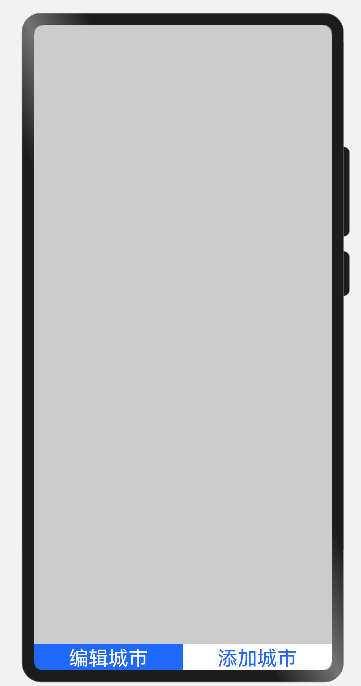
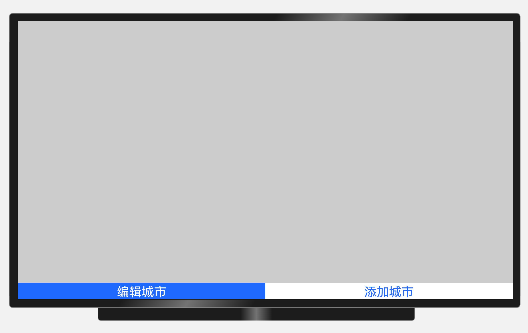
代码如下:
<?xml version="1.0" encoding="utf-8"?>

<!--依赖布局-->

<DependentLayout

    xmlns:ohos="http://schemas.huawei.com/res/ohos"

    ohos:height="match_parent"

    ohos:width="match_parent"

    ohos:background_element="#CCCCCC"

    >

<!--添加ListContainer标识多行数据    -->

        <ListContainer

            ohos:id="$+id:list_container"

            ohos:height="match_content"

            ohos:width="match_parent"

            ohos:above="$id:layout_bottom"

            >

        </ListContainer>

<!--按钮子布局-->

        <DirectionalLayout

            ohos:id="$+id:layout_bottom"

            ohos:height="match_content"

            ohos:width="match_parent"

            ohos:orientation="horizontal"

            ohos:align_parent_bottom="true"

            >

<!--            编辑城市按钮-->

            <Button

                ohos:id="$+id:button_edit"

                ohos:height="match_content"

                ohos:width="match_parent"

                ohos:text="编辑城市"

                ohos:background_element="#1F69FF"

                ohos:text_color="#FFFFFF"

                ohos:text_size="24vp"

                ohos:weight="1"

                ohos:layout_alignment="bottom"

                />

<!--            添加城市按钮-->

            <Button

                ohos:id="$+id:button_add"

                ohos:height="match_content"

                ohos:width="match_parent"

                ohos:text="添加城市"

                ohos:background_element="#FFFFFF"

                ohos:text_color="#1F69FF"

                ohos:text_size="24vp"

                ohos:weight="1"

                ohos:layout_alignment="bottom"

                />

    </DirectionalLayout>

</DependentLayout>
<?xml version="1.0" encoding="utf-8"?>

<!--依赖布局-->

<DependentLayout      //依赖布局

    xmlns:ohos="http://schemas.huawei.com/res/ohos"

    ohos:height="match_parent"

    ohos:width="match_parent"

    ohos:background_element="#CCCCCC"

    >

<!--添加ListContainer标识多行数据    -->

        <ListContainer

            ohos:id="$+id:list_container"

            ohos:height="match_content"

            ohos:width="match_parent"

            ohos:above="$id:layout_bottom"   //让此组件下边缘与另一个组件的上边缘对齐

            >

        </ListContainer>

<!--按钮子布局-->

        <DirectionalLayout

            ohos:id="$+id:layout_bottom"

            ohos:height="match_content"

            ohos:width="match_parent"

            ohos:orientation="horizontal"

            ohos:align_parent_bottom="true"   //将底边与父组件对齐

            >

<!--            编辑城市按钮-->

            <Button

                ohos:id="$+id:button_edit"

                ohos:height="match_content"

                ohos:width="match_parent"

                ohos:text="编辑城市"

                ohos:background_element="#1F69FF"

                ohos:text_color="#FFFFFF"

                ohos:text_size="24vp"

                ohos:weight="1" //权重:1

                ohos:layout_alignment="bottom"    //对齐方式:底部对齐

                />

<!--            添加城市按钮-->

            <Button

                ohos:id="$+id:button_add"

                ohos:height="match_content"

                ohos:width="match_parent"

                ohos:text="添加城市"

                ohos:background_element="#FFFFFF"

                ohos:text_color="#1F69FF"

                ohos:text_size="24vp"

                ohos:weight="1" //权重:1

                ohos:layout_alignment="bottom" //对齐方式:底部对齐

                />

    </DirectionalLayout>

</DependentLayout>
页面案例2
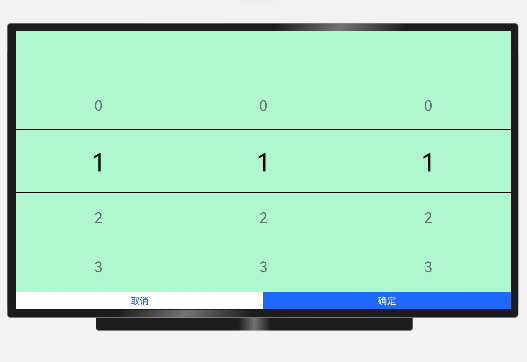
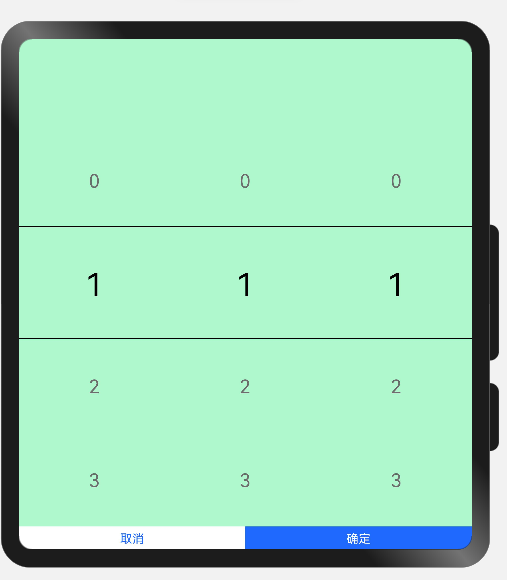
<?xml version="1.0" encoding="utf-8"?>

<DependentLayout

    xmlns:ohos="http://schemas.huawei.com/res/ohos"

    ohos:height="match_parent"

    ohos:width="match_parent"

    ohos:background_element="#F5FFC3"

    ohos:orientation="vertical"

    >

<!--    线性布局 Picker-->

<DirectionalLayout

        ohos:height="match_parent"

        ohos:width="match_parent"

        ohos:orientation="horizontal"

        ohos:background_element="#FFAFF8CE"

        ohos:above="$id:layout_bottom"

        >

        <Picker

            ohos:id="$+id:picker_province"

            ohos:height="match_parent"

            ohos:width="match_parent"

            ohos:weight="1"

            ohos:normal_text_size="28vp"

            ohos:selected_text_size="48vp"

            ohos:normal_text_color="#FF6D6D6D"

            ohos:selected_text_color="#FF000000"

            ohos:top_line_element="#000000"

            ohos:bottom_line_element="#000000"

            ohos:layout_alignment="horizontal_center"

            />

        <Picker

            ohos:id="$+id:picker_city"

            ohos:height="match_parent"

            ohos:width="match_parent"

            ohos:weight="1"

            ohos:normal_text_size="28vp"

            ohos:selected_text_size="48vp"

            ohos:normal_text_color="#FF6D6D6D"

            ohos:selected_text_color="#FF000000"

            ohos:top_line_element="#000000"

            ohos:bottom_line_element="#000000"

            ohos:layout_alignment="horizontal_center"

            />

        <Picker

            ohos:id="$+id:picker_county"

            ohos:height="match_parent"

            ohos:width="match_parent"

            ohos:weight="1"

            ohos:normal_text_size="28vp"

            ohos:selected_text_size="48vp"

            ohos:normal_text_color="#FF6D6D6D"

            ohos:selected_text_color="#FF000000"

            ohos:top_line_element="#000000"

            ohos:bottom_line_element="#000000"

            ohos:layout_alignment="horizontal_center"

            />

    </DirectionalLayout>

<!--    线性布局 按钮-->

    <DirectionalLayout

        ohos:id="$+id:layout_bottom"

        ohos:height="match_content"

        ohos:width="match_parent"

        ohos:orientation="horizontal"

        ohos:align_parent_bottom="true"

        >

        <!--            取消按钮-->

        <Button

            ohos:id="$+id:button_cancel"

            ohos:height="match_content"

            ohos:width="match_parent"

            ohos:text="取消"

            ohos:background_element="#FFFFFF"

            ohos:text_color="#1F69FF"

            ohos:text_size="18vp"

            ohos:weight="1"

            ohos:layout_alignment="bottom"

            ohos:padding="5vp"

            />

        <!--            确定按钮-->

        <Button

            ohos:id="$+id:button_enter"

            ohos:height="match_content"

            ohos:width="match_parent"

            ohos:text="确定"

            ohos:background_element="#1F69FF"

            ohos:text_color="#FFFFFF"

            ohos:text_size="18vp"

            ohos:weight="1"

            ohos:layout_alignment="bottom"

            ohos:padding="5vp"

            />

    </DirectionalLayout>

    </DependentLayout>
<?xml version="1.0" encoding="utf-8"?>

<DependentLayout  //依赖布局

    xmlns:ohos="http://schemas.huawei.com/res/ohos"

    ohos:height="match_parent"

    ohos:width="match_parent"

    ohos:background_element="#F5FFC3"

    ohos:orientation="vertical"   //子布局上下排列

    >

<!--    线性布局 Picker-->

<DirectionalLayout

        ohos:height="match_parent"

        ohos:width="match_parent"

        ohos:orientation="horizontal"  //子布局左右排列

        ohos:background_element="#FFAFF8CE"

        ohos:above="$id:layout_bottom"

        >

        <Picker

            ohos:id="$+id:picker_province"

            ohos:height="match_parent"

            ohos:width="match_parent"

            ohos:weight="1"

            ohos:normal_text_size="28vp"

            ohos:selected_text_size="48vp"

            ohos:normal_text_color="#FF6D6D6D"

            ohos:selected_text_color="#FF000000"

            ohos:top_line_element="#000000"              //顶部框线:颜色值

            ohos:bottom_line_element="#000000"           //底部框线:颜色值

            ohos:layout_alignment="horizontal_center"   //对齐方式:居中对齐

            />

        <Picker

            ohos:id="$+id:picker_city"

            ohos:height="match_parent"

            ohos:width="match_parent"

            ohos:weight="1"

            ohos:normal_text_size="28vp"

            ohos:selected_text_size="48vp"

            ohos:normal_text_color="#FF6D6D6D"

            ohos:selected_text_color="#FF000000"

            ohos:top_line_element="#000000"

            ohos:bottom_line_element="#000000"

            ohos:layout_alignment="horizontal_center"

            />

        <Picker

            ohos:id="$+id:picker_county"

            ohos:height="match_parent"

            ohos:width="match_parent"

            ohos:weight="1"

            ohos:normal_text_size="28vp"

            ohos:selected_text_size="48vp"

            ohos:normal_text_color="#FF6D6D6D"

            ohos:selected_text_color="#FF000000"

            ohos:top_line_element="#000000"

            ohos:bottom_line_element="#000000"

            ohos:layout_alignment="horizontal_center"

            />

    </DirectionalLayout>

<!--    线性布局 按钮-->

    <DirectionalLayout

        ohos:id="$+id:layout_bottom"

        ohos:height="match_content"

        ohos:width="match_parent"

        ohos:orientation="horizontal"

        ohos:align_parent_bottom="true"     //此组件底线与父组件底线对齐

        >

        <!--            取消按钮-->

        <Button

            ohos:id="$+id:button_cancel"

            ohos:height="match_content"

            ohos:width="match_parent"

            ohos:text="取消"

            ohos:background_element="#FFFFFF"

            ohos:text_color="#1F69FF"

            ohos:text_size="18vp"

            ohos:weight="1"

            ohos:layout_alignment="bottom"

            ohos:padding="5vp"

            />

        <!--            确定按钮-->

        <Button

            ohos:id="$+id:button_enter"

            ohos:height="match_content"

            ohos:width="match_parent"

            ohos:text="确定"

            ohos:background_element="#1F69FF"

            ohos:text_color="#FFFFFF"

            ohos:text_size="18vp"

            ohos:weight="1"

            ohos:layout_alignment="bottom"

            ohos:padding="5vp"

            />

    </DirectionalLayout>

    </DependentLayout>
页面案例3
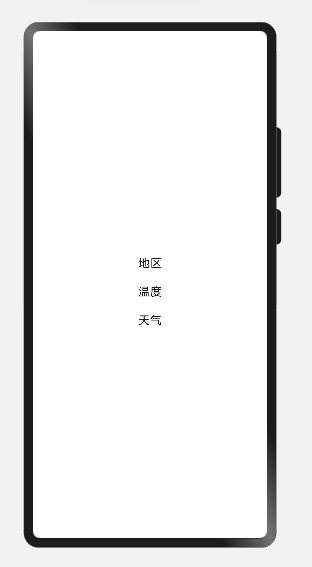
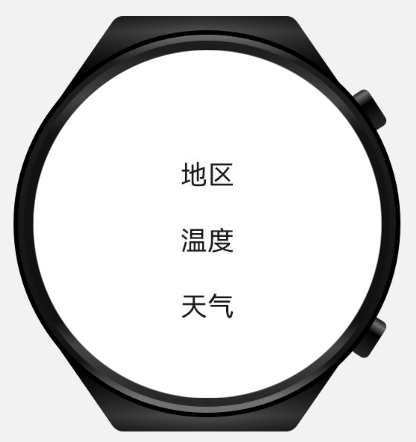
<?xml version="1.0" encoding="utf-8"?>

<DirectionalLayout

    xmlns:ohos="http://schemas.huawei.com/res/ohos"

    ohos:height="match_parent"

    ohos:width="match_parent"

    ohos:alignment="center"

    ohos:orientation="vertical">

<Text

    ohos:height="match_content"

    ohos:width="match_content"

    ohos:text_size="18vp"

    ohos:top_margin="20vp"

    ohos:text="地区"

    />

    <Text

        ohos:height="match_content"

        ohos:width="match_content"

        ohos:text_size="18vp"

        ohos:top_margin="20vp"

        ohos:text="温度"

        />

    <Text

        ohos:height="match_content"

        ohos:width="match_content"

        ohos:text_size="18vp"

        ohos:top_margin="20vp"

        ohos:text="天气"

        />

</DirectionalLayout>
<?xml version="1.0" encoding="utf-8"?>

<DirectionalLayout   //线性布局

    xmlns:ohos="http://schemas.huawei.com/res/ohos"

    ohos:height="match_parent"

    ohos:width="match_parent"

    ohos:alignment="center"

    ohos:orientation="vertical">  //上下布局

<Text

    ohos:height="match_content"

    ohos:width="match_content"

    ohos:text_size="18vp"

    ohos:top_margin="20vp"  //顶部边距

    ohos:text="地区"

    />

    <Text

        ohos:height="match_content"

        ohos:width="match_content"

        ohos:text_size="18vp"

        ohos:top_margin="20vp"

        ohos:text="温度"

        />

    <Text

        ohos:height="match_content"

        ohos:width="match_content"

        ohos:text_size="18vp"

        ohos:top_margin="20vp"

        ohos:text="天气"

        />

</DirectionalLayout>
【HarmonyOS】【xml】初学XML布局作业的更多相关文章
- Xml解析作业与Xml建模andXml建模作业
作业:config.xml解析 1.获取所有action中的type的值 public static void main(String[] args) throws Exception { Input ...
- XML初学笔记
一.基本概要: XML,全称是eXtensible Markup Language,可扩展的标记语言,是Web服务的基础之一,使用XML,用户可以定义自己需要的标记.而用户创建的标记可以使用文档类型定 ...
- xml初学简单介绍
什么是XML? 1.全称Extensible Markup Language,可扩展标记语言,W3C组织公布. 2.XML用来保存有一定结构关系的数据. 3.标签的嵌套,实质是一串字符串. 4.跨平台 ...
- XML 参考:XML基础 XML 简介
XML 参考:XML基础 -- XML简介和用途 转:http://www.cnblogs.com/Dlonghow/archive/2009/01/22/1379799.html XML 参考:XM ...
- hadoop三个配置文件的参数含义说明core-site.xml,hdfs-site.xml,mapred-site.xml
配置hadoop,主要是配置core-site.xml,hdfs-site.xml,mapred-site.xml三个配置文件,默认下来,这些配置文件都是空的,所以很难知道这些配置文件有哪些配置可以生 ...
- js解析xml,获取XMl标签属性值
<script type="text/javascript"> var xml="<?xml version=\"1.0\" enc ...
- XML Helper XML操作类
写的一个XML操作类,包括读取/插入/修改/删除. using System;using System.Data;using System.Configuration;using System.Web ...
- Linq to XML 读取XML 备忘笔记
本文转载:http://www.cnblogs.com/infozero/archive/2010/07/13/1776383.html Linq to XML 读取XML 备忘笔记 最近一个项目中有 ...
- Struts2中有关struts-default.xml,struts.xml,struts.properties文件详解
1) struts-default.xml 这个文件是struts2框架默认加载的配置文件.它定义struts2一些核心的bean和拦截器. <?xml version="1.0&qu ...
- XML.ObjTree -- XML source code from/to JavaScript object like E4X
转载于:http://www.kawa.net/works/js/xml/objtree-try-e.html // ========================================= ...
随机推荐
- c++学习笔记(八)
内联函数 概念 内联(inline)函数是c++为提高程序运行速度所做得一项改进. 与常规函数的区别不在于编写方式,而在于被调用时的运行机制不同----编译器使用函数代码替换函数调用. 引用内联函数时 ...
- 博主日常工作中使用的shell脚本分享
前言: 今天给大家分享一篇在我工作中常用的一个shell脚本,里面有一些我们常用到的shell操作.该脚本用于本地电脑和服务器交互上,实现以下功能: 自动拉取自己个人电脑上的源码到服务器上yocto包 ...
- python爬取ip地址
ip查询,异步get请求 分析接口,请求接口响应json 发现可以data中获取 result.json()['data'][0]['location'] # _*_ coding : utf-8 _ ...
- java meil
import java.util.Date; import java.util.List; import java.util.Properties; import javax.activation.D ...
- element ui tree回显 setCheckedNodes,setCheckedKeys,setChecked等函数报undefined问题
在写项目的时候,需要用到tree组件进行回显来进行权限控制: 在回显过程中使用回显函数会报报undefined, 这时只需要给该函数包裹一层nextTick方法就行了, 在回显过程中我们有可能使用半选 ...
- Ubuntu加速訪問GitHub
Github一般用于Git的远程仓库,由于服务器位于国外,国内访问速度比较慢,为了提高访问速度,决定绕过DNS域名解析. 获取Github的IP地址 按下ctrl+alt+T打开命令终端,输入: ns ...
- RocketMQ源码详解 | Broker篇 · 其四:事务消息、批量消息、延迟消息
概述 在上文中,我们讨论了消费者对于消息拉取的实现,对于 RocketMQ 这个黑盒的心脏部分,我们顺着消息的发送流程已经将其剖析了大半部分.本章我们不妨乘胜追击,接着讨论各种不同的消息的原理与实现. ...
- python实现其它形态学操作
目录: (一) 顶帽(原图像与开操作图像的差值)(二) 黑帽(原图像与闭操作图像的差值)(三) 形态学梯度 (1)基本梯度(膨胀后的图像与腐蚀后的图像差值) (2)内部梯度(原图像减去腐蚀后的图像 ...
- [atAGC050B]Three Coins
记$p_{i}$表示该位置是否有硬币 称使得$p_{i,i+1,i+2}$都变为1的操为对$i$的添加操作,使得$p_{i,i+1,i+2}$都变为0的操作为对$i$的删除操作 考虑一个简单的操作:若 ...
- go语言并发编程
引言 说到go语言最厉害的是什么就不得不提到并发,并发是什么?,与并发相关的并行又是什么? 并发:同一时间段内执行多个任务 并行:同一时刻执行多个任务 进程.线程与协程 进程: 进程是具有一定独立功能 ...