
【Azure API 管理】在APIM中使用客户端证书验证API的请求,但是一直提示错误"No client certificate received."
API 管理 (APIM) 是一种为现有后端服务创建一致且现代化的 API 网关的方法。
问题描述
在设置了APIM客户端证书,用户保护后端API,让请求更安全。 但是,最近发现使用客户端证书的API全部出现错误,无法收到客户端证书,通过浏览器中查看,发现证书也是无效的。
在API请求的Trace中,错误消息为:
            {

                "source": "client-certificate-handler",

                "timestamp": "2021-07-13T12:23:51.8172847Z",

                "elapsed": "00:00:00.00053",

                "data": "Requesting client certificate because next handler requires access to it."

            }, {

                "source": "client-certificate-handler",

                "timestamp": "2021-07-13T12:23:51.8172847Z",

                "elapsed": "00:00:00.00048",

                "data": "No client certificate received."

            }
在浏览器中查看证书发现无效:
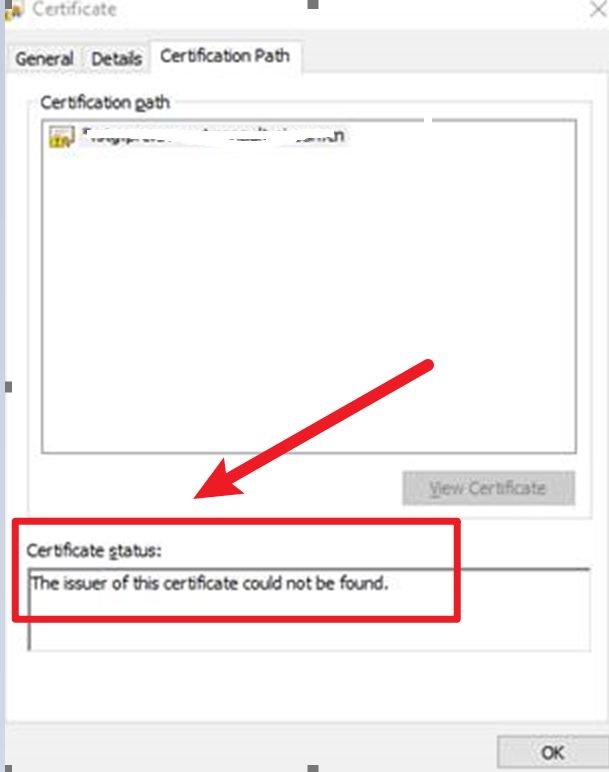
问题验证
根据消息提示,第一反应检查APIM的客户端证书是否有效,是否过期
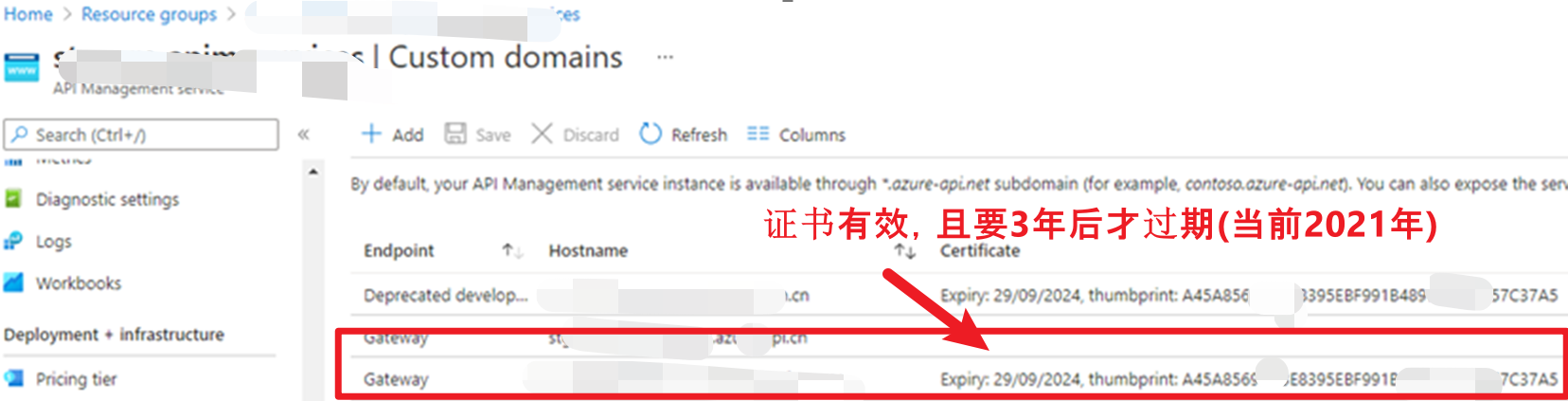
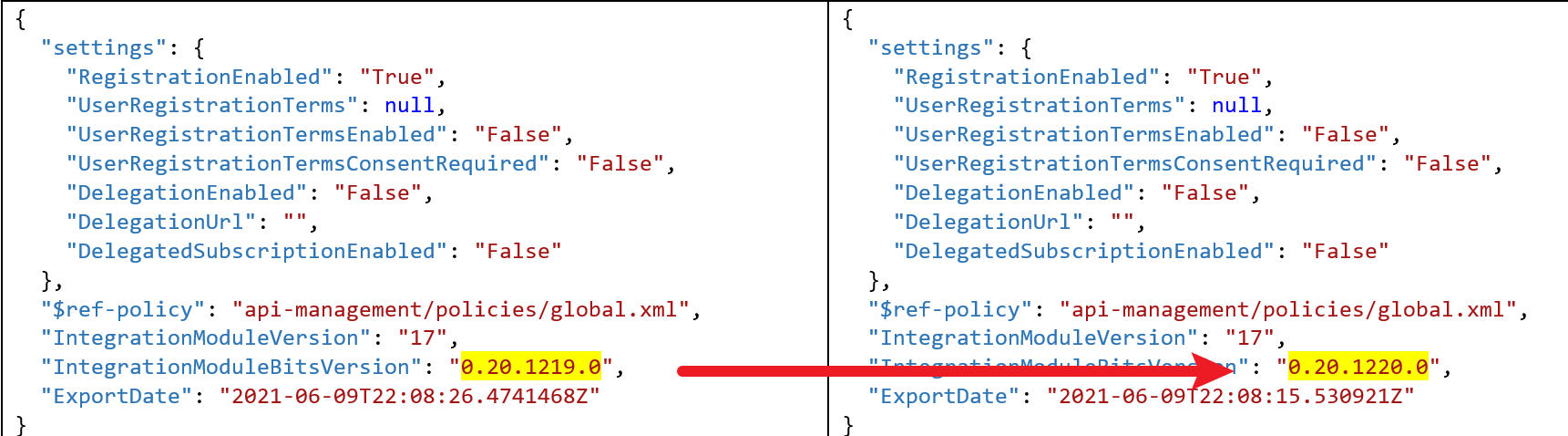
第二步当证书并无异常(没有过期)时,则调查APIM是否有变动,通过配置的Git存储库(APIM Repository), Clone最新的文件后发现版本有变动。发现前后有版本变动()
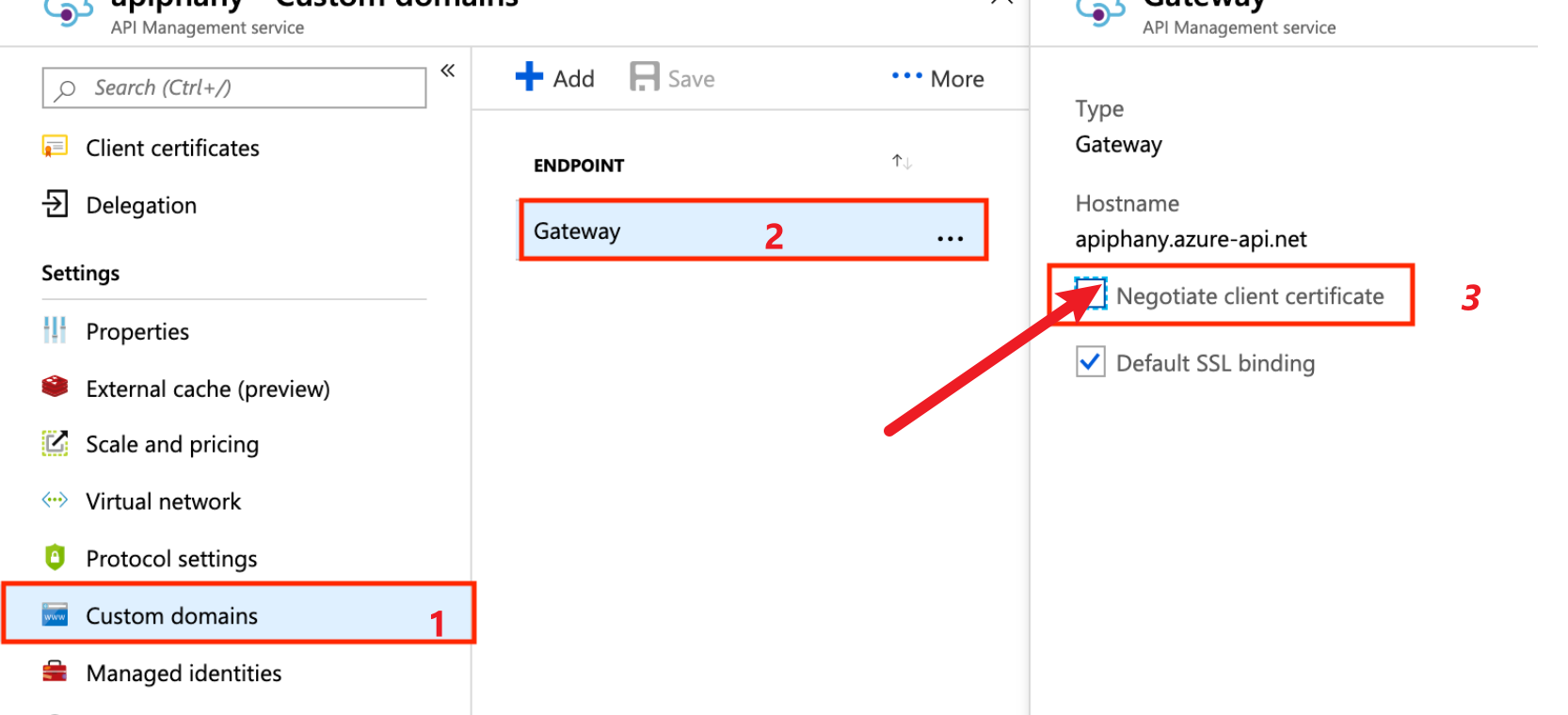
第三步:从APIM的证书设置入手,发现有新功能 ”协商客户端证书(Negotiate client certificate)“ 功能,在通过启用它之后,APIM的"No client certificate received" 问题消失
问题原因
因为在设置APIM时候,有一句提示消息为:”若要在开发人员层、基本层、标准层或高级层中通过 HTTP/2 接收和验证客户端证书,必须在“自定义域”边栏选项卡上启用“协商客户端证书”设置“” 。也就是说:如果不使用HTTP/2则不用启用"协商客户端证书"设置。这也是为什么在最初设置时,没有启用该功能的原因。
但是现在验证了问题的关键就是APIM升级后,必须启用"协商客户端证书", 通过对APIM的版本改动所发布的Release Notification(新版通知)看,是因为:

附录一:使用APIM Repository获取当前APIM中的所有文件,包含根目录的configuration.json文件
第一步:在APIM中启用Repository
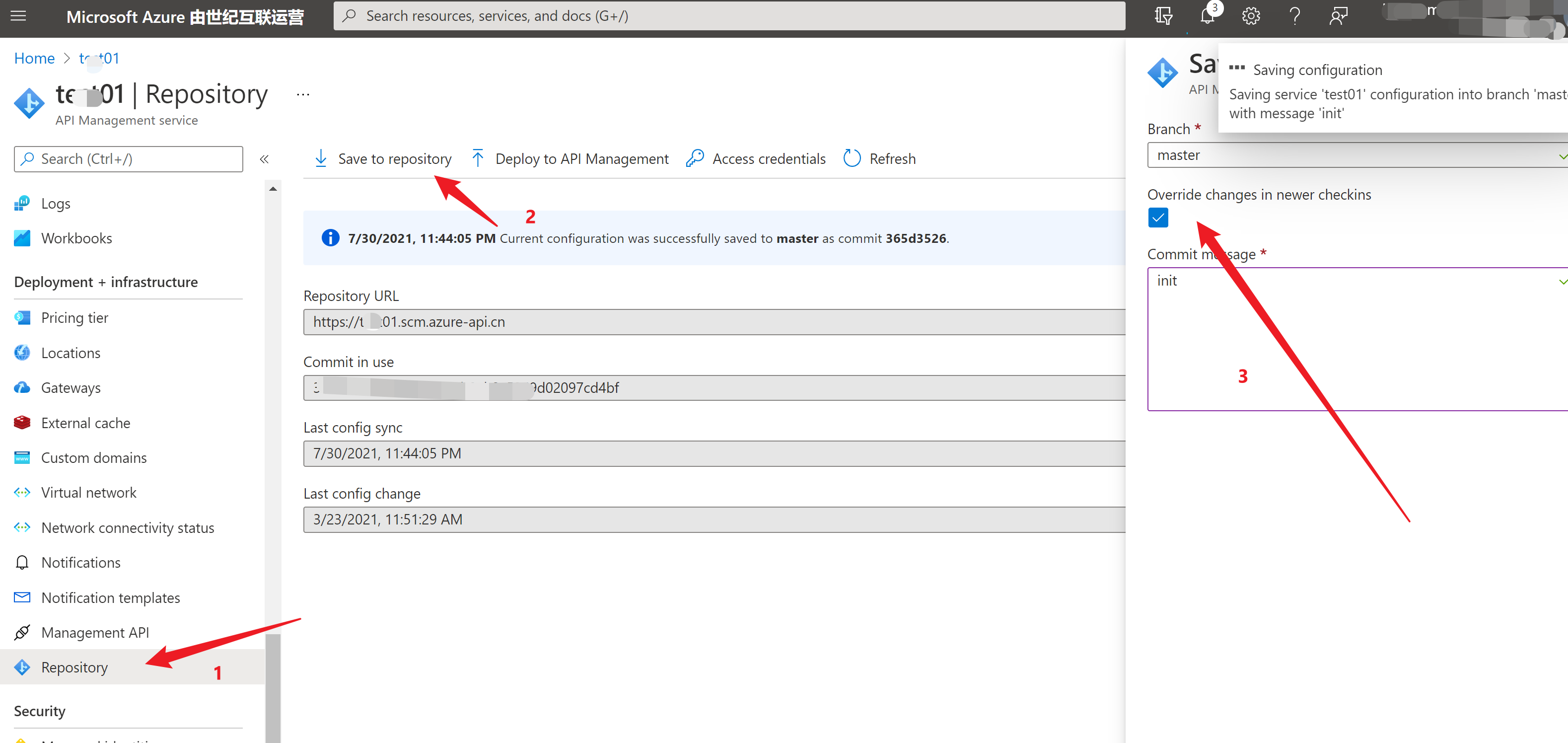
第二步:通过 git clone https://username:password@{name}.scm.azure-api.cn/ 下载APIM所有文件到本地

第三步:查看configuration.json文件 IntegrationModuleBitsVersion 信息
{

  "settings": {

    "RegistrationEnabled": "True",

    "UserRegistrationTerms": null,

    "UserRegistrationTermsEnabled": "False",

    "UserRegistrationTermsConsentRequired": "False",

    "DelegationEnabled": "False",

    "DelegationUrl": "",

    "DelegatedSubscriptionEnabled": "False"

  },

  "$ref-policy": "api-management/policies/global.xml",

  "IntegrationModuleVersion": "17",

  "IntegrationModuleBitsVersion": "0.20.1220.0",

  "ExportDate": "2021-06-09T22:08:15.530921Z"

}
参考文档
如何使用 API 管理中的客户端证书身份验证确保 API 安全:https://docs.azure.cn/zh-cn/api-management/api-management-howto-mutual-certificates-for-clients
APIM Release:https://github.com/Azure/API-Management/releases/tag/release-service-2021-05
A regular Azure API Management service update was started on May 5, 2021, and included the following new features, bug fixes, and other improvements. It may take several weeks for your API Management service to receive the update.
Featured
- Open-source API Portal is now generally available.
- Azure API Management's support for Availability Zones is now generally available.
- Request and response validation policies are now generally available.
New
- You can now validate the client certificate with the new
<validate-client-certificate>policy. Documentation and support in the Azure portal are coming soon.- The Visual Studio Code extension now supports policy debugging for self-hosted gateways running locally.
- The Visual Studio Code extension now supports Dapr and validation policies.
- The developer portal now supports resource owner password grant flow.
- The new Ciphers + Protocols page in the Azure portal lets you manage API gateways' cipher and protocol configuration and displays a warning if a weak cipher or protocol is enabled.
- The Locations page in the Azure portal lets you now configure Availability Zones.
- You can now apply validation policies with the visual policy editors in the Azure portal, without writing any policy code.
- The
timeoutattribute of thesend-requestpolicy now supports policy expressions.Fixed
- Caching issues, which might have resulted in a broken developer portal's administrative interface, are now resolved.
Changed
- The client certificate renegotiation feature is now disabled for all new and existing API Management services, except for the services that relied on it in the last 30 days (services with at least one API call that resulted in a client certificate request from a policy, not as part of an initial TLS handshake). The API gateway will request a client certificate only if
HostnameConfiguration's propertynegotiateClientCertificateis set totrue. If the property is set tofalse, the client certificate won't be available in thecontext.Request.Certificateproperty.
【END】
【Azure API 管理】在APIM中使用客户端证书验证API的请求,但是一直提示错误"No client certificate received."的更多相关文章
- 【Azure API 管理】APIM 配置Validate-JWT策略,验证RS256非对称(公钥/私钥)加密的Token
问题描述 在APIM中配置对传入的Token进行预验证,确保传入后端被保护的API的Authorization信息正确有效,可以使用validate-jwt策略.validate-jwt 策略强制要求 ...
- 【Azure API 管理】APIM CORS策略设置后,跨域请求成功和失败的Header对比实验
在文章"从微信小程序访问APIM出现200空响应的问题中发现CORS的属性[terminate-unmatched-request]功能"中分析了CORS返回空200的问题后,进一 ...
- 【Azure API 管理】APIM集成内网虚拟网络后,启用自定义路由管理外出流量经过防火墙(Firewall),遇见APIs加载不出来问题
问题描述 使用 Azure 虚拟网络,Azure APIM 可以管理无法通过 Internet 访问的 API,达到以保护企业内部的后端API的目的.在虚拟网络中,启用网络安全组(NSG:Networ ...
- ASP.NET Core的身份认证框架IdentityServer4(7)- 使用客户端证书控制API访问
前言 今天(2017-9-8,写于9.8,今天才发布)一口气连续把最后几篇IdentityServer4相关理论全部翻译完了,终于可以进入写代码的过程了,比较累.目前官方的文档和Demo以及一些相关组 ...
- node.js – 服务器端的客户端证书验证,DEPTH_ZERO_SELF_SIGNED_CERT错误
我正在使用节点0.10.26并尝试建立与客户端验证的https连接. 服务器代码: var https = require('https'); var fs = require('fs'); proc ...
- Asp.Net Web API 2第三课——.NET客户端调用Web API
详情请查看http://aehyok.com/Blog/Detail/70.html 个人网站地址:aehyok.com QQ 技术群号:206058845,验证码为:aehyok 本文文章链接:ht ...
- SVN 错误:Error validating server certificate for 'https://xxxxxxx':443... Mac os svn客户端证书验证缓存 解决
mac上的SVN今天突然间 不好使了 在进行SVN操作是报出警告信息 Error validating server certificate for 'https://xxxxxxx':443 - T ...
- 详解 UWP (通用 Windows 平台) 中的两种 HttpClient API
UWP (通用 Windows 平台) 应用开发者在构建通过 HTTP 与 Web 服务或服务器断点交互的应用时,有多种 API 可以选择.要在一个托管 UWP 应用中实现 HTTP 客户端角色,最常 ...
- API 管理在云原生场景下的机遇与挑战
作者 | 张添翼 来源 | 尔达Erda公众号 云原生下的机遇和挑战 标准和生态的意义 自从 Kubernetes v1.0 于 2015 年 7 月 21 日发布,CNCF 组织随后建立以来,其 ...
随机推荐
- go语言的排序和搜索(转载)
http://studygolang.com/articles/1598 go语言的排序和搜索 晚上准备动手写点 go 的程序的时候,想起 go 如何排序的问题.排序 sort 是个基本的操作,当然搜 ...
- Paxos 图解 (秒懂)
文章很长,建议收藏起来,慢慢读! 疯狂创客圈为小伙伴奉上以下珍贵的学习资源: 疯狂创客圈 经典图书 : <Netty Zookeeper Redis 高并发实战> 面试必备 + 大厂必备 ...
- 【TCP/IP】TCP详解笔记
目录 前言 17. TCP 传输控制协议 17.1 引言 17.2 TCP 服务 17.3 TCP的首部 18. TCP连接的建立与终止 18.1 引言 18.2 连接的建立与终止 18.2.1 建立 ...
- 【进阶之路】深入理解Java虚拟机的类加载机制(长文)
我们在参加面试的时候,经常被问到一些关于类加载机制的问题,也都会在面试之前准备的时候背好答案,但是我们是否有去深入了解什么是类加载机制呢?这段时间因为一些事情在家看了些书,这次就和大家分享一些关于Ja ...
- JWT理论知识
JWT学习文章: 第一篇:JWT原理 第二篇:JWT原理实现代码 简介 JWT全拼是JSON Web Tocken,是目前最流行的跨域身份认证解决方案,特别适合分布式系统,减少用户麻烦,保证账号安全, ...
- mapboxgl绘制3D线
最近遇到个需求,使用mapboxgl绘制行政区划图层,要求把行政区划拔高做出立体效果,以便突出显示. 拿到这个需求后,感觉很简单呀,只需要用fill-extrusion方式绘制就可以啦,实现出来是这个 ...
- 浅析C++的函数式编程
前言 Java8在Java中通过lambda表达式.Stream API引入了函数式编程,那么C++中是否也支持函数式编程呢?答案是肯定的.目前关于C++进行函数式编程的语法探究的相关博客.文章并不多 ...
- Python如何设计面向对象的类(上)
Python是一门高级语言,支持面向对象设计,如何设计一个符合Python风格的面向对象的类,是一个比较复杂的问题,本文提供一个参考,表达一种思路,探究一层原理. 目标 期望实现的类具有以下基本行为: ...
- 20、oralce中单引号和双引号的区别
20.oralce中单引号和双引号的区别: 20.1.单引号和双引号oracle都支持,但是两者是有区别的: 20.2.双引号在 Oracle 中的作用: 1.双引号的作用是:假如建立对象的时候,对象 ...
- 关于TreeView的实例
前台代码 (只需要有TreeView控件, 添加ID,其他默认生成) <form id="form1" runat="server"> <di ...