
tep0.9.5支持自定义扩展request
tep0.9.5更新了以下内容:
- 自定义request请求日志
- Allure报告添加request描述
- 猴子补丁扩展request
- fixtures支持多层级目录
- FastAPI替代Flask
升级tep到0.9.5版本,使用tep startproject demo创建项目脚手架,开箱即用以上新功能。
1.自定义request请求日志
tep默认的request请求日志如下所示:
2022-01-22 20:00:26.335 | INFO | tep.client:tep_request_monkey_patch:44 - method:"post" url:"http://127.0.0.1:5000/login" headers:{"Content-Type": "application/json"} json:{"username": "dongfanger", "password": "123456"} status:200 response:{"token":"de2e3ffu29"} elapsed:0.000s
全部都在一行,假如想换行显示,那么可以在utils/http_client.py文件中修改request_monkey_patch代码:

在测试代码中把from tep.client import request改成from utils.http_client import request:
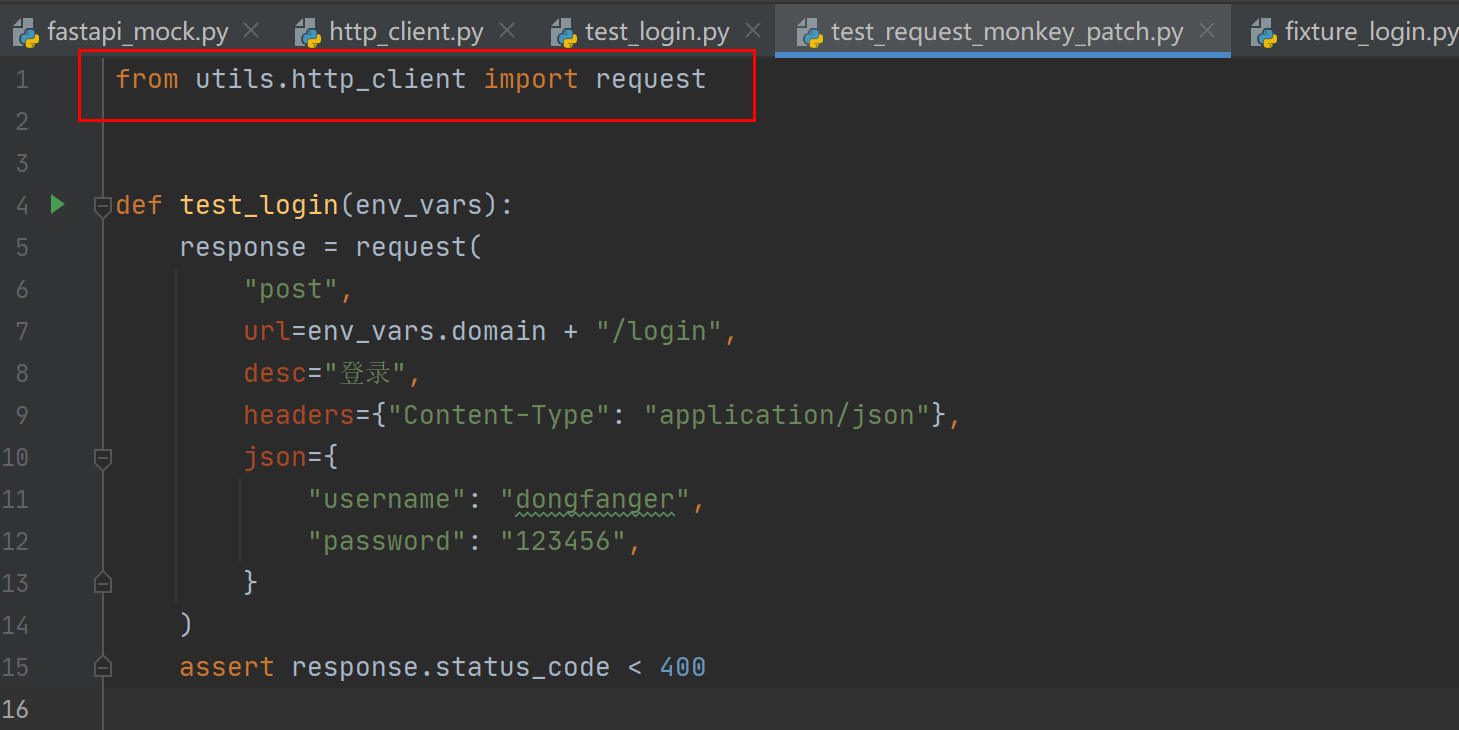
日志就会变成换行显示了:
2022-01-22 20:04:05.379 | INFO     | utils.http_client:request_monkey_patch:38 -

method:"post"

headers:{"Content-Type": "application/json"}

json:{"username": "dongfanger", "password": "123456"}

status:200

response:{"token":"de2e3ffu29"}

elapsed:0.000s
2.Allure报告添加request描述
tep的Allure报告默认会有个request & response:
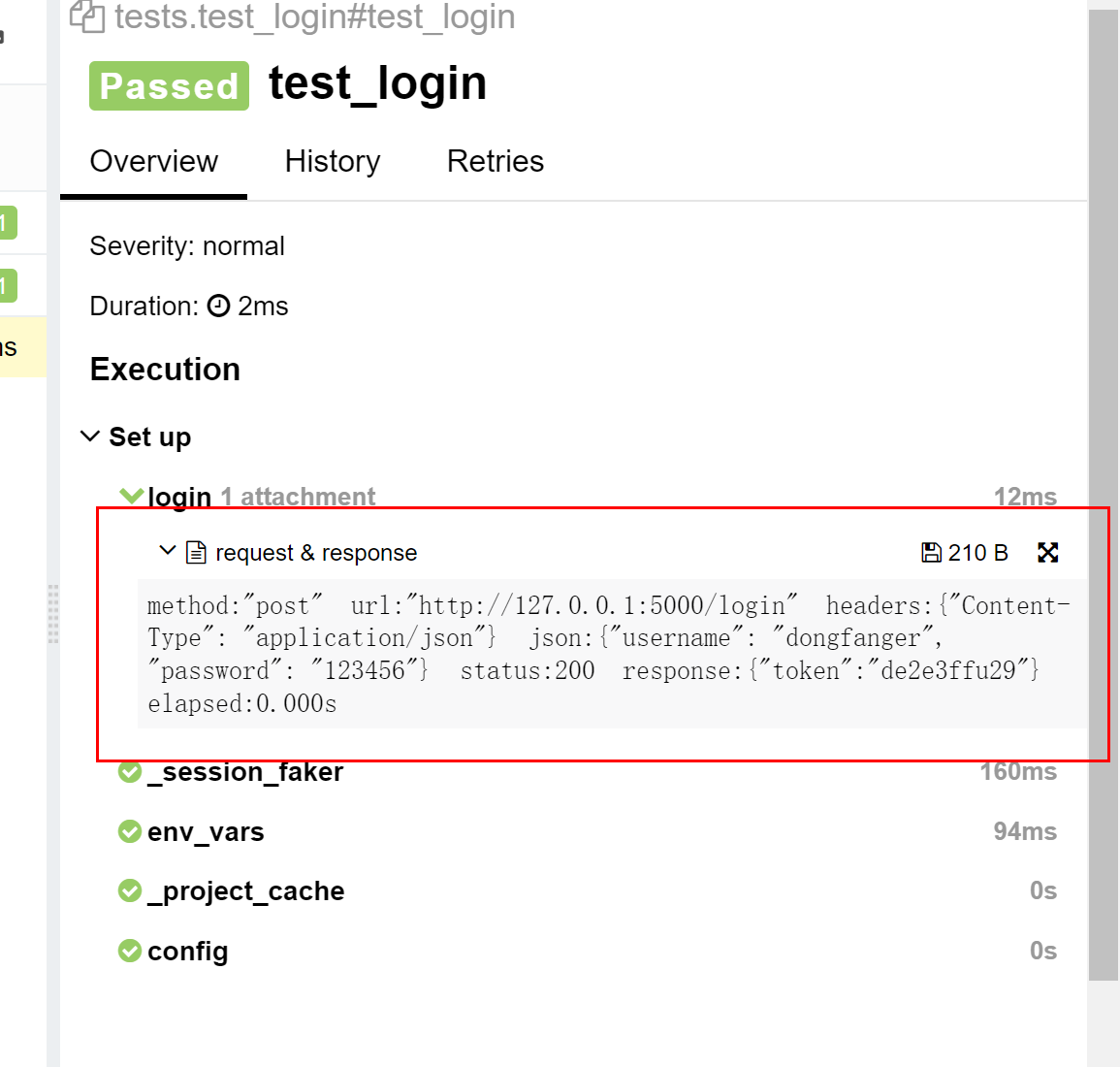
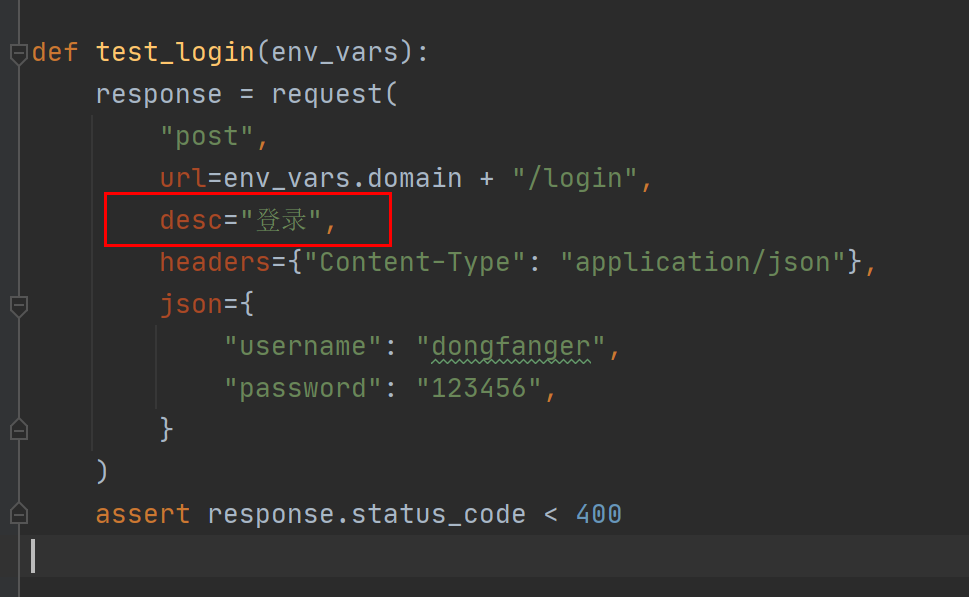
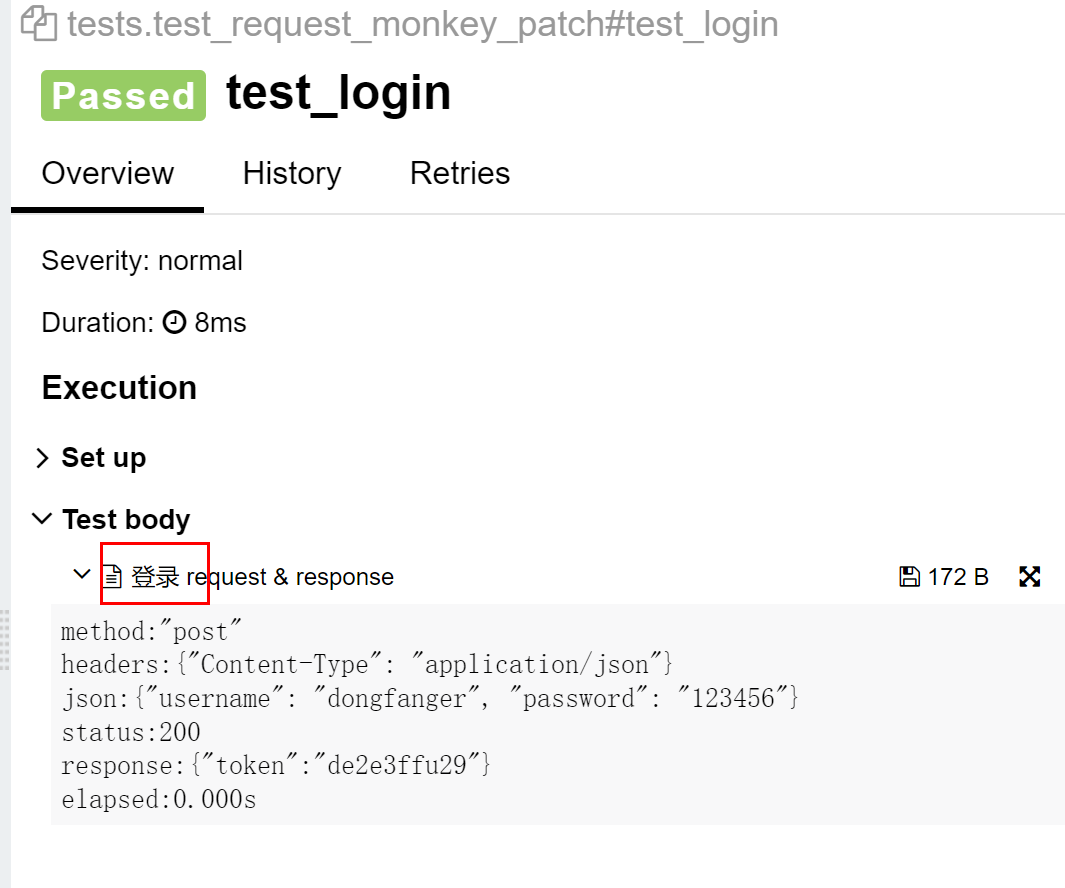
可以给request添加desc参数,在Allure测试报告中添加描述:
运行以下命令,然后打开Allure测试报告:
pytest -s test_request_monkey_patch.py --tep-reports
3.猴子补丁扩展request
前面的“自定义request请求日志”和“Allure报告添加request描述”已经展示了如何通过猴子补丁扩展日志和扩展报告,您还可以为request扩展更多想要的功能,只需要实现utils/http_client.py里面的request_monkey_patch函数即可:
#!/usr/bin/python

# encoding=utf-8

import decimal

import json

import time

import allure

from loguru import logger

from tep import client

from tep.client import TepResponse

def request_monkey_patch(req, *args, **kwargs):

    start = time.process_time()

    desc = ""

    if "desc" in kwargs:

        desc = kwargs.get("desc")

        kwargs.pop("desc")

    response = req(*args, **kwargs)

    end = time.process_time()

    elapsed = str(decimal.Decimal("%.3f" % float(end - start))) + "s"

    log4a = "{}\n{}status:{}\nresponse:{}\nelapsed:{}"

    try:

        kv = ""

        for k, v in kwargs.items():

            # if not json, str()

            try:

                v = json.dumps(v, ensure_ascii=False)

            except TypeError:

                v = str(v)

            kv += f"{k}:{v}\n"

        if args:

            method = f'\nmethod:"{args[0]}" '

        else:

            method = ""

        request_response = log4a.format(method, kv, response.status_code, response.text, elapsed)

        logger.info(request_response)

        allure.attach(request_response, f'{desc} request & response', allure.attachment_type.TEXT)

    except AttributeError:

        logger.error("request failed")

    except TypeError:

        logger.warning(log4a)

    return TepResponse(response)

def request(method, url, **kwargs):

    client.tep_request_monkey_patch = request_monkey_patch

    return client.request(method, url, **kwargs)
4.fixtures支持多层级目录
tep之前一直只能支持fixtures的根目录的fixture_*.py文件自动导入,现在能支持多层级目录了:
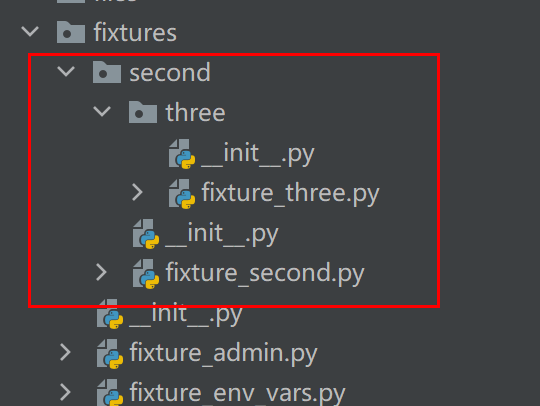
测试代码test_multi_fixture.py:
#!/usr/bin/python

# encoding=utf-8

def test(fixture_second, fixture_three):

    pass
能运行成功。自动导入多层目录的代码实现如下:
# 自动导入fixtures

_fixtures_dir = os.path.join(_project_dir, "fixtures")

for root, _, files in os.walk(_fixtures_dir):

    for file in files:

        if file.startswith("fixture_") and file.endswith(".py"):

            full_path = os.path.join(root, file)

            import_path = full_path.replace(_fixtures_dir, "").replace("\\", ".").replace("/", ".").replace(".py", "")

            try:

                fixture_path = "fixtures" + import_path

                exec(f"from {fixture_path} import *")

            except:

                fixture_path = ".fixtures" + import_path

                exec(f"from {fixture_path} import *")
5.FastAPI替代Flask
因为HttpRunner用的FastAPI,所以我也把Flask替换成了FastAPI,在utils/fastapi_mock.py文件中可以找到代码实现的简易Mock:
#!/usr/bin/python

# encoding=utf-8

import uvicorn

from fastapi import FastAPI, Request

app = FastAPI()

@app.post("/login")

async def login(req: Request):

    body = await req.json()

    if body["username"] == "dongfanger" and body["password"] == "123456":

        return {"token": "de2e3ffu29"}

    return ""

@app.get("/searchSku")

def search_sku(req: Request):

    if req.headers.get("token") == "de2e3ffu29" and req.query_params.get("skuName") == "电子书":

        return {"skuId": "222", "price": "2.3"}

    return ""

@app.post("/addCart")

async def add_cart(req: Request):

    body = await req.json()

    if req.headers.get("token") == "de2e3ffu29" and body["skuId"] == "222":

        return {"skuId": "222", "price": "2.3", "skuNum": "3", "totalPrice": "6.9"}

    return ""

@app.post("/order")

async def order(req: Request):

    body = await req.json()

    if req.headers.get("token") == "de2e3ffu29" and body["skuId"] == "222":

        return {"orderId": "333"}

    return ""

@app.post("/pay")

async def pay(req: Request):

    body = await req.json()

    if req.headers.get("token") == "de2e3ffu29" and body["orderId"] == "333":

        return {"success": "true"}

    return ""

if __name__ == '__main__':

    uvicorn.run("fastapi_mock:app", host="127.0.0.1", port=5000)
最后,感谢@zhangwk02提交的Pull requests,虽然写的代码被我全部优化了,但是提供了很棒的想法和动力。
tep0.9.5支持自定义扩展request的更多相关文章
- 纸壳CMS现已支持自定义扩展字段
简介 纸壳CMS是开源免费的可视化内容管理系统. GitHub https://github.com/SeriaWei/ZKEACMS 自定义字段 纸壳CMS现已支持自定义字段,在不修改代码的情况下, ...
- SparkContext自定义扩展textFiles,支持从多个目录中输入文本文件
需求 SparkContext自定义扩展textFiles,支持从多个目录中输入文本文件 扩展 class SparkContext(pyspark.SparkContext): def ...
- WCF自定义扩展,以实现aop!
引用地址:https://msdn.microsoft.com/zh-cn/magazine/cc163302.aspx 使用自定义行为扩展 WCF Aaron Skonnard 代码下载位置: S ...
- 第十三节:HttpHander扩展及应用(自定义扩展名、图片防盗链)
一. 自定义扩展名 1. 前言 凡是实现了IHttpHandler接口的类均为Handler类,HttpHandler是一个HTTP请求的真正处理中心,在HttpHandler容器中,ASP.NET ...
- SharePoint 2013 自定义扩展菜单
在对SharePoint进行开发或者功能扩展的时候,经常需要对一些默认的菜单进行扩展,以使我们开发的东西更适合SharePoint本身的样式.SharePoint的各种功能菜单,像网站设置.Ribbo ...
- Silverlight实例教程 - 自定义扩展Validation类,验证框架的总结和建议(转载)
Silverlight 4 Validation验证实例系列 Silverlight实例教程 - Validation数据验证开篇 Silverlight实例教程 - Validation数据验证基础 ...
- 工作随笔——selenium支持post请求,支持自定义header
背景: 最近在写一个小程序,发现博主所在的地区访问该网站时有防ddos功能验证导致程序不能正常工作. 经过试验发现可以用国外代理ip解决这个问题,但是程序走代理访问延迟高且不稳定. 思路: selen ...
- Asp.Net Mvc 自定义扩展
目录: 自定义模型IModelBinder 自定义模型验证 自定义视图引擎 自定义Html辅助方法 自定义Razor辅助方法 自定义Ajax辅助方法 自定义控制器扩展 自定义过滤器 自定义Action ...
- 第一步 使用sencha touch cmd 4.0 创建项目、打包(加入全局变量、公用类、自定义扩展、资源文件)
参考资料: http://www.cnblogs.com/qqloving/archive/2013/04/25/3043606.html http://www.admin10000.com/docu ...
随机推荐
- windows安装openoffice4
官网:https://www.openoffice.org/download/index.html 下载完成后 直接点击安装即可
- JAVA获取当前日期指定月份后(多少个月后)的日期
环境要求:使用jdk1.8 package com.date; import java.text.ParseException; import java.text.SimpleDateFormat; ...
- 【LeetCode】666. Path Sum IV 解题报告 (C++)
作者: 负雪明烛 id: fuxuemingzhu 个人博客:http://fuxuemingzhu.cn/ 目录 题目描述 题目大意 解题方法 DFS 日期 题目地址:https://leetcod ...
- 【LeetCode】170. Two Sum III - Data structure design 解题报告(C++)
作者: 负雪明烛 id: fuxuemingzhu 个人博客:http://fuxuemingzhu.cn/ 目录 题目描述 题目大意 解题方法 数组+字典 平衡查找树+双指针 日期 题目地址:htt ...
- 【LeetCode】475. Heaters 解题报告(Python & C++)
作者: 负雪明烛 id: fuxuemingzhu 个人博客: http://fuxuemingzhu.cn/ 目录 题目描述 题目大意 解题方法 遍历 日期 题目地址:https://leetcod ...
- 【LeetCode】287. Find the Duplicate Number 解题报告(Python & C++)
作者: 负雪明烛 id: fuxuemingzhu 个人博客: http://fuxuemingzhu.cn/ 目录 题目描述 题目大意 解题方法 保存已经访问过的数字 链表成环 二分查找 日期 题目 ...
- 记录一次线上OOM调优经历
现状: k8s 的一个pod 有32G内存,每秒产生新对象的峰值在900Mb ---- 1900Mb(根据jstat计算Eden区获得) . 修改之前的参数 就一个命令行参数是-Xmx31g; 我修改 ...
- 编写Java程序,利用List实现报数游戏的实现思路
返回本章节 返回作业目录 需求说明: 利用List实现报数游戏 在控制台输入一个大于3的正整数,该整数表示有多少人,如在控制台输入10,表示有10个人,10个人围成一个圆圈,从序号1开始为这些人依次编 ...
- [学习笔记] Oracle基础增删改查用法
查询 select *|列名|表达式 from 表名 where 条件 order by 列名 select t.* from STUDENT.STUINFO t where t.stuname = ...
- Nginx-正反向代理及负载均衡
目录 正/反向代理 代理的方式 Nginx代理服务支持的协议 代理实战 部署web01 部署Lb01 Nginx代理常用参数 添加发往后端服务器的请求头信息 代理到后端的TCP连接.响应.返回等超时时 ...