
8.PHP图像处理
PHP图像处理
GD2
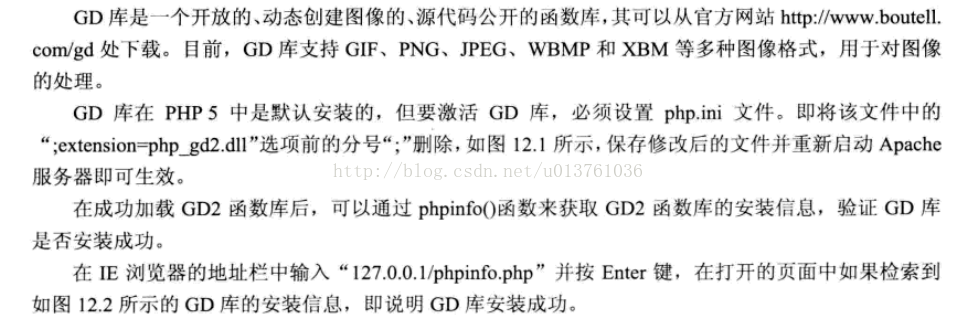
Jpgraph
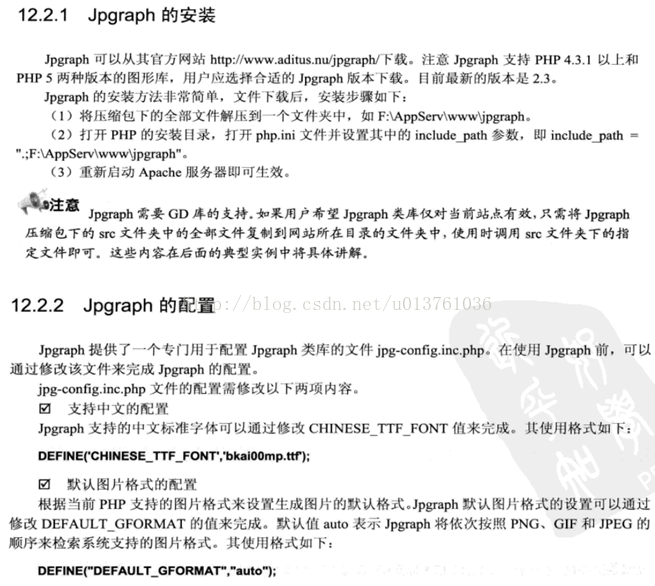
创建一个画布:
<?php
header('content-type:image/gif');
//echo "你好";
$im = imagecreate(200,60);
$white = imagecolorallocate($im ,225 ,66 ,159);
imagegif($im);
?>
显示一张图片
<?php
function LoadPNG($imgname)
{
/* Attempt to open */
$im = @imagecreatefromjpeg($imgname);
/* See if it failed */
if(!$im){
echo "aaa";
/* Create a blank image */
$im = imagecreatetruecolor(150,40);
$bgc = imagecolorallocate($im, 255, 255, 255);
$tc = imagecolorallocate($im, 0, 0, 0);
imagefilledrectangle($im, 0, 0, 150, 40, $bgc);
/* Output an error message */
imagestring($im, 1, 5, 5, 'bb ' . $imgname, $tc);
}
return $im;
}
header('Content-Type: image/jpeg');
$img = LoadPNG('p.jpg');
imagepng($img);
imagedestroy($img);
?>
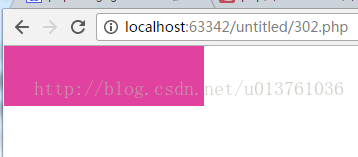
随机生成验证码:
<?php
session_start();
header('Content-Type: image/png');
$image_width = 70;
$image_height = 18;
srand(microtime()*100000);
$new_number = '';
for($i = 0 ;$i < 4 ;$i ++){
$new_number.=dechex(rand(0 ,15));
}
$_SESSION['check_checks'] = $new_number;
$num_image = imagecreate($image_width ,$image_height);
imagecolorallocate($num_image ,255 ,255 ,255);
for($i = 0 ;$i < strlen($_SESSION['check_checks']) ;$i ++){
$font = mt_rand(3 ,5);
$x = mt_rand(1 ,8) + $image_width * $i / 4;
$y = mt_rand(1 ,$image_height / 4);
$color = imagecolorallocate($num_image ,mt_rand(0,100) ,mt_rand(0 ,150) ,mt_rand(0 ,200));
imagestring($num_image ,$font ,$x ,$y,$_SESSION['check_checks'][$i] ,$color);
}
imagepng($num_image);
imagedestroy($num_image);
?>
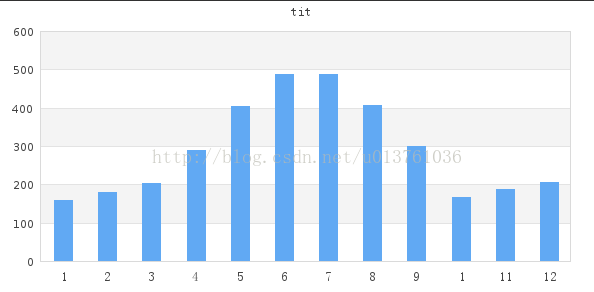
创建一个柱形图
<?php
include ("src/jpgraph.php");
include ("src/jpgraph_bar.php");
$datay = array(160 ,180 ,203 ,289 ,405 ,488 ,489 ,408 ,299 ,166 ,187 ,205);
$graph = new Graph(600 ,300 ,"auto");
$graph -> SetScale("textlin");
$graph -> yaxis -> scale -> SetGrace(20);
$graph -> SetShadow();
$graph -> img -> SetMargin(40 ,30 ,30 ,40);
$bplot = new BarPlot($datay);
$bplot -> SetFillColor('orange');
$bplot -> value -> Show();
$bplot -> value -> SetFormat('%d');
$graph -> Add($bplot);
$graph -> SetMarginColor("lightblue");
$graph -> title -> Set("tit");
$a = array(1 ,2 ,3 ,4 ,5 ,6 ,7 ,8 ,9 ,10 ,11 ,12);
$graph -> xaxis -> SetTickLabels($a);
$graph -> title -> SetFont(FF_SIMSUN);
$graph -> xaxis -> SetFont(FF_SIMSUN);
$graph -> Stroke();
?>
绘制折线图
<?php
include ("src/jpgraph.php");
include ("src/jpgraph_line.php");
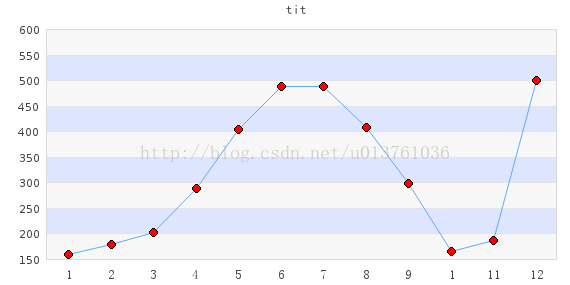
$datay = array(160 ,180 ,203 ,289 ,405 ,488 ,489 ,408 ,299 ,166 ,187 ,500);
$graph = new Graph(600 ,300 ,"auto");
$graph -> img -> SetMargin(50 ,40 ,30 ,40);
$graph -> img -> SetAntiAliasing();
$graph -> SetScale("textlin");
$graph -> SetShadow();
$graph -> title -> Set("tit");
$graph -> title -> SetFont(FF_SIMSUN ,FS_BOLD);
$graph -> SetMarginColor("lightblue");
$graph -> yaxis ->title -> SetFont(FF_SIMSUN);
$graph -> xaxis -> SetPos("min");
$graph -> yaxis -> HideZeroLabel();
$graph -> ygrid -> SetFill(true ,'#EFEFEF@0.5' ,'#BBCCFF@0.5');
$a = array(1 ,2 ,3 ,4 ,5 ,6 ,7 ,8 ,9 ,10 ,11 ,12);
$graph -> xaxis -> SetTickLabels($a);
$graph -> xaxis -> SetFont(FF_SIMSUN);
$graph -> yscale -> SetGrace(20);
$p1 = new LinePlot($datay);
$p1 -> mark -> SetType(MARK_FILLEDCIRCLE);
$p1 -> mark ->SetFillColor('red');
$p1 -> mark ->SetWidth(4);
$p1 -> SetColor('blue');
$p1 -> SetCenter();
$graph -> Add($p1);
$graph -> Stroke();
?>
3D饼状图
<?php
include ("src/jpgraph.php");
include ("src/jpgraph_pie.php");
include ("src/jpgraph_pie3d.php");
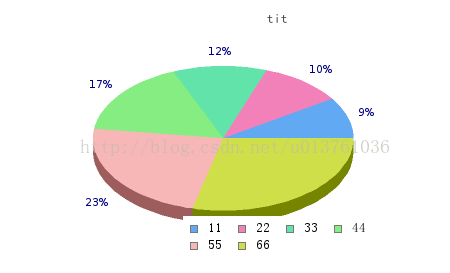
$data = array(160 ,180 ,203 ,289 ,405 ,500 );
$graph = new PieGraph(540 ,260 ,"auto");
$graph -> SetShadow();
$graph -> title -> Set("tit");
$graph -> title -> SetFont(FF_SIMSUN ,FS_BOLD);
$graph -> legend -> SetFont(FF_SIMSUN ,FS_NORMAL);
$p1 = new PiePlot3D($data);
$p1 -> SetLegends(array('11','22','33','44','55','66'));
$targ = array("pie3d_csimex1.php?v=1","pie3d_csimex1.php?v=2","pie3d_csimex1.php?v=3","pie3d_csimex1.php?v=4","pie3d_csimex1.php?v=5","pie3d_csimex1.php?v=6");
$alts = array("val=%d" ,"val=%d" ,"val=%d" ,"val=%d" ,"val=%d" ,"val=%d");
$p1 -> SetCSIMTargets($targ ,$alts);
$p1 -> SetCenter(0.4 ,0.5);
$graph -> Add($p1);
$graph -> StrokeCSIM();
?>
8.PHP图像处理的更多相关文章
- Atitit 图像处理和计算机视觉的分类 三部分 图像处理 图像分析 计算机视觉
Atitit 图像处理和计算机视觉的分类 三部分 图像处理 图像分析 计算机视觉 1.1. 按照当前流行的分类方法,可以分为以下三部分:三部分 图像处理 图像分析 计算机视觉1 1.2. 图像处理需要 ...
- Atitit 图像处理的摩西五经attilax总结
Atitit 图像处理的摩西五经attilax总结 1. 数字图像处理(第三版)1 2. 图像处理基础(第2版)(世界著名计算机教材精选)1 3. 计算机视觉特征提取与图像处理(第三版)2 4. Op ...
- Atitit 图像处理的心得与疑惑 attilax总结
Atitit 图像处理的心得与疑惑 attilax总结 1.1. 使用类库好不好??还是自己实现算法1 1.2. 但是,如果遇到类库体积太大,后者没有合适的算法,那就只能自己开发算法了1 1.3. 如 ...
- Atitit 图像处理 调用opencv 通过java api attilax总结
Atitit 图像处理 调用opencv 通过java api attilax总结 1.1. Opencv java api的支持 opencv2.4.2 就有了对java api的支持1 1. ...
- Atitit MATLAB 图像处理 经典书籍attilax总结
Atitit MATLAB 图像处理 经典书籍attilax总结 1.1. MATLAB数字图像处理1 1.2. <MATLAB实用教程(第二版)>((美)穆尔 著)[简介_书评_在线阅读 ...
- Atitit 图像处理类库大总结attilax qc20
Atitit 图像处理类库大总结attilax qc20 1.1. 选择与组合不同的图像处理类库1 1.2. Halcon 貌似商业工具,功能强大.1 1.3. Openvc Openvc功能也是比 ...
- Atitit MATLAB 图像处理attilax总结
Atitit MATLAB 图像处理attilax总结 1.1. 下载 Matlab7.0官方下载_Matlab2012 v7.0 官方简体中文版-办公软件-系统大全.html1 1.2. Matla ...
- 使用MATLAB对图像处理的几种方法(下)
试验报告 一.试验原理: 图像点处理是图像处理系列的基础,主要用于让我们熟悉Matlab图像处理的编程环境.灰度线性变换和灰度拉伸是对像素灰度值的变换操作,直方图是对像素灰度值的统计,直方图均衡是对 ...
- 使用MATLAB对图像处理的几种方法(上)
实验一图像的滤波处理 一.实验目的 使用MATLAB处理图像,掌握均值滤波器和加权均值滤波器的使用,对比两种滤波器对图像处理结果及系统自带函数和自定义函数性能的比较,体会不同大小的掩模对图像细节的影响 ...
- 图像处理中任意核卷积(matlab中conv2函数)的快速实现。
卷积其实是图像处理中最基本的操作,我们常见的一些算法比如:均值模糊.高斯模糊.锐化.Sobel.拉普拉斯.prewitt边缘检测等等一些和领域相关的算法,都可以通过卷积算法实现.只不过由于这些算法的卷 ...
随机推荐
- HTB系列之七:Bastard
出品|MS08067实验室(www.ms08067.com) 这次挑战的是 HTB 的第7台靶机:Bastard 技能收获: PHP Unserilaize CMS Version Identify ...
- Java 多线程 | 并发知识问答总结
写在最前面 这个项目是从20年末就立好的 flag,经过几年的学习,回过头再去看很多知识点又有新的理解.所以趁着找实习的准备,结合以前的学习储备,创建一个主要针对应届生和初学者的 Java 开源知识项 ...
- 2017-2018 ACM-ICPC Northern Eurasia(A.Archery Tournament)
题目链接:https://vjudge.net/problem/Gym-101630A 题意: n个事件,t=1 代表增加一个圆心为(x,y),半径为 abs(y)的靶子,t=2,代表射击的坐标为(x ...
- Java系列教程-MyBatis 3.5.5 教程目录
MyBatis 3.5.5 初级教程目录 可参考MyBatis的官方文档也比较清楚 https://mybatis.org/mybatis-3/zh/getting-started.html 代码 目 ...
- java例题_33 等腰输出杨辉三角
1 /*33 [程序 33 杨辉三角] 2 题目:打印出杨辉三角形(要求打印出 10 行如下图) 3 程序分析: 4 1 5 1 1 6 1 2 1 7 1 3 3 1 8 1 4 6 4 1 9 1 ...
- Spring Cloud 升级之路 - 2020.0.x - 1. 背景知识、需求描述与公共依赖
1. 背景知识.需求描述与公共依赖 1.1. 背景知识 & 需求描述 Spring Cloud 官方文档说了,它是一个完整的微服务体系,用户可以通过使用 Spring Cloud 快速搭建一个 ...
- k8s删除节点
k8s 删除节点 线上环境 # ctl get nodes NAME STATUS ROLES AGE VERSION 10.0.0.123 Ready <none> 104d v1.20 ...
- golang 入门之环境搭建
[安装运行时] 直接上官网下载运行时安装即可:golang 官网 根据自己操作系统选择 golang 运行时版本,例如windows 当然我们也可以直接选择下面的稳定版本进行下载 下载安装后,安装程序 ...
- elementui 表格格式化
<el-table-column prop="userType" label="角色" width="180" :formatter= ...
- Cloudreve 自建云盘实践,我说了没人能限得了我的容量和速度!
作者:小傅哥 博客:https://bugstack.cn 沉淀.分享.成长,让自己和他人都能有所收获! 一.前言 为啥要用自建网盘,市面上的云盘不香了? 每一个用户需求的背后都是因为有场景存在,而这 ...