
整理spring + mysql + redis + 测试 的配置格式 和源码
经过多次整理,最终以这样的文件格式配置
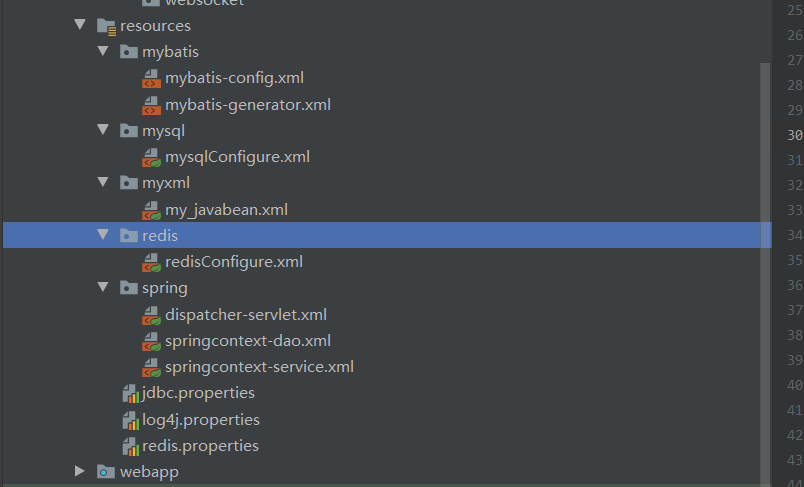
目前配好的基本模板:
1 <?xml version="1.0" encoding="UTF-8"?>
2 <web-app xmlns="http://xmlns.jcp.org/xml/ns/javaee"
3 xmlns:xsi="http://www.w3.org/2001/XMLSchema-instance"
4 xsi:schemaLocation="http://xmlns.jcp.org/xml/ns/javaee http://xmlns.jcp.org/xml/ns/javaee/web-app_4_0.xsd"
5 version="4.0">
6 <!-- <!– 首页–>-->
7 <!-- <welcome-file-list>-->
8 <!-- <welcome-file>/WEB-INF/jsp/toIndex.jsp</welcome-file>-->
9 <!-- </welcome-file-list>-->
10
11
12 <!-- 加载spring容器 -->
13 <context-param>
14 <param-name>contextConfigLocation</param-name>
15 <param-value>classpath:spring/springcontext-*.xml</param-value>
16 </context-param>
17 <listener>
18 <listener-class>org.springframework.web.context.ContextLoaderListener</listener-class>
19 </listener>
20
21 <servlet>
22 <servlet-name>dispatcher</servlet-name>
23 <servlet-class>org.springframework.web.servlet.DispatcherServlet</servlet-class>
24 <init-param>
25 <param-name>contextConfigLocation</param-name>
26 <param-value>classpath:spring/dispatcher-servlet.xml</param-value>
27 </init-param>
28 <load-on-startup>1</load-on-startup>
29 </servlet>
30 <servlet-mapping>
31 <servlet-name>dispatcher</servlet-name>
32 <url-pattern>/</url-pattern>
33 </servlet-mapping>
34
35
36 <!-- post请求乱码拦截器 -->
37 <filter>
38 <filter-name>CharacterEncodingFilter</filter-name>
39 <filter-class>org.springframework.web.filter.CharacterEncodingFilter</filter-class>
40 <init-param>
41 <param-name>encoding</param-name>
42 <param-value>utf-8</param-value>
43 </init-param>
44 </filter>
45 <filter-mapping>
46 <filter-name>CharacterEncodingFilter</filter-name>
47 <url-pattern>/*</url-pattern>
48 </filter-mapping>
49
50 <!-- <!–自定义监听,根据sessionid获取session–>-->
51 <!-- <listener>-->
52 <!-- <listener-class>com.songs.monitor.MySessionListener</listener-class>-->
53 <!-- </listener>-->
54 </web-app>
web.xml
1 <?xml version="1.0" encoding="UTF-8"?>
2 <beans xmlns="http://www.springframework.org/schema/beans"
3 xmlns:xsi="http://www.w3.org/2001/XMLSchema-instance"
4 xmlns:context="http://www.springframework.org/schema/context"
5 xmlns:mvc="http://www.springframework.org/schema/mvc"
6 xsi:schemaLocation="http://www.springframework.org/schema/beans
7 http://www.springframework.org/schema/beans/spring-beans.xsd
8 http://www.springframework.org/schema/context
9 http://www.springframework.org/schema/context/spring-context.xsd
10 http://www.springframework.org/schema/mvc
11 http://www.springframework.org/schema/mvc/spring-mvc.xsd">
12 <!-- 配置SpringMVC -->
13 <!-- 1.开启SpringMVC注解模式 -->
14 <!-- 简化配置:
15 (1)自动注册DefaultAnootationHandlerMapping,AnotationMethodHandlerAdapter
16 (2)提供一些列:数据绑定,数字和日期的format @NumberFormat, @DateTimeFormat, xml,json默认读写支持
17 -->
18 <mvc:annotation-driven/>
19
20
21 <!-- 2.静态资源默认servlet配置
22 (1)加入对静态资源的处理:js,gif,png
23 (2)允许使用"/"做整体映射
24 -->
25 <mvc:default-servlet-handler/>
26
27 <!-- 3.配置视图解析器-->
28 <bean id="internalResourceViewResolver" class="org.springframework.web.servlet.view.InternalResourceViewResolver">
29 <property name="prefix" value="/WEB-INF/jsp/"/>
30 <property name="suffix" value=".jsp"/>
31 </bean>
32
33 <!-- 4.扫描web相关的bean -->
34 <context:component-scan base-package="cn.cen2guo.clinic.web"/>
35
36
37 <!--<!– 拦截器–>-->
38 <!-- <mvc:interceptors>-->
39 <!-- <mvc:interceptor>-->
40 <!--<!– 拦截所有–>-->
41 <!-- <mvc:mapping path="/**"/>-->
42 <!--<!– 设置不拦截请求–>-->
43 <!-- <mvc:exclude-mapping path="/**/fonts"/>-->
44 <!-- <mvc:exclude-mapping path="/**/*.css"/>-->
45 <!-- <mvc:exclude-mapping path="/**/*.js"/>-->
46 <!-- <mvc:exclude-mapping path="/**/*.png"/>-->
47 <!-- <mvc:exclude-mapping path="/**/*.gif"/>-->
48 <!-- <mvc:exclude-mapping path="/**/*.jpg"/>-->
49 <!-- <mvc:exclude-mapping path="/**/*.jpeg"/>-->
50 <!-- <mvc:exclude-mapping path="/**/*Login*"/>-->
51 <!-- <mvc:exclude-mapping path="/**/*login*"/>-->
52 <!-- <mvc:exclude-mapping path="/**/logOut"/>-->
53 <!--<!–拦截逻辑类–>-->
54 <!-- <bean class="com.songs.interceptor.MyInterceptor"/>-->
55 <!-- </mvc:interceptor>-->
56 <!-- </mvc:interceptors>-->
57
58
59 <!--文件上传 -->
60 <bean id="multipartResolver" class="org.springframework.web.multipart.commons.CommonsMultipartResolver"/>
61
62
63
64
65 </beans>
dispatcher-servlet.xml
 1 <?xml version="1.0" encoding="UTF-8"?>

 2 <beans xmlns="http://www.springframework.org/schema/beans"

 3        xmlns:xsi="http://www.w3.org/2001/XMLSchema-instance"

 4        xmlns:context="http://www.springframework.org/schema/context"

 5        xmlns:tx="http://www.springframework.org/schema/tx"

 6        xmlns:aop="http://www.springframework.org/schema/aop"

 7        xsi:schemaLocation="http://www.springframework.org/schema/beans

 8     http://www.springframework.org/schema/beans/spring-beans.xsd

 9     http://www.springframework.org/schema/context

10     http://www.springframework.org/schema/context/spring-context.xsd

11     http://www.springframework.org/schema/tx

12     http://www.springframework.org/schema/tx/spring-tx.xsd

13     http://www.springframework.org/schema/aop

14     http://www.springframework.org/schema/aop/spring-aop.xsd">

15     <!-- 扫描service包下所有使用注解的类型 -->

16     <context:component-scan base-package="cn.cen2guo.clinic.service" />

17

18     <!-- 配置事务管理器 -->

19     <bean id="transactionManager"

20           class="org.springframework.jdbc.datasource.DataSourceTransactionManager">

21         <!-- 注入数据库连接池 -->

22         <property name="dataSource" ref="dataSource" />

23     </bean>

24

25     <!-- 通知 -->

26     <tx:advice id="txAdvice" transaction-manager="transactionManager">

27         <tx:attributes>

28             <!-- 传播行为 -->

29             <tx:method name="save*" propagation="REQUIRED"/>

30             <tx:method name="insert*" propagation="REQUIRED"/>

31             <tx:method name="delete*" propagation="REQUIRED"/>

32             <tx:method name="update*" propagation="REQUIRED"/>

33             <tx:method name="find*" propagation="SUPPORTS" read-only="true"/>

34             <tx:method name="get*" propagation="SUPPORTS" read-only="true"/>

35         </tx:attributes>

36     </tx:advice>

37     <!-- 切面 -->

38     <aop:config>

39         <aop:advisor advice-ref="txAdvice" pointcut="execution(* cn.cen2guo.clinic.service.*.*(..))"/>

40     </aop:config>

41

42 </beans>
springcontext-service.xml
 1 <?xml version="1.0" encoding="UTF-8"?>

 2 <beans xmlns="http://www.springframework.org/schema/beans"

 3        xmlns:xsi="http://www.w3.org/2001/XMLSchema-instance"

 4        xmlns:context="http://www.springframework.org/schema/context"

 5        xsi:schemaLocation="http://www.springframework.org/schema/beans

 6     http://www.springframework.org/schema/beans/spring-beans.xsd">

 7

 8

 9     <!-- spring的属性加载器,加载所有properties文件中的属性,供所有springcontext-*.xml文件共同使用 -->

10     <bean id="configPropertyConfigurer"

11           class="org.springframework.beans.factory.config.PropertyPlaceholderConfigurer">

12         <property name="locations">

13             <list>

14                 <!--这样写可以引入多个properties文件-->

15                 <!-- <value>/WEB-INF/configInfo.properties</value> -->

16                 <value>classpath:redis.properties</value>

17                 <value>classpath:jdbc.properties</value>

18             </list>

19         </property>

20     </bean>

21

22     <!-- 导入redis配置文件-->

23     <import resource="classpath:redis/redisConfigure.xml"/>

24

25     <!--导入mysql配置文件-->

26     <import resource="classpath:mysql/mysqlConfigure.xml"/>

27

28     <!-- 导入自定义注册构造注入的bean-->

29     <import resource="classpath:myxml/my_javabean.xml"/>

30

31 </beans>
springcontext-dao.xml
 1 <?xml version="1.0" encoding="UTF-8"?>

 2 <beans xmlns="http://www.springframework.org/schema/beans"

 3        xmlns:xsi="http://www.w3.org/2001/XMLSchema-instance"

 4        xmlns:context="http://www.springframework.org/schema/context"

 5        xsi:schemaLocation="http://www.springframework.org/schema/beans

 6         http://www.springframework.org/schema/beans/spring-beans-3.2.xsd">

 7

 8

 9     <!-- Redis连接池配置 -->

10     <bean id="jedisPoolConfig" class="redis.clients.jedis.JedisPoolConfig">

11         <!-- 控制一个pool能分配多少个jedis实例 -->

12         <property name="maxTotal" value="${redis.pool.maxActive}"/>

13         <!-- 连接池中最多空闲多少个maxIdle个连接,这里为20,表示即使没有数据库连接时依然可以保持20空闲的连接,而不被清除,处于待命状态,随时连接 -->

14         <property name="maxIdle" value="${redis.pool.maxIdle}"/>

15         <!-- 最大等待时间,当没有可用连接时,连接池等待连接被归还的最大时间(以毫秒计数),超过时间即抛出异常 -->

16         <property name="maxWaitMillis" value="${redis.pool.maxWait}"/>

17         <!-- 在获取连接时,检查有效性 -->

18         <property name="testOnBorrow" value="${redis.pool.testOnBorrow}"/>

19     </bean>

20     <!-- 创建Redis连接池,并做相关配置 -->

21     <bean id="jedisWritePool" class="cn.cen2guo.clinic.redis.JedisPoolWriper"

22           depends-on="jedisPoolConfig">

23         <constructor-arg index="0" ref="jedisPoolConfig"/>

24         <constructor-arg index="1" value="${redis.hostname}"/>

25         <constructor-arg index="2" value="${redis.port}" type="int"/>

26         <constructor-arg index="3" value="${redis.timeout}" type="int"/>

27         <constructor-arg index="4" value="${redis.password}"/>

28     </bean>

29     <!-- 创建Redis工具类,封装好Redis的连接以进行相关操作 -->

30     <bean id="jedisUtil" class="cn.cen2guo.clinic.redis.JedisUtil"

31     >

32         <property name="jedisPool" ref="jedisWritePool"/>

33     </bean>

34 <!--    这里的红色下划线提示不是指写错了,而是警告,如果使用自动补全修正,会报错UnsatisfiedDependencyException

35 为什么使用$进行隔开呢,是因为这是两个类嵌套定义,因为不是文件路径,无法使用.符号进行区分,故使用$符号时没问题的

36 -->

37     <bean id="jedisKeys" class="cn.cen2guo.clinic.redis.JedisUtil$Keys"

38     >

39         <constructor-arg ref="jedisUtil"/>

40     </bean>

41     <bean id="jedisStrings" class="cn.cen2guo.clinic.redis.JedisUtil$Strings"

42     >

43         <constructor-arg ref="jedisUtil"/>

44     </bean>

45     <bean id="jedisLists" class="cn.cen2guo.clinic.redis.JedisUtil$Lists"

46     >

47         <constructor-arg ref="jedisUtil"/>

48     </bean>

49     <bean id="jedisSets" class="cn.cen2guo.clinic.redis.JedisUtil$Sets"

50     >

51         <constructor-arg ref="jedisUtil"/>

52     </bean>

53     <bean id="jedisHash" class="cn.cen2guo.clinic.redis.JedisUtil$Hash"

54     >

55         <constructor-arg ref="jedisUtil"/>

56     </bean>

57

58

59 </beans>
redisConfigure.xml
 1 <?xml version="1.0" encoding="UTF-8"?>

 2 <beans xmlns="http://www.springframework.org/schema/beans"

 3        xmlns:xsi="http://www.w3.org/2001/XMLSchema-instance"

 4        xmlns:context="http://www.springframework.org/schema/context"

 5        xsi:schemaLocation="http://www.springframework.org/schema/beans

 6     http://www.springframework.org/schema/beans/spring-beans.xsd">

 7

 8     <!-- 配置 数据源 -->

 9     <bean id="dataSource" class="com.alibaba.druid.pool.DruidDataSource">

10         <!-- 驱动 -->

11         <property name="driverClassName" value="${jdbc.driverClassName}"/>

12         <!-- url -->

13         <property name="url" value="${jdbc.url}"/>

14         <!-- 用户名 -->

15         <property name="username" value="${jdbc.username}"/>

16         <!-- 密码 -->

17         <property name="password" value="${jdbc.password}"/>

18     </bean>

19

20     <!-- 配置 Mybatis的工厂 -->

21     <bean class="org.mybatis.spring.SqlSessionFactoryBean">

22         <!-- 数据源 -->

23         <property name="dataSource" ref="dataSource"/>

24         <!-- 配置Mybatis的核心 配置文件所在位置 -->

25         <property name="configLocation" value="classpath:mybatis/mybatis-config.xml"/>

26         <!-- 配置pojo别名 -->

27         <property name="typeAliasesPackage" value="cn.cen2guo.clinic.entity"/>

28         <!--当mapper中的接口文件与xml文件在同一个包下但是不在同一级时-->

29         <!--需要指定mapper 的xml文件路径,如果在同一级则可不写-->

30         <!-- 否则会报错org.apache.ibatis.binding.BindingException: Invalid bound statement (not found)-->

31         <property name="mapperLocations" value="classpath:cn/cen2guo/clinic/mapper/mapperXML/*.xml"/>

32     </bean>

33

34     <!--扫描mapper接口, 写在此包下即可被扫描到 -->

35     <bean class="org.mybatis.spring.mapper.MapperScannerConfigurer">

36         <property name="basePackage" value="cn.cen2guo.clinic.mapper"/>

37     </bean>

38 </beans>
mysqlConfigure.xml
1 <?xml version="1.0" encoding="UTF-8" ?>

2 <beans xmlns="http://www.springframework.org/schema/beans"

3        xmlns:xsi="http://www.w3.org/2001/XMLSchema-instance"

4        xsi:schemaLocation="http://www.springframework.org/schema/beans

5     http://www.springframework.org/schema/beans/spring-beans.xsd">

6     <!-- 位置信息服务接口-->

7     <bean id="locationService" class="cn.cen2guo.clinic.service.serviceImpl.LocationServiceImpl"/>

8

9 </beans>
my_javabean.xml
1 <?xml version="1.0" encoding="UTF-8" ?>
2 <!DOCTYPE configuration
3 PUBLIC "-//mybatis.org//DTD Config 3.0//EN"
4 "http://mybatis.org/dtd/mybatis-3-config.dtd">
5 <configuration>
6 <settings>
7 <!-- 开启log4j日志,打印到控制台,关闭则注释掉该语句即可-->
8 <!-- <setting name="logImpl" value="STDOUT_LOGGING"/>-->
9
10 <!-- 开启驼峰命名转换:Table{create_time} -> Entity{createTime} -->
11 <setting name="mapUnderscoreToCamelCase" value="true"/>
12 <!-- 使用列别名替换列名 默认:true -->
13 <setting name="useColumnLabel" value="true"/>
14 <!-- 使用jdbc的getGeneratedKeys获取数据库自增主键值 -->
15 <setting name="useGeneratedKeys" value="true"/>
16 </settings>
17 <!-- pageHelper分页插件 -->
18 <!-- <plugins>-->
19 <!-- <plugin interceptor="com.github.pagehelper.PageHelper">-->
20 <!-- <property name="dialect" value="mysql"/>-->
21 <!-- <property name="offsetAsPageNum" value="true"/>-->
22 <!-- <!– rowBoundsWithCount设置为true时,使用 RowBounds 分页会进行 count 查询。 –>-->
23 <!-- <property name="rowBoundsWithCount" value="true"/>-->
24 <!-- <!– pageSizeZero 为 true, 当 pageSize=0 或者 RowBounds.limit = 0 就会查询出全部的结果 –>-->
25 <!-- <property name="pageSizeZero" value="true"/>-->
26 <!-- <!– reasonable 为 true,这时如果 pageNum<=0 会查询第一页,如果 pageNum>总页数 会查询最后一页 –>-->
27 <!-- <property name="reasonable" value="true"/>-->
28 <!-- <property name="returnPageInfo" value="check"/>-->
29 <!-- </plugin>-->
30 <!-- </plugins>-->
31 </configuration>
mybatis-config.xml
 1 <?xml version="1.0" encoding="UTF-8"?>

 2 <!DOCTYPE generatorConfiguration

 3         PUBLIC "-//mybatis.org//DTD MyBatis Generator Configuration 1.0//EN"

 4         "http://mybatis.org/dtd/mybatis-generator-config_1_0.dtd">

 5 <generatorConfiguration>

 6     <context id="testTables" targetRuntime="MyBatis3">

 7         <commentGenerator>

 8             <!-- 是否去除自动生成的注释 true:是 : false:否 -->

 9             <property name="suppressAllComments" value="true"/>

10         </commentGenerator>

11         <!--数据库连接的信息:驱动类、连接地址、用户名、密码 -->

12         <jdbcConnection driverClass="com.mysql.jdbc.Driver"

13                         connectionURL="jdbc:mysql://localhost:3306/clinic"

14                         userId="root"

15                         password="mysql">

16         </jdbcConnection>

17         <!--

18             默认false,把JDBC DECIMAL 和 NUMERIC 类型解析为 Integer,

19             为true时把JDBC DECIMAL和NUMERIC类型解析为java.math.BigDecimal

20         -->

21         <javaTypeResolver>

22             <property name="forceBigDecimals" value="false"/>

23         </javaTypeResolver>

24

25         <!-- targetProject:生成PO类的位置,重要!! -->

26         <javaModelGenerator targetPackage="cn.cen2guo.clinic.entity"

27                             targetProject="src/main/java">

28             <!-- enableSubPackages:是否让schema作为包的后缀 -->

29             <property name="enableSubPackages" value="false"/>

30             <!-- 从数据库返回的值被清理前后的空格 -->

31             <property name="trimStrings" value="true"/>

32         </javaModelGenerator>

33         <!-- targetProject:mapper映射文件生成的位置,重要!! -->

34         <sqlMapGenerator targetPackage="cn.cen2guo.clinic.mapper.mapperXML"

35                          targetProject="src/main/java">

36             <property name="enableSubPackages" value="false"/>

37         </sqlMapGenerator>

38         <!-- targetPackage:mapper接口生成的位置,重要!! -->

39         <javaClientGenerator type="XMLMAPPER"

40                              targetPackage="cn.cen2guo.clinic.mapper"

41                              targetProject="src/main/java">

42             <!-- 是否让schema作为包的后缀 -->

43             <property name="enableSubPackages" value="fasle"/>

44         </javaClientGenerator>

45

46

47         <!-- 指定数据库表,要生成哪些表,就写哪些表,要和数据库中对应,不能写错! -->

48 <!--        <table tableName="t_province" enableCountByExample="false" enableUpdateByExample="false"-->

49 <!--               enableSelectByExample="false" enableDeleteByExample="false"-->

50 <!--               selectByExampleQueryId="false"/>-->

51 <!--        <table tableName="t_city" enableCountByExample="false" enableUpdateByExample="false"-->

52 <!--               enableSelectByExample="false" enableDeleteByExample="false"-->

53 <!--               selectByExampleQueryId="false"/>-->

54 <!--        <table tableName="t_region" enableCountByExample="false" enableUpdateByExample="false"-->

55 <!--               enableSelectByExample="false" enableDeleteByExample="false"-->

56 <!--               selectByExampleQueryId="false"/>-->

57

58     </context>

59 </generatorConfiguration>
mybatis-generator.xml
单元测试:
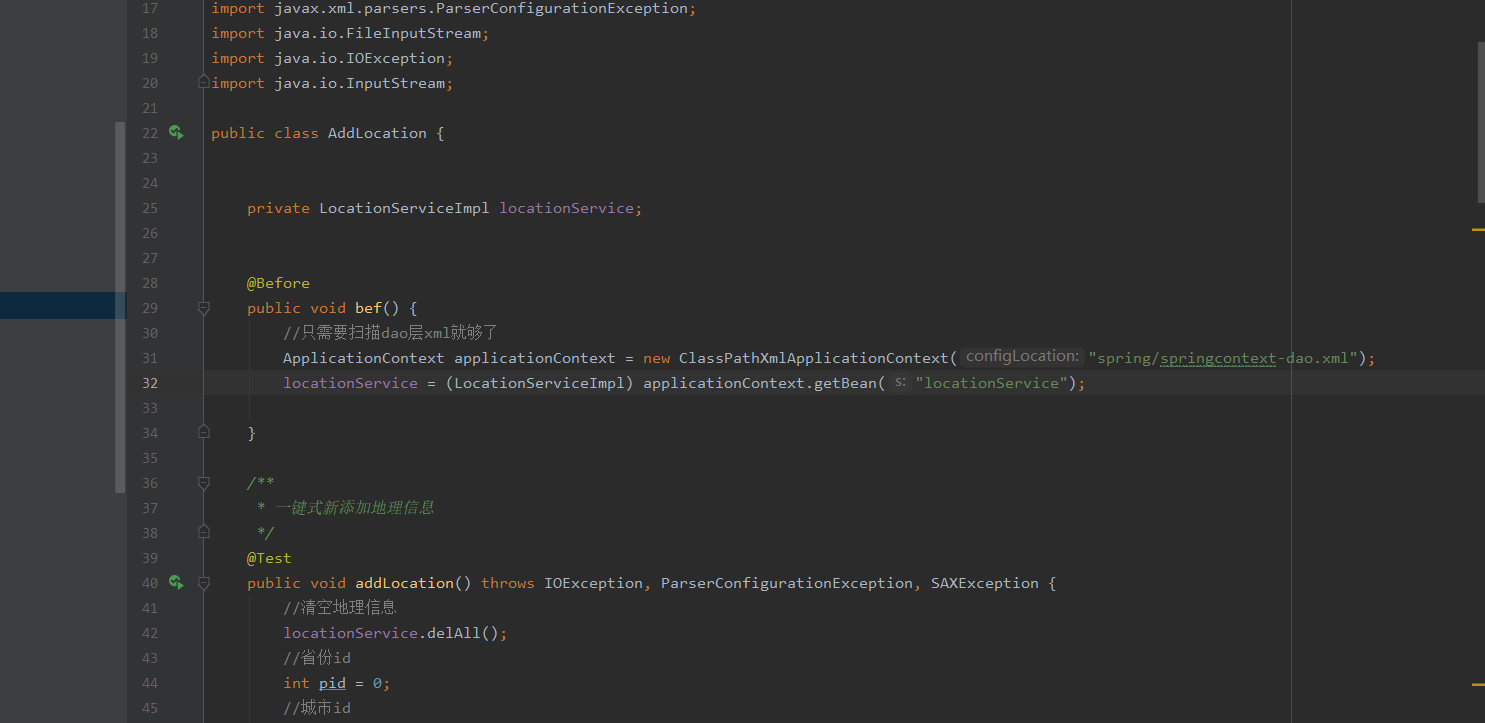
测试时,需要用到mysql和redis,那么只需要获取dao层xml配置文件即可,当然,无法使用spring的@Service ,使用接口则必须手动构造注入bean,
然后由配置文件的ApplicationContext ,获取javabean , 这就是为什么还需要 有 my_javabean.xml 这个文件的原因,调用接口和接口的方法里使用redis和mysql的方法无变化,正常使用即可。
整理spring + mysql + redis + 测试 的配置格式 和源码的更多相关文章
- Flask+MySQL+Redis的Docker配置
Docker配置了好多天,昨天晚上终于把碎遮项目的Docker打包完成了,后面会继续完善项目代码,把稳定版本打包后推送到DockerHub上. 网上关于Docker配置的文章很多,但大部分都是复制粘贴 ...
- STM32时钟系统的配置寄存器和源码分析
一.时钟系统 概述 时钟是单片机运行的基础,时钟信号推动单片机内各个部分执行相应的指令,时钟系统就是CPU的脉搏,决定cpu速率. STM32有多个时钟来源的选择,为什么 STM32 要有多个时钟源呢 ...
- Spring整合Redis,并配置Jedis连接池
目录 只言片语 创建redis连接池的配置文件 单机版 spring整合redis(使用JedisPool) 项目中使用示例 集群版 spring整合redis(使用JedisCluster) 项目中 ...
- spring 使用redis集群配置
上面两篇介绍了redis集群的配置合一些基本的概念,所以接下来当然是要在项目中使用咯,redis的java支持已经做的非常好了,所以我们来试着使用这些api来进行redis的操作,首先我们需要操作re ...
- spring boot redis代码与配置
import org.springframework.context.annotation.Bean; import org.springframework.context.annotation.Co ...
- Mysql for Linux安装配置之—— 源码安装
1.安装 --假设已经有mysql-5.5.10.tar.gz以及cmake-2.8.4.tar.gz两个源码压缩文件1)先安装cmake(mysql5.5以后是通过cmake来编译的) # ta ...
- spring boot通过Spring Data Redis集成redis
在spring boot中,默认集成的redis是Spring Data Redis,Spring Data Redis针对redis提供了非常方便的操作模版RedisTemplate idea中新建 ...
- Spring Data Redis—Pub/Sub(附Web项目源码)
一.发布和订阅机制 当一个客户端通过 PUBLISH 命令向订阅者发送信息的时候,我们称这个客户端为发布者(publisher). 而当一个客户端使用 SUBSCRIBE 或者 PSUBSCRIBE ...
- Spring Data Redis—Pub/Sub(附Web项目源码) (转)
一.发布和订阅机制 当一个客户端通过 PUBLISH 命令向订阅者发送信息的时候,我们称这个客户端为发布者(publisher). 而当一个客户端使用 SUBSCRIBE 或者 PSUBSCRIBE ...
随机推荐
- 追踪工具strace
目录 一.简介 二.例子 找出程序读取的文件 查看现在程序在做什么 查看程序中哪个部分消耗大量cpu 无法连接服务器查看信息 一.简介 Linux 操作系统有很多用来跟踪程序行为的工具,内核态的函数调 ...
- MySQL如何使用WITH ROLLUP函数
一.WITH ROLLUP函数适用于跟在GROUP BY 字段后面进行分组求和使用 SELECT t1.`产品名称`,SUM(t1.`数量`),SUM(t1.`金额`),t1.`日期` FROM sh ...
- IO多路复用技术总结
来源:微信公众号「编程学习基地」 IO 多路复用概述 I/O 多路复用技术是为了解决进程或线程阻塞到某个 I/O 系统调用而出现的技术,使进程不阻塞于某个特定的 I/O 系统调用. 在IO多路复用技术 ...
- windows10 安装 Mysql8.0
目录 1.Mysql8.0下载 2.配置环境变量 3.在安装目录下创建my.ini文件 4 初始化Mysql 5 安装至系统服务 6 更改密码 1.Mysql8.0下载 2.配置环境变量 将下载后文件 ...
- WebRTC与音频音量
WebRTC打开麦克风,获取音频,在网页上显示音量. 播放示例音频 先从播放音频入手.准备一个现成的音频文件. 界面上放一个audio元素,提前准备好一个音频文件,路径填入src <audio ...
- LuoguB2102 计算鞍点 题解
Content 给定一个 \(5\times 5\) 的矩阵,请在这个矩阵中找出一个元素,使得这个元素既是它所在行的最大值,也是它所在列的最小值. Solution 如果直接暴力枚举每一个元素,再去算 ...
- CF1438A Specific Tastes of Andre 题解
Content 如果一个序列的和能够被它的长度整除,我们称这个序列是不错的.如果一个序列的所有的非空子序列都是不错的,我们就称这个序列是完美的.现在有 \(t\) 组询问,每组询问给定一个整数 \(n ...
- Tornado WEB服务器框架 Epoll
引言: 回想Django的部署方式 以Django为代表的python web应用部署时采用wsgi协议与服务器对接(被服务器托管),而这类服务器通常都是基于多线程的,也就是说每一个网络请求服务器都会 ...
- SpringBoot基础篇(一)
1.前言 什么是SpringBoot:springboot是当下一套流行的J2EE框架.借助微服务的思想.将业务分成一个个的服务.通过spring-cloud进行整合.最后通过spring-data进 ...
- MFC屏蔽按键ESC、ENTER、Alt+F4
1.重写 重写下面的函数 virtual BOOL PreTranslateMessage(MSG* pMsg); 2.函数体 BOOL Cfile_trans_codeDlg::PreTransla ...