
Google Maps API 调用实例
本实例介绍如何调用Google Maps API,并实现用鼠标标注地图,保存进数据库,以及二次加载显示等。
1.需要新建一个自定义控件(如:Map.ascx),用于显示Google地图:
<%@ Control Language="C#" AutoEventWireup="true" CodeBehind="Map.ascx.cs" Inherits="StarSoft.UI.Customer.UserControl.Map" %>
<div id="map" style="width: 100%; height: 360px;">
</div>
<table style="display: none">
<tr>
<td width="60px">
<span>
纬度</span>
</td>
<td>
<asp:TextBox ID="txtY" runat="server" CssClass="txtbase" onfocus="this.className='txtfocus';"
onblur="this.className='txtbase';" onpropertychange="javascript:CheckInputFloat(this);"></asp:TextBox>
</td>
<td>
<span>
经度</span>
</td>
<td>
<asp:TextBox ID="txtX" runat="server" CssClass="txtbase" onfocus="this.className='txtfocus';"
onblur="this.className='txtbase';" onpropertychange="javascript:CheckInputFloat(this);"></asp:TextBox>
</td>
</tr>
<tr>
<td colspan="4">
<script src=" http://ditu.google.com/maps?file=api&v=2&sensor=false&key=<%=System.Configuration.ConfigurationSettings.AppSettings["googlemapkey"].Trim() %>"
type="text/javascript"></script>
<script language="javascript" type="text/javascript">
function CheckInputFloat(oInput) {
if ('' != oInput.value.replace(/\d{1,}\.{0,1}\d{0,}/, '')) {
oInput.value = oInput.value.match(/\d{1,}\.{0,1}\d{0,}/) == null ? '' : oInput.value.match(/\d{1,}\.{0,1}\d{0,}/);
}
} //<![CDATA[
var x;
var geocoder;
var marker;
if (GBrowserIsCompatible()) {
var map = new GMap2(document.getElementById("map"));
var LatValue = document.getElementById("<%=txtX.ClientID%>").value;
var LngValue = document.getElementById("<%=txtY.ClientID%>").value;
if ((LatValue == "") || (LngValue == "")) {
map.setCenter(new GLatLng(30.25372, 120.13343), 13);
}
else {
map.setCenter(new GLatLng(LatValue, LngValue), 13);
var curpoint = new GLatLng(LatValue, LngValue);
marker = new GMarker(curpoint, this.ico);
map.addOverlay(marker);
}
geocoder = new GClientGeocoder();
}
function createMarker(point, title, html) {
var marker = new GMarker(point);
//GEvent.addListener(marker, "click", function(){marker.openInfoWindowHtml(html,{maxContent: html,maxTitle: title});});
return marker;
}
function showAddress(address) {
if (geocoder) {
geocoder.getLatLng(
'中国' + address,
function (point) {
if (!point) {
// alert(address + " 未找到");
}
else {
if (marker)//移除上一個點
{
map.removeOverlay(marker);
}
map.setCenter(point, 13);
var title = "地址";
marker = createMarker(point, title, address);
map.addOverlay(marker);
//marker.openInfoWindowHtml(address,{ maxContent: address, maxTitle: title});
}
}
);
}
}
GEvent.addListener(map, 'click', function (overlay, point) {
if (point) {
map.clearOverlays();
var marker = new GMarker(point, { draggable: true });
map.addOverlay(marker); GEvent.addListener(marker, "dragstart", function () {
});
GEvent.addListener(marker, "dragend", function () {
point = marker.getLatLng();
document.getElementById("<%=txtY.ClientID%>").value = point.x;
document.getElementById("<%=txtX.ClientID%>").value = point.y;
});
document.getElementById("<%=txtY.ClientID%>").value = point.x;
document.getElementById("<%=txtX.ClientID%>").value = point.y;
}
});
map.enableScrollWheelZoom();
map.addControl(new GSmallZoomControl());
map.addControl(new GMapTypeControl()); //]]>
</script>
</td>
</tr>
</table>
Map.ascx
using System;

using System.Collections;

using System.Configuration;

using System.Data;

using System.Linq;

using System.Web;

using System.Web.Security;

using System.Web.UI;

using System.Web.UI.HtmlControls;

using System.Web.UI.WebControls;

using System.Web.UI.WebControls.WebParts;

using System.Xml.Linq;

namespace StarSoft.UI.Customer.UserControl

{

    public partial class Map : System.Web.UI.UserControl

    {

        /// <summary>

        /// 纬度

        /// </summary>

        public string Latitude

        {

            get { return this.txtX.Text; }

            set { this.txtX.Text = value; }

        }

        /// <summary>

        /// 经度

        /// </summary>

        public string Longitude

        {

            get { return this.txtY.Text; }

            set { this.txtY.Text = value; }

        }

        protected void Page_Load(object sender, EventArgs e)

        {

        }

    }

}
Map.ascx.cs
2.页面中调用这个自定义控件:
<%@ Page Language="C#" AutoEventWireup="true" CodeBehind="AreaLocation.aspx.cs" Inherits="StarSoft.UI.Customer.AreaLocation" %>

<%@ Register src="UserControl/Map.ascx" tagname="Map" tagprefix="uc1" %>

<!DOCTYPE html PUBLIC "-//W3C//DTD XHTML 1.0 Transitional//EN" "http://www.w3.org/TR/xhtml1/DTD/xhtml1-transitional.dtd">

<html xmlns="http://www.w3.org/1999/xhtml" >

<head runat="server">

    <title>无标题页</title>

   <webcontrol:Style ID="Style" runat="server" />

   <script language="javascript" type="text/javascript">

      function ChooseLoaction()

      {

         var txtX=document.getElementById('<%=Map1.FindControl("txtX").ClientID %>').value;

         var txtY= document.getElementById('<%=Map1.FindControl("txtY").ClientID %>').value;

         if(txtX=="")

         {

             alert('请选择经纬度!');

         }

         else

         {

            window.returnVal =  txtX+"|"+ txtY;

            window.parent.hidePopWin(true);

         }

      }

   </script>

</head>

<body>

    <form id="form1" runat="server">

   <div class="popForm" >

            <div class="mainForm">

        <uc1:Map ID="Map1" runat="server" />

    </div></div>

    <div class="operArea">

                <div class="btnArea" >

        <input type="button"  id="BtnQuery" class="btnSubmit"   runat="server"  onclick="javascript:ChooseLoaction();"/>

        <input type="button"  id="close" class="btnReturn"  onclick="javascript:parent.hidePopWin(false);" runat="server"/>

                </div>

            </div>

    </form>

</body>

</html>
AreaLocation。aspx
using System;

using System.Collections;

using System.Configuration;

using System.Data;

using System.Linq;

using System.Web;

using System.Web.Security;

using System.Web.UI;

using System.Web.UI.HtmlControls;

using System.Web.UI.WebControls;

using System.Web.UI.WebControls.WebParts;

using System.Xml.Linq;

namespace StarSoft.UI.Customer

{

    public partial class AreaLocation : System.Web.UI.Page

    {

        protected void Page_Load(object sender, EventArgs e)

        {

            if (!string.IsNullOrEmpty(StrLoactID) && StrLoactID != "null")

            {

                Map1.Latitude = StrLoactID.Split(',')[];

                Map1.Longitude = StrLoactID.Split(',')[];

            }

            if (!IsPostBack)

            {

                BtnQuery.Value = StarSoft.Common.ResourceManager.Field("Query");

                close.Value = StarSoft.Common.ResourceManager.Field("CancelBtn");

                if (Ty != "")

                {

                    close.Value = StarSoft.Common.ResourceManager.Field("CloseBtn");

                    BtnQuery.Style["display"] = "none";

                }

            }

        }

        /// <summary>

        /// 经纬度信息

        /// </summary>

        public string StrLoactID

        {

            get

            {

                try

                {

                    return Request.Params["LoactID"].ToString();

                }

                catch

                {

                    return "";

                }

            }

        }

        /// <summary>

        /// 经纬度信息

        /// </summary>

        public string Ty

        {

            get

            {

                try

                {

                    return Request.Params["Ty"].ToString();

                }

                catch

                {

                    return "";

                }

            }

        }

    }

}
AreaLocation。aspx.cs
3.web.config文件中配置Google Map访问秘钥:
<add key="googlemapkey" value="ABQIAAAAFLEnBlXXNVEsCX6NrllENxRtJCFYwXExx0HqCDFUHyWjOHbgXhTNZ_AeqPjv3EmRwdeButm3wRXAuw"/>
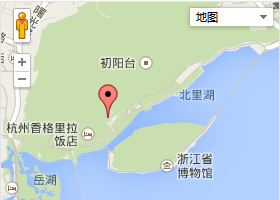
运行效果图:
Google Maps API 调用实例的更多相关文章
- Google maps API开发(二)(转)
这一篇主要实现怎么调用Google maps API中的地址解析核心类GClientGeocoder: 主要功能包括地址解析.反向解析.本地搜索.周边搜索等, 我这里主要有两个实例: 实例一.当你搜索 ...
- Google Maps API Web Services
原文:Google Maps API Web Services 摘自:https://developers.google.com/maps/documentation/webservices/ Goo ...
- Google maps API开发
原文:Google maps API开发 Google maps API开发(一) 最近做一个小东西用到google map,突击了一下,收获不小,把自己学习的一些小例子记录下来吧 一.加载Googl ...
- Google Maps API V3 之绘图库 信息窗口
Google官方教程: Google 地图 API V3 使用入门 Google 地图 API V3 针对移动设备进行开发 Google 地图 API V3 之事件 Google 地图 API V3 ...
- Google Maps API V3 之 图层
Google官方教程: Google 地图 API V3 使用入门 Google 地图 API V3 针对移动设备进行开发 Google 地图 API V3 之事件 Google 地图 API V3 ...
- Google Maps API V3 之 路线服务
Google官方教程: Google 地图 API V3 使用入门 Google 地图 API V3 针对移动设备进行开发 Google 地图 API V3 之事件 Google 地图 API V3 ...
- Google maps API开发(一)(转)
一.加载Google maps API <script type="text/javascript" src="http://ditu.google.com/map ...
- Google Maps API的使用
之前在学习了简单的API调用后,查看了几个知名网站的API调用方法,发现Google的API调用还是相对比较简单的.下面就从API key的获取.googlemaps的安装,再到实际使用做一下说明. ...
- Android Google Maps API 网络服务用于网络定位、计算路线、获取经纬度、获取详细地址等
extends:http://blog.csdn.net/h7870181/article/details/12505883 Google Maps API 网络服务 官网地址 : https://d ...
- google maps api申请的问题
现在已经改由统一的GOOGLE API控制台进行所有GOOGLE API的管理了. 方法是使用Google帐号登入 https://code.google.com/apis/console. 然后在所 ...
随机推荐
- 独立线程中实现QT GUI
在网上搜集的资料: http://www.qtcentre.org/threads/16552-Starting-QT-GUI-in-a-seperate-Threadhttp://stackover ...
- yarn环境的搭建
1.首先,在zookeeper搭建成功,服务运行的基础上搭建yarn,其次,保证时间一致 2.在 /home/install/hadoop-2.5/etc/hadoop目录下配置一下几个配置文件: 第 ...
- 转(NLP必读)
如果你刚接触自然语言处理并对她感兴趣,最好读几本这方面的书籍,除了能让你知道自然语言处理各个领域是干什么的外,还能培养一下NLP的感觉.以下四本书是我读研期间阅读和接触过的,如果您还有好书推荐,欢迎补 ...
- ARM Linux字符设备驱动程序
1.主设备号和次设备号(二者一起为设备号): 一个字符设备或块设备都有一个主设备号和一个次设备号.主设备号用来标识与设备文件相连的驱动程序,用来反 映设备类型.次设备号被驱动程序用来辨别操作的是哪个 ...
- HDOJ-ACM1097(JAVA) A hard puzzle
这道题就是HDOJ的1061的变形: 1061 :求n的n次方的个位数 http://www.cnblogs.com/xiezie/p/5596779.html 1097 :求n的m次方的个位数 因此 ...
- 问题-[ACCESS2007]怎么显示MsysObjects
office 2007设置:单击左上角图标 -> Access选项 -> 当前数据库 -> 导航 -> 导航选项 -> 勾选显示隐藏对象,显示系统对象.数据库工具选项卡 ...
- 如何把jquery 的dialog和ztree结合
第一步:先准备好juqury-ui.ztree 的js文件和css 文件 第二步:example.jsp文件代码中写 ..引入jqueryui.ztree 的js和css文件 <body> ...
- 常用的windowd属性和对象
window.location.href="" 指向一个定向的url并提交数据过去 window.location.reload() 强制刷新当前 ...
- linux jmail乱码
在Windows 里面,标题和内容都正常, 在linux里面,--- 1.字符串 more /etc/sysconfig/i18n export LANG=en_US.UTF-8 ====默认是e ...
- linux 查看并终止进程
1,查看port被那个进程占用 比如: netstat -anp | grep 1160 ps:查看port1169被那个进程占用. 2.查找进程 比如 :ps -ef | grep 'tomcat' ...