
Android中Style和Theme的使用
Style:
Style是View中一些属性的集合,包括height,padding,font color,background等等,Style单独定义在xml文件中,类似与web页面中css的角色,将设计和内容分开,便于修改和重复使用。
定义Style:
style文件需要保存在res/values目录下,文件名任意,但是必须是xml文件,sytle文件的根标记必须是<resources>。写了一个简单示例,效果如下:
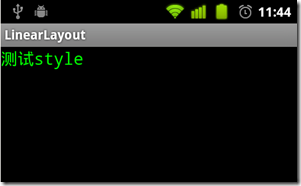
程序目录结构如下图,其中mystyle.xml是自定义的style文件。

main.xml文件代码:
- <?xml version="1.0" encoding="utf-8"?>
- <LinearLayout
- xmlns:android="http://schemas.android.com/apk/res/android"
- android:layout_width="fill_parent"
- android:layout_height="fill_parent">
- <TextView
- style="@style/CodeFont"
- android:text="测试style">
- </TextView>
- </LinearLayout>
<?xml version="1.0" encoding="utf-8"?>
<LinearLayout
xmlns:android="http://schemas.android.com/apk/res/android"
android:layout_width="fill_parent"
android:layout_height="fill_parent">
<TextView
style="@style/CodeFont"
android:text="测试style">
</TextView>
</LinearLayout>
声明style是CodeFont,对应的是style文件中的style name。mystyle.xml文件中定义了style name是CodeFont:
parent属性表示style之间可以继承,同时可以覆盖parent style的一些属性。
- <?xml version="1.0" encoding="utf-8"?>
- <resources>
- <style name="CodeFont" parent="@android:style/TextAppearance.Medium">
- <item name="android:layout_width">fill_parent</item>
- <item name="android:layout_height">wrap_content</item>
- <item name="android:textColor">#00FF00</item>
- <item name="android:typeface">monospace</item>
- </style>
- </resources>
<?xml version="1.0" encoding="utf-8"?>
<resources>
<style name="CodeFont" parent="@android:style/TextAppearance.Medium">
<item name="android:layout_width">fill_parent</item>
<item name="android:layout_height">wrap_content</item>
<item name="android:textColor">#00FF00</item>
<item name="android:typeface">monospace</item>
</style>
</resources>
Style的继承:
style继承有两种方式:
- style的继承可以通过parent属性,用来继承android已经定义好的style,例如:
- <style name="GreenText" parent="@android:style/TextAppearance">
- <item name="android:textColor">#00FF00</item>
- </style>
<style name="GreenText" parent="@android:style/TextAppearance">
<item name="android:textColor">#00FF00</item>
</style>
继承了android中的TextAppearance,同时覆盖了android:textColor属性。
- 如果要继承自定义的style,不需要通过parent属性,只要style的name以需要继承的style的name开始后跟新的style的name,中间用“.”隔开。注意:这种方式只适用与自定义的style继承 。
- <style name="CodeFont.Red">
- <item name="android:textColor">#FF0000</item>
- </style>
<style name="CodeFont.Red">
<item name="android:textColor">#FF0000</item>
</style>
新的style继承了CodeFont,则在修改上边例子中的main.xml为:
- <?xml version="1.0" encoding="utf-8"?>
- <LinearLayout
- xmlns:android="http://schemas.android.com/apk/res/android"
- android:layout_width="fill_parent"
- android:layout_height="fill_parent">
- <TextView
- style="@style/CodeFont.Red"
- android:text="测试style">
- </TextView>
- </LinearLayout>
<?xml version="1.0" encoding="utf-8"?>
<LinearLayout
xmlns:android="http://schemas.android.com/apk/res/android"
android:layout_width="fill_parent"
android:layout_height="fill_parent">
<TextView
style="@style/CodeFont.Red"
android:text="测试style">
</TextView>
</LinearLayout>
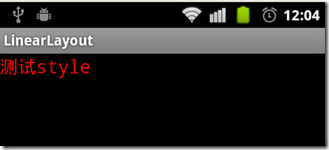
效果如下,字体颜色变为了红色:
style也可以多级继承:
- <style name="CodeFont.Red.Big">
- <item name="android:textSize">30sp</item>
- </style>
<style name="CodeFont.Red.Big">
<item name="android:textSize">30sp</item>
</style>
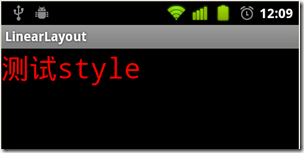
字号变大,效果如下:
sytle的更多属性见android包下的R.attr。需要注意,并不是所有的View都支持定义的style的属性,如果自定义的sytle中包含View不支持的属性,程序会自动忽略它。
Theme:
如果声明一个style作为Theme,需要配置mainfest文件中<activity> 或 <application>的android:theme 属性。
将自定义的style作为application的theme:
修改mystyle.xml为:
- <?xml version="1.0" encoding="utf-8"?>
- <resources>
- <style name="CodeFont">
- <item name="android:textSize">20sp</item>
- <item name="android:typeface">monospace</item>
- </style>
- </resources>
<?xml version="1.0" encoding="utf-8"?>
<resources>
<style name="CodeFont">
<item name="android:textSize">20sp</item>
<item name="android:typeface">monospace</item>
</style>
</resources>
在mainfest 的application中添加 android:theme属性:
- <application android:icon="@drawable/icon"
- android:label="@string/app_name"
- android:theme="@style/CodeFont">
<application android:icon="@drawable/icon"
android:label="@string/app_name"
android:theme="@style/CodeFont">
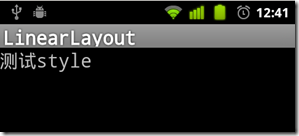
则application中的所有text字体都会改变,效果如下:
在每个<activity>标签中使用android:theme属性:
- <activity android:name=".MainActivity"
- android:label="@string/app_name"
- android:theme="@style/CodeFont">
<activity android:name=".MainActivity"
android:label="@string/app_name"
android:theme="@style/CodeFont">
android:theme还可以配置android中已经存在的theme:
- <activity android:theme="@android:style/Theme.Translucent">
<activity android:theme="@android:style/Theme.Translucent">
如果想调整android已经定义好的theme,则可以通过自定义style来实现,例如:
- <color name="custom_theme_color">#b0b0ff</color>
- <style name="CustomTheme" parent="android:Theme.Light">
- <item name="android:windowBackground">@color/custom_theme_color</item>
- <item name="android:colorBackground">@color/custom_theme_color</item>
- </style>
<color name="custom_theme_color">#b0b0ff</color>
<style name="CustomTheme" parent="android:Theme.Light">
<item name="android:windowBackground">@color/custom_theme_color</item>
<item name="android:colorBackground">@color/custom_theme_color</item>
</style>
效果如下:

关于在<activity>中android的Theme的详细使用见:android Theme使用总结
根据android版本选择主题:
在android新的版本中增加了新的theme,如果想在新版中利用新theme同时又兼容旧版本,可以通过配置两个theme文件实现,例如在res/values目录下配置sytle.xml文件:
- <style name="LightThemeSelector" parent="android:Theme.Light">
- </style>
<style name="LightThemeSelector" parent="android:Theme.Light">
</style>
在res/values-11目录下配置文件style.xml:
- <style name="LightThemeSelector" parent="android:Theme.Holo.Light" mce_bogus="1">
- </style>
<style name="LightThemeSelector" parent="android:Theme.Holo.Light" mce_bogus="1">
</style>
按照文档中说的在res下创建values-11目录,程序报错,需要找时间研究一下,说不定是android的一个bug。
使用Android提供的Style和Theme:
Android平台提供了大量的styles和themes,可以在android包中的R.style下找到,但是Android现在并未提供关于styles和themes的相关文档说明,具体可以参考styles.xml源码 和themes.xml源码 ,扫了一下,描述的很清楚。
Android中Style和Theme的使用的更多相关文章
- Android中style和theme的区别
在学习Xamarin android的过程中,最先开始学习的还是熟练掌握android的六大布局-LinearLayout .RelativeLayout.TableLayout.FrameLayou ...
- Android:Style和Theme
在Web开发中,Html负责内容,CSS负责表现.同样,在Android开发中,可以使用Theme.Style+UI组件的方式实现内容和形式的分离. Style是针对窗体元素级别的,改变指定控件或者L ...
- android的style控制Theme
value-v14就是在API14(4.0)的手机上所使用的Theme(其他版本以此类推) theme的名字叫做AppTheme,后面写有继承自哪个Theme,如下所示 <style name= ...
- Android中的主题Theme
系统自带的Theme: android以及为我们定义好了一些theme,需要是我们直接可以拿来使用. 常用的Theme通常如下: android:theme="@android:style ...
- Android中style的使用
摘自搜搜问问. <item name="#1">#2</item> 1.item 的name属性#1可以为所有系统所带组件的属性,#2为此属性的值如andr ...
- 【转】说说Android中的style和theme
最近在做软件从2.3到4.0的改变的一些工作,其中涉及了一些style和theme相关的东西.上网上查了一些东西,这个一并说说.关于android中style和theme的基本使用,这里就不再赘述了, ...
- Android入门第十六篇之Style与Theme [转]
本文来自http://blog.csdn.net/hellogv/ ,引用必须注明出处! 越来越多互联网企业都在Android平台上部署其客户端,为了提升用户体验,这些客户端都做得布局合理而且美观.. ...
- Android中如何利用attrs和styles定义控件
一直有个问题就是,Android中是如何通过布局文件,就能实现控件效果的不同呢?比如在布局文件中,我设置了一个TextView,给它设置了 textColor,它就能够改变这个TextView的文本的 ...
- android 中theme.xml与style.xml的区别
from://http://liangoogle.iteye.com/blog/1848448 android 中theme.xml与style.xml的区别: 相同点: 两者的定义相同. <r ...
随机推荐
- MFC笔记
一.Win32基本程序概念 所有的windows程序都必须载入windows.h MFC程序都有一个Stdafx.h文件,它载入了MFC框架必须的文件. Windows程序以消息为基础,以事件驱动之. ...
- Day22 JSONP、瀑布流
一.JSONP JSONP a.Ajax $.ajax({ url:'/index/', dataType:'json', data:{}, type:'GET', success:function( ...
- 【转】mysqldump
原文地址:http://blog.chinaunix.net/uid-16844903-id-3411118.html 导出 导出全库备份到本地的目录 mysqldump -u$USER -p$PAS ...
- python 学习笔记整理
首先自我批评一下,说好的一天写一篇博客,结果不到两天,就没有坚持了,发现自己做什么事情都没有毅力啊!不能持之以恒.但是,这次一定要从写博客开始来改掉自己的一个坏习惯. 可是写博客又该写点什么呢? 反正 ...
- BZOJ 4011 开店
Description 风见幽香有一个好朋友叫八云紫,她们经常一起看星星看月亮从诗词歌赋谈到人生哲学.最近她们灵机一动,打算在幻想乡开一家小店来做生意赚点钱.这样的想法当然非常好啦,但是她们也发现她们 ...
- Flyer
hdu4768:http://acm.hdu.edu.cn/showproblem.php?pid=4768 题意:给你1--2^32个位置,然后有m个操作,每次操作给你3个数 a,b,c,然后在a, ...
- httpclient 超时设置
最近项目客户反应超时经常出现:现已经总结超时设置: 使用是apache的HttpClient: DefaultHttpClient:请求超时httpclient.getParams().setPara ...
- 单片机Keil软件仿真与调试技巧
一.引言 单片机软件开发过程中,软件调试遇到的各种问题常令初学者感到不知所措.实际上.各种仿真开发软件的程序调试基本方法和技巧大同小异,掌握正确的程序调试基本技巧.对于排查这些程序错误问题可以起到举一 ...
- MySQL安装完可以使用,但是找不到对应的系统服务
为何我用 mysqld 启动 mysql 的服务后,在系统“服务”中查不到mysql服务呢?首先声明,我的服务启动成功了,因为我可以另开一个 cmd 窗口进行mysql登录,登录后可以进行各种操作.用 ...
- mac 目录详解
打开Macintosh HD你会发现内中有四个文件夹 分别有——应用程序(Applications).系统(System).用户(User).资料库(Library).四个文件夹中又分别各有若干数量的 ...