
Centos6.7 ELK日志系统部署
Centos6.7 ELK日志系统部署
原文地址:http://www.cnblogs.com/caoguo/p/4991602.html
一. 环境
elk服务器:192.168.55.134
logstash日志采集端:192.168.55.132
二.安装JDK
[root@elk01 ~]# cd /usr/local/src

[root@elk01 src]# wget http://download.oracle.com/otn-pub/java/jdk/8u65-b17/jdk-8u65-linux-x64.tar.gz?AuthParam=1447919869_29a658de74feaeda612894dc77923aa4

[root@elk01 src]# tar zxvf jdk-8u65-linux-x64.tar.gz

[root@elk01 src]# mv jdk1..0_65/ /usr/local/

[root@elk01 ~]# vi /etc/profile

JAVA_HOME=/usr/local/jdk1..0_20

export JAVA_HOME

PATH=$JAVA_HOME/bin:$PATH

export PATH

[root@elk01 ~]# source /etc/profile
#检查下

三.redis安装
#### Redis install ####

[root@elk01 src]#  yum install -y wget gcc make tcl

[root@elk01 src]# http://download.redis.io/releases/redis-3.0.5.tar.gz

[root@elk01 src]# cd redis-3.0.

[root@elk01 redis-3.0.]# make

[root@elk01 redis-3.0.]# make install

[root@elk01 redis-3.0.]# cp redis.conf /etc/

[root@elk01 redis-3.0.]# touch /etc/init.d/redis

[root@elk01 redis-3.0.]# chmod  /etc/init.d/redis
[root@elk01 redis-3.0.]# vi /etc/init.d/redis

#!/bin/bash

#

# Init file for redis

#

# chkconfig: -

# description: redis daemon

#

# processname: redis

# config: /etc/redis.conf

# pidfile: /var/run/redis.pid

source /etc/init.d/functions

#BIN="/usr/local/bin"

BIN="/usr/local/bin"

CONFIG="/etc/redis.conf"

PIDFILE="/var/run/redis.pid"

### Read configuration

[ -r "$SYSCONFIG" ] && source "$SYSCONFIG"

RETVAL=

prog="redis-server"

desc="Redis Server"

start() {

        if [ -e $PIDFILE ];then

             echo "$desc already running...."

             exit

        fi

        echo -n $"Starting $desc: "

        daemon $BIN/$prog $CONFIG

        RETVAL=$?

        echo

        [ $RETVAL -eq  ] && touch /var/lock/subsys/$prog

        return $RETVAL

}

stop() {

        echo -n $"Stop $desc: "

        killproc $prog

        RETVAL=$?

        echo

        [ $RETVAL -eq  ] && rm -f /var/lock/subsys/$prog $PIDFILE

        return $RETVAL

}

restart() {

        stop

        start

}

case "$1" in

  start)

        start

        ;;

  stop)

        stop

        ;;

  restart)

        restart

        ;;

  condrestart)

        [ -e /var/lock/subsys/$prog ] && restart

        RETVAL=$?

        ;;

  status)

        status $prog

        RETVAL=$?

        ;;

   *)

        echo $"Usage: $0 {start|stop|restart|condrestart|status}"

        RETVAL=

esac

exit $RETVAL
[root@elk01 redis-3.0.]# chkconfig redis on

[root@elk01 redis-3.0.]# /etc/init.d/redis start
#redis连接测试

四.logstash indexer服务安装配置
#### Logstash 从redis取数据到elasticsearch ####

[root@elk01 src]# wget https://download.elastic.co/logstash/logstash/logstash-2.0.0.tar.gz

[root@elk01 src]# tar zxf logstash-2.0..tar.gz -C /usr/local/

[root@elk01 ~]# /usr/local/logstash-2.0./bin/logstash -e 'input { stdin { } } output { stdout {} }'

[root@elk01 logstash-2.0.]# vi logstash_indexer.conf

input {

  redis {

      host => 'localhost'

      data_type => 'list'

      port => ''

      key => 'logstash:redis'

      type => 'redis-input'

  }

}

output {

  elasticsearch {

      hosts => 'localhost'

  }

}

[root@elk01 logstash-2.0.]# bin/logstash -f logstash_indexer.conf

[root@elk01 elasticsearch]# redis-cli monitor

OK

1448364122.959182 [ 127.0.0.1:] "rpush" "logstash:redis" "{\"message\":\"Nov 24 19:22:02 elk01 yum[3074]: Erased: httpd\",\"@version\":\"1\",\"@timestamp\":\"2015-11-24T11:22:02.553Z\",\"host\":\"0.0.0.0\",\"path\":\"/var/log/messages\",\"type\":\"messages\"}"
# redis-cli monitor 看到的输出

五. elasticsearch 安装配置
#### Elasticsearch ####

[root@elk01 src]# tar zxf elasticsearch-2.0..tar.gz

[root@elk01 src]# mv elasticsearch-2.0. /usr/local/elasticsearch

[root@elk01 src]# useradd elasticsearch -d /usr/local/elasticsearch -s /sbin/nologin

[root@elk01 ~]# vi /etc/sysconfig/elasticsearch

# Directory where the Elasticsearch binary distribution resides

ES_HOME=/usr/local/elasticsearch

# Heap Size (defaults to 256m min, 1g max)

#ES_HEAP_SIZE=2g

# Heap new generation

#ES_HEAP_NEWSIZE=

# max direct memory

#ES_DIRECT_SIZE=

# Additional Java OPTS

#ES_JAVA_OPTS=

# Maximum number of open files

MAX_OPEN_FILES=

# Maximum amount of locked memory

#MAX_LOCKED_MEMORY=

# Maximum number of VMA (Virtual Memory Areas) a process can own

MAX_MAP_COUNT=

# Elasticsearch log directory

LOG_DIR=/var/log/elasticsearch

# Elasticsearch data directory

DATA_DIR=/usr/local/elasticsearch/data

# Elasticsearch work directory

WORK_DIR=/tmp/elasticsearch

# Elasticsearch conf directory

CONF_DIR=/etc/elasticsearch

# Elasticsearch configuration file (elasticsearch.yml)

CONF_FILE=/etc/elasticsearch/elasticsearch.yml

# User to run as, change this to a specific elasticsearch user if possible

# Also make sure, this user can write into the log directories in case you change them

# This setting only works for the init script, but has to be configured separately for systemd startup

ES_USER=elasticsearch

# Configure restart on package upgrade (true, every other setting will lead to not restarting)

#RESTART_ON_UPGRADE=true

[root@elk01 ~]# mkdir -p /var/run/elasticsearch

[root@elk01 ~]# mkdir -p /var/log/elasticsearch

[root@elk01 ~]# mkdir -p /usr/local/elasticsearch/data

[root@elk01 ~]# mkdir -p /usr/local/elasticsearch/plugins

[root@elk01 ~]# mkdir -p /usr/local/elasticsearch/config/scripts

[root@elk01 ~]# chown -R elasticsearch.elasticsearch /var/run/elasticsearch

[root@elk01 ~]# chown -R elasticsearch.elasticsearch /var/log/elasticsearch

[root@elk01 ~]# chown -R elasticsearch.elasticsearch /usr/local/elasticsearch/data

[root@elk01 ~]# ln -s /usr/local/elasticsearch/config /etc/elasticsearch
[root@elk01 ~]# vi /etc/init.d/elasticsearch

#!/bin/sh

#

# elasticsearch <summary>

#

# chkconfig:

# description: Starts and stops a single elasticsearch instance on this system

#

### BEGIN INIT INFO

# Provides: Elasticsearch

# Required-Start: $network $named

# Required-Stop: $network $named

# Default-Start:

# Default-Stop:

# Short-Description: This service manages the elasticsearch daemon

# Description: Elasticsearch is a very scalable, schema-free and high-performance search solution supporting multi-tenancy and near realtime search.

### END INIT INFO

#

# init.d / servicectl compatibility (openSUSE)

#

if [ -f /etc/rc.status ]; then

    . /etc/rc.status

    rc_reset

fi

#

# Source function library.

#

if [ -f /etc/rc.d/init.d/functions ]; then

    . /etc/rc.d/init.d/functions

fi

exec="/usr/local/elasticsearch/bin/elasticsearch"

prog="elasticsearch"

pidfile=/var/run/elasticsearch/${prog}.pid

[ -e /etc/sysconfig/$prog ] && . /etc/sysconfig/$prog

export ES_HEAP_SIZE

export ES_HEAP_NEWSIZE

export ES_DIRECT_SIZE

export ES_JAVA_OPTS

lockfile=/var/lock/subsys/$prog

# backwards compatibility for old config sysconfig files, pre 0.90.

if [ -n $USER ] && [ -z $ES_USER ] ; then

   ES_USER=$USER

fi

checkJava() {

    if [ -x "$JAVA_HOME/bin/java" ]; then

        JAVA="$JAVA_HOME/bin/java"

    else

        JAVA=`which java`

    fi

    if [ ! -x "$JAVA" ]; then

        echo "Could not find any executable java binary. Please install java in your PATH or set JAVA_HOME"

        exit

    fi

}

start() {

    checkJava

    [ -x $exec ] || exit

    [ -f $CONF_FILE ] || exit

    if [ -n "$MAX_LOCKED_MEMORY" -a -z "$ES_HEAP_SIZE" ]; then

        echo "MAX_LOCKED_MEMORY is set - ES_HEAP_SIZE must also be set"

        return

    fi

    if [ -n "$MAX_OPEN_FILES" ]; then

        ulimit -n $MAX_OPEN_FILES

    fi

    if [ -n "$MAX_LOCKED_MEMORY" ]; then

        ulimit -l $MAX_LOCKED_MEMORY

    fi

    if [ -n "$MAX_MAP_COUNT" ]; then

        sysctl -q -w vm.max_map_count=$MAX_MAP_COUNT

    fi

    if [ -n "$WORK_DIR" ]; then

        mkdir -p "$WORK_DIR"

        chown "$ES_USER":"$ES_GROUP" "$WORK_DIR"

    fi

    echo -n $"Starting $prog: "

    # if not running, start it up here, usually something like "daemon $exec"

    daemon --user $ES_USER --pidfile $pidfile $exec -p $pidfile -d -Des.default.path.home=$ES_HOME -Des.default.path.logs=$LOG_DIR -Des.default.path.data=$DATA_DIR -D

es.default.path.work=$WORK_DIR -Des.default.path.conf=$CONF_DIR

    retval=$?

    echo

    [ $retval -eq  ] && touch $lockfile

    return $retval

}

stop() {

    echo -n $"Stopping $prog: "

    # stop it here, often "killproc $prog"

    killproc -p $pidfile -d  $prog

    retval=$?

    echo

    [ $retval -eq  ] && rm -f $lockfile

    return $retval

}

restart() {

    stop

    start

}

reload() {

    restart

}

force_reload() {

    restart

}

rh_status() {

    # run checks to determine if the service is running or use generic status

    status -p $pidfile $prog

}

rh_status_q() {

    rh_status >/dev/null >&

}

case "$1" in

    start)

        rh_status_q && exit

        $

        ;;

    stop)

        rh_status_q || exit

        $

        ;;

    restart)

        $

        ;;

    reload)

        rh_status_q || exit

        $

        ;;

    force-reload)

        force_reload

        ;;

    status)

        rh_status

        ;;

    condrestart|try-restart)

        rh_status_q || exit

        restart

        ;;

    *)

        echo $"Usage: $0 {start|stop|status|restart|condrestart|try-restart|reload|force-reload}"

        exit

esac

exit $?
[root@elk01 ~]# chmod +x /etc/init.d/elasticsearch

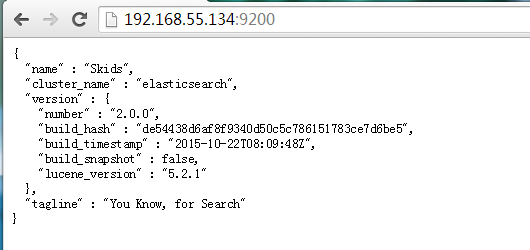
[root@elk01 ~]# /etc/init.d/elasticsearch start
#管理工具

[root@elk01 ~]# /usr/local/elasticsearch/bin/plugin install lmenezes/elasticsearch-kopf

[root@elk01 ~]# /usr/local/elasticsearch/bin/plugin install mobz/elasticsearch-head


六. Kibana安装
#### Kibana Install ####

[root@elk01 src]# wget https://download.elastic.co/kibana/kibana/kibana-4.2.1-linux-x64.tar.gz

[root@elk01 src]# tar zxf kibana-4.2.-linux-x64.tar.gz -C /usr/local/

[root@elk01 local]# touch /etc/init.d/kibana

[root@elk01 local]# chmod  /etc/init.d/kibana

[root@elk01 local]# vi /etc/init.d/kibana

#!/bin/bash

### BEGIN INIT INFO

# Provides:          kibana

# Default-Start:

# Default-Stop:

# Short-Description: Runs kibana daemon

# Description: Runs the kibana daemon as a non-root user

### END INIT INFO

# Process name

NAME=kibana

DESC="Kibana4"

PROG="/etc/init.d/kibana"

# Configure location of Kibana bin

KIBANA_BIN=/usr/local/kibana/bin

# PID Info

PID_FOLDER=/var/run/kibana/

PID_FILE=/var/run/kibana/$NAME.pid

LOCK_FILE=/var/lock/subsys/$NAME

PATH=/bin:/usr/bin:/sbin:/usr/sbin:$KIBANA_BIN

DAEMON=$KIBANA_BIN/$NAME

# Configure User to run daemon process

DAEMON_USER=root

# Configure logging location

KIBANA_LOG=/var/log/kibana.log

# Begin Script

RETVAL=

if [ `id -u` -ne  ]; then

        echo "You need root privileges to run this script"

        exit

fi

# Function library

. /etc/init.d/functions

start() {

        echo -n "Starting $DESC : "

pid=`pidofproc -p $PID_FILE kibana`

        if [ -n "$pid" ] ; then

                echo "Already running."

                exit

        else

        # Start Daemon

if [ ! -d "$PID_FOLDER" ] ; then

                        mkdir $PID_FOLDER

                fi

daemon --user=$DAEMON_USER --pidfile=$PID_FILE $DAEMON >"$KIBANA_LOG" >& &

                sleep

                pidofproc node > $PID_FILE

                RETVAL=$?

                [[ $? -eq  ]] && success || failure

echo

                [ $RETVAL =  ] && touch $LOCK_FILE

                return $RETVAL

        fi

}

reload()

{

    echo "Reload command is not implemented for this service."

    return $RETVAL

}

stop() {

        echo -n "Stopping $DESC : "

        killproc -p $PID_FILE $DAEMON

        RETVAL=$?

echo

        [ $RETVAL =  ] && rm -f $PID_FILE $LOCK_FILE

}

case "$1" in

  start)

        start

;;

  stop)

        stop

        ;;

  status)

        status -p $PID_FILE $DAEMON

        RETVAL=$?

        ;;

  restart)

        stop

        start

        ;;

  reload)

reload

;;

  *)

# Invalid Arguments, print the following message.

        echo "Usage: $0 {start|stop|status|restart}" >&

exit

        ;;

esac

[root@elk01 local]# mv kibana-4.2.-linux-x64/ kibana

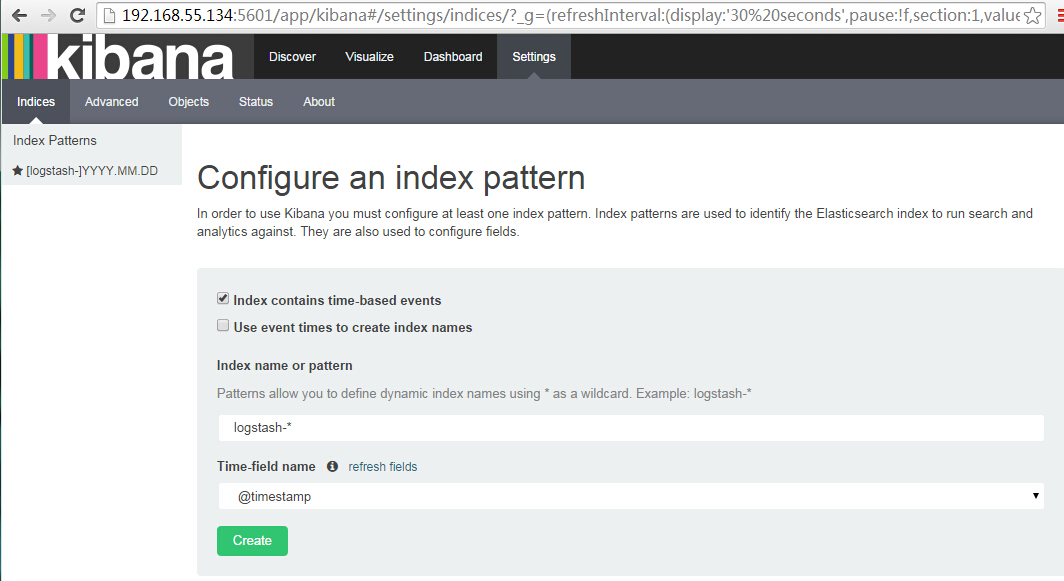
[root@elk01 ~]# mkdir -p /var/run/kibana
七. logstash日志收集
#### logstash 日志收集  ####

[root@localhost ~]#  tar zxf logstash-2.0..tar.gz -C /usr/local/

[root@localhost ~]# /usr/local/logstash-2.0./bin/logstash -e 'input { stdin { } } output { stdout {} }'

[root@localhost logstash-2.0.]# cat logstash_agent.conf

input {

  file {

    type => "apache_access"

    path => ["/var/log/httpd/access_log"]

  }

}

output {

  stdout {codec => rubydebug }

  redis {

    host => '192.168.55.134'

    data_type => 'list'

    key => 'logstash:redis'

  }

}

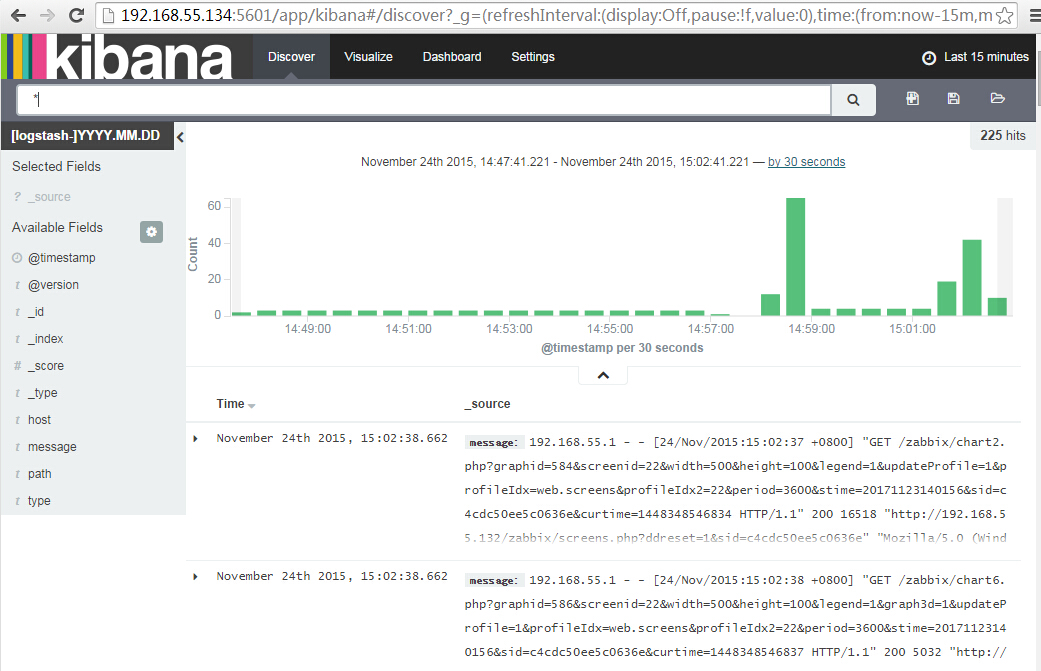
# 访问一下http服务,看redis是否收到日志

[root@elk01 elasticsearch]# redis-cli monitor

OK

1448364122.959182 [ 127.0.0.1:] "rpush" "logstash:redis" "{\"message\":\"Nov 24 19:22:02 elk01 yum[3074]: Erased: httpd\",\"@version\":\"1\",\"@timestamp\":\"2015-11-24T11:22:02.553Z\",\"host\":\"0.0.0.0\",\"path\":\"/var/log/messages\",\"type\":\"messages\"}"


Centos6.7 ELK日志系统部署的更多相关文章
- 创业公司做数据分析(四)ELK日志系统 (转)
http://blog.csdn.net/zwgdft/article/details/53842574 作为系列文章的第四篇,本文将重点探讨数据采集层中的ELK日志系统.日志,指的是后台服务中产生的 ...
- Elasticstack 5.1.2 集群日志系统部署及实践
Elasticstack 5.1.2 集群日志系统部署及实践 一.ELK Stack简介 ELK Stack 是Elasticsearch.Logstash.Kibana三个开源软件的组合,在实时数据 ...
- ELK日志系统之通用应用程序日志接入方案
前边有两篇ELK的文章分别介绍了MySQL慢日志收集和Nginx访问日志收集,那么各种不同类型应用程序的日志该如何方便的进行收集呢?且看本文我们是如何高效处理这个问题的 日志规范 规范的日志存放路径和 ...
- 【7.1.1】ELK日志系统单体搭建
ELK是什么? 一般来说,为了提高服务可用性,服务器需要部署多个实例,每个实例都是负载均衡转发的后的,如果还用老办法登录服务器去tail -f xxx.log,有很大可能错误日志未出现在当前服务器中, ...
- 创业公司做数据分析(四)ELK日志系统
作为系列文章的第四篇.本文将重点探讨数据採集层中的ELK日志系统.日志.指的是后台服务中产生的log信息,一般会输入到不同的文件里.比方Django服务下,一般会有nginx日志和uWSGI日志. ...
- ELK日志系统:Elasticsearch+Logstash+Kibana+Filebeat搭建教程
ELK日志系统:Elasticsearch + Logstash + Kibana 搭建教程 系统架构 安装配置JDK环境 JDK安装(不能安装JRE) JDK下载地址:http://www.orac ...
- ELK日志系统之kibana的使用操作
1.ELK日志系统打开后,打开kibana的操作界面,第一步创建索引模式: 第2步:创建日志索引 第3步:创建成功 第4步:查看30分钟时间段内的日志数据,也可以查今天的,今月的,今年的 放牛去
- 03篇ELK日志系统——升级版集群之ELK日志系统整合springboot项目
[ 前言:整个ELK日志系统已经搭建好了,接下来的流程就是: springboot项目中的logback日志配置通过tcp传输,把springboot项目中所有日志数据传到————>logsta ...
- 02篇ELK日志系统——升级版集群之kibana和logstash的搭建整合
[ 前言:01篇LK日志系统已经把es集群搭建好了,接下来02篇搭建kibana和logstash,并整合完成整个ELK日志系统的初步搭建. ] 1.安装kibana 3台服务器: 192.168.2 ...
随机推荐
- 几道splay
hdu 1890 题意:每次将第i位到第i小数字所在的位置之间的位置翻转,每次输出第i小数字所在的位置 分析: 简单的splay处理区间翻转问题 有三点需要注意: 1.区间是1~n+2 2.此题里的查 ...
- JVM内存分布和垃圾回收
内存区域划分 程序计数器(Program counter Register) 描述 程序计数器(Program Counter Register)是一块较小的内存空间.它可以看作是当前线程执行的 ...
- Java的23种设计模式(转)
设计模式(Design pattern)是一套被反复使用.多数人知晓的.经过分类编目的.代码设计经验的总结.使用设计模式是为了可重用代码.让代码更容易被他人理解.保证代码可靠性. 毫无疑问,设计模式于 ...
- Alcatel OmniSwitch 重置密码
OmniSwitch 6250重置密码 Press s to STOP AT MINIBOOT... [Miniboot]->cd "network" value = 0 = ...
- [JavaEE] Data Validation
When we create Entity and Respority, we also need to do validations to protect our data. In Java, va ...
- Python科学计算的瑞士军刀——Anaconda 安装与配置
Introduce Python是一种强大的编程语言.其提供了非常多用于科学计算的模块,常见的包含numpy.scipy和matplotlib.要利用Python进行科学计算.就须要一一安装所需的模块 ...
- 【转】Linux 查看CPU信息、机器型号等硬件信息
测试机器的硬件信息: 查看CPU信息(型号) # cat /proc/cpuinfo | grep name | cut -f2 -d: | uniq -c 8 Intel(R) Xeo ...
- <感悟帖>互联网与电子传统行业之经历
依据鄙人浅显的实习.毕业工作经验以及个人思考得此文. 鄙人有幸在BAT中的B实习,以及某电子行业科研机构工作,略有心得.总结例如以下.也算是对自己的一个交待和反省. 鄙人小硕毕业211学校非985,C ...
- 还在自建Redis缓存?那你就out了
Redis 是什么?简单来说,Redis是一个开源的内存数据库,支持Key-Value等多种数据结构,可用于缓存.事件发布或订阅.高速队列等场景.Redis使用ANSIC语言编写,支持网络,提供字符串 ...
- Spark SQL Catalyst源代码分析之UDF
/** Spark SQL源代码分析系列文章*/ 在SQL的世界里,除了官方提供的经常使用的处理函数之外.一般都会提供可扩展的对外自己定义函数接口,这已经成为一种事实的标准. 在前面Spark SQL ...