
安装使用Spring boot 写一个hello1
一、创建springboot 项目
二、进行代编写
1.连接数据库:application.properties里配置
spring.datasource.driverClassName=com.mysql.cj.jdbc.Driver

spring.datasource.url=jdbc:mysql://localhost:3306/huoguo?useUnicode=true&characterEncoding=utf-8&useSSL=false&serverTimezone=UTC

spring.datasource.username=root

spring.datasource.password=123456

spring.jpa.showSql=true

mybatis.type-aliases-package=com.xiaojungan.huoguo.entity

mybatis.mapper-locations=mybatis/*.xml
2.用户实体 entity.User:
package com.xiaojungan.huoguo.entity;

public class User {

    private Integer id;

    private String name;

    private Integer password;

    private Integer canzhuo_id;

    public User(){

    }

    public User(Integer id, String name, Integer password,Integer canzhuo_id ) {

        this.id = id;

        this.name = name;

        this.password = password;

        this.canzhuo_id  = canzhuo_id ;

    }

    public Integer getId() {

        return id;

    }

    public void setId(Integer id) {

        this.id = id;

    }

    public String getName() {

        return name;

    }

    public void setName(String name) {

        this.name = name;

    }

    public Integer getPassword() {

        return password;

    }

    public void setPassword(Integer password) {

        this.password = password;

    }

    public Integer getCanzhuo_id() {

        return canzhuo_id;

    }

    public void setCanzhuo_id(Integer canzhuo_id) {

        this.canzhuo_id = canzhuo_id;

    }

}
3.UserDao
package com.xiaojungan.huoguo.dao;

import com.xiaojungan.huoguo.entity.User;

import org.apache.ibatis.annotations.Param;

public interface UserDao {

    //登录判断

    User login(User user);

    //注册

    int addUser(User user);

    int adduser(@Param("name") String name, @Param("password") Integer password);

}
4.UserDaoImpl
package com.xiaojungan.huoguo.dao.impl;

import com.xiaojungan.huoguo.dao.UserDao;

import com.xiaojungan.huoguo.entity.User;

public class UserDaoImpl implements UserDao {

    @Override

    public User login(User user) {

        return null;

    }

    @Override

    public int addUser(User user) {

        return 0;

    }

    @Override

    public int adduser(String name, Integer password) {

        return 0;

    }

}
5.控制层 UserController.
package com.xiaojungan.huoguo.controller;

import com.xiaojungan.huoguo.dao.impl.UserDaoImpl;

import com.xiaojungan.huoguo.entity.User;

import com.xiaojungan.huoguo.dao.UserDao;

import com.xiaojungan.huoguo.service.UserService;

import org.springframework.stereotype.Controller;

import org.springframework.ui.Model;

import org.springframework.web.bind.annotation.RequestMapping;

import org.springframework.web.bind.annotation.ResponseBody;

import javax.annotation.Resource;

import javax.servlet.http.HttpServletRequest;

import javax.servlet.http.HttpSession;

import org.springframework.web.bind.annotation.*;

@Controller

public class UserController {

    @Resource

    UserDao ad = new UserDaoImpl();

    @RequestMapping("/login")//主页

    public String index(){

        return "login";

    }

    @RequestMapping("/goregister1")//去注册页面

    public String goregister(){

        return  "register1";

    }

    @RequestMapping("/gologin")//登录获取用户信息存到seccion

    public String  login(User user,HttpServletRequest request,Model model){

        User aa= ad.login(user);

        if (aa==null){

            return  "public/false";

        }

        HttpSession session =  request.getSession();

        session.setAttribute("name",user.getName());

        session.setAttribute("password",user.getPassword());

        model.addAttribute("user",aa);

        return "user/index";

    }

    @RequestMapping("/index")//从其他页面操作后返回列表页面(重复登录)

    public String login(User user,Model model,HttpServletRequest request){

        HttpSession session =  request.getSession();

        user.setName((String) session.getAttribute("aname"));

        user.setPassword((Integer) session.getAttribute("apassword"));

        User aa = ad.login(user);

        model.addAttribute("user",aa);

        return "user/index";

    }

    @RequestMapping(value = {"/register1"})

    public String adduser(@RequestParam("name") String username,

                          @RequestParam("password") Integer password,

                          @RequestParam("password2") Integer password2){

        if (!password.equals(password2)) {

            return "/user/wrong";

        } else {

            int res = ad.adduser( username, password);

            if (res == 0) {

                return "/user/wrong";

            } else {

                return "/login";

            }

        }

    }

}
6.application中配置
package com.xiaojungan.huoguo;

import org.springframework.boot.SpringApplication;

import org.mybatis.spring.annotation.MapperScan;

import org.springframework.boot.autoconfigure.SpringBootApplication;

@SpringBootApplication

@MapperScan("com.xiaojungan.huoguo.dao")

public class HuoguoApplication {

    public static void main(String[] args) {

        SpringApplication.run(HuoguoApplication.class, args);

    }

}
7.UserMapper.xml 设置数据库语句的操作
<?xml version="1.0" encoding="UTF-8" ?>

<!DOCTYPE mapper PUBLIC "-//mybatis.org//DTD Mapper 3.0//EN" "http://mybatis.org/dtd/mybatis-3-mapper.dtd" >

<mapper namespace="com.xiaojungan.huoguo.dao.UserDao">

    <select id="login" parameterType="com.xiaojungan.huoguo.entity.User" resultType="com.xiaojungan.huoguo.entity.User">

        select name,password FROM user WHERE name = #{name} AND password = #{password}

    </select>

    <insert id="addUser" parameterType="com.xiaojungan.huoguo.entity.User">

        INSERT INTO user(name,password) VALUES (#{name},#{password});

    </insert>

    <insert id="adduser">

        INSERT INTO user (name,password) VALUES (#{name},#{password})

    </insert>

</mapper>
8.登录页面 login.html
<!DOCTYPE html>
<html lang="en">
<head>
<meta charset="UTF-8">
<title>首页</title>
<link href="user/css/1.css" type="text/css" rel="stylesheet"/>
<style>
/*a标签去下划线和点击不变色,div内容居中*/
a{
text-decoration: none;
color: #333333;
}
#idiv{text-align: center;border-radius: 20px;
width: 300px;
height: 350px;
margin: auto;
position: absolute;
top: 0;
left: 0;
right: 0;
bottom: 0;} </style>
</head>
<body background="../../../../../../java%20%20work/huoguo/src/main/webapp/user/img/2.jpg">
<div id="idiv">
<form action="/gologin" method="post">
请输入姓名<input id="name" name="name" required="required"><br><br>
请输入密码<input id="password" name="password" type="password" placeholder="仅支持正整数" required="required"><br><br>
<input type="submit" value="登录"> <button>
<a href="/goregister1">注册</a></button>
</form>
</div>
</body>
</html>
9.注册页面 register1.html
<html lang="en">

<head>

    <meta charset="UTF-8">

    <title>注册</title>

</head>

<body>

<form action="/register1" method="post">

    用户姓名:<input type="text" name="name" /></br>

    用户密码:<input type="password" name="password" placeholder="仅支持整数" /></br>

    确认密码:<input type="password" name="password2" placeholder="仅支持整数" /></br>

    <input type="submit" value="注册">

</form>

</body>

</html>
10.index.html
<!DOCTYPE html>

<html lang="en">

<head>

    <meta charset="UTF-8">

    <title>使用spring boot写一个hello1</title>

</head>

<body>

      Hello1

</body>

</html>
11运行结果:
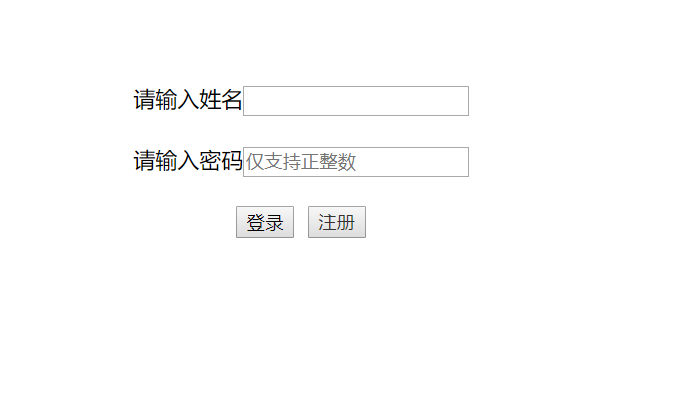
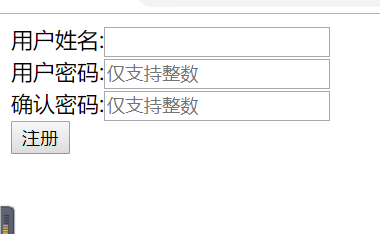
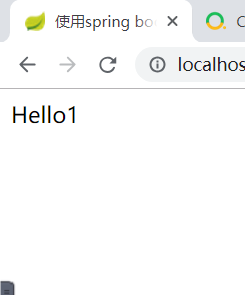
安装使用Spring boot 写一个hello1的更多相关文章
- 学记:为spring boot写一个自动配置
spring boot遵循"约定优于配置"的原则,使用annotation对一些常规的配置项做默认配置,减少或不使用xml配置,让你的项目快速运行起来.spring boot的神奇 ...
- spring cloud教程之使用spring boot创建一个应用
<7天学会spring cloud>第一天,熟悉spring boot,并使用spring boot创建一个应用. Spring Boot是Spring团队推出的新框架,它所使用的核心技术 ...
- 手把手教你用 Spring Boot搭建一个在线文件预览系统!支持ppt、doc等多种类型文件预览
昨晚搭建环境都花了好一会时间,主要在浪费在了安装 openoffice 这个依赖环境上(Mac 需要手动安装). 然后,又一步一步功能演示,记录,调试项目,并且简单研究了一下核心代码之后才把这篇文章写 ...
- Spring Boot实现一个监听用户请求的拦截器
项目中需要监听用户具体的请求操作,便通过一个拦截器来监听,并继续相应的日志记录 项目构建与Spring Boot,Spring Boot实现一个拦截器很容易. Spring Boot的核心启动类继承W ...
- 如何基于Spring Boot搭建一个完整的项目
前言 使用Spring Boot做后台项目开发也快半年了,由于之前有过基于Spring开发的项目经验,相比之下觉得Spring Boot就是天堂,开箱即用来形容是绝不为过的.在没有接触Spring B ...
- 记录Spring Boot大坑一个,在bean中如果有@Test单元测试,不会注入成功
记录Spring Boot大坑一个,在bean中如果有@Test单元测试,不会注入成功 记录Spring Boot大坑一个,在bean中如果有@Test单元测试,不会注入成功 记录Spring Boo ...
- spring boot是一个应用框架生成工具?
spring boot是一个应用框架生成工具?
- Spring boot 自定义一个starter pom
用过springboot的自动配置会觉得非常方便,我们完全可以自己写一个starter pom,这样不仅可以有自动配置功能,而且具有更通用的的耦合度低的配置, 新建一个starter的maven项目, ...
- Spring Boot 构建一个 RESTful Web Service
1 项目目标: 构建一个 web service,接收get 请求 http://localhost:8080/greeting 响应一个json 结果: {"id":1,&qu ...
随机推荐
- win7创建无线(WIFI)cmd命令
1.创建无限热点:netsh wlan set hostednetwork mode=allow ssid=name key=12345678. 2.承载网络:netsh wlan start(关闭s ...
- ML-学习提纲1
http://www.sohu.com/a/130379077_468714 本文用一系列「思维导图」由浅入深的总结了「统计学」领域的基础知识,是对之前系列文章做的一次完整的梳理,也是我至今为止所有与 ...
- idea java 注释模板配置
在网上找了好久,好多的文章都有一个共同的病点就是“@param注释当有多个参数时候,全部放在了一行里面”,非常不友好. 以下是我整理好的,完全按照eclipse的注释风格. !!!先看最后实现的效果图 ...
- DNS查询过程
DNS查询过程 假设www.abc.com的主机要查询www.xyz.abc.com的服务器ip地址. 知识点 1.hosts文件:以静态映射的方式提供IP地址与主机名的对照表,类似ARP表 2.域: ...
- 5.1 qbxt 一测 T3
反物质[问题描述] 物理学家有一种假设,世界上存在反物质,反物质遇到正常的物质会发生湮灭. 假设现在有 n 个粒子,每个粒子的种类用一个 m 以内的正整数表示.现在要将这些粒子按一定顺序放入一个封闭空 ...
- Linux制作本地yum
首先在vm上安装centos 1.首先查看挂载光盘的位置:#df -h [root@lang ~]# df -hFilesystem Size Used Avai ...
- python 04 学生信息管理系统
今天任务不多,做了学生信息管理系统1.0,使用字典存储学生个体信息,列表存储学生字典.注意dict定义要在循环体内,若定义成全局变量或循环体外,则旧数据会被新数据覆盖.dict属于可变类型数据,内容改 ...
- CSS3---媒体查询与响应式布局
1. 值 设备类型 All 所有设备 Braille 盲人用点字法触觉回馈设备 Embossed 盲文打印机 Handheld 便携设备 Print 打印用纸或打印预览视图 Projection 各种 ...
- svn基本使用详情
1.增加(Add)先提到变更列表中,再commit到配置库中,选择新增文件,右键SVN菜单执行“Add“操作提交到”变更列表中”,然后右键SVN菜单执行”SVNCommit”提交到版本库中. 2.删除 ...
- go语言的碎片整理:time
时间和日期是我们编程中经常用到的,本文主要介绍了Go语言内置的time包的基本用法. Go语言中导入包 单行导入 import "time" import "fmt&qu ...