
遮罩 HUD 指示器 蒙板 弹窗
遮罩 HUD 指示器 蒙板 弹窗
UIAlertView的使用<代理方法处理按钮点击>
UIAlertView *alertView = [[UIAlertView alloc] initWithTitle:@"警告" message:@"是否要删除它?" delegate:self cancelButtonTitle:@"是" otherButtonTitles:@"否", nil];

//加登录框

    alertView.alertViewStyle = UIAlertViewStyleLoginAndPasswordInput;

    [alertView show];

/hud/HUDimage/iOS%20Simulator%20Screen%20Shot%202015年7月7日%20下午3.34.43.png)
UIActionSheet的使用 <代理方法处理按钮点击>
UIActionSheet *sheet = [[UIActionSheet alloc] initWithTitle:@"警告:确定要删除它?" delegate:self cancelButtonTitle:@"取消" destructiveButtonTitle:@"确定" otherButtonTitles:@"随便", nil];

    [sheet showInView:self.view];

/hud/HUDimage/iOS%20Simulator%20Screen%20Shot%202015年7月7日%20下午3.37.52.png)
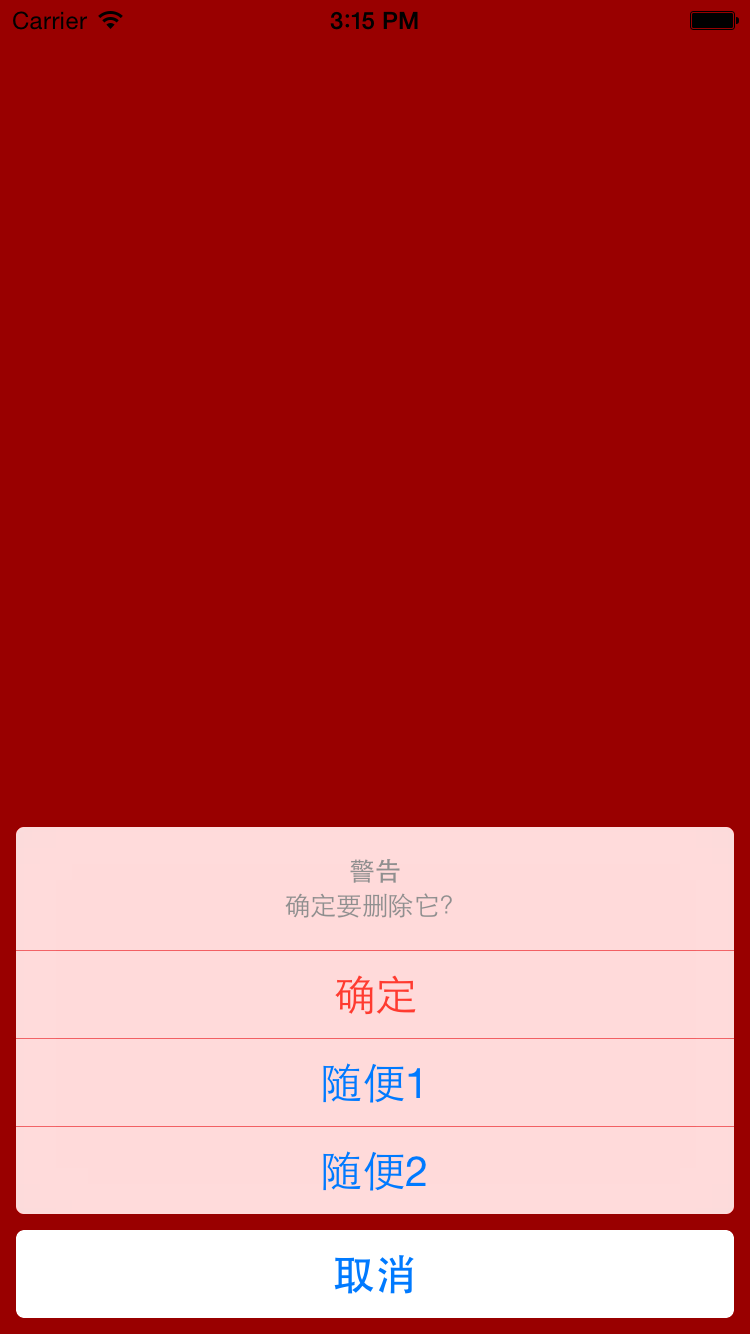
UIAlertController的使用:UIAlertControllerStyleActionSheet
UIAlertController *alertController = [UIAlertController alertControllerWithTitle:@"警告" message:@"确定要删除它?" preferredStyle:UIAlertControllerStyleActionSheet];

    // 添加按钮 <UIAlertActionStyleDestructive>

    UIAlertAction *sure = [UIAlertAction actionWithTitle:@"确定" style:UIAlertActionStyleDestructive handler:^(UIAlertAction *action) {

        NSLog(@"点击了【确定】按钮");

    }];

    [alertController addAction:sure];

    [alertController addAction:[UIAlertAction actionWithTitle:@"随便1" style:UIAlertActionStyleDefault handler:^(UIAlertAction *action) {

        NSLog(@"点击了【随便1】按钮");

    }]];

    [alertController addAction:[UIAlertAction actionWithTitle:@"随便2" style:UIAlertActionStyleDefault handler:^(UIAlertAction *action) {

        NSLog(@"点击了【随便2】按钮");

    }]];

    [alertController addAction:[UIAlertAction actionWithTitle:@"取消" style:UIAlertActionStyleCancel handler:^(UIAlertAction *action) {

        NSLog(@"点击了【取消】按钮");

    }]];

    // 在当前控制器上面弹出另一个控制器:alertController  显示

    [self presentViewController:alertController animated:YES completion:nil];
/hud/HUDimage/iOS%20Simulator%20Screen%20Shot%202015年7月7日%20下午3.15.07.png)
UIAlertController的使用:UIAlertControllerStyleAlert<一>
 UIAlertController *alertController = [UIAlertController alertControllerWithTitle:@"警告" message:@"message:确定?" preferredStyle:UIAlertControllerStyleAlert];

    // 添加按钮

    UIAlertAction *sure = [UIAlertAction actionWithTitle:@"确定" style:UIAlertActionStyleDestructive handler:^(UIAlertAction *action) {

        NSLog(@"点击了【确定】按钮");

    }];

    [alertController addAction:sure];

    [alertController addAction:[UIAlertAction actionWithTitle:@"取消" style:UIAlertActionStyleCancel handler:^(UIAlertAction *action) {

        NSLog(@"点击了【取消】按钮");

    }]];

    [alertController addAction:[UIAlertAction actionWithTitle:@"按钮" style:UIAlertActionStyleDefault handler:^(UIAlertAction *action) {

        NSLog(@"点击了【按钮】按钮");

    }]];

    // 还可以添加文本框

    [alertController addTextFieldWithConfigurationHandler:^(UITextField *textField) {

        textField.textColor = [UIColor redColor];

        textField.secureTextEntry = YES; // 暗文

        textField.placeholder = @"请输入密码";

    }];

    // 在当前控制器上面弹出另一个控制器:alertController

    [self presentViewController:alertController animated:YES completion:nil];
/hud/HUDimage/iOS%20Simulator%20Screen%20Shot%202015年7月7日%20下午3.24.29.png)

UIAlertController的使用:UIAlertControllerStyleAlert<二>
 UIAlertController *alertController = [UIAlertController alertControllerWithTitle:@"警告" message:@"message:确定?" preferredStyle:UIAlertControllerStyleAlert];

    // 添加按钮

    UIAlertAction *sure = [UIAlertAction actionWithTitle:@"确定" style:UIAlertActionStyleDestructive handler:^(UIAlertAction *action) {

        NSLog(@"点击了【确定】按钮");

    }];

    [alertController addAction:sure];

    [alertController addAction:[UIAlertAction actionWithTitle:@"取消" style:UIAlertActionStyleCancel handler:^(UIAlertAction *action) {

        NSLog(@"点击了【取消】按钮");

    }]];

    // 在当前控制器上面弹出另一个控制器:alertController

    [self presentViewController:alertController animated:YES completion:nil];
/hud/HUDimage/iOS%20Simulator%20Screen%20Shot%202015年7月7日%20下午3.27.40.png)

介绍框架<一> SVProgressHUD
// 下面这些消息需要主动调用dismiss方法来隐藏

    [SVProgressHUD show];

    [SVProgressHUD showWithMaskType:SVProgressHUDMaskTypeBlack]; // 增加灰色蒙板

    [SVProgressHUD showWithStatus:@"正在加载中..."];//下面添加提醒文字

    // 延迟2秒后 取消显示

    dispatch_after(dispatch_time(DISPATCH_TIME_NOW, (int64_t)(2.0 * NSEC_PER_SEC)), dispatch_get_main_queue(), ^{

        [SVProgressHUD dismiss];

    });

    // 下面这些消息会自动消失

//    [SVProgressHUD showInfoWithStatus:@"数据加载完毕!"];

//    [SVProgressHUD showSuccessWithStatus:@"成功加载到4条新数据!"];

//    [SVProgressHUD showErrorWithStatus:@"网络错误,请稍等!"];

    // 延迟2秒后做一些事情

//    dispatch_after(dispatch_time(DISPATCH_TIME_NOW, (int64_t)(2.0 * NSEC_PER_SEC)), dispatch_get_main_queue(), ^{

//        [SVProgressHUD dismiss];

//    });

//   [SVProgressHUD showProgress:progress status:[NSString stringWithFormat:@"已下载%.0f%%", progress * 100]];
另一框架 MBProgressHUD
遮罩 HUD 指示器 蒙板 弹窗的更多相关文章
- WPF蒙板弹窗
由于界面设计需要,要给弹窗添加蒙板效果,在百度和google搜索了半天,竟然没有一个满意的方案,最后只能自己想办法实现了一个,原理还是比较简单的,现在分享给大家. 先看一下效果.. 原理其实 ...
- SVG 2D入门9 - 蒙板
SVG支持的蒙板 SVG支持多种蒙板特效,使用这些特性,我们可以做出很多很炫的效果.至于中文中把mask叫做"蒙板"还是"遮罩"就不去区分了,这里都叫做蒙板吧. ...
- WPF通过不透明蒙板切割显示子控件
版权声明:本文为博主原创文章,遵循 CC 4.0 BY-SA 版权协议,转载请附上原文出处链接和本声明.本文链接:https://blog.csdn.net/Backspace110/article/ ...
- WPF弹出带蒙板的消息框
效果图 思路 拿到父级窗体的内容,放入一个容器里,再在容器里放入一个半透明层.将整个容器赋给父级窗体的内容. 关闭时反向操作. 代码 消息窗弹出时 /// <summary> /// 弹出 ...
- NeHe OpenGL教程 第二十课:蒙板
转自[翻译]NeHe OpenGL 教程 前言 声明,此 NeHe OpenGL教程系列文章由51博客yarin翻译(2010-08-19),本博客为转载并稍加整理与修改.对NeHe的OpenGL管线 ...
- 利用 js 实现弹出蒙板(model)功能
关于 js 实现一个简单的蒙板功能(model) 思路: 创建一个蒙板, 设置蒙板的堆叠顺序保证能将其它元素盖住 position: absolute; top: 0; left: 0; displa ...
- CLIP PATH (MASK) GENERATOR是一款在线制作生成clip-path路径的工具,可以直接生成SVG代码以及配合Mask制作蒙板。
CLIP PATH (MASK) GENERATOR是一款在线制作生成clip-path路径的工具,可以直接生成SVG代码以及配合Mask制作蒙板. CLIP PATH (MASK) GENERATO ...
- cocos2d-x之蒙板,局部高亮可点,CCRenderTexture
转自:http://www.2cto.com/kf/201207/144656.html 蒙板,局部高亮可点的用处大多是在新手引导的时候,引导玩家一步一步的走游戏的操作流程. 之前写了一个cocos2 ...
- Android 图片合成:添加蒙板效果 不规则相框 透明度渐变效果的实现
Android 图片合成:添加蒙板效果 不规则相框 透明度渐变效果的实现 暂时还未有时间开发这效果,所以先贴出来. 先贴一张效果图,这是一张手机截屏: 左上方的风景图:背景图片 右上方的人物图:前景图 ...
随机推荐
- i节点,容易被人遗忘的节点
部分内容转自点击打开链接 点击打开链接 前段时间做了RHCE的一道题,是iSCSi的,后来在挂载的时候说是磁盘被占用.当时资料找了很多结果还是没有找到解决方法.反倒是发现了这个inode,也是关于被占 ...
- YTU 2432: C++习题 对象数组输入与输出
2432: C++习题 对象数组输入与输出 时间限制: 1 Sec 内存限制: 128 MB 提交: 1603 解决: 1152 题目描述 建立一个对象数组,内放n(n<10)个学生的数据( ...
- poyla计数问题
关于poyla定理,首先推荐两篇很好的文章阅读 2001-----符文杰<poyla原理及其应用> 2008-----陈瑜希<poyla计数法的应用> 在然后就是自己的学习笔记 ...
- bzoj 1731 Layout 排队布局 —— 差分约束
题目:https://www.lydsy.com/JudgeOnline/problem.php?id=1731 差分约束: ML: dis[y] - dis[x] <= k,即 x 向 y 连 ...
- mysqlnd cannot connect to MySQL 4.1+ using old authentication
报这个错误主要是因为mysql使用了老的密码格式,而程序要求使用新的格式导致的,解决办法: SET old_passwords = 0; UPDATE mysql.user SET Password ...
- Rails - ActiveRecord的where.not方法详解(copy)
[说明:资料来自https://robots.thoughtbot.com/activerecords-wherenot] ActiveRecord's where.not Gabe Berke-Wi ...
- 开源ORM
Farseer.net轻量级开源框架 目录 https://github.com/steden/Farseer.net ---------------------------------- SunSo ...
- 本地通信实例(AF_UNIX) (转载)
转自:http://www.groad.net/bbs/thread-1709-1-1.html 程序说明: 程序里包含服务端和客户端两个程序,它们之间使用 AF_UNIX 实现本机数据流通信.使用 ...
- bzoj 1306: [CQOI2009]match循环赛【dfs+剪枝】
大力剪枝,最后洛谷上还开了o2才过-- 大概这样剪枝: 1.搜索中,一个队当前得分超过要求或者一个队剩下的比赛场数全赢也达不到要求则return: 2.注意到如果平局,最总分的贡献是2,否则是3,所以 ...
- [Swift通天遁地]一、超级工具-(4)使用UIWebView(网页视图)加载HTML和Gif动画
★★★★★★★★★★★★★★★★★★★★★★★★★★★★★★★★★★★★★★★★➤微信公众号:山青咏芝(shanqingyongzhi)➤博客园地址:山青咏芝(https://www.cnblogs. ...